
HubSpot vs Salesforce for 3 to 50 Sellers, Cost and Admin
HubSpot vs Salesforce for small B2B teams: year-one cost at 5 and 25 sellers, admin hours, Breeze vs Agentforce, and a third option to keep either current.


CEO and Founder of ZUUZ. He scaled Cloud Box Technologies from 0 to $25M ARR in IT services and distribution before building ZUUZ. Connect on LinkedIn
HubSpot vs Salesforce comes down to who will run the system. For a B2B team of 3 to 50 sellers, HubSpot is faster to set up and needs less admin time. Salesforce costs about the same per seat at the Pro level but needs an owner who builds and maintains it, and that time is often the biggest cost.
TL;DR: As of November 2026, HubSpot Sales Hub Professional and Salesforce Pro Suite both list at $100 a seat a month, so the license gap in HubSpot vs Salesforce is small. The real differences are admin work and AI pricing: Breeze runs on HubSpot Credits, Agentforce for Sales is an add-on on Core and above. Neither fills the record by itself. A third option is to keep either and add ZUUZ, the agentic AI CRM, which connects to the sales inbox, calendar, meetings and calls and keeps leads and deals current, with a source on every value.
- Five sellers pay about $7,500 in year one on either HubSpot Professional or Salesforce Pro Suite with API access, at list price as of November 2026.
- At 25 sellers, HubSpot Professional is about $6,000 cheaper than Pro Suite with API, and far cheaper than Salesforce Core plus Agentforce.
- Admin hours, not seats, decide the total for most small teams. The Admin Owner Test prices them first.
- Breeze and Agentforce can both apply some AI updates without review, and neither documents an undo afterward.
- A team can keep either CRM. ZUUZ syncs two-way with both, and the rep's own edits win.
Most Salesforce vs HubSpot articles are written for a company with a marketing department and a budget for consultants. A twelve-person team selling software or managed services, where the owner is also the admin, is a different buyer. This comparison prices both for that team over a full year, counts the admin hours, compares the AI agents by what they change in the record, and covers the option most guides skip: keeping the CRM already in place.
HubSpot vs Salesforce at a Glance
Both are full CRMs with pipelines, email sync, sequences, reporting and an app marketplace. For a small B2B team the differences sit in seat cost, configuration, AI billing, and what happens after an AI update lands. The table uses each vendor's pricing page, checked in November 2026.
| Question | HubSpot Sales Hub | Salesforce Sales Cloud |
|---|---|---|
| Free option | Free tools for up to two users | Free Suite listed at $0 |
| Entry paid seat (list) | Starter, $20 a seat a month | Starter Suite, $25 a user a month |
| Seat most sales teams end up on | Professional, $100 a seat a month | Pro Suite, $100 a user a month, billed annually |
| One-time fees | $1,500 onboarding on Professional, $3,500 on Enterprise | None on the page; partner setup is common |
| How AI is billed | HubSpot Credits: 3,000 a month on Professional, then $0.01 each | Agentforce for Sales add-on from $125 a user a month on Core and Advanced, or metered Flex Credits |
| Who usually configures it | A sales manager or ops generalist | A trained admin or a partner |
| AI updates from conversations | Suggested; a Super Admin can mark a property as Automated | Suggestive mode, or update automatically |
| Undo after an AI update is applied | Not documented; property history only | Not documented; org-level backup on Advanced and Max |
| Third-party API access | Included | Extra $25 a user a month on Pro Suite |
Sources: HubSpot Sales Hub pricing and Salesforce Sales Cloud pricing, as of November 2026. HubSpot also shows a lower annual rate for new customers on Starter and Professional, and Salesforce notes its page is "subject to change". Treat every figure here as a list price to negotiate from.
HubSpot vs Salesforce Cost for 5 and 25 Sellers Over a Year
Entry prices are almost useless here. A sales team needs sequences, automation and full email sync, which live on the Pro tier or above on both platforms. So the fair match is HubSpot Professional against Salesforce Pro Suite, with Core shown because it is the first edition where Agentforce for Sales can be added.
The edition-by-edition Salesforce breakdown is in the Salesforce pricing guide, and ten-rep HubSpot math is in Pipedrive vs HubSpot.
| Plan | Seat price a month | 5 sellers, year one | 25 sellers, year one | AI in the plan |
|---|---|---|---|---|
| HubSpot Professional | $100 plus $1,500 onboarding | $7,500 | $31,500 | 3,000 credits a month |
| HubSpot Enterprise | $150 plus $3,500 onboarding | $12,500 | $48,500 | 5,000 credits a month |
| Salesforce Pro Suite | $100 | $6,000 | $30,000 | No Agentforce add-on |
| Salesforce Pro Suite with API | $125 | $7,500 | $37,500 | No Agentforce add-on |
| Salesforce Core | $195 | $11,700 | $58,500 | 500,000 Flex Credits per org |
| Salesforce Core plus Agentforce for Sales | $320 to $345 | $19,200 to $20,700 | $96,000 to $103,500 | Unmetered employee agents |
The Agentforce range exists because the Sales Cloud page lists the add-on "from $125" per user per month while the Agentforce pricing page lists $150, as of November 2026. Budget the higher figure and ask for the lower one in writing.
At five sellers, the licenses come out level: $7,500 on HubSpot Professional and $7,500 on Salesforce Pro Suite with API access. At 25 sellers, HubSpot Professional is about $6,000 cheaper than Pro Suite with API. If the comparison is HubSpot Professional against Salesforce Core with Agentforce, the gap is between $64,500 and $72,000 a year.
Add the admin line
Here is a worked example with illustrative assumptions, not measurements: an internal admin at a loaded $60 an hour; HubSpot Professional needing two hours a week at five sellers and three at 25; Salesforce Pro Suite needing five and eight. An experienced admin will need fewer.
- Five sellers on HubSpot Professional: $7,500 in licenses plus $6,240 of admin time, about $13,740.
- Five sellers on Salesforce Pro Suite with API: $7,500 plus $15,600, about $23,100.
- 25 sellers on HubSpot Professional: $31,500 plus $9,360, about $40,860.
- 25 sellers on Salesforce Pro Suite with API: $37,500 plus $24,960, about $62,460.
Under these assumptions the admin line is larger than the license gap at both sizes, so the admin estimate deserves more care than the seat price. None of these totals include a partner implementation, data migration, or the hours reps spend typing updates into whichever CRM wins.
HubSpot or Salesforce, Somebody Still Has to Fill It.
ZUUZ connects to the sales inbox, calendar, meetings and calls, and keeps leads and deals current in the CRM the team already pays for.
Admin Burden After Go-Live
Every review says Salesforce is more customizable. For a small team that cuts both ways, because customization is paid for every month in the form of someone who knows how objects, page layouts, flows and permission sets fit together.
HubSpot comes mostly preset, so a sales manager can add a deal stage or workflow without training, but a team with partner splits hits its ceiling sooner. Salesforce is built to be shaped. The catch is that each build needs an owner, and the next owner inherits rules they did not write.
Some admin work does not depend on the vendor: new seller accounts, report changes, duplicate contacts. The largest item is records going stale when the conversation moves to the inbox and nobody copies it across, and neither platform's settings page fixes it.
From an operator's seat, the pattern is the same at most small B2B sellers: the admin who set up the CRM is also the person who sells the biggest accounts, so cleanup happens in the last week of the quarter or not at all. The team does not lack a tool. It lacks an hour on Thursday. The more a CRM depends on that hour, the faster its records drift from what customers said.
The Admin Owner Test
Before comparing features, price the person who will run the system. This thirty-minute test settles most HubSpot vs Salesforce decisions for teams under 50 sellers.
The Admin Owner Test: who will keep this CRM working in month twelve?
- Write down the name of the person who will own CRM admin. A role is not an answer.
- Estimate the hours a week that person can give it after their current job, and be honest about quarter-end.
- List the five changes the team expects in year one: a new pipeline, a new product line, a new report, three new hires, a new integration.
- For each change, ask both vendors' sales engineers how it is built on the tier being quoted, and note whether it needs code, a partner or an add-on.
- If no name fits step one, or the hours in step two are under four a week, choose HubSpot or keep the CRM already in place. If the name is a trained admin with time, Salesforce becomes a fair contest.
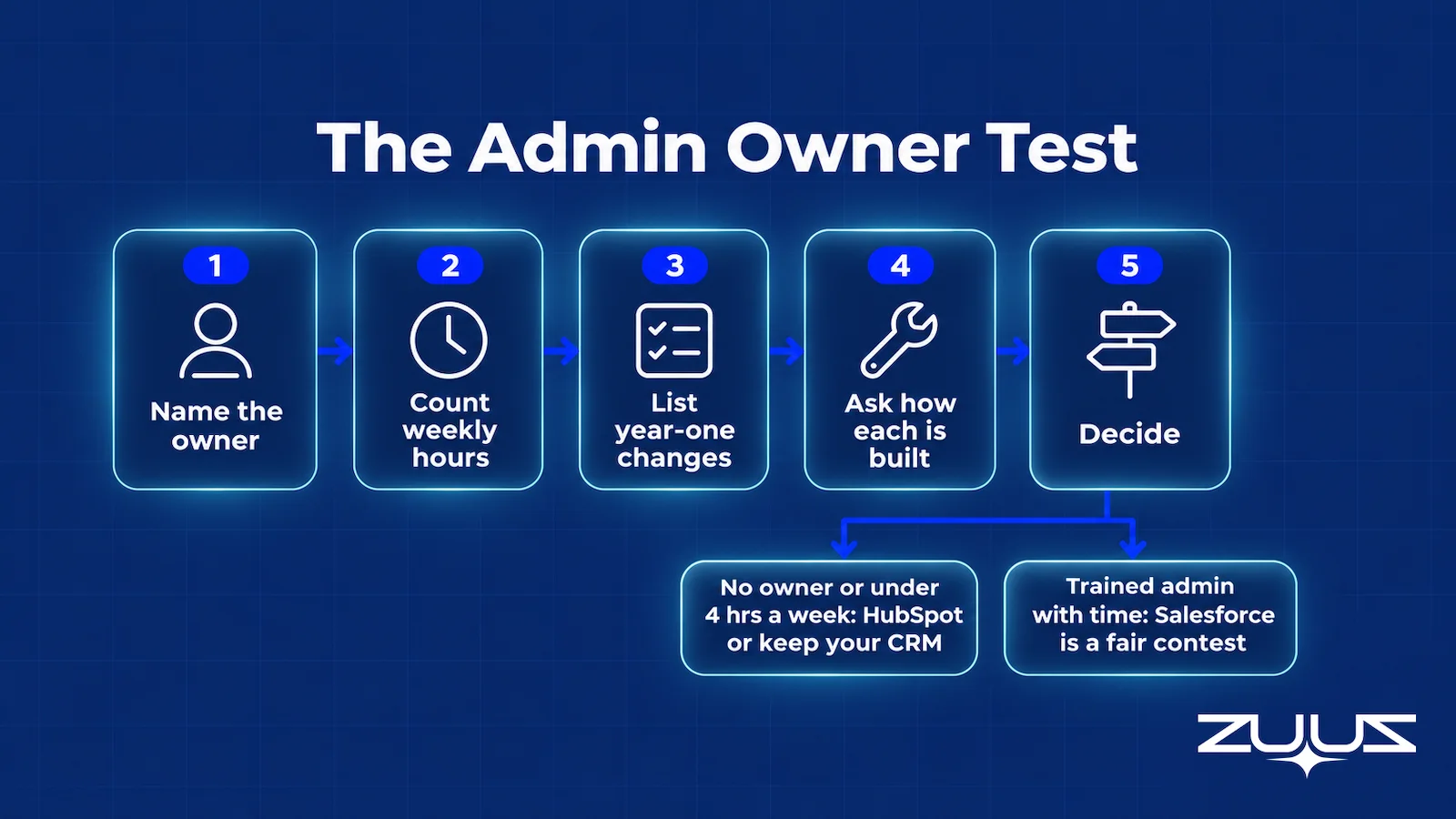
Step four is where quotes change. A checkbox on one platform can be a flow plus a permission set on the other, and a sales engineer will say so if asked directly. The answers become the admin estimate in the cost table.
Some admin work can be removed rather than staffed. Keeping records current from email and meetings is the biggest recurring chore, and ZUUZ takes it off the admin: its agents write those updates into HubSpot or Salesforce with the source conversation attached, and the rep's own edits win.
Breeze vs Agentforce for a Small Sales Team
Both vendors have rebuilt their pricing around AI agents. HubSpot Breeze agents covers credit costs and limits, and Agentforce for Sales covers each agent stage by stage. This section compares the two only at the level a small team needs.
How each one is bought
HubSpot includes Breeze in its paid Sales Hub tiers and meters agent work in HubSpot Credits. Professional includes 3,000 credits a month, and extra credits cost $0.010 each, as of November 2026. Included credits reset monthly, so a light user pays nothing extra and a heavy prospecting program needs a usage budget.
Salesforce sells Agentforce for Sales as a per-user add-on on Core and Advanced, or as a $5 per user license that draws on Flex Credits at $500 per 100,000. A standard Agentforce action uses 20 credits, about ten cents, and unused credits do not roll over. The add-on is predictable; metering is cheaper for light use.
What each one changes in the record
HubSpot's Notetaker and deal tools suggest property updates from call and meeting transcripts, with a source link to the transcript moment. A Super Admin can tick an Automated checkbox per property so its suggestions apply without review. Salesforce describes its pipeline agent as keeping fields such as stage and next steps updated, with a choice to "review and approve updates in suggestive mode, or update automatically".
Both can move from suggesting to writing, and neither documents an undo after an AI update is applied, beyond property history on HubSpot and org-level backup on top Salesforce editions. HubSpot's deal progression says it watches emails as well as calls and meetings, but on both platforms the best-documented path to a changed field runs through recorded calls.
For a team under 15 sellers, Breeze is the easier start because it comes with the tier. Agentforce has more depth, including a builder for custom agents, and pays off when an admin can configure it.
HubSpot vs Salesforce for Small Business
For a small business with three to ten sellers, HubSpot vs Salesforce is usually decided by time, not money. What differs is how soon the CRM is useful and how much of the owner's week it needs. HubSpot's free tools and Starter tier let a very small team begin with contacts and deals, then move to Professional when sequences matter, with no migration. Salesforce's Starter Suite covers basic pipeline work too, but the step up to Pro Suite or Core brings the configuration work forward.
Four situations change that default for a small business:
- Enterprise or government buyers ask for Salesforce-specific compliance documents.
- A parent company already runs Salesforce and wants the pipeline in the same org.
- The process has approval chains or partner splits that HubSpot's preset objects cannot model.
- A certified Salesforce admin is already on staff with time to spare.
If none apply, HubSpot is the safer default. A broader look at options beyond these two, by team stage, is in the best CRM for sales teams of 3 to 50 B2B sellers, and a step-by-step selection process is in how to choose a CRM.
Before Paying for a Switch, See What the Current CRM Is Missing.
Connect one mailbox to ZUUZ. The first records appear within 72 hours, with a source on every value.
Where Each One Wins
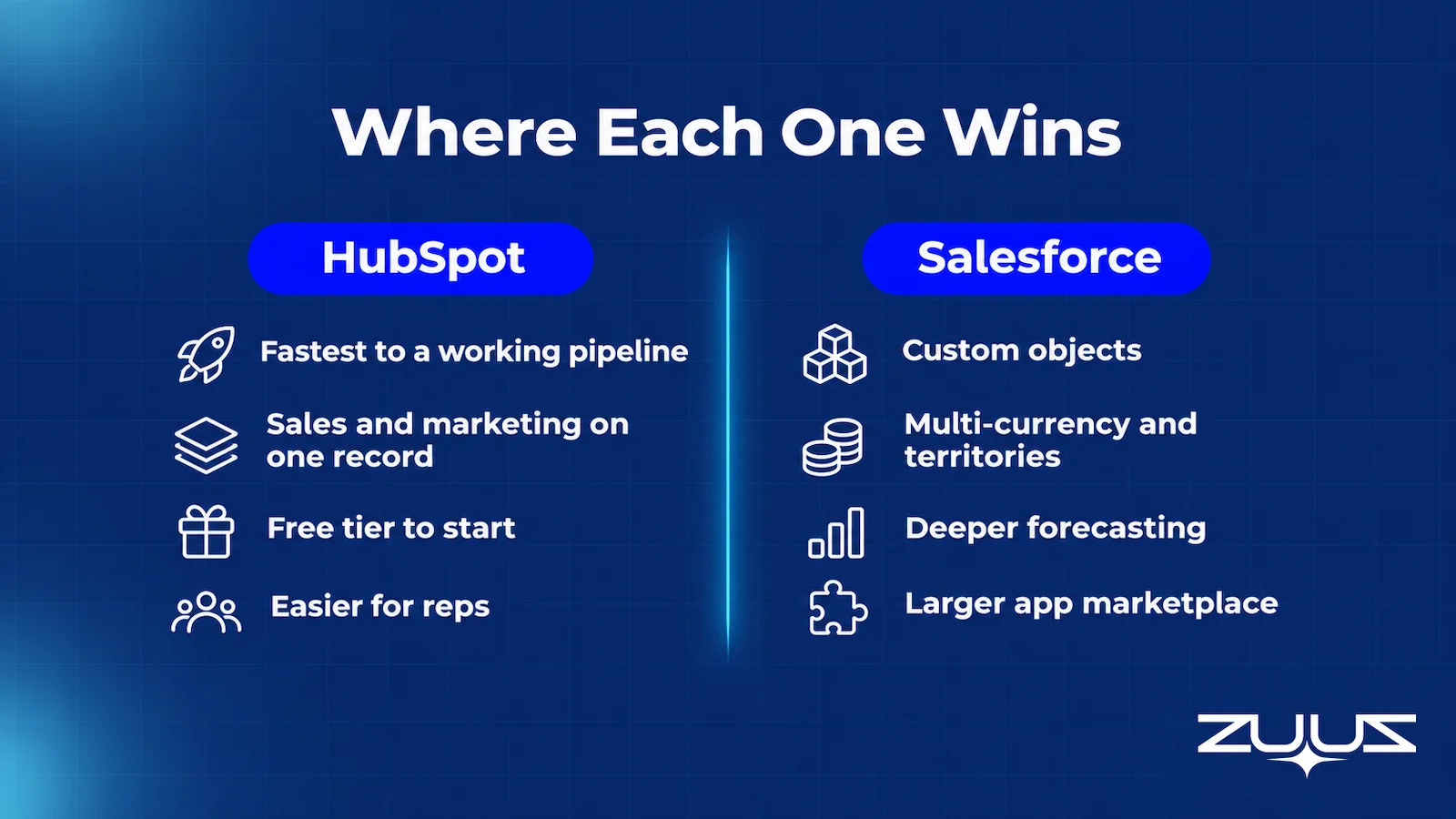
Neither is a bad choice for a B2B team. They are built for different owners.
Where HubSpot wins
HubSpot wins on time to a working pipeline and on running sales and marketing from one record. Its free tier lets a team start before spending, and reps find it easier. Calling, sequences, a meetings tool and Breeze come together on Professional. Security documentation is strong, with SOC 2 Type II and an EU data center listed on its trust pages.
Where Salesforce wins
Salesforce wins on depth. It models custom objects, multi-currency and territory rules that HubSpot handles awkwardly or not at all. Its predictive forecasting and Revenue Intelligence add-on go further than HubSpot's projections, its AppExchange is larger, and its compliance list includes FedRAMP. Teams heading past 50 sellers with a revenue operations function often end up there.
Where the vendors' own claims need care
Each vendor publishes a page about the other. HubSpot's page cites internal research with 232 customers who switched from Salesforce, conducted in March 2026. Salesforce's page cites surveys of customers who switched from HubSpot and claims faster setup. Both survey people who switched toward the publisher, so neither says much about the average team.
What Most HubSpot vs Salesforce Comparisons Get Wrong
They compare entry prices. A $20 seat and a $25 seat are not the decision. The decision is the tier the team will need in month twelve, plus the admin time to run it. Most guides list tiers and stop, so the reader never sees a team total.
They skip AI billing. Credits are now part of the cost on both platforms. A comparison that prices seats but not agent usage is a year out of date.
They assume the CRM fills itself. This is the largest gap. On both, the deal moves in an email thread and nobody updates the stage. Switching from one to the other does not close that gap. It resets it.
A worked example of what gets lost
An illustration, not a real account: a 12-seller software team has a $48,000 renewal-plus-expansion deal. Over three weeks the customer's thread says the CFO has joined, a competitor quoted lower, and go-live moved to next quarter. The CRM still shows the original contact, close date and stage.
HubSpot's deal progression or Salesforce's pipeline agent may suggest some of these updates, depending on tier, settings and a rep acting on the suggestion. When that thread runs through a connected inbox, ZUUZ updates the close date and adds the CFO as a contact in the CRM, with the email attached as the source.
The cost of that gap is a pipeline review planned around a close date that already moved. AI CRM vs traditional CRM covers why rebuilding the CRM rarely fixes it.
The Third Option, Keep Either and Let ZUUZ Keep It Current
Many teams comparing HubSpot or Salesforce already run one of them, and the complaint is stale data. Before a switch, there is a cheaper test: keep the CRM, and change how it gets filled.
ZUUZ, the agentic AI CRM, connects to the sales inbox (Gmail or Outlook), the calendar, meetings on Teams, Meet and Zoom, and calls on JustCall, GoTo Connect, CallTrackingMetrics and CallTools. Its agents create and update leads, deals, follow-ups and renewals from those conversations. Every value carries its source, and a deal's value comes only from a quote, purchase order or contract. When unsure whether a thread is sales, ZUUZ asks ("Maybe sales?").
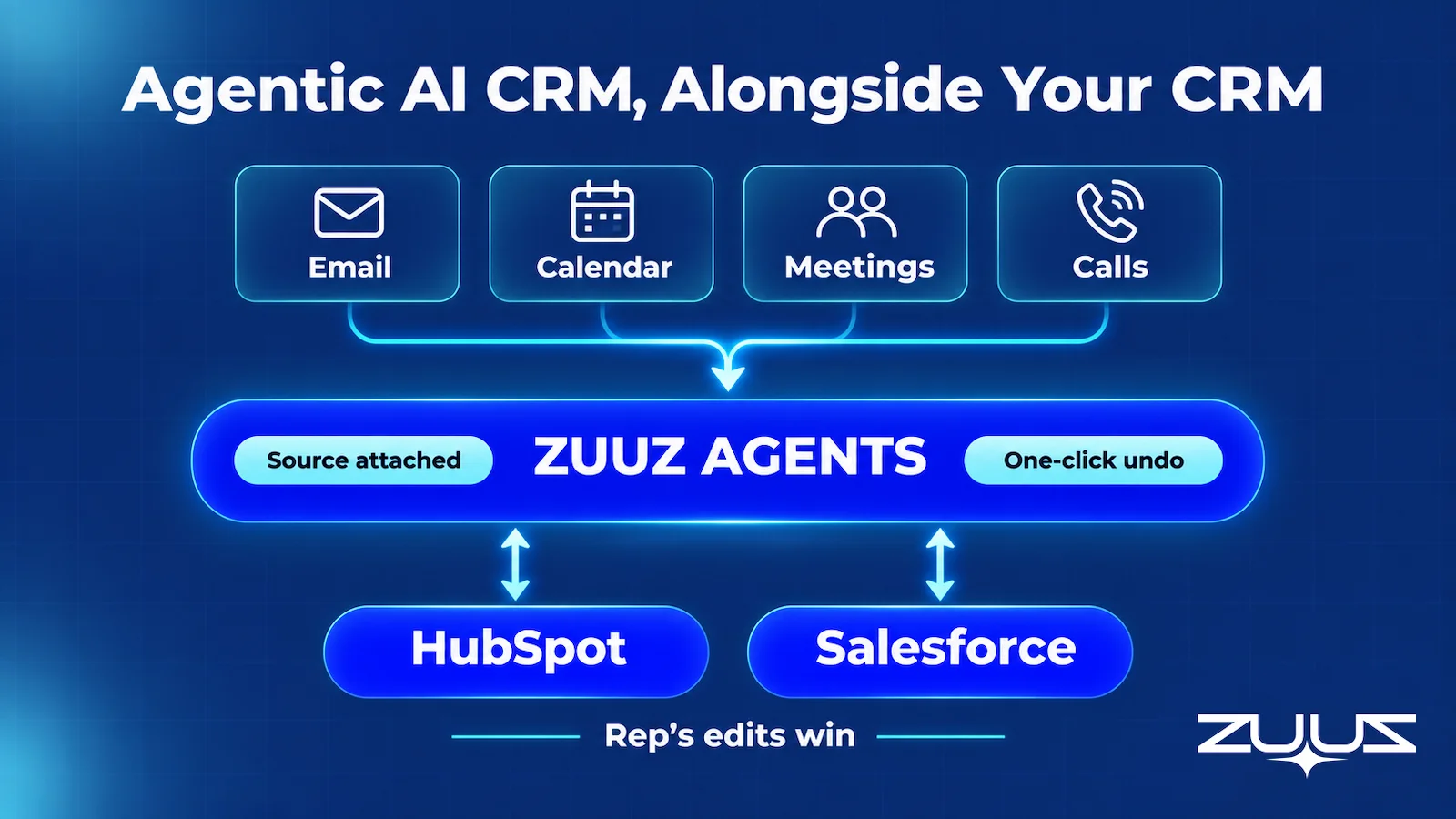
It syncs two-way with HubSpot and Salesforce, as well as Zoho, Attio, Pipedrive, Dynamics 365 and Less Annoying CRM. An admin approves the first match-up once; after that the rep's own edits win, and every lead and deal the agents create has a one-click undo. On first connection ZUUZ looks back 90 days, so the first records appear within 72 hours. A team with no CRM yet can use ZUUZ as its CRM instead. Pricing is on the pricing page.
That pipeline came from the sales mailbox, on a CRM the team already paid for. One team is not a benchmark. Side-by-side pages for each pairing are at ZUUZ vs HubSpot and ZUUZ vs Salesforce, and the keep-your-CRM setup is described on keep your CRM.
When ZUUZ Is Not the Right Choice
ZUUZ does not dial, does not send outbound sequences, and does not forecast revenue or give deal health scores or win probabilities. A team that wants calling, sequencing and forecasting in one product should buy the HubSpot or Salesforce tier that includes them. Both do those jobs well.
ZUUZ has no CSV import and no public API or Zapier connector today, its reports are partial, and it does not capture Slack or WhatsApp. SOC 2 Type I is complete and Type II is in progress, so a buyer whose security review requires Type II today should note that HubSpot and Salesforce both hold it.
If the real problem is the CRM itself, such as an org nobody can maintain, switching is the right call. The guides to HubSpot alternatives and Salesforce alternatives cover the options, and CRM migration covers how to move without losing deal history.
How to Decide Before the Contract Renews
A team can settle this in the first month of looking, with real numbers instead of demos.
- Run the Admin Owner Test. If no owner exists, the answer is HubSpot or the CRM already in place.
- Price both at the month-twelve tier for the real seat count, with onboarding, API access and an AI line.
- Have each sales engineer show how the five expected changes are built on the quoted tier.
- If the team already runs one, connect two sellers' mailboxes to ZUUZ on it and compare the records it writes with what the CRM holds.
- If the current CRM holds up once records are current, keep it. If it still cannot model the business, switch.
Step four costs nothing but a connection, and it shows whether the complaint about the CRM was really about empty records.
Test the third option on the CRM already in place. Connect two sellers' mailboxes, calendars and call platform to ZUUZ on the HubSpot or Salesforce account the team already has. ZUUZ reads the previous 90 days, writes to the CRM with a source on every value, and the first records appear within 72 hours, before anyone signs a new contract. 14-day free trial, no credit card: https://zuuz.ai/signup
Keep the CRM You Chose. Let ZUUZ Keep It Current.
Two-way sync with HubSpot and Salesforce, one-click undo on every lead and deal the agents create, and the rep's edits always win.
More comparisons and switching guides sit in the CRM alternatives and switching hub. For how agents that keep the CRM current work in general, see the agentic AI CRM hub or what an agentic AI CRM is.
Frequently Asked Questions
Is HubSpot or Salesforce better for a small business?
HubSpot is usually better for a small business with 3 to 15 sellers and no dedicated CRM admin. It is faster to set up and lets a team grow from free tools into Professional without a migration. Salesforce fits better when the process needs custom objects or complex approvals, and someone trained can run it.
Is HubSpot cheaper than Salesforce?
At the tier most sales teams need, the seat prices are close. As of November 2026, HubSpot Sales Hub Professional and Salesforce Pro Suite both list at $100 a seat a month. HubSpot adds a $1,500 onboarding fee; Salesforce charges $25 a user a month extra for API access on Pro Suite. Salesforce costs much more at Core and above.
Is Salesforce harder to use than HubSpot?
Salesforce is harder to set up and maintain, though day-to-day use for a rep can be similar once it is configured. Almost everything can be customized, so someone has to make and maintain those choices. HubSpot comes more preset, and a sales manager can run it without training.
Does a small team need a Salesforce admin?
A team on Salesforce Pro Suite or above usually needs someone who acts as admin, even part-time. That person handles permissions, layouts, reports and flows as the team changes. A team that cannot name that person, or can give it under four hours a week, is usually better served by HubSpot.
Which is better for sales, HubSpot Breeze or Salesforce Agentforce?
Breeze is easier for a small team because it comes with paid Sales Hub tiers and is metered in HubSpot Credits. Agentforce for Sales offers more depth but is an add-on from $125 to $150 a user a month on Core and above, as of November 2026. Both suggest record updates from conversations, and both can be set to apply some updates without review.
Can a team switch from HubSpot to Salesforce later?
Yes, and many teams do once they pass a few dozen sellers or need custom objects. Deal stages, properties, automations and email history all need mapping, and integrations need rebuilding. Teams that expect to move should keep their HubSpot setup simple and documented.
Can a team keep HubSpot or Salesforce and still stop manual CRM updates?
Yes. ZUUZ, the agentic AI CRM, syncs two-way with both HubSpot and Salesforce and keeps leads, deals, follow-ups and renewals current from the sales inbox, calendar, meetings and calls. Every value carries its source, the rep's own edits win, and every lead and deal the agents create has a one-click undo. Nobody migrates.
How long does ZUUZ take to show results on HubSpot or Salesforce?
The first records appear within 72 hours of connecting a mailbox. On first connection, ZUUZ looks back 90 days, so existing conversations turn into leads and deal updates in the CRM straight away. An admin approves the first match-up once. RA Technologies, a US IT services company, surfaced $120K in pipeline within 72 hours on the HubSpot instance it had used for two years.