
AI CRM vs Traditional CRM, and the Third Option
AI CRM vs traditional CRM is really three choices: keep your CRM, migrate to an AI-native CRM, or add an AI layer on top. Costs, risks and when each fits.

CEO of ZUUZ. He scaled Cloud Box Technologies from 0 to $25M ARR in IT services and distribution before building ZUUZ. Connect on LinkedIn
TL;DR: AI CRM vs traditional CRM is usually framed as two choices, but a sales team actually has three: keep the traditional CRM as it is, migrate to an AI-native CRM, or keep the CRM it already runs and add an AI layer on top. Migration buys a new data model at the cost of history, integrations and retraining, while a layer keeps the system of record in place. All three are limited by what actually reaches the CRM record.
- The AI CRM vs traditional CRM question has three answers, not two: keep the CRM, migrate to an AI-native CRM, or add an AI layer on top of the CRM already in place.
- An AI-native CRM is still a CRM. Adopting one means migrating to it, and the migration, not the license, is usually the largest cost.
- Salesforce and HubSpot now ship their own AI, so the largest traditional CRMs are AI-powered CRMs too. Their limits show up at capture, and both vendors document them.
- Every option answers from the record. If a deal update stays in an email or LinkedIn thread, every architecture reports the same stale deal.
- Migration fits teams with no CRM or a data model that no longer fits. An AI layer fits teams whose CRM works but whose records lag the conversation.
- ZUUZ is a revenue intelligence layer on top of Salesforce, HubSpot, Zoho, Attio or Pipedrive. It is not a CRM, and nobody changes how they work.
- The mechanism: ZUUZ connects to the sales inbox, reads LinkedIn messages and meeting or call transcripts, and writes leads, stakeholders, next steps and renewal signals into the CRM automatically, with full change history and one-click rollback.
Picture a VP of Sales at a 120-person IT services company who searches “AI CRM vs traditional CRM” after another pipeline review built on stale records. The scene is an illustration, but the pattern behind it is common. The results page frames the choice as two boxes: stay on the old CRM and keep typing, or move to a new AI CRM that promises to type for the team. Neither box mentions what made the review painful in the first place, which is that the real deal updates lived in email and LinkedIn threads the CRM never saw.
The honest version of the AI CRM vs CRM comparison has three options. A team can keep its traditional CRM as it is, migrate to an AI-native CRM, or keep the CRM it already runs and add an AI layer on top. This guide covers what each option costs, what happens to data history and adoption, where the AI built into Salesforce and HubSpot helps and where it stops, and when each option is the right call.
AI CRM vs Traditional CRM Is a Three-Way Decision
Most comparison articles line up a traditional CRM against an AI CRM, feature by feature, and declare the AI column the winner. That framing assumes the only way to get AI into a sales process is to change the database underneath the sales team. For a company with years of accounts, deals, custom fields and integrations in Salesforce or HubSpot, that assumption is the most expensive part of the decision, and it usually goes unexamined.
The three options differ on one question: where does the system of record live after the decision is made? In two of them it stays exactly where it is. In one it moves. Everything else, from migration cost to rep adoption, follows from that answer.
Option 1: keep the traditional CRM as it is
The CRM stays, the process stays, and reps keep entering updates by hand or through native email sync. This costs nothing new and risks nothing, which is why it is the default. The cost is the one already being paid: records that trail the real conversation by days.
Option 2: migrate to an AI-native CRM
The team moves accounts, contacts, deals and as much history as it can into a newer platform built around AI from the start. The appeal is a data model designed for automatic capture and plain-English use. The cost is the migration itself, plus retraining and rebuilt integrations.
Option 3: keep the CRM and add an AI layer on top
The existing CRM stays the system of record. A separate AI layer reads the conversations reps already have, writes structured updates into the CRM, and answers questions about the pipeline. Nothing is migrated, and every change it writes can be rolled back. ZUUZ is built for this third option: it is a revenue intelligence layer on top of the CRM, not a CRM.
What a Traditional CRM Does Well, and Where It Stalls
A traditional CRM is a structured database of accounts, contacts, deals and activities, wrapped in pipeline views, reports, permissions and workflow rules. Salesforce, HubSpot, Zoho and Pipedrive all started here, and the core job has not changed: be the one place the company agrees on for who the customers are and what is in the pipeline. That job is still valuable, and it is why finance, customer success and leadership all read from the CRM even while sales complains about it.
The weakness has always been input. A traditional CRM knows what someone typed into it and very little else. Salesforce’s State of Sales report, 7th edition, found that sales professionals spend 40% of their time selling, and that manually entering data takes up 13% of the workweek. The time is only half the problem, because updates also get skipped when a quarter gets busy, which is exactly when the pipeline matters most.
Adoption follows the same line. Forrester analyst Kate Leggett reported in 2022 that most decision-makers who had implemented a CRM in the prior year were not successful with it, with 68% struggling to get a single view of the customer and 39% struggling with data quality (Forrester). None of that is a software defect in the narrow sense. It is what happens when a system depends on busy people doing data entry after the real work is done, a pattern covered in more depth in the guide to CRM user adoption.
Anyone who has run a sales floor knows the Friday afternoon version of this. Reps catch up on a week of activity from memory, log the calls they remember and skip the email threads they do not. The record ends up describing what reps had time to type rather than what buyers said, and teams trying to fix that specific problem can compare the best CRM options to reduce manual data entry. That gap, more than any missing feature, is what usually starts the AI CRM vs traditional CRM search.
What an AI-Native CRM Is, and How It Differs From AI Features
An AI-native CRM is a CRM designed around AI from the start, rather than an established product that added AI later. In practice that usually means automatic capture of email and calendar activity, records that enrich themselves, and a plain-English interface for searching and updating data. Attio markets itself as an AI-native CRM, and several newer entrants use the same label.
The architectural point is simple: an AI-native CRM is still a CRM. It replaces the system of record rather than sitting beside it, so adopting one means migrating to it. For a new company with no CRM, that is barely a cost. For a company with years of history in Salesforce or HubSpot, the migration is the main line on the bill.
AI-native CRM vs a traditional CRM with AI features
The incumbents have not stood still. Salesforce ships AI across its platform under the Einstein and Agentforce names, and HubSpot ships its AI under the Breeze name. These are traditional CRMs with AI features added, and for teams already on them they require no migration, though some features sit in higher editions or paid add-ons. The AI powered CRM vs traditional CRM line is therefore blurrier than most comparison pages admit, because the largest traditional CRMs are now AI-powered CRMs as well.
What separates the options is less the AI model than the data it can reach. An AI feature inside a CRM can only work on what the CRM holds or what its connectors capture. An AI-native CRM faces the same constraint after migration. That constraint gets its own section below, because it decides more outcomes than any feature list does.
Get the AI Without Moving the CRM.
ZUUZ runs on top of Salesforce, HubSpot, Zoho, Attio or Pipedrive, so the system of record, its history and its reports stay exactly where they are.
- Capture coverage. Which channels does it read (email, calendar, LinkedIn messages, meeting and call transcripts), and does it read them without the rep remembering a BCC or a button?
- Where the output lands. CRM fields a report can read, or an activity feed a human has to open and interpret.
- Match accuracy and correction cost. Does the update land on the right account and deal, and how long does it take a rep to fix one that does not?
- What happens to history. Do years of activity, integrations and reports survive the change, and can the decision be reversed inside a quarter?
- Rep workflow cost. A new interface to learn, or the same one with the records filled in for them.
- Total cost of the change. License plus migration, integration rebuilds, retraining and the adoption dip at cutover. The license is rarely the biggest line.
How Is AI Used in CRM?
AI in CRM covers a handful of distinct jobs, and it helps to separate them because each one fails in a different way. Some jobs read data and summarize it. Some write data. Some rank or flag records, and some draft messages for a person to send.
A product that is strong at one job can be weak at another, whichever architecture it sits in. The table below lists the common jobs, what each needs in order to work, and where it breaks when that input is missing.
| AI job in the CRM | What it needs to work | Where it breaks |
|---|---|---|
| Summarize an account or deal | Complete activity history on the record | The summary skips anything that never reached the CRM |
| Draft an email reply | Thread context and account history | Drafts read as generic when history is thin |
| Capture contacts, deals and next steps | Access to email, LinkedIn messages, meetings and calls | Channels that are not connected stay invisible |
| Rank or prioritize leads | Consistent fields and engagement data | The ranking inherits gaps and duplicates in the data |
| Flag stalled deals | The date of the last real buyer contact | A deal looks active or stalled based on logging, not reality |
| Answer questions in plain English | Current records and captured conversations | Answers stay confident while the records lag |
Two patterns fall out of that table. First, most of the AI jobs a sales team cares about sit downstream of capture: they read the record, so they are only as good as the record. Second, the plain-English jobs are the most visible and the most fragile, because a fluent answer built on a stale record reads exactly like a fluent answer built on a current one. The guides to an AI CRM assistant and a conversational CRM go deeper on the question-and-answer side.
The same Salesforce report found that 46% of sales professionals using AI agents say data quality issues hurt their sales, with manual errors and duplicate data ranked as the top two problems. That figure matters for the AI CRM vs traditional CRM decision because it describes teams that have already adopted AI. Adding intelligence did not remove the data problem, and in many cases it made the problem easier to see.
Where Built-In AI in Salesforce and HubSpot Helps, and Where It Stops
For a team already on Salesforce or HubSpot, the first question is whether the AI already in the platform solves the problem. Often it solves part of it. Built-in AI works on data that lives inside the vendor’s platform, respects its permission model and appears inside the screens reps already use, and for summarizing records, drafting replies or building reports from well-kept data that is hard to beat.
The limits show up at capture, and both vendors document them. HubSpot’s help article on logging email replies in the CRM says that under its log-replies setting, a new email from a contact that is not part of an existing thread will not log to HubSpot, and a reply whose subject line has changed will not log either. Those are reasonable rules for a logging tool. They also mean the first email from a new stakeholder, often one of the most important messages in a deal, can miss the record.
On the Salesforce side, Einstein Activity Capture syncs email and calendar activity, but Salesforce’s documentation says captured emails and events are held on its Activity Platform rather than stored as ordinary Salesforce records, do not count against data storage and are subject to a retention period. The guide to an Einstein Activity Capture alternative walks through what that means for reporting and history. Capturing an activity is also a different job from reading the thread, deciding which deal it belongs to and updating the stage, amount or next step, and teams should test that second job specifically.
Built-in AI is a strong reason to stay on the incumbent CRM, not a reason to leave it. The open question it leaves is how the conversations get into the record in the first place, and neither a new CRM nor a new AI feature answers that by default.
AI CRM vs Traditional CRM vs an AI Layer, Side by Side
The table below compares the three options on the factors that decide the outcome once the demo is over. It describes typical patterns rather than any single product, and capabilities vary within each column.
| Factor | Traditional CRM | AI-native CRM | AI layer on your CRM |
|---|---|---|---|
| System of record | Stays where it is | Moves to the new platform | Stays where it is |
| Data history | Kept | Moved in part; older activity often archived | Kept |
| Migration work | None | Objects, fields, history, integrations and reports | None |
| Rep workflow | Unchanged, including manual entry | New interface to learn | Unchanged; records are filled in automatically |
| Where the AI gets its data | What reps log, plus native sync | The new platform’s own capture and connectors | The conversations it reads, plus the CRM |
| Email and LinkedIn capture | Manual or partial logging | Varies by product | Read and written to the record |
| Existing integrations | Keep working | Rebuilt or replaced | Keep working |
| Main risk | Records keep lagging | History loss and an adoption dip at cutover | Another vendor to evaluate and govern |
| Best fit | Teams whose records are already current | Teams with no CRM, or one that no longer fits | Teams with a CRM that works but records that lag |
| Where ZUUZ sits | ZUUZ leaves it in place as the system of record | Not applicable: ZUUZ is not a CRM and does not replace one | This column. ZUUZ connects to the sales inbox, reads LinkedIn messages and meeting or call transcripts, and writes leads, stakeholders, next steps and renewal signals into Salesforce, HubSpot, Zoho, Attio or Pipedrive automatically, with every change logged and reversible in one click |
Read down the columns and the tradeoff is plain. The traditional CRM keeps everything, including the problem. The AI-native CRM changes the problem’s shape but asks the team to pay for it with history, integrations and a second round of adoption. The AI layer keeps the database and the habits and changes only how records get filled.
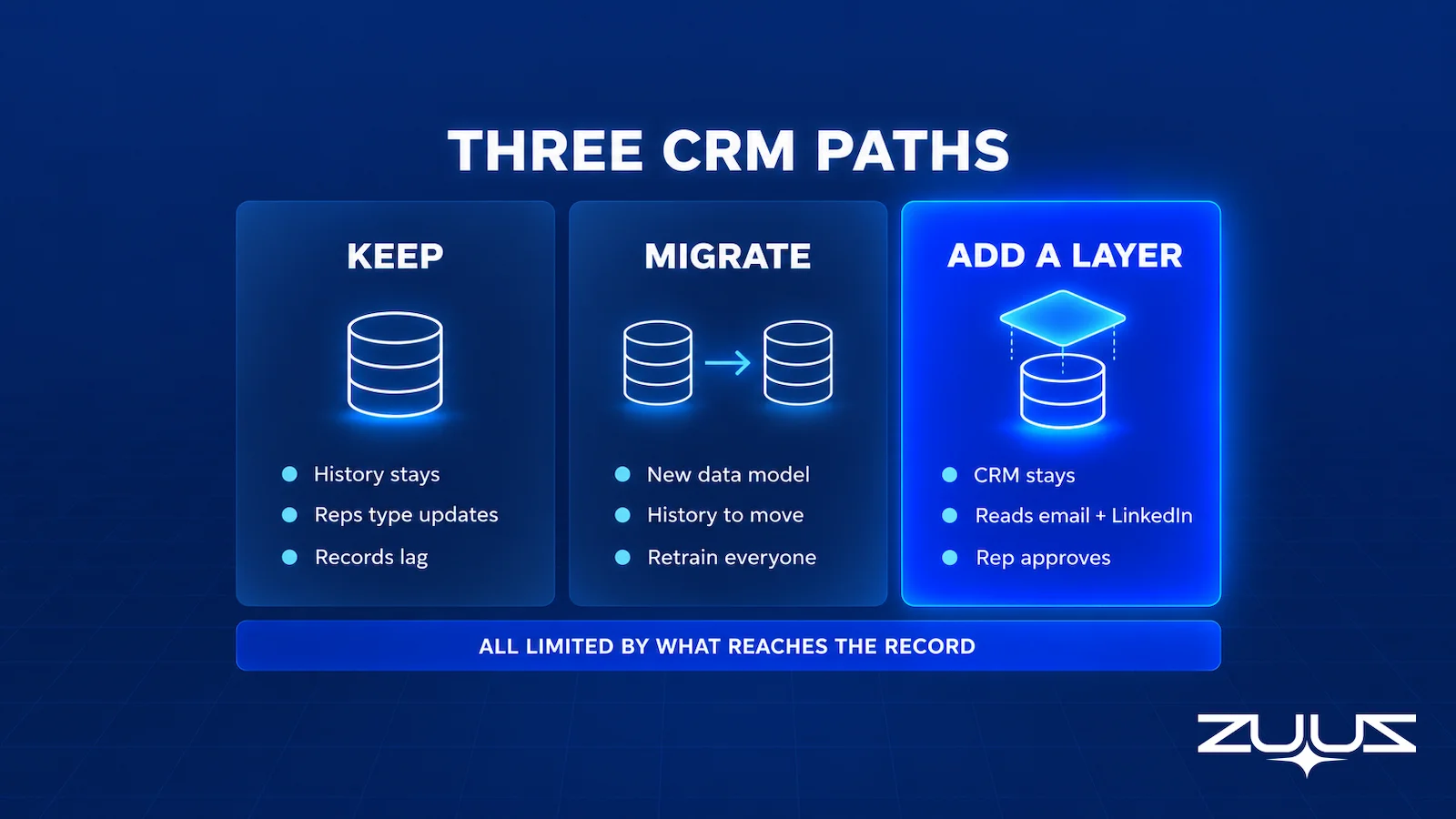
The AI layer is also the option buyers tend to overlook, because it does not fit the two-column format most articles use. It is not a CRM, so it rarely appears in CRM comparisons, and it is not a traditional CRM feature, so it rarely appears in the vendor’s own roadmap pages either.
The two AI columns share one weakness with the traditional column, which the rest of this guide keeps returning to. Whichever option a team picks, the answers it gets are only as current as what reached the record.
Compare the Options on Real Deals.
See ZUUZ read real email and LinkedIn threads and write the CRM updates automatically, with one-click rollback, on the CRM the team already runs.
The Real Cost of Migrating to an AI-Native CRM
License price is the easiest number to compare and rarely the largest. A defensible migration estimate includes implementation labor, data mapping and validation, integration rebuilds, a dual-running period when both systems are licensed, retraining, and the productivity dip while reps relearn where things live. The Attio alternative guide breaks down what survives a CRM migration and what does not, component by component.
Data history
Accounts, contacts and deals usually move cleanly. Activity history is harder: emails, notes, call logs and attachments often move only for a rolling window, with older records archived to an export nobody opens again. Field history and audit trails can be lost outright, and for a renewal-heavy business that archive is where the context for next year’s renewal conversation lives.
Adoption
A new CRM restarts adoption from zero. Every report, saved view and habit gets rebuilt, and the people who resisted the last CRM rollout get a second chance to resist this one. The change-management point Forrester makes about CRM success applies twice here, once for the migration and once for the new way of working.
Reversibility
A migration is hard to undo. Once integrations point at the new platform and the old license lapses, going back means a second migration. An AI layer is easier to reverse because the CRM never moved: if it does not earn its place, the team disconnects it and the records it wrote stay in the CRM.
None of this makes migration the wrong answer to the AI CRM vs traditional CRM question. It makes migration a decision to price rather than a default. For a team whose current CRM is a spreadsheet and a shared inbox, the migration cost is close to zero, and an AI-native CRM can be a sensible first system.
Every Option Is Limited by What Reaches the Record
This is the point most AI CRM comparisons skip. A traditional CRM, an AI-native CRM and a CRM with an AI layer all answer questions from the same place, which is the record. If a buyer’s change of timeline arrived in a LinkedIn message and a new decision-maker was copied on an email thread nobody logged, every option reports the same stale deal with the same confidence.
In B2B sales, most of the conversation happens in email, LinkedIn messages, meetings and calls, not inside the CRM. The record is a summary written after the fact by whoever had time. So the useful question for any of the three options is which channels it reads, and whether what it reads becomes a structured record on the right account and deal.
Capture from email alone misses the LinkedIn thread where a champion said the budget moved. Capture that logs a message without matching it to the right deal adds noise rather than signal. The guide to logging LinkedIn messages in the CRM covers the channel most tools miss, and the guide to CRM data quality covers what happens to reports downstream when records lag.
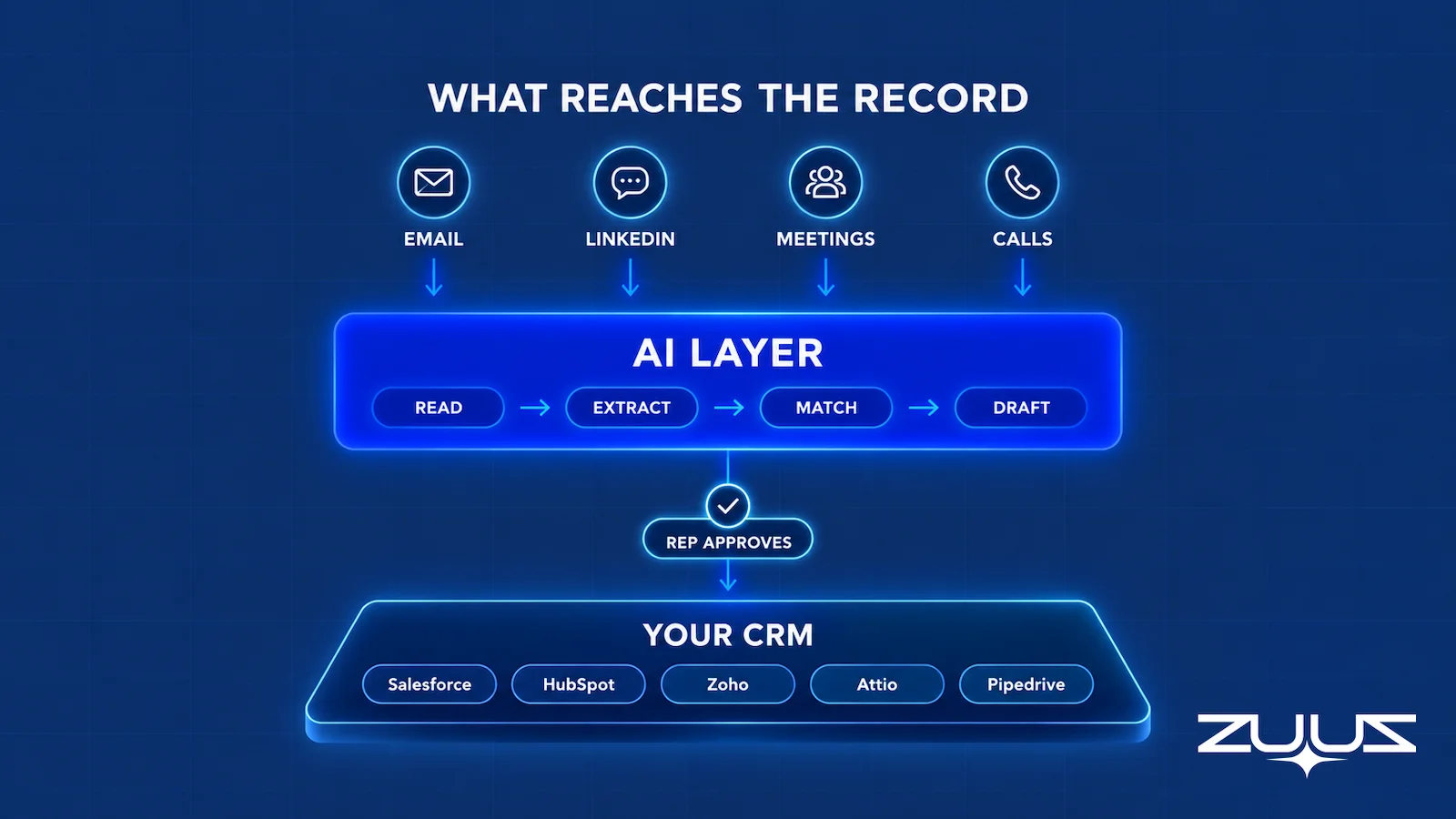
One detail from years of running sales teams: the messages that change a deal are often the shortest ones. “Can we push this to Q2?”, “Adding our CFO to the thread” and “Legal has the redlines” are all one-line emails, none of them maps neatly to a field anyone thinks to update, and every one of them changes what the next pipeline review should say.
That is why a CRM pipeline is often wrong even in well-run teams with a modern platform. The fix is not a smarter model on top of the same gaps. It is getting those one-line messages into the record, on the right deal, without asking a rep to retype them.
The Capture Layer Test
Whichever of the three options is on the table, judge it on whether the record is complete without rep effort. Four questions, asked in this order, separate the options faster than a feature matrix.
- Does it capture from the channels where the deal actually moves: email, calendar, LinkedIn messages, meeting and call transcripts?
- Does what it captures land in CRM fields a report can read, or only in an activity feed a human must open?
- Does the rep have to remember anything, such as a BCC, a button, a sidebar or a sync?
- Can the rep reverse it in one click after it is written?
A tool that fails 2 or 3 produces activity history, not a pipeline you can run a review on. Run the test on all three options with the same deal and the results rarely match the category label: a traditional CRM with native sync usually passes question 1 for email and fails question 2, because the thread is attached to the contact but the decision fields stay empty. An AI-native CRM can pass 1 and 2 and still fail 3, because the capture depends on reps working inside the new interface. The LinkedIn message where a champion said the budget moved is the question most products fail on, whatever their architecture.
The AI Layer Option: How ZUUZ Runs on the CRM Already in Place
ZUUZ is a revenue intelligence layer on top of the CRM a team already runs. It is not a CRM and does not replace one. It connects to Salesforce, HubSpot, Zoho, Attio or Pipedrive, reads the sales conversations that happen in email and LinkedIn messages, and writes structured records back to the CRM, which stays the system of record.
The mechanics are narrow on purpose. ZUUZ reads connected Outlook or Gmail mailboxes and LinkedIn messages, plus Microsoft Teams meeting transcripts and CallTrackingMetrics call transcripts where those are connected. It extracts contacts, companies, deal signals and next steps, enriches contact and account records, matches each signal to the right account and deal, and writes the update. LinkedIn capture is read-only, so ZUUZ does not send messages or automate connection requests.
Nobody changes how they work. Reps keep selling from the inbox and LinkedIn, and ZUUZ updates the CRM automatically, with full change history and one-click rollback: the new contact, the deal update, the next step. Records land in the CRM with a full change history of every update ZUUZ made, each reversible in one click, and manual entries take precedence over automated ones.
On top of the captured data, ZUUZ flags stalled deals and renewal risk, spots scheduling intent in a thread and books the meeting, and reports on what actually happened, such as pipeline at risk in dollars and renewals coming due. It does not forecast revenue or assign win probabilities. Reps can also ask Zari, the ZUUZ AI agent, questions by voice or typing, such as which deals have gone quiet this month, and get answers drawn from captured pipeline and CRM data.

The proof is in what surfaced on CRMs that did not change. RA Technologies, a US IT services company, had run HubSpot for two years. ZUUZ ran on the same instance with the same team and surfaced $120K in pipeline within 72 hours that the CRM had never seen, captured from the sales mailbox, as the RA Technologies case study describes. Nothing was migrated to get that result.
At Cloud Box Technologies, where ZUUZ founder Avinash Gujje scaled the business from $0 to $25M ARR, ZUUZ turns inbound email into leads and renewals so leadership sees live pipeline, with 10 to 12 renewals tracked in minutes. Teams on Attio can take the same route, because Attio is a live ZUUZ integration: a company that already chose an AI-native CRM can run ZUUZ on top of it instead of choosing between the two. How records stay consistent in both directions is covered in the guide to bidirectional CRM sync.
Keep the CRM. Fill It From Every Conversation.
ZUUZ writes the record from email and LinkedIn messages, automatically, with one-click rollback, no migration and no new screen to learn.
When Each Option Is Right
No side of the AI CRM vs traditional CRM debate wins for every team, and neither does the third option. The right answer depends on whether a CRM exists, whether it still fits the business, and whether the real problem is the database or what reaches it.
| Situation | Best-fit option | Why |
|---|---|---|
| No CRM yet, or a spreadsheet and a shared inbox | AI-native CRM | Nothing to migrate, so capture is designed in from day one |
| Records are current, reps log reliably, needs are met | Keep the traditional CRM | A new tool would add cost without closing a real gap |
| Built-in Salesforce or HubSpot AI covers the jobs needed | Keep the CRM and use its AI | No new vendor; test the capture limits first |
| The CRM fits the business, but records lag the conversation | Add an AI layer | Keeps history, reports and integrations while fixing capture |
| The data model no longer fits, with years of workarounds | Migrate | The rebuild cost is already being paid in workarounds |
| Already on an AI-native CRM, with gaps in email or LinkedIn capture | Add an AI layer on top | Keeps the platform the team already chose |
Most mid-market teams with a working Salesforce or HubSpot instance land in the fourth row. Their CRM is not broken in any way a migration would fix; it is simply fed by people who are busy selling. Teams in that position get more from changing how records are filled than from changing where they are stored.
The fifth row is real, too. A company that has bolted a second business line onto a CRM configured for the first one, with custom objects nobody understands and reports nobody trusts, may be paying a migration’s cost every month already. For that team, a planned rebuild on a new platform can be cheaper than keeping the old one alive.
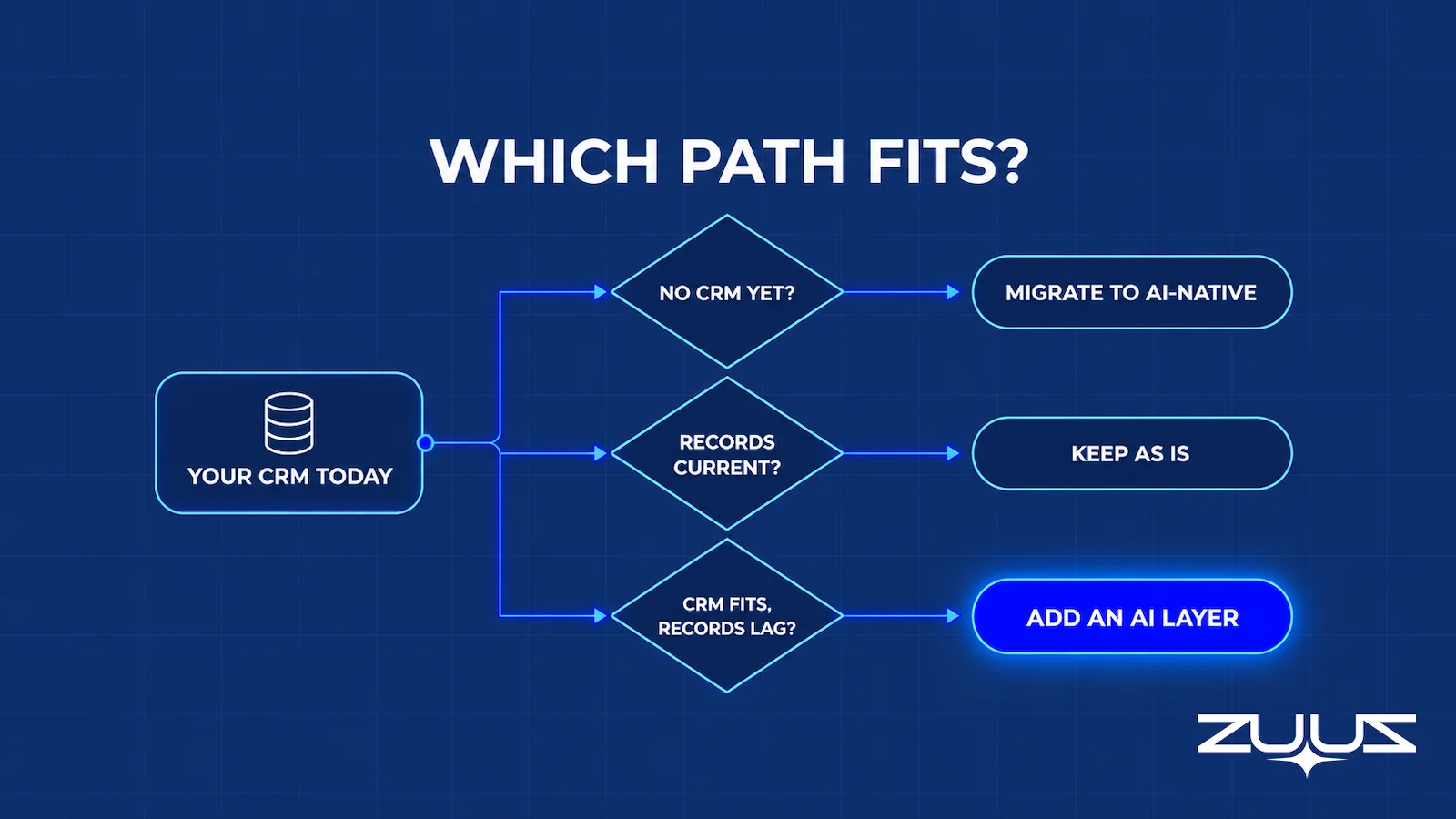
A practical tiebreak for teams stuck between rows: ask what would break first if nothing changed for a year. If the answer is the database, look at migration. If the answer is that the pipeline review keeps being wrong, the problem is capture, and a layer addresses capture directly.
Will CRM Be Replaced by AI?
Framed as AI CRM vs CRM, the question sounds like one system replacing another. The CRM as a system of record is not going away. Finance needs a customer list it can reconcile, customer success needs renewal dates, and leadership needs a pipeline that someone is accountable for. Those are database jobs, and a database with rules, permissions and an audit trail is still the right tool for them.
What AI is replacing is the manual work around the CRM: typing updates, logging emails, building the same report every Monday and hunting through threads before a call. The interface is shifting as well, from forms and list views toward asking a question in plain English. That is a change in how people use the CRM rather than the end of the CRM.
So the honest answer to whether CRM will be replaced by AI is that the data entry will be, well before the database is. The version that holds up is human-curated and AI-accelerated, with the rep selling while the AI captures and writes, and every change logged and reversible. Teams weighing AI that works on buyers against AI that works for reps can compare the two in the guide to an AI sales agent.
How to Test the Three Options on Real Deals
Feature demos run on clean sample data. A better test of AI CRM vs traditional CRM uses the team’s own last quarter: pick 20 to 30 real deals, including a new inbound lead, a deal with several stakeholders, a renewal and one whose dates changed by email, and trace each deal through each option.
- Pull the real threads. Collect the email, LinkedIn messages and meeting notes behind each deal, not just the CRM record.
- Trace every signal. For each message that mattered, check whether the option captured it, matched it to the right account and deal, and wrote the right field.
- Count correction time. Measure the time reps spend fixing wrong updates alongside the time saved on logging.
- Check history. For a migration, run a test export and import of a real account with years of activity. For a layer, confirm that nothing moves.
- Set the gate first. Decide before the pilot what share of signals has to land correctly, and what it has to cost, for the option to win.
For a team that already runs a CRM it mostly likes, this test tends to make the decision for it. If the signals were in the inbox and on LinkedIn all along, the question was never whether to buy an AI CRM or keep a traditional one. It was how to get those conversations into the record the team already trusts.
From an operator’s seat
Having run this comparison with teams mid-evaluation, the surprise is almost never the model quality. It is that the pilot has no agreed definition of a correct update, so week three turns into an argument about whether a renewal signal counted. Across the deployments ZUUZ runs, the teams that get a clean answer write the four decision fields down before connecting anything, and they pick the reps who complain most about CRM admin rather than the most organized ones. A tidy rep has already closed the gap by hand, so the test measures nothing. The part teams do not plan for is the backlog: the first lookback surfaces months of unrecorded context at once, and somebody has to own triaging it before the pipeline report can be trusted again.
The First Step, Concretely
There is a smaller version of this test that takes a day rather than a quarter. Connect one mailbox, let ZUUZ read the last 90 days, and have the rep who owns those threads check what it wrote to the CRM in the change history. Nothing moves, nothing is migrated, and the output is a list of real deals, stakeholders and renewal signals the record never held. That list is the evidence the three-way decision actually turns on. The trial runs 30 days, free, with no credit card: https://zuuz.ai/trial/
Frequently Asked Questions
What is the difference between an AI CRM and a traditional CRM?
A traditional CRM stores what people type into it and relies on reps to log activity by hand. An AI CRM builds capture, enrichment, summaries and plain-English search into the product. The bigger practical difference is architecture: moving to an AI-native CRM means migrating the system of record, while an AI layer adds the same kind of automation on top of the CRM already in place.
What is an AI native CRM?
An AI-native CRM is a CRM designed around AI from the start rather than one that added AI features later. It typically captures email and calendar activity automatically, enriches records and offers a plain-English interface. Because it is still a CRM, adopting one means replacing the current system of record and migrating accounts, contacts, deals and history into it.
How is AI used in CRM?
AI in CRM handles six common jobs: summarizing accounts and deals, drafting replies, capturing contacts and deal updates from conversations, ranking leads, flagging stalled deals and answering questions in plain English. Most of these read the record, so they are only as accurate as what reached it. Capture from email and LinkedIn messages is the job the others depend on.
Will CRM be replaced by AI?
The CRM as a system of record is unlikely to be replaced, because finance, customer success and leadership still need one accountable database of customers and pipeline. What AI replaces is the manual work around it: typing updates, logging email and rebuilding reports. The interface is also moving toward plain-English questions, which changes how people use the CRM, not whether they need one.
Is an AI-powered CRM better than a traditional CRM?
An AI-powered CRM is better only when the AI has good data to work on. Salesforce and HubSpot now ship built-in AI, so the largest traditional CRMs are AI-powered too. The deciding factor is whether deal conversations from email, LinkedIn, meetings and calls reach the record. If they do not, any CRM, AI-powered or not, reports a stale pipeline.
Can I add AI to my existing CRM without migrating?
Adding AI without migrating is possible in two ways. The first is the CRM vendor’s own AI features, such as Salesforce Einstein and Agentforce or HubSpot Breeze. The second is an AI layer that sits on top of the CRM, reads sales conversations and writes structured records back. In both cases the system of record, its history and its integrations stay where they are.
Do I need another AI tool if I already use Salesforce or HubSpot AI?
Another AI tool is only worth adding if the built-in features leave a proven gap. Test capture first: HubSpot documents that new emails outside an existing thread do not log under its log-replies setting, and Salesforce documents that Einstein Activity Capture data has a retention period. If key conversations still miss the record, an AI layer can close that gap.
What happens to historical data when switching to an AI CRM?
Accounts, contacts and deals usually migrate cleanly, but activity history is harder. Emails, notes, call logs and attachments often move only for a recent window, with older records archived to an export, and field history or audit trails can be lost. Reports and automations are rebuilt rather than moved. Running a test migration on one real, long-lived account shows what survives.
Can AI update CRM records automatically from email and LinkedIn messages?
AI can read email and LinkedIn messages, extract contacts, deal signals and next steps, and write them to the CRM. The pattern that holds up writes the update automatically and keeps a full change history with one-click rollback. ZUUZ works this way on Salesforce, HubSpot, Zoho, Attio and Pipedrive, reading LinkedIn messages without sending anything and updating the CRM automatically, with one-click rollback.
Is ZUUZ an AI CRM?
For most teams, no. ZUUZ is a revenue intelligence layer on top of the CRM a team already runs, with Salesforce, HubSpot, Zoho, Attio and Pipedrive supported. It reads email and LinkedIn messages, writes structured records to the CRM automatically, keeping a full change history with one-click rollback, and answers the rep’s questions from captured data, while the CRM stays the system of record. The exception is an early-stage MSP with no CRM yet, which can use ZUUZ as its AI CRM.
How should a sales team test AI CRM options before committing?
The best test uses 20 to 30 real deals from the last quarter, including a multi-stakeholder deal, a renewal and one whose dates changed by email. For each option, trace whether every important message was captured, matched to the right deal and written to the right field. Count correction time alongside time saved, and set the pass mark before the pilot starts.

