
Copper CRM Alternatives for Gmail-First Sales Teams
Copper CRM alternatives for Gmail-first B2B teams: price, AI that updates records and switching cost compared, plus what a Copper export leaves behind.


CEO and Founder of ZUUZ. He scaled Cloud Box Technologies from 0 to $25M ARR in IT services and distribution before building ZUUZ. Connect on LinkedIn
The best Copper CRM alternatives depend on why you are leaving. To keep working inside Gmail, look at Streak or folk. For deeper pipelines and reporting, Pipedrive or HubSpot. For the lowest price, Zoho CRM. For a custom data model, Attio. If the real problem is records nobody fills in, pick a CRM whose agents write them.
TL;DR: Teams leave Copper, the CRM built around Google Workspace, for one of four reasons: a price step, a reporting or automation ceiling, selling beyond Gmail, or records that stay empty despite the Gmail sidebar. This guide gives the Copper Exit Test to name yours, compares the options on price and on what their AI changes in a record, prices a 10-seller switch, and lists what a Copper export leaves behind. ZUUZ does not sync with Copper; it can be the CRM itself or run alongside a CRM it does sync with.
- As of November 2026, Copper lists Basic at $23, Professional at $59 and Business at $99 per seat per month on annual billing. Basic caps contacts at 2,500 and does not list reporting.
- A Gmail sidebar makes logging easier, but someone still fills the stage, close date and next step.
- Copper's self-serve export covers people, companies, opportunities, projects, tasks and leads. Activity history needs a one-time request to Copper Support.
- For 10 sellers, most alternatives cost as much as Copper Professional or more.
- ZUUZ does not sync with Copper. It can replace Copper as the CRM, or keep HubSpot, Pipedrive, Zoho or Attio current after a move.
Copper earned its place on a simple promise: a CRM next to Gmail, so a Google Workspace team never leaves the inbox to update a deal. The search for Copper alternatives starts later, when the team has grown, the sales manager wants a pipeline review that matches reality, and the plan that fixes it costs more than expected.
This guide is for owners and sales managers of B2B teams with 3 to 50 sellers on Gmail. It sorts the alternatives by why you are leaving, and links to our HubSpot alternatives and Pipedrive alternatives guides for full reviews. Vendor prices are list prices from each vendor's own page, as of November 2026.
Why Gmail-First Teams Leave Copper
Copper's pricing page lists Gmail and Google Calendar sync, a Chrome extension and Google Drive integration. That is the whole appeal, and the reasons teams leave are rarely about Google. They fall into four groups.
A price step between plans
As of November 2026, Copper Basic costs $23 per seat per month on annual billing ($29 monthly) and caps contacts at 2,500. Professional is $59 ($69 monthly) with 15,000 contacts, and adds workflow automation and reporting. Business is $99 ($134 monthly), unlimited, with custom reports. A team that needs pipeline reports is choosing between $59 and $99 a seat, and that is when the shopping starts.
A reporting or automation ceiling
Basic includes task automation only. Teams that want stage-based workflows or custom reports upgrade or look elsewhere. This is the reason where a different CRM really does fix the problem.
Selling that moved beyond Gmail
A new hire on Outlook, a partner team on another domain, or a motion that now runs on phone calls. Copper's strength is Google Workspace, so selling elsewhere fits it less well.
Records that stay empty
The reason teams name least and feel most. Copper makes it easy to log an email from the sidebar, but someone still has to decide what the email meant for the deal. When reps are busy, the stage, next step and close date drift. A different CRM with the same habits produces the same empty records.
The Copper Exit Test
Before booking demos, name the reason. This takes an afternoon and tells you whether to switch, upgrade or change how records get filled.
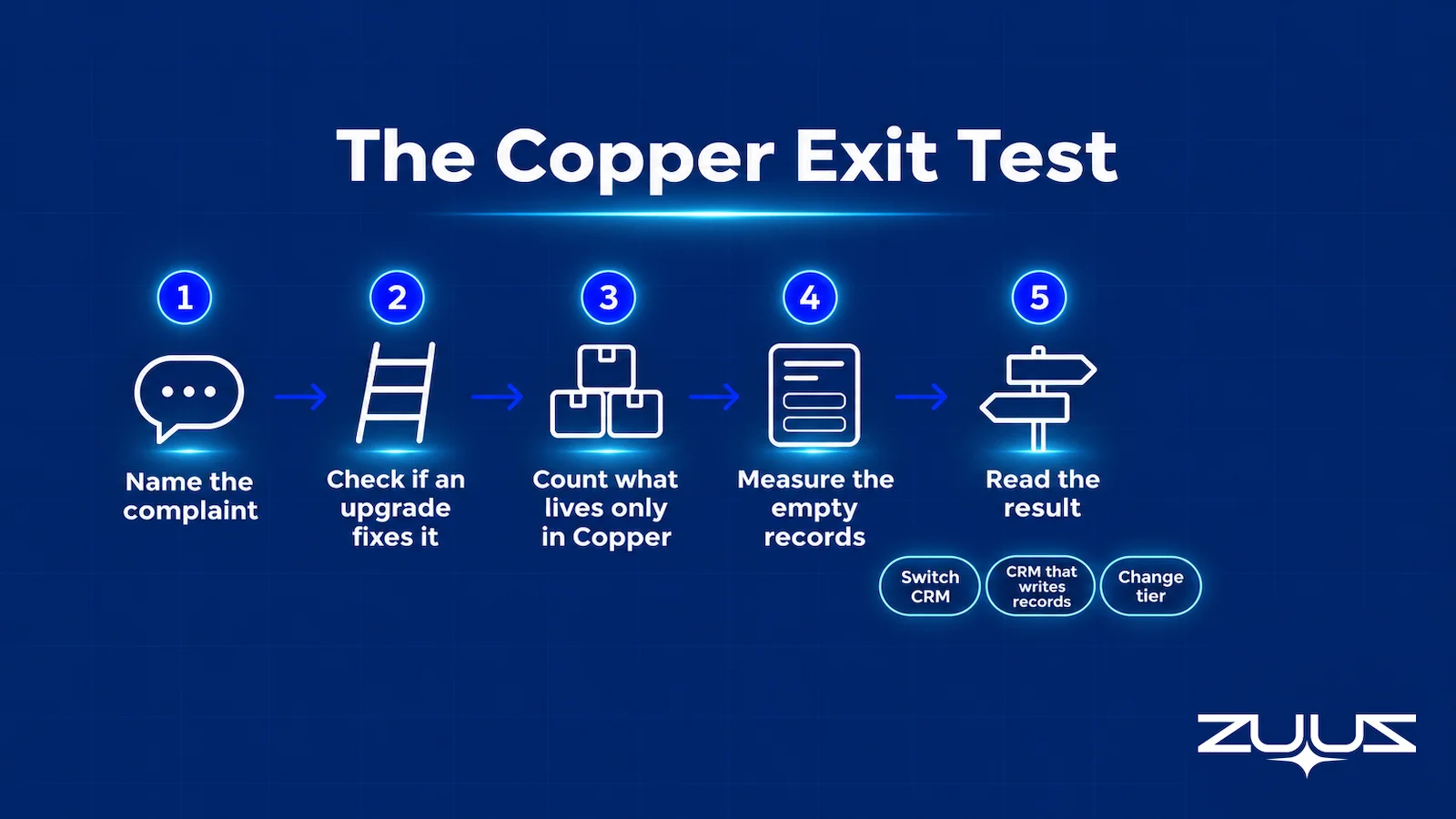
The Copper Exit Test
- Name the complaint. Price step, ceiling, selling beyond Gmail, or empty records. Use the one raised in the last pipeline review.
- Check whether a Copper upgrade fixes it. Professional adds workflow automation and reporting; Business adds custom reports and unlimited contacts. If an upgrade fixes it, price that path first.
- Count what lives only in Copper. Activity history, projects, automations, custom fields. Each is work on the other side.
- Measure the empty records. Take two deals from last quarter, read the Gmail thread end to end, and mark which facts reached a Copper field. More than a third missing means the problem is capture, not the CRM.
- Read the result. A ceiling or channel gap points to switching. Empty records point to a CRM that writes records for the rep. A price complaint with current records points to changing tier.
Step four is where most teams change their mind. The missing facts are rarely trivia: a competing quote, a new budget owner, a delayed start date. In ZUUZ, every value the agents write keeps a link to the email, meeting or call it came from, which is the same comparison step four asks you to do by hand.
For a broader checklist, see how to choose a CRM. The Exit Test only asks why Copper stopped working.
Empty Records Follow You to the Next CRM. Unless Something Writes Them.
ZUUZ agents build leads, deals and follow-ups from Gmail, Google Calendar, Meet and calls, with the source on every value.
Copper CRM Alternatives Compared
Two columns here are missing from most lists: what the AI actually does to a record, and whether ZUUZ syncs with the product. Prices are per seat per month, annual billing, as of November 2026.
| Option | Where reps work | List price | What AI does to the record | Where it wins | Two-way sync with ZUUZ |
|---|---|---|---|---|---|
| Copper (baseline) | Gmail sidebar via Chrome extension | Basic $23, Professional $59, Business $99 | AI email drafting, not record updates | Stays next to Google Workspace | No |
| HubSpot Sales Hub | HubSpot app; Gmail inbox connection | Free for 2 users; Professional $90 plus $1,500 required onboarding | Suggests updates; rep applies, or automatic per property | Marketing and sales on one platform | Yes |
| Pipedrive | Pipedrive app; Gmail email sync | Four per-seat plans; see Pipedrive's pricing page | Nova suggests updates; nothing applied automatically | Simple visual pipeline | Yes |
| Zoho CRM | Zoho app; Gmail integration from Standard | Free for 3 users; Standard $14, Professional $23, Enterprise $40, Ultimate $52 | Zia agents; no documented approval step or undo | Depth for the price | Yes |
| Attio | Attio app; email and calendar sync on every plan | Free for 3; Plus $40 plus $35 per extra user; Pro $100 plus $79 per extra user | Workflows and agents write records | Flexible data model | Yes |
| folk | folk app plus folkX extension for Gmail and LinkedIn | Standard $24, Premium $48, Enterprise from $80 | AI fields and follow-up assistants | Relationship lists, light outreach | No |
| Streak | Inside Gmail | Free without pipelines; Pro $49, Pro+ $69, Enterprise $129 | AI Autofill fills columns from the deal timeline, on credits | The CRM never leaves Gmail | No |
| ZUUZ | Gmail or Outlook, calendar, Meet, Teams, Zoom and calls | See pricing | Agents write leads, deals and follow-ups; source on each value | Teams whose records stay empty | Is the CRM, or syncs with the Yes rows plus Salesforce, Dynamics 365, Less Annoying CRM |
Sources: HubSpot Sales Hub pricing, Streak pricing, folk pricing, and the Copper, Zoho and Attio pricing pages. Pipedrive's pricing page would not load during this check, so its numbers are left out. ZUUZ pricing is on the pricing page.
The Alternatives, by Reason for Leaving
You want to stay inside Gmail: Streak or folk
Streak is the closest thing to Copper's original promise: pipelines live inside Gmail, with Calendar, Drive, Sheets and Chat integrations on paid plans. AI Autofill fills columns from the deal timeline, with 20 credits per user per month on Pro and 150 on Pro+. It loses when managers need cross-team reporting.
folk is a relationship CRM whose Chrome extension can "save contacts from LinkedIn, Gmail and any website in one click," in folk's words. It suits list-based selling with light outreach, less so a deal with many stakeholders. Neither Streak nor folk syncs with ZUUZ.
You hit a reporting or automation ceiling: Pipedrive or HubSpot
Pipedrive gives a cleaner deal pipeline and syncs with Gmail; its Nova assistant drafts updates and the rep approves each one. HubSpot adds marketing on the same platform, and at $90 a seat plus $1,500 onboarding it is the priciest first year below. See Pipedrive vs HubSpot. Both sync two-way with ZUUZ.
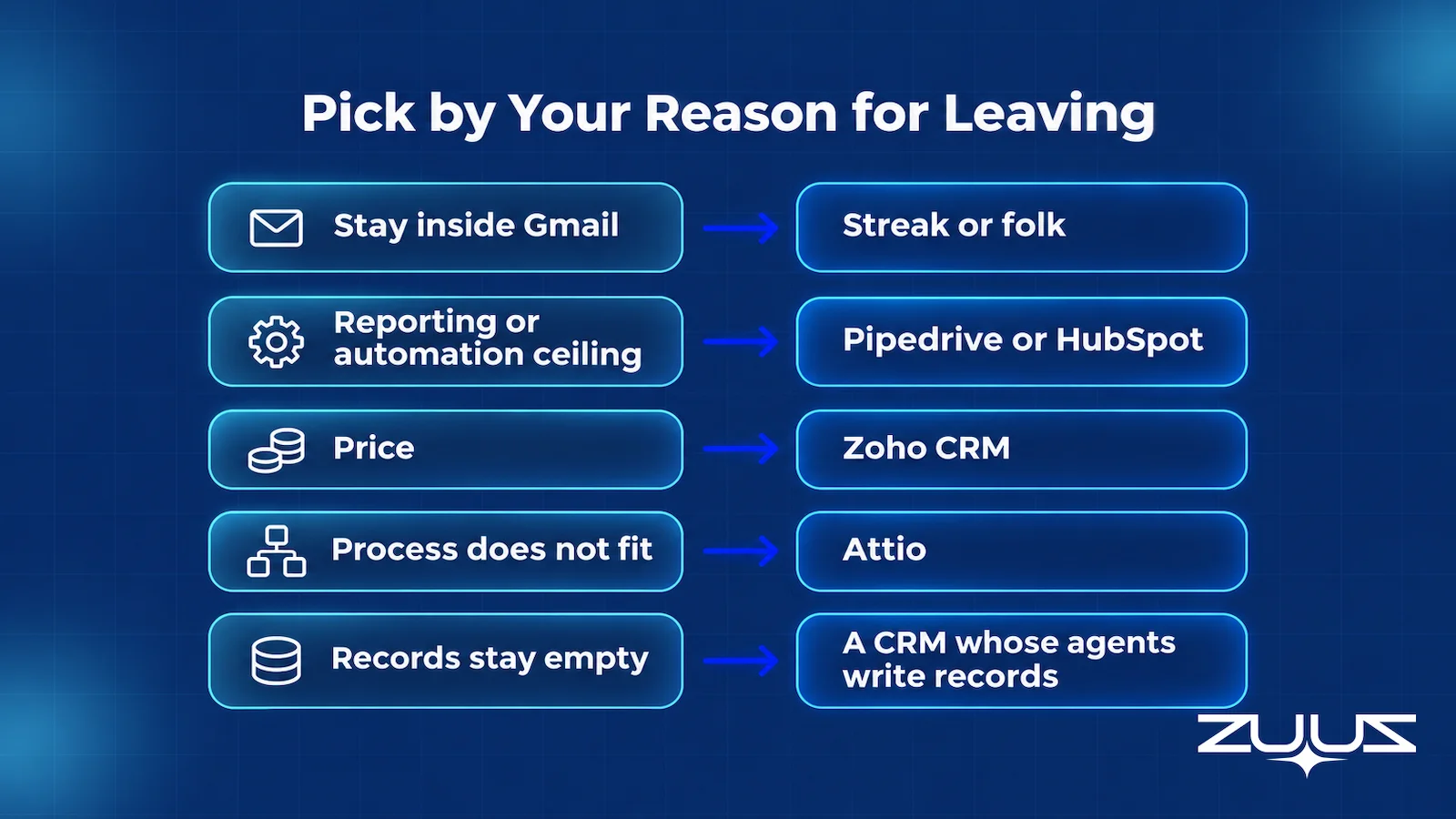
Price is the complaint: Zoho CRM
Zoho CRM is the only option clearly cheaper than Copper Professional: $23 a seat for Professional, free for three users, with Gmail integration from Standard. The trade is setup time, and Zia agents have no documented approval step or undo. Zoho syncs two-way with ZUUZ.
Your process does not fit a fixed model: Attio
Attio lets you define your own objects, which helps teams selling to partners or multi-entity accounts. Records from email and calendar come on every plan, and credits fund its AI. Our Attio alternative guide covers where it struggles. Attio syncs two-way with ZUUZ.
Records stay empty: a CRM that writes them
If step four came back with a third or more missing, a new screen will not help. The fix is a CRM whose agents write the record from the conversations, so the rep corrects instead of types. That is the gap ZUUZ was built for, covered below.
What a 10-Seller Switch Costs
A worked example for 10 sellers, on annual list prices as of November 2026. License figures are arithmetic from vendor pages; labor figures are illustrative.
- Copper Professional: 10 seats x $59 x 12 months = $7,080 a year. Business would be $11,880.
- HubSpot Sales Hub Professional: 10 x $90 x 12 = $10,800, plus $1,500 onboarding = $12,300 in year one.
- Attio Pro: $100 for the first user plus 9 x $79, so $811 a month, or $9,732 a year.
- Streak Pro+: 10 x $69 x 12 = $8,280.
- folk Premium: 10 x $48 x 12 = $5,760.
- Zoho CRM Professional: 10 x $23 x 12 = $2,760.
Now add the switch. Assume, as an illustration, 40 admin hours to map fields, rebuild automations and retrain, at $60 an hour: $2,400 before anyone sells. Counting that, only Zoho beats Copper Professional in year one; folk comes close, and HubSpot, Attio and Streak cost more.
The bigger cost is the empty start: a migrated CRM holds only what Copper held. ZUUZ reads the last 90 days of a connected mailbox on first connection, so its records do not start from zero even without an import file. For the step-by-step mechanics of any move, see our CRM migration guide.
Price the Switch on Real Deals. Not on a Demo.
Connect one Gmail mailbox and see which deals and follow-ups the agents find in the last 90 days.
What a Copper Export Leaves Behind
Copper's help center explains how to export data from Copper: admins export people, companies, opportunities, projects, tasks and leads by email. Four things need extra work.
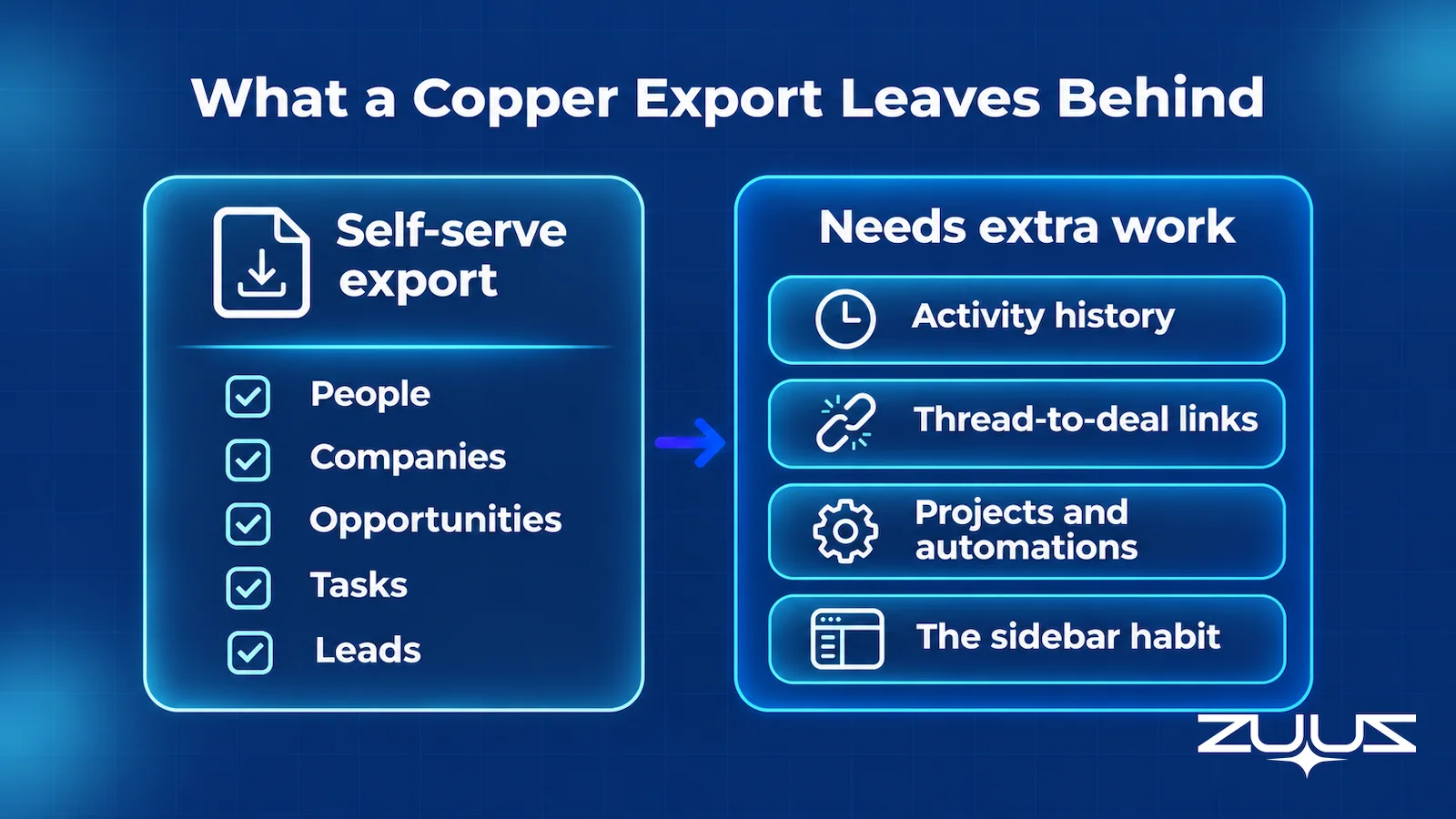
- Activity history. Activities are not in the self-serve export. Copper's help says to contact Copper Support for a one-time activity export. Ask early.
- The link between threads and deals. Emails stay in Gmail; the thread-to-opportunity association often comes back as loose notes, if at all.
- Projects and automations. Many CRMs have no project object, and workflow rules are rebuilt by hand.
- The sidebar habit. Unless you pick Streak, reps move to a separate app. Expect a logging dip in the first month.
That dip is when stray threads do the most damage. When ZUUZ is unsure whether a thread is sales at all, it asks the rep ("Maybe sales?") instead of guessing.
What Most Copper Alternatives Guides Get Wrong
Most lists for this search are written by a vendor on the list, including Copper. That shapes what gets left out.
- They treat a Gmail sidebar as capture. A sidebar shortens the click to log an email; it does not decide the email changed the close date. Our Gmail CRM guide separates what lands as a field from what lands as a timeline entry.
- They compare entry prices. Copper Basic at $23 does not list reporting and caps contacts at 2,500. The fair baseline for a team with a pipeline is Professional at $59.
- They skip the export. Few lists mention that activity history needs a support request.
- They assume switching fixes adoption. Reps who did not update Copper will not update the next CRM by hand either.
Where ZUUZ Fits for a Former Copper Team
First, the plain fact: ZUUZ does not sync with Copper, so it cannot run on top of Copper today. It fits a Copper team in one of two ways.
ZUUZ as the CRM
ZUUZ is the agentic AI CRM for B2B teams of 3 to 50 sellers. Its agents create and update leads, deals, follow-ups and renewals from Gmail or Outlook, Google Calendar, Meet, Teams or Zoom meetings, and calls on JustCall, GoTo Connect, CallTrackingMetrics or CallTools. Every value has a source, and a deal's value comes only from a quote, purchase order or contract. Every lead and deal the agents create has a one-click undo, and the rep's own edits win. On first connection ZUUZ reads the last 90 days, and the first records appear within 72 hours. You can ask Zari, the ZUUZ agent, about any account.
The gap that matters for a Copper switch: ZUUZ has no CSV import today, so Copper records will not load from the export file. ZUUZ builds the pipeline from the conversations, and the Copper export stays as an archive.
ZUUZ alongside the CRM you move to
If the Exit Test points to HubSpot, Pipedrive, Zoho or Attio, ZUUZ keeps that CRM current with two-way sync (also Salesforce, Dynamics 365 and Less Annoying CRM). An admin approves the first match-up once. See the integrations page and keep your CRM.
RA Technologies did not change CRMs, and one team is not a benchmark, but it shows where missing pipeline sits: in the mailbox. From an operator's seat, teams that come out of a switch ahead fixed how records get written before they picked a logo. ZUUZ has completed SOC 2 Type I; Type II is in progress. For the wider category, see our agentic AI CRM articles.
Leaving Copper? Start With a Pipeline That Fills Itself.
Use ZUUZ as your CRM, or keep HubSpot, Pipedrive, Zoho or Attio current after the move.
When ZUUZ Is Not the Right Choice
ZUUZ solves one problem: conversations that never reach the record. Choose something else if:
- You want to keep Copper. ZUUZ does not sync with Copper.
- You need your Copper history imported on day one. ZUUZ has no CSV import today.
- You need a dialer or sequences. ZUUZ does neither. folk Premium and HubSpot include sequences.
- You need forecasting or deal scores. ZUUZ does not forecast and does not give deal health scores or win probabilities. Its reports are partial.
- You rely on Zapier, a public API, Slack or WhatsApp. ZUUZ has no API or Zapier today and does not capture Slack or WhatsApp.
For more switching guides, see our CRM alternatives and switching hub.
Decide on One Mailbox
Demos run on clean sample data. Test on your own deals.
- Run the Copper Exit Test and write the reason in one sentence.
- For a ceiling or price, trial the one alternative that fixes it on two real deals.
- For empty records, connect one seller's Gmail to ZUUZ and compare what the agents write with what Copper holds.
- Request Copper's activity export now, whatever you decide.
- Price the switch with the worked example above.
See what Copper never recorded before you replace it. Connect one Gmail mailbox. ZUUZ reads the last 90 days, and its agents build leads, deals and follow-ups with a source on every value. The first records appear within 72 hours. 14-day free trial, no credit card: https://zuuz.ai/signup
Frequently Asked Questions
What is the best alternative to Copper CRM?
The best alternative depends on why you are leaving Copper. Streak suits teams that want the CRM inside Gmail, Pipedrive and HubSpot suit a reporting ceiling, Zoho CRM suits tight budgets, and Attio suits unusual data models. If records stay empty, pick a CRM whose agents write them.
Does ZUUZ integrate with Copper CRM?
No. ZUUZ does not sync with Copper today. A Copper team can use ZUUZ as its CRM, with agents building leads, deals and follow-ups from Gmail, calendar, meetings and calls, or move to HubSpot, Pipedrive, Zoho or Attio and run ZUUZ alongside it with two-way sync.
Which CRM works best with Google Workspace?
It depends on how deep you want the Gmail fit to go. Streak runs entirely inside Gmail. Copper sits beside Gmail with a Chrome extension and Calendar sync. HubSpot, Pipedrive, Zoho and Attio connect a Gmail inbox but run in their own app. ZUUZ reads Gmail, Google Calendar and Meet and writes the records itself.
How much does Copper CRM cost?
As of November 2026, Copper lists Basic at $23, Professional at $59 and Business at $99 per seat per month on annual billing, or $29, $69 and $134 on monthly billing. Basic caps contacts at 2,500, Professional at 15,000, and Business is unlimited. Workflow automation and reporting start on Professional.
Can I export my data from Copper?
Yes, with one gap. Copper admins can export people, companies, opportunities, projects, tasks and leads, and the file arrives by email. Activity history is not in the self-serve export: Copper's help center says to contact Copper Support for a one-time activity export. Request it early in any switch.
Is there a free alternative to Copper?
Yes, with limits. As of November 2026, Zoho CRM is free for up to three users, Attio's free plan covers up to three users, and HubSpot Sales Hub is free for up to two users. Streak's free plan runs in Gmail but has no CRM pipelines.
Is Pipedrive or HubSpot better than Copper for a Gmail team?
Either is better if your complaint is reporting or pipeline structure, and neither is better if your complaint is that reps do not update records. Both connect a Gmail inbox but work in their own app, so reps lose Copper's sidebar. HubSpot costs more at Professional, including a required $1,500 onboarding fee.
Can I move from Copper to ZUUZ without losing history?
Partly. ZUUZ has no CSV import today, so Copper records do not load from the export file. ZUUZ reads the last 90 days of a connected mailbox and builds leads, deals and follow-ups from those conversations, with first records within 72 hours. Keep the Copper export as an archive.