
Attio Alternative or Keep Your CRM? What to Weigh First
Weighing an Attio alternative? Compare migrating with keeping Salesforce, HubSpot or Zoho and adding an AI layer on top, one that also runs on Attio itself.

CEO of ZUUZ. He scaled Cloud Box Technologies from 0 to $25M ARR in IT services and distribution before building ZUUZ. Connect on LinkedIn
TL;DR: Most Attio alternatives ask a team to migrate to a different all-in-one CRM. ZUUZ is a different kind of alternative: an AI layer that sits on top of Salesforce, HubSpot, or Zoho, so a team gets automated capture and scoring without leaving the CRM it already runs.
- Attio markets itself as an AI-native CRM, but every published Attio alternative list compares it against other full CRM replacements.
- Switching CRMs to get AI features means migrating records, retraining reps, and rebuilding integrations, a real cost most comparisons skip over.
- ZUUZ takes a different approach: it adds automated email capture, lead scoring, and pipeline risk monitoring on top of the CRM a team already uses.
- Some parts of a CRM migration port cleanly, some get rebuilt by hand, and some are quietly lost for good, and knowing which is which is how a team prices the decision honestly.
- Teams running Salesforce, HubSpot, or Zoho can get comparable automation outcomes without a migration.
- The right choice depends on whether the actual problem is the CRM itself or what happens between the inbox and the CRM.
Most searches for an Attio alternative assume the fix is another CRM. Attio’s own pitch is a rebuilt, AI-native database, so the natural comparison becomes Attio versus Folk versus HubSpot versus whichever CRM a reviewer prefers that week.
That framing misses a real option. The reason a team looks at Attio in the first place is usually not the CRM itself. It is what the CRM cannot do on its own: read email, score leads, and flag risk without a rep typing it in first.
This guide covers what Attio does, what switching actually costs, and a second path that adds the automation without the migration.
What Attio Actually Does
Attio is a relationship and deal database built around a flexible data model, where a team defines its own objects and fields rather than working inside Salesforce or HubSpot‘s fixed structure. It markets itself as an AI-native CRM, with automation features like research reports and record enrichment layered into that flexible base.
Attio does not connect natively to LinkedIn, and several published reviews note that its automation depth sits behind add-ons rather than in the core product. Pricing and setup are built for teams starting from a blank slate, seed-stage and early growth companies without years of Salesforce or HubSpot configuration already in place.
For a team evaluating Attio, the real question is not whether it is a capable database. It is whether replacing an existing CRM is the fastest way to get the specific automation the team is missing, or whether that automation can be added without touching the database at all.
The Migration Cost Most Comparisons Skip
Every published Attio alternative list compares feature sets: pipeline views, automation depth, pricing tiers. Almost none price in what a CRM migration actually costs a mid-market sales team.
Moving from Salesforce, HubSpot, or Zoho to a new CRM means re-mapping every custom field, rebuilding every integration, and retraining every rep on a new interface at the exact moment deals are supposed to be moving forward. Historical deal data, attachments, and email threads tied to old records do not always transfer cleanly.
None of that cost shows up in a feature comparison table. It shows up three months after the migration, when a sales team is still asking where a field went.
Table 1: Two Ways to Get AI Automation
| Factor | Migrate to a New CRM | Add ZUUZ as an AI Layer |
|---|---|---|
| System of record | Changes to the new platform | Stays Salesforce, HubSpot, or Zoho |
| Historical data risk | Fields and attachments may not transfer cleanly | Nothing moves |
| Rep retraining | Full new interface to learn | None, reps keep their existing CRM |
| Time to value | Weeks to months for migration | Days to connect an inbox |
| What it fixes | Interface and data model | What never reaches the CRM in the first place |
The migration column is not a reason to avoid a new CRM outright. It is the cost that most Attio alternative comparisons leave out of the decision entirely.
What Actually Has to Move in a CRM Migration
“Migrate the data” is one line on a project plan and about nine separate projects in practice. The useful way to price a CRM switch is to go through the instance component by component and sort each one into three buckets: what a migration tool moves for you, what a human rebuilds by hand in the new system, and what simply does not survive the trip. Most teams price the first bucket and get surprised by the third.
Objects, fields, and the shape of the data
Standard objects. Accounts, contacts, opportunities or deals, and leads exist in some form in every major CRM, so the top-level records are the most solved part of the job. The names differ, an opportunity in one system is a deal in another, and every record-to-record relationship has to be re-pointed at new IDs once the rows land. But a row-for-row move of standard objects is the part a migration tool genuinely handles.
Custom objects. A custom object is a table that exists only because someone in the business built it: a table of installations, or renewals, or sites, or shipments. Whether it ports depends on two things a feature comparison never shows: whether the destination supports custom objects at the pricing tier actually being bought, and whether the relationships between that object and the standard objects can be recreated with the same cardinality. These usually survive. They rarely survive automatically.
Custom fields and picklists. Field mapping is the single largest manual line item in most migrations, because data types do not line up one to one. A formula field has no column behind it, so it arrives as a static snapshot or as nothing. A multi-select picklist can land as free text. A lookup relationship can arrive as a bare ID pointing at nothing. Picklist values that drifted over the years, three spellings of “Closed Lost” and a stage nobody has used since 2023, force a choice: consolidate them and break historical reporting, or carry the mess across intact.
History, ownership, and who can see what
Record ownership. Ownership is a pointer to a user ID, which means it only survives if every user, including departed ones, is created in the destination first, in the right order, with a mapping table connecting old IDs to new. Skip the departed reps and their accounts land unowned or all pile onto whichever admin ran the import. Teams discover this the week commission reporting runs.
Sharing and territory rules. Role hierarchies, territory assignments, and team-based access are configuration rather than data, so nothing about them moves. They get rebuilt by hand in a different system’s model of access, and this is the component most likely to be discovered late, because a broken sharing model looks completely fine until a rep sees an account they should not or cannot find one they should.
Historical activity and email history. Calls, meetings, notes, tasks, and logged emails are the highest-volume and lowest-priority records in the project, which is exactly why scope gets cut here when the timeline slips. Many migrations move a rolling window, the last twelve or twenty-four months, and archive the rest to a flat export nobody opens again. The subtler loss is the association itself: where email was synced into the old CRM, the messages still exist on the mail server, but the link between a thread and a deal record is platform-specific metadata with nowhere to land. The correspondence survives. The context does not.
Attachments and files. Files move as a separate pass, with their own API rate limits, size caps, and partial-failure modes. Links to files pasted into the body of a note break silently, so nobody reports them and nobody counts them.
Audit trail and field history. The record of who changed which field and when is generally not portable at all. For a team that has never needed it, that is a shrug. For a regulated business, or one that settles internal disputes by checking when a close date moved, it is a real loss that surfaces months later.
Automations, reporting, and everything downstream
Automations and workflows. Nothing in this category ports. Assignment rules, validation rules, approval processes, scheduled jobs, and every “if stage equals X then notify Y” built over the years is written in a platform-specific language and gets recreated from scratch in the destination’s own. The one genuine upside on this list lives here: a rebuild is a legitimate excuse to delete the rules nobody remembers writing. The catch is that working out what each rule did usually requires the person who wrote it, who has often left.
Reports and dashboards. Always rebuilt, never migrated, because a report definition is a saved query against a schema that no longer exists in the same shape. The quieter problem is historical report snapshots: the state of a metric at a point in time, such as pipeline coverage at the end of each quarter for three years, is not stored as records anywhere and cannot be reconstructed after the fact. A team that has tracked a number weekly for years generally loses the series and starts a new one.
Integrations and API consumers. Every system that reads from or writes to the CRM has to be re-pointed: marketing automation, billing, the support desk, the data warehouse, BI dashboards, e-signature, enrichment vendors, and the script an analyst wrote two years ago that quietly refreshes a spreadsheet every morning. The count is almost always higher than the list anyone can produce from memory. The honest way to find the real number is to pull the source CRM’s API access logs and see which client IDs actually call it.
User permissions and field-level security. Profiles and permission sets get rebuilt. Field-level security is the quiet one: if a compensation or margin field was hidden from a role in the source and that restriction is not deliberately recreated, the field is simply visible to everyone on go-live day. Nothing errors. Nobody is notified.
A team can walk that list in twenty minutes and produce a defensible estimate of its own exposure, which is more than any vendor comparison page will give it.
Table 2: What Survives a CRM Migration, and What Does Not
| Migration component | Typically ports cleanly | Usually rebuilt by hand | Commonly lost |
|---|---|---|---|
| Standard objects (accounts, contacts, deals) | Yes | Relationship re-pointing | Rarely anything |
| Custom objects | Records, if the tier supports them | The object and its relationships | Cardinality the new model cannot express |
| Custom fields and picklists | Simple text, number, date fields | Field-by-field mapping | Formula fields, unused picklist values |
| Record ownership | Only with a full user mapping first | The user mapping table | Ownership by departed users |
| Sharing and territory rules | Nothing | The entire access model | Edge-case exceptions nobody documented |
| Activity history (calls, meetings, notes) | Within a chosen date window | Scope decision on how far back | Everything outside the window |
| Email-to-record associations | Rarely | Re-syncing the mailbox forward | Historical thread-to-deal links |
| Attachments and files | As a separate pass | Retry handling for failures | File links pasted inside note bodies |
| Automations and workflows | Nothing | All of it, in a new language | Rules whose original purpose is unknown |
| Reports and dashboards | Nothing | Every report definition | Historical report snapshots and trend series |
| Integrations and API consumers | Nothing | Every connection, re-pointed | Undocumented scripts nobody inventoried |
| Permissions and field-level security | Nothing | Profiles and permission sets | Field-level restrictions, silently |
| Audit trail and field history | Nothing | Not rebuildable | The full change record |
The third column is the one worth sitting with. Losses in that column do not generate an error, do not appear in a migration report, and are usually noticed by an individual rep or analyst weeks later, one at a time, long after the project has been declared finished.
The Total Cost of a Migration Beyond License Price
Comparison pages price CRMs per seat per month, which is the one cost that is both easy to find and rarely the largest. The rest of the bill is labor and lost output, and it lands over a period of months rather than on an invoice.
Implementation labor. Either an internal admin loses most of a quarter to the project or a partner is hired, and mid-market projects usually involve both. The driver is not record count, which machines handle fine. It is the number of custom fields, custom objects, and automation rules, because each one needs a human decision about what it becomes.
Data migration and validation. The import is the fast part. Somebody then has to sample records in the new system and confirm that owners, amounts, close dates, and stage values actually match the source, and that reconciliation pass is where timelines usually slip.
Integration rebuild. Every connection has to be rebuilt, tested, and watched in production for a cycle. Anything with its own security or approval review, particularly systems touching billing or customer data, adds calendar time unrelated to engineering effort.
The dual-running period. Almost nobody cuts over cleanly. For some weeks both systems are live, both are licensed, and the team is either double-entering or trusting neither. This is the most expensive part of a migration and the least likely to be budgeted, because on the plan it is a dotted line rather than a phase.
Retraining and enablement. The training session is a day. The cost is the tail after it: months of small hesitations, questions in a channel, and the rep who keeps a personal spreadsheet because they no longer trust the dashboard.
The productivity dip. Reps relearning where things live are not selling at their previous rate, and the dip lands in whatever quarter the cutover falls in. Gartner found that AI saves sellers an average of 4.8 hours per week, yet 72% of sales organizations report low reinvestment of that time into high-value activities. The pattern is the same: a tooling change on its own does not convert into selling capacity unless the operating model around it changes too.
Ongoing admin ownership. A new CRM does not stay configured. Someone owns the object model, the automation, and the permissions from go-live onward, and if that role was informal before it usually has to be made formal.
Table 3: The Cost Lines a Feature Comparison Leaves Out
| Cost component | What it actually covers | What drives the size | When it lands |
|---|---|---|---|
| License price | Per seat, per month, on the new platform | Seat count and tier | Day one, and visible |
| Implementation labor | Internal admin time plus partner fees | Custom fields, objects, and rule count | Across the project |
| Data migration and validation | Mapping, loading, and reconciling records | Schema complexity, not record volume | Mid-project, and it slips |
| Integration rebuild | Re-pointing every system that reads or writes | Number of connected systems and reviews | Late, and blocks cutover |
| Dual-running period | Two live systems, two bills, split trust | How clean the cutover plan is | Weeks around go-live |
| Retraining and enablement | Sessions, documentation, and the question tail | Headcount and how different the model is | Go-live and the quarter after |
| Productivity dip | Reduced selling output while reps relearn | Interface distance from the old system | The cutover quarter |
| Ongoing admin ownership | Someone maintaining the new configuration | How much was customized on the way in | Permanently |
None of this argues that the total is always too high. It argues that the total is knowable in advance, and that a team that has priced all eight lines is making a different and better decision than a team comparing two per-seat numbers. Forrester’s own research on recent CRM implementations found that most decision-makers who had rolled out a CRM in the prior twelve months were not successful with it, with 68% still unable to get a single view of the customer and 39% reporting data-quality problems, which suggests the platform choice is rarely the variable that decides the outcome.
A Layer Over the CRM Instead of a New CRM
ZUUZ is CRM-agnostic software that reads email, scores leads, and monitors pipeline risk on top of Salesforce, HubSpot, or Zoho rather than replacing any of them. The distinction matters for a team evaluating Attio for its AI capabilities specifically, rather than for its data model.
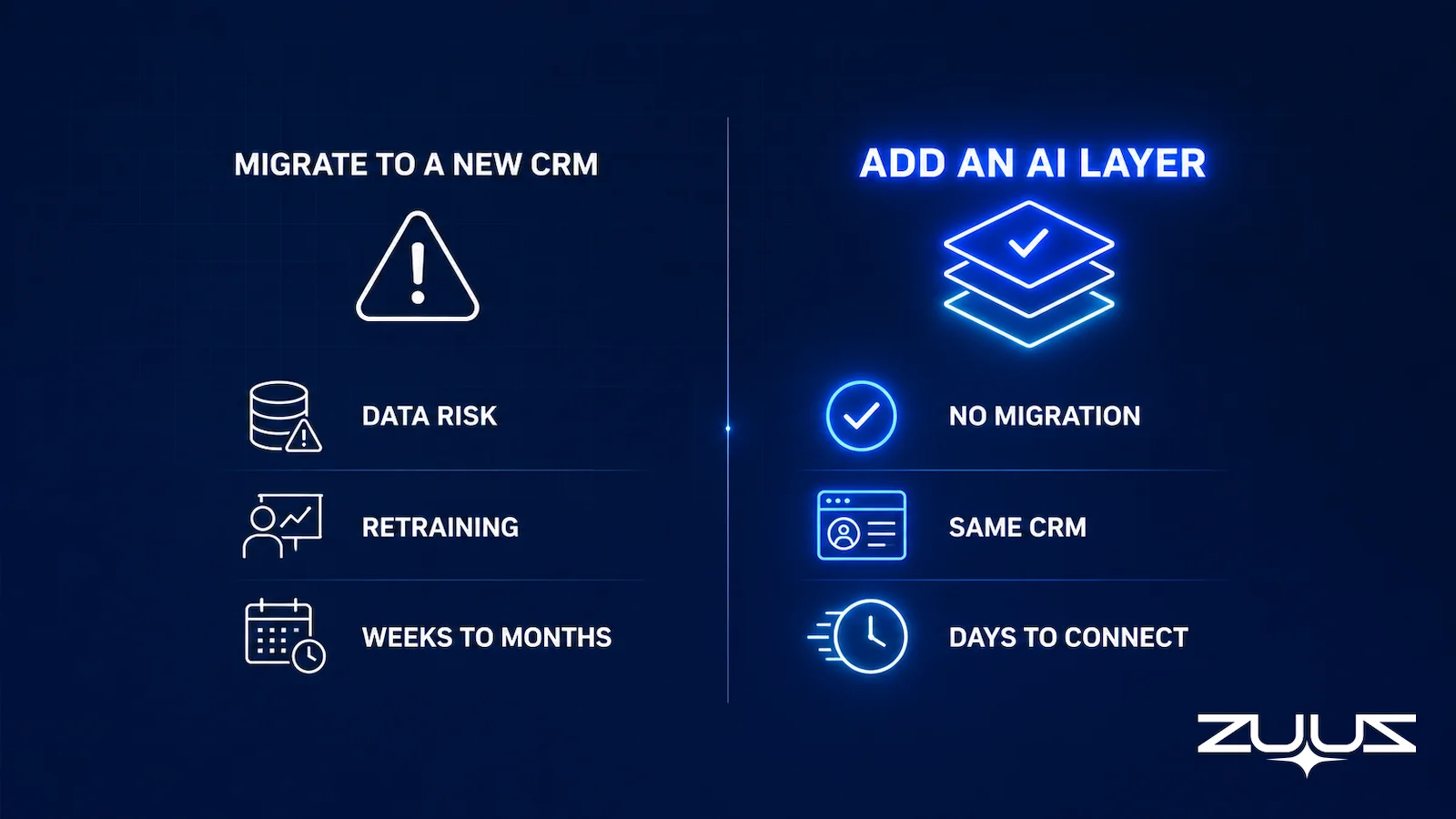
A layer approach reads inbound and outbound email, extracts contact and deal signals, and writes structured records back to whichever CRM a team already runs. No records move. No rep relearns an interface. The CRM stays the system of record; the automation happens around it.
This is not a smaller version of what an all-in-one AI-native CRM offers. It is a different bet: that the AI value teams actually want, automatic capture, scoring, and risk visibility, does not require rebuilding the database underneath it.
When a Full CRM Replacement Still Makes Sense
A layer is not the right answer for every team, and a comparison that pretends otherwise is not worth reading. There are four situations where replacing the CRM outright is the correct call, and they are specific enough that a team can check itself against them in a few minutes.
1. There is no real CRM to migrate from
If the current system of record is a spreadsheet, a shared inbox, and the memory of two founders, there is no migration, because there is nothing structured to move. The entire cost list above collapses to an import of a contact export. A company still building its first real CRM discipline, with no meaningful Salesforce, HubSpot, or Zoho investment to protect, should pick whichever system fits how it actually sells, and a flexible, user-defined data model of the kind Attio is built around is a legitimate answer to that question.
2. The customization has outrun anyone’s ability to maintain it
Some instances stop being an asset. The signs are consistent: several hundred custom fields of which a minority are populated, validation rules that contradict each other, automation nobody can trace, and a change in one place that routinely breaks something unrelated somewhere else. When the cost of understanding the current system approaches the cost of rebuilding it, the migration stops being a loss and becomes a controlled write-off. The practical test is whether a competent admin can explain, without guessing, exactly what happens when a deal moves to Closed Won. If nobody can, a rebuild is already on the table regardless of which vendor wins.
3. The team is small enough that migration is genuinely cheap
Everything in the cost table scales with complexity rather than headcount, though the two correlate. A team of eight with a few thousand records, two integrations, and no custom objects can move over a weekend and be fully productive the following week. At that size, switching for a better fit is a reasonable trade, and nobody should talk themselves out of a good decision using cost arguments written for a two-hundred-seat Salesforce org.
4. The object model cannot express the business
This is the one case where no layer helps, and the most defensible reason to switch. Some businesses do not fit a linear account-contact-opportunity pipeline. Venture and private equity firms track a network where people, companies, and funds relate to each other in every direction at once. Professional services firms sell recurring engagements against projects rather than one-time deals. Marketplaces have two sides that both behave like customers. When the object model cannot hold the shape of the business, teams build a parallel spreadsheet for the part that does not fit and then maintain both forever. A tool built around user-defined objects and relationships addresses that directly, and no amount of automation on top of the wrong data model will.
How to tell which situation applies
The distinguishing question is where the pain sits. If the data in the CRM is wrong, thin, or late, the problem is upstream of the database and moving the database moves the problem with it. If the data cannot be structured correctly in the first place, or the configuration has become unmaintainable, that is a genuine platform problem and a replacement is the honest answer.
The migration math changes for a company already running a CRM with years of historical data and custom configuration that basically works. At that point the question is not which database is better designed. It is whether the specific automation gap is worth the switching cost, or whether it can be closed without one.
From an operator’s seat
Having run this migration in practice, the cost that lands last is the one nobody quotes: the second system that reads the CRM. Mapping objects and moving history is a project with a plan, and teams handle it. What surprises them is the quoting tool, the invoicing export, the renewal tracker and the two dashboards leadership actually opens, each wired to field names that no longer exist. Across the deployments ZUUZ runs, the pattern is that the CRM itself is live within weeks while those downstream connections limp for a quarter, and that is the same quarter reps stop updating anything because they cannot tell which system is real. The order of operations that works is unglamorous: fix capture on the CRM already in place, watch one quarter of complete records, then decide whether the database was ever the problem. ZUUZ is an AI layer on top of the CRM a team already runs, never a CRM and never a replacement for one: a new CRM changes where the rep types, while ZUUZ writes the record so the typing is not the plan.
How to Evaluate an Attio Alternative With the Capture Layer Test
The Capture Layer Test is the standard worth applying before any migration quote gets signed: whatever gets chosen has to create records rather than summaries, write to the CRM record itself, read what changed on the account, cover every channel where deals move, and avoid depending on a path that is being retired. Three questions separate a genuine automation gap from a database preference. First, is the complaint about what the CRM looks like, or about what never makes it into the CRM in the first place. A flexible data model solves the first problem. It does nothing for the second.
Second, how much historical pipeline and account history would a migration put at risk. Teams with two or more years of CRM history have real switching costs that a comparison chart never shows.
Third, would the team rather solve for a better interface or for less manual entry. Manual data entry is a capture problem, not a database problem, and a new CRM does not fix it by itself unless the team also changes how data gets in. A renewal or churn-risk conversation that goes unlogged is the same problem in a different part of the deal cycle.
The Capture Layer Test, four questions in order:
- Does it capture from the channels where the deal actually moves: email, calendar, LinkedIn messages, meeting and call transcripts?
- Does what it captures land in CRM fields a report can read, or only in an activity feed a human must open?
- Does the rep have to remember anything: a BCC, a button, a sidebar, a sync?
- Can the rep correct it in one click before it is written?
A tool that fails 2 or 3 produces activity history, not a pipeline you can run a review on. Applied to this decision, Attio and every CRM on the shortlist answer question 1 the same way: they hold what someone puts into them. That is why a migration can finish on time and leave the original complaint untouched.
Avinash Gujje ran sales in IT services and distribution before building ZUUZ, scaling Cloud Box Technologies from zero to $25M ARR. Platform changes came up regularly in that market, and the proposals almost always arrived framed as a data-model argument. The thing that decided them in practice was far more ordinary: which systems quoted, invoiced, renewed and reported off the same customer record, and how many of those a switch would put in the rebuild queue.
What stands out in hindsight is how rarely the complaint that started the search was about the database. It was about a renewal nobody saw coming, an account where the last real update was a month old, and a forwarded request that never became an opportunity. A new CRM answers none of those on its own, because the gap sits between the conversation and the record rather than inside the record. Distribution and IT services teams feel it harder than most, since a single long email thread can carry a renewal, an expansion and a support escalation at once.
Keep Your CRM: How ZUUZ Replaces the Reason to Switch
RA Technologies, a US-based IT services company, evaluated its options after two years running HubSpot with growing frustration over deals that never got logged. Rather than migrating to a new platform, the team connected its sales inbox to ZUUZ.
A 90-day historical lookback across that mailbox surfaced $120,000 in pipeline that had never existed in HubSpot at all. The signals had always been there, sitting in email threads no one had time to log manually.
Two customers, neither of whom migrated.
RA Technologies, a US IT services company, ran ZUUZ on the HubSpot instance it had used for two years, with the same team and no migration. Within 72 hours, $120K in pipeline the CRM had never seen was surfaced from the sales mailbox. The detail is in the RA Technologies case study.
Cloud Box Technologies, a UAE cloud and IT services business, tracks 10 to 12 renewals in minutes from a single connected user, with leadership seeing live pipeline instead of a weekly rollup.
ZUUZ reads inbound and outbound email, extracts contact, company, and deal signals, and writes structured records directly to HubSpot, Salesforce, or Zoho. A lead scoring layer ranks what gets captured by intent and engagement, and a pipeline risk layer flags accounts that have gone quiet against their typical cycle length. None of it required moving off the CRM the team already knew.
The cheapest way to price the decision is to test the capture side before committing to a license. The first step is connecting one mailbox, and ZUUZ reads the last 90 days on that connection, so the gap between what the CRM logged and what the accounts actually said is visible in minutes. A team can then compare that gap against a migration plan with real numbers on both sides rather than a feature grid.
See the Automation Without the Migration.
ZUUZ runs on the Salesforce, HubSpot, or Zoho instance already in place. Book a 15-minute walkthrough on your own inbox.
Switching cost is only one axis of the decision. The other is category, because a CRM, a capture layer, and a conversation intelligence platform solve different problems and still end up on the same shortlist more often than they should.

The broader category this fits into, and how it compares to conversation intelligence, lead scoring, and other AI sales tool categories, is covered in the full guide to AI sales tool categories.
A first step that costs nothing to run
Before a migration quote gets signed, test the capture side. Connect one mailbox to ZUUZ, let it read the last 90 days, and have the rep review what it found before anything is written to the CRM. The gap between what the CRM logged and what the accounts actually said is then a number, not an argument. The free trial runs 30 days with no credit card: https://zuuz.ai/trial/
Frequently Asked Questions
What is Attio?
Attio is a relationship and deal management platform built around a flexible, user-defined data model rather than the fixed object structure of Salesforce or HubSpot. It markets itself as an AI-native CRM, with automation features such as record enrichment and research reports layered on top of that data model.
What are the best Attio alternatives?
Published comparisons typically name Folk, HubSpot, Pipedrive, Copper, and Affinity as Attio alternatives, each a different full CRM. A separate category of alternative adds AI automation to a CRM a team already runs instead of replacing it, which fits teams that want the automation without a migration.
Does switching to Attio require migrating from an existing CRM?
Yes. Moving to Attio, like moving to any new CRM, means re-mapping custom fields, rebuilding integrations, and retraining reps on a new interface. Historical deal data and email threads tied to old records do not always transfer cleanly, a cost that rarely appears in feature comparisons.
Can ZUUZ replace Attio?
ZUUZ is not a CRM and does not replace Attio, Salesforce, HubSpot, or Zoho. It is an execution layer that adds email capture, lead scoring, and pipeline risk monitoring on top of Salesforce, HubSpot, or Zoho, for teams that want Attio-style automation without switching their system of record.
Is Attio worth it for a team that already has a CRM?
It depends on what is actually missing. If the complaint is the interface or data model, a new CRM like Attio may be worth the switch. If the complaint is that deal signals in email never reach the CRM, that is a capture problem a new database does not automatically solve.
What does Attio not do well?
Published reviews note that Attio lacks native LinkedIn integration and that its automation depth sits mostly behind add-on features rather than the core product. Teams evaluating it for AI-driven automation specifically should weigh this against tools built primarily around that capability.
How long does a CRM migration to Attio typically take?
Timelines vary by data volume and integration count, but re-mapping fields, migrating historical records, and rebuilding third-party integrations commonly takes several weeks to a few months for a mid-market sales team, with rep productivity affected throughout.
How much does a CRM migration cost?
There is no reliable published benchmark, because the cost is mostly labor and lost output rather than software. A defensible estimate adds up eight lines: license fees, implementation labor, data migration and validation, integration rebuild, the dual-running period when both systems are licensed and live, retraining, the productivity dip while reps relearn, and ongoing admin ownership. The largest driver is not how many records exist but how many custom fields, custom objects, and automation rules do, because each one needs a human decision about what it becomes.
How long does a CRM migration take?
Schema complexity sets the timeline, not record count. A small team with a few thousand records, no custom objects, and two integrations can move in days. A mid-market instance with years of configuration and a list of connected systems nobody has fully inventoried typically runs several weeks to several months, and the phases most likely to overrun are data validation and integration rebuild rather than the import itself. Pulling the current CRM’s API access logs to see which systems actually call it is the fastest way to make the estimate realistic.
Can you keep historical data when switching CRM?
Partly. Standard objects such as accounts, contacts, and deals port with the fewest surprises. Custom fields need field-by-field mapping, and formula fields have no direct equivalent. Activity history is often migrated only for a rolling window. Three things are commonly lost outright: the association between historical email threads and specific deal records, historical report snapshots that captured a metric at a point in time, and the audit trail of who changed which field and when. None of those losses produces an error message, which is why they surface weeks after a project is declared complete.
What is an AI CRM?
An AI CRM is a customer relationship management system that builds machine-learning features such as record enrichment, summarization, or automated data entry into the core product rather than adding them through separate tools. The system of record and the AI ship together. A distinct approach keeps the existing system of record and adds the AI features as a layer on top of it. ZUUZ is that second kind: it is an AI layer that runs on top of Salesforce, HubSpot, or Zoho. It is not a CRM and does not replace one.
Do you need to switch CRM to get AI features?
No. The AI capabilities most sales teams are missing, capturing deal signals out of email automatically, scoring leads by intent and engagement, and flagging accounts that have gone quiet, operate on the data flowing into the CRM rather than on the database design underneath it. Those can be added on top of an existing Salesforce, HubSpot, or Zoho instance without moving records or retraining reps. Switching is the right answer when the problem is the data model itself rather than what reaches the CRM, which is a narrower set of cases than most comparison pages imply.

