
Zoho CRM Alternatives by Reason, Plus When to Stay
Zoho CRM alternatives sorted by why teams leave: admin work, AI, reporting, integrations or price. Compare HubSpot, Pipedrive, Salesforce and when to stay.


CEO and Founder of ZUUZ. He scaled Cloud Box Technologies from 0 to $25M ARR in IT services and distribution before building ZUUZ. Connect on LinkedIn
The best Zoho CRM alternatives depend on why a team is leaving. Pipedrive suits teams tired of admin work, HubSpot and Salesforce suit teams that need deeper AI, reporting or integrations, and Freshsales or Bigin suit teams fighting price creep. Teams whose real problem is empty records can keep Zoho and add ZUUZ to keep it current.
TL;DR: Teams leave Zoho CRM for one of five reasons: admin effort and data entry, AI depth, reporting, integrations, or price creep. Each points to a different alternative, and two are often fixed without leaving Zoho. Name the reason with the Zoho Exit Reason Test, then compare 12-month costs at the edition the team really needs. ZUUZ, the agentic AI CRM, syncs two-way with Zoho, so a team can keep Zoho and stop retyping what customers already wrote.
- Zoho CRM is one of the lowest-priced full CRMs: Standard is $14 per user per month billed annually and Professional is $23, as of November 2026.
- AI agents and unlimited reports both start at Zoho's Professional edition, so many "Zoho is missing X" complaints are really edition questions.
- Among the editions compared here, only Freshsales Growth and Pipedrive Lite list below Zoho Professional per seat, so leaving for price alone rarely saves money.
- If reps did not update Zoho, they will not update HubSpot either.
- The Zoho Exit Reason Test sorts each complaint into "fix in Zoho", "add to Zoho" or "switch", in four steps.
- ZUUZ syncs two-way with Zoho and writes leads, deals, follow-ups and renewals from email, meetings and calls, with a source on every value.
Zoho CRM wins a lot of first purchases with a free plan for three users, low seat prices and built-in calling. The trouble shows up a year or two later, when the sales manager stops trusting the pipeline report or the renewal lands at a higher edition than planned.
That is when the search for Zoho CRM alternatives starts. This guide sorts the alternatives by the reason a team is leaving, prices them at the edition the team would need, and says when keeping Zoho is the better move.
Five Reasons Teams Leave Zoho CRM
Complaints about Zoho CRM fall into five groups. Each has a different fix, and some have a fix inside Zoho.
1. Admin effort and data entry
Zoho is configurable, and configuration needs an owner. On a team of 3 to 50 sellers that owner is often the sales manager working evenings. Meanwhile reps still type the deal stage, the next step and the new contact after every call. Logging a call is different from turning what the buyer said into fields.
2. AI depth
Zia, Zoho's assistant, now ships with pre-built agents for SDR work, follow-ups, deal analysis and quotes. The Zia Agents pricing page says the agents are free with Zoho-hosted models up to 30 million tokens a month, as of November 2026. But AI agents first appear in the Professional edition, so teams on Standard often conclude Zoho "has no AI" when they are one edition short.
3. Reporting
"Unlimited reports" starts at Professional, and reporting hierarchy starts at Enterprise. The deeper problem is rarely the report builder. A dashboard built on stale stages is wrong in any CRM, which is why auditing the six reports a sales team needs often finds data gaps before tool gaps.
4. Integrations
Zoho connects tightly to the rest of Zoho, such as Desk, Campaigns and Books. Outside that family, teams often rely on Zapier or custom API work. A team running a separate marketing platform and a third-party phone system can end up maintaining more connectors than it planned.
5. Price creep
Zoho's advertised prices are annual. Billed monthly, Standard rises from $14 to $20 per user, Professional from $23 to $35, and Enterprise from $40 to $50, per the Zoho CRM pricing page as of November 2026. Add a move to Professional for agents and reports, and a cheap CRM becomes a mid-priced one. It is still cheaper than most alternatives, which many teams forget.
The Zoho Exit Reason Test
Before comparing products, name the reason. The Zoho Exit Reason Test takes about an hour with the sales manager and the Zoho admin, and sorts every complaint into fix, add or switch.
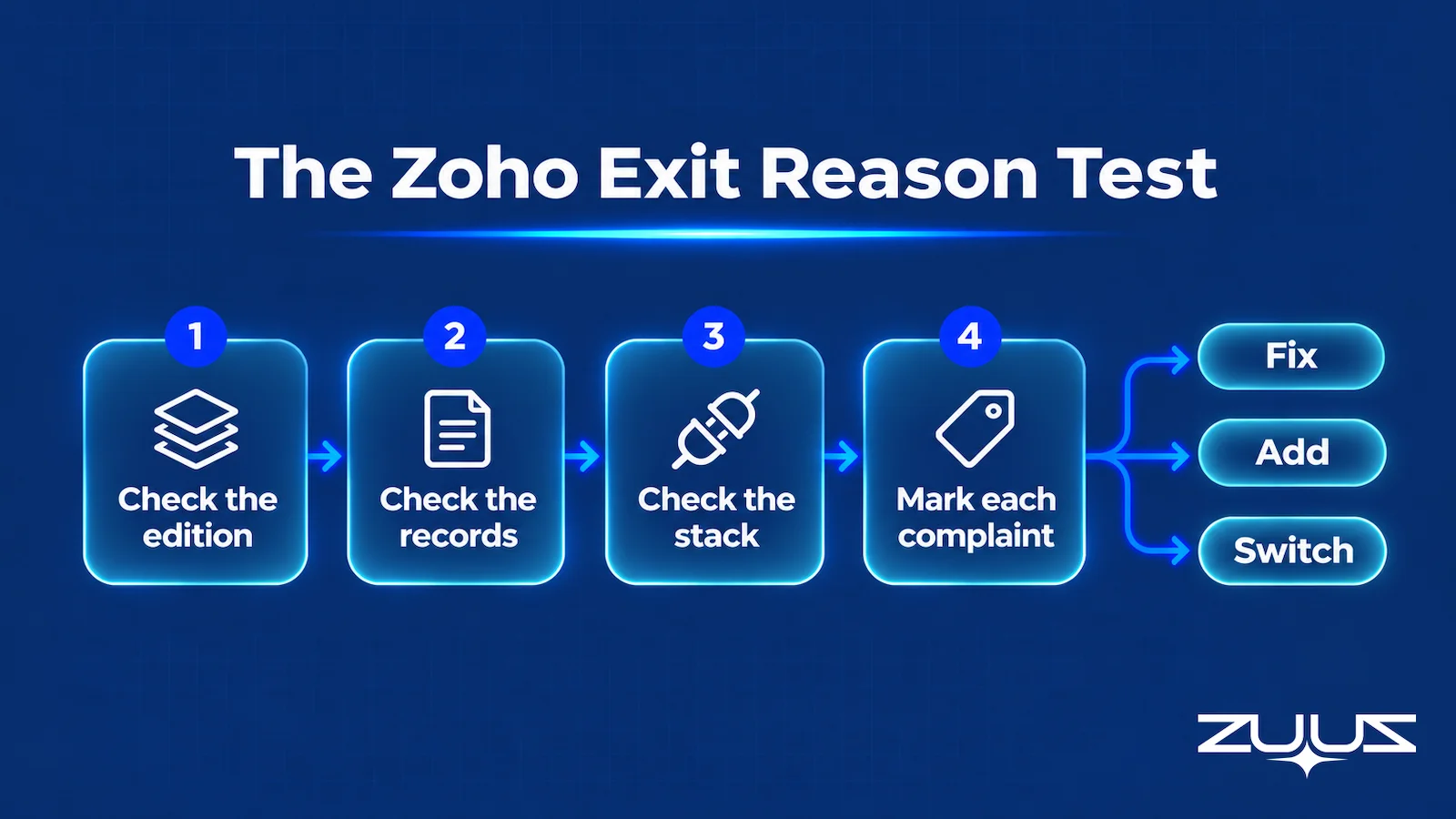
Four steps. Write each complaint on its own line before starting.
- Check the edition. For each complaint, look up whether a higher Zoho edition covers it. If Professional or Enterprise fixes it, price the upgrade before pricing a migration.
- Check the records. Open five recent deals. If the stage, next step and key contacts are missing or stale, the complaint is about data entry, and a new CRM will inherit it.
- Check the stack. List every tool the CRM must talk to. Count how many connect natively to Zoho and how many need Zapier or code. Three or more painful connectors is a real reason to switch.
- Score the outcome. Mark each complaint "fix", "add" or "switch". If most land on "switch", shortlist alternatives by that reason. If most land on "fix" or "add", the cheaper move is to stay.
Step two is the one most teams skip, and it decides more than the others. When ZUUZ connects to a sales inbox, it reads the previous 90 days and fills in the deals, contacts and next steps that never reached the CRM, which shows whether the CRM or the record-keeping is at fault. Step two also works by hand, with five deals and their email threads.
Leaving Zoho Because Records Are Empty? A New CRM Will Be Empty Too.
ZUUZ syncs two-way with Zoho and writes leads, deals and follow-ups from email, meetings and calls, each value with its source.
Zoho CRM Alternatives Compared
The table maps each alternative to the Zoho complaint it answers best, plus a column most comparisons leave out: where Zoho still beats it. Prices are annual list prices from each vendor's pricing page, as of November 2026.
| Option | Zoho reason it answers | List price per user per month | AI that changes records | Where Zoho still wins |
|---|---|---|---|---|
| Zoho CRM (baseline) | None, the starting point | Free for 3; $14 / $23 / $40 | Zia agents from Professional | Price, built-in calling, Zoho app family |
| Pipedrive | Admin effort | $14 / $39 / $59 / $79 | Nova prepares CRM updates for a rep to approve | Lower price at Professional, CPQ, inventory |
| HubSpot Sales Hub | Integrations, AI depth | Professional $90 plus $1,500 onboarding | Suggests updates from conversations; runs on HubSpot Credits | Price, no onboarding fee |
| Salesforce Sales Cloud | Reporting, AI depth | $25 / $100 / $195 / $395 / $550; Agentforce for Sales from $125 | Pipeline agent, suggestive or automatic, as an add-on | Price, setup effort |
| Attio | Admin effort, data model | Free for 3; Plus $40 plus $35 per user; Pro $100 plus $79 per user | Workflows and agents write records; credits | Built-in calling, price per seat |
| Freshsales | Price creep | $9 / $39 / $59 | No AI record updates found; Freddy AI Agent add-on is $49 per 100 sessions | Breadth of the Zoho suite |
| ZUUZ | Data entry, on Zoho or as the CRM | See pricing | Agents write from email, calendar, meetings and calls; one-click undo on leads and deals they create | Dialer, sequences, forecasting, CSV import |
Only Pipedrive Lite and Freshsales Growth undercut Zoho Professional on seat price, and both drop features to do it. And the AI column varies more than the marketing suggests: some tools suggest and wait for a rep, others write directly or charge per action.
The Right Alternative for Each Reason
The shortlists below go one reason at a time, with where each alternative wins and loses against Zoho.
Admin Effort and Data Entry Point to Pipedrive or Attio
Pipedrive is the usual answer for teams that find Zoho cluttered, with fewer modules and less to configure. Its pricing page lists Lite at $14 per seat per month billed annually, and says Nova, its meeting intelligence tool, gives "ready-to-approve CRM updates" after calls, as of November 2026. A rep still approves each one. The full set of Pipedrive's trade-offs is in Pipedrive alternatives by reason for leaving.
Attio suits teams that want a flexible data model, though its pricing adds up past a handful of seats and it has no dialer. What to weigh before moving to Attio covers the migration side. Neither tool removes data entry. They make the CRM nicer to update by hand.
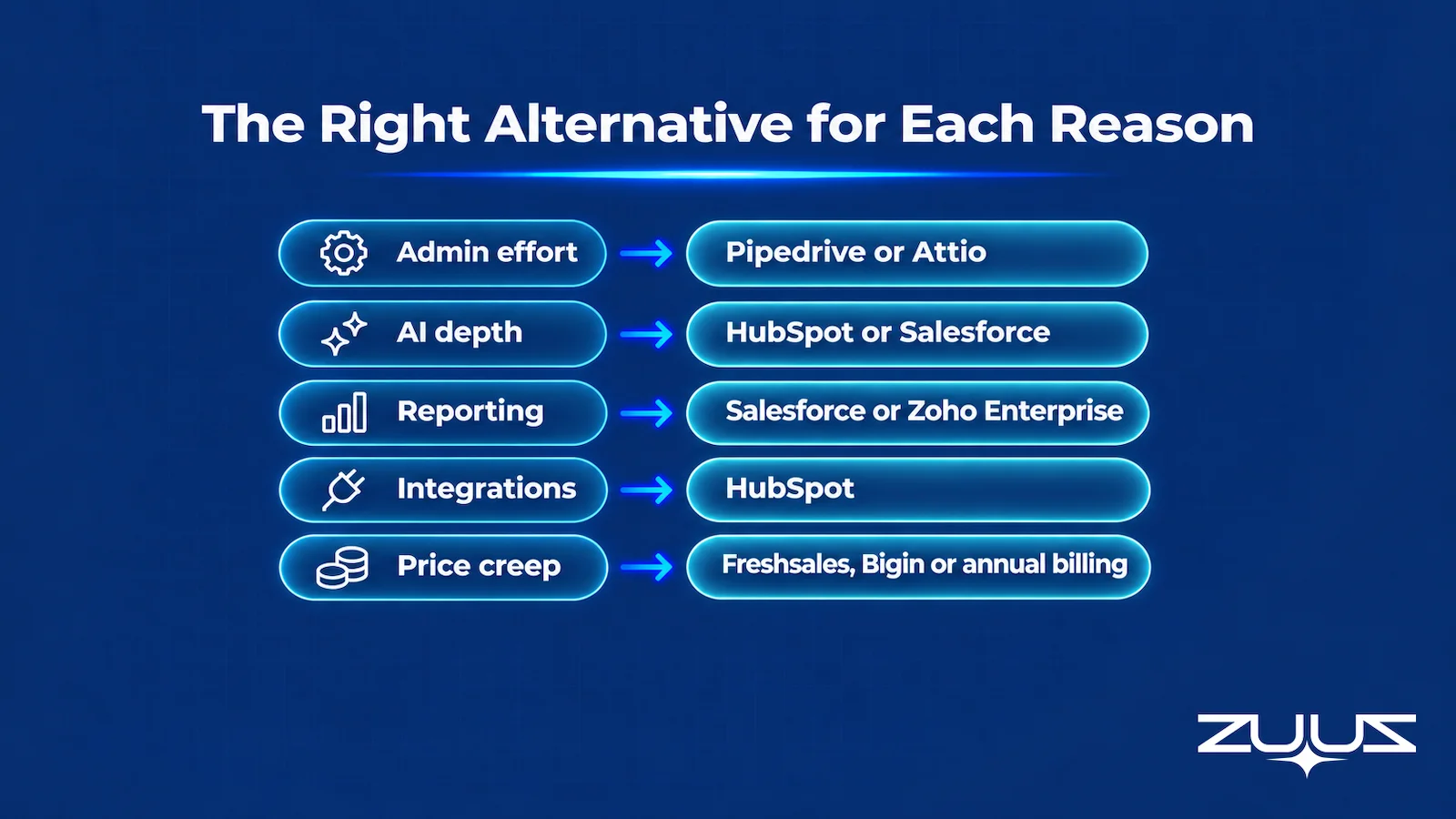
AI Depth Points to HubSpot or Salesforce
HubSpot Sales Hub Professional bundles deal progression and conversation intelligence, with 3,000 HubSpot Credits for its AI features. The HubSpot Sales Hub pricing page lists Professional at $90 per seat per month billed annually, plus a required one-time $1,500 onboarding fee, as of November 2026. HubSpot's Breeze agents covers what those credits buy.
Salesforce goes further and costs more. Agentforce for Sales is an add-on from $125 per user per month on top of a Sales Cloud edition, per the Sales Cloud pricing page, as of November 2026. Small teams rarely need that unless governance already demands Salesforce.
Reporting Points to Salesforce or Zoho Enterprise
Salesforce has the deepest reporting in this group. But a team frustrated with Zoho reports should price Zoho Enterprise first, at $40 per user per month billed annually, which adds reporting hierarchy and multi-team management. If the reports are wrong because the data is wrong, no upgrade fixes it.
Integrations Point to HubSpot
HubSpot's app marketplace is broad, and its marketing tools sit on the same records. A team running marketing in HubSpot and sales in Zoho is maintaining a sync for no reason. The reverse holds too: a team on Zoho Books and Desk gives up native wiring by leaving.
Price Creep Points to Freshsales, Bigin or Annual Billing
Freshsales Growth is $9 per user per month billed annually, as of November 2026. Zoho's own Bigin is the other low-cost path, a simpler pipeline that stays inside the Zoho family. Before either, check whether the team pays monthly. Annual billing cuts Zoho Professional from $35 to $23 a seat.
A Worked Example With 12 Reps
This worked example is illustrative and uses only the list prices above. A 12-rep team is on Zoho Professional, billed annually, and its manager is pricing a year on each option.
| Path | Edition | 12 months at list price | What the team still does by hand |
|---|---|---|---|
| Stay on Zoho | Professional | $3,312 | Most record updates |
| Upgrade Zoho | Enterprise | $5,760 | Most record updates |
| Move to Pipedrive | Growth | $5,616 | Approving Nova suggestions, other updates |
| Move to HubSpot | Sales Hub Professional | $14,460 including onboarding | Applying suggestions; watching credit use |
| Move to Salesforce | Pro Suite plus Agentforce for Sales | $32,400 | Configuring the agent and the org |
The arithmetic is seats times monthly price times twelve, plus HubSpot's onboarding fee. It leaves out migration labor: rebuilding modules, workflows and reports and retraining reps can take weeks of a manager's spare hours, and the CRM migration guide lists what has to move.
Now look at the last column. Every path leaves the reps typing, and most manager spreadsheets miss it because typing time is harder to price than seats. On the stay-on-Zoho path, ZUUZ would write those updates into the same Zoho records, using a deal value only when a quote, purchase order or contract supports it.
Price the Migration Honestly. Then Price Keeping Zoho.
Connect one mailbox and see what ZUUZ writes to Zoho within 72 hours, before committing to a move.
What Most Zoho Alternatives Guides Get Wrong
Most Zoho CRM alternatives lists come from vendors ranking themselves first, which leaves gaps.
They compare starting prices, not the edition the team needs. Entry plans say little about a team that needs automation and reporting. Price the edition that covers the reason for leaving.
They treat AI that suggests and AI that writes as the same thing. A suggestion still needs a rep to click. Over a quarter, that gap decides whether the pipeline is current.
They ignore what never reached Zoho. A migration moves the records that exist. The pricing question in an email or the new decision-maker on a call never reached Zoho, so it does not move. ZUUZ is built for exactly that gap, and when it is not sure whether an email is sales, it asks the rep instead of guessing.
They present Zoho as outdated. Zoho ships agents and built-in calling at prices most rivals do not match.
When Staying on Zoho Is the Better Call
Some teams are better off skipping the switch.
Signs the team should stay on Zoho CRM
- The team runs other Zoho apps. Books, Desk or Campaigns on the same records is wiring a new CRM would have to rebuild.
- A higher edition covers the complaint. Agents and unlimited reports at Professional, reporting hierarchy at Enterprise.
- Five recent deals are missing facts. The problem is data entry, and it moves with the team to any CRM.
- Price is the main reason. Few alternatives beat Zoho's per-seat price at the same feature level.
- Nobody has time to run a migration. A half-finished move leaves two stale CRMs instead of one.
If three or more are true, the problem is probably not Zoho. For a broader take, see how to choose a CRM in seven steps.
Keep Zoho CRM and Let ZUUZ Keep It Current
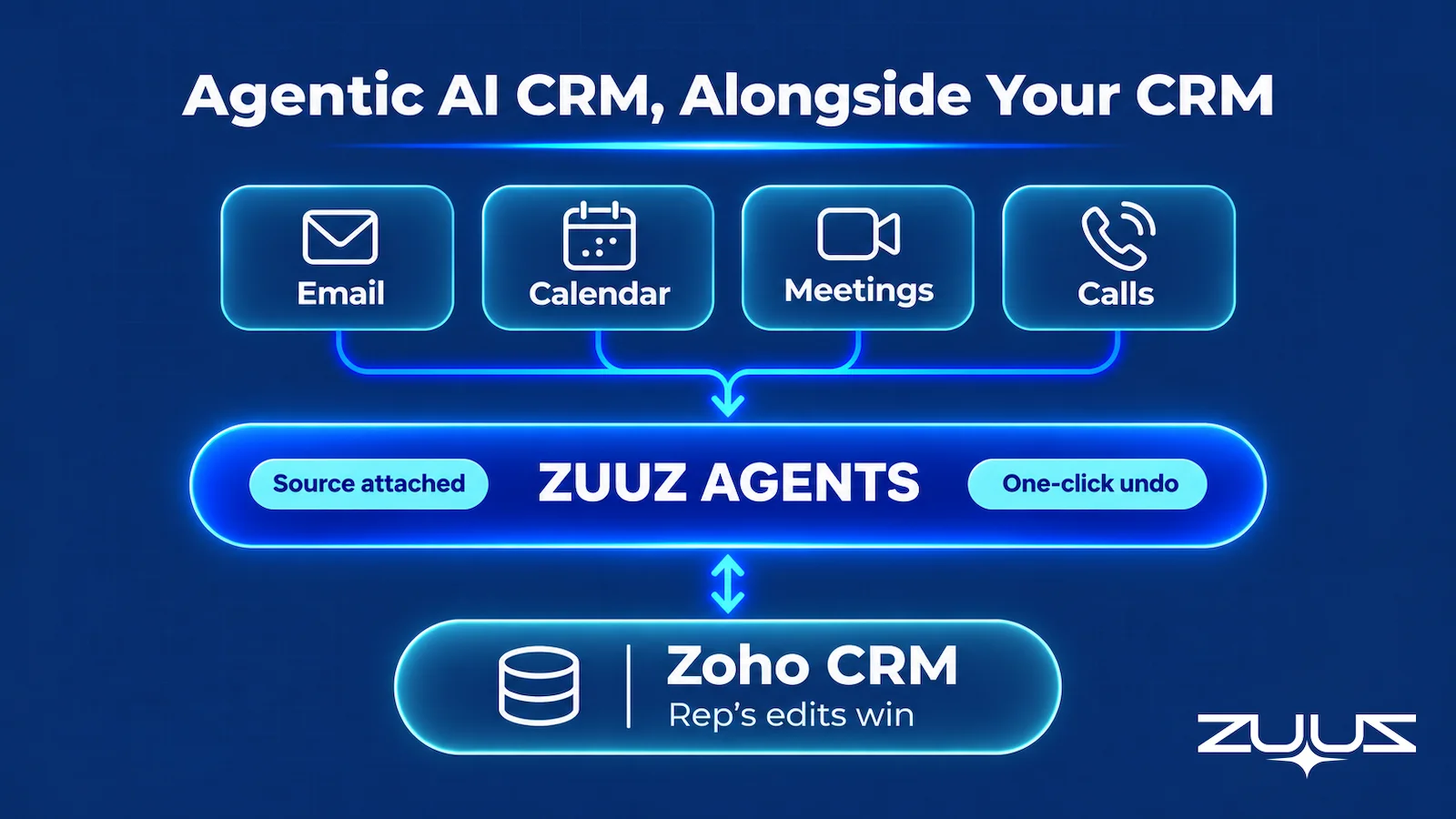
ZUUZ, the agentic AI CRM, connects to the sales inbox (Gmail or Outlook), the calendar, meetings on Teams, Meet or Zoom, and calls on JustCall, GoTo Connect, CallTrackingMetrics or CallTools. Its agents create and update leads, deals, follow-ups and renewals, each value with its source, and two-way sync lands them in the team's Zoho account. An admin approves the first match-up once, and a rep's own edits win.
Every lead and deal the agents create has a one-click undo, and the first records appear within 72 hours. Teams can ask Zari, the ZUUZ AI agent, about any account. More detail is on keeping the existing CRM with ZUUZ and the integrations page. A team with no CRM can also use ZUUZ as its CRM.
That result came from HubSpot, not Zoho, and one team is not a benchmark. The pattern applies to any CRM, including teams weighing HubSpot alternatives or Salesforce alternatives: the pipeline was in the inbox, and the CRM had never seen it.
See what Zoho is missing before replacing it. Connect one mailbox. ZUUZ reads the last 90 days and its agents write what they find to Zoho, each record with its source, and the first records appear within 72 hours. 14-day free trial, no credit card: https://zuuz.ai/signup
Keep the Zoho Setup You Built. Stop Retyping Customer Emails.
Two-way sync with Zoho, a source on every value, and one-click undo on every lead and deal the agents create.
When ZUUZ Is Not the Right Choice
ZUUZ does not fit every reason for leaving Zoho. If the team needs a dialer, Zoho's built-in calling or a dedicated phone tool does that and ZUUZ does not. ZUUZ does not send outbound sequences, does not forecast revenue, and does not give deal health scores or win probabilities. Its reports are partial, so a team leaving for reporting depth should look at Salesforce or HubSpot.
ZUUZ also has no CSV import and no public API or Zapier connection today, and it does not capture Slack or WhatsApp conversations. A team that sells over chat apps, or needs to bulk-load old deals from a spreadsheet, will hit those limits. For the wider picture, see AI CRM: replace or add, the CRM alternatives and switching hub, and the agentic AI CRM hub.
The next step costs nothing: run the Zoho Exit Reason Test and decide from what is missing, not from a feature list.
Frequently Asked Questions
What is the best alternative to Zoho CRM?
The best alternative depends on why the team is leaving. Pipedrive suits teams that find Zoho too heavy to administer. HubSpot suits teams that need broad integrations and marketing on the same records. Salesforce suits complex reporting. Freshsales suits tight budgets. If the problem is stale records, fixing data entry on Zoho is often cheaper than any switch.
Is HubSpot better than Zoho CRM?
HubSpot is better for teams that want marketing and sales on one platform and a large app marketplace. Zoho is better on price: Sales Hub Professional is $90 per seat per month billed annually plus a $1,500 onboarding fee, against $23 for Zoho Professional, as of November 2026. Teams on other Zoho apps usually lose more than they gain.
Is there a free alternative to Zoho CRM?
Yes. HubSpot has a free CRM for up to two users, and Attio has a free plan for up to three, as of November 2026. Zoho itself is free for three users, so a free plan is rarely a reason to leave. Free tiers also trim automation, reporting and AI.
What is cheaper than Zoho CRM?
Freshsales Growth, at $9 per user per month billed annually, is cheaper than Zoho Standard at $14, as of November 2026. Pipedrive Lite matches Zoho Standard at $14. Above the entry level, few alternatives beat Zoho Professional at $23. Zoho's own Bigin is another low-cost option that stays inside the Zoho family.
Does Zoho CRM have AI agents?
Yes. Zoho lists pre-built Zia agents for SDR work, follow-up scheduling, deal analysis and quotes, plus a studio for building custom agents. AI agents start at the Professional edition. Zoho says the agents themselves are free with Zoho-hosted models up to 30 million tokens a month, with charges for usage beyond that or for outside models.
Can I keep Zoho CRM and stop manual data entry?
Yes. ZUUZ, the agentic AI CRM, syncs two-way with Zoho and writes leads, deals, follow-ups and renewals from the sales inbox, calendar, meetings and calls, each value with its source. An admin approves the first match-up once, a rep's own edits win, and every lead and deal the agents create has a one-click undo.
How hard is it to migrate away from Zoho CRM?
Moving contacts, accounts and deals is the easy part, because Zoho exports data and most CRMs import it. The hard part is rebuilding modules, workflows, reports and integrations, then retraining reps. Plan for weeks of a manager's time, not a weekend, and run the Zoho Exit Reason Test first.
Why do teams leave Zoho CRM?
Teams leave Zoho CRM for five common reasons: admin effort and data entry, AI depth, reporting, integrations outside the Zoho family, and price creep from monthly billing or edition upgrades. Two of these, AI depth and reporting, are often solved by a higher Zoho edition. Data entry follows the team to any CRM unless something else writes the records.