
CRM Reporting: The 6 Reports B2B Sales Teams Need and How to Audit Each One
Most CRM reports are wrong because the data behind them is incomplete. The 6 reports every B2B sales team needs, how to build them, and how to verify they reflect reality.


CEO of ZUUZ. He scaled Cloud Box Technologies from 0 to $25M ARR in IT services and distribution before building ZUUZ. Connect on LinkedIn
TL;DR: CRM reporting turns the records in a CRM into answers about pipeline, deals, renewals and follow-through. Six reports cover most of what a B2B sales team needs, and each takes an hour or two to build. But a CRM report can only count what reached the record, so most wrong reports are data-capture problems, not dashboard problems, and the fix starts with auditing the report against the real conversations. ZUUZ is the layer that fixes the capture: a revenue intelligence layer on top of the CRM a team already runs, it connects to your sales inbox, reads LinkedIn messages and meeting or call transcripts, and writes leads, stakeholders, next steps and renewal signals into the CRM automatically, with full change history and one-click rollback, so the reports count what actually happened.
- CRM reporting answers questions from recorded data. A report answers one question; a dashboard puts several answers side by side.
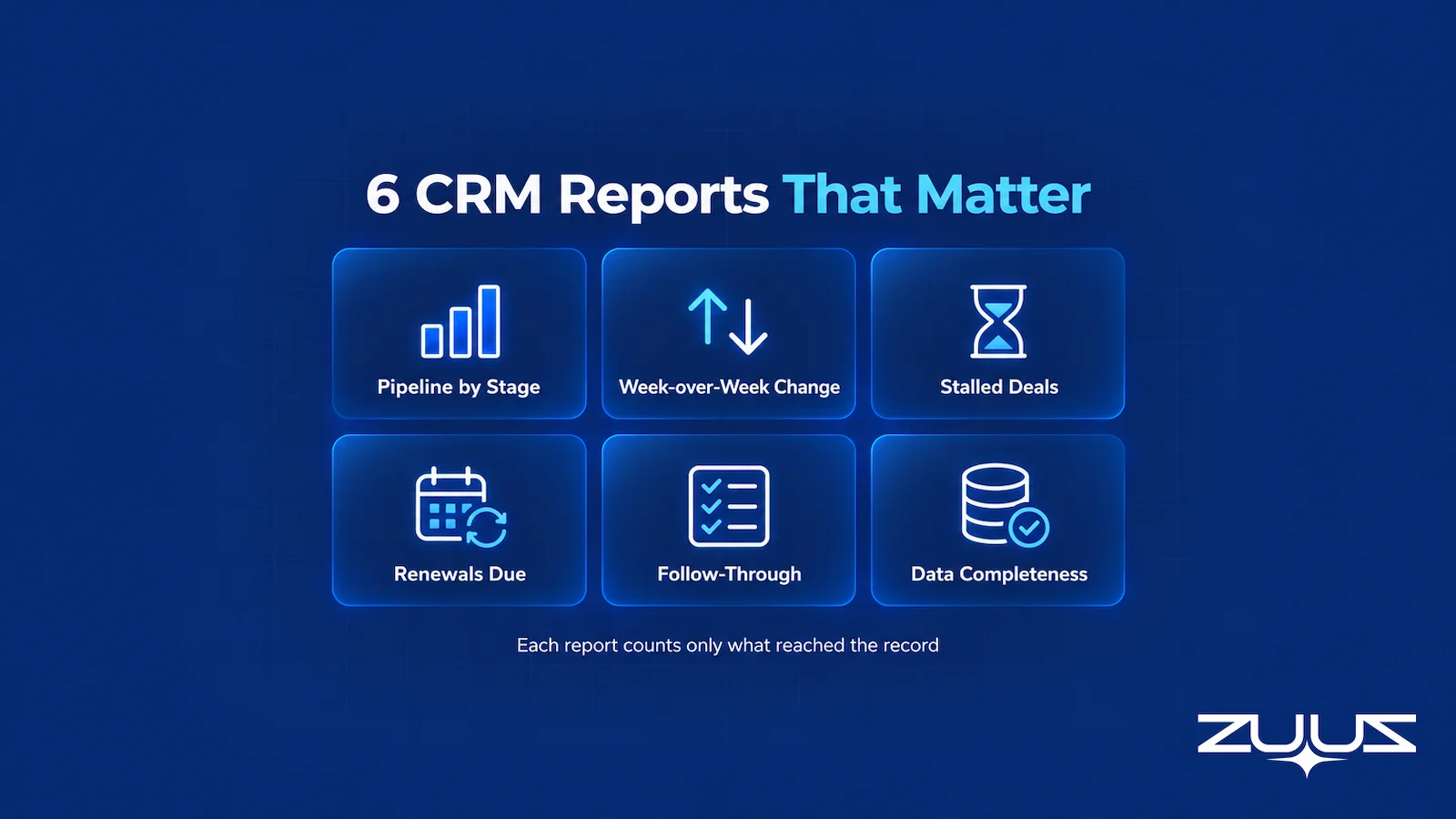
- Six reports cover most B2B needs: pipeline by stage, pipeline change week over week, stalled deals, renewals due, activity and follow-through, and data completeness.
- Every report depends on a small set of fields being current. When a buyer’s change of plan sits in an inbox, the report is wrong before anyone opens it.
- Most report errors trace back to capture, structure, association or staleness. Filter mistakes are real but rarer.
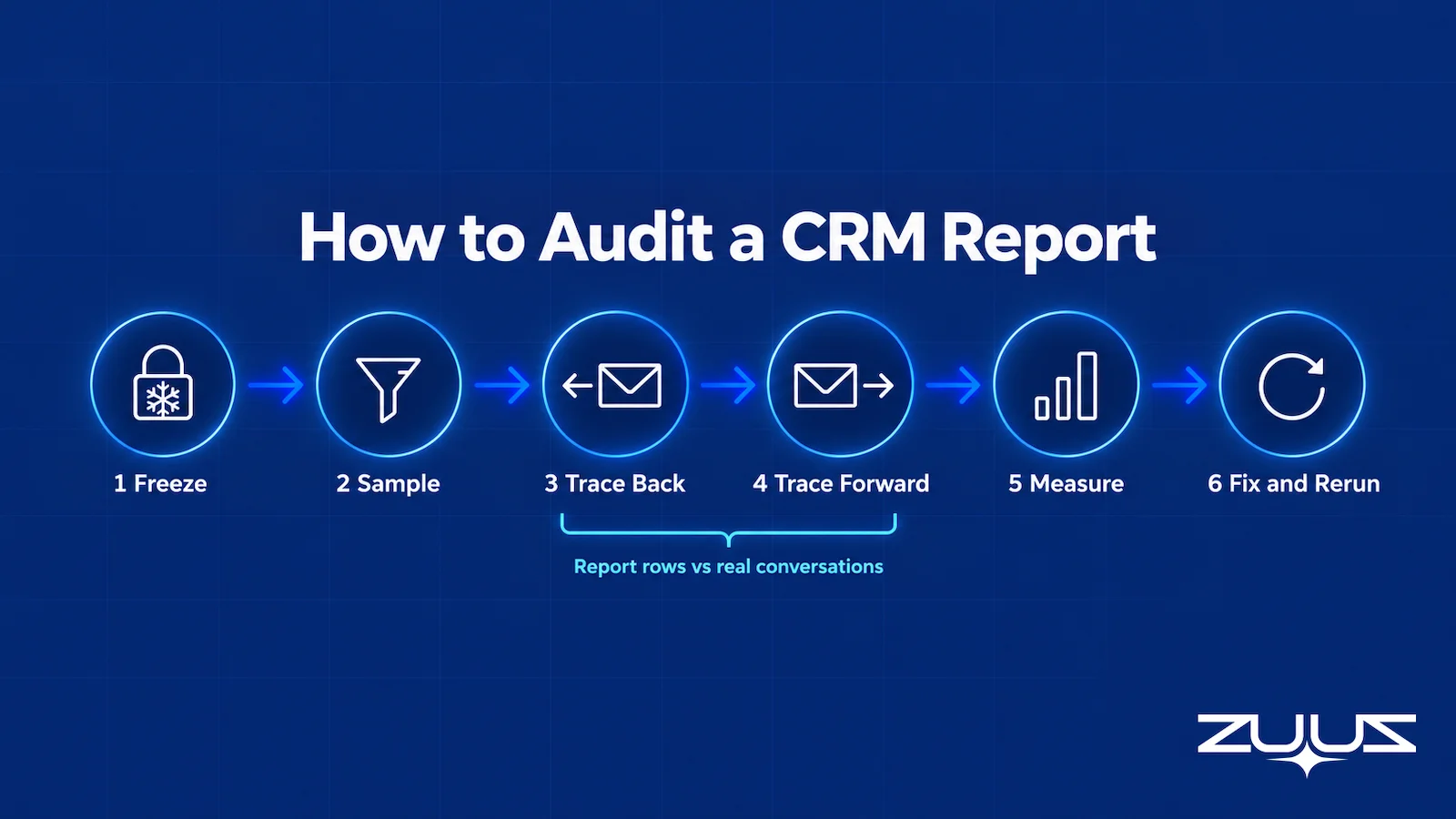
- Audit a report by tracing rows back to source conversations and tracing recent conversations forward to the report.
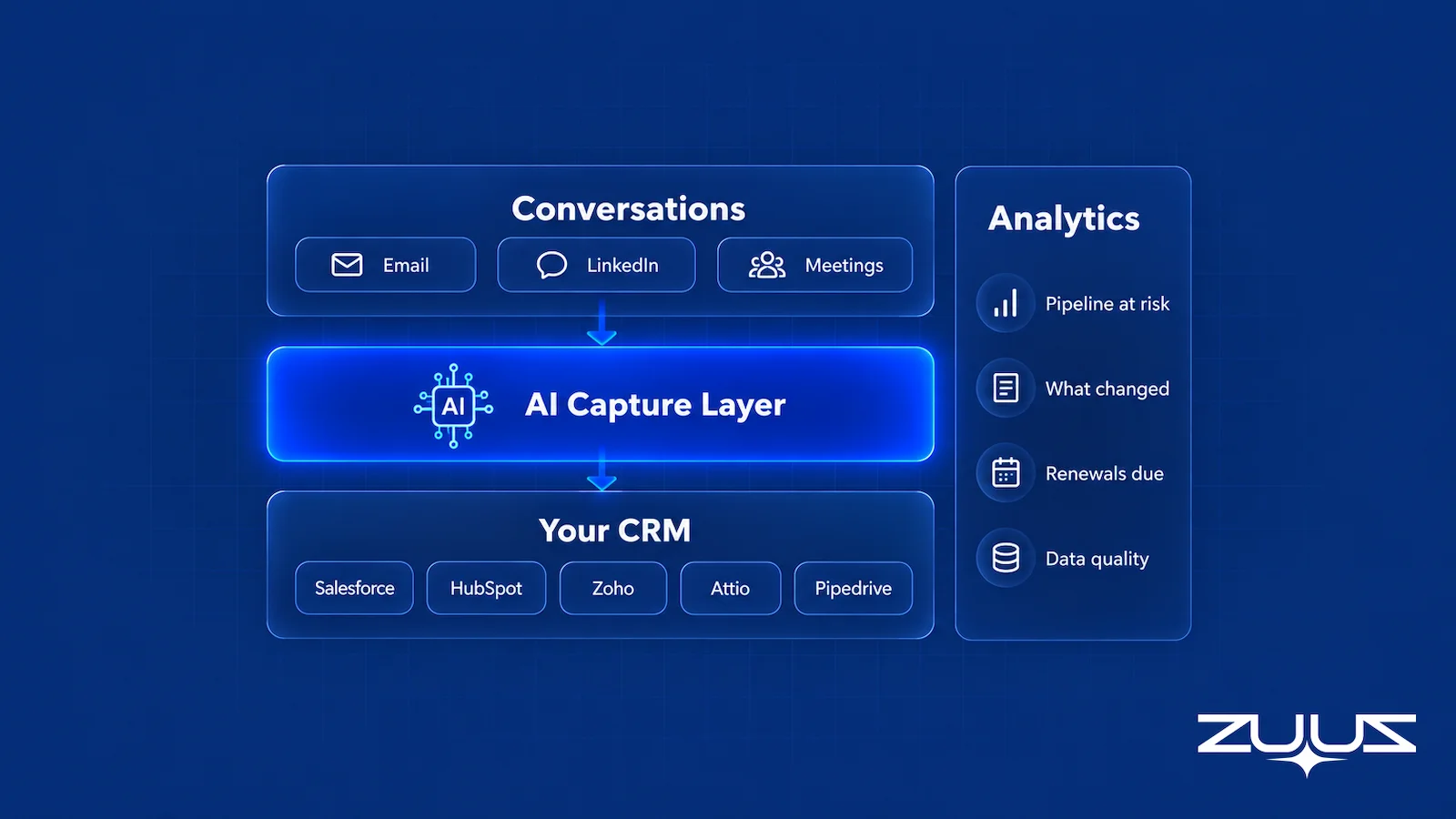
- ZUUZ adds a capture layer and an Analytics module on top of Salesforce, HubSpot, Zoho, Attio or Pipedrive. It reports what happened with traceable numbers, and never forecasts or scores deals.
Picture a Monday pipeline meeting at a forty-person IT services firm. The dashboard says the quarter carries $2.1M in open pipeline, six deals sit in Negotiation, and nothing has slipped since last week. Twenty minutes in, one rep mentions that a buyer pushed go-live to next year in an email on Thursday, another says a renewal contact left the company, and a third admits a deal marked Negotiation has not had a reply in three weeks. The dashboard was built correctly. It was also wrong, because the records underneath it were.
That gap between a well-built report and a true one is what this guide is about. It covers what CRM reporting is, the six reports that matter for a B2B sales team, how to build a sales pipeline report and a week-over-week change report, why most wrong reports are data-capture problems, how to audit a report against reality, and the CRM reporting best practices and tools that keep reports honest. The scene above is an illustration, but most sales leaders will recognize it.
What Is CRM Reporting?
CRM reporting is the practice of turning the records stored in a CRM into answers: lists, totals, groupings and trends about deals, accounts, contacts and activities. A report pulls records that match a set of filters, arranges them by fields such as stage, owner or close date, and summarizes them as counts and sums. Zoho’s help documentation describes its reports as a detailed list of records drawn from modules such as Deals, Leads and Accounts, and the Zoho CRM reports guide shows the same filter, group and summarize pattern that Salesforce and HubSpot follow.
The point of CRM reporting is a decision. A sales manager uses a pipeline report to decide which deals to inspect, a RevOps lead uses a data completeness report to decide which fields to fix, and an account manager uses a renewals report to decide which customer to call first. A report that nobody acts on is decoration, however good it looks.
Reports, Dashboards and Reporting Tools
A report answers one question with one set of records. A dashboard puts several report outputs on one screen so a team can see pipeline, activity and renewals together. CRM reporting tools are the software that produces both, which usually means the CRM’s own report builder, sometimes a separate business intelligence tool, and increasingly a layer that feeds the CRM better records in the first place.
The distinction matters when something looks wrong. A dashboard that disagrees with reality is rarely a dashboard problem. It is almost always one of the reports feeding it, and behind that report, the records.
Why CRM Reporting Only Counts What Reached the Record
Every CRM report runs on a simple rule: it can only count what is in the database. If a buyer emails that the budget moved to next quarter and nobody changes the close date, every report that uses close date is now wrong, and none of them will say so. The report builder did its job perfectly on data that no longer describes the deal.
This is the part most CRM reporting guides skip. They explain charts, filters and templates, then mention data quality as one challenge among several. In a B2B sale where deals move over email and LinkedIn messages, it is the main challenge. Salesforce’s State of Sales report (7th edition, 2026) found that manual data entry alone takes 13% of a sales professional’s week, and the updates reps skip when that week runs out are the ones reports miss.
Six CRM Reports Every B2B Sales Team Should Build
Most CRM reports fall into a handful of families, and a B2B sales team does not need dozens of them. Six cover the questions that come up every week. Each needs only a few fields to be current, which is also what makes each one fragile.
1. Pipeline by Stage
The sales pipeline report most teams start with groups open deals by stage and shows the count and total value in each. Add owner and close date, and it answers where the pipeline sits, who carries it and when it is expected to close. It is the report behind most pipeline meetings and board updates.
It breaks when stages are stale. A deal left in Proposal after the buyer has gone quiet inflates that stage, and a deal that moved forward in an email thread but not in the CRM understates the next one. The total can look healthy while the distribution is fiction.
2. Pipeline Change Week Over Week
This report shows what changed since the last review: deals added, deals won, deals lost, stage moves, value changes and close-date pushes. It is the most useful report in a weekly meeting, because it points attention at movement rather than at a static total that looks the same every Monday.
It breaks when changes are recorded late. If a rep updates five deals on Friday afternoon that actually changed on Tuesday, the report shows a burst of Friday movement, and the week’s real story is lost. A change report measures when the CRM learned something, which is not always when it happened.
3. Stalled Deals
A stalled deals report lists open deals with no meaningful progress for longer than a set threshold, usually measured by days in stage, days since last buyer reply or an overdue next step. It is the early-warning report, and the guide to why a CRM pipeline is wrong explains how stale deals distort everything downstream of it.
It breaks in two directions. A deal that is active in email looks stalled because no activity was logged, and a deal that is truly dead looks alive because a rep logged an internal note. Days since last activity only means something if activity means contact with the buyer.
4. Renewals Due
A renewals report lists contracts coming up for renewal in a window, typically 30, 60 and 90 days out, with owner, value and the date notice is due. For companies with recurring revenue it is as important as the new-business pipeline, and the guide to renewal tracking software covers the systems teams use for it.
It breaks when contract dates live in a spreadsheet or a PDF instead of the CRM, and when the customer’s latest signal never reached the account. A renewal that shows as routine can be at risk because the customer asked about cancellation terms in a support email the account manager never saw.
5. Activity and Follow-Through
Activity reports count calls, emails and meetings by rep and by deal. Follow-through goes one step further: it checks whether the next step agreed with the buyer actually happened by the date it was due. A rep can be very busy on the wrong deals, which activity counts alone will not reveal.
It breaks because activity capture is uneven. Emails sent from a phone, LinkedIn messages and meetings booked outside the calendar integration often never reach the CRM, so the busiest reps can look idle and the committed next steps exist only in someone’s memory.
6. Data Completeness
A data completeness report counts open deals and accounts missing the fields every other report depends on: close date, amount, next step, primary contact, stage entry date. It is the report that tells a team whether to trust the other five, and it belongs on every CRM dashboard even though nobody enjoys looking at it.
It breaks in a subtle way. A field can be filled and still be wrong, so completeness is not accuracy. A close date entered three months ago passes a completeness check while describing a deal that no longer exists. The guide to CRM data quality covers accuracy and freshness alongside completeness.
| Report | What it answers | What breaks it |
|---|---|---|
| Pipeline by stage | Where pipeline sits, who owns it, when it should close | Stages and close dates not updated after the buyer changed plans |
| Pipeline change week over week | What was added, won, lost, moved or pushed since last review | Changes entered days late, so the report tracks data entry, not deals |
| Stalled deals | Which deals have stopped moving | Buyer email and LinkedIn replies never logged; internal notes counted as activity |
| Renewals due | Which contracts renew soon and who owns them | Contract dates outside the CRM; customer warning signs sitting in an inbox |
| Activity and follow-through | Whether agreed next steps happened on time | Mobile email, LinkedIn and ad hoc meetings not captured |
| Data completeness | Whether the other reports can be trusted | Fields filled once and never refreshed, so complete but wrong |
The third column is the pattern to notice. Five of the six failure modes are about information that existed somewhere, usually in a conversation, and never reached the record. Only a few involve the report itself.
How to Build a Sales Pipeline Report
Building a sales pipeline report takes less time than agreeing what it should show, and most sales pipeline reporting problems start with that skipped agreement. The steps below apply in Salesforce, HubSpot and Zoho alike, since all three follow the same pattern of choosing records, fields, filters and groupings. HubSpot’s custom report builder, for example, has users pick data sources, add fields, set filters and then choose a chart or table.
Start With the Decision the Report Serves
Write down the question before opening the report builder. “Which late-stage deals need a manager’s attention this week?” produces a very different report from “How much open pipeline does each rep carry?” The first needs stage, close date and last buyer contact; the second needs owner and amount. A report built to answer everything answers nothing clearly.
Decide also what one row represents. For a sales pipeline report it is usually one open deal. Mixing deals with line items or with contacts inflates counts, which is one of the most common reasons two people get two different totals from the same CRM.
Pick the Object, Fields and Filters
Choose the deal or opportunity object, then add only the fields the question needs: deal name, account, owner, stage, amount, close date, next step and the date the deal entered its current stage. Filter to open deals in the relevant pipeline, and exclude test records and internal deals. Group by stage first and owner second, so the report reads top-down the way a manager reviews it.
Set Date Rules, Currency Rules and Blank-Field Rules
Decide whether the report includes deals with close dates in the past, which usually means they slipped and nobody updated them. Show them in a separate group rather than silently dropping or including them. Convert amounts to one currency, and decide how blank amounts and blank close dates are treated, since a filter on close date quietly excludes every deal where it is empty.
Validate Totals Before Sharing
Before the report goes on a dashboard, pick ten rows and open each record. Check that the stage, amount and close date match what the owner believes, and that no deal appears twice. Then compare the grand total with the number finance or leadership has been using. If they differ, find out why before anyone else notices. The guide to sales pipeline management software covers how teams structure pipelines so these reports stay consistent.
A Pipeline Report Is Only as Good as the Records Under It.
ZUUZ reads email and LinkedIn messages and writes stages, dates and next steps into Salesforce, HubSpot, Zoho, Attio or Pipedrive, so every report starts from what buyers actually said.
How to Report Pipeline Change Week Over Week
A pipeline-by-stage report shows the pipeline as it is now. It cannot show what it looked like last Monday, because most CRM fields hold only their current value. Reporting on change needs history, and there are two ways to get it.
Snapshots Versus History Tracking
The first is a snapshot: a scheduled copy of the pipeline saved at the same time each week, so this week’s copy can be compared with last week’s. The second is field history tracking, where the CRM records every change to selected fields with a timestamp. Salesforce supports both; its help article on how to report on historical changes describes historical trend reports that compare up to five snapshot dates and reporting snapshots that save report results to a custom object on a schedule.
Snapshots are simpler to reason about and work for any field. History tracking is more precise but usually limited to a set number of fields and a retention window. Most teams start with a weekly snapshot taken at a fixed cutoff, such as Friday at 6 p.m., and keep it for at least a quarter.
Reconcile Opening and Closing Pipeline
A week-over-week report should reconcile. Opening pipeline, plus new deals, plus value increases, minus won, minus lost, minus value decreases, minus deals pushed out of the period, should equal closing pipeline. If it does not, deals are being created and deleted, moved between pipelines, or edited in ways the report cannot see.
| Line (illustration) | Deals | Value |
|---|---|---|
| Opening pipeline, last Friday cutoff | 48 | $2,050,000 |
| New deals created | +6 | +$310,000 |
| Value changes on existing deals | n/a | +$40,000 |
| Closed won | -3 | -$140,000 |
| Closed lost | -2 | -$95,000 |
| Close date pushed out of quarter | -1 | -$65,000 |
| Closing pipeline, this Friday cutoff | 48 | $2,100,000 |
The figures above are an illustration, not a real company’s pipeline. The flat deal count hides a lot of movement, which is exactly why teams that only look at the total miss what happened during the week.
Separate Real Change From Late Entry
The hardest part of a week-over-week report is telling a real change from a late record. A deal pushed a quarter because the buyer asked is a real change. A deal pushed because the rep finally updated a date the buyer changed a month ago is a correction. Both show up as the same field edit. Tagging corrections, or comparing the edit date with the date of the underlying conversation, keeps the report honest about what the week actually contained.
Why Most Wrong CRM Reports Are Capture Problems
When a report disagrees with what the team knows, the instinct is to rebuild the report. Sometimes that is right: a filter excludes a pipeline, a join double-counts, a permission hides records. But across the six reports above, the more common cause sits upstream. The information existed, in an email, a LinkedIn thread or a meeting, and never became a field the report could count.
Avinash Gujje built ZUUZ after scaling Cloud Box Technologies from $0 to $25M ARR in IT services and distribution, a business where most of what moves a deal arrives in writing: a revised quantity, a renewal question, a new decision-maker copied on a thread. In that kind of sale the conversation is the pipeline, and the CRM holds whatever someone found time to type afterward. The five failure types below cover nearly every mismatch between a CRM report and reality.
The Conversation Never Reached the CRM
A buyer emails a rep’s phone, a partner messages on LinkedIn, a customer raises a renewal question in a thread nobody logged. None of it exists in the CRM, so no report can count it. This is the largest category, and no report builder can fix it, because the missing information was never data in the first place. The guide on how to log LinkedIn messages in a CRM covers one of the most common gaps.
The Detail Exists but Not in a Reportable Field
Sometimes the information made it in, as a pasted email or a free-text note, but not as a field. “Buyer wants to delay to Q3” sitting in a note does not move the close date, so every report that groups by close date still shows the old quarter. Logged is not the same as captured. A report reads fields, not prose.
Wrong Association
Activity attached to the wrong deal, contact or account distorts two reports at once. One deal looks active when it is quiet, and another looks stalled when it is moving. This happens most with accounts that have several open opportunities, with forwarded threads and with contacts who appear under two companies.
Stale Capture
The record reflects an earlier conversation. The amount was right when the deal was created, the stage was right a month ago, and the next step describes a meeting that already happened. Stale capture passes every completeness check, which makes it the hardest failure to see in a report and the easiest to see in the inbox.
Genuine Reporting Errors
Filters that miss a pipeline, date ranges that exclude blank values, currency mixing, duplicated rows from joined objects and permissions that hide records from some viewers all produce wrong numbers from correct data. These are worth checking first because they are quick to fix. They are rarely the whole explanation.
| Cause | How it shows up in the report | Where the fix lives |
|---|---|---|
| Conversation never reached the CRM | Missing deals, missing renewals, deals that look stalled | Capture from email, LinkedIn and meetings |
| Detail in a note, not a field | Wrong close dates and stages despite logged activity | Structured updates to the fields reports use |
| Wrong association | Activity on the wrong deal; two reports wrong at once | Matching rules for accounts, contacts and deals |
| Stale capture | Complete-looking records that describe old situations | Updates triggered by new buyer messages |
| Reporting error | Totals that differ between two reports of the same data | Filters, joins, currency and permissions |
The last row is the only one a dashboard change fixes. That is why teams that rebuild reports every quarter often end up with better-looking reports that are just as wrong, and why the CRM data quality checks that matter most are the ones comparing records with source conversations.
Fix the Capture, and the Reports Follow.
Nobody changes how they work. ZUUZ turns buyer messages into structured CRM updates and writes them automatically, with full change history and one-click rollback.
How to Audit a CRM Report Against Reality
An audit answers one question: does this report describe what actually happened? It takes a few hours for one report and one sales team, and it is the most reliable way to find out which of the five failure types is costing the most. Run it on the report leadership trusts most, usually pipeline by stage.
1. Freeze the Report
Export the report at a fixed cutoff, with its filters and definitions written down. Auditing a live report that changes while it is being checked produces arguments, not answers.
2. Sample Across the Report
Pick 20 to 30 deals across stages and owners, including deals that look quiet and deals that look healthy. A sample of only late-stage deals misses the stale early-stage deals that inflate the top of the funnel.
3. Trace Rows Back to Conversations
For each sampled deal, open the rep’s recent email and LinkedIn threads with the buyer, and any meeting notes. Check stage, amount, close date and next step against what the buyer last said. Record each mismatch and which failure type caused it.
4. Trace Conversations Forward to the Report
This is the half most audits skip. Take a week of a rep’s buyer conversations and check whether each one that should have changed a deal, created a contact or started a renewal discussion is reflected in the report. Tracing backward finds wrong rows; tracing forward finds missing ones, which is usually the bigger number.
5. Measure Coverage, Accuracy and Delay
Three numbers summarize the audit. Coverage is the share of deal-changing conversations that reached the CRM. Accuracy is the share of sampled fields that match the latest conversation. Delay is the typical gap between a buyer’s message and the matching CRM update. Together they say more about report quality than any dashboard setting.
6. Fix the Cause, Then Rerun
Assign each failure type to an owner. Reporting errors go to whoever owns the report, association problems to the CRM admin, and capture gaps to whoever owns the process or tooling that moves conversations into the CRM. Rerun the same audit a month later on a fresh sample to see whether the numbers moved.
| Source evidence (illustration) | Expected in the CRM | Recorded value | Failure type |
|---|---|---|---|
| Buyer email: “Let’s revisit in January” | Close date moved to Q1 | Close date still this quarter | Detail not in a field |
| LinkedIn message from a new procurement lead | Contact added to the deal | No contact | Never reached the CRM |
| Reply on thread forwarded from a colleague | Activity on Deal A | Activity on Deal B | Wrong association |
| Signed order form attached to an email | Stage Closed Won | Stage Negotiation | Stale capture |
The rows above are an illustration of what an audit worksheet looks like, not findings from a specific company. In most audits the first two failure types fill the sheet.
The Pipeline Truth Test
An audit tells a team how wrong a report is. The Pipeline Truth Test answers a narrower question that leadership asks in every review: can this quarter’s number survive being questioned? It runs in twenty minutes, in the same CRM the report came from.
- Take the top five deals by value in the current quarter.
- For each, find the evidence in the CRM for its stage and close date: a dated, written commitment, not a rep’s assurance.
- Count how many rest on a stage last changed more than two weeks ago.
- A pipeline in which most of the top five lack dated evidence is a forecast of rep optimism. ZUUZ does not forecast; it makes the record underneath the number real.
Worked example for a reporting review: the pipeline-by-stage report shows four of the top five deals sitting in Proposal. Two carry a dated buyer email confirming the proposal landed and a review date set. One has a stage last changed five weeks ago and no buyer message since. One has a close date that moved twice with no written reason recorded. The report is not miscalculating anything. Three of the five numbers in it rest on something no manager could quote back.
RevOps Metrics Worth Carrying in a CRM Report
RevOps metrics are the measures a revenue operations team reviews to see whether the pipeline and the customer base are moving. Six fit naturally into a CRM report, and all of them describe what already happened rather than predict what will.
- Pipeline coverage. Open pipeline against target, read next to the evidence under it. The pipeline coverage guide covers the formula and why the ratio inflates.
- Stage conversion and time in stage. Where deals leave the funnel and how long they wait in each step.
- Close-date slippage. How often a committed close date moves, and by how much.
- Renewals due. Contracts expiring by month, with the last real conversation beside each.
- Follow-through. The share of agreed next steps that happened by their date.
- Data completeness. Required fields filled on open deals, since every metric above inherits its gaps.
Each metric is only as honest as the capture beneath it. ZUUZ does not forecast; it keeps the record these measures read from current.
CRM Reporting Best Practices
Once a team knows where its reports go wrong, a short set of habits keeps them right. These CRM reporting best practices are less about chart choice than about definitions, ownership and capture.
Agree Definitions Before Building
Write down what each stage means in terms of buyer actions, not rep activity. “Proposal” should mean the buyer received a proposal, not that the rep intends to send one. Define which fields are required at each stage and who owns each metric. Two managers with two definitions of pipeline will produce two reports and one argument.
Measure Completeness, Freshness and Accuracy Separately
Completeness asks whether a field is filled. Freshness asks when it was last confirmed. Accuracy asks whether it matches the latest conversation. A single “data quality” number blends all three and hides which one is failing. Track them as separate lines on the data completeness report.
Keep Cutoffs and Definitions Stable
Use the same weekly cutoff, the same filters and the same currency rules every week. A report that changes its definition quietly makes this week incomparable with last week, which defeats the point of a week-over-week report.
Reduce Manual Entry Rather Than Adding Required Fields
Making more fields mandatory is the usual response to bad reports, and it usually makes them worse, because reps fill required fields with placeholder values to get past the form. The better route is to reduce how much reps have to type at all, which the guide to reducing manual data entry with CRM automation covers in detail. Fewer typed fields means fewer skipped updates, and fewer placeholder values in the reports.
End Every Review With an Owner and a Date
A report reviewed in a meeting should produce actions: this deal gets a call, that renewal gets an owner, this field gets fixed. The guide to running a sales pipeline review covers how to structure the meeting so reports lead to decisions rather than recollections.

From an operator’s seat
From an operator’s seat, the working sequence is capture first, definitions second, dashboards last, and nearly every team arrives having done it in reverse. The part teams do not plan for is that fixing capture makes the reports look worse before they look better: stalled deals a stale stage had been hiding appear all at once, and the first weekly review after a capture layer goes live usually shows pipeline falling rather than rising. Across the deployments ZUUZ runs, the pattern is that the teams who push through that week are the ones whose leader warned the room it was coming. The cost nobody budgets is the definitions meeting: one hour to agree what Proposal means saves weeks of arguing about whose report is right, and it has to happen before anyone rebuilds a dashboard.
How to Choose CRM Reporting Tools
CRM reporting tools fall into three groups, and each fixes a different problem. Buying from the wrong group is the most common reason a new tool makes reports prettier without making them truer.
Native CRM Reports
The report builders in Salesforce, HubSpot and Zoho handle the six reports in this guide well. They are the right place for routine operational reporting, since they read the CRM directly, respect its permissions and need no extra integration. Their limits show up in history retention, cross-object joins and combining CRM data with finance or product data.
Business Intelligence Tools
BI tools pull CRM data into a warehouse and combine it with other systems, such as billing, product usage or support. They suit teams that need revenue reporting across several systems or long history. They add cost and a data team to maintain them, and they inherit every capture gap in the CRM, because they read the same records.
Capture and Sync Layers
The third group does not draw charts. It improves what the reports count by moving information from email, LinkedIn and meetings into structured CRM fields. It is the only group that addresses the first four failure types in the capture section, and it makes both native reports and BI tools more accurate without replacing either. The guide to revenue intelligence software covers adjacent tools that analyze conversations.
| Tool category | Problem it addresses | What it cannot fix |
|---|---|---|
| Native CRM reports | Routine pipeline, activity and renewal reporting | Records that were never updated |
| Business intelligence tools | Combining CRM data with other systems and long history | Records that were never updated |
| Capture and sync layers | Getting conversation detail into reportable fields | Poor stage definitions and report design |
| ZUUZ (capture layer plus Analytics) | Writing conversation detail into reportable CRM fields, then reporting on what happened with every number traceable to the records and messages behind it | Stage definitions, report design, and anything said on a channel it does not read |
When evaluating any of them, test on the team’s real CRM with real records, check how far back history goes, check whether every number drills down to the records behind it, and check refresh timing. A CRM reporting tool that cannot show which records produced a number is asking for trust it has not earned.
Reports That Trace Back to the Actual Conversation.
ZUUZ Analytics shows pipeline at risk, what changed this week and renewals due, with every number linked to the records and messages behind it.
CRM Reporting From Captured Activity: How ZUUZ Reports on What Happened
ZUUZ is a revenue intelligence layer that sits on top of the CRM a team already runs. It is not a CRM, and it works with Salesforce, HubSpot, Zoho, Attio and Pipedrive, which stay the system of record. ZUUZ reads email and LinkedIn messages, read-only, along with Microsoft Teams meeting transcripts where connected, and writes structured records to the CRM: contacts, activities, stages, next steps and stakeholders. Nobody changes how they work. Reps keep selling in the inbox and on LinkedIn, and ZUUZ updates the CRM automatically, with full change history and one-click rollback.
That capture layer addresses the upstream problem. Conversations reach the CRM, details land in fields instead of notes, messages are matched to the right account and deal, and new buyer messages trigger updates so records stay current. The CRM’s own reports get more accurate without anyone rebuilding them.
On top of that, the ZUUZ Analytics module reports on what actually happened, from captured activity and CRM records. It shows pipeline at risk in dollars, what changed this week, renewals due, CRM data quality with fields marked “not captured” or “needs mapping”, follow-through on committed next steps, and a log of every update ZUUZ made to the CRM. A manager can ask for a report in plain language, then save and export it.
What Analytics does not do matters as much. It never forecasts revenue, gives a win probability or produces a numeric health score. Where a deal is at risk, it shows the reason, such as “no reply in 16 days” or “next step overdue”, and every number traces back to the records and messages behind it. The distinction is deliberate: a sales leader can check a reason against the conversation, while a score asks to be taken on trust.
The results show up in the pipeline itself. RA Technologies, a US IT services company, had run HubSpot for two years; ZUUZ ran on the same instance with the same team and surfaced $120K in pipeline within 72 hours that the CRM had never seen, captured from the sales mailbox. At Cloud Box Technologies, inbound email turns into leads and renewals, leadership sees live pipeline in real time, and tracking 10 to 12 renewals takes minutes. Teams that also want to ask questions of the CRM directly can use the AI CRM assistant side of ZUUZ, which answers from the same captured data.
Where to Start This Week
Start with one report and one audit. Take the pipeline-by-stage report leadership already uses, freeze it at Friday’s cutoff, and trace 20 deals back to their latest buyer conversations. Then trace one rep’s week of conversations forward to the report. The two lists of mismatches will say more about the state of CRM reporting in the team than any dashboard review.
If most mismatches are filters and definitions, fix the reports. If most are conversations that never reached a field, the dashboard was never the problem. Better CRM reporting starts with getting what buyers said into the record, and every report built on top of it improves at once.
A first step that costs an hour
If the week’s audit shows the mismatches are mostly conversations that never reached a field, there is a concrete next step rather than a dashboard rebuild. Connect one mailbox, let ZUUZ read the last 90 days, and see what it writes to the CRM, with full change history and one-click rollback. Then rerun the frozen report and compare it with the first run. The trial runs 30 days free with no credit card: https://zuuz.ai/trial/
Frequently Asked Questions
What is CRM reporting?
CRM reporting is the practice of turning records stored in a CRM into answers about deals, accounts, contacts and activities. A report filters records, groups them by fields such as stage, owner or close date, and summarizes them as counts and totals. Teams use CRM reporting to decide which deals to inspect, which renewals to prioritize and which data to fix.
What are some examples of CRM reports?
Common CRM reports include pipeline by stage, pipeline change week over week, stalled deals, renewals due, activity and follow-through, and data completeness. Many teams also run win and loss reports and lead source reports. For a B2B sales team, the first six cover most weekly questions, and the data completeness report shows whether the others can be trusted.
What should a sales pipeline report include?
A sales pipeline report should include each open deal with its account, owner, stage, amount, close date, next step and the date it entered the current stage. Group by stage and then owner, show past-due close dates separately, and convert amounts to one currency. Before sharing it, open a sample of records to confirm the fields match reality.
How can I track my sales pipeline?
Track a sales pipeline with a pipeline-by-stage report for the current state and a week-over-week change report for movement, reviewed at a fixed weekly cutoff. Add a stalled-deals report based on days since the last buyer reply. The tracking is only as good as the updates behind it, so make sure buyer email and LinkedIn conversations reach the CRM.
Is a pipeline a CRM system?
No. A sales pipeline is the set of open deals moving through defined stages, while a CRM is the system that stores those deals along with accounts, contacts and activities. Most CRMs, including Salesforce, HubSpot and Zoho, include pipeline views and pipeline reports, but the pipeline itself is the data and process, not the software.
What CRM reports should a sales manager review weekly?
A sales manager should review pipeline change week over week, stalled deals and follow-through on committed next steps every week, with pipeline by stage as context. Renewals due belongs in the weekly review for teams with recurring revenue. A data completeness report is worth checking monthly, or weekly while a team is fixing capture problems.
Why does my CRM report show the wrong numbers?
Most wrong CRM reports come from the records, not the report. The usual causes are conversations that never reached the CRM, details stored in notes instead of fields, activity attached to the wrong deal, and records that reflect an earlier conversation. Filter, join and permission errors also happen, but they are quicker to find and fix.
How do I audit a CRM report for accuracy?
Freeze the report at a fixed cutoff, sample 20 to 30 deals across stages and owners, and compare each against the latest buyer emails, LinkedIn messages and meeting notes. Then trace a week of one rep’s conversations forward to see what the report missed. Measure coverage, accuracy and delay, assign each failure type an owner, and rerun a month later.
What are CRM reporting best practices?
CRM reporting best practices include defining stages by buyer actions, measuring completeness, freshness and accuracy separately, keeping weekly cutoffs and filters stable, and reducing manual entry rather than adding required fields. Every report review should end with a named owner and a due date for each action, so reports drive decisions instead of discussion.
Do I need separate CRM reporting tools?
Not always. Native report builders in Salesforce, HubSpot and Zoho handle routine pipeline, activity and renewal reports well. BI tools help when CRM data must be combined with billing or product data. If reports are wrong because conversations never reach the CRM, neither will fix it; a capture layer that writes structured updates to the CRM addresses that problem.
Is CRM reporting the same as sales forecasting?
No. CRM reporting describes what is in the CRM and what changed, such as pipeline by stage or renewals due. Forecasting estimates future revenue, often with probabilities. Accurate reporting is a prerequisite for any forecast, but the two are separate jobs. ZUUZ Analytics reports on what happened and does not forecast, predict win probability or score deals.
Does ZUUZ replace my CRM’s reports?
No. ZUUZ runs on top of Salesforce, HubSpot, Zoho, Attio or Pipedrive, and the CRM’s own reports keep working. ZUUZ improves them by capturing email and LinkedIn conversations into structured CRM fields, and its Analytics module adds reports on pipeline at risk, weekly changes, renewals due, data quality and follow-through, each traceable to source.
What RevOps metrics should a CRM report include?
A CRM report should carry pipeline coverage, stage conversion, time in stage, close-date slippage, renewals due, follow-through on agreed next steps and data completeness. These describe what happened and where deals are stuck. Each depends on records that reflect real conversations, so completeness belongs on the same report as the rest.

