
MSP QBR: How to Run Reviews That Drive Renewals
How to run an MSP QBR that drives renewals and expansion: agenda, who attends, a QBR template, metrics, software, and prep from real client history.


CEO of ZUUZ. He scaled Cloud Box Technologies from 0 to $25M ARR in IT services and distribution before building ZUUZ. Connect on LinkedIn
TL;DR: An MSP QBR earns renewals and expansion when it opens with the client's business, closes every open complaint and ends with dated decisions, not when it replays a ticket dashboard. The hard part is prep, because the client's requests, complaints and expansion hints sit in email, meetings and LinkedIn messages rather than in the PSA report. ZUUZ, revenue intelligence for the IT channel, reads those conversations and keeps the account history current in the CRM, so the QBR brief is built from what the client actually said.
- An MSP QBR is a business meeting with the client's decision makers. Ticket data belongs in an appendix.
- A 60-minute agenda that starts with business changes and ends with owners and dates beats a 40-slide deck.
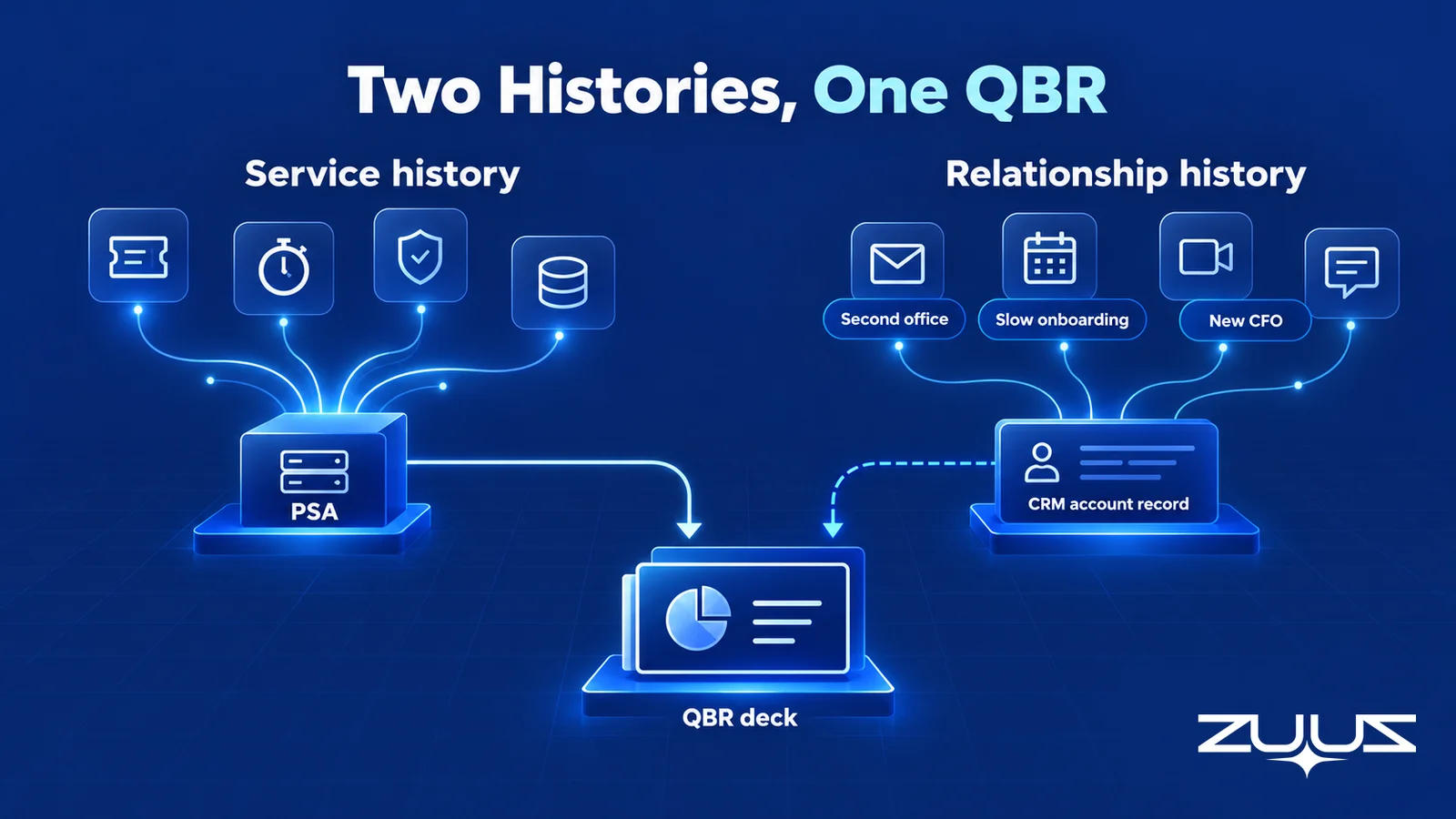
- The PSA holds service history. Relationship history, meaning what the client asked for, complained about and planned, lives in email, meetings and LinkedIn messages.
- The Renewal Signal Check finds the renewals the system only knows by date, which are the ones that surprise an MSP.
- ZUUZ builds the account history from captured client conversations, so QBR prep starts from the client's words instead of memory.
Picture a sixty-seat accounting firm sitting down for its MSP QBR. The account manager opens with a strong quarter: tickets inside SLA, patching current, backups verified. Twenty minutes in, the managing partner asks why nobody followed up on her August email about opening a second office, and the office manager adds that new-hire laptops still take a week. Neither point is in the deck, and both were in writing.
That scene is an illustration, but most MSP account managers have lived a version of it. The QBR was technically accurate and commercially wrong, because the deck came from the PSA and the client was thinking about the conversations. This guide covers how to run an MSP QBR that leads to renewals and expansion: the agenda, who attends, what to bring, a QBR template, the metrics, the software, and the prep problem underneath all of it.
What an MSP QBR Is, and What It Is Not
An MSP QBR, or quarterly business review, is a scheduled meeting between a managed service provider and a client's leadership to review the last quarter, agree on priorities for the next one and settle decisions that need the client's money or time. It is the one meeting each quarter where the MSP talks to the people who decide whether the contract renews.
It is not a technical review. Ticket reports, endpoint inventories and patch charts are evidence, and evidence belongs in an appendix the client's IT contact can read later.
QBR vs TBR vs vCIO meeting
The names get mixed up. A technical business review (TBR) is an engineer-led check of the environment against the MSP's standards, and a vCIO meeting is longer-range IT planning. The QBR sits above both and turns their findings into business decisions.
| Meeting | Main purpose | Typical attendees | Expected outcome |
|---|---|---|---|
| QBR | Review the quarter and agree on business decisions | Account manager, vCIO, client executive, budget owner | Dated decisions with owners on both sides |
| TBR | Check the environment against the MSP's standards | Alignment engineer, client IT contact | A prioritized list of technical fixes |
| vCIO meeting | Plan technology investment over one to three years | vCIO, client owner, finance | An agreed IT plan and budget |
Why the MSP QBR Decides Renewals and Expansion
For most MSPs, growth comes from inside the client base: more users, more sites, more security services, and contracts that renew on better terms. Writing in Harvard Business Review, Amy Gallo noted that acquiring a new customer is anywhere from five to 25 times more expensive than retaining one, and cited Bain and Company research finding that a 5% increase in retention lifts profits by 25% to 95%.
The QBR is where retention is confirmed or quietly lost. A client rarely announces that it is shopping the contract. It mentions a new CFO reviewing vendors, a complaint nobody resolved, or a project it handed to someone else. That is why the QBR sits at the center of MSP account management.
Who Should Attend an MSP QBR
The right room is small and senior. Every attendee should make a decision, own a follow-up, or bring evidence a decision depends on.
- Account manager (MSP). Owns the relationship, runs the meeting and owns the follow-up.
- vCIO or technical alignment lead (MSP). Brings recommendations and answers the hard technical questions.
- Client owner or executive sponsor, plus finance when budget is in play. Non-negotiable, because a QBR without someone who can commit money produces a list nobody can fund. The MSP owner should join for top accounts.
- Client IT contact or office manager. Brings the daily view, and often knows the complaints the executives have not heard yet.
Cadence should follow size and risk. A fifteen-seat client may need the owner and the account manager for forty-five minutes twice a year. A two-hundred-seat client with a finance team usually needs a quarterly review with four to six attendees, with the technical review held separately the week before.
Walk Into the QBR Knowing What the Client Already Said.
ZUUZ reads client email, meetings and LinkedIn messages and keeps the account history current in the CRM.
How to Prepare for an MSP QBR
Most of the outcome is decided before the meeting starts. A useful prep window is two to three weeks, with the agenda sent a week ahead.
Close the loop on last quarter
Start with the previous QBR's action list and mark what was done, what slipped and what waits on the client. A complete answer to "what did we say we would do" buys more trust than any metric.
Pull service, security and backup evidence
From the PSA, export SLA attainment, recurring incidents, onboarding time and project status. From the RMM and security tools, pull patch status, aging hardware, MFA coverage, backup success and the date of the last verified restore. Framing findings against the NIST Cybersecurity Framework helps a non-technical executive see the gaps, and CISA's guidance on multifactor authentication is a vendor-neutral reference for accounts with users still outside MFA.
Gather the client's own words
This is the step most checklists skip. Read back through the quarter's email threads, meeting notes, calls and LinkedIn messages, and list every request, complaint, commitment and business change. These rarely appear in a PSA export.
Check renewal dates and expansion signals
Confirm the agreement end date, notice period and any price change due. Then match the client's stated plans, such as hiring, a move or an audit, against services it does not yet have. Each recommendation should trace back to something the client said.
Send three questions ahead
A short pre-QBR email asks what has changed in the business, which IT issue frustrates people most, and what decision the client wants to make this quarter.
The QBR Prep Problem Nobody Puts on the Agenda
Every guide to the MSP QBR says to gather the data; few say where the data that matters most lives. The PSA and the RMM produce a clean record of what the MSP delivered, and almost nothing about what the client asked for outside a ticket or said about next year.
Service history vs relationship history
Service history is what the MSP did: tickets, time, projects, patches, restores. Relationship history is what the client said: requests, complaints, priorities, budget comments, stakeholder changes and hints of new work. A QBR built only from service history answers a question the client did not ask, while the renewal and the expansion are decided by the relationship history.
The PSA records tickets, not conversations
A PSA is built around the ticket, the time entry and the agreement, as covered in PSA vs CRM for MSPs. An email to the account manager about a second office is not a ticket, and nobody opens a ticket for a complaint made on a call.
So the account manager rebuilds it from memory
QBR prep turns into archaeology: searching the inbox by client domain, asking technicians what they heard and hoping nothing important was said on a call. Salesforce reports that sales reps spend 60% of their time on non-selling tasks, including manually entering customer notes into the CRM. For an account manager with thirty clients, QBR quality ends up depending on memory.
| Source | What it captures | What it usually misses | Effect on the QBR |
|---|---|---|---|
| PSA | Tickets, time, SLAs, projects, agreements | Requests and complaints made outside a ticket | Accurate service story, incomplete client story |
| RMM and security tools | Endpoint, patch, backup and alert data | Business context | Charts with no decision attached |
| CRM | Contacts, opportunities, renewal records | Whatever nobody typed in | Renewal known by date only |
| Email, meetings, calls, LinkedIn messages | Requests, complaints, plans, stakeholder changes | Private and unstructured | Depends on what one person remembers to search |
The fix is making relationship history accumulate on the account record continuously, through a disciplined logging habit or a capture layer that works from the conversations themselves.
MSP QBR Agenda for a 60-Minute Review
Sixty minutes is enough for almost every client, and forty-five suits small ones. The order matters more than the length: business first, open issues second, evidence third, decisions last.
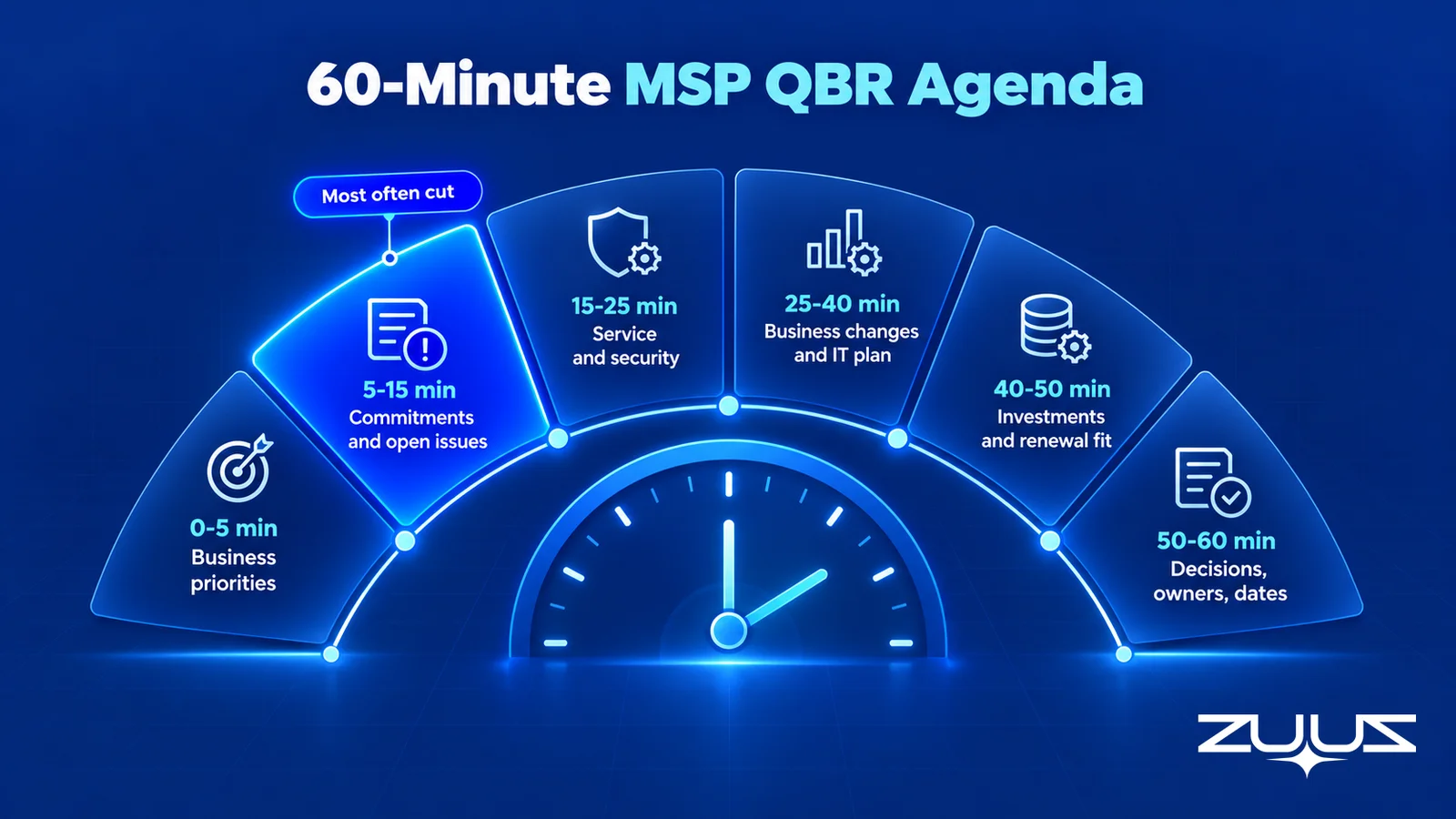
| Time | Agenda item | Question to ask | Outcome |
|---|---|---|---|
| 0 to 5 min | Business priorities | What has changed in the business since we last met? | The client's agenda goes first |
| 5 to 15 min | Last quarter's commitments and open issues | Is anything still bothering the team that we have not fixed? | Every open complaint has an owner and a date |
| 15 to 25 min | Service, security and backup summary | Which of these risks would hurt the business most? | Agreed priority among risks |
| 25 to 40 min | Business changes and the IT plan | What is coming next: hires, moves, audits, projects? | Recommendations tied to the client's plans |
| 40 to 50 min | Investments and renewal fit | Does the current agreement still fit how the business works? | Clarity on budget, scope and concerns |
| 50 to 60 min | Decisions, owners and dates | Who owns each item, and by when? | A written list both sides sign off on |
The second slot is the one MSPs most often cut, and the one that most affects renewal.
Raise the Client's Complaint Before the Client Does.
ZUUZ keeps every client request and concern on the CRM account, so the open-issues slot starts from the record.
MSP QBR Template to Copy
An MSP QBR template keeps one structure for every client, which makes prep faster and lets a manager compare accounts. It works as a document, a spreadsheet or a short deck.
| QBR section | What to document | Example entry | Source |
|---|---|---|---|
| 1. Client overview | Review period, attendees, business goals | Second office opening in Q1 | Pre-QBR answers, client email |
| 2. Last quarter's commitments | Each promise and its status | MFA rollout finished for all users | Previous QBR summary, PSA projects |
| 3. Open requests and concerns | Requests and complaints raised anywhere, not only in tickets | New-hire laptops taking a week | Email, meetings, calls, CRM account history |
| 4. Service and security summary | Three to five findings that need a decision | One site produces a third of all tickets | PSA, RMM, backup and security tools |
| 5. Business changes and IT plan | Hires, moves, audits, aging hardware | Twelve hires planned; 14 laptops past warranty | Client conversations, asset inventory |
| 6. Renewal and investment | Agreement fit, renewal date, proposed changes | Renews in March; add second-site coverage | Agreement, CRM renewal record |
| 7. Decisions and next steps | Owner, date and status for every item | Network assessment for new office by Nov 30 | Meeting notes |
Section 3 is the one most templates leave out, and it is the reason clients feel heard. If it is empty, the likelier explanation is that requests were never captured, not that there were none.
MSP QBR Metrics Clients Actually Care About
Metrics exist to support a decision. A good test is whether a business owner could say what to do differently after seeing the chart. Ticket volume alone fails; ticket volume by site, with one site far above the rest, passes.
| Metric | Source | Why the client cares | Caution |
|---|---|---|---|
| SLA attainment | PSA | The MSP kept its promise | A good number does not cancel a remembered complaint |
| Recurring incidents by cause or site | PSA | Points to a fix worth paying for | Show the pattern, not the raw count |
| Onboarding and offboarding time | PSA | Felt directly by managers and new hires | Often the hidden source of frustration |
| Backup success and last restore test | Backup console | Proves recovery, not just copying | A date matters more than a percentage |
| MFA and patch coverage | RMM, identity tools | Ties to insurance and audit questions | List exceptions by name |
| Open requests and follow-up completion | CRM account history, QBR action list | Shows whether the MSP listens and follows through | Only as complete as what was captured |
The last row is where QBRs go thin, and it is the one a renewal decision rests on.
How to Run an MSP QBR That Leads to Renewals and Expansion
Knowing how to run an MSP QBR well comes down to one discipline: the client's business and words come first, and recommendations follow from them. Before building packs for renewing clients, run a short check on the book of business.
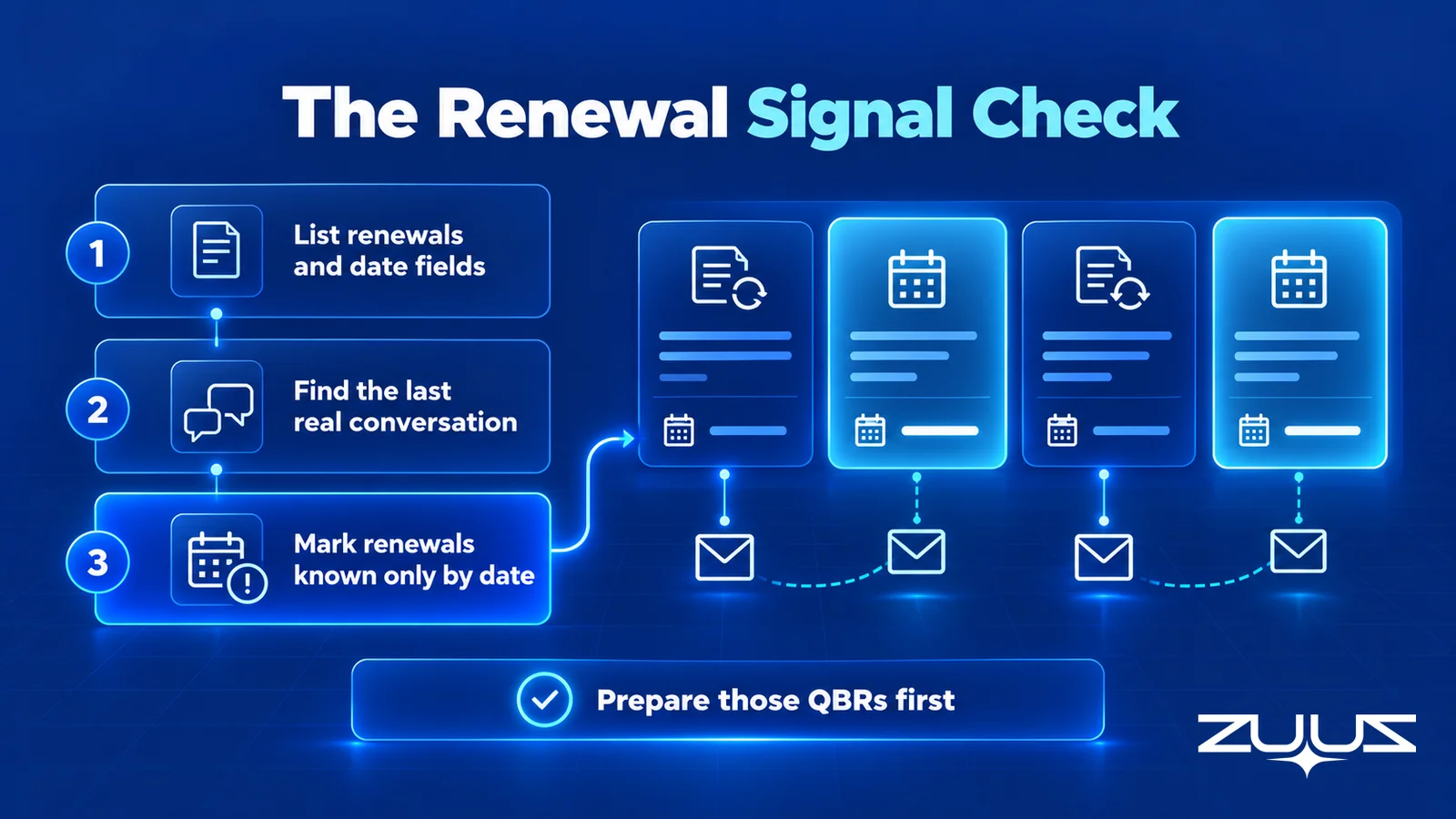
The Renewal Signal Check
Run it across every client before QBR season. It takes about an hour and shows which reviews carry renewal risk.
- List every renewal in the next two quarters and its date field.
- For each, find the last real conversation and what it said about budget, champion or satisfaction.
- Mark every renewal where the date is the only thing the system knows.
- Those are the renewals that surprise you; the signal existed, in a mailbox.
Worked example for an MSP: a three-year agreement renews in March and the QBR is in November. The PSA holds the agreement date and the CRM holds a renewal record. Neither holds the September email in which the office manager wrote that a new CFO is reviewing every recurring contract. That client gets step three's mark, and its QBR needs a renewal conversation, not a service recap.
Close complaints before proposing anything
Every unresolved complaint should be acknowledged, owned and dated before an investment is proposed. Recommending a security bundle while laptops still take a week to provision reads as tone-deaf at renewal time.
Tie every expansion to the client's own words
The strongest recommendation quotes the client back: "In August the second office came up for Q1. Here is what it needs." Expansion framed that way is advice the client asked for. A recommendation with no link to anything the client said is a pitch.
Raise renewal fit before the notice period
Ask whether the agreement still fits at least one QBR before the notice period opens. Budget concerns or a new decision maker are easier to handle in November than in February, which is how strong account teams treat MSP customer retention as a quarterly practice.
Send the summary within 48 hours
Send written decisions, owners and dates within two days, put every commitment on the account record, and open the next QBR with that list. Agreed expansions move into the MSP sales process the same week.
From an operator's seat
From an operator's seat, the QBRs that go wrong are rarely the ones with weak SLA numbers. Avinash Gujje ran client account reviews for years while growing an IT services and distribution business from zero to $25M ARR, and the pattern that held was that clients forgive a bad month of tickets far more readily than having to repeat themselves. The moment that costs a renewal is a client raising, in front of its own leadership, something it already put in writing. The part teams do not plan for is that the best expansion conversations come from the same place, because the client usually said what it needed weeks earlier in a thread about something else.
MSP QBR Software, Tool by Tool
No single piece of MSP QBR software does everything. Prep pulls from several systems, and each covers a different part of the template.
| Category | QBR job | Limits |
|---|---|---|
| PSA (ConnectWise PSA, Autotask, HaloPSA) | Tickets, SLAs, projects and agreements | Little of what the client said outside a ticket |
| RMM, backup and security tools | Technical evidence for the appendix | No business context |
| vCIO and QBR platforms | Alignment standards, IT plans, QBR reports | Only as current as the data fed in |
| CRM (Salesforce, HubSpot, Zoho, Attio, Pipedrive) | Contacts, opportunities, renewal records | Gaps wherever logging slips |
| ZUUZ (revenue intelligence layer) | Relationship history from email, calendar, meetings and LinkedIn messages, written to the CRM | Does not read PSA tickets or RMM data |
Once the client count outgrows one account manager's memory, the weak point is the relationship history, the same gap that shows up in day-to-day account planning.
Stop Rebuilding Account History Every Quarter.
ZUUZ writes client requests, complaints and expansion signals to the CRM as they happen, with full change history and one-click rollback.
QBR Prep: How ZUUZ Builds the Account History From Client Conversations
ZUUZ is revenue intelligence for the IT channel: MSPs and the vendors, distributors and resellers they work with. It reads email, calendar, meetings and LinkedIn messages, finds the deal and account signals in them, and updates the CRM automatically, with full change history and one-click rollback. The second-office request and the onboarding complaint land on the right account in Salesforce, HubSpot, Zoho, Attio or Pipedrive without anyone typing them in.
At QBR time, the account manager asks ZUUZ for the account history and gets a brief built from what the client said over the quarter: open requests, unresolved concerns, stakeholder changes and expansion hints, each traceable to its conversation. After the meeting, ZUUZ drafts the follow-up email with decisions and owners, and the account manager reviews and sends it. When an expansion closes, the won customer syncs to ConnectWise PSA.
The structural difference is where the record comes from: a CRM plugin logs the threads someone remembers to log, while ZUUZ starts from the conversations themselves. RA Technologies, a US IT services company, surfaced $120K of identified pipeline within 72 hours that two years of HubSpot had never recorded.
The boundaries matter. ZUUZ does not read PSA tickets or RMM data, so the service half of the QBR pack still comes from those tools, and it does not build slide decks. Early-stage MSPs can use ZUUZ as their AI CRM, while later-stage MSPs run it as the intelligence layer on their existing CRM; the ZUUZ page for managed service providers covers both. First pipeline typically appears within 72 hours, and a full rollout takes one to two weeks.
A first step before next QBR season
Connect one account manager's mailbox, let ZUUZ read the last 90 days, and compare what it writes to the CRM for the next three clients due a QBR against their records today. The difference is the relationship history the QBR would otherwise miss. The trial is free for 30 days: start a free trial.
MSP QBR Mistakes That Cost Renewals
- Turning the QBR into a ticket report. Statistics without business context say what the MSP did, not why it mattered.
- Ignoring complaints made outside the service desk. An email to the account manager counts as much as a ticket.
- Proposing upgrades before fixing what is broken. Expansion lands only after open issues are closed or owned.
- Rebuilding account history every quarter. If prep starts with an inbox search, relationship history is not being captured between QBRs.
A QBR reflects how well the MSP tracked the relationship during the quarter. Run the Renewal Signal Check, put the client's own words in section 3, and the meeting becomes the easy part.
Frequently Asked Questions
What is a QBR for an MSP?
An MSP QBR is a quarterly business review between a managed service provider and a client's leadership. It reviews the last quarter, resolves open issues, agrees on priorities and investments for the next quarter, and checks that the agreement still fits. It is a business meeting for decision makers, with technical detail kept in an appendix.
How do you run an MSP QBR?
Prepare two to three weeks ahead, send the agenda a week before, and hold a 60-minute meeting in a fixed order: business changes, open complaints and commitments, a short service and security summary, recommendations tied to the client's plans, renewal fit, then decisions with owners and dates. Send the written summary within 48 hours.
What should be included in an MSP QBR?
Include the client's business priorities, the status of last quarter's commitments, open requests and complaints from every channel, a short service and security summary, business changes and the IT plan, renewal and investment discussion, and a decision list with owners and dates. Ticket and endpoint detail belongs in an appendix, not the main deck.
What goes in an MSP QBR template?
A practical MSP QBR template has seven sections: client overview and goals, last quarter's commitments, open requests and concerns, service and security summary, business changes and the IT plan, renewal and investment, and decisions and next steps. Keeping one structure for every client makes prep faster and lets managers compare accounts.
Who should attend a quarterly business review with an MSP?
From the MSP, the account manager and the vCIO or technical alignment lead, with the owner joining for top accounts. From the client, the business owner or an executive sponsor must attend, plus finance when budget or renewal is discussed, and the IT contact or office manager who knows the day-to-day issues.
What metrics should an MSP show in a QBR?
Show metrics that support a decision: SLA attainment, recurring incidents by cause or site, onboarding time, backup success and the last restore test, MFA and patch coverage, hardware past warranty, and the count of open client requests and completed follow-ups. Present patterns and exceptions rather than raw totals.
What is the best MSP QBR software?
The best MSP QBR software is usually a combination: the PSA for service and agreement data, RMM and security tools for technical evidence, a vCIO or QBR platform for assessments, and the CRM for renewal records. The weak spot is relationship history, which a layer such as ZUUZ fills from client email, meetings and LinkedIn messages.
Does ZUUZ read PSA tickets for QBR prep?
ZUUZ does not read PSA tickets or RMM data. It reads email, calendar, meetings and LinkedIn messages, and writes the client's requests, complaints and expansion signals to the CRM with full change history and one-click rollback. The service half of a QBR still comes from the PSA, and won customers sync to ConnectWise PSA.

