
PSA vs CRM for MSPs and the Client Signal Neither Catches
PSA vs CRM for MSPs: the PSA runs tickets, time and billing, the CRM runs pipeline. When each is enough, and where expansion and renewal signal really lives.


CEO of ZUUZ. He scaled Cloud Box Technologies from 0 to $25M ARR in IT services and distribution before building ZUUZ. Connect on LinkedIn
TL;DR: PSA vs CRM is a division of labor: the PSA runs tickets, time, agreements and billing, and the CRM runs pipeline. Many MSPs can sell from the PSA’s built-in sales tools until a dedicated sales team or a real new-logo motion arrives. Either way, the expansion and renewal signal that shows up first in client email and LinkedIn messages reaches neither system unless something captures it. ZUUZ is that capture layer: the AI CRM for an MSP that has none yet, or a revenue intelligence layer on top of the CRM an MSP already runs. It connects to your sales inbox, reads LinkedIn messages and meeting or call transcripts, and writes leads, stakeholders, next steps and renewal signals into the CRM automatically, with full change history and one-click rollback.
- A PSA is built around the ticket, the time entry and the agreement. A CRM is built around the lead, the opportunity and the pipeline stage.
- ConnectWise PSA is not a dedicated CRM, but it ships with CRM features, as do Autotask and HaloPSA. For an owner-led MSP those features are often enough.
- A separate CRM earns its place when a dedicated sales team, marketing, or a steady new-logo motion outgrows the PSA’s sales tools.
- Integrating PSA with CRM moves records that already exist. It cannot move a client sentence that was never turned into a record.
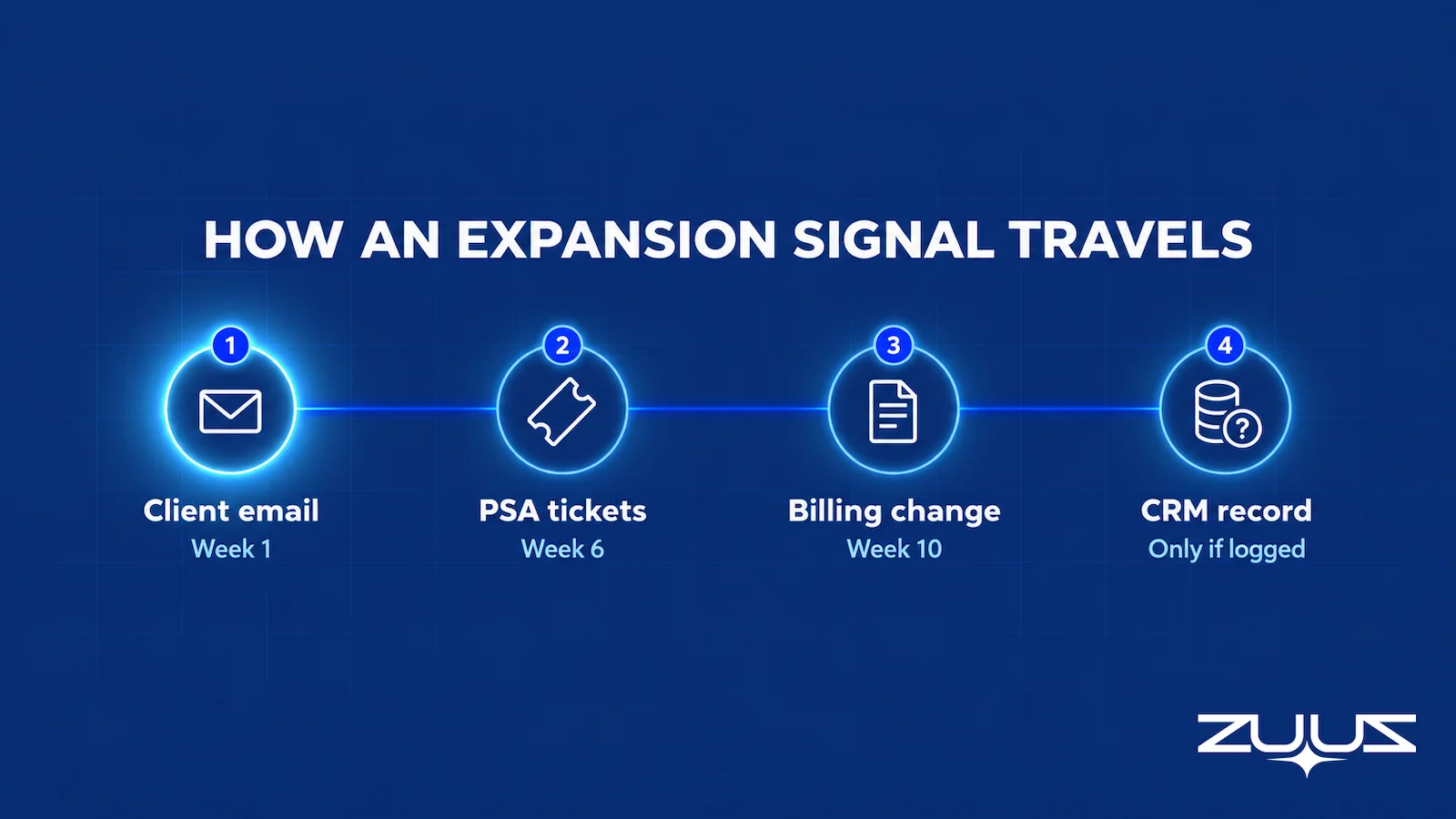
- Expansion and renewal signal usually appears first in an account manager’s email or LinkedIn messages, weeks before the PSA or the CRM sees it.
- ZUUZ is not a PSA. An MSP selling from the PSA with no CRM yet can use ZUUZ as its AI CRM, and an MSP on Salesforce, HubSpot, Zoho, Pipedrive or Attio keeps that CRM and uses ZUUZ as the revenue intelligence layer on top.
Picture a forty-person MSP that has settled the PSA vs CRM question by running its Monday pipeline meeting from ConnectWise. Nine opportunities sit on the board, most of them renewals, and every one is marked “on track.” That same morning, the operations director at the largest client had written to her account manager that the board wants to “revisit the IT budget before Q3.” The email is read and flagged in one inbox, and it appears nowhere on the board.
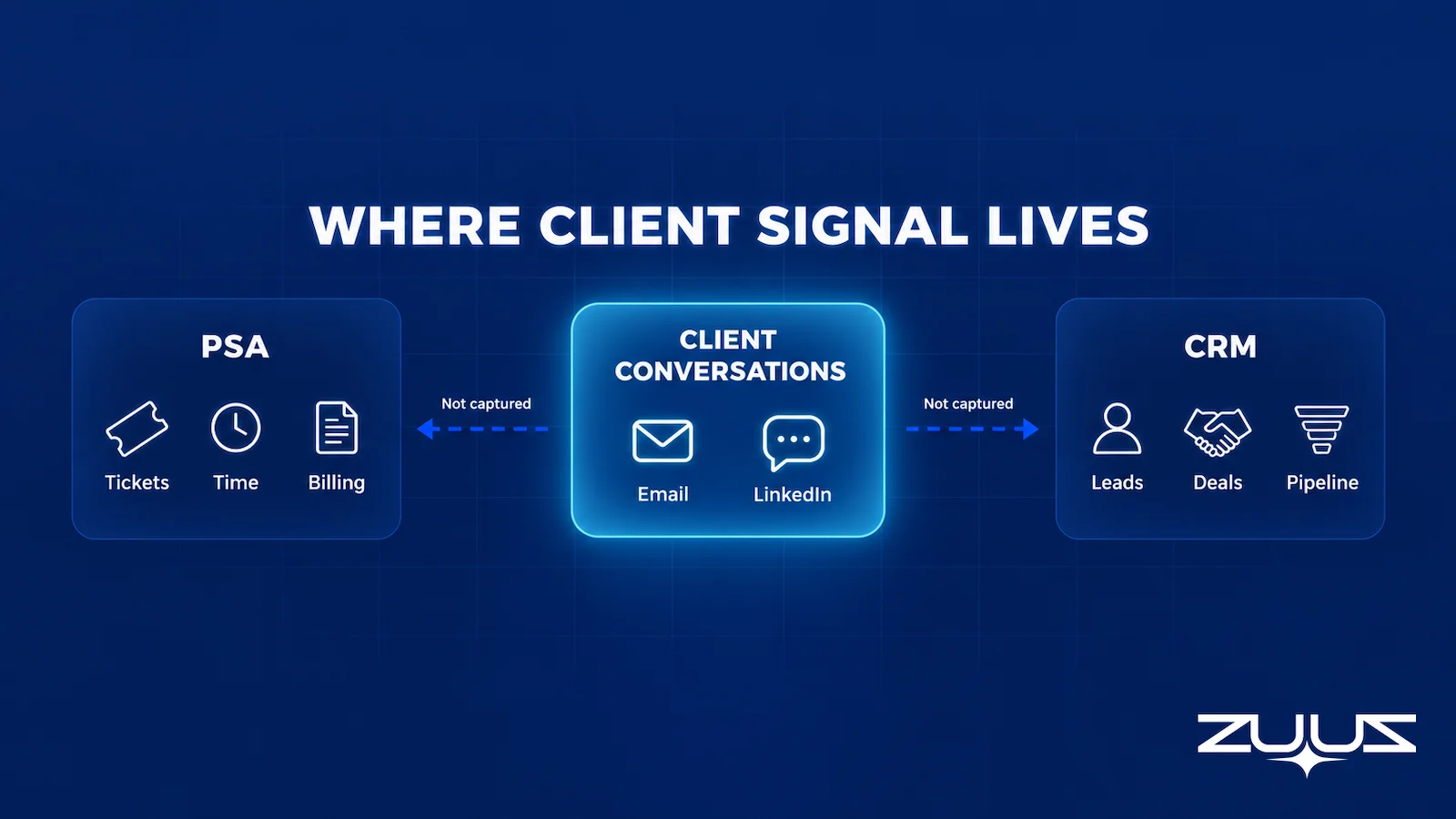
This is the part of the PSA vs CRM debate the comparison pages skip. They line up feature lists and conclude that a services firm needs both, which is often true and rarely the whole problem. The client conversation where expansion and renewal decisions first show up reaches neither system on its own. This guide covers what each system does for an MSP, when the PSA’s sales tools are enough, what integration can and cannot fix, and where the signal that drives growth actually lives.
PSA vs CRM Comes Down to the Job Each System Was Built For
A professional services automation platform, or PSA, is the operating system of service delivery. For an MSP that means the service desk, time entries, agreements, configurations, projects and the billing run that turns all of it into invoices. A customer relationship management platform, or CRM, is the system of record for selling: leads, contacts, opportunities, pipeline stages and the reporting built on top of them.
The two overlap more for MSPs than for most businesses, because the leading MSP PSAs ship with sales modules of their own. That is why the question in MSP forums is rarely “PSA or CRM” and usually whether the PSA suffices or a separate CRM is needed too. The honest answer depends on how the MSP sells, how many people sell, and where its growth comes from.
A third question sits underneath, and it matters more than which box to buy. Neither system is built to notice that a client just said something commercially important; both store what someone chose to record. For an MSP, whose growth mostly comes from inside existing clients, that gap decides more revenue than the PSA vs CRM choice itself.
What a PSA Is Built to Do for an MSP
Everything in a PSA is organized around delivering and billing service. The core object is the ticket, and around it sit time entries, service boards, SLAs, agreements and configurations. When a technician closes a ticket, the PSA knows who worked it, for how long, under which agreement, and whether that time is billable.
The data model is service-first
A PSA’s company record is really a service account. It holds the agreement type, covered users and devices, contract dates, managed configurations and the full ticket history. It is the best single view of what an MSP has delivered to a client, but it is not designed to hold a probability, a close date or a stakeholder map for a deal that does not exist yet.
The people in it are service people
Technicians, dispatchers, service managers and the billing team live in the PSA all day, and account managers often do too. Sellers are the exception, because most of their day happens in email and meetings. The PSA is excellent at recording work that happened, which means it sees a business change as the tickets it produces, usually after the client has already decided what it wants.
What a CRM Is Built to Do
A CRM is organized around revenue that has not happened yet. The core objects are the lead, the contact, the account and the opportunity, and the core view is the pipeline of deals moving through stages. Salesforce’s own overview of what a CRM does is a fair summary of the job.
For an MSP, a CRM usually does three things the PSA does less well: it runs a new-logo motion with lead sources and campaigns, it gives a sales team a shared pipeline with owners and close dates, and it connects to the marketing and reporting tools a growing sales function adds. HubSpot’s guidance on setting up deal pipelines shows how much of a CRM is shaped around those stages. What a CRM does not do on its own is find the deal.
Its pipeline is only as complete as what sellers and account managers type into it. Salesforce’s State of Sales research (7th edition, 2026) found that sales professionals spend only 40% of their time selling, with manual data entry alone taking 13% of the week. That is part of why so many CRMs lag behind what the team actually knows.
The Pipeline Is Only as Complete as What Gets Typed In.
ZUUZ reads email and LinkedIn messages and writes the record into Salesforce, HubSpot, Zoho, Attio or Pipedrive.
PSA vs CRM Side by Side
Laid out next to each other, the two systems answer different questions about the same client. The PSA answers what was delivered, under which agreement, and what gets billed. The CRM answers what could be sold next, to whom, and when.
| Dimension | PSA | CRM | ZUUZ (capture layer) |
|---|---|---|---|
| Built for | Service delivery and billing | Pipeline and revenue not yet closed | Keeping the CRM current from the conversations already happening |
| Core object | Ticket, time entry, agreement | Lead, opportunity, pipeline stage | The captured fact: lead, stakeholder, next step, renewal signal |
| Main users | Technicians, service managers, billing, account managers | Sellers, sales leaders, marketing | The same account managers and sellers, with one-click rollback on any record |
| Typical MSP examples | ConnectWise PSA, Autotask, HaloPSA | Salesforce, HubSpot, Zoho, Pipedrive | Runs on Salesforce, HubSpot, Zoho, Attio or Pipedrive, or serves as the AI CRM for an MSP without one; syncs won customers to ConnectWise PSA |
| Sees a business change | As tickets, after the change starts | As an opportunity, if someone logs one | When it is first mentioned in email or a LinkedIn message |
| Renewal data | Agreement dates and billing terms | Renewal opportunities and owners | Renewal signal from the last real conversation, written to the account |
| Client email and LinkedIn messages | Only when they become tickets | Only when someone logs them | Connects to the sales inbox and reads LinkedIn messages, then writes what matters to CRM fields |
The last row matters most for growth. Both systems have a path for conversation to become data, and in both cases the path depends on a person. Email-to-ticket turns a service request into a ticket, but a sentence about budgets inside that email is still just text on a ticket. A CRM email plugin can log a thread, but only the threads a seller remembers to log.
Is ConnectWise a CRM?
ConnectWise PSA, formerly ConnectWise Manage, is a PSA first. It is not a dedicated CRM, but it includes CRM features: company and contact records, opportunities with sales stages, sales activities and marketing tools, all next to the service desk and agreements. So the accurate answer to “is ConnectWise a CRM” is that it is PSA CRM software, a service platform with a sales module built in.
Many MSPs sell from ConnectWise with no other CRM, and for plenty of them it works. The opportunity sits on the same company record as the agreement and the ticket history, so an account manager sees both at once. The real question is whether its sales tools fit how the MSP’s team actually sells.
Autotask and HaloPSA follow the same pattern
Autotask PSA includes a CRM module with accounts, contacts and opportunities, and HaloPSA offers sales and CRM features alongside its service desk. Across the category, a CRM PSA combination in one product is normal. That is why searches for “psa crm” exist at all: MSP buyers are working out how much CRM they already own.
Test it from first conversation to signed agreement
The useful test is a workflow, not a feature list. Pick a recent expansion deal and trace it from the first client comment to the signed agreement change. If someone other than the account owner can find who asked, what they needed, what was promised and what happens next without searching a private inbox, the PSA’s sales tools are doing their job.
When the PSA Is Enough and When MSPs Add a CRM
There is a strong case for keeping sales inside the PSA, and it deserves a hearing before anyone buys a second system. Every extra platform adds setup, a sync to maintain, duplicate records to reconcile and one more place to forget to update. An MSP that adds a CRM to fix a discipline problem usually ends up with the same problem in two systems.
When the PSA’s sales tools are enough
The PSA tends to be enough when the owner or a single account manager runs sales, most growth comes from existing clients and referrals, and the opportunity list fits in one meeting. In that setup, keeping commercial follow-up next to service history is an advantage. The fix for a messy pipeline is often configuration and habit: clear stages, a required next step on every opportunity, and a weekly review with the service lead.
When a separate CRM earns its place
A separate CRM earns its place when the sales motion outgrows what the PSA was designed to hold. That usually means a dedicated sales team with its own targets, a marketing function running campaigns, or a steady new-logo motion with a longer cycle. It also shows up when sales work has quietly moved into spreadsheets and personal reminders because the PSA’s sales screens do not fit the process.
| What the MSP sees | Keep sales in the PSA | Add a CRM alongside the PSA |
|---|---|---|
| Who sells | Owner or one account manager | A dedicated sales team with quotas |
| Where growth comes from | Existing clients and referrals | New logos plus expansion |
| Marketing | Occasional, owner-driven | Campaigns, lead sources, attribution |
| Workarounds | Few, and fixable with process | Spreadsheets and private reminders |
| Reporting audience | Owner and service lead | Sales leadership, board or investors |
Most MSPs that add a CRM keep the PSA as the system of record for service and billing and let the CRM own pipeline. That split is sensible. It also raises a new question, which is how the two systems keep each other current, and that is where most of the frustration in the PSA vs CRM discussion lives.
Whichever System Owns Pipeline, Keep It Current.
ZUUZ sits on top of the CRM an MSP already runs and fills it from the client conversations account managers are already having.
Integrating PSA with CRM Moves Records, Not Conversations
Integrating PSA with CRM is mostly a set of ownership decisions, and the sync is the easy part. Before any connector is switched on, someone has to decide which system is authoritative for company identity, contacts, opportunity stages, agreement dates and billing terms. Without one owner per record, the two systems overwrite each other until nobody trusts either.
Decide which system owns each record
A workable split gives the CRM leads, opportunities and stages, and gives the PSA agreements, configurations, service history and billing. Closed-won deals hand off into the PSA with the scope and onboarding details delivery needs, while agreement end dates and major incidents flow back to the account team. The principles of bidirectional CRM sync apply here as anywhere: one owner per field, a clear direction, and a plan for conflicts.
Checking a ConnectWise CRM integration before relying on it
A ConnectWise CRM integration can come from a marketplace connector, an integration platform, or custom work against the PSA’s REST API. Whichever route an MSP takes, the checks are the same: which objects sync, in which direction, how often, how custom fields map, and what happens when an update fails. Account matching deserves extra attention, because clients with several domains or sites are exactly where duplicates appear.
| Data | Does a PSA to CRM sync move it? | Why |
|---|---|---|
| Companies and contacts | Yes, once matching rules are set | Both systems store them as records |
| Opportunities and stages | Yes, in the direction chosen | Structured fields on both sides |
| Agreement and renewal dates | Usually, if mapped | Held as fields in the PSA |
| A client’s email about a new office | No | It was never turned into a record |
| A LinkedIn message about a budget review | No | Neither system captures it natively |
The bottom two rows are the ones MSP owners feel without being able to name. A sync keeps two databases consistent, but it only ever copies what already exists as a record. When an owner says the systems are integrated and the pipeline still misses things, this is usually why. The integration project and the capture problem are two different projects.

Where Expansion and Renewal Signal Actually Lives
Ask an MSP owner where the last five expansion deals started, and the answer is rarely a form fill. They started with a client saying something in passing, in the channel that client already uses with the account manager. The MSP sales pipeline grows mostly inside existing clients, and that growth arrives as conversation first and as records much later.
The examples are ordinary. A client that has signed a lease on a second floor needs cabling, network hardware and user onboarding, and a cyber insurance renewal asking about MFA is a security project with a deadline attached. A new IT director asking on LinkedIn how the contract works is a renewal conversation starting early. Teams that log LinkedIn messages in the CRM know how often the most commercial sentence of the month arrives there.
| Client signal | Where it first appears | What the PSA sees | What the CRM sees |
|---|---|---|---|
| New office or relocation | Email to the account manager | Onboarding and hardware tickets, weeks later | Nothing, unless an opportunity is created by hand |
| Hiring batch | Email from an office manager or HR contact | New-user tickets as people start | Rarely anything |
| Audit or insurance questionnaire | Email with an attachment, often forwarded | A ticket if someone asks for help | Rarely, and usually near the deadline |
| Budget review or cost pressure | Email or LinkedIn message from a decision maker | Nothing | Nothing, unless someone logs it |
| New IT lead or stakeholder change | LinkedIn message | A contact update, eventually | No native path |
Every row follows the same timeline. First comes a sentence in an email or a LinkedIn message, then weeks later the PSA sees tickets because delivery has started. Later still the agreement or invoice changes, and by then the client has usually decided what it is buying and from whom. The CRM sees whatever an account manager found time to type in.
A logged email is not a qualified opportunity
Even when a conversation does reach a system, it often produces no action. A technician resolves the question about extra desks and closes the ticket, and nobody asks whether it is a project. A CRM plugin that attaches a thread to a contact stores the text but does not identify the need, the timing, the owner or the next step.
That is one reason trust in CRM data stays low. Salesforce data republished in its State of Sales research (6th edition, 2024) found that only 35% of sales professionals completely trust the accuracy of their organization’s data. For an MSP, the missing piece is usually not a field or a report but the client sentence that never became a record.
Why MSP Renewals Fall Between the PSA and the CRM
Renewals show the PSA vs CRM gap more clearly than any other motion. The PSA holds the agreement end date, the notice period and the billing terms, and the CRM holds a renewal opportunity with an owner and a stage. Neither holds the evidence that actually decides the renewal: whether the client is happy, whether the budget is under review, and whether a competitor has been in touch.
That evidence lives in conversation. An operations director who writes that the board wants to “revisit the IT budget” says more about renewal risk than any agreement field. Good renewal tracking software starts from dates, but dates only say when the decision happens, not which way it is leaning.
So renewal risk shows up late in both systems. The PSA shows an escalation after the relationship is already strained, and the CRM shows a stage change once someone admits the renewal is in trouble. MSPs that watch churn risk signals in client conversations tend to hear about the budget review in the week it is mentioned, while there is still time to respond.
The Renewal Signal Check
Before settling whether the PSA or the CRM should own renewals, run the Renewal Signal Check on the book of business the MSP already has. It takes about an hour and it answers the question with evidence instead of opinion.
- List every renewal in the next two quarters and its date field.
- For each, find the last real conversation, whether email, message or meeting, and what it said about budget, champion or satisfaction.
- Mark every renewal where the date is the only thing the system knows.
- Those are the renewals that surprise you. The signal existed; it was in a mailbox.
Worked example for an MSP: a three-year managed services agreement renews in March. The PSA holds the agreement date and the billing terms, and the CRM holds a renewal opportunity created from that date. Neither holds the sentence from January in which the client IT manager mentioned that a new CFO is reviewing every recurring contract above a threshold. The date field was never wrong. It was just the only thing either system knew, which is exactly what step three is looking for.
Hear About the Budget Review the Week It Is Mentioned.
ZUUZ turns renewal and expansion signal in email and LinkedIn into structured records on the right CRM account.
How to Choose a PSA and CRM Setup Without Guessing
The cleanest way to settle PSA vs CRM for a specific MSP is a short test on real evidence. Take the last thirty days of client conversations that turned into, or should have turned into, expansion or renewal work. For each one, check whether it reached a shared record, whether it got an owner, and whether a next step happened before the client’s own deadline.
The results usually point to one of three setups. If most conversations reached the PSA’s sales tools and got followed up, the PSA is enough. If sales work has spread into spreadsheets and several people need a shared pipeline, the MSP needs a CRM alongside the PSA. If the records are fine but the conversations never became records, the problem is capture, and neither buying nor integrating another system solves it alone.
| Setup | Fits | What it catches | What it still misses |
|---|---|---|---|
| PSA only, with its sales module | Owner-led sales, mostly expansion and referrals | Service history, agreements, a short pipeline | Signals in email and LinkedIn that nobody logs |
| PSA plus a CRM | Dedicated sales team, marketing, new-logo motion | All of the above, plus stage reporting and lead sources | The same unlogged signals, now in two places |
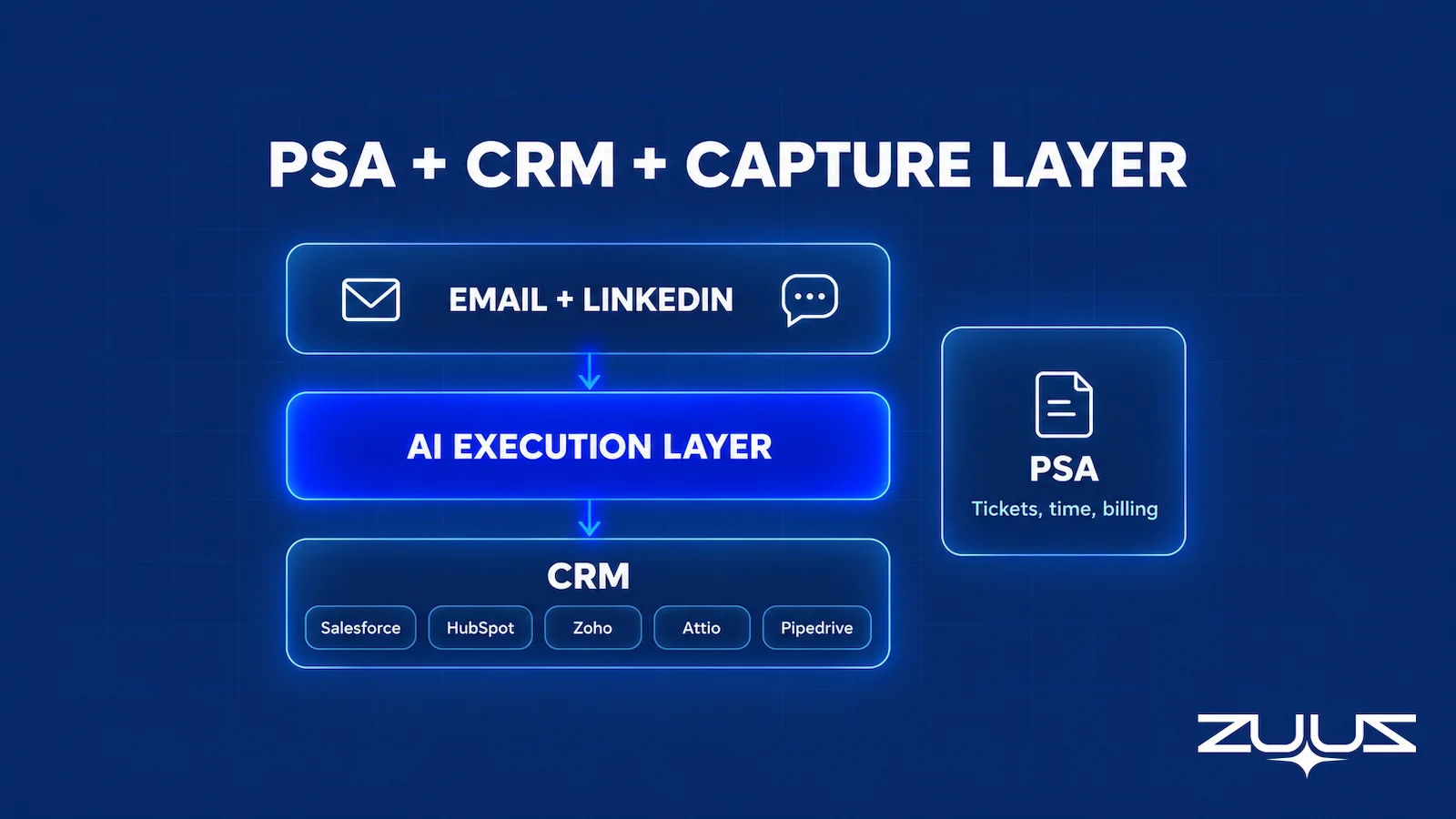
| PSA plus a CRM plus a capture layer | MSPs whose growth depends on noticing client changes | All of the above, plus conversation signal written to the CRM | Channels the layer does not read, such as unrecorded phone calls |
The third setup does not replace either of the first two. It sits on top of the CRM an MSP already chose and keeps it current from conversations the account team is already having. If the thirty-day test shows those conversations already reaching the records, it is not needed.
From an operator’s seat
From an operator’s seat, the order of operations decides this more than the feature list does. MSPs that add a CRM before deciding which system owns the client record end up with two half-true records and an account manager who trusts neither, so the ownership call comes first and the tooling second. The part teams do not plan for is the first week of captured signal: it surfaces commercial conversations the service side has been having for months, and somebody has to own the triage before the volume turns into noise. Across the deployments ZUUZ runs, the pattern is that one named owner reviewing captured signal for fifteen minutes a day beats a team-wide rollout with nobody accountable. The other surprise is where the signal comes from: more of it arrives in the service inbox than in the sales one, which is the inbox nobody thought to connect.
Client Conversation Signal: How ZUUZ Writes It to the CRM
ZUUZ is not a PSA, and for an MSP that already has a CRM it is a revenue intelligence layer that sits on top of that CRM. It reads the sales and account management inbox and LinkedIn messages, read-only, identifies the commercial signal in those conversations, and writes structured records into Salesforce, HubSpot, Zoho, Attio or Pipedrive. The CRM stays the system of record for pipeline, and the PSA stays the system of record for service and billing.
In practice, the email about the second floor becomes an opportunity or activity on the right account, with the contact, the need and the timing attached. The LinkedIn message from a new IT director lands on the account record instead of staying in one person’s messages. Account managers keep working in their inbox and technicians keep working in the PSA. Nobody has to change how they work or remember to log anything, and ZUUZ updates the CRM automatically, with full change history and one-click rollback. It is the same idea as email-to-CRM automation for IT companies, applied to the conversations that matter most to an MSP.
The results are measured in pipeline. RA Technologies, a US IT services company, ran ZUUZ on top of the CRM it had used for two years, with the same team, and surfaced $120K in pipeline within 72 hours that the CRM had never seen, captured from the sales mailbox. The deals were already in the conversations; they had just never become records. Cloud Box Technologies, the IT services and cloud business where Avinash Gujje built his operator record, runs ZUUZ the same way: inbound email turns into leads and renewals, leadership sees live pipeline in real time, and tracking 10 to 12 renewals takes minutes.
The boundary matters for MSPs. ZUUZ does not read PSA tickets. It syncs won customers to ConnectWise PSA, and it does not integrate with Autotask or HaloPSA. Otherwise ZUUZ works on the CRM side of the stack, where both the MSP pipeline and the IT VAR sales pipeline get reported.
Which MSPs This Fits, and Which It Does Not
ZUUZ fits an MSP that runs Salesforce, HubSpot, Zoho, Attio or Pipedrive as its sales CRM alongside the PSA, and whose account managers carry real commercial conversations in email and LinkedIn. That is typically an MSP with a dedicated sales or account management function and a mix of expansion and new-logo work. For those teams, the account management side of the CRM is where missed signal shows up first.
An MSP that runs its whole sales process inside the PSA with no separate CRM can use ZUUZ as its AI CRM instead of buying a CRM first. ZUUZ builds leads, contacts, accounts, deals and renewals from email, calendar, meetings and LinkedIn, and syncs won customers to ConnectWise PSA. Either way, a simple habit helps: log client comments against the company record in the PSA, and review them weekly with the service lead so every commercial signal gets an owner.
Either way, the PSA vs CRM decision is worth making on evidence rather than feature lists. Look at where the last few expansion deals actually started and put the effort where the signal is being lost. For many MSPs that turns out to be the inbox between the two systems, and the revenue leakage that follows is quiet enough to go unnoticed for a long time.
A first step that costs an hour
If the Renewal Signal Check turns up renewals the system only knows by date, the first step is small and reversible. Connect one mailbox, let ZUUZ read the last 90 days, and see what it writes to the CRM, with full change history and one-click rollback. Every change is logged and can be rolled back in one click. The trial runs 30 days free with no credit card: https://zuuz.ai/trial/
Frequently Asked Questions
What is the difference between a PSA and a CRM?
A PSA runs service delivery and billing: tickets, time entries, agreements and invoices. A CRM runs selling: leads, contacts, opportunities and pipeline stages. For an MSP, the PSA shows what was delivered and billed, and the CRM shows what might be sold next. Many MSP PSAs include sales features, so the two overlap more than in other industries.
Is ConnectWise PSA a CRM?
ConnectWise PSA is a professional services automation platform with CRM features built in, not a dedicated CRM. It includes company and contact records, opportunities with sales stages and sales activities alongside the service desk and agreements. Many MSPs sell entirely from it, while others add a separate CRM once a sales team or marketing function outgrows it.
Do MSPs need a CRM if they already have a PSA?
Many MSPs do not. With owner-led sales, growth mostly from existing clients and a short opportunity list, sales can run inside the PSA. A separate CRM makes sense when there is a dedicated sales team, a marketing function with lead sources and campaigns, or a steady new-logo motion that needs stage reporting.
What is PSA CRM software?
PSA CRM software is a professional services automation platform that also includes customer relationship management features. ConnectWise PSA, Autotask and HaloPSA all combine a service desk, time tracking and billing with accounts, contacts and opportunities. The CRM side is usually lighter than a dedicated CRM, which suits many MSPs and limits larger sales teams.
What is an MSP CRM?
An MSP CRM is the system a managed service provider uses to track leads, contacts, accounts, opportunities and renewals, usually beside a PSA that runs tickets, agreements and billing. The right setup depends on stage. An early-stage MSP with no CRM yet can use ZUUZ as its AI CRM, with leads, contacts, accounts, deals and renewals built from email, calendar, meetings and LinkedIn. A later-stage MSP keeps its existing CRM and adds ZUUZ on top as the revenue intelligence layer. Either way, ZUUZ syncs won customers to ConnectWise PSA.
Can a CRM replace a PSA for an MSP?
A CRM cannot replace a PSA for most MSPs. It has no native service desk, time entry, agreement billing or configuration management, which are the core of running managed services. MSPs keep the PSA for delivery and billing and use a CRM, if they add one, for pipeline.
How do you integrate a PSA with a CRM?
Integrating a PSA with a CRM starts with deciding which system owns each record, then choosing a connector. A common split lets the CRM own leads and opportunities and the PSA own agreements, service history and billing. Closed-won deals hand off into the PSA, and account matching needs testing because multiple domains and sites create duplicates.
How does a ConnectWise CRM integration work?
A ConnectWise CRM integration connects ConnectWise PSA to a CRM such as Salesforce or HubSpot through a marketplace connector, an integration platform, or custom work against the PSA’s REST API. It typically syncs companies, contacts and opportunities in a chosen direction. Verify the objects covered, sync frequency, field mapping and failure handling before relying on it.
What is the best PSA for an MSP?
The best PSA for an MSP is the one the service desk will actually live in and that bills agreements accurately without manual rework. ConnectWise PSA, Autotask and HaloPSA are the most common choices. If sales will also run inside the PSA, test its sales tools against a real expansion deal before choosing.
Should MSP renewals be managed in the PSA or the CRM?
Renewal dates and billing terms belong in the PSA, where the agreement lives, and the renewal opportunity and its owner belong in the CRM if the MSP runs one. The evidence that decides the renewal, such as a budget review or a new decision maker, usually arrives in email and LinkedIn messages and needs capturing onto the account record.
Where do MSP expansion opportunities come from?
Most MSP expansion opportunities start as a client comment about a new office, a hiring batch, an audit, an insurance questionnaire or a budget change. These comments usually arrive in an account manager’s email or LinkedIn messages. The PSA sees the resulting tickets weeks later, and the CRM sees them only if someone logs them.
Does ZUUZ integrate with ConnectWise PSA?
Yes. ZUUZ syncs won customers to ConnectWise PSA. It does not read PSA tickets or agreements, and it does not integrate with Autotask or HaloPSA. For MSPs that run Salesforce, HubSpot, Zoho, Attio or Pipedrive alongside the PSA, ZUUZ writes structured records to that CRM; for MSPs with no CRM yet, ZUUZ can be the AI CRM.
Is ZUUZ a CRM or a PSA?
ZUUZ is not a PSA. Whether it acts as a CRM depends on the MSP. An early-stage MSP with no CRM yet, selling from the PSA or spreadsheets, can use ZUUZ as its AI CRM, with leads, contacts, accounts, deals and renewals built from email, calendar, meetings and LinkedIn. An MSP already on Salesforce, HubSpot, Zoho, Pipedrive or Attio keeps that CRM, and ZUUZ sits on top as the revenue intelligence layer, reading client email and LinkedIn messages read-only and writing structured records such as opportunities and activities into it.

