
Account Management Software for Sales Teams Running a CRM
Account management software splits into three very different product types. This guide covers what each one does, how it differs from a CRM, and which fits.

CEO of ZUUZ. He scaled Cloud Box Technologies from 0 to $25M ARR in IT services and distribution, managing multi-OEM renewals, distributor relationships, and a 200-plus account customer base before building ZUUZ. Connect on LinkedIn
TL;DR: Account management software is a label covering three different product types: key account planning suites that build relationship maps, the account views already built into Salesforce, HubSpot, and Zoho, and execution layers that read activity and write it back into the CRM. Most sales teams already own more account management capability than they realize, so the useful question is which specific gap a new tool is filling. ZUUZ sits in the third group as a renewal, churn-risk, and deal-history lens over accounts that already exist in the CRM. ZUUZ sits on top of whichever CRM the team already runs, connects to the sales inbox, reads LinkedIn messages and meeting or call transcripts, and writes stakeholders, next steps and renewal signals onto the account automatically, with full change history and one-click rollback.
Key Takeaways
- Account management software is not a single category. Key account planning suites, CRM-native account views, customer success platforms, and CRM execution layers solve different problems and rarely compete head to head.
- The capabilities most buyers treat as definitional, meaning relationship maps, org charts, and whitespace analysis, belong specifically to key account planning suites such as Kapta, DemandFarm, and Gainsight. Not every tool carrying the label offers them.
- Salesforce, HubSpot, and Zoho each ship an account or company object with contacts, deals, and activity history already attached. For a large share of teams that is a working account management system on day one.
- Any tool that asks a person to build and maintain a relationship map inherits a maintenance cost. Median employee tenure in the United States is 3.9 years, so the map decays whether or not anyone gets around to updating it.
- ZUUZ does not do relationship mapping, org charts, or whitespace analysis. It reads renewal dates, churn signals, and deal history out of activity that already happened and writes the result into the CRM.
- The evaluation question that actually separates these categories is whether a tool requires a new dataset somebody has to maintain, or reads one that already exists.
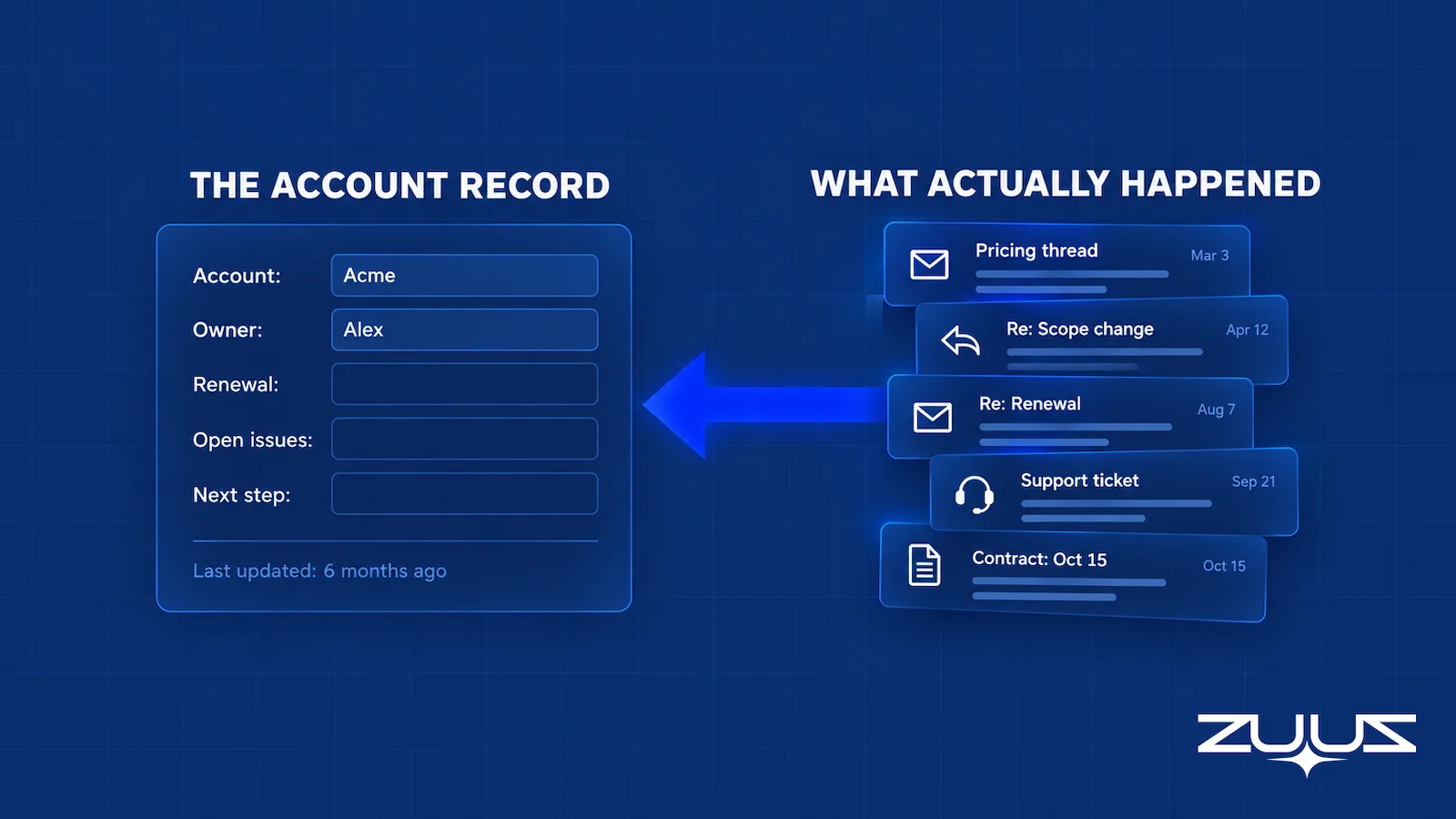
A quarterly account review usually starts the same way. Someone opens the CRM, pulls up the twenty largest customer accounts, and finds that each record effectively stops on the day the original deal closed. The contacts are there and the closed-won opportunity is there, followed by a gap where eleven months of email, support threads, and contract conversation should sit.
That gap is what sends people searching for account management software in the first place. The search returns key account planning suites, customer success platforms, general-purpose CRMs, and AI tools, all describing very different products with nearly identical words. This guide separates those types, explains what each one genuinely does, and states plainly which problems each one leaves untouched.
What Account Management Software Does for a Sales Team
Account management software organizes the work that happens after a deal closes. Where a sales tool is built around the opportunity, an account tool is built around the customer, and its unit of work is the account record rather than the deal. The job is retaining the customer, catching problems before a renewal date arrives, and finding the next expansion conversation.
The people using these tools are account managers, customer success managers, sales leaders reviewing a book of business, and the revenue operations function that has to keep the underlying data usable. Their shared problem is not finding new buyers. It is knowing the current state of forty or four hundred existing relationships well enough to act before something goes wrong.
One thing worth naming early is that vendors define this category to match whatever they happen to sell. A customer success platform defines it around health scores, a planning suite defines it around account plans, and a CRM defines it around the account object it already ships. None of those definitions is dishonest, but none of them is the whole category either, which is why the search results feel so inconsistent.
How Account Management Software Differs From a CRM
The honest answer is that the overlap is much larger than most comparison pages admit. Salesforce ships an Accounts object that stores customer organizations along with their contacts, cases, and opportunity history. HubSpot ships companies as a core object and lets reps tag them as target accounts inside the sales workspace. Zoho carries an equivalent Accounts module among its standard modules.
So a team asking whether it needs a separate tool for crm account management is often asking the wrong question. The account object already exists, and the fields for owner, renewal date, and health status can usually be added in an afternoon. What a CRM does not do on its own is keep those fields current or interpret what the activity attached to them means.
That is the real dividing line. A CRM stores account data and a dedicated tool does something to it, whether that means structuring a plan around it, scoring it, or populating it automatically. Teams evaluating a crm for account management should start by testing the second half of that sentence, because the storage half is almost certainly already handled.
| Capability | Already in a standard CRM | Where a dedicated tool adds something | Where ZUUZ sits |
|---|---|---|---|
| Account record with contacts and deal history | Yes, as a core object | Little to add | Reads what is there; adds nothing here |
| Custom fields for renewal date, tier, health | Yes, configurable | Little to add | Writes into these fields |
| Keeping those fields current without manual entry | No | Capture and execution layers | Yes, from activity that already happened |
| Structured account plan with objectives and owners | Rarely, and usually only with heavy customization | Key account planning suites | No |
| Buying-group org chart and relationship map | No | Key account planning suites | No |
| Whitespace and expansion analysis against a product catalog | No | Key account planning suites | No |
| Product usage and support signals rolled into a health score | No | Customer success platforms | No |
| Renewal and churn risk read from conversation activity | No | Execution layers | Yes |
See What Every Account Record Is Actually Missing.
ZUUZ reads the email threads behind each customer account and writes renewal dates, risk signals, and deal history into Salesforce, HubSpot, Zoho, Attio, or Pipedrive.
What to look for before shortlisting anything
- Does the tool need a new dataset somebody maintains, or does it read one the team already produces by working?
- Where does the account record live after the purchase: in the CRM already in use, or in a second database someone has to reconcile?
- Is there a capture layer underneath it, something that writes renewal dates, stakeholders and next steps into CRM fields from the sales inbox, LinkedIn messages and meeting or call transcripts?
- Does what the tool produces land in fields a report can read, or only in an activity feed a human has to open?
- What does the account view look like a month after the owning rep leaves or the territory changes?
- How many clicks per account per week does it cost a rep, measured honestly rather than demoed?
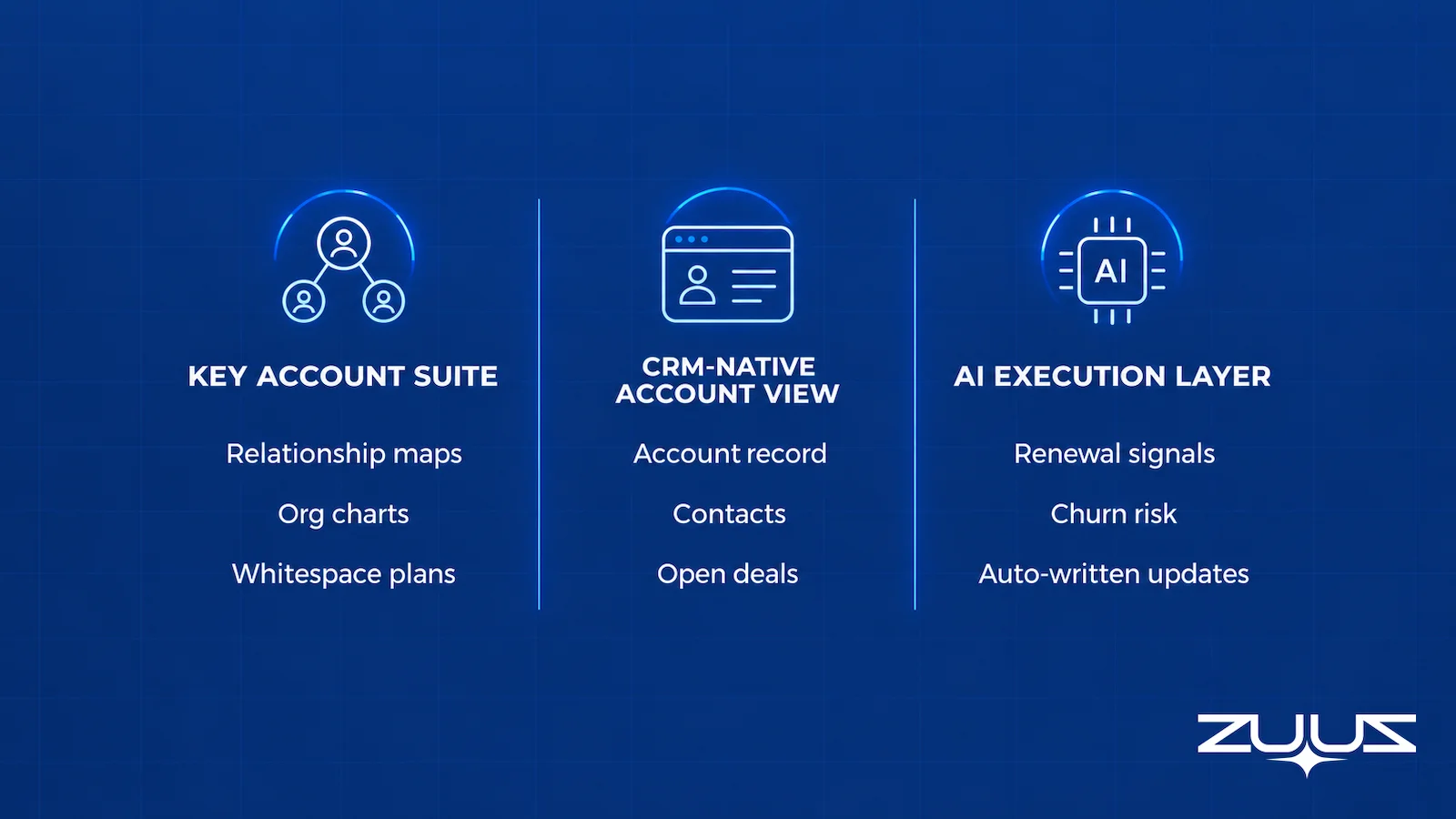
Four Types of Account Management Tools for B2B Sales Teams
Grouping the market by what a product actually requires and produces makes the choice far easier than reading feature lists side by side. Four types cover almost everything that ranks for this term, and the differences between them are structural rather than cosmetic.
Key Account Management Software
This is the most distinct group and the one most people picture when they hear the phrase. Key account management software is built for a small number of strategic customers where the buying group is large and the relationship spans several years. Kapta, DemandFarm, and Gainsight all publish product documentation describing capabilities in this shape.
DemandFarm’s own documentation describes relationship maps and org charts, a whitespace planner for identifying untapped opportunity, and an opportunity planner, all sitting alongside the CRM rather than inside it. That is the defining characteristic of a key account management tool: it creates a new structured dataset about the account, one that a human being builds deliberately and then maintains. When a team genuinely runs formal account planning on twenty named enterprise customers, this is the right category and nothing else substitutes for it.
CRM-Native Account Views
The second group is not a separate product at all. It is the account management crm capability that Salesforce, HubSpot, and Zoho already include, extended with a handful of custom fields and a saved view or two. Teams often skip past this option because it does not come with a purchase decision attached, which is a mistake when the underlying need is modest.
For a team managing sixty accounts where the main requirement is knowing who owns what and when each contract expires, this is frequently sufficient. The limits show up in two places. Nobody keeps the custom fields current under real workload, and the CRM will not tell anyone which of those sixty accounts changed behavior last month.
Customer Success Platforms
Customer account management software aimed at subscription businesses forms the third group. These platforms ingest product usage telemetry, support ticket volume, and survey responses, then compress them into a health score that drives playbooks and renewal workflows. They work well when the product emits usage data continuously and when a dedicated customer success function exists to act on the output.
They fit poorly when neither of those is true. A distributor selling hardware and multi-year support contracts has no product telemetry to ingest, and a six-person sales team has nobody to run the playbooks. The category is genuinely strong for recurring-revenue software businesses and genuinely awkward outside them.
CRM Execution and Capture Layers
The fourth group takes the opposite approach to the first. Instead of asking a person to build a new dataset about the account, these tools read the activity that already surrounds it, mainly email and calendar, and write structured conclusions back into the CRM. ZUUZ sits here, and so do the narrower activity-capture tools that log messages against records without interpreting them.
Worth stating plainly: adding AI to any of the four groups above does not create a fifth category. An AI-assisted planning suite is still a planning suite, and an AI health score is still a health score. The structural question of what data the tool needs and who maintains it does not change because a model was added to it.
| Type | What it requires | What it produces | Best fit |
|---|---|---|---|
| Key account planning suite | A person to build and maintain account plans and relationship maps | Org charts, whitespace analysis, structured growth plans | 10 to 50 strategic enterprise accounts |
| CRM-native account view | Field configuration and manual discipline | A current-state record of who owns what | Small books with simple workflows |
| Customer success platform | Product usage telemetry and a CS function | Health scores, playbooks, renewal workflows | Recurring-revenue software businesses |
| CRM execution layer | Read access to email and the CRM | Populated fields, renewal and churn flags, deal history | Teams whose account history lives in email |
What an Account Management System Should Track for Each Customer
Independent of which type a team picks, a working account management system needs a short list of things kept genuinely current. Ownership and coverage come first, meaning who is responsible for the account and when they last spoke to anyone inside it. Commercial state comes next, covering contract value, expiry date, and which products are attached.
Renewal timing deserves separate treatment because it drives everything else. A renewal date sitting ninety days out changes how urgently every other signal should be read, and the mechanics of tracking that reliably across products and contract types are covered in more depth in the guide to renewal tracking software.
Risk is the fourth item and the hardest to keep honest. A useful risk view is not a static tier assigned at onboarding but something that moves when engagement drops, when support friction rises, or when a champion goes quiet. The signal set behind that, and the difference between monitoring signals and predicting outcomes, is the subject of the companion guide to churn risk software.
The fifth item is the one most often missing entirely: the conversation history that explains why the account is in its current state. Forrester found that among decision-makers who had implemented a CRM in the previous twelve months, 68% struggle to get a single view of the customer and 39% struggle with data quality. Those two numbers describe the same failure from different angles.
The Maintenance Cost Nobody Lists as a Feature
Every comparison of account management tools evaluates what a product displays. Almost none of them evaluate what the product demands in order to keep displaying it, which turns out to be the difference between a tool that survives eighteen months and one that quietly stops being opened.
A relationship map is a good illustration. Building one for a strategic account is genuinely valuable work, and it is also a snapshot of a group of people at one moment. The US Bureau of Labor Statistics puts median employee tenure at 3.9 years, with 22% of workers holding one year or less with their current employer as of January 2024. A map of a twelve-person buying committee starts drifting out of date within months of being drawn, and nothing about the software notices.
The second half of the problem is who does the updating. McKinsey’s analysis of nearly 500 B2B companies reported that non-selling activities still consume two-thirds of the average sales team’s time. Adding a second system that needs deliberate curation competes directly against the selling hours a team is already short of, which is one reason CRM data quality decays in the first place.

This is also why the industry-wide picture looks the way it does. Gartner’s survey of 402 enterprise leaders found that only 14% of organizations have achieved a 360-degree view of the customer, while 82% still aspire to it. The aspiration is nearly universal and the achievement is rare, and the gap between them is mostly maintenance rather than capability.
The practical takeaway is a question to ask every vendor. Does this tool need a new dataset that somebody on the team has to build and keep current, or does it read one that already exists? Both answers can be correct, but they carry very different odds of still being true a year later. The same logic applies to the wider problem of CRM data quality, where manual upkeep is usually the first thing to lapse.
Account Data That Stays Current Without Anyone Maintaining It.
No new dataset to build. ZUUZ reads the activity that already happened and keeps the account record in the CRM accurate on its own.
How to Evaluate an Account Management Tool Before Buying
Feature checklists tend to reward whichever vendor wrote them, so a better approach is to test a small number of things that are hard to fake. Anyone searching for the best account management software is really asking which product will still be in use after the first quarter, and these checks predict that better than a feature count.
Account structure. Confirm the tool handles parent companies, subsidiaries, and shared ownership the way the business actually operates. A distributor with one buying entity and six delivery sites breaks a surprising number of tools that assume one account equals one company.
CRM integration depth. Ask which objects and fields are supported, whether writes go back to the CRM or only read from it, what the sync delay is, and how duplicates are resolved. A one-way read means the CRM stays stale, which defeats the point. The mechanics of getting this right are covered in the guide to bidirectional CRM sync.
What still has to be typed. Have a vendor walk through a normal week and count the manual entry steps that remain. This is the single strongest predictor of whether reps keep using the thing, and it connects directly to the broader question of reducing manual CRM data entry.
Evidence behind any AI output. If a tool flags an account as at risk, it should show which messages or events produced the flag. A score with no visible reasoning cannot be argued with, corrected, or trusted in a pipeline review.
A real pilot, not a demo. Run one live renewal, one account handoff, and one stakeholder change through the tool with real data. Then measure whether the CRM record ended up more accurate than it would have been otherwise, and whether follow-ups that used to slip were caught.
The Renewal Signal Check
Before comparing vendors, it helps to measure the problem against a real account list. The Renewal Signal Check exists to find renewal and expansion risk that lives outside the renewal date field.
- List every renewal in the next two quarters and its date field.
- For each, find the last real conversation (email, message or meeting) and what it said about budget, champion or satisfaction.
- Mark every renewal where the date is the only thing the system knows.
- Those are the renewals that surprise you. The signal existed; it was in a mailbox.
Run on a book of two hundred accounts, step four usually lands on accounts that every quarterly review has called healthy. The date field was filled in, the owner was assigned, and nothing else about the relationship had reached the record. That is the specific gap an account management tool either closes or decorates.
From an operator’s seat
From an operator’s seat, the order of purchase matters more than the shortlist. Teams buy a planning suite first and the opening workshop stalls on facts nobody has to hand: who the current buying group is, and what was last agreed in writing. Across the deployments ZUUZ runs, the accounts that look worst on paper are rarely the ones at risk, because a tidy record with no conversation against it in six weeks is usually a record nobody has touched. The part teams do not plan for is the first review pass: once the last ninety days of activity land against accounts, the owning rep has to read the updates ZUUZ wrote on accounts they believed were current, and that sitting, not the integration, is the real onboarding cost.
Account Management in CRM: How ZUUZ Reads Accounts Already in the System
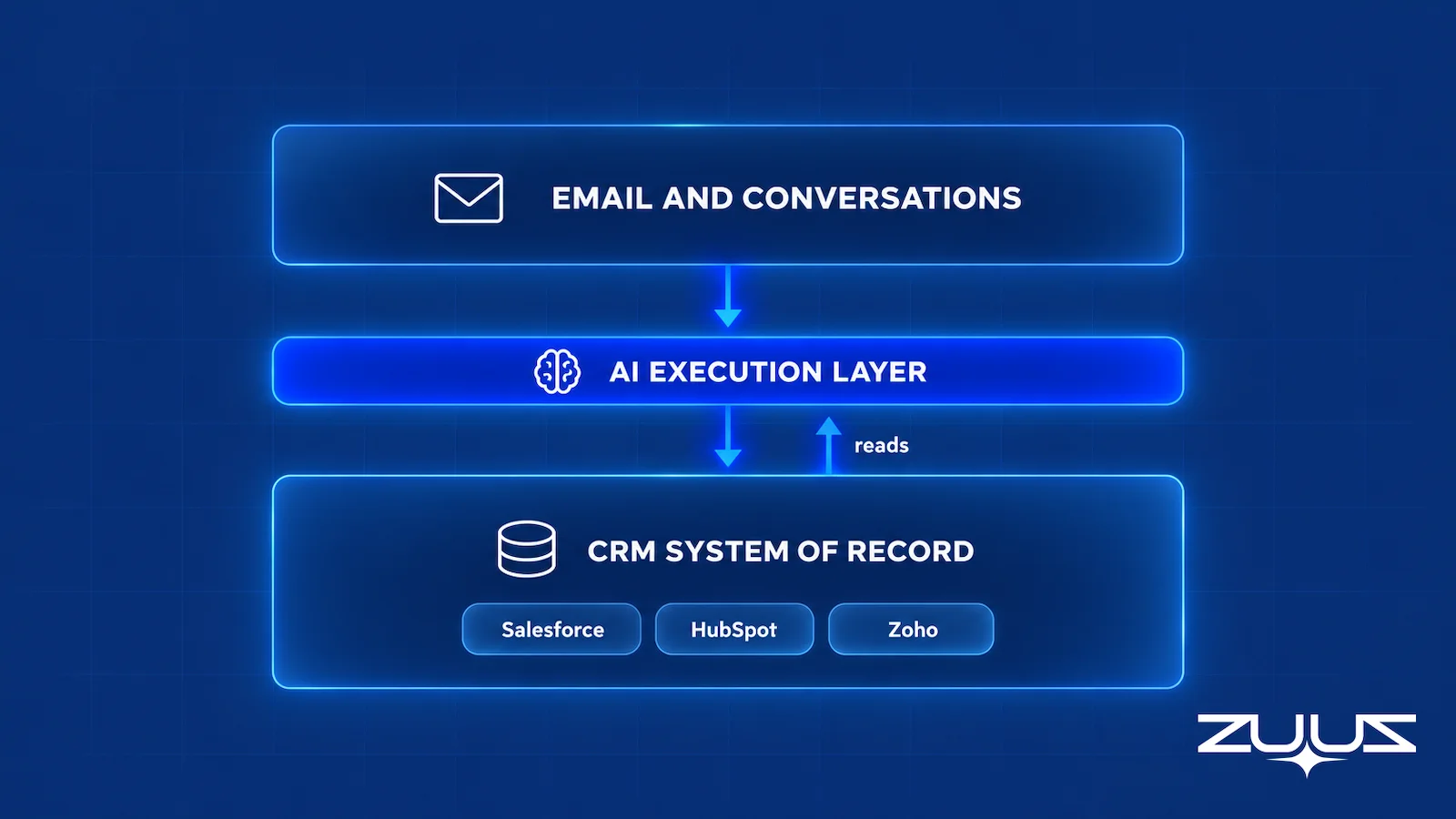
ZUUZ is a revenue intelligence layer that runs on top of Salesforce, HubSpot, Zoho, Attio or Pipedrive, including more than one at once. It is not a CRM and it does not replace one. For account management in crm terms, it is a lens over the accounts already there rather than a second place to record them.
What it does with an account is narrow and specific. It reads the email threads attached to that customer, identifies renewal dates and contract references, flags engagement decay and support friction as churn risk, keeps deal history against the account current, and writes the results into CRM fields rather than into a separate dashboard. A rep can also ask a plain-English question about an account through the AI search agent and get an answer from the CRM without building a report.
What ZUUZ does not do is equally important to state. There is no relationship mapping, no org chart builder, and no whitespace or expansion analysis against a product catalog. There is no revenue forecasting. A team whose actual requirement is formal strategic account planning across a named list of enterprise customers needs a key account planning suite, and ZUUZ is not a substitute for one.
The distinction that matters is between a lens and a new dataset. A planning suite asks a person to build a model of the account and keep it accurate. ZUUZ reads what already happened in the systems the team already uses, which means the account view degrades only if people stop emailing each other.
One concrete result is available publicly. RA Technologies, a US-based IT services firm, surfaced $120K in previously unrecorded pipeline within 72 hours of connecting ZUUZ, described in the RA Technologies case study. That revenue was not created by the tool. It already existed inside email threads that had never reached an account record, which is the same gap this whole category is trying to close.
Put a Renewal and Risk Lens Over Accounts Already in the CRM.
Connect an existing CRM and see which accounts are drifting, which renewals are close, and what the last conversation actually said.
Which Type of Account Management Software Fits Which Sales Team
The fastest way through this decision is to match the shape of the book of business rather than the size of the company. Five common situations cover most B2B teams.
A small book with simple workflows. Under roughly fifty accounts with straightforward renewals, the CRM’s own account view plus a few custom fields is genuinely enough. Buying client account management software at this stage adds cost and a second place to look without solving anything the CRM cannot.
A handful of very large enterprise accounts. When ten to fifty accounts carry most of the revenue and each involves a wide buying committee, a key account planning suite earns its price. Relationship maps and whitespace planning matter here in a way they simply do not at fifty transactional accounts.
A large recurring-revenue portfolio with usage data. Subscription software businesses with product telemetry and a staffed customer success function should look at customer success platforms first, since health scoring is what those platforms are actually built to do.
Email-heavy relationships with thin CRM history. IT services firms, distributors, and value-added resellers usually have complete account history sitting in inboxes and almost none of it in the CRM. Sales account management software that depends on reps typing the history in will not fix that, because the typing is the thing that never happens. An execution layer that reads email is the closer match, and the related problem of outsourcing CRM data entry tends to surface for the same teams.
Split ownership between sales and customer success. When both functions touch the same accounts, the software decision should wait until responsibilities are settled. No tool resolves an ownership disagreement, and buying one during the argument usually formalizes the confusion. Settling that inside a defined revenue operations function is usually the cheaper first move.
Two of these situations overlap more than they look. A team with a large renewal book and thin CRM history often needs the renewal and risk lens long before it needs formal planning, which is why tracking renewals across multiple products and closing revenue leakage tend to deliver faster than a planning rollout.
A First Step That Is Not a Rollout
The cheapest way to find out whether this is a tooling problem or a capture problem is to run it on one mailbox. Connect a single sales inbox, let ZUUZ read the last 90 days against the accounts already in Salesforce, HubSpot, Zoho, Attio or Pipedrive, and see what it writes to a record, with full change history and one-click rollback. ZUUZ is a revenue intelligence layer on top of the CRM a team already runs; it is never a CRM and never replaces one. Most tools in this category report on what the rep entered, which is why a quiet account reads as a healthy one. The trial runs 30 days, free, with no credit card: https://zuuz.ai/trial/
Frequently Asked Questions
What is account management software?
Account management software organizes the work of retaining and growing existing customers after a deal closes. Its unit of work is the customer account rather than the individual deal, and it typically tracks ownership, contract and renewal details, relationship health, and expansion opportunity. The label covers four distinct product types, from key account planning suites to CRM execution layers, which is why search results for the term look so inconsistent.
Is account management software the same as a CRM?
No, though the overlap is larger than most vendors suggest. Salesforce, HubSpot, and Zoho all ship an account or company object that stores contacts, deals, and activity history, which already covers the storage side. A dedicated tool adds something on top, such as structured account plans, health scoring from usage data, or automatic population of account fields from email. If the only requirement is a place to record accounts, the CRM already handles it.
What is the difference between key account management and account management?
Key account management applies a formal, resourced planning process to a small number of strategic customers, usually those carrying a disproportionate share of revenue. It involves documented account plans, mapped buying groups, and named executive sponsors. General account management covers the whole customer base with lighter process. The software follows the same split, with key account management software building structured plans and broader tools focusing on coverage and renewal timing.
Does account management software replace the CRM?
It should not, and most credible products do not claim to. The CRM stays the system of record for accounts, contacts, and opportunities, because moving that record into a second platform creates two versions of the truth and a sync problem. The better arrangement is a tool that reads from and writes back to the CRM, so account data stays in one place while the extra capability sits alongside it.
What should account management software track?
Five things, kept genuinely current rather than filled in once. Ownership and last meaningful contact, commercial state including contract value and attached products, renewal timing, a risk view that moves when behavior changes, and the conversation history that explains why the account is in its present state. The last item is the one most commonly missing, because it usually lives in email rather than in any CRM field.
Which account management tool is best for a small sales team?
For a small team under roughly fifty accounts, the account view already inside Salesforce, HubSpot, or Zoho plus a few custom fields is usually the right answer. Buying a separate platform at that scale adds a second place to look without solving a problem the CRM cannot. The exception is a team whose account history lives almost entirely in email, where a capture layer pays for itself before any planning tool would.
Can account management software update the CRM automatically from email?
Some types can. Execution and capture layers read email and calendar activity, extract structured details such as renewal references, stakeholder changes, and deal movement, then write them into CRM fields. Key account planning suites and customer success platforms generally do not work this way, since they depend on a person building the plan or on product usage telemetry. Confirming that writes actually reach the CRM, rather than only a vendor dashboard, is worth testing directly.
Does ZUUZ do relationship mapping or whitespace analysis?
No. ZUUZ does not build relationship maps, org charts, or whitespace and expansion analysis against a product catalog, and it does not forecast revenue. Its account scope is narrower: reading renewal dates, churn risk signals, and deal history out of email activity and writing them into Salesforce, HubSpot, Zoho, Attio, or Pipedrive. Teams that need formal strategic account planning across named enterprise accounts should evaluate a key account planning suite instead.

