
MSP Sales Process: 7 Stages From First Call to MSA
The MSP sales process in 7 stages, from lead and assessment to pitch, objections, signed MSA and handoff, with exit criteria and where deals stall.


CEO of ZUUZ. He scaled Cloud Box Technologies from 0 to $25M ARR in IT services and distribution before building ZUUZ. Connect on LinkedIn
TL;DR: The MSP sales process runs in seven stages: qualify the lead, run discovery and a technical assessment, build the proposal and pricing, deliver the sales presentation and pitch, work through objections, close on a signed MSA, and hand the client to service delivery. Most stalled deals do not die at a stage; they die between stages, in follow-ups and client details that live in the owner's inbox. ZUUZ reads email, calendar, meetings and LinkedIn messages, finds the deal signals, and updates the CRM automatically with full change history and one-click rollback, so every stage has a record behind it.
- A repeatable MSP sales process has seven stages, each with a written exit criterion.
- The technical assessment sets scope, price and the story the sales presentation tells.
- A strong MSP sales pitch names client outcomes, not the tool stack.
- The close is a signed MSA plus SOW, and the handoff to service delivery is part of the sale.
- Deals stall where follow-ups and client details sit in the owner's inbox and never reach a CRM field.
- ZUUZ is revenue intelligence for the IT channel. It captures those conversations and keeps the CRM current; ConnectWise PSA receives won customers.
Picture a 35-person MSP on a Thursday afternoon. The owner ran a great discovery call with a dental group two weeks ago and promised a quote once the practice's IT contact sent the device count. The IT contact replied on Monday with the count and a question about after-hours support. That reply sits, read, in the owner's inbox, under forty service escalations. The CRM still says "Discovery," and the dental group has started taking calls from someone else.
The owner can sell. What failed is the process around the selling: no exit criterion for discovery, no owner for the next step, no record of what the client said. This guide walks through the MSP sales process from first conversation to signed MSA and onboarding, with exit criteria for each stage and a plain look at where deals stall.
What the MSP Sales Process Is
The MSP sales process is the repeatable sequence of steps that turns a prospect into a managed services client: from the first conversation, through an assessment and proposal, to a signed master services agreement (MSA) and onboarding. It is the operating manual for MSP sales, so anyone who sells can run it the same way every time.
It differs from selling hardware or a one-off project in three ways. The buyer commits to a multi-year relationship, so trust outweighs features. The price depends on what the assessment finds, so technical work comes before the proposal. And onboarding is where the promises made in the sales presentation hold or fall apart.
In most MSPs of 10 to 200 people, the seller is the owner, a vCIO or a technician who is good with clients, not a full-time salesperson. That is why the MSP sales process has to be written down: anything that depends on a split-attention seller's memory will slip.
The MSP Sales Process at a Glance
Seven stages cover almost every new-logo deal. The lengths are illustrative ranges for a small or mid-sized client, not industry benchmarks; regulated or multi-site clients run longer.
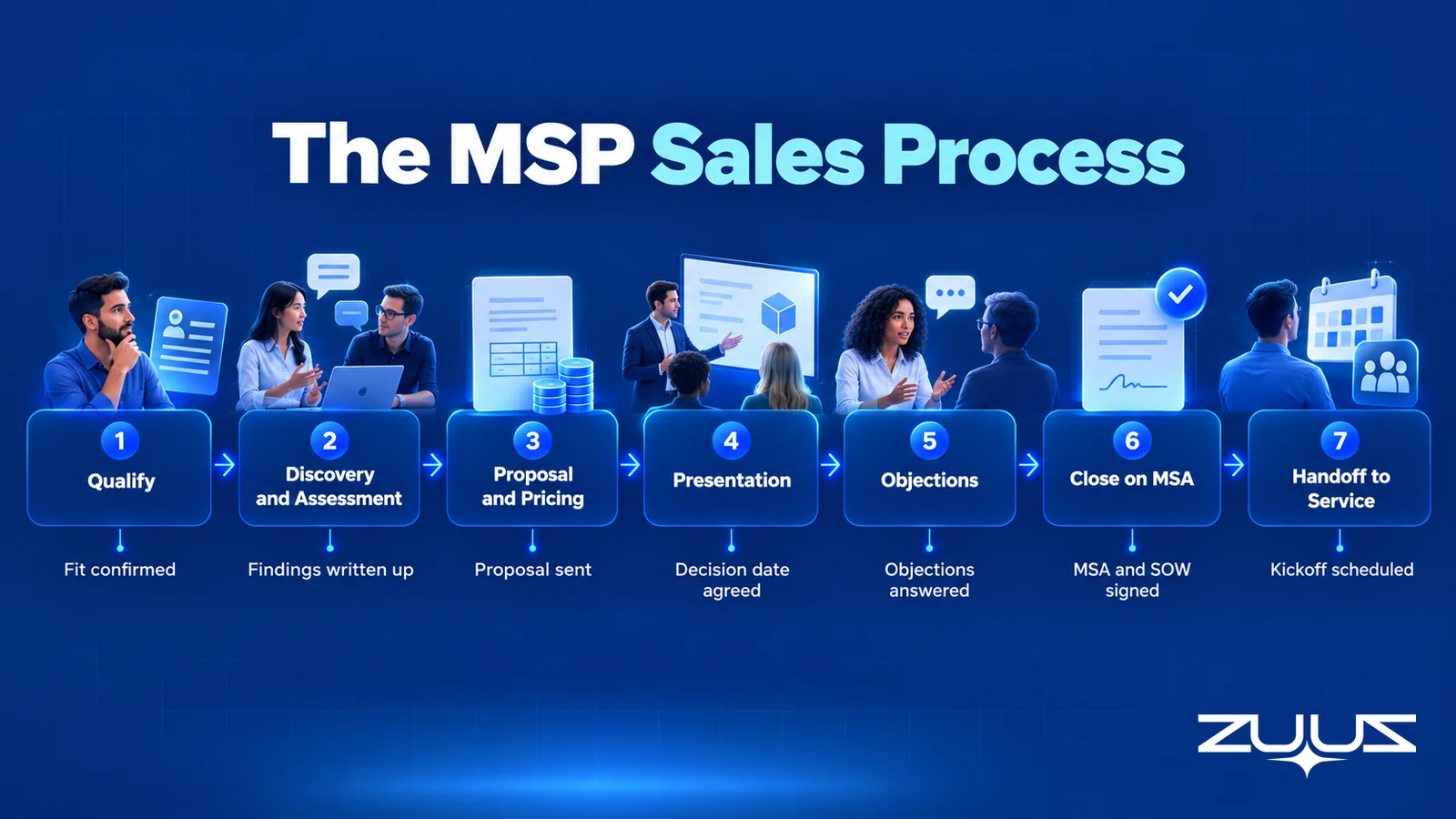
| Stage | Goal | Exit criteria | Typical length (illustrative) | Where it stalls |
|---|---|---|---|---|
| 1. Qualify the lead | Decide whether this prospect deserves sales time | Fit confirmed on size, environment and reason to change; discovery booked | 1 to 5 days | Slow first reply; the lead sits in an inbox |
| 2. Discovery and assessment | Understand the business problem and the environment | Pain, decision makers, budget range and timeline documented; assessment findings written up | 1 to 3 weeks | Missing access, missing device counts, unknown decision maker |
| 3. Proposal and pricing | Turn findings into a scoped, priced offer | Proposal sent with scope, exclusions, recurring fee and onboarding fee | 3 to 7 days | The owner has not found time to write it |
| 4. Presentation and pitch | Walk the decision makers through the proposal | Proposal presented live; decision process and date agreed | 1 to 2 weeks | Proposal emailed instead of presented |
| 5. Objections | Resolve the real reason for hesitation | Every stated objection answered in writing | Days to weeks | "We need to think about it" with no next date |
| 6. Close | Get the MSA and SOW signed | Signed MSA and SOW, billing details, start date | 1 to 3 weeks | Legal review, security questionnaire, contract notice period with the incumbent |
| 7. Handoff to service | Give delivery everything sales learned | Handoff accepted by the onboarding lead; kickoff scheduled | 1 to 5 days | Client context lives in the seller's head and inbox |
The column that matters most is exit criteria: a deal moves only when the criterion is true and visible in the CRM, not when the seller feels good about the last call. Almost every stall in the last column is a follow-up nobody owned.
Stage 1. Qualify the Lead Before the First Meeting
Finding leads is its own discipline, covered in the guide to MSP sales leads. The MSP sales process starts once a lead exists, and its first job is to decide quickly whether that lead deserves an assessment.
Qualification questions for the first call
A short first call should answer five things: users, devices and sites; who supports IT today; what triggered the conversation now (an outage, an audit, a cyber insurance questionnaire, growth); who signs; and roughly what the business spends on IT. A prospect with no trigger is usually researching, not buying.
When to disqualify or nurture
Disqualifying early is a sales skill. A 4-person office that wants break-fix pricing, an unsupported environment, or a buyer locked in for another 18 months should get a nurture path, not a free assessment.
Stage 2. Discovery and the Technical Assessment
Discovery answers the business question: what is this client trying to fix, and what does it cost them? The assessment answers the technical one: what is in the environment, and what would supporting it take? Skipping either produces a quote too cheap to deliver or too vague to sign.
A 30-minute discovery agenda
A workable agenda runs five blocks: business context, current IT pain, the operational impact of that pain, the decision process (who, when, what budget cycle), and an agreed next step. Owners skip the last block, and it is the one that keeps the deal moving.
What the assessment should cover
A pre-sales assessment typically covers endpoints and users, servers and network, Microsoft 365 or Google Workspace, backup and recovery, security controls, line-of-business applications and existing vendors. Framing security findings against a recognized standard such as the NIST Cybersecurity Framework or the CIS Critical Security Controls makes the findings credible to a business owner and gives the sales presentation a structure.
Free or paid assessment
A light assessment a technician can run in a few hours is usually free. A deep assessment with interviews and a remediation plan is consulting work, and many MSPs charge for it and credit the fee against onboarding. Either way, the findings belong on the CRM opportunity, not in a technician's notes folder.
Discovery Notes Belong on the Deal, Not in an Inbox.
ZUUZ reads the discovery emails, meetings and calendar invites and writes decision makers, pain points and next steps to the CRM opportunity.
Stage 3. Proposal and Pricing
In the MSP sales process, the proposal turns findings into a scoped, priced offer, short enough for a business owner to read and specific enough to sign. It covers a summary in the client's words, assessment risks, recommended services, scope and exclusions, service levels, onboarding, pricing and a next step.
Common managed services pricing models
| Model | How it works | Works well when | Watch out for |
|---|---|---|---|
| Per user | A monthly fee per covered employee, covering all their devices | Most staff have a laptop, a phone and cloud apps | Shared devices and servers need a separate line |
| Per device | A monthly fee per endpoint, server or network device | Device counts are stable and easy to audit | Clients feel nickel-and-dimed as devices grow |
| Tiered packages | Good, better, best bundles with different scope and response times | The MSP wants a simple choice and a clear upgrade path | Tiers that differ only on price invite a race to the bottom |
| All-inclusive flat fee | One monthly price for a defined environment and scope | The environment is well documented after the assessment | Scope creep without a change-request clause |
Separate recurring fees from one-time work
Onboarding, remediation, migrations and hardware should be priced as one-time items, separate from the monthly fee. Bundling them inflates the recurring price, and clear separation makes the price objection easier to answer.
Stage 4. The MSP Sales Presentation and Pitch
The most common mistake in the MSP sales process at this stage is emailing the proposal instead of presenting it. A proposal sent cold gets forwarded without context and compared line by line with a cheaper quote. A proposal presented live, to every decision maker, gets discussed on the MSP's terms.
How to structure an MSP sales presentation
An MSP sales presentation that works follows the client's logic, not the service catalog: their situation, the assessment risks, the recommended approach, what changes for staff, onboarding, price and the decision being asked for. Assessment findings shown with real counts from the client's own environment persuade more than any slide about the MSP.
Building the MSP sales pitch around outcomes
The MSP sales pitch is the short version of the presentation, the two or three sentences the owner says when someone asks why they should switch. It works when it names an outcome the client cares about rather than a tool. Three illustrations of how the pitch changes by buyer:
- A security-worried buyer: "Your insurer asked about MFA and backups, and the assessment found gaps in both. We close them in the first 30 days and document it."
- A growing business: "Your second office opens next year. New staff will be productive on day one, without your operations manager running IT on the side."
- A buyer unhappy with the incumbent: "You said tickets sit for days. Here are our response targets and how you will see what we did each month."
The presentation mistake that costs the most deals is ending without an agreed next step and date, which turns a live decision into "send it over and we will review."
Stage 5. Handling Objections Without Discounting
At this point in the MSP sales process, an objection is usually information, not rejection. Find out what it means before answering, and answer in writing so the response survives being forwarded.
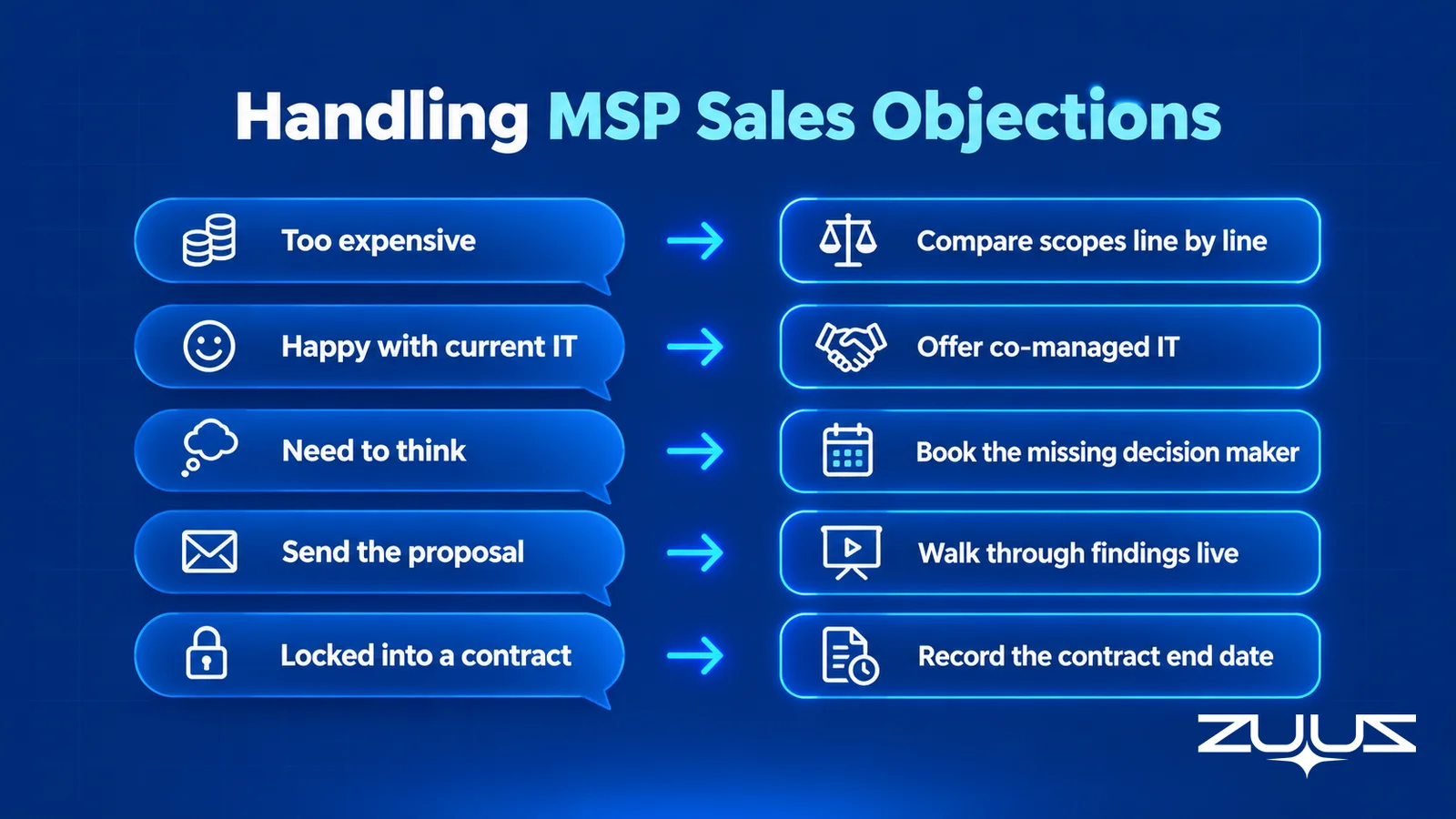
| Objection | What it usually means | A better response than a discount |
|---|---|---|
| "You are more expensive than our current provider." | The client is comparing monthly fees, not scope | Lay the two scopes side by side, line by line, and show what the cheaper quote leaves out |
| "We are happy with our current IT person." | The pain is real but nobody wants to fire a friend | Offer co-managed IT or a defined project, rather than a full replacement |
| "We need to think about it." | A decision maker or a fact is missing | Ask who else needs to see it and what information is missing, then book that meeting |
| "Just send me the proposal." | The buyer wants to avoid a sales conversation | Send it, and ask for 20 minutes to walk through the assessment findings with everyone who decides |
| "We are locked into a contract." | The timing is wrong, not the fit | Record the contract end date and notice period on the opportunity and agree a check-in before notice is due |
Stage 6. Closing on a Signed MSA
Closing the MSP sales process means moving from a verbal yes to signed paper: for most MSPs, the MSA, the statement of work and the service level agreement.
MSA vs SOW vs SLA
The MSA sets the general terms: liability, confidentiality, payment, term and termination. The statement of work (SOW) defines what is delivered for this client: services, covered users and devices, exclusions and onboarding. The SLA defines response and resolution targets, support hours and escalation. Keeping them separate means an added site needs a new SOW, not a renegotiated MSA.
Procurement, security questionnaires and signatures
Larger and regulated clients add legal review, redlines and a vendor security questionnaire. Each should be a dated next step on the opportunity. Deals here rarely die from disagreement; they die from a questionnaire that sat unanswered for three weeks.
What to confirm before marking closed-won
Signed MSA and SOW, agreed pricing, a start date, billing details, the incumbent's offboarding date and a named onboarding owner. If any is missing, the deal is not closed; it is waiting.
Every Promised Date Should Be a Date in the CRM.
ZUUZ captures contract end dates, questionnaire deadlines and next steps from email and meetings, and writes them to the opportunity with full change history.
Stage 7. Handoff From Sales to Service Delivery
The last stage of the MSP sales process is the handoff. The client bought promises made in discovery and the presentation, and onboarding can only keep promises it knows about. A short handoff meeting between seller, onboarding lead and account manager prevents most first-month escalations. The general mechanics of sales handoffs apply, with one MSP twist: assessment findings matter as much as commercial terms.
The handoff note covers contacts and roles, why the client switched, assessment risks, scope and exclusions, anything promised outside the SOW, and the incumbent's offboarding plan. ZUUZ users on ConnectWise PSA get the won customer synced into the PSA, so the service side starts from the same account the sales side closed.
The Record-Ready Test for a handoff
To check whether a handoff will hold, run the Record-Ready Test, a ZUUZ framework:
- Choose an account the owning rep has not touched in two weeks.
- Ask a colleague to say who the buying group is, what was last agreed and what happens next, from the CRM alone.
- Every answer needing the rep, the inbox or a call is a record-ready failure.
- A record that passes survives a handoff, a territory change and a departure.
If the onboarding lead needed the owner on a call to learn what was promised, the handoff depended on memory. The same discipline carries into ongoing MSP account management once the client is live.
Where the MSP Sales Process Stalls
Look back at the "where it stalls" column. Almost none of the stalls are about price or competition. They are a reply that sat unread, a device count that never reached the proposal, a contract end date nobody wrote down. In an owner-led MSP, all of those live in one place: the owner's inbox, calendar and LinkedIn messages.
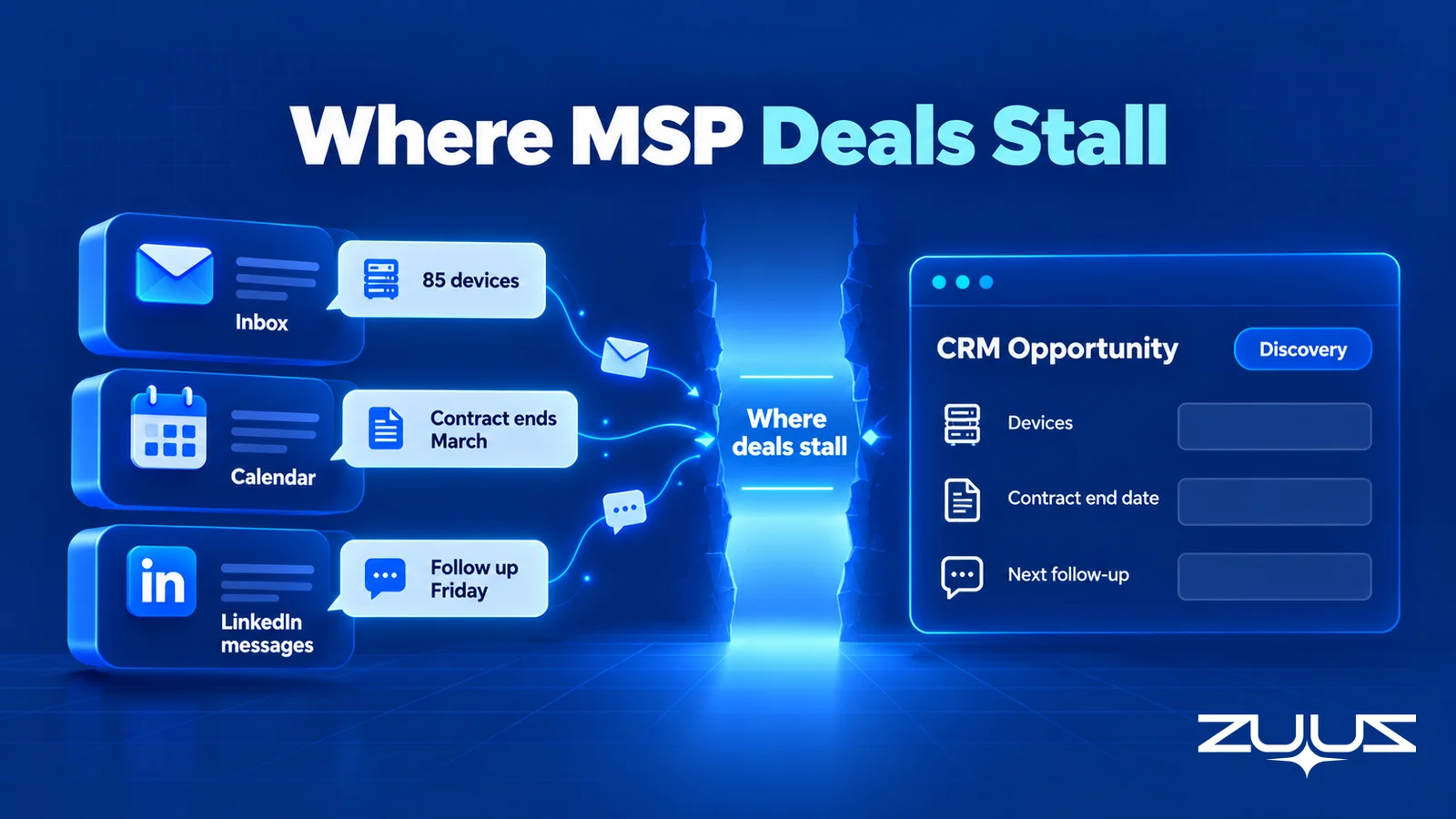
The underlying problem is time. Salesforce's 2026 State of Sales research reports that sales reps spend 60% of their time on non-selling tasks, including manually entering customer notes into the CRM. An MSP owner who sells between escalations, hiring and vendor calls has even less room, so the CRM gets updated at the end of the week, from memory, if at all.

To see how much of a pipeline is real, run the Pipeline Truth Test, a ZUUZ framework:
- Take the top five deals by value this quarter.
- For each, find the CRM evidence for its stage and close date: a dated written commitment, not a rep's assurance.
- Count how many rest on a stage last changed more than two weeks ago.
- Mostly-undated top five means the number reflects rep optimism. ZUUZ does not forecast; it makes the record underneath the number real.
From an operator's seat, the pattern is consistent. Avinash Gujje, who scaled Cloud Box Technologies from $0 to $25M ARR in IT services and distribution, puts it this way: across IT services and distribution, the deals that slip away quietly are rarely the ones a team competes hard for. They are the ones where the client asked a small question, such as after-hours coverage or a device count, and waited a week for the answer. Buyers read the speed of a pre-sales reply as a preview of the speed of support. The discipline that works is not more pipeline meetings; it is making sure every client question has an owner and a date the day it arrives.
MSP Sales Process: How ZUUZ Keeps the CRM Current
ZUUZ is revenue intelligence for the IT channel: MSPs and the vendors, distributors and resellers they work with. It reads email, calendar, meetings and LinkedIn messages, finds deal signals such as a new decision maker, a contract end date or a promised follow-up, and updates the CRM automatically, with full change history and one-click rollback. ZUUZ also drafts replies to client questions; the rep reviews and sends them.
What makes this structurally different from a CRM email plugin is that nobody has to remember to log anything, and the result lands in CRM fields a pipeline report can read, not an activity feed. ZUUZ works with Salesforce, HubSpot, Zoho, Attio and Pipedrive, and ConnectWise PSA syncs won customers so delivery starts from the same account. Early-stage MSPs without a CRM can use ZUUZ as their AI CRM; later-stage MSPs use it as the intelligence layer on the CRM they already run. More detail on the MSP fit is on the ZUUZ page for managed service providers.
The proof point is specific. RA Technologies, a US IT services company, surfaced $120K of identified pipeline within 72 hours that two years of HubSpot had never recorded. That is identified pipeline, not closed revenue, and it is the gap the stage table shows: the deal existed in the inbox, not the record.
A concrete first step: connect the owner's mailbox. ZUUZ reads the last 90 days, and the gap between what the CRM shows and what was said becomes visible. Every stage of the MSP sales process then has a record behind it. The first pipeline usually appears within 72 hours, a full rollout takes one to two weeks, and the trial is free for 30 days. For the broader automation picture across an MSP's sales motion, see MSP sales automation.
See What the Owner's Inbox Knows That the CRM Does Not.
Connect one mailbox and ZUUZ reads the last 90 days, then writes the deals, contacts and next steps it finds into the CRM.
Measuring the MSP Sales Funnel
The MSP sales funnel measures conversion between stages across all deals; the pipeline tracks individual opportunities. The pipeline view, including the expansion and renewal motions this post leaves out, is covered in the guide to the MSP sales pipeline.
A small MSP needs a handful of funnel numbers: qualified leads per month, assessment-to-proposal rate, proposal-to-close rate, days in each stage, recurring revenue won and lost-deal reasons. Days in stage shows the bottleneck. If proposals take three weeks to go out, the fix is a template, not more leads.
Every MSP sales process metric depends on true stage dates. HubSpot's guide to setting up deal pipelines shows how to map these stages in a CRM; keeping the dates honest is the part configuration cannot do. For MSPs deciding where stages should live, see PSA vs CRM and the best CRM for MSPs.
Which MSPs This Fits, and Which It Does Not
A written MSP sales process helps any MSP that sells more than a few new clients a year, most of all where the owner or a technician sells. ZUUZ fits MSPs whose deals run through email, calendar, meetings and LinkedIn messages, including conversations with vendors and distributors, and that want the CRM to reflect them without anyone typing them up.
The limits are worth stating plainly. ZUUZ does not read PSA tickets, does not forecast revenue, does not run outbound email sequences and does not write RFP responses. It will not fix a process with no stages; it keeps an existing one honest. An MSP that closes two or three deals a year through one referral partner may get more from a weekly review and a QBR rhythm with existing clients than from any tool.
Frequently Asked Questions
What are the 7 steps of the MSP sales process?
The seven steps of the MSP sales process are lead qualification, discovery and technical assessment, proposal and pricing, the sales presentation and pitch, objection handling, closing on a signed MSA and SOW, and handoff to service delivery. Each step needs a written exit criterion so a deal only advances when something verifiable has happened, such as a booked assessment or a signed agreement.
How long does the MSP sales cycle take?
The MSP sales cycle commonly takes several weeks to a few months from first conversation to signed MSA, depending on client size, how deep the assessment goes, legal and security reviews, and whether the client must give notice to an incumbent provider. Tracking days spent in each stage shows where a specific MSP's cycle is actually losing time.
What should an MSP sales presentation include?
An MSP sales presentation should include the client's situation as heard in discovery, the risks found in the technical assessment, the recommended services, what changes for staff day to day, the onboarding plan, pricing split into recurring and one-time fees, and the decision being requested. It should end with an agreed decision date, not an open "let us know."
How do you write an MSP sales pitch?
Write an MSP sales pitch by naming one outcome the client cares about and tying it to something found in discovery or the assessment. For example, closing backup and MFA gaps before a cyber insurance renewal. Keep it to two or three sentences, avoid tool names, and adjust it for security-driven buyers, growing businesses and buyers unhappy with their current provider.
What is an MSP sales funnel?
An MSP sales funnel is the view of how prospects convert from stage to stage across all deals: leads to qualified leads, qualified leads to assessments, assessments to proposals, and proposals to signed clients. It complements the sales pipeline, which tracks individual opportunities. Conversion rates and days per stage show which part of the funnel is the bottleneck.
How do MSPs price managed services?
MSPs usually price managed services per user, per device, in tiered packages or as an all-inclusive flat fee for a defined environment. Onboarding, remediation, migrations and hardware should be priced separately as one-time work. The right model depends on how the client's staff use devices and how clearly the assessment has defined the environment.
How should an MSP handle the "too expensive" objection?
An MSP should handle the "too expensive" objection by comparing scope, not price. Put the current provider's coverage beside the proposal line by line and show what the cheaper option excludes, such as security tooling, after-hours support or documentation. Discount only as a last step, and only in exchange for something, such as a longer term.
What is the difference between an MSA and an SOW for an MSP?
The MSA sets the general legal and commercial terms of the MSP relationship, such as liability, payment, term and termination. The SOW defines exactly what will be delivered for a specific client or project, including services, covered users and devices, exclusions and onboarding. Adding a site or project usually means a new SOW under the existing MSA.
Can ZUUZ keep the CRM current when the owner does the selling?
ZUUZ keeps the CRM current by reading the owner's email, calendar, meetings and LinkedIn messages and writing deals, contacts and next steps to Salesforce, HubSpot, Zoho, Attio or Pipedrive, with full change history and one-click rollback. It drafts replies that the owner reviews and sends. ConnectWise PSA syncs won customers, and the trial is free for 30 days.

