
A Practical Guide to AI Sales Tools for Revenue Teams
AI sales tools split into six categories, and most buyer guides skip the one that keeps the other five accurate. See how to compare all six.

CEO of ZUUZ. He scaled Cloud Box Technologies from 0 to $25M ARR in IT services and distribution before building ZUUZ. Connect on LinkedIn
TL;DR: AI sales tools split into six functional categories, and most buyer’s guides only name five of them. Email signal capture, turning inbox activity into structured CRM records, is the category most guides skip. ZUUZ operates in that category as a CRM-agnostic execution layer across Salesforce, HubSpot, Zoho, Attio or Pipedrive.
- AI sales tools split into six functional categories, and most buyer’s guides only cover four or five of them.
- Email signal capture, turning inbox activity into structured deal data, is the category most guides leave out entirely.
- Conversation intelligence and sales engagement tools analyze what happens after a lead exists; email signal capture determines whether the lead gets recorded at all.
- CRM-native AI tools tie a company to one CRM vendor; CRM-agnostic tools operate across Salesforce, HubSpot, Zoho, Attio or Pipedrive without a migration.
- The right AI sales tool stack depends on where deals actually get lost, not which category has the most vendors.
- A RevOps team evaluating this market should map its own pipeline against these six categories before comparing individual vendors.
Most revenue leaders evaluating AI sales tools start with a list of vendor names and no framework for comparing them. A tool that scores leads gets compared against one that analyzes sales calls, and the comparison collapses because the two products solve different problems.
The market has expanded fast enough that AI sales tools now cover at least six distinct categories, each built around a different signal source and a different point in the deal cycle. Sales teams between $50 million and $5 billion in revenue feel this most acutely, since they run enough volume to need automation but rarely have a dedicated RevOps engineer to architect the stack.
This guide breaks the category down by function, flags the gap most buyer’s guides skip, and lays out a framework for building a stack that fits an existing CRM rather than replacing it.
What Counts as an AI Sales Tool
“AI sales tool” gets applied to almost any software that touches a sales process and uses a machine learning model somewhere in its stack. That definition is too broad to support an actual buying decision.
A narrower, more useful definition: an AI sales tool is software that uses machine learning or language models to automate a decision or action a sales rep would otherwise make manually. That includes scoring which lead to call first, drafting a follow-up email, flagging a deal that has gone quiet, or extracting deal terms from an email thread.
This definition excludes plain automation. A workflow trigger that sends an email at a fixed time is not an AI sales tool, even when a vendor markets it as one. The distinguishing factor is whether the system makes a judgment call based on patterns in data, rather than following a fixed rule.
The category boundary matters because it changes what to evaluate. A rule-based automation tool should be judged on reliability and setup time. An AI sales tool should be judged on the quality of the underlying signal it works from, since a scoring model trained on incomplete CRM data produces confident, wrong answers.
Six categories account for most of what the market currently sells under the AI sales tools label, and understanding where a vendor sits inside them is the fastest way to evaluate a fit.
The Six Categories of AI Sales Tools
Vendors market to different buyers, so the same underlying category gets described in different language depending on which team is buying. Sorting by function rather than by vendor pitch makes the comparison easier.
The six categories below cover conversation analysis, engagement automation, prospecting, scoring, CRM data management, and pipeline health. Each answers a different question about a deal, and most sales organizations need capability from more than one.
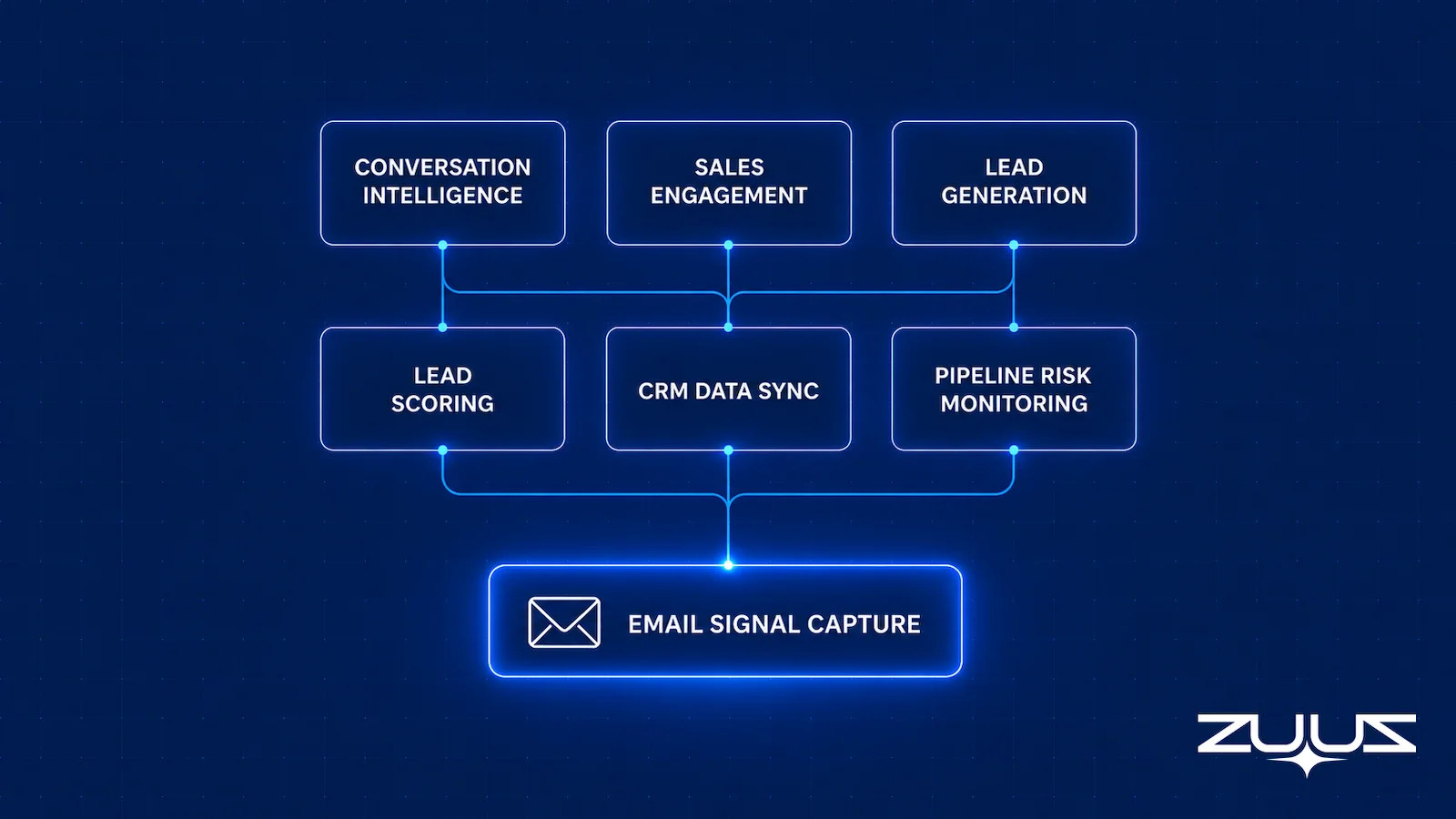
Conversation Intelligence
Conversation intelligence tools record and analyze sales calls and meetings, surfacing talk-time ratios, competitor mentions, and objection patterns. Gong and Chorus, part of ZoomInfo, are the best known vendors in this category.
This category solves a coaching and forecasting problem: what happened on the call, and what that predicts about the deal. It does not solve a data capture problem, since most conversation intelligence tools only cover calls and meetings that get recorded, not the email threads that surround them.
Sales Engagement and Outreach Sequencing
Sales engagement platforms automate outbound cadences: sequenced emails, call reminders, and follow-up scheduling across a list of prospects. Outreach and Salesloft lead this category, both built around multi-step campaign automation for sales development reps.
These tools assume a rep-initiated outbound motion, where the sales team decides who to contact and the software manages the cadence. They are built for volume outbound, not for processing signals from inbound email a prospect sends unprompted.
Lead Generation and Data Enrichment
Apollo, ZoomInfo, and Cognism sit in this category, providing contact databases and firmographic data that feed the top of a pipeline. These tools answer who the sales team should contact, rather than what is already happening with existing contacts.
Lead Scoring and Buyer Intent
Lead scoring tools rank contacts and accounts by likelihood to convert, using a combination of firmographic fit, engagement history, and intent signals pulled from web activity or third-party data cooperatives. 6sense is a widely referenced vendor in this space. The scoring output is only as reliable as the input signals a scoring model works from.
CRM Data Sync and Hygiene
This category covers tools that keep CRM records accurate: deduplication, field validation, and activity logging that reduces manual entry. Salesforce Einstein and HubSpot Breeze bundle some of this natively inside their own CRM, which works well inside a single platform but not across a company running more than one CRM.
Pipeline Risk and Deal Health Monitoring
Pipeline risk tools flag deals that have stalled, lost a champion, or gone quiet longer than the typical cycle length for that deal size. Clari is the best known vendor, built primarily around Salesforce data. Most sales pipeline risk software in this category depends on CRM fields being current to detect risk accurately.
Five of these six categories assume the CRM record is already accurate. The category that determines whether it is accurate in the first place rarely gets its own line item in a buyer’s guide.
See Which Category Your Pipeline Is Missing.
ZUUZ reads a connected inbox and shows what deal activity never made it into the CRM. Book a 15-minute walkthrough on your own mailbox.
Email Signal Capture Is the Category Most Guides Miss
Every category above assumes a lead or deal already exists as a clean CRM record. In practice, a large share of deal activity starts and continues in email before anyone opens the CRM to log it.
A reply to a cold outreach message, an inbound request for quote, or a renewal conversation buried in a thread with a procurement contact can sit unlogged for weeks. Email signal capture tools read inbound and outbound email and extract the deal-relevant content: contact details, product interest, budget language, and timeline mentions.
The output is a structured, CRM-ready record built directly from email activity rather than from manual entry. This is distinct from a sales engagement platform, which sends email rather than reading it, and distinct from CRM-native automation, which logs activity a rep has already entered by hand.
The gap matters because of where deals actually die. A prospect that replies to an email six weeks after the last CRM update has effectively gone invisible to every downstream tool. The scoring model has stale inputs, the pipeline risk tool sees no active fields to flag, and the forecast excludes a deal that is, in reality, still moving. A closer look at how sales leads go missing inside an inbox shows how often this happens even at teams with a fully staffed sales operations function.
Most comprehensive AI sales tools guides, including several of the longest and most detailed published in 2026, define five or six categories without naming this one separately. That omission is not because email signal capture is rare. It is because the category sits between sales engagement and CRM administration, and most guides are organized around the tools their authors already sell.
Comparing AI Sales Tool Categories by Effort and CRM Fit
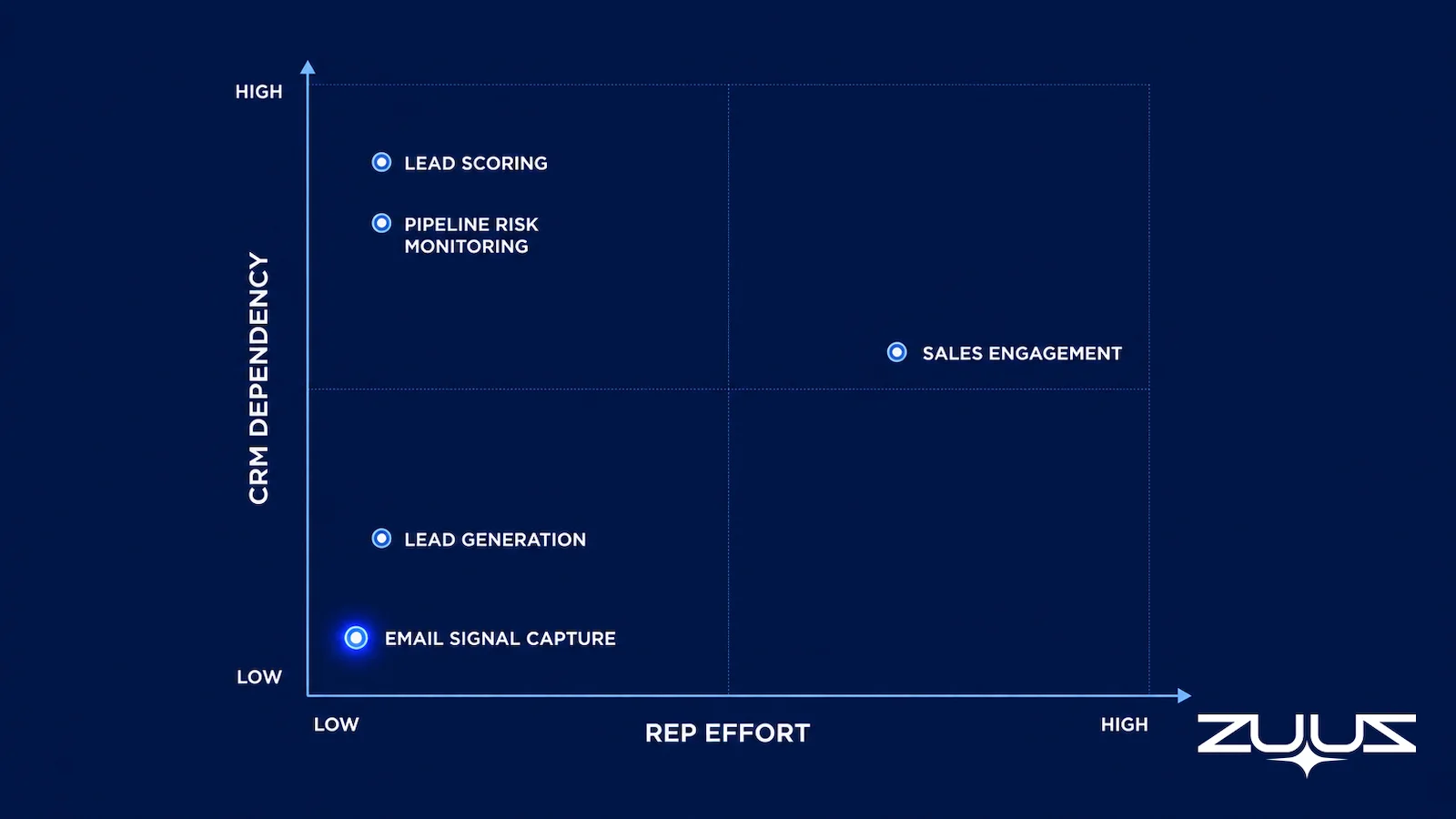
Buyers can decide faster by evaluating category first and vendor second. Two dimensions differentiate the categories most: the ongoing rep effort required to keep the tool useful, and how dependent the tool is on a specific CRM.
| Category | Ongoing Rep Effort | CRM Dependency | Primary Signal Source | Does ZUUZ Do This |
|---|---|---|---|---|
| Conversation Intelligence | Low, passive recording | Medium | Call and meeting recordings | Partly: ZUUZ reads meeting and call transcripts for deal facts, it does not score talk tracks or coach reps |
| Sales Engagement | High, campaign management | Medium | Rep-initiated outbound | No. ZUUZ does not run sequences or send outreach |
| Lead Generation and Enrichment | Low | Low | Third-party contact data | Partly: ZUUZ enriches the contacts and companies it captures rather than sourcing cold lists |
| Lead Scoring | Low | High | CRM fields plus intent data | Yes, it ranks captured signals by intent and engagement |
| CRM Data Sync and Hygiene | Low | Very high, single CRM | Existing CRM records | Yes, it writes structured records into Salesforce, HubSpot, Zoho, Attio or Pipedrive |
| Pipeline Risk Monitoring | Low | High | CRM stage and activity fields | Yes, it flags accounts that have gone quiet against their own history. It does not forecast revenue |
| Email Signal Capture | Very low, passive | Low, works across CRMs | Inbound and outbound email | Yes, this is the core job, plus LinkedIn messages |
The categories with the lowest rep effort, lead generation, lead scoring, and email signal capture, also carry the least CRM dependency at the input stage, though scoring and pipeline tools still need CRM fields for output. Email signal capture is the only category built to feed accurate data into the other five, rather than depend on them for its own accuracy.
Find Out Which Signals Your CRM Never Sees.
ZUUZ runs a historical lookback across a connected mailbox to show deal activity the CRM never recorded, at no cost to see the first result.
How to Choose an AI Sales Tool Stack
The starting question is not which category is best. It is which category addresses the specific point where a company’s pipeline currently loses accuracy or momentum.
A sales team with a high volume of inbound requests, common in distribution and reseller businesses, usually loses the most ground at the email signal capture stage. Quotes and renewal requests arrive by email and get logged inconsistently, if at all. A team running high-volume outbound cold email loses ground differently, typically at the sales engagement or lead generation stage.
Three questions narrow the choice faster than a vendor comparison chart. First, where does a deal currently go quiet without anyone noticing. If the answer is in the inbox, the priority category is email signal capture or pipeline risk monitoring, not conversation intelligence.
Second, does the company run one CRM or several. A single-CRM company, especially one already invested in Salesforce, gets more value from CRM-native tools like Einstein. A company running multiple CRM instances, common after an acquisition or across regional business units, needs a CRM-agnostic layer instead.
Third, what does the sales team already do well without software. A team with strong manual pipeline hygiene has less need for a hygiene tool and more need for scoring or risk monitoring layered on top of data that is already clean.
Revenue operations automation works best when it targets one clear gap first, rather than layering five new tools onto a stack that has never identified where deals are actually lost. Teams that skip this diagnostic step tend to end up with overlapping tools that all claim the same signal, a pattern documented in how RevOps teams evaluate software before adding a new layer.
The Capture Layer Test
Those three questions narrow the category. One more test narrows the vendor, and it applies to any tool in any of the six categories: judge it on whether the record is complete without rep effort.
- Does it capture from the channels where the deal actually moves – email, calendar, LinkedIn messages, meeting and call transcripts?
- Does what it captures land in CRM fields a report can read, or only in an activity feed a human must open?
- Does the rep have to remember anything – a BCC, a button, a sidebar, a sync?
- Can the rep correct it in one click before it is written?
A tool that fails 2 or 3 produces activity history, not a pipeline you can run a review on. Applied to this market the test is unkind to demo-friendly products. Most conversation intelligence tools pass question 1 for calls and fail question 2, because the summary lands in a feed rather than on a decision field. Most native sync features pass 1 and 2 for calendar and email metadata and fail on content, because attaching a thread to a contact is not the same as recording what the thread changed. Question 3 is where the quiet failures live: a sidebar a rep has to open is a behavior change dressed as automation, and it decays in the third busy week.
Worth stating plainly where ZUUZ fits in that test: ZUUZ is an AI layer on top of the CRM a team already runs, never a CRM and never a replacement for one. Most AI sales tools report on or act within what the rep already entered; ZUUZ produces the record they all depend on, and the rep approves it before it is written.
CRM-Agnostic vs CRM-Native AI Sales Tools
CRM-native AI tools, Salesforce Einstein and HubSpot Breeze among them, are built into the CRM platform itself and work best for a company that has fully standardized on one CRM and does not expect that to change. The tradeoff is lock-in: switching CRM platforms later means losing the AI layer along with the database.
CRM-agnostic tools sit above the CRM rather than inside it, reading and writing data across whichever platform a team uses. This matters for two groups of companies: those running multiple CRMs across business units or regions, and those that inherited a second CRM instance after a merger or acquisition.
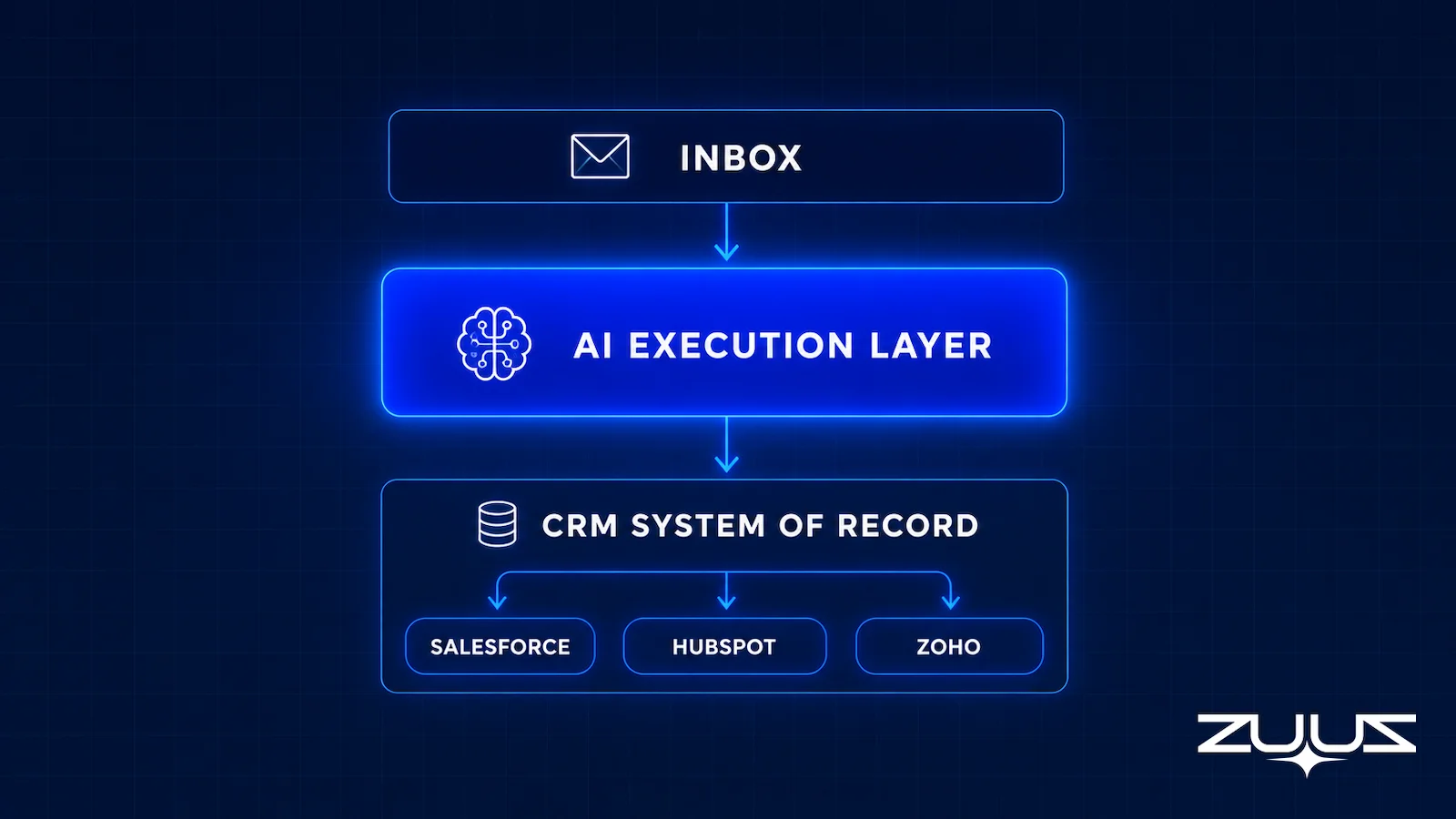
An account manager crm workflow illustrates the difference. A CRM-native tool can score a lead inside Salesforce, but it has no visibility into a renewal conversation happening in a HubSpot instance run by a different subsidiary. A CRM-agnostic layer reads both and writes back to whichever CRM owns that account. A closer look at why pipeline data drifts from reality across CRM instances covers this pattern in more detail.
The distinction is not about which approach is more advanced. It is about which constraint a company is willing to accept: platform lock-in in exchange for deeper native integration, or a layer on top that adds a small amount of setup complexity in exchange for working across whatever CRM the company runs today or adopts later.
Email to Pipeline: How ZUUZ Closes the AI Sales Tools Gap
RA Technologies, a US-based IT services company, had run HubSpot for two years before connecting its sales inbox to ZUUZ. The team assumed most active deals were already reflected in HubSpot, since reps entered new opportunities as a matter of routine.
ZUUZ ran a 90-day historical lookback across the connected mailbox and surfaced $120,000 in pipeline that had never been recorded in HubSpot at all: replies to old proposals, renewal inquiries, and follow-up threads that never made it into a CRM field.
ZUUZ operates as the email signal capture layer described earlier in this guide. It reads inbound and outbound email, extracts contact, company, and deal signals, including data found in attachments, and writes structured records back to Salesforce, HubSpot, or Zoho without requiring manual entry. A lead scoring layer ranks the captured signals by intent and engagement, and a pipeline risk layer flags accounts that have gone quiet against their typical cycle length.
Because ZUUZ operates across all three major CRMs rather than inside one of them, an IT services company running HubSpot in one region and Salesforce in another gets the same signal capture and account visibility from both, through the same connected mailbox. The RA Technologies deployment ran on the CRM the team already had, with no migration and no new database. See the full walkthrough of email-to-CRM sync for IT services sales teams for the technical detail behind this deployment.
From an operator’s seat
Across the deployments ZUUZ runs, the pattern is that the lookback is the easy part and the stack audit is where the real work lands. Teams arrive with a conversation intelligence tool, a scoring tool and native sync already in place, all three quietly claiming the same account, and nobody owns which one is allowed to write a field. The part teams do not plan for is deciding that before connecting anything: two tools writing the next step on the same deal produce a record that is busier and less trustworthy than the one they replaced. The order of operations that holds up is to name the writer for each field first, keep every other tool read-only, and only then let the rep start approving updates.
See What Your Own Inbox Is Already Hiding.
Run the same 90-day lookback RA Technologies ran, on the CRM already in place, no migration required.
A First Step That Sizes the Gap
Before buying into any of the six categories, there is a one-day version of this diagnostic. Connect one mailbox, let ZUUZ read the last 90 days, and have the rep who owns those threads review what it found before anything is written to the CRM. The output is a list of real leads, stakeholders, next steps and renewal signals the CRM never held, which is the only honest way to size the capture gap against the other five categories competing for the same budget. The trial runs 30 days, free, with no credit card: https://zuuz.ai/trial/
Frequently Asked Questions
What are AI sales tools?
AI sales tools are software applications that use machine learning or language models to automate decisions a sales rep would otherwise make manually, including scoring leads, flagging at-risk deals, and extracting information from email or calls. The category spans conversation intelligence, sales engagement, lead generation, scoring, CRM data management, and email signal capture.
Will AI sales tools replace sales reps?
AI sales tools automate specific decisions and data entry tasks rather than the relationship-building work of selling. Reps still handle negotiation, objection handling, and judgment calls that require context an algorithm does not have. The realistic outcome is fewer hours spent on manual entry and scoring, not fewer sales roles.
What is the difference between conversation intelligence and email signal capture?
Conversation intelligence tools analyze recorded calls and meetings for talk patterns and objections. Email signal capture tools read inbound and outbound email threads and extract deal signals into CRM records. The two cover different channels: one analyzes what was said out loud, the other captures what happened in writing.
Do AI sales tools work with any CRM?
It depends on the category. CRM-native tools, such as Salesforce Einstein or HubSpot Breeze, work only inside the platform they are built for. CRM-agnostic tools read and write across Salesforce, HubSpot, and Zoho simultaneously, which matters for companies running more than one CRM across regions or business units.
How much does an AI sales tool stack typically cost?
Pricing varies widely by category and company size, from under $100 per user per month for point tools to five-figure annual contracts for enterprise conversation intelligence or CRM-agnostic platforms. Total stack cost depends more on how many categories a team needs at once than on any single vendor’s list price.
What should a company evaluate first when choosing an AI sales tool?
The starting point is identifying where deals currently lose accuracy or go quiet, not comparing vendor feature lists side by side. A team that loses visibility in email needs signal capture before it needs scoring or forecasting, since scoring a stale record produces a confident but inaccurate output either way.
Can AI sales tools reduce manual CRM data entry?
Email signal capture and CRM sync tools directly target this problem by extracting contact and deal information from email and writing it into CRM fields automatically. This differs from sales engagement tools, which send email rather than reduce the entry required after it arrives, and from scoring tools, which rank existing records rather than create new ones.
What is the biggest gap in most AI sales tools comparisons?
Most published comparisons organize the market into five categories: conversation intelligence, sales engagement, lead generation, scoring, and CRM hygiene. They typically omit email signal capture, the category responsible for turning inbound and outbound email into structured CRM records before any other tool can act on it.

