
Churn Risk Software: How ZUUZ Flags At-Risk Accounts Early
Churn risk software should flag at-risk accounts before renewal using engagement, support, and usage signals, not replace your CRM with another platform.
TL;DR: Churn risk software watches existing customer accounts for signals that health is slipping: engagement decay, support friction, usage drop, and how close the account sits to renewal, then alerts the account owner before the relationship is actually lost. It is not the same as churn prediction modeling and it is not a substitute for a full customer success platform with onboarding and support ticketing built in. ZUUZ runs this monitoring as part of an AI layer on top of Salesforce, HubSpot, or Zoho, watching the accounts already in the CRM instead of replacing it.
- Churn risk software watches existing accounts for signals that health is deteriorating. It does not replace the CRM and it does not forecast revenue.
- The signals that matter are engagement decay, support friction, usage drop, and renewal-date proximity, not one black-box health score.
- Churn risk monitoring and renewal tracking solve different problems: monitoring answers whether an account is getting worse, tracking answers what is coming due and when.
- A full customer success platform bundles churn monitoring with onboarding, support ticketing, and journey orchestration. A monitoring layer does one job instead of all of them.
- ZUUZ reads signals across email and CRM activity and writes risk flags directly onto the account record already inside Salesforce, HubSpot, or Zoho.
- IT services and distribution teams use this kind of monitoring to catch a slipping account weeks before a renewal conversation, not after it has already gone quiet.
A customer success manager pulls up an account the week before its renewal call and everything looks fine on paper: same seat count, same plan, nothing flagged in the CRM. Two weeks later the account gives notice, and looking back, the signs were sitting in email threads and a stalled support ticket that nobody had connected to each other. Churn risk software exists to close that exact gap, catching the pattern before the account is already gone.
At a category level, churn risk software is any tool that watches an existing customer account for signals that its health is declining and alerts a human before the account churns. The best of it does one thing well: it turns scattered signals, a quiet inbox, a rising support escalation, a usage graph trending down, into a single flag with enough context for someone to act on it. That is a narrower job than a full customer success platform, and a different job than statistical churn prediction, even though the three get marketed under overlapping language.
This guide covers the risk-signal and account-health side of churn risk software: the behavioral signals that suggest an account is drifting toward churn and how a monitoring layer surfaces them in time to matter. It does not cover the renewal calendar and contract-date side of the problem, which a companion guide covers on its own, referenced in full further down this page.
What Churn Risk Software Actually Does
Churn risk software monitors accounts that are already customers, not prospects, for behavioral change that suggests the relationship is weakening. It pulls in whatever data sources it can reach, most commonly email, CRM activity, support tickets, and product usage where that exists, and looks for patterns that correlate with accounts that eventually leave. When a pattern crosses a threshold, it flags the account and tells the owner what changed, distinct from the plain definition of customer churn itself, which is simply the rate at which existing customers stop renewing over a given period.
The category gets confused with two adjacent things worth separating up front, because the confusion changes what a buyer should actually evaluate.
Signal Monitoring vs. Prediction Modeling
Signal monitoring watches for known, explainable indicators, a contact going quiet, a ticket sitting unresolved past its target, usage falling against an account’s own baseline, and raises an alert when enough of them line up. It is closer to a smoke detector than a weather forecast. Prediction modeling instead trains a statistical or machine-learning model on a company’s own history of who has churned before, then produces a probability score for every current account, which requires a meaningful volume of historical churn data to train against in the first place.
Both are legitimate approaches and some vendors do both. ZUUZ does the first: it monitors and flags known risk signals against the account record already in the CRM, and it does not run predictive churn-probability modeling. That distinction matters more than it sounds, because a small or mid-market book of accounts rarely has enough historical churn events to train a model that means anything, and the same data gap that leaves a CRM pipeline incomplete tends to leave a churn-prediction model undertrained too.
Churn Risk Software vs. a Full Customer Success Platform
A full customer success platform, the category ChurnZero, Gainsight, Totango, and Vitally compete in, bundles churn and health monitoring with onboarding workflows, in-app engagement tools, journey orchestration, and often a support or ticketing layer as well. Churn risk monitoring is one module inside that larger system, not the whole product, and the same overlap runs right through the wider account management software category. For a team whose actual problem is narrower, monitoring existing accounts for risk, buying the entire platform to get one module is a heavier lift than the problem requires.
The Signals That Actually Point to Account Risk
Most churn risk tools converge on the same four families of signal, even when the marketing language differs. None of them is reliable alone. A team that treats one signal as the whole story, usage dropping, say, ends up chasing accounts that were always light users and missing the heavy user whose champion just left.
Engagement Decay
The clearest early signal is often not what a customer says, it is how fast they stop saying anything. A primary contact whose reply time doubles, meetings that get pushed twice instead of rescheduled once, or an account that has never added a second stakeholder beyond the original champion all point the same direction. Engagement decay is relative to the account’s own history, a naturally quiet account going quieter is a smaller signal than a normally responsive one going silent.
Support Friction
Raw ticket volume is a weak signal on its own, since a heavily engaged customer often files more tickets than a disengaged one. What matters is friction that does not resolve: an escalation that sits open past its target, the same issue reopened twice, or a tone shift in how a contact writes into support. That kind of unresolved friction compounds distrust faster than any single bad ticket does.
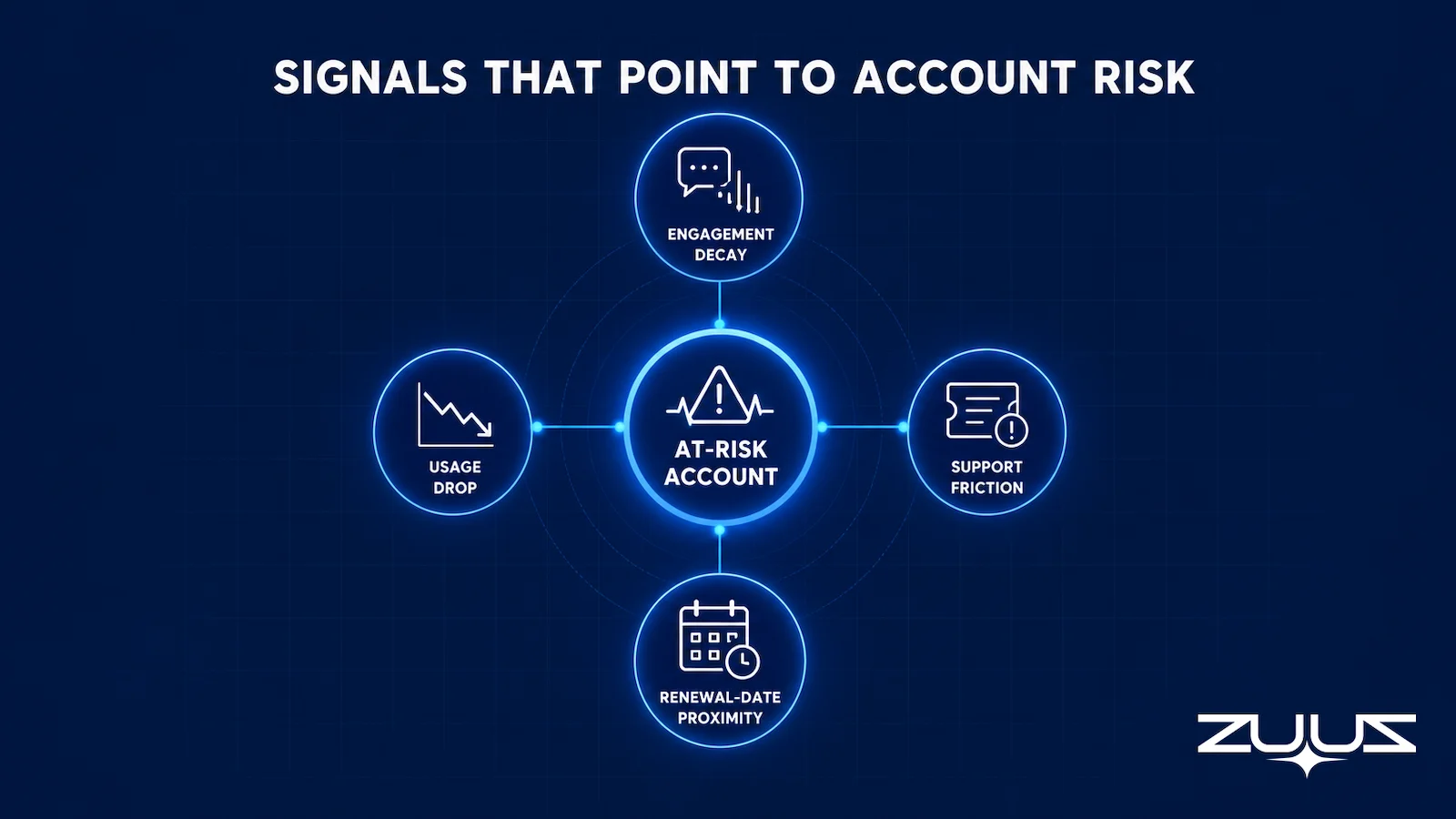
Usage Drop
Where product usage data is available, a decline against the account’s own baseline, active seats, login frequency, or feature depth, is one of the more reliable leading indicators available, because it reflects behavior rather than sentiment. A drop from 40 active seats to 25 in a month says more than a satisfaction survey filled out once a year. The comparison has to be against that account’s own normal, not a fleet-wide average, or the signal drowns in noise.
Renewal-Date Proximity as a Risk Multiplier
A renewal date by itself is not a churn signal, plenty of healthy accounts renew without incident. What it does is act as a multiplier on whatever else is already true. An account with a quiet contact and an open escalation at 90 days out from renewal deserves a note. The same account at 20 days out deserves a call. This is the one point where churn risk monitoring and renewal tracking touch, and it is worth being precise about the boundary, which the next section covers directly.
See Which Accounts Are Actually Slipping.
ZUUZ watches the accounts already in your CRM for the signals that come before a churn conversation, not after it. Book 15 minutes and look at your own book of accounts.
Knowing which signals matter is a separate question from knowing how a system detects them. The mechanics are more consistent across tools than the marketing suggests, and they explain why some products surface risk weeks earlier than others.
How Churn Risk Monitoring Turns Signals Into Alerts
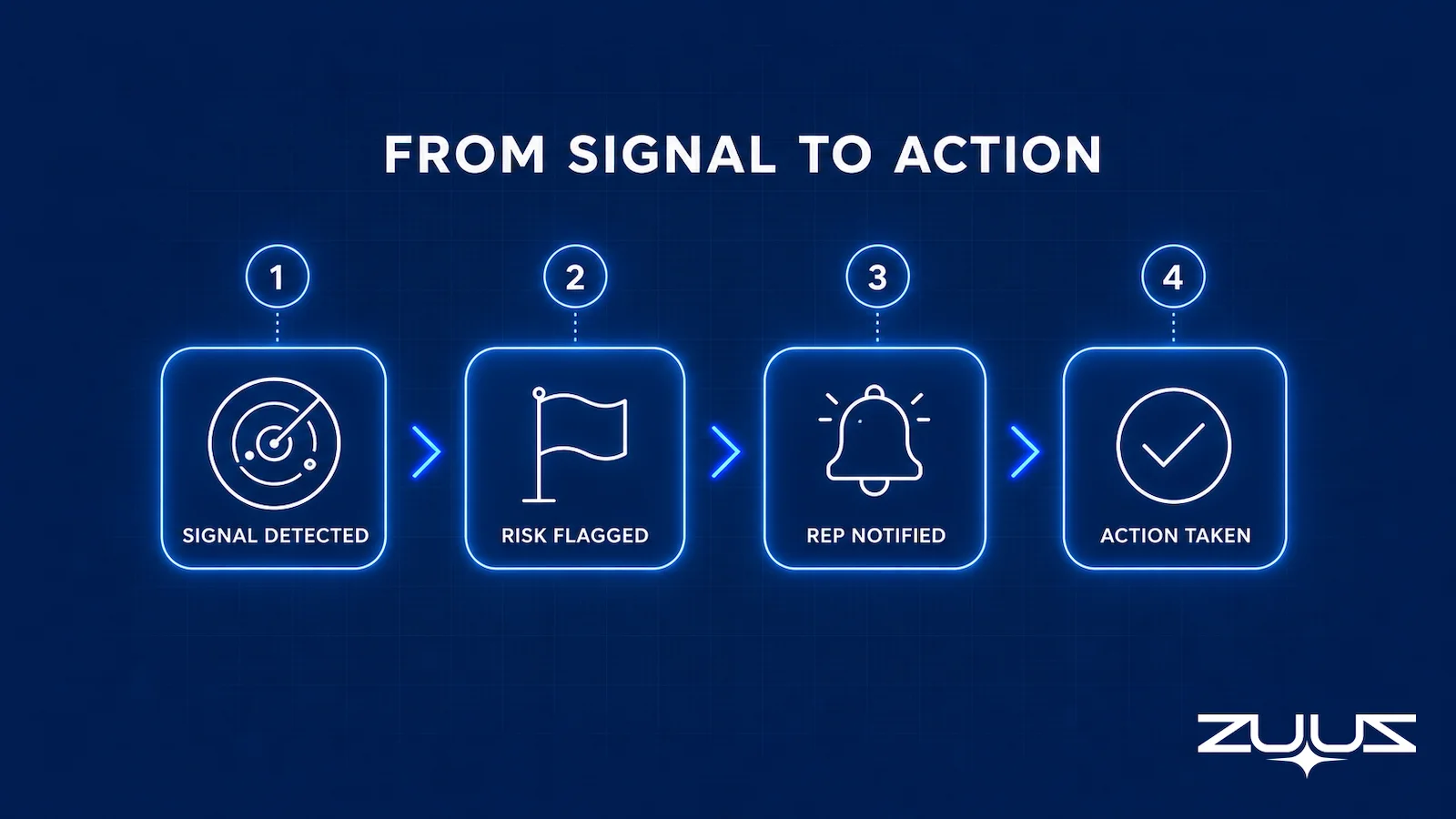
The mechanics behind churn risk monitoring are consistent across most tools that do this well, even when the interfaces look different. The system connects to the account’s data sources, usually the CRM plus email and, where it exists, product usage and support data. It watches for the signal families already covered, combines whatever fires at the account level, and pushes an alert to the account owner with the underlying evidence attached rather than a bare score.
That last step is where a lot of tools fall short. A dashboard that shows “Account health: 42 out of 100” tells a rep almost nothing to act on. An alert that reads “usage fell against this account’s own baseline, the primary contact has not replied in three weeks, and one support escalation remains open past its target” gives the account owner a starting point for the next conversation. The explanation, not the number, is what makes an alert useful.
A monitoring system worth using also tracks what happened after an alert fired, whether the account owner reached out, whether the risk cleared or the account eventually churned anyway. Without that feedback loop, a team has no way to tell whether its signal thresholds are catching real risk or just generating noise that gets ignored after the third false alarm.
A Practical Framework for Scoring Account Risk
The table below is a starting framework, not a universal formula, since every book of business weighs these differently. It groups the signal families already covered against a concrete example and the reason each one earns attention.
| Signal Family | Example Signal | Why It Matters |
|---|---|---|
| Engagement | Primary contact stops responding, meetings pushed twice | Loss of a champion often precedes a decision to leave |
| Usage | Active seats or logins fall against the account’s own baseline | Falling usage shows up before a cancellation notice does |
| Support | An escalation stays open past its resolution target | Unresolved friction compounds distrust faster than one bad ticket |
| Renewal timing | Any of the above inside 60 to 90 days of renewal | The same signal carries more urgency close to a decision point |
| Pipeline activity | Expansion or upsell conversations go quiet | Silence in the pipeline often shows up before silence in email |
The Renewal Signal Check
Signal families are easier to argue about than to audit. The Renewal Signal Check is the audit ZUUZ runs with account teams to find renewal and expansion risk that lives outside the renewal date field.
- List every renewal in the next two quarters and its date field.
- For each, find the last real conversation, email, message or meeting, and what it said about budget, champion or satisfaction.
- Mark every renewal where the date is the only thing the system knows.
- Those are the renewals that surprise you. The signal existed; it was in a mailbox.
Worked example on a churn-risk book: a managed services account renews in 70 days, the CRM shows an active subscription and a clean renewal date, and step 2 turns up a support escalation reopened twice and a sponsor who stopped replying five weeks ago. The date field said healthy. The conversation said the account is already deciding. That account is a churn flag today, not a renewal call in ten weeks.
One Layer, Not Another Platform.
ZUUZ monitors renewal and churn risk on top of the CRM you already run, without asking your team to adopt a second system for onboarding or support. See how it fits into your existing stack.
Churn Risk Monitoring vs. Renewal Tracking Solve Different Problems
These two categories get bundled together constantly, and it is worth being precise about where they actually differ. Renewal tracking answers a scheduling and process question: which contracts are coming due, when, who owns the renewal conversation, and what needs to happen before the date arrives. It is fundamentally about the calendar. The full mechanics of that side of the problem, including how teams handle renewals across dozens or hundreds of accounts at once, live in the guide to renewal tracking software for VARs and distributors and the companion piece on how to track renewals across multiple products.
Churn risk monitoring answers a different question entirely: is this account’s health getting worse, independent of when its contract happens to renew. An account can be perfectly on schedule for its renewal date and still be at real risk, and an account can be months away from renewal with no risk signals present at all. Renewal proximity, as covered above, makes existing risk signals more urgent. It does not create risk on its own, which is the core reason these need to stay two separate lenses rather than one blended score. The dedicated guide to renewal tracking software covers the scheduling and process side in full; this guide owns the signal and health side.
Churn Risk Software vs. a Full Customer Success Platform
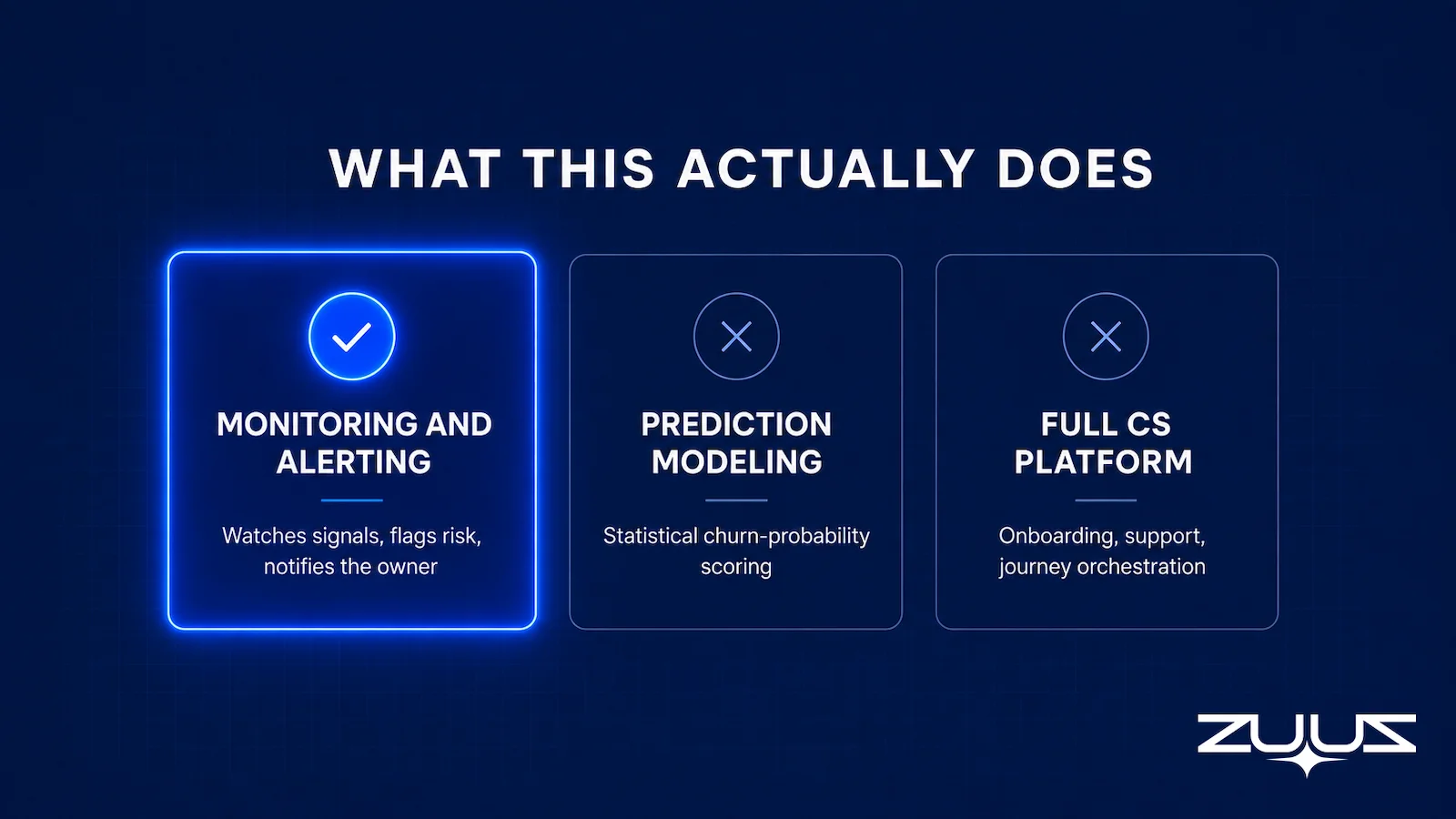
A full customer success platform is built to run the entire post-sale motion: onboarding checklists, in-app engagement campaigns, journey orchestration across the customer lifecycle, and frequently a support or ticketing layer alongside health scoring. Churn risk monitoring is one capability inside that broader system, and for a team that already has onboarding and support tools it likes, adopting an entire new platform just to get the monitoring piece means paying for, learning, and maintaining a large amount of surface area the team will not use. IBM’s overview of customer churn frames this same tradeoff at the platform level: broader retention systems add real capability, at the cost of scope a narrower team may not need yet.
A monitoring layer that connects directly to the CRM instead does one job: watch signals, flag risk, explain why. It does not run onboarding sequences, does not replace a support ticketing system, and does not orchestrate in-app messaging campaigns. That is a deliberate scope boundary, not a missing feature, and it is the right fit for a team whose actual gap is visibility into account health rather than a full post-sale operating system.
Three Ways Teams Monitor Account Risk Today
Most teams handle churn risk one of three ways, and each has a real place depending on team size and how much post-sale infrastructure already exists.
| Approach | How It Works | Where It Fits |
|---|---|---|
| Manual account reviews | A CS or sales leader periodically reviews notes, spreadsheets, and gut feel across a book of accounts | Works for a handful of accounts; does not scale past a small book |
| Full customer success platform | Bundles health scoring with onboarding, in-app engagement, and ticketing in one system | Best when a team wants one platform to run the entire post-sale motion |
| AI layer connected to the CRM | Watches signals across email, CRM activity, and timing, and writes flags onto the existing account record | Best when the CRM should stay the system of record and a second platform is not wanted |
| ZUUZ | An AI layer on top of Salesforce, HubSpot, Zoho, Attio or Pipedrive: connects to the sales inbox, reads LinkedIn messages and meeting or call transcripts, and writes renewal signals and risk flags onto the existing account record for the owner to approve in one click | Best for teams keeping the CRM as the system of record and wanting a layer scoped to monitoring rather than onboarding or ticketing |
The automated sales pipeline software a team already runs and its churn risk monitoring often turn out to be the same architectural question: whether to layer intelligence on top of the CRM or bolt on a separate system that has to be kept in sync with it.
Stop Finding Out After the Account Is Gone.
Connect your CRM and let ZUUZ flag the accounts drifting toward risk while there is still time to act on them. No new platform to learn.
How ZUUZ Monitors Renewal and Churn Risk
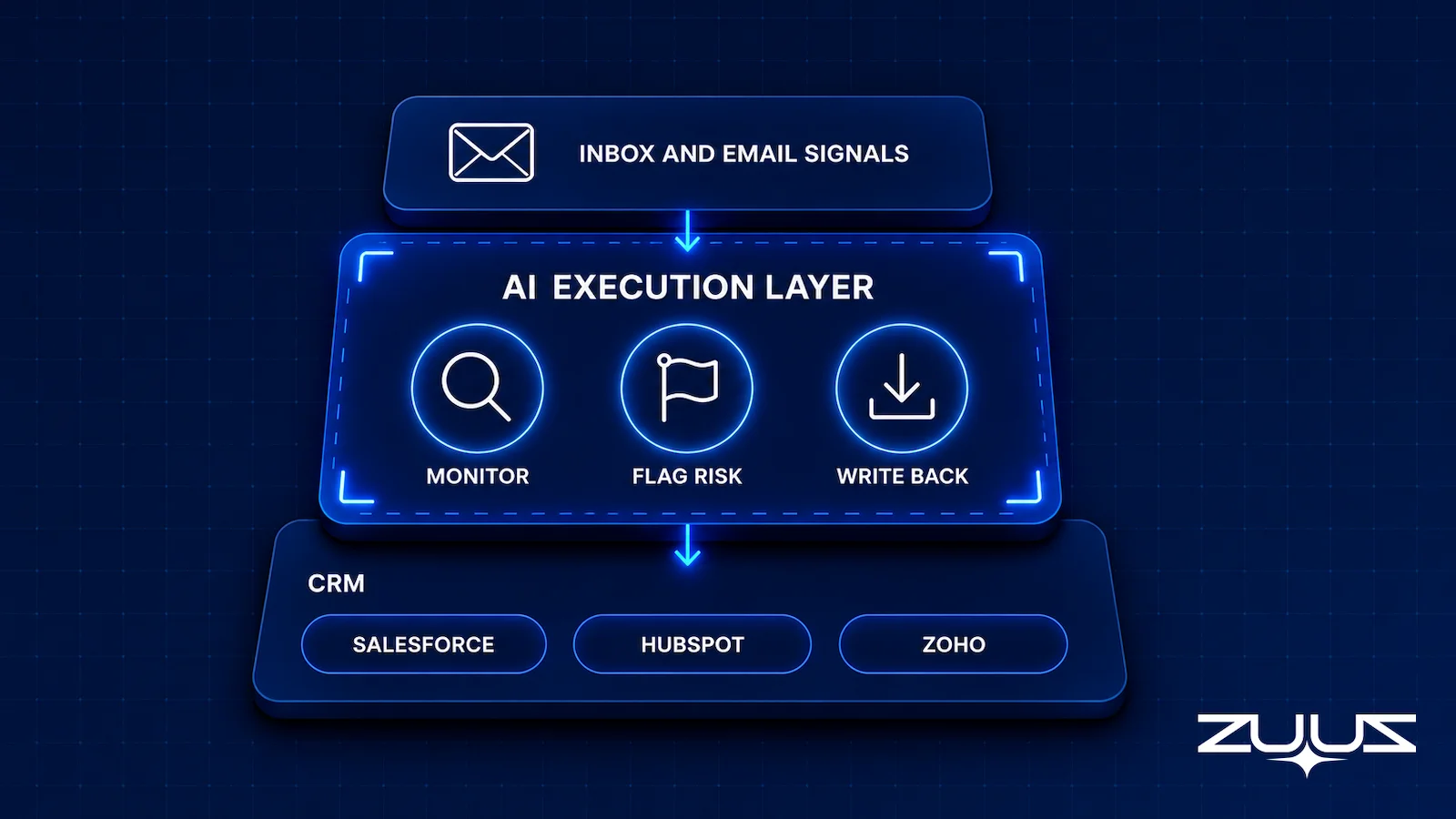
ZUUZ runs renewal and churn risk monitoring as part of the same AI execution layer that sits on top of an existing CRM, connecting to Salesforce, HubSpot, or Zoho through bidirectional CRM sync rather than requiring a separate database of its own. It reads the signals covered throughout this guide, engagement patterns in email, activity on the account record, and how close the account sits to its renewal date, then writes a risk flag directly onto the account inside the CRM already in place.
Because the flag lives on the account record itself, a rep or account owner sees it in the same view of deal and account management they already use, instead of logging into a separate churn dashboard. The same underlying signal layer feeds pipeline and revenue visibility elsewhere in ZUUZ, so a slipping renewal shows up in the same place as a stalling deal rather than in a disconnected tool.
ZUUZ is explicit about what this does not replace. It is not an onboarding tool, not a support ticketing system, and it does not run statistical churn-probability modeling against historical outcomes. RA Technologies, a US-based IT services firm and one of ZUUZ’s confirmed customers, uses this same email-and-CRM signal layer to catch account activity that would otherwise sit unread in an inbox; the full mechanics of how that surfaced previously invisible pipeline are in the RA Technologies case study. Western International Group, a distribution and trading company, and Cloud Box Technologies, an IT services and cloud distributor, run on the same underlying signal capture for their own account monitoring.
From an operator’s seat
Across the deployments ZUUZ runs, the pattern is that the first useful churn flag almost never comes from the account the team was already worried about. It comes from a quiet account nobody had on the list, because quiet is the one signal a human account review cannot see. The part teams do not plan for is the order of operations: connect the mailbox before tuning any scoring weights, because the first two weeks of captured conversation is what tells you which signals actually lead anywhere in your own book. Teams that tune first are scoring an account set they have not read yet. The other cost nobody budgets is ownership rather than software: a flag with no named owner on the account record gets read, agreed with, and then left alone.
How to Choose Churn Risk Software
A short checklist separates a monitoring layer that will actually get used from one that becomes another dashboard nobody opens. Confirm the answers before signing anything.
Does It Explain the Flag, Not Just Score It
An alert with no evidence attached gets ignored by the second week. Every flag should name the signals behind it, not just render a number or a color.
Does It Watch Signals Relative to Each Account’s Own Baseline
A tool that compares every account to a fleet-wide average will misflag naturally quiet accounts and miss a heavy user’s real decline. Baselines should be per account.
Does It Sit on Top of the CRM Already in Place
A tool that requires migrating account data into a new system adds a second source of truth to keep in sync. One that reads and writes to the CRM already in use, in the vein of a conversational CRM or an AI CRM assistant a rep can query directly, keeps the account record as the single place anyone looks.
Does It Stay Scoped to Monitoring
If the honest need is visibility into which accounts are drifting, a tool that also tries to run onboarding and support ticketing adds cost and complexity the team did not ask for. Match the tool’s scope to the actual problem, not the other way around.
Every one of the signals covered here, a quiet contact, an unresolved ticket, a usage graph trending the wrong way, is visible somewhere before an account actually cancels. The gap most teams have is not a lack of data, it is that the data sits in three disconnected places and nobody is watching all three at once. Churn risk software’s entire job, done well, is closing that gap early enough that the renewal call is a formality rather than a rescue attempt. Retaining an existing account is also simply cheaper than replacing it: acquiring a new customer can run five to 25 times more than keeping one already won (Harvard Business Review, 2014), which is the economic case for watching the accounts already on the books closely.
A Concrete First Step
Start with one mailbox, not a rollout. Connect a single sales or account-management inbox, let ZUUZ read the last 90 days, and have the account owner review what it found before anything is written to the CRM. Every renewal signal and risk flag is proposed for approval first, so the rep stays the one deciding what lands on the record. It is a 30-day free trial with no credit card: https://zuuz.ai/trial/
Frequently Asked Questions
What is churn risk software?
Churn risk software monitors existing customer accounts for signals that their health is declining, such as engagement decay, support friction, usage drop, and proximity to renewal, then alerts the account owner before the account actually churns. It focuses on accounts already won rather than prospects, and it is distinct from statistical churn prediction modeling, which trains on historical churn outcomes to produce a probability score.
What signals indicate a customer account is at risk of churning?
The most reliable signals fall into four families: engagement decay (a primary contact going quiet or meetings getting pushed), support friction (an escalation left unresolved past its target), usage drop (activity falling against the account’s own baseline), and renewal-date proximity, which does not create risk on its own but makes existing signals more urgent as the date approaches. Together these are the early warning signs of customer churn, and the conversational ones, such as a contact going quiet, usually surface in email and LinkedIn before usage starts to drop.
What is the difference between churn risk monitoring and churn prediction?
Churn risk monitoring watches for known, explainable signals and alerts when enough of them line up on a single account, closer to a smoke detector than a forecast. Churn prediction trains a statistical or machine-learning model on a company’s history of past churn to generate a probability score for every current account, which requires enough historical churn data to train against meaningfully.
Is churn risk software the same as a customer success platform?
No. A full customer success platform bundles churn and health monitoring with onboarding workflows, in-app engagement, journey orchestration, and often support ticketing. Churn risk monitoring is one capability inside that larger system, and a team that only needs the monitoring piece can get it from a focused layer instead of adopting the entire platform.
How is churn risk software different from renewal tracking software?
Renewal tracking answers a scheduling question: which contracts are coming due, when, and who owns the conversation. Churn risk monitoring answers a health question: is this account getting worse, independent of its renewal date. An account can be on schedule for renewal and still be at risk, or months from renewal with no risk signals present at all.
Can churn risk software work with Salesforce, HubSpot, or Zoho?
Yes, when the tool is built to be CRM-agnostic. ZUUZ connects to Salesforce, HubSpot, Zoho, Attio or Pipedrive through bidirectional sync and writes risk flags directly onto the account record already in that system, rather than requiring accounts to be migrated into a separate database.
How early can churn risk signals be detected?
Engagement and usage signals typically surface weeks before a formal cancellation, since a contact going quiet or usage trending down against an account’s own baseline tends to precede an actual decision to leave. Detection speed depends on how quickly the underlying data sources, email, CRM activity, and usage where available, are actually being watched rather than reviewed occasionally.
Does ZUUZ replace customer success or support ticketing tools?
No. ZUUZ monitors renewal and churn risk signals and writes flags onto the CRM account record, but it does not run onboarding sequences, does not replace a support ticketing system, and does not perform statistical churn-probability modeling. It is scoped to monitoring and alerting on top of the CRM already in place, not to running the entire post-sale motion.

CEO of ZUUZ. He scaled Cloud Box Technologies from 0 to $25M ARR in IT services and distribution before building ZUUZ. Connect on LinkedIn

