
Sales Pipeline Management Software: A Buyer’s Guide
A buyer’s guide to sales pipeline management software: tool categories, evaluation criteria, and the capture gap that breaks pipeline data.
- Sales pipeline management software tracks deals from first contact to close and reports on pipeline health, but every category depends on one input: the deal data a rep actually enters.
- The market splits into four jobs, CRM-native pipeline, standalone trackers, forecasting layers, and the capture layer that most teams skip. Buying the upper layers before fixing capture produces clean reports on incomplete data.
- Evaluate capture method, update latency, forecasting accuracy against closed-won history, and CRM-agnosticism before comparing dashboards. A precise-looking forecast built on a partial pipeline is the most common buying mistake.
- Pipeline data is wrong because deals move in email and the CRM updates only when a rep stops to log them. Salesforce found reps spend under 30 percent of their week selling.
- RA Technologies surfaced $120,000 in previously unrecorded pipeline within 72 hours by connecting their inbox to ZUUZ and running a 90-day email lookback.
- ZUUZ is CRM-agnostic, running on Salesforce, HubSpot, Zoho, Attio or Pipedrive, and writes captured deal signals to the system already in place.
- ZUUZ is an AI layer on top of the CRM a team already runs: it connects to the sales inbox, reads LinkedIn messages and meeting or call transcripts, and writes leads, stakeholders, next steps and renewal signals into the CRM for the rep to approve in one click.
A sales leader opens the pipeline report on Monday morning and sees a number. The forecast says $1.4 million in committed deals. By the actual close of quarter, two of those deals were never real, three large renewals that did close were never in the report at all, and the gap gets explained away as sandbagging. The software did its job. It reported exactly what was entered. The problem was what never got entered.
Sales pipeline management software is one of the most mature categories in B2B technology, and also one of the most misunderstood. Buyers compare dashboards, drag-and-drop boards, and forecasting models. Few of them ask the question that determines whether any of it works: how does a deal get into the system in the first place. Once deals are in the system, the next question is how well individual deals get tracked and flagged as they stall, covered in the guide to deal management software.
This guide covers what pipeline management software does, the four categories that make up the market, what to evaluate before buying, and the structural reason pipeline data drifts from reality no matter which tool a team picks. It is written for operators choosing a system, not for buyers looking for a feature checklist.
What Sales Pipeline Management Software Actually Does
Sales pipeline management is the practice of tracking every open opportunity through a defined set of stages, from first contact to closed-won or closed-lost. Pipeline management software is the tooling that makes that practice visible and repeatable across a team. It holds each deal, its stage, its value, its expected close date, and the activity history attached to it.
The core jobs are consistent across vendors. The software organizes deals into a visual board or list by stage. It applies a probability to each stage so a forecast can be calculated. It tracks movement, so leadership can see which deals advanced, stalled, or slipped. And it rolls everything up into a pipeline view that answers the question every revenue leader asks: what is going to close, and when.
That last question is where the category earns its budget. A pipeline is a forecasting instrument. The board, the stages, and the activity logs all exist to produce a number a leader can commit to. The accuracy of that number is the only metric that ultimately matters, and it depends entirely on whether the deals in the system match the deals in reality.
This is the distinction most buyers miss. Sales pipeline tracking software does not generate deal data. It displays and interprets it. A deal that closes over email, with a stage change a rep never logged, is invisible to the most sophisticated forecasting model ever built. The software can only manage what reaches it.
See the Pipeline Your Reports Can’t See.
ZUUZ connects to the sales inbox, extracts the deal signal, and writes it to Salesforce, HubSpot, Zoho, Attio or Pipedrive. Book a 15-minute walkthrough on your own inbox.
The Four Categories of Pipeline Management Tools
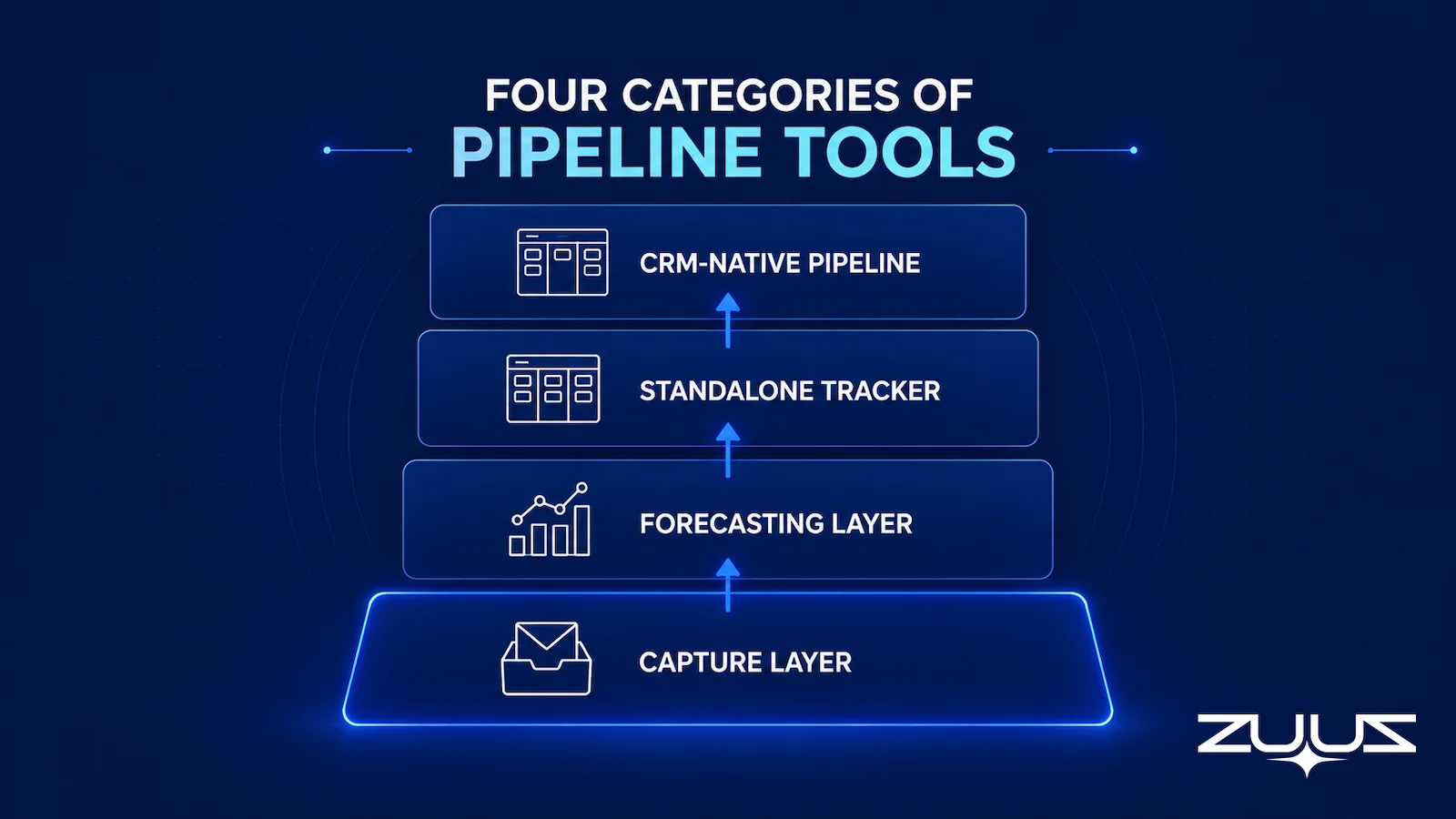
The market for sales pipeline management tools is wide, but it sorts into four categories by the job each one is built to do. Most teams own tools in three of these categories and underinvest in the fourth, which is the one that determines whether the other three are working with accurate data.
CRM-Native Pipeline Management
This is where most teams start. Salesforce, HubSpot, and Zoho all ship pipeline management as a core feature of the CRM. The deal object, the stages, the kanban board, and the forecast all live inside the system of record. For a fuller picture of how the pipeline sits inside the record, the question of why your CRM pipeline is wrong covers the gap between what the board shows and what is actually happening in accounts.
The advantage of CRM-native pipeline management is that there is no integration to maintain and no second system to reconcile. The pipeline reflects the same records reps already touch. The limitation is that it inherits whatever capture discipline the team has. If reps log deals inconsistently, the native pipeline is inconsistent too, which is the case that the cost comparison of ZUUZ versus manual CRM entry lays out in numbers.
Standalone Pipeline Tracking Software
A second category exists for teams that want a lighter, more visual deal tracker than a full CRM, or that have outgrown spreadsheets but are not ready for a heavy platform. These standalone sales pipeline tracking tools focus on the board, the stages, and simple reporting. They are fast to set up and often cheaper per seat.
The tradeoff is fragmentation. A standalone tracker that does not sync cleanly with the system of record creates a second pipeline that can disagree with the first. For small teams this is manageable. For organizations running marketing, support, and finance off the CRM, a disconnected pipeline tool adds a reconciliation tax.
Forecasting and Revenue Intelligence Layers
The third category sits above the CRM and applies analytics to the deal data already there. These forecasting layers score deal risk, project close probabilities, and flag deals that are slipping. They are powerful when the underlying pipeline is complete. The deeper mechanics of this layer are covered in the guide to revenue intelligence software and how it interprets pipeline signals.
The structural weakness of this category is inherited, not internal. A forecasting layer applies sophisticated models to whatever the CRM contains. When the CRM holds 50 to 60 percent of real account activity, the forecast is precise about the wrong inputs. The model is sound. The data feeding it is partial, which is the core argument behind why your CRM pipeline is wrong in the first place.
The Capture Layer Most Teams Skip
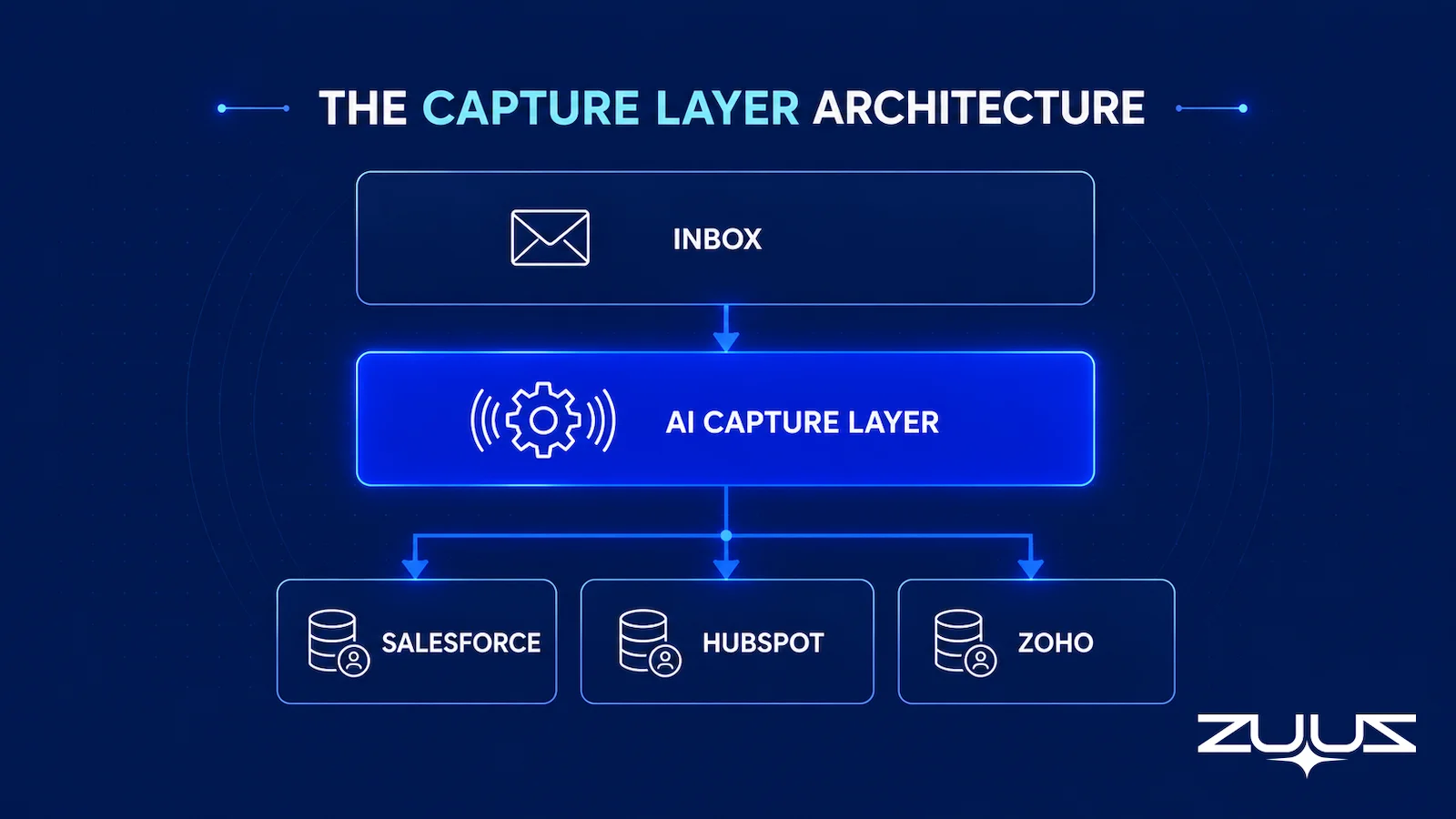
The fourth category is the one most pipeline buyers never evaluate, because it does not look like pipeline software. The capture layer reads where deals actually happen, the inbox, and writes structured deal records into the CRM without requiring a rep to stop and log them. It is the foundation the other three categories assume but rarely get.
ZUUZ sits in this layer. The reason this category gets skipped is that the gap it fills is invisible by definition. A team cannot see the deals missing from the CRM by looking at the CRM. The missing pipeline only becomes visible when something reads the email directly, which is exactly what the capture layer does and what the upper three layers cannot. The case for fully automated sales pipeline software rests entirely on closing this gap.

Tool Categories Mapped to the Job They Do
The table below maps each category against its primary job, where it works best, and where it breaks down for teams whose deals move through email.
| Category | Primary Job | Works Best When | Breaks Down When | Buyer Priority |
|---|---|---|---|---|
| CRM-Native Pipeline | Track deals by stage inside the system of record | Reps log deals consistently and on time | Manual logging is partial or delayed | Required foundation; depends on capture |
| Standalone Tracker | Lightweight visual deal board and stage tracking | Small team wants speed over depth | It runs as a second, disconnected pipeline | Fit for early teams; reconcile with the CRM |
| Forecasting Layer | Score risk and project close probability | CRM data reflects real account activity | Applied to a 50-60% complete pipeline | High value after capture is solved |
| Capture Layer | Read email and write deal signals to the CRM | Deals move through inbound and outbound email | Tool is generic and misses real deal signals | Highest ROI; fixes the source data |
Read top to bottom, the table describes the order in which most teams buy. Read bottom to top, it describes the order in which they should. Capture comes first because every layer above it inherits the completeness of the data it produces.
What to Evaluate Before Buying Pipeline Software
Feature comparisons dominate most pipeline software evaluations, and they are the least useful part. Every serious tool has a kanban board, custom stages, and a forecast view. The differences that determine whether a team gets accurate pipeline live below the feature list. Four criteria matter more than the rest.
Capture Method
The first question is how a deal gets into the system. Manual entry depends on rep discipline at the worst possible moment, after a long day of selling. Calendar and email sync that only logs metadata captures that a meeting happened, not what was decided in it. Automatic signal extraction reads the content of email and writes structured deal records on its own. The capture method sets the ceiling on data quality before any dashboard is involved.
Update Latency
The second question is how quickly the pipeline reflects reality after a deal moves. Latency is the silent killer of pipeline accuracy. A renewal that closes Tuesday but is not logged until the following Monday is invisible for six days, and in a fast-moving deal six days is the difference between a save and a loss. The relevant benchmark is the lag between a deal signal and the CRM record, not the refresh rate of the dashboard.
Forecasting Accuracy Against History
Every forecasting tool claims accuracy. The only test that means anything is running the model against the team’s own closed-won history and checking whether last quarter’s forecast would have matched the actual result. A forecast that is consistently off by 20 percent is not a forecast, it is a guess with a confidence interval. Demand a backtest on real data before trusting the projection.
CRM-Agnosticism
The fourth question matters for any organization that runs more than one CRM or might migrate. A tool locked to a single CRM becomes a liability the moment a division standardizes on something else or an acquisition arrives with a different system. CRM-agnostic capture and reporting survives those changes. ZUUZ runs natively across Salesforce, HubSpot, Zoho, Attio or Pipedrive for exactly this reason.
Stop Forecasting on Half the Data.
Connect your CRM in minutes and let ZUUZ capture the deal signals your team never logs. Start free, with no integration project required.
The Evaluation Criteria Matrix
The matrix below turns the four criteria into a scoring tool. Score a shortlisted system on each row, weight capture and latency most heavily, and the strongest option usually separates from the pack on the first two rows rather than the last.
| Criterion | Weak Signal | Strong Signal | Why It Decides the Outcome | Where ZUUZ Sits |
|---|---|---|---|---|
| Capture Method | Manual entry only | Automatic email signal extraction | Sets the ceiling on data completeness | Reads the sales inbox, LinkedIn messages and meeting or call transcripts |
| Update Latency | Days between signal and record | Under one hour from signal to CRM | Determines whether deals are seen in time to act | Prepares the update as the thread moves; the rep approves in one click |
| Forecast Accuracy | Vendor claims, no backtest | Validated against closed-won history | Tells you if the number can be committed | Does not forecast; makes the record underneath the number real |
| CRM-Agnosticism | Locked to one CRM | Runs on Salesforce, HubSpot, Zoho, Attio or Pipedrive | Survives migrations, divisions, and acquisitions | Runs on Salesforce, HubSpot, Zoho, Attio or Pipedrive; ConnectWise PSA is on the ZUUZ roadmap |
| Rep Workflow Cost | Adds steps to the rep’s day | Runs in the background, brief daily review | Low-friction tools get adopted; heavy ones decay | No BCC, no button, no sidebar to remember; the rep reviews and corrects before anything is written |
The Structural Problem No Dashboard Solves
Pipeline management software has a foundational dependency that vendors rarely state plainly. The pipeline is only as good as what reaches the CRM, and most of what happens in a deal never reaches it. This is not a discipline failure or a training gap. It is a structural mismatch between where deals move and where they are recorded.
Deals move in email. Renewal mentions, scope changes, pricing questions, procurement approvals, and competitive threats arrive as messages and forwarded threads, not as stage changes on a board. For a deal signal to become pipeline data, a rep has to notice it, decide it matters, open the CRM, find the record, and log it. That chain breaks at volume.
The volume is the problem. According to Salesforce research on sales productivity (2022), reps spend less than 30 percent of their week actually selling, with the majority consumed by administrative work including data entry. A rep under that load makes hundreds of micro-decisions a day about what is worth logging, and most signals do not make the cut.
The result is a pipeline that looks populated but reflects a fraction of real activity. Forecasting layers, BI dashboards, and pipeline review meetings then run on that partial record. The same Salesforce State of Sales research found that 84 percent of sales leaders agree AI output depends on the quality of the data going in (2026), which is the polite way of saying that a model on bad data produces confident nonsense.
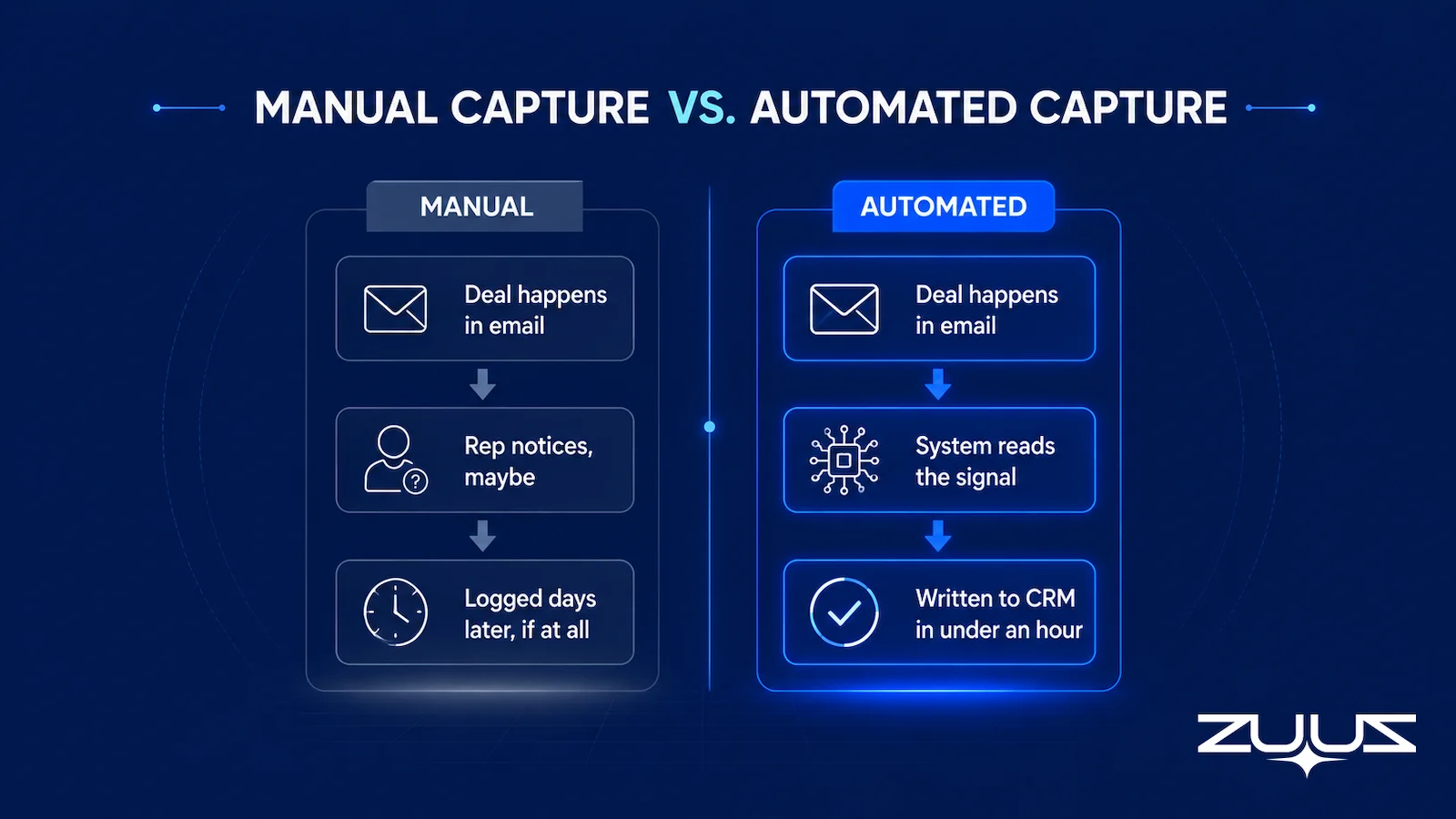
No dashboard solves this, because the dashboard is the wrong layer. A reporting tool cannot recover a signal that never entered the system. The comparison between ZUUZ versus manual CRM entry quantifies the gap directly: manual logging creates a multi-day visibility lag, while automated capture closes it to under an hour. The fix is not a better view of the data. It is getting the data in.
The Pipeline Truth Test
Before comparing vendors, run a test on the pipeline that already exists. It takes an hour and it answers the only question a pipeline number has to survive: is there evidence for it?
- Take the top five deals by value in the current quarter.
- For each, find the evidence in the CRM for its stage and close date – a dated, written commitment, not a rep’s assurance.
- Count how many rest on a stage last changed more than two weeks ago.
- A pipeline in which most of the top five lack dated evidence is a forecast of rep optimism. ZUUZ does not forecast; it makes the record underneath the number real.
A worked example from a $1.4 million quarter: two of the five top deals have stage changes from last week tied to a written procurement date, one has a close date the rep moved twice with nothing in the thread behind either move, and two are renewals whose last written word was a pricing question nobody answered. Three of the five are assumptions. No dashboard in the stack will say so, because all five records look equally complete. That is the difference between pipeline software that reports a number and a capture layer that decides whether the number is true.
This is also where ZUUZ sits in the stack: ZUUZ is an AI layer on top of the CRM a team already runs, never a CRM and never a replacement for one. Most tools in this category report on what the rep entered; ZUUZ writes the record the report is built from.
How Teams Fix the Capture Gap
Teams that close the capture gap stop relying on rep memory and put a system between the inbox and the CRM. The principle is simple: remove humans from a task they cannot perform reliably at volume, and let the pipeline software report on data that is actually complete.
Read the Inbox, Not the Rep
The capture layer reads inbound and outbound email directly and extracts deal signals from the content. A renewal mention, an RFP attachment, a pricing question, a competitive comparison, each becomes a structured record. The rep does not change how they work in email. The signal is captured whether or not the rep would have logged it.
Write Structured Records Fast
Captured signals are written to the CRM as proper deal and activity records, in the native format of whichever system is in place. Fast writes keep the pipeline current, which is the difference between a renewal a manager can save and one they learn about after it churned.
Keep the Human in the Loop, Briefly
Good capture does not mean blind automation. Reps review flagged signals in a short daily digest, confirming or dismissing each one. The review takes roughly 90 seconds rather than the cumulative hours that manual entry consumes. Reps stay in control of what becomes a deal without bearing the cost of logging it.

Pipeline Capture: How ZUUZ Reads Email and Writes the Deal
ZUUZ operates as the capture layer beneath whatever pipeline management software a team already runs. It reads inbound and outbound email, identifies deal signals, and syncs structured records to Salesforce, HubSpot, or Zoho. The pipeline software then reports on data that reflects real account activity rather than what reps remembered to enter.
The CRM-agnostic design is the differentiator. ZUUZ does not require a specific CRM and does not replace the one in place. It connects to Salesforce, HubSpot, or Zoho and writes in that system’s native format, which matters for organizations running different CRMs across divisions or working through a migration. The pipeline board stays where the team already manages it.
Beyond capture, ZUUZ handles the execution work that follows a signal: lead scoring, meeting scheduling, enrichment, renewal and churn risk monitoring, and a Sales AI agent that answers natural-language questions about the pipeline. Each of those depends on the same foundation, accurate deal data that came from reading email rather than waiting for a rep to type it in.
The Cloud Box Technologies Origin
The insight behind ZUUZ came from operating Cloud Box Technologies, an IT services and cloud distribution company that grew from $0 to $25 million ARR. At that scale, the pipeline was not in the CRM. It was in email. Reps were closing deals and renewing accounts through shared inboxes while the CRM showed a fraction of the activity. Adding a forecasting layer on top of that CRM would have produced precise reports on roughly 40 percent of the business.
RA Technologies: $120K Surfaced in 72 Hours
RA Technologies, an IT services firm in the United States, connected their inbox to ZUUZ and ran a 90-day historical lookback on first connection. The system identified $120,000 in active pipeline that had never been recorded in their CRM. These were not cold leads or past losses. They were live deals and renewals still in motion, recovered from email threads that pipeline reporting alone would never have surfaced.
The $120,000 figure was pipeline the team could still work, not a retrospective audit of what slipped. That is the practical line between a capture layer and a reporting layer. A dashboard shows what exists. A capture layer surfaces what was happening but had never been written down. For teams comparing approaches, the IT sales pipeline visibility tools breakdown covers where each layer fits in a full stack.
From an operator’s seat
Across the deployments ZUUZ runs, the pattern is that the first week is not about new deals at all. A 90-day lookback returns threads the team had already written off, and the conversation that follows is about which of them are still real, not about whether the capture worked. The part teams do not plan for is reconciliation: a pipeline that suddenly contains deals nobody had in the forecast makes the quarter look messier before it looks better, and a sales leader who has not warned their own leadership about that spends a week defending a number that just got more honest. The order of operations that holds up is lookback first, review with the reps who owned those threads second, committed number third. Teams that swap the last two steps end up arguing about the tool instead of the deals.
Choosing the Right Stack for Your Team Size
The right combination of sales pipeline management tools depends on team size and deal motion, but the sequencing principle holds at every scale: fix capture before buying reporting. Adding a forecasting layer to an incomplete pipeline buys a sharper picture of the wrong data.
Small Teams and Free Pipeline Tools
Early-stage teams often start with free sales pipeline management tools or a spreadsheet, then graduate to a CRM-native pipeline as deal volume grows. Free tiers from CRM vendors handle basic stage tracking and a kanban board well. The limitation is the same one larger teams face: a free pipeline still reflects only what reps manually log. Capture is the gap that does not go away by spending less.
Mid-Market Teams Running Renewals
Teams managing renewals across multiple products or accounts feel the capture gap most acutely, because renewal signals scatter across long email threads rather than arriving as clean deal stages. A CRM-native pipeline plus a capture layer is the practical baseline here. The forecasting layer becomes worth its cost only once the underlying data reflects what is actually in the threads, the point made in detail in the guide to IT sales pipeline visibility tools.
Enterprise Teams With Multiple CRMs
Large organizations often run different CRMs across divisions, which makes CRM-agnosticism non-negotiable. A capture layer that writes to Salesforce, HubSpot, and Zoho in parallel keeps pipeline data consistent across systems that would otherwise drift apart. This is where the best sales pipeline management software is judged less on its dashboard and more on whether it keeps every division’s pipeline honest at the same time.
Whatever the size, the pipeline review is the moment of truth. When capture is automated and the pipeline updates in real time as deal signals arrive, the weekly review stops being an exercise in reconstructing what happened and becomes a decision about what to do next. That shift, from forensic accounting to forward planning, is the practical payoff of getting the capture layer right.
A First Step That Tests Capture, Not the Dashboard
The cheapest way to find out how much pipeline is missing is to connect one mailbox, not to roll out a platform. ZUUZ reads the last 90 days on that single connected inbox, and the rep reviews what it found before anything is written to the CRM. If the lookback returns nothing the report did not already have, capture is not the gap and the budget belongs further up the stack. The trial runs 30 days, free, with no credit card: https://zuuz.ai/trial/
Frequently Asked Questions
What Is Sales Pipeline Management Software?
Sales pipeline management software is the set of tools that track deals from first contact to close. It records each opportunity, its stage, value, and expected close date, then reports on the health of the pipeline as a whole. Most options are either CRM-native modules like Salesforce, HubSpot, and Zoho, standalone pipeline trackers, or forecasting layers. All of them depend on one thing: the deal data a rep actually enters.
What Is the Difference Between a CRM and Pipeline Management Software?
A CRM is the system of record for contacts, accounts, and deals. Pipeline management software is the view and the workflow on top of that record, organizing deals into stages, applying probabilities, and generating forecasts. In most modern suites the two are bundled, so the pipeline board is a feature of the CRM. The distinction that matters is capture: neither one can manage a deal that was never entered.
What Should You Evaluate Before Buying Pipeline Management Software?
Start with capture rather than reporting. Ask how deal signals reach the system: manual entry, calendar sync, or automatic email reading. Then check update latency, how current the pipeline stays after a deal moves. Test forecasting against closed-won history rather than vendor claims. Confirm the tool works with the CRM already in place. A polished dashboard on incomplete data produces forecasts that look precise and miss real deals.
Are There Free Sales Pipeline Management Tools?
Several CRMs offer free pipeline management tiers, including HubSpot and Zoho, and spreadsheets remain a common starting point for small teams. Free tiers handle basic deal tracking and a kanban board well. They tend to cap automation, reporting, and seats, and none of them solve the capture problem on their own. A free pipeline still reflects only what reps manually log, so the same data gaps appear at any price point.
Why Is Pipeline Data So Often Wrong?
Pipeline data is wrong because deals move in email and the CRM updates only when a rep stops to log them. Renewal mentions, scope changes, and pricing questions arrive in threads, not stages. Salesforce research found reps spend less than 30 percent of their week actually selling, with much of the rest going to admin and data entry. Under that load, logging slips, and the pipeline drifts away from reality.
How Does ZUUZ Improve Pipeline Management Software?
ZUUZ sits under the pipeline software as a capture layer. It reads inbound and outbound email, extracts deal signals, and writes structured records to Salesforce, HubSpot, or Zoho. Reps confirm or dismiss flagged signals in a short daily review rather than logging deals by hand. The pipeline software then reports on data that reflects real account activity, not what reps remembered to enter.
Can Pipeline Software Recover Deals That Were Never Entered?
Standard pipeline software cannot, because it only displays records that already exist. A capture layer can. When RA Technologies, an IT services firm, connected ZUUZ and ran a 90-day email lookback, the system surfaced $120,000 in active pipeline that had never reached their CRM. Those were live deals and renewals still in motion, not historical analysis, recovered from conversations that pipeline reporting alone would never have seen.
What Is a Sales Pipeline Review and How Often Should Teams Run One?
A sales pipeline review is a recurring meeting where leadership and reps inspect open deals, validate stages and close dates, and decide where to focus. Most teams run one weekly. The review is only as honest as the underlying data. When capture is automated and the pipeline updates in real time as deal signals arrive, reviews shift from reconstructing what happened to deciding what to do next.
Is pipeline management software the same as a CRM?
Pipeline management software is not the same as a CRM. The CRM is the system of record that stores accounts, contacts, and opportunities. Pipeline management software adds stage discipline, visibility, and risk workflow on top of those records, and many CRMs bundle a basic version. Both share the same gap: neither knows about a deal until someone enters it, which is why a capture layer sits underneath.
See What Your Inbox Is Actually Doing.
Pipeline software reports what is in your CRM. ZUUZ captures what never made it there, so book 15 minutes and see the deals that exist today but are missing from your forecast.

CEO of ZUUZ. He scaled Cloud Box Technologies from 0 to $25M ARR in IT services and distribution before building ZUUZ. Connect on LinkedIn

