
CRM Data Quality Checks: Automating Sales Ops Manual Work
A playbook for CRM data quality checks: duplicate detection, completeness, validation, staleness, ownership, standardization, and how to automate each.
- Six checks carry most of a sales ops team’s data quality work: duplicate detection, field completeness, format and validation, staleness and recency, ownership and routing accuracy, and standardization.
- Each check has a manual version that does not scale and an automated version that runs on a fixed cadence, from on-write to monthly.
- A check inspects records that already exist. It can flag a missing field but cannot recover a value that never left the inbox.
- Capture at source removes whole categories of checks instead of scoring them, because records arrive complete and timestamped from the conversation that created them.
- ZUUZ writes structured records to Salesforce, HubSpot, or Zoho from email, so completeness and recency checks pass by default.
- RA Technologies surfaced $120,000 in previously unrecorded pipeline within 72 hours by connecting their shared inbox and running a 90-day historical email lookback.
- ZUUZ connects to your sales inbox, reads LinkedIn messages and meeting or call transcripts, and writes leads, stakeholders, next steps and renewal signals into the CRM for the rep to approve in one click, so the record is correct on arrival instead of corrected by a check.
A sales ops team does not lack CRM data quality checks. The team lacks the hours to run them. The duplicate scan, the completeness report, the staleness query: all of these exist as someone’s recurring task, and most of them slip when the quarter gets busy.
This guide treats each check as a unit. What it inspects, how a sales ops team ran it by hand, and how to automate it so it runs on a schedule instead of a good intention. The goal is an operational playbook, not another argument for why clean data matters — Gartner’s data quality research already makes that case well enough.
For the business case behind all of this, the cost of dirty records and the reasons it accumulates, see the pillar on CRM data quality. For the software category that runs these checks, see CRM data quality tools. This article stays on the checks themselves.
The Six CRM Data Quality Checks
Most CRM data quality audits reduce to six checks. Each answers one question about whether a record can be trusted. Below, each check appears with what it inspects, how sales ops ran it manually, and how to automate it.
1. Duplicate Detection
Duplicate detection finds records that describe the same account, contact, or deal under more than one entry. Duplicates split activity history, break reporting counts, and route the same buyer to two reps. This is the foundation of CRM duplicate detection work.
Manually, a sales ops analyst exported the contact table, sorted by email domain and last name, and eyeballed the near-matches. The work was slow, subjective, and never complete because new duplicates appeared the moment the export finished.
Automated, fuzzy matching runs on every write. It compares incoming records against existing ones on email, normalized company name, and phone, then either blocks creation or queues a merge. The check moves from a quarterly export to a real-time gate.
2. Field Completeness
A completeness check measures whether required fields are populated. CRM data completeness is the difference between a record that can be acted on and one that cannot: a deal with no amount, a contact with no title, an account with no region.
Manually, completeness was a filtered view: show every open opportunity missing a close date, then chase the owning rep to fill it. The chasing rarely finished, and the next week produced a fresh list.
Automated, a daily query reports completeness percentage per object and per required field, and a workflow can flag or hold records below a threshold. The metric becomes a tracked number rather than a one-time cleanup.
3. Format and Validation Rules
Validation checks confirm that values match an expected format: a real email address, a phone in the right pattern, a currency amount with no stray text, a date that parses. This is CRM data validation in the strict sense.
Manually, a rep caught format errors by reading records one at a time, or a downstream system rejected the data and someone traced it back. Most format errors were found by the tool that broke on them.
Automated, validation rules fire on write and reject or correct malformed input before it lands. The check shifts from cleanup after the fact to prevention at the point of entry.
4. Staleness and Recency
A staleness check finds records that have not been touched within a meaningful window: an open deal with no activity in 30 days, a contact last updated a year ago. Recency is one of the most useful CRM data quality metrics because it correlates directly with trust.
Manually, staleness was a pipeline review where a manager scrolled a report and asked which deals were still real. The answer depended on memory, and the records that had gone quiet were exactly the ones nobody remembered.
Automated, a scheduled query flags records past the recency threshold and can downgrade stage, alert the owner, or mark the record for review. The check runs on the calendar instead of in a meeting.
5. Ownership and Routing Accuracy
An ownership check confirms that each record sits with the right rep, territory, or team. Wrong ownership means a buyer gets ignored because the assigned rep no longer covers that account, or two reps both think the other has it.
Manually, ownership corrections happened after a complaint: a deal stalled, someone asked who owned it, and the routing error surfaced. The check was reactive and triggered by failure.
Automated, routing rules evaluate territory, segment, and round-robin logic on creation and reassignment, and an audit query flags records whose owner does not match the rule. The check becomes a rule the system enforces rather than a fire it puts out.
6. Standardization
Standardization confirms that values use a consistent form: “United States” not “USA” not “U.S.”, a single picklist value per concept, title case where expected. Inconsistent values fragment reports and break filters even when every field is technically populated.
Manually, standardization was a find-and-replace pass across an export, reconciled against a style guide that lived in a wiki few people read. It corrected the past and did nothing for the next entry.
Automated, normalization rules map variants to a canonical value on write, and a conformance query reports how many records deviate. The check enforces the standard at entry and measures drift over time.
Skip the Cleanup. Write It Right the First Time.
ZUUZ captures structured records from email, so completeness and recency checks pass before you ever run them. Book a 15-minute walkthrough on your own inbox.
- Does it inspect records that already exist, or does it change what arrives in the first place?
- Does it capture from the channels where the deal actually moves – email, calendar, LinkedIn messages, meeting and call transcripts – or only from what is already in the CRM?
- Does what it produces land in CRM fields a report can read, or only in an activity feed someone has to open?
- Does the rep have to remember anything for it to work: a BCC, a button, a sidebar, a sync?
- Can the rep correct it in one click before it is written, so the fix does not create a second review queue?
- Does the quality number it improves measure the records you have, or the records you should have had?
Checks to Automation Table
The table below maps each check to what it inspects, the manual method it replaces, and the automated equivalent. It doubles as a starting outline for a CRM data quality audit.
| Check | What It Inspects | Manual Method | Automated Method | With Capture at Source (ZUUZ) |
|---|---|---|---|---|
| Duplicate detection | Same account, contact, or deal under multiple records | Sorted export, eyeball near-matches | Fuzzy matching on write, block or queue merge | Deduplication stays a CRM-side rule; capture does not replace it |
| Field completeness | Required fields populated | Filtered view, chase the owning rep | Daily completeness query, threshold hold | Stakeholders and next steps are written from the conversation, so fields fill without a chase |
| Format and validation | Values match expected format | Found when a downstream system breaks | Validation rules fire on write, reject bad input | Values arrive from the source thread rather than memory, so fewer malformed entries reach the rule |
| Staleness and recency | Records untouched past a time window | Pipeline review by memory | Scheduled query flags stale records, alerts owner | The field updates when the conversation happens, not at the next pipeline review |
| Ownership and routing | Record sits with the correct rep or territory | Corrected after a complaint | Routing rules on creation, audit query for mismatch | Routing stays a CRM rule, but the record exists early enough to be routed at all |
| Standardization | Consistent canonical values | Find-and-replace against a style guide | Normalization on write, conformance query | Fewer hand-typed variants to normalize, because the rep approves a written value instead of typing one |

How Often Each Check Should Run
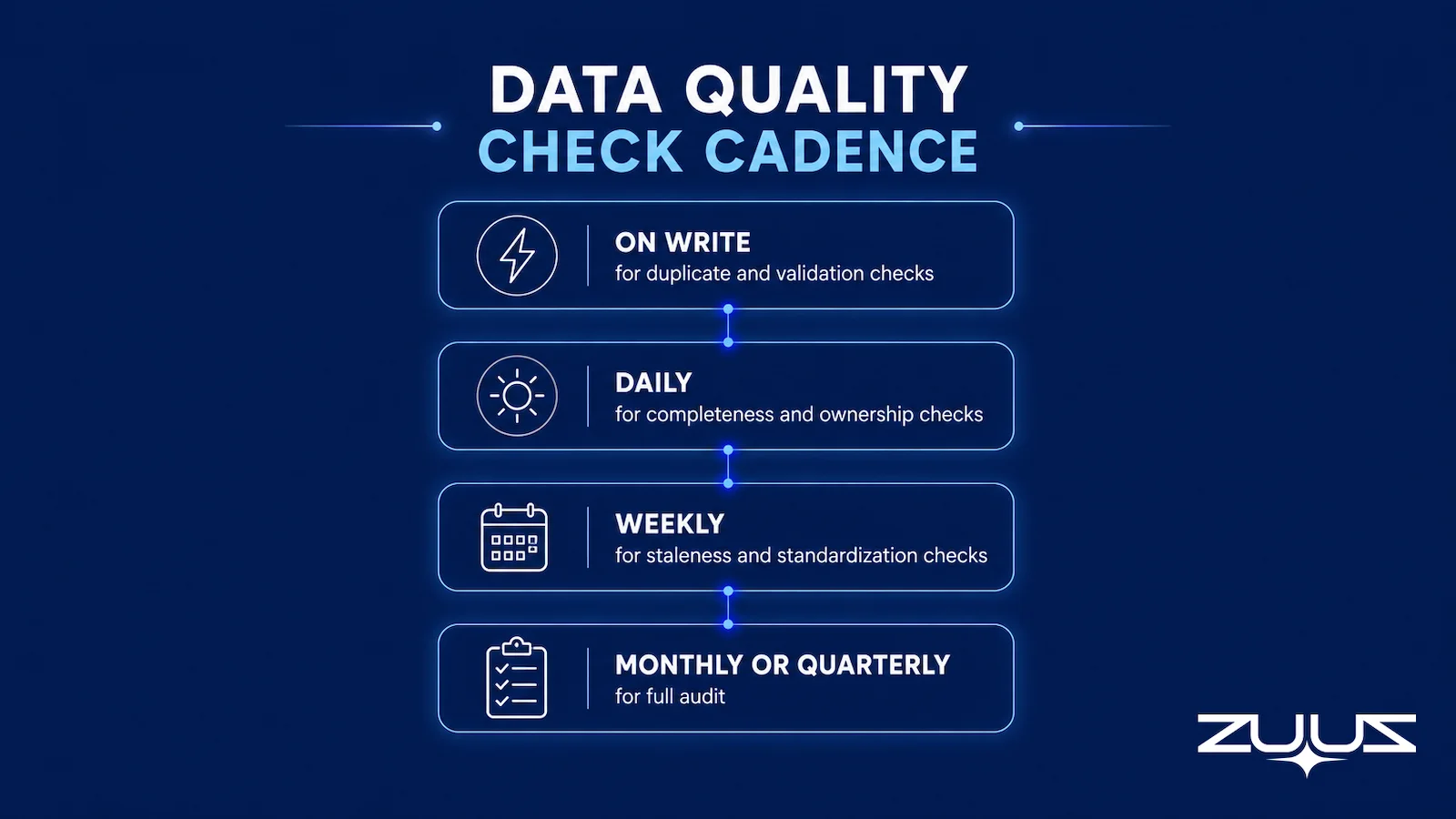
Cadence is where most data quality programs fail. A check that should run on every write but instead runs quarterly is not a check. It is a backlog. The intervals below reflect how often each check stays useful.
| Check | Recommended Cadence | Why This Interval |
|---|---|---|
| Duplicate detection | On write | A duplicate created today corrupts reporting immediately |
| Format and validation | On write | Malformed values break downstream systems the moment they land |
| Field completeness | Daily | Gaps appear constantly; a daily number keeps them visible |
| Ownership and routing | Daily | Misrouted records lose days of response time fast |
| Staleness and recency | Weekly | Deals go quiet on a rhythm that a weekly sweep catches |
| Standardization | Weekly | Drift accumulates slowly; weekly conformance is enough |
| Full audit, all six | Monthly or quarterly | A trended snapshot shows whether quality is rising or eroding |
A manual team cannot hit these intervals. On-write checks are impossible by hand, and daily ones get skipped under quota pressure. This is why most teams collapse all six into a single quarterly cleanup that fixes the past and leaves the next quarter to rot. Automated checks, by contrast, run at their natural cadence without competing for a person’s time. The economics of that swap are covered in ZUUZ versus manual CRM entry.
The Limit of Check and Fix
Every check in this article shares one boundary. A check inspects records that already exist. It cannot create a value that was never recorded.
A completeness check can prove that an opportunity has no close date. It cannot tell you the close date. If the buyer mentioned “we need this signed before our fiscal year ends in March” in an email that nobody logged, the check will correctly flag the empty field and remain unable to fill it. The signal left a trace, but the trace stayed in the inbox.
The same limit applies to staleness. A recency check flags a deal with no activity in 30 days. If the account actually sent three emails last week that never reached the CRM, the check is technically right and practically wrong. The record looks dead because the capture failed, not because the deal died.
This is the difference between mechanical fixes and signal recovery. Duplicate merges, format normalization, and standardization are mechanical: an automated check can fully resolve them because the information is present. Completeness and recency gaps are signal problems: the check can score them perfectly and fix nothing, because the missing data never entered the system. More on how this distorts the funnel sits in why your CRM pipeline is wrong.

How Capture at Source Removes Checks
If a check cannot recover what was never captured, the better move is to capture correctly the first time. Capture at source means writing the record from the conversation that created it, rather than reconstructing it later from memory.
When records are created from the source email, several checks stop being necessary. A completeness check has nothing to flag if the deal amount, contact title, and next step were extracted from the thread at creation. A recency check finds no false staleness if every inbound and outbound message updates the record’s activity timestamp automatically. The check still runs, but it passes by default because the gap it looks for never opens.
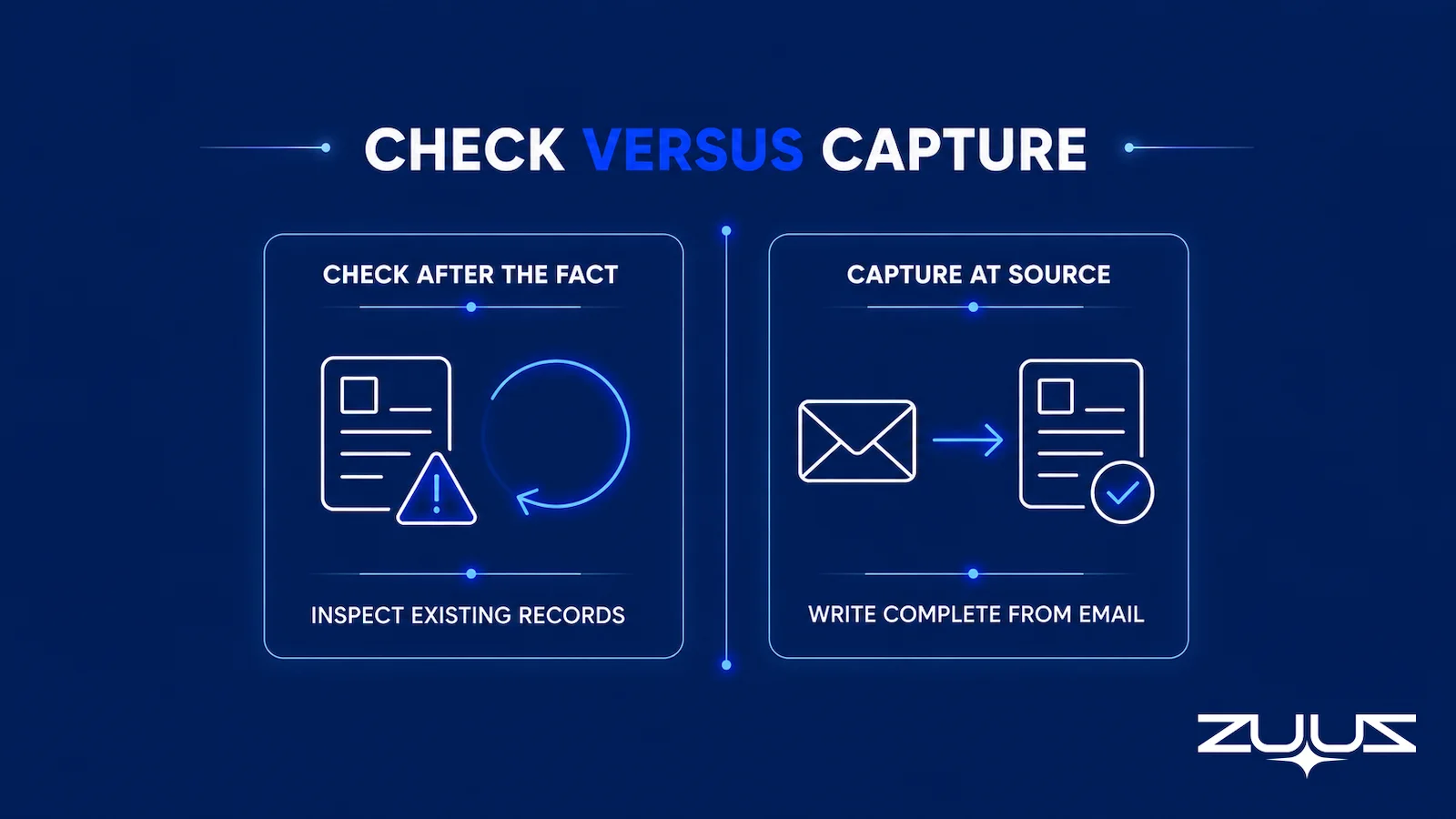
This reframes the entire program. Instead of running six checks to score how badly manual entry decayed the data, a team runs capture at source and watches whole categories of failure disappear. Validation and standardization still apply at the write step. Completeness and recency largely solve themselves. Duplicate detection improves because the system matches against existing accounts before creating anything. The work shifts from auditing decay to preventing it, a pattern detailed in choosing a CRM that reduces manual data entry.
Stop Auditing Decay. Prevent It at the Source.
Connect your CRM in minutes and let ZUUZ write complete, current records from every email. Start free, with no integration project required.
The Capture Gap Audit
The six checks grade the records the CRM has. They cannot grade the records it never received. The Capture Gap Audit is the one measurement that closes that blind spot, and it takes two deals and an afternoon.
- Pick one closed-won and one slipped deal from the last quarter.
- Read the full email and message thread end to end; list every fact that mattered – people, objections, dates, competitors, commitments.
- Open the CRM record for the same deal and mark which of those facts appear in a field, not a note.
- The percentage missing is the capture gap. Anything above about a third means the team is running on a CRM that records outcomes, not the deal.
Run alongside the six checks, the audit produces the result sales ops teams find hardest to explain upward: every check can pass while the capture gap is large. The closed-won record had no duplicates, every required field populated, clean formats, a recent last-activity date and the right owner – and the thread behind it named two stakeholders who were never contacts, a competitor mentioned once, and a dated commitment that never became a next step. A completeness score of ninety-odd percent measured against the fields you chose to require says nothing about the facts you never gave a field to. Report the capture gap next to the check results, on the same slide, and the two numbers stop contradicting each other.
From an operator’s seat
The order that works is to measure the capture gap before tightening required fields, not after. Teams that add required fields first get a completeness score that rises within a week, because reps type whatever passes validation – “TBD” in next step, the switchboard number in phone – and the check has no way to tell filler from fact. Across the deployments ZUUZ runs, the pattern is that the staleness check is the one that quietly becomes useless first: any sync that touches a record updates its last-activity date, so the field starts reporting system behavior rather than deal behavior. The part teams do not plan for is the merge backlog. Closing the capture gap creates contacts and stakeholders that the duplicate check will flag against records created by earlier imports, and somebody has to own that queue for the first month.
ZUUZ is an AI layer on top of the CRM a team already runs – it is never a CRM and never replaces one. Checks report on what the rep entered; ZUUZ writes the record the checks then have something true to inspect.
Data Quality Checks: How ZUUZ Removes the Work
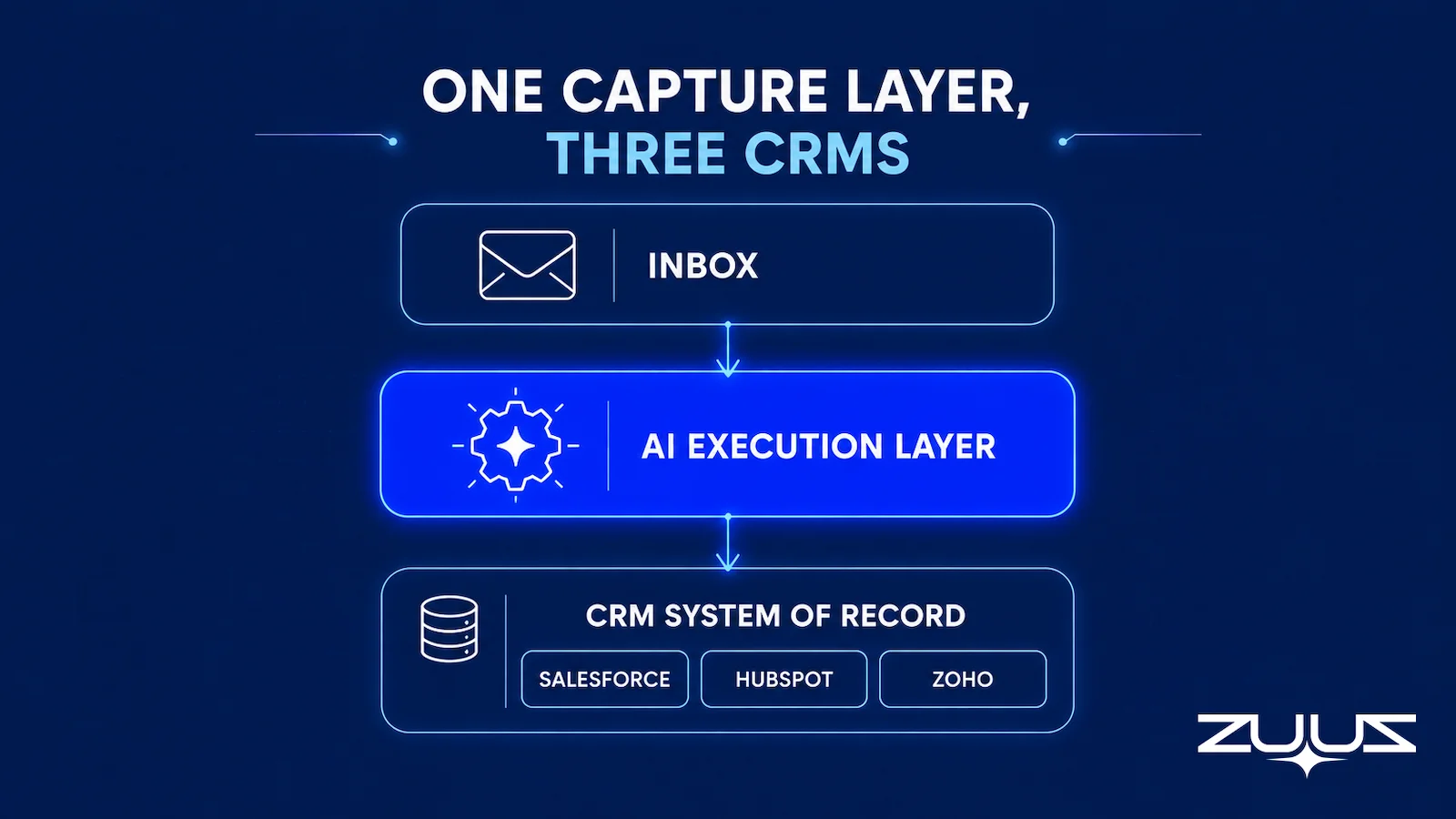
ZUUZ operates as the layer between email and CRM. It reads inbound and outbound email, extracts deal signals, and writes structured records to Salesforce, HubSpot, or Zoho. Because the record is built from the source conversation, the data quality checks that punish manual entry have far less to catch.
Completeness checks pass by default because fields arrive populated from the email: contact, company, deal context, and next step are extracted at creation rather than chased afterward. Recency checks pass because every message in the thread updates the record’s activity timestamp, so an active account never looks stale. Duplicate creation drops because the system matches incoming signals against existing accounts before writing anything new.
The CRM-agnostic design matters here. A sales ops team running Salesforce in one division and HubSpot or Zoho in another does not need a separate quality program per system. ZUUZ writes structured, validated records in each platform’s native format, so the same capture standard holds across all three. That removes the most common reason standardization checks fail: different tools, different conventions, no shared source of truth.
RA Technologies: $120K Surfaced in 72 Hours
RA Technologies, an IT services firm in the United States, connected their shared inbox to ZUUZ and ran a 90-day historical lookback on first connection. The system surfaced $120,000 in pipeline from prior email threads that had never been recorded in their CRM. No completeness check could have found that pipeline, because the records did not exist to be checked. Capture created them from email that the CRM had never seen.
That is the practical case for capture over check. A perfect audit of an empty record set returns a perfect score and zero recovered revenue. The pipeline was earned business already in motion, invisible to leadership only because it had stayed in the inbox.
Checks still have a place. Validation, standardization, and ownership rules belong in any well-run CRM, and a monthly audit keeps the team honest. But for the two checks that cost sales ops the most time, completeness and recency, capture at source changes the question from “how do we fix this faster” to “how do we stop creating it.” Teams that want hands-on help can review CRM data quality services or work with CRM data quality consultants to set the standard before automating it.
A first step that measures the gap for you
The concrete first step is one mailbox, not a cleanup project. Connect it, ZUUZ reads the last 90 days, and the rep reviews what it found before anything is written to the CRM. That review list is the capture gap, itemised on your own deals, which is a more useful first data quality artefact than another completeness report. The trial runs 30 days free, with no credit card: https://zuuz.ai/trial/
Frequently Asked Questions
What Are the Core CRM Data Quality Checks Every Sales Ops Team Should Run?
Six checks cover most of the work: duplicate detection, field completeness, format and validation rules, staleness and recency, ownership and routing accuracy, and standardization. Each answers a different question about whether a record can be trusted. Run together, they tell a sales ops team how much of the CRM reflects reality and how much is noise, missing data, or contradiction that reporting will then amplify.
How Often Should CRM Data Quality Checks Run?
Duplicate detection and validation should run on write, the moment a record is created or edited. Completeness and ownership accuracy fit a daily cadence. Staleness and standardization work well weekly. A full audit across all six belongs on a monthly or quarterly schedule. Manual teams cannot hit these intervals, which is why most checks collapse into a single rushed quarterly cleanup that leaves the next quarter to decay.
What Is the Difference Between a Data Quality Check and Capture at Source?
A check inspects records that already exist and flags what is wrong. Capture at source writes the record correctly the first time, from the email or document where the signal originated. The difference matters because a completeness check can find a missing field but cannot recover the value if that value never left the inbox. Capture removes whole categories of checks rather than scoring them after the fact.
Can Automated Checks Fix Bad CRM Data on Their Own?
Automated checks can fix mechanical problems: duplicate merges, format normalization, and standardization, because the information is already present. They cannot fix missing signal. If a renewal date or deal value was never recorded because the conversation stayed in email, no check can restore it. Checks score the gap accurately, but closing it requires capturing data at the point it is created rather than reconstructing it later.
How Does ZUUZ Improve CRM Data Quality Across Salesforce, HubSpot, Zoho, Attio or Pipedrive?
ZUUZ reads inbound and outbound email, extracts deal signals, and writes structured records to Salesforce, HubSpot, or Zoho. Because records are created from the source conversation, completeness and recency checks pass by default. Fields arrive populated, timestamps reflect real activity, and duplicate creation drops because the system matches against existing accounts before writing a new record.
What CRM Data Quality Metrics Should a Sales Ops Team Track?
Track duplicate rate, completeness percentage on required fields, validation pass rate, staleness percentage of records untouched past a threshold, ownership match rate, and standardization conformance. Each metric maps to one check. Trended over time, they show whether data quality is improving or eroding, which is far more useful than a single quarterly audit snapshot that captures only one moment.
See the Records Your Checks Can’t Find.
Audits score what exists. ZUUZ captures what never reached the CRM, so book 15 minutes and see the complete, current records your inbox could be writing today.

CEO of ZUUZ. He scaled Cloud Box Technologies from 0 to $25M ARR in IT services and distribution before building ZUUZ. Connect on LinkedIn

