
CRM Data Quality Tools: What to Evaluate in 2026
A category guide to CRM data quality tools: deduplication, validation, enrichment, monitoring, capture-at-source, and the blind spot most tools share.
- CRM data quality tools fall into five categories: deduplication, validation and standardization, enrichment, monitoring and alerting, and capture-at-source automation.
- Four of those five categories clean data that already sits in the CRM. They cannot recover a deal that was discussed only in email and never logged.
- The shared blind spot is missing data, not dirty data. A field cannot be deduplicated, validated, or enriched if no record was ever created.
- Evaluate tools on five axes: CRM-agnosticism, real-time versus batch, capture versus cleanup, rep effort, and source traceability.
- Capture-at-source tools reduce the workload of every cleanup category by preventing bad and missing records from forming in the first place.
- ZUUZ is the capture layer. It writes structured records from email to Salesforce, HubSpot, or Zoho and surfaced $120,000 in unrecorded pipeline at RA Technologies in 72 hours.
A sales operations lead opens the CRM on a Monday and finds three records for the same account, a contact whose email bounced last quarter, and a renewal nobody can date because the deal was never logged. Three different problems. Most teams reach for one tool and expect it to solve all three.
The CRM data quality tool market is usually sold as a single bucket. In practice it is five distinct categories, and they do not do the same job. Some find duplicates. Some check that a field is correct. Some add missing firmographics. Some watch for decay. And one rarely-discussed category prevents bad records from forming at all.
This guide separates those categories, names the job each one does, and flags the blind spot most of them share. It is written for Sales Ops and RevOps teams evaluating tools: the distinctions that change a buying decision, and nothing padded around them.
The Five Categories of CRM Data Quality Tools
Tool vendors and listicles tend to organize the market by product name. A more useful frame organizes it by the job the tool performs. Five categories cover almost everything sold as a CRM data quality tool or as data quality software with CRM connectors.
Deduplication
CRM deduplication tools find records that point to the same person or company and merge or flag them. They run fuzzy matching across names, email domains, phone numbers, and addresses to catch near-duplicates that an exact match would miss. The hard part is the merge rule: deciding which record wins each field and which gets retired. This is the category most teams notice first, because duplicates are visible in every list view.
Validation and Standardization
CRM data validation tools check that individual fields are correct and consistently formatted. Email verification confirms an address is deliverable. Phone validation checks format and line type. Standardization normalizes the messy variants, turning “USA,” “U.S.,” and “United States” into one canonical value so segmentation and reporting hold together. Deduplication asks whether two records are the same. Validation asks whether one record is right.
Enrichment
CRM data enrichment tools add fields the record is missing by matching it against a third-party database. They append firmographics like employee count, industry, and revenue band, or fill in a job title and a verified work email. Enrichment is the one cleanup category that adds data rather than correcting it, but it is bounded by the provider’s coverage and refresh cadence, and it works on records that already exist.
Monitoring and Alerting
Data quality monitoring tools watch the CRM over time and surface decay before it spreads. They track completeness rates, flag fields that fall below a threshold, alert on duplicate creation spikes, and report on records that have gone stale. They do not fix data on their own. They tell a RevOps team where the rot is forming so a person or another tool can act. Ongoing CRM data quality checks formalize what monitoring tools automate.
Capture at Source
Capture-at-source tools write structured records into the CRM at the moment a signal arrives, rather than cleaning records after the fact. The clearest example is email-to-CRM automation: reading inbound and outbound mail, extracting the deal, contact, and intent, and creating the record directly. This category is rarely listed alongside the other four, because the other four assume the record already exists. Capture-at-source questions that assumption.
| Category | The Job It Does | Acts On | Timing | Fixes Missing Data? |
|---|---|---|---|---|
| Deduplication | Find and merge records for the same entity | Existing records | Batch or on-create | No |
| Validation and standardization | Confirm fields are correct and uniformly formatted | Existing fields | Real time or batch | No |
| Enrichment | Append firmographic and contact fields from a database | Existing records | Batch or on-demand | Partially, within provider coverage |
| Monitoring and alerting | Track decay and flag where quality is dropping | Existing dataset | Continuous | No, it reports |
| Capture at source | Create the record from the signal as it arrives | Email and inbound activity | Near real time | Yes, prevents the gap |
Clean Data Starts at Capture.
ZUUZ writes structured records from email to your CRM, so fewer bad records ever form. Book a 15-minute walkthrough on your own inbox.
The Blind Spot Four of the Five Share
Look back at the last column of that table. Four of the five categories answer “no” to whether they fix missing data. That is not a coincidence. Deduplication, validation, enrichment, and monitoring all operate on records that already exist in the CRM. They are cleanup categories, and cleanup presumes there is something to clean.
The records that hurt forecasting most are the ones that were never created. A renewal mentioned in a reply thread. An RFP attached to an email that landed in a shared inbox while the rep was on another account. A pricing question a technical buyer forwarded on a Friday afternoon. None of those leave a row in the CRM, so none of them can be deduplicated, validated, or enriched.
This is the gap the SERP misses. The listicles and product pages organize tools by deduplication versus validation, but none of them separates fixing data after the fact from capturing it at the source. A perfect deduplication engine running on a CRM that holds half the deals produces a clean view of half the business. The cleanliness is real. The completeness is not.
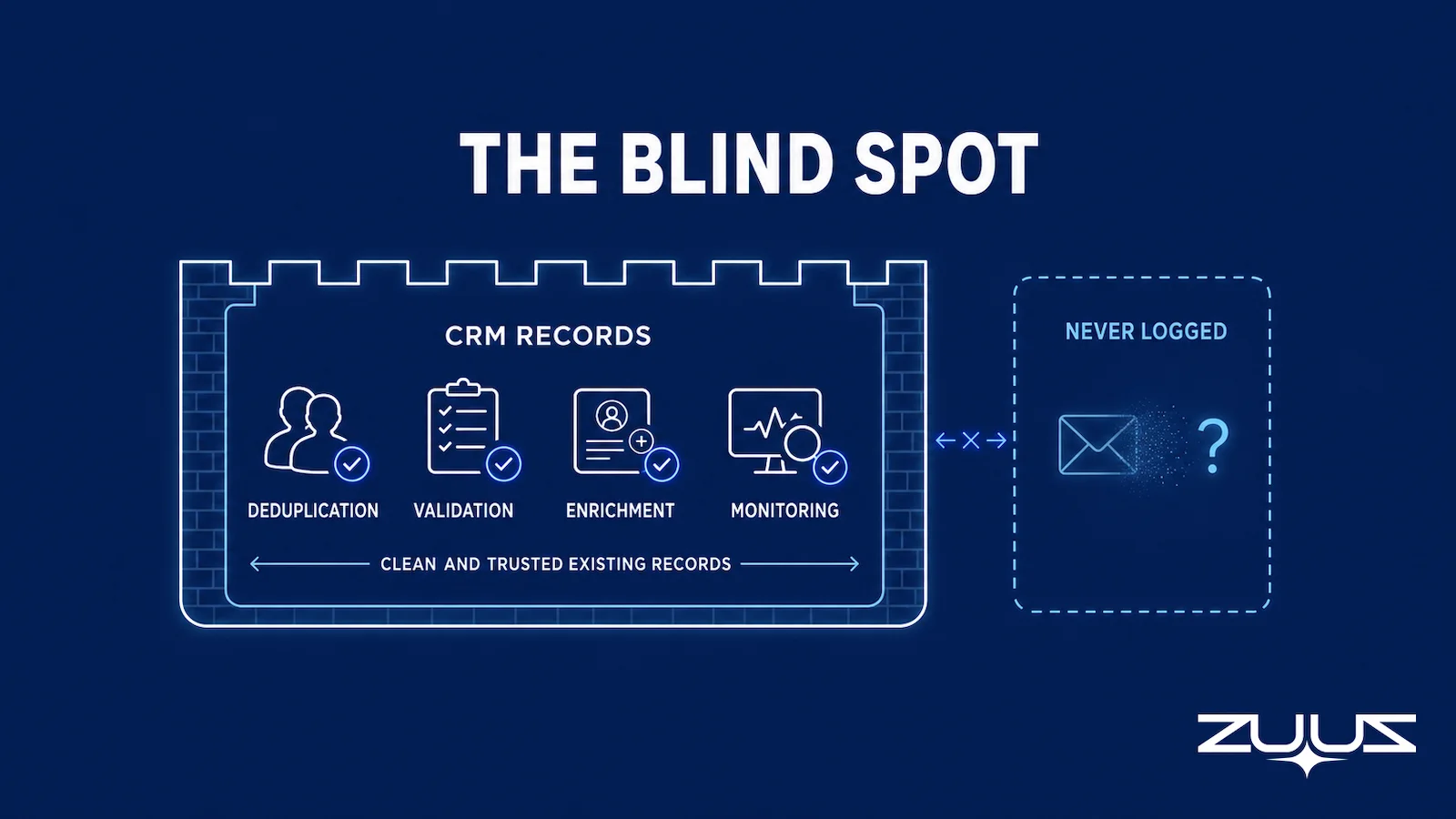
The point is not that cleanup tools fail. They do their job well. The point is that the job they do has a ceiling set by capture. As covered in the pillar on CRM data quality, accuracy and completeness are separate dimensions, and most tooling targets accuracy because dirty data is visible while missing data is not.

Five Criteria for Evaluating CRM Data Quality Tools
Category labels narrow the field. The buying decision comes down to five questions that cut across categories. Each one separates tools that fit a real RevOps workflow from tools that look good in a demo.
1. CRM-Agnostic or Locked to One Platform
Some tools are native to a single CRM and break the moment a division runs a different system or a migration is underway. Others connect to Salesforce, HubSpot, and Zoho alike and write in each system’s native format. CRM-agnosticism matters most for organizations that grew through acquisition or run separate CRMs across regions. A tool tied to one platform becomes a liability the day the platform changes.
2. Real Time or Batch
Batch tools run on a schedule, cleaning the dataset nightly or weekly. Real-time tools act as the record is created or edited. For deduplication and validation, real time prevents the bad record from ever landing. For capture, real time is the difference between a renewal that a manager can see today and one that surfaces two weeks late. Narrow deal windows in renewal and refresh cycles punish lag.
3. Capture or Cleanup
This is the axis the market underweights. A cleanup tool improves what exists. A capture tool changes what gets created. The two are not substitutes. A team that buys only cleanup tools is treating symptoms of a capture problem, and the symptoms return every cycle because the source keeps producing incomplete records.
4. Rep Effort Required
Any tool that asks reps to change how they work in email or to log records manually will see adoption decay. Tools that require significant rep behavior change see lower sustained adoption than tools that fit the way reps already work. The best data quality tools ask for review and confirmation, not data entry.
5. Source Traceability
A record is only trustworthy if a RevOps lead can trace it back to where it came from. Tools that write or merge data without an audit trail create a new problem: a clean-looking field that nobody can verify. Capture and enrichment tools should link each value to its source, whether that is the email thread that produced it or the database that supplied it.
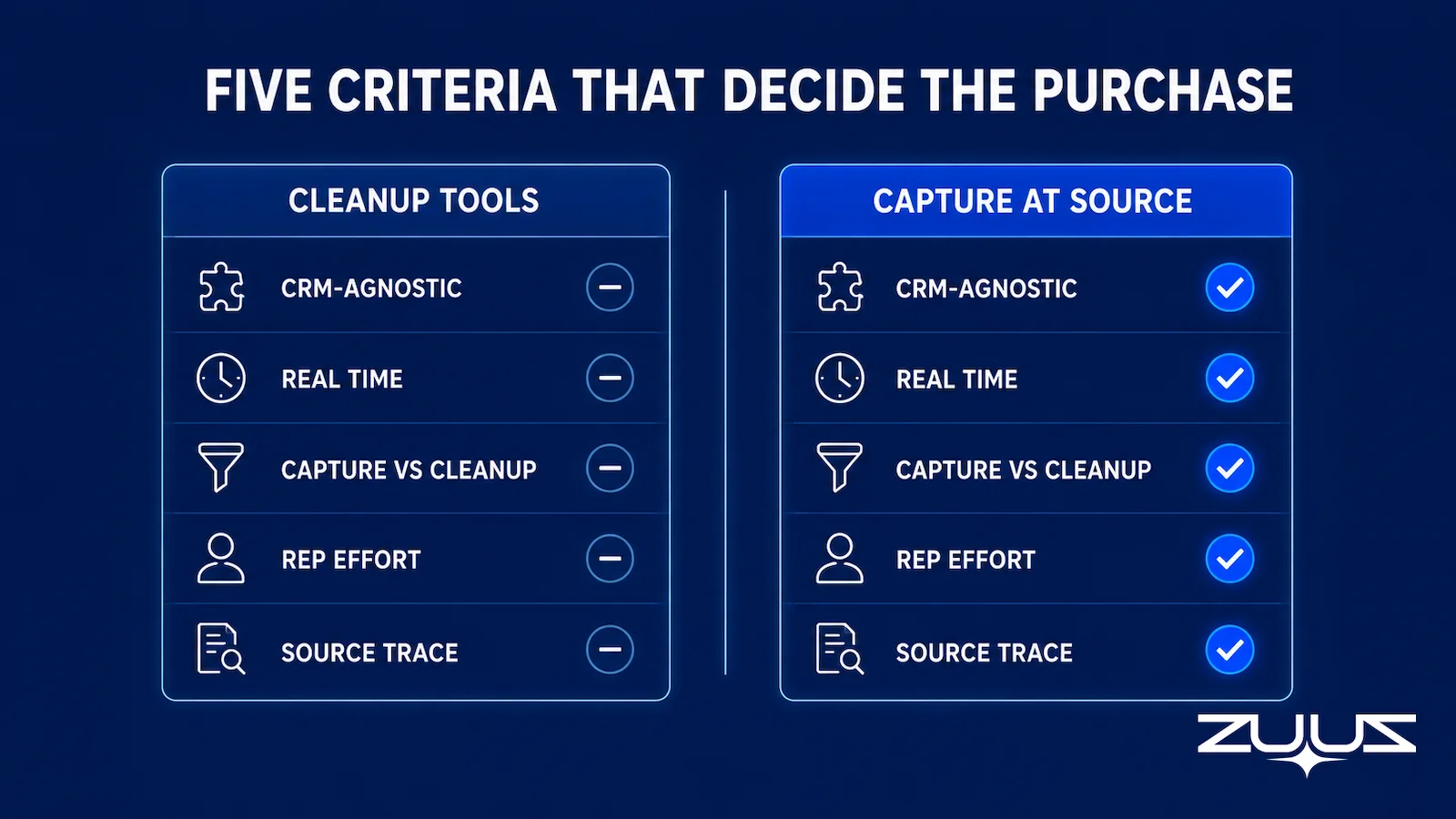
| Criterion | Cleanup Categories | Capture at Source | Why It Matters | ZUUZ |
|---|---|---|---|---|
| CRM-agnostic | Varies by vendor | Required for multi-CRM orgs | Survives migrations and divisional splits | Salesforce, HubSpot, Zoho, Attio, Pipedrive |
| Real time vs batch | Often batch | Near real time | Lag costs visibility on narrow deal windows | Near real time, plus a 90-day lookback on first connection |
| Capture vs cleanup | Cleanup only | Capture | Cleanup has a ceiling set by capture | Capture; the record is written rather than corrected |
| Rep effort | Low, runs in background | Review, not data entry | Adoption decays when reps must change habits | Rep reviews and approves in one click, in the inbox they already use |
| Source traceability | Varies | Links to source thread | Untraceable fields cannot be trusted | Every write links back to the thread it came from |
Stop Cleaning the Same Records Twice.
Fix the source and the cleanup queue shrinks. Connect your CRM and let ZUUZ capture what reps never log. Start free, no integration project required.
Criteria are useful when comparing two tools inside the same category. They help far less with the question that usually comes first, which is which category to buy at all, and that question has a clearer answer than most buying guides admit.

How the Categories Work Together
These categories are not a menu where a team picks one. They form a sequence, and the order determines how much work each link has to do. The further upstream a problem is solved, the less the downstream tools have to clean.
Capture at source comes first. When a record is written correctly from the email that produced it, the data is right on arrival. Validation and standardization then keep the fields formatted and verified as records age and people update them. Deduplication prevents and merges copies, which matters more when multiple sources feed the same CRM. Enrichment fills the firmographic gaps that email alone does not carry. Monitoring watches the whole set for decay over time.
The relationship compounds rather than repeats. Every record that capture-at-source creates correctly is a record the cleanup tools never have to fix. A team running strong capture sees fewer validation failures, because fewer malformed records form in the first place. The cleanup layers still earn their place, handling what slips through and what ages out, but they stop being a treadmill.
For teams weighing whether to build this capability in-house, license tools, or hand it off, the choice often comes down to delivery model. Managed CRM data quality services handle the work as an outsourced engagement, while CRM data quality consultants advise on strategy and process design without owning the ongoing execution. Tools are the third path: software the team runs itself.
The Capture Gap Audit
Category labels do not tell a team how much of this problem it actually has. The Capture Gap Audit measures how much of what the team already knows never reached the CRM.
- Pick one closed-won and one slipped deal from the last quarter.
- Read the full email and message thread end to end; list every fact that mattered – people, objections, dates, competitors, commitments.
- Open the CRM record for the same deal and mark which of those facts appear in a field, not a note.
- The percentage missing is the capture gap. Anything above about a third means the team is running on a CRM that records outcomes, not the deal.
The audit is worth running before a data quality purchase, because it separates the two failures this market conflates. A high duplicate count is a cleanup problem. A high capture gap is not, and no deduplication, validation or enrichment pass will close it. ZUUZ is an AI layer on top of the CRM a team already runs, never a CRM and never a replacement for one: the cleanup categories repair what the rep entered, while ZUUZ writes the record in the first place.
Capture at Source: How ZUUZ Prevents Bad Records
ZUUZ sits in the capture-at-source category. It reads inbound and outbound email, extracts the deal signal, the contact, and the intent, and writes a structured record to Salesforce, HubSpot, or Zoho. The record is correct on creation, which means it does not enter the cleanup queue at all.
The CRM-agnostic design is the differentiator. ZUUZ does not require a specific CRM. It connects to whichever system is in place and writes in that system’s native format, which matters for organizations running different CRMs across divisions or working through a migration. Reps do not change how they work in email. They review flagged signals in a short daily digest and confirm or dismiss, which keeps the rep-effort axis low.
This is what separates a capture tool from a cleanup tool in practice. RA Technologies, an IT services firm in the United States, connected their shared inbox to ZUUZ and ran a 90-day historical lookback on first connection. The system surfaced $120,000 in pipeline that had never been recorded in their CRM. Those were not lost deals or analysis of past losses. They were active conversations progressing through email while remaining invisible to sales leadership, because no record had ever been created for a cleanup tool to find.
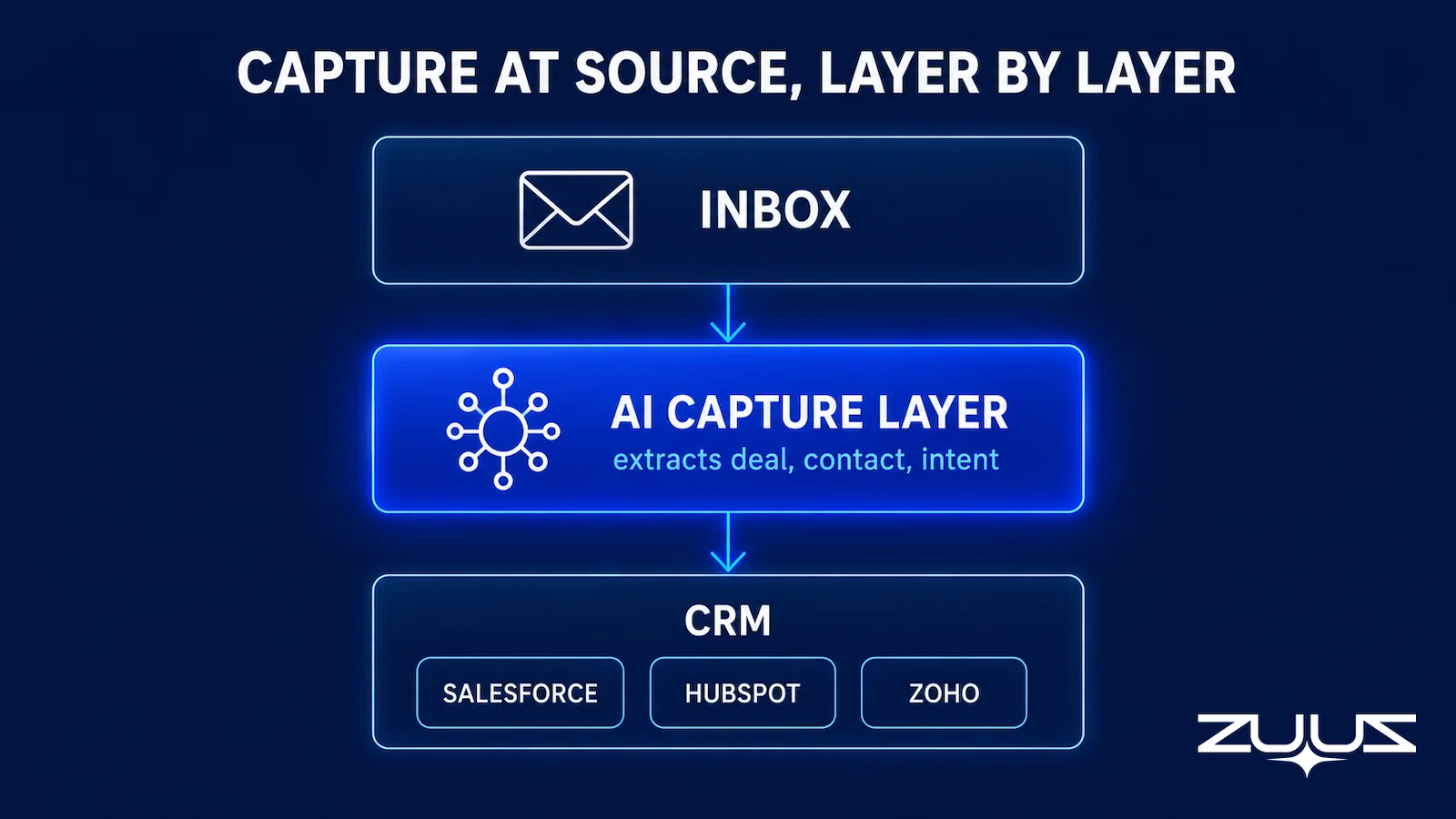
Capture-at-source complements rather than replaces the cleanup categories. Validation still standardizes fields. Deduplication still merges copies that arrive from web forms and imports. Enrichment still appends firmographics. ZUUZ reduces the volume those tools have to process by stopping the most expensive failure, the missing record, before it becomes a gap in the forecast. Teams comparing automated capture against the status quo can read ZUUZ versus manual CRM entry for the workflow difference, or the guide to the best CRM to reduce manual data entry for platform context.
Clean capture also feeds the layer above the CRM. Once records reflect what is actually happening in accounts, revenue intelligence software and forecasting tools have a complete dataset to work from, rather than a polished view of partial data.
From an operator’s seat
From an operator’s seat, the capture gap shows up in the cleanup queue long before anyone measures it. Duplicate volume tends to fall once capture is running, because a share of those duplicates were reps re-creating a contact that already existed under a different spelling while moving fast in email. Across the deployments ZUUZ runs, the surprise in the first lookback is rarely a missing deal; it is missing people, the three or four names active on live threads who were never contacts on the account, which is why an enrichment bill never quite matched the contact list it was supposed to cover. The part teams do not plan for is the approval pass: someone has to own the review of what the lookback found in the first week, and a queue nobody owns is how a capture layer gets blamed for noise it did not create.
A First Step That Does Not Touch the Cleanup Stack
Trying this does not mean replacing a deduplication or validation tool. Connect one mailbox, let ZUUZ read the last 90 days, and have the rep who owns those accounts review what it found before anything is written into Salesforce, HubSpot, Zoho, Attio or Pipedrive. What comes back is the set of records the cleanup tools were never given a chance to clean. The trial runs 30 days, free, with no credit card: https://zuuz.ai/trial/
Frequently Asked Questions
What Are CRM Data Quality Tools?
CRM data quality tools are software that keep records in a CRM accurate, complete, and free of duplicates. They fall into five categories: deduplication, validation and standardization, enrichment, monitoring and alerting, and capture-at-source automation. The first four clean data that already exists in the CRM. Capture-at-source tools prevent bad or missing records from forming in the first place by writing structured data from email.
What Is the Difference Between CRM Deduplication and Validation Tools?
Deduplication tools find and merge records that point to the same person or company, using fuzzy matching on names, domains, and addresses. Validation and standardization tools check that individual fields are correct and consistently formatted, such as verifying an email is deliverable or normalizing a country name. Deduplication answers whether two records are the same. Validation answers whether one record is right.
Do CRM Data Quality Tools Fix Missing Data?
Mostly no. Deduplication, validation, and monitoring tools work on records that already exist in the CRM. Enrichment tools add firmographic and contact fields from third-party databases, but they cannot recover a deal that was discussed only in email and never logged. The signal that never reached the CRM is invisible to every cleanup category. Capture-at-source tools address that specific gap.
What Should You Evaluate When Choosing CRM Data Quality Tools?
Evaluate five things: whether the tool is CRM-agnostic or locked to one platform, whether it runs in real time or in batch, whether it fixes data after the fact or prevents bad records at the source, how much effort it asks of reps, and whether it leaves an audit trail back to the source. Most tools score well on cleanup and poorly on capture, which is why categories are usually combined.
How Do CRM Data Quality Tool Categories Work Together?
Capture-at-source tools write structured records from email so the data is correct on arrival. Validation standardizes the fields, deduplication prevents and merges copies, enrichment fills firmographic gaps, and monitoring watches for decay over time. Capture reduces the volume of work the cleanup categories have to do, because fewer bad records form. The cleanup layers handle what slips through and what ages out.
Where Does ZUUZ Fit Among CRM Data Quality Tools?
ZUUZ is the capture-at-source layer. It reads inbound and outbound email, extracts deal signals, and writes structured records to Salesforce, HubSpot, or Zoho. It prevents incomplete and missing records from forming, which complements deduplication and validation tools that clean what already exists. RA Technologies surfaced $120,000 in unrecorded pipeline within 72 hours of connecting their inbox.
See the Records Your Tools Never Get to Clean.
Deduplication and validation fix what exists. ZUUZ captures what never made it into the CRM. Book 15 minutes and see the pipeline hiding in your inbox today.

CEO of ZUUZ. He scaled Cloud Box Technologies from 0 to $25M ARR in IT services and distribution before building ZUUZ. Connect on LinkedIn

