
Best CRM to Reduce Manual Data Entry, Without Switching CRMs
Cut manual CRM data entry without switching CRMs: which tools remove the typing instead of moving it, and how to automate logging in Salesforce or HubSpot.
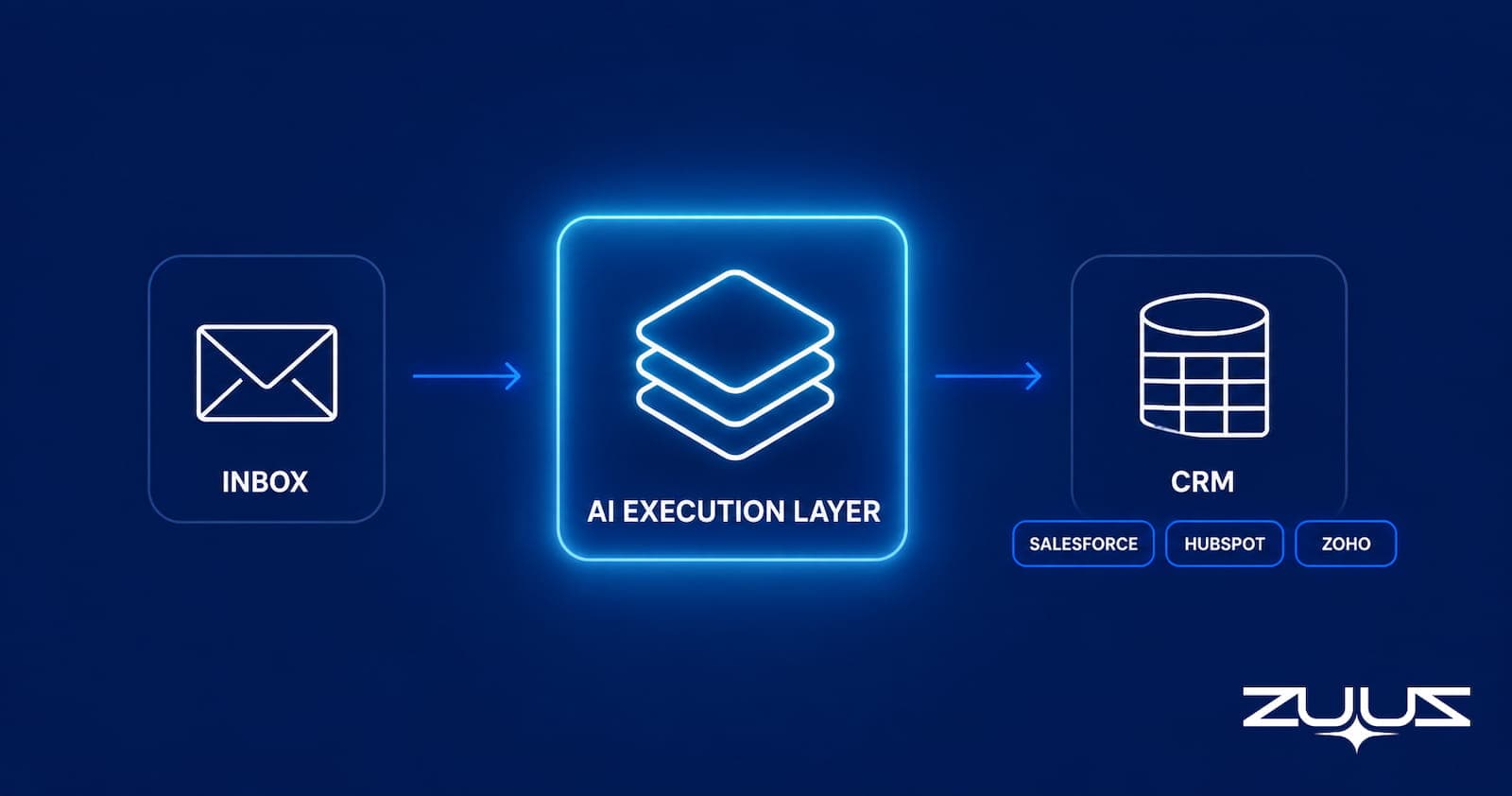
- Manual CRM data entry is a symptom. The real problem is that the most important sales signals (buying intent, urgency, pricing questions, renewal risk) originate outside the CRM and depend entirely on a rep to notice and log them.
- Post-call tools such as Gong, Avoma, and Fireflies reduce meeting logging burden. They do not touch inbound email, which is the highest-volume deal signal channel in B2B sales.
- Native CRM automation in Salesforce, HubSpot, and Zoho handles workflow rules and contact sync. It does not extract signal intelligence from unstructured inbound emails.
- The right evaluation question is not “which CRM requires less typing?” It is “which tool captures revenue signals before a rep has to notice them?”
- ZUUZ sits between sales conversations and the CRM, reading inbound emails, identifying buying intent, qualifying leads, and writing structured pipeline data to Salesforce, HubSpot, or Zoho with the rep approving the finished record in one click.
- A CRM records what the team remembers to enter. ZUUZ captures what actually happened.
- ZUUZ is an AI layer on top of the CRM a team already runs: it connects to the sales inbox, reads LinkedIn messages and meeting or call transcripts, and writes leads, stakeholders, next steps and renewal signals into Salesforce, HubSpot, Zoho, Attio or Pipedrive for the rep to approve in one click.
A sales manager opens the CRM on Monday morning. The forecast looks clean. The stages look updated. The pipeline looks under control.
But the real deal activity is somewhere else. A prospect asked about pricing in an email. A renewal customer mentioned a competitor. A buyer requested a revised proposal. A warm lead replied to an old thread. None of it made it into the CRM.
This is the real CRM data problem. Manual data entry is the visible symptom. The deeper issue is that the most important sales signals originate outside the CRM, then depend on a human being to notice, interpret, prioritize, and log them.
This article covers what actually causes CRM data failure at a structural level, which tools address which parts of the problem, and where finding the best CRM to reduce manual data entry requires looking beyond the CRM itself to the execution layer where signals are first created.
The CRM Data Entry Problem Is a Design Failure, Not a Discipline Failure
Where Deals Actually Happen vs. Where CRMs Expect Data to Arrive
CRMs were designed in an era when the sales process was largely phone-based and data volumes were manageable. A rep made a call. A manager reviewed the record. The system worked because reps had time to type notes between interactions.
That is not what the inbox looks like now. A mid-market sales rep handles dozens of inbound emails per day across active deals, renewal accounts, warm leads, and new inquiries. Each email contains information that belongs in the CRM. Most of it never gets there.
The CRM was built to store data. It was not built to collect it. That distinction is why training reps to update records more consistently never solves the problem at scale.
The Admin Burden by the Numbers
Sales reps spend an average of 5.5 hours per week on manual CRM data entry, according to Salesforce’s 2024 State of Sales research. For a team of ten, that is more than 2,800 hours per year spent transferring information from where it was created into a system that should already have it.
The cost compounds beyond hours. A rep who fields four emails in the morning and updates the CRM at end of day is entering a summary of a memory, not a record of the conversation. The urgency in the email at 9am is gone by 5pm. The specific budget figure the prospect mentioned is paraphrased, and the stage that should have moved did not move because no one was sure which criteria triggered it.
The 1-10-100 rule quantifies this degradation. It costs $1 to capture data correctly at the point of creation, $10 to correct it later, and $100 to address the business failures (missed deals, inaccurate forecasts, undetected renewals at risk) that follow from bad data. Manual entry is the most expensive path. It just appears free.
The admin burden is real, but it is a symptom of a deeper structural problem. Fixing it requires understanding the three distinct ways CRM data fails before any tool purchase can actually close the gap. For a detailed breakdown of what goes wrong inside the pipeline, see why your CRM pipeline is wrong.
See the Pipeline Your CRM Can’t See.
ZUUZ connects to the sales inbox, extracts the deal signal, and writes it to Salesforce, HubSpot, Zoho, Attio or Pipedrive. Book a 15-minute walkthrough on your own inbox.
The Three CRM Data Failures and Why Fixing One Does Not Fix the Others
“Data entry reduction” is not a single problem. There are three distinct failure modes, and a tool that addresses one does not close the other two.
Post-call logging is the most familiar. A rep finishes a discovery call, plans to update the CRM, gets pulled into another meeting, and the record never gets written. Tools like Gong, Avoma, Fireflies, and Fathom address this by transcribing calls and writing summaries directly to the CRM record.
Contact and record decay is the second failure mode. People change roles, companies change ownership, and a CRM that was accurate six months ago drifts into unreliable territory. Enrichment tools such as Apollo and ZoomInfo handle this by refreshing data automatically.
Inbound email signal capture is the third, and the most consequential. Every day, emails arrive containing buying intent, pricing questions, proposal requests, renewal risk, and competitor mentions. No standard CRM, no post-call tool, and no enrichment platform captures them automatically. They sit in the rep’s inbox until someone manually notices and logs them, and that dependency is where the most revenue-affecting CRM failures occur.
Table 1: The Three CRM Data Failures, Cause, Consequence, and Tool Coverage
| Failure Mode | Revenue Consequence | Addressed By |
|---|---|---|
| Post-call logging | Stale deal records, missed next steps | Gong, Avoma, Fireflies, Fathom |
| Contact and record decay | Outreach failures, bad data in reports | Apollo, ZoomInfo, Clearbit |
| Inbound email signal capture | Missed leads, lost deals, invisible pipeline | Not addressed by standard tools |
Understanding where standard tools stop is the prerequisite for evaluating what comes next. The most logical starting point is the CRM platforms themselves, specifically what native automation in Salesforce, HubSpot, Zoho, Attio or Pipedrive handles without any add-on.

What Native CRM Automation in Salesforce, HubSpot, Zoho, Attio or Pipedrive Actually Handles
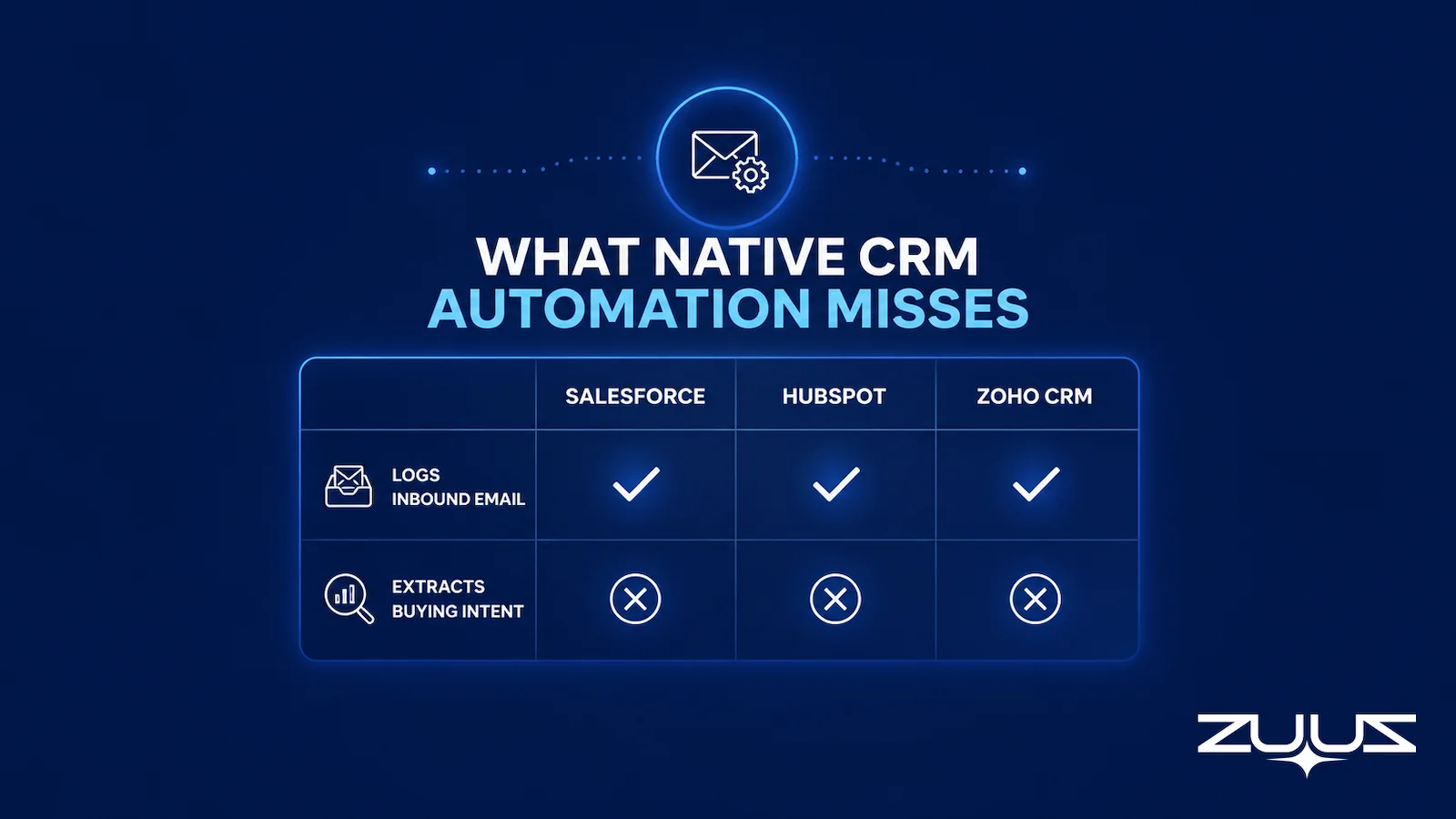
All three major CRMs include automation that reduces some manual work. Salesforce Flow triggers field updates and routes leads based on predefined rules. HubSpot Workflows automate sequences, task creation, and deal stage movement. Zoho CRM’s rules handle lead assignment and follow-up reminders. Outbound email sync is also covered: when a rep sends from a connected inbox, the message logs to the contact record automatically.
What none of these features address is unstructured inbound email. A prospect replies with new requirements. A customer emails about renewal terms. A warm lead says they are ready to move forward. Native CRM sync attaches these emails as message records but does not read the content, extract intent, update deal stages, or alert anyone that something worth acting on has arrived.
Table 2: Native CRM Automation Coverage Across Five Data Capture Types
| Data Capture Type | Salesforce | HubSpot | Zoho CRM | With ZUUZ on top |
|---|---|---|---|---|
| Outbound email logging | Yes | Yes | Yes | Yes |
| Inbound email logging as a record | Yes | Yes | Yes | Yes |
| Inbound email content extraction | No | No | No | Yes |
| Buying intent identification from email | No | No | No | Yes, with lead scoring |
| Automatic deal stage updates from email content | No | No | No | Stage updates the rep approves |
A logged email is a file attachment on a contact record. A read email is intelligence that should change what the deal stage shows and what the rep does next. Native automation handles the former. It does not touch the latter.
ZUUZ operates at that second layer, reading inbound email content and writing structured deal data to the CRM record without rep input. IT-focused teams using Salesforce for pipeline tracking will find more context in how Salesforce email integration works for IT sales teams.
Post-call tools work in adjacent territory, and understanding their boundary gives buyers a complete picture before evaluating tools built to go further.
Post-Call Tools That Reduce CRM Admin and the Channel They Do Not Cover
Tools like Gong, Avoma, Fireflies, and Fathom handle post-call logging well. They transcribe calls, extract key points (next steps, objections, competitor mentions, pricing discussion), and write summaries to the CRM record. Fathom offers a free tier for Salesforce and HubSpot users. Gong adds coaching and analytics. Each earns its place in a revenue operations stack for teams running a high volume of calls and demos.
None of them connect to the sales inbox. A prospect who sends a pricing question via email generates no signal any of these tools will see. A renewal customer who emails a concern before contract end generates no alert. A warm lead who replies to an old thread to say they are ready to move is invisible to every post-call tool on the market.
The category is named for what it captures. That name is also its boundary. ZUUZ captures what post-call tools cannot reach: the inbound email, read and classified the moment it arrives, before a rep has to act on it. Missed signals of this type are one of the most documented causes of pipeline loss, a pattern covered in detail in how to fix missed sales leads in email.
The Capture Layer Test, Five Questions That Reveal Whether a Tool Reduces Admin or Captures Revenue Signals
When evaluating any CRM or CRM add-on for admin reduction, most buyers default to two questions: how much manual typing does it eliminate, and how does it connect to the existing CRM. Both matter. Neither is the most consequential question to ask.
The five criteria below make up the Capture Layer Test, and they are ordered from most consequential to least. A tool that scores well only on the last two reduces admin work. A tool that scores well on all five protects revenue.
Table 3: Evaluation Framework, Five Criteria to Score Any Tool
| Evaluation Area | Why It Matters | What to Ask Any Tool |
|---|---|---|
| Does it capture signals before CRM entry? | Most revenue signals exist at the moment of the conversation, before a rep logs anything | Does the tool read the source channel directly, without waiting for rep initiation? |
| Does it identify buying intent automatically? | Not every inbound message carries equal weight, and intent classification determines where to focus | Does the tool distinguish a pricing question from a support request without manual tagging? |
| Does it surface missed opportunities? | Buried signals become lost deals, and the tool should alert without a rep searching for it | Does it automatically route or flag high-priority signals without rep intervention? |
| Does it write to the CRM automatically? | Removes the manual transfer step between where work happens and where it needs to live | Does it update specific CRM fields, or only attach a summary note? |
| Does it work across the existing CRM? | Buyers should not need to replace infrastructure to fix a data capture problem | Does it operate across Salesforce, HubSpot, and Zoho, or only one? |
A tool that answers yes to the first three criteria is operating at the revenue intelligence layer. A tool that answers yes only to the last two is operating at the admin reduction layer. Both have value. The question is which problem is actually costing the business more.
ZUUZ is built to answer yes to all five. It reads the source channel directly, classifies intent without manual tagging, surfaces missed signals before a rep searches for them, writes to CRM fields automatically, and operates across Salesforce, HubSpot, Zoho, Attio or Pipedrive.
Stop Losing Pipeline in the Inbox.
Connect your CRM in minutes and let ZUUZ capture the signals your team never logs. Start free, with no integration project required.
No single product answers all five questions the same way. Comparing how each one fails is more revealing than comparing how each one markets itself.
Tools That Reduce Manual CRM Data Entry and What Each One Covers
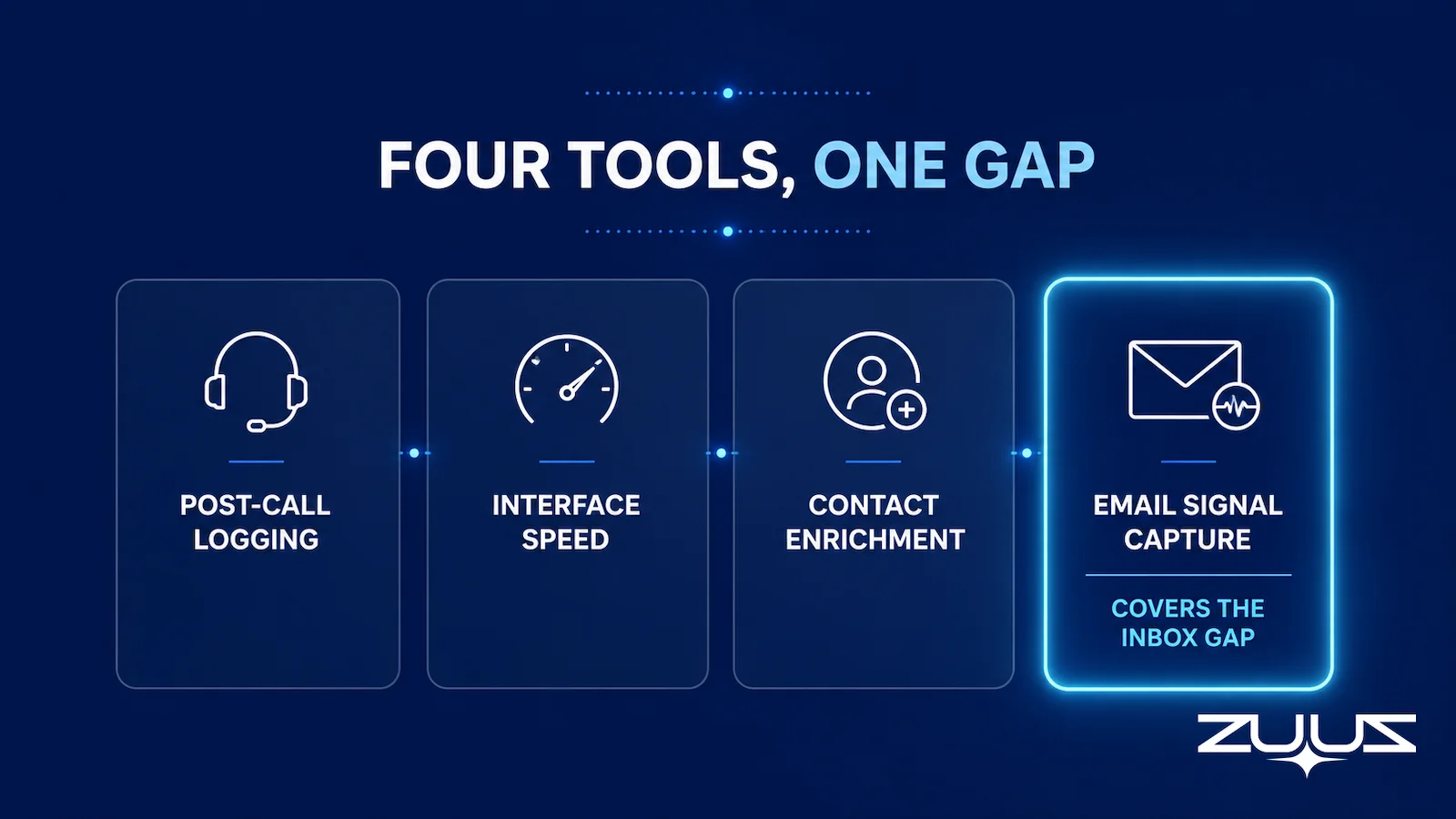
Several tools address the CRM data entry problem in meaningful ways. Each covers a specific failure mode, and none covers all three without adding a dedicated email signal layer.
Post-Call Logging Tools
Fathom handles post-call logging for Salesforce and HubSpot users. It joins meetings, transcribes them, and writes structured summaries to the CRM record. The free tier is functional for most sales teams. It does not read email.
Avoma covers a similar territory with added conversation analytics and coaching. Like all tools in this category, its coverage boundary is the audio channel. Inbound email signals fall outside its scope entirely.
CRM Interface Acceleration Tools
Scratchpad reduces Salesforce data entry friction by overlaying a faster rep-facing interface on top of Salesforce records. It makes updating fields faster without changing where the data comes from. It does not capture inbound email signals, and it does not operate on HubSpot or Zoho.
Contact and Record Enrichment Tools
Apollo handles contact and record enrichment, refreshing company and contact data across a CRM. It addresses the decay failure mode. It does not capture deal signals from inbound conversations, making it a complement to signal capture rather than a substitute.
Email Signal Capture: ZUUZ
ZUUZ addresses the third failure mode: inbound email. It connects to the sales inbox, reads those threads for deal signal including buying intent, pricing questions, proposal requests, and renewal risk, and writes structured pipeline data to Salesforce, HubSpot, or Zoho automatically. It is the layer in this list that operates at the inbox before a rep has to open, categorize, or log anything.
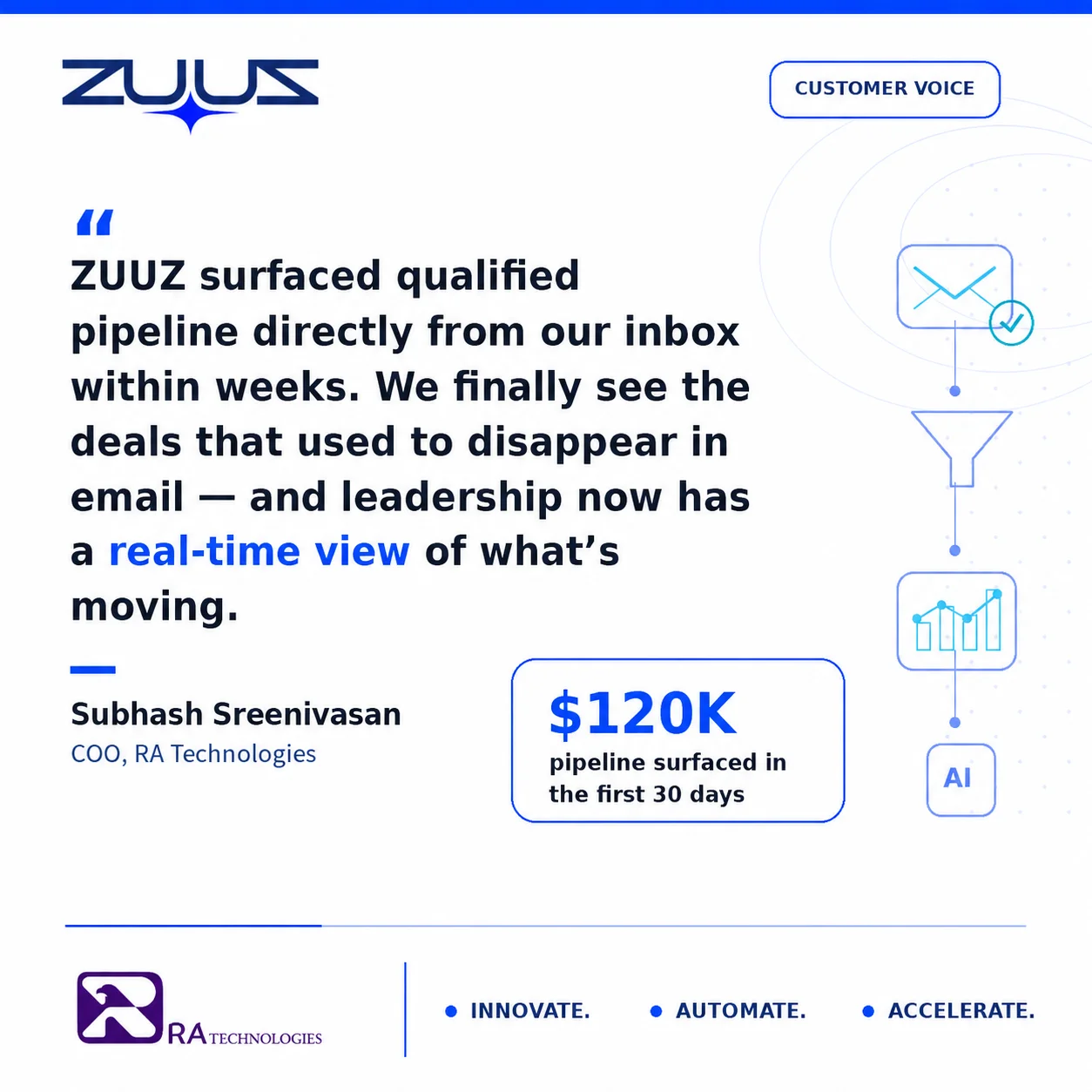
RA Technologies, a US-based IT services firm, ran a 90-day lookback after deploying ZUUZ and found $120,000 in pipeline that had been sitting unacted on in the sales inbox. Those signals existed. They simply had no mechanism to surface them before ZUUZ read the email thread and wrote them to the CRM record.
What the capture layer produced for two customers.
RA Technologies, a US IT services company, ran ZUUZ on the HubSpot instance it had used for two years, with the same team and no migration. Within 72 hours, $120K in pipeline the CRM had never seen was surfaced from the sales mailbox. The detail is in the RA Technologies case study.
Cloud Box Technologies, a UAE cloud and IT services business, tracks 10 to 12 renewals in minutes from a single connected user, with leadership seeing live pipeline instead of a weekly rollup.
Avinash Gujje ran sales in IT services and distribution before building ZUUZ, scaling Cloud Box Technologies from zero to $25M ARR. Across those years the CRM hygiene conversation repeated itself every quarter, and the reps who were hardest to fault on effort were often the ones with the thinnest records. The reason was mechanical rather than attitudinal. A rep working a distribution account handles dozens of threads a day where the commercial content sits three replies down, and the record only gets the part that was still in memory when the laptop came back open.
The detail that the training answer misses is which entries get dropped first. It is not the new logo, which everyone wants credit for. It is the renewal mentioned in passing, the quiet expansion request, and the second stakeholder who joined a thread without ever being added to the account. Those are exactly the entries a pipeline review needs and the ones a busy rep has least reason to type. Treating that as a discipline problem produces more reminders, and treating it as a capture problem produces records.
How ZUUZ Turns Inbox Activity Into Pipeline Action
Most CRM automation starts after data is already inside the CRM. A workflow fires when a deal stage changes. A sequence triggers when a contact is enrolled. A task creates when a field is updated. These are all downstream reactions to data that a human already had to enter.
ZUUZ starts earlier, at the point where the signal is created.
What ZUUZ Reads and What It Identifies
ZUUZ connects to the sales inbox and reads every inbound email as it arrives. It does not wait for a rep to open the message, categorize it, or decide whether it is worth logging. ZUUZ reads the email directly and identifies the signals worth acting on, including buying intent, pricing questions, proposal requests, urgency, budget comments, renewal risk, competitor mentions, and follow-up gaps.
This is not keyword matching. ZUUZ reads the full context of the message, including who sent it, what stage of the buying process it suggests, and how quickly it needs a response, then classifies it accordingly. A message asking “can we get a revised quote by end of week?” is a live deal with a deadline, not a support request, and ZUUZ routes it as one.
How the CRM Record Gets Written Before the Rep Opens the Email
Once ZUUZ identifies the signal, it acts. A new lead gets captured and scored. An existing deal gets updated with the new information from the email. A high-priority message gets routed to the right person. A buried opportunity gets surfaced before it becomes a missed one.
The CRM record is written before the rep has opened the email. The deal stage reflects what the prospect actually said, not what the rep remembered to type in later. The pipeline data that sales managers see on Monday morning reflects everything that happened in the inbox last week, not only the portion a rep found time to log.
ZUUZ writes bidirectionally to Salesforce, HubSpot, Zoho, Attio or Pipedrive. A team using HubSpot today does not need to replace their CRM. A team considering a migration from Salesforce to Zoho does not lose continuity. The execution layer operates across the stack without requiring a platform decision. This CRM-agnostic approach is particularly relevant for IT services firms managing multiple CRM instances across their customer accounts, as described in email-to-CRM automation for IT companies.
What This Looks Like for a Sales Team in Practice
The pattern that puts a team in the market for this layer is consistent across IT services and distribution. Deals move forward in the inbox before they move in the CRM, renewal dates surface inside threads about something else, and a Monday pipeline review runs against records that are days behind the conversations in the mailbox. A typical scenario: the manager prepares for that review by reading the mailbox rather than the report.
Cloud Box Technologies, a UAE-based IT services and cloud provider, connected its sales mailbox to ZUUZ. Inbound threads in that mailbox are read for deal signal and written to the CRM as structured pipeline records, with the rep approving the finished record in one click. Leads that arrive on Friday evening are surfaced and scored before the team opens a laptop on Monday, and renewal signals that previously needed a manual inbox search are flagged and routed to the account owner.
The reduction in manual data entry was measurable. The more consequential change was visibility. The pipeline the team was managing reflected what was actually happening, not what had been remembered and typed in.
ZUUZ is not a replacement for Salesforce, HubSpot, or Zoho. It is the execution layer that sits between the inbox and the CRM, capturing what those systems expect humans to transfer manually, before the signal is lost.

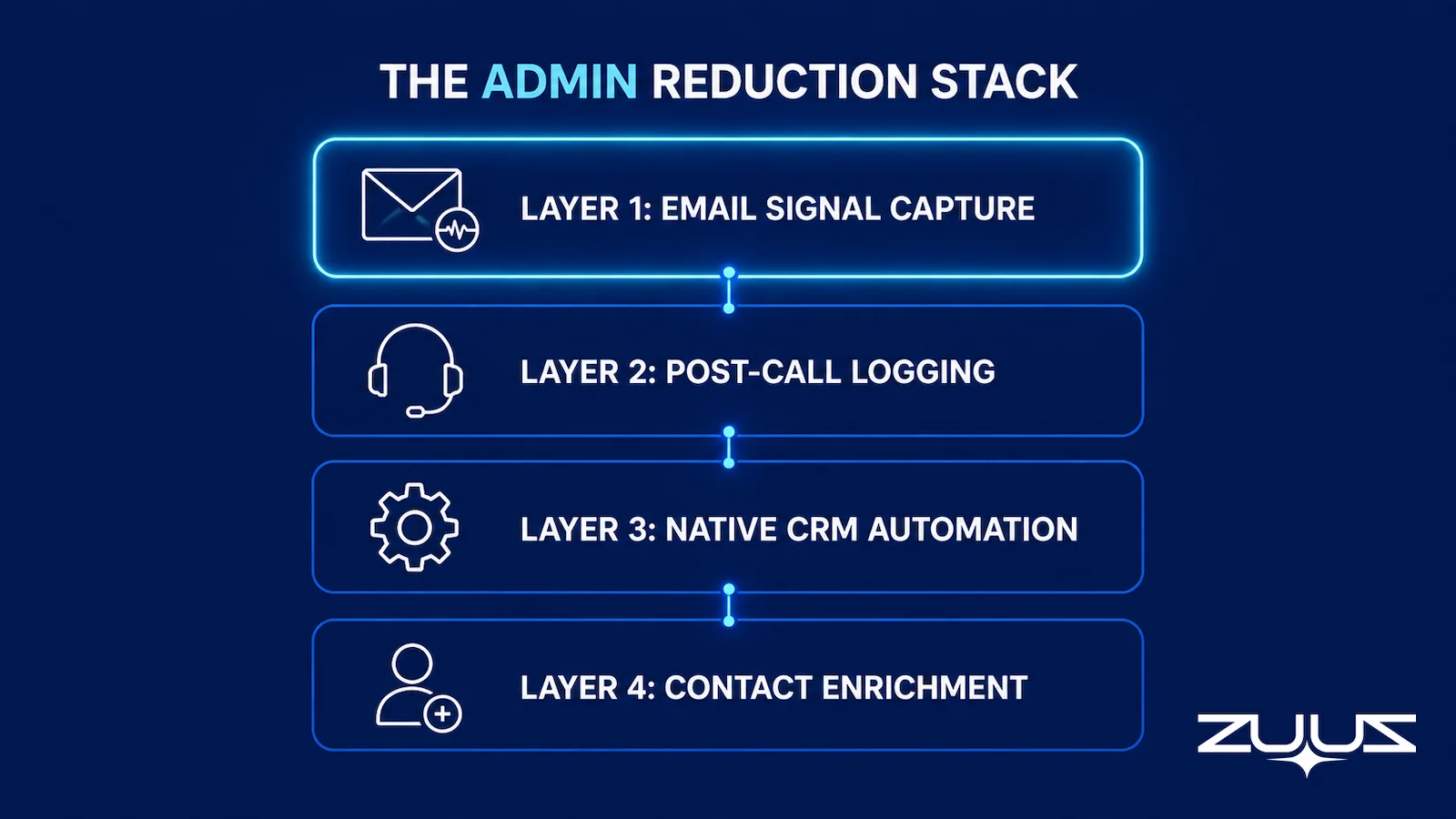
Building the Right CRM Admin Reduction Stack
The instinct when addressing CRM admin overload is to start with the CRM itself, adding automation rules, connecting the inbox, and enriching the contacts. This is reasonable but incomplete, because none of those layers address the inbound email channel where the most consequential deal signals originate.
A more effective approach starts with the failure mode closest to where revenue is created. The sequencing below addresses all three CRM data failures without replacing existing infrastructure.
Layer One: Email Signal Capture
A tool that reads inbound sales emails and writes deal data to the CRM automatically addresses the failure mode with the highest revenue consequence. This is the layer that closes the gap between where deals actually move and what the CRM knows about them. It is the correct starting point, not a late addition to the stack.
Layer Two: Post-Call Logging
For teams with high call volume, Fathom, Avoma, or Fireflies handles post-meeting logging without overlap with the email capture layer. The two solve different failure modes and complement each other. Neither replaces the other.
Layer Three: Native CRM Automation
Once the right data is inside the CRM, Salesforce Flow, HubSpot Workflows, and Zoho CRM rules handle the downstream execution, including routing leads, triggering sequences, moving deal stages, and creating tasks. These features earn their value when the data feeding them is accurate. They cannot compensate for missing data.
Layer Four: Contact Enrichment
Apollo, ZoomInfo, or Clearbit keeps contact and company records current over time. This runs in the background and addresses the decay problem without rep involvement.
The common mistake is buying only layers three and four and expecting them to fix a data capture problem they were not built to solve. For teams tracking renewals across complex product lines, the same signal capture logic applies; see how renewal tracking across multiple products depends on the same upstream email intelligence.
The Pipeline Visibility Shift
The CRM data entry problem will not be solved by stricter process or more thorough training. It is a structural issue. The places where deals actually move (inbound emails, pricing threads, renewal signals, proposal requests) are disconnected from the system that is supposed to track them.
Tools that reduce admin work after the fact help at the margins. Tools that capture the signal before a rep has to notice it change what is visible, what gets prioritized, and what actually reaches the CRM as a structured record.
A UAE-based retail and distribution operator uses ZUUZ for bulk order matching at a 10-to-1 efficiency ratio. The incoming order volume is too high for manual review. ZUUZ reads each request, matches it to the right product and account, and writes the pipeline data without requiring a rep to process each email individually. The efficiency gain is a function of capturing signals at the inbox level rather than waiting for them to make it through a manual entry step.
One distinction is worth stating plainly: ZUUZ is an AI layer on top of the CRM a team already runs, never a CRM and never a replacement for one. Most tools sold against manual data entry report on what the rep entered faster; ZUUZ writes the part of the record the rep never got to.
From an operator’s seat
From an operator’s seat, the first week of a capture layer is not a time-savings story, it is an argument about ownership. Across the deployments ZUUZ runs, the pattern is that the 90-day lookback surfaces threads sitting with a rep who has since changed territory, and nobody wants to take the account once the commitment inside it is visible in a field. The part teams do not plan for is the review queue: reps approve captured records willingly while the queue is short, so the right order of operations is to connect one mailbox, clear what it finds in a single sitting, and only then add the second and the third. Teams that connect five mailboxes on day one create a backlog large enough that reps stop reviewing it, and an unreviewed queue teaches a sales floor to distrust the capture.
The test costs one connection. Connecting a single mailbox to ZUUZ is the whole first step, and the lookback reads the last 90 days on that connection, so the distance between what the CRM logged and what the accounts actually said is visible in minutes. A team deciding between a CRM change, another add-on license and a capture layer can read that distance before committing to any of them.
The next opportunity may already be in the sales inbox. The question is whether it reaches the pipeline or disappears in someone’s unread messages. For a direct comparison of what ZUUZ captures versus what manual CRM entry misses, see ZUUZ vs. manual CRM entry.
Frequently Asked Questions
Which CRM Has the Least Manual Data Entry?
No CRM eliminates manual data entry on its own. Salesforce, HubSpot, and Zoho all include automation for workflow rules, email logging, and contact sync, but none automatically read inbound email content and extract deal signals. The platform with the least manual entry is whichever CRM is paired with an email signal capture layer that handles the inbound channel, the highest-volume, lowest-automated source of deal data in B2B sales.
How Much Time Do Sales Reps Spend on CRM Data Entry?
According to Salesforce’s 2024 State of Sales research, sales reps spend an average of 5.5 hours per week on manual CRM data entry. For a team of ten, that is more than 2,800 hours per year. Records entered hours or days after the conversation they reference carry less accuracy than data captured at the point of the interaction, which leads to forecasting gaps and missed pipeline signals.
Can AI Eliminate CRM Data Entry Entirely?
AI can eliminate most CRM data entry for specific channels. Post-call tools eliminate meeting note entry for calls and video meetings. Email signal capture tools eliminate manual entry for inbound email, the highest-volume channel in most B2B sales inboxes. Contact enrichment tools eliminate manual contact record updates. Full elimination requires addressing all three channels. Relying on a single tool typically closes one data entry gap while leaving the others open.
What Is the Difference Between CRM Workflow Automation and Sales Signal Capture?
CRM workflow automation (Salesforce Flow, HubSpot Workflows, Zoho rules) reacts to data that is already inside the CRM. It fires when a field changes, a stage moves, or a condition is met. Sales signal capture operates upstream. It reads the source channel before the data is in the CRM and writes the structured information directly to the CRM record. One automates what happens after entry. The other replaces the entry step entirely.
Does HubSpot Automatically Capture Inbound Email Signals?
HubSpot Sales Hub logs inbound emails as message records when a connected inbox is configured. It does not read the content of those messages, identify buying intent, extract deal signals, or update deal fields based on what the email contains. The email appears as an attached record on the contact or deal, but interpreting the signal and deciding what to update still falls on the rep. Native HubSpot email sync addresses logging. It does not address signal extraction.
How Does Email-to-CRM Signal Extraction Work?
Email-to-CRM signal extraction connects to the sales inbox and reads inbound messages as they arrive. The tool identifies the nature of the signal (a new lead inquiry, a pricing question, a renewal concern, an urgent request) and extracts the relevant structured information. That information is then written to the appropriate CRM record, including a lead score, a deal stage update, a field value, or an alert for the account owner. The rep receives the update without having to read the email first or decide what to log.
What Is the Real Revenue Cost of Incomplete CRM Data?
The direct cost is rep time: 5.5 hours per week per rep in manual entry that could be recovered. The less visible cost is forecasting inaccuracy. Pipeline reports built on incomplete records produce forecasts that diverge from actual deal activity, leading managers to make decisions based on what reps remembered to log rather than what customers actually communicated. Deals die quietly in inboxes. Renewals get missed. Pipeline reviews produce summaries of situations that have already changed.
How Do I Build a CRM Admin Reduction Stack Without Replacing My Existing CRM?
Start with the signal capture layer, a tool that reads inbound email and writes deal data to the CRM automatically. This addresses the failure mode with the highest revenue consequence and requires no CRM replacement. Add a post-call logging tool for meeting-heavy sales motions. Let native CRM automation handle workflow rules and follow-up sequences. Add contact enrichment to keep records current over time. All four layers operate on top of Salesforce, HubSpot, or Zoho without replacing the underlying system.
See What Your Inbox Is Actually Doing.
Your next qualified deal may already be sitting unread in the sales inbox. ZUUZ connects to the sales inbox, extracts the deal signal, and prepares the CRM record for the rep to approve.

CEO of ZUUZ. He scaled Cloud Box Technologies from 0 to $25M ARR in IT services and distribution before building ZUUZ, after watching how much qualified pipeline died in inboxes because CRMs recorded what reps remembered rather than what customers actually said. Connect on LinkedIn

