
Why Your CRM Pipeline Is Wrong: 6 Root Causes
Your CRM pipeline is wrong because manual entry can’t keep pace with your inbox. Learn the 6 root causes and how to fix pipeline data accuracy for good.
- CRM pipeline inaccuracy is a system design problem, not a rep discipline problem. Reps handle 60 to 100 emails per day and logging each one correctly requires 4 to 6 clicks per record in Salesforce.
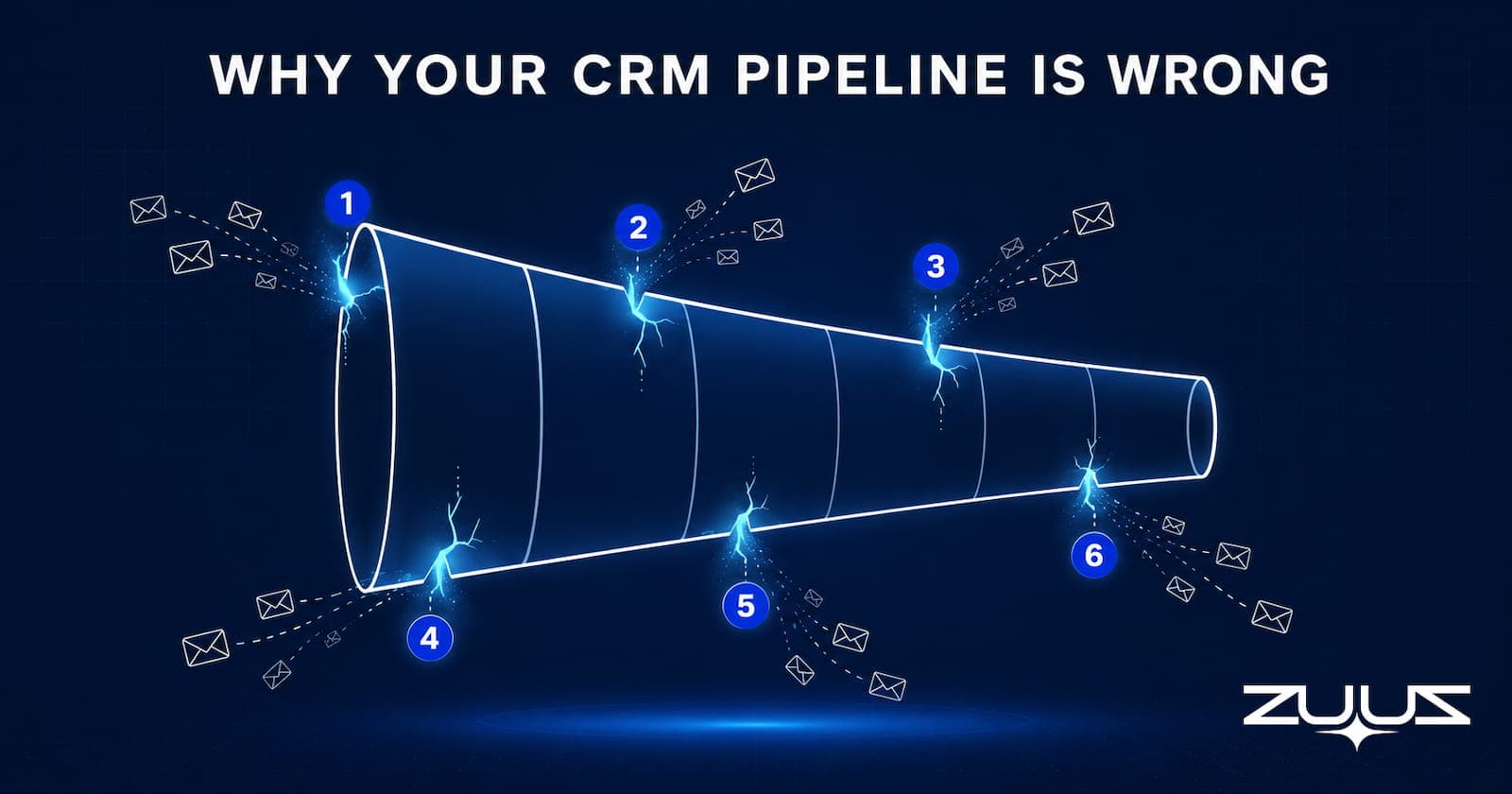
- The six root causes of CRM pipeline inaccuracy are stale stage data, round-number amounts, batch logging, missed contacts, missed competitive signals, and undocumented renewal signals.
- What reps fail to log most often are inbound inquiries that become large deals, procurement contacts added to CC lines, competitor mentions, and expansion asks buried in routine email replies.
- RA Technologies surfaced $120,000 in undocumented pipeline from a 90-day email lookback on their sales inbox using ZUUZ, with no new outbound effort required.
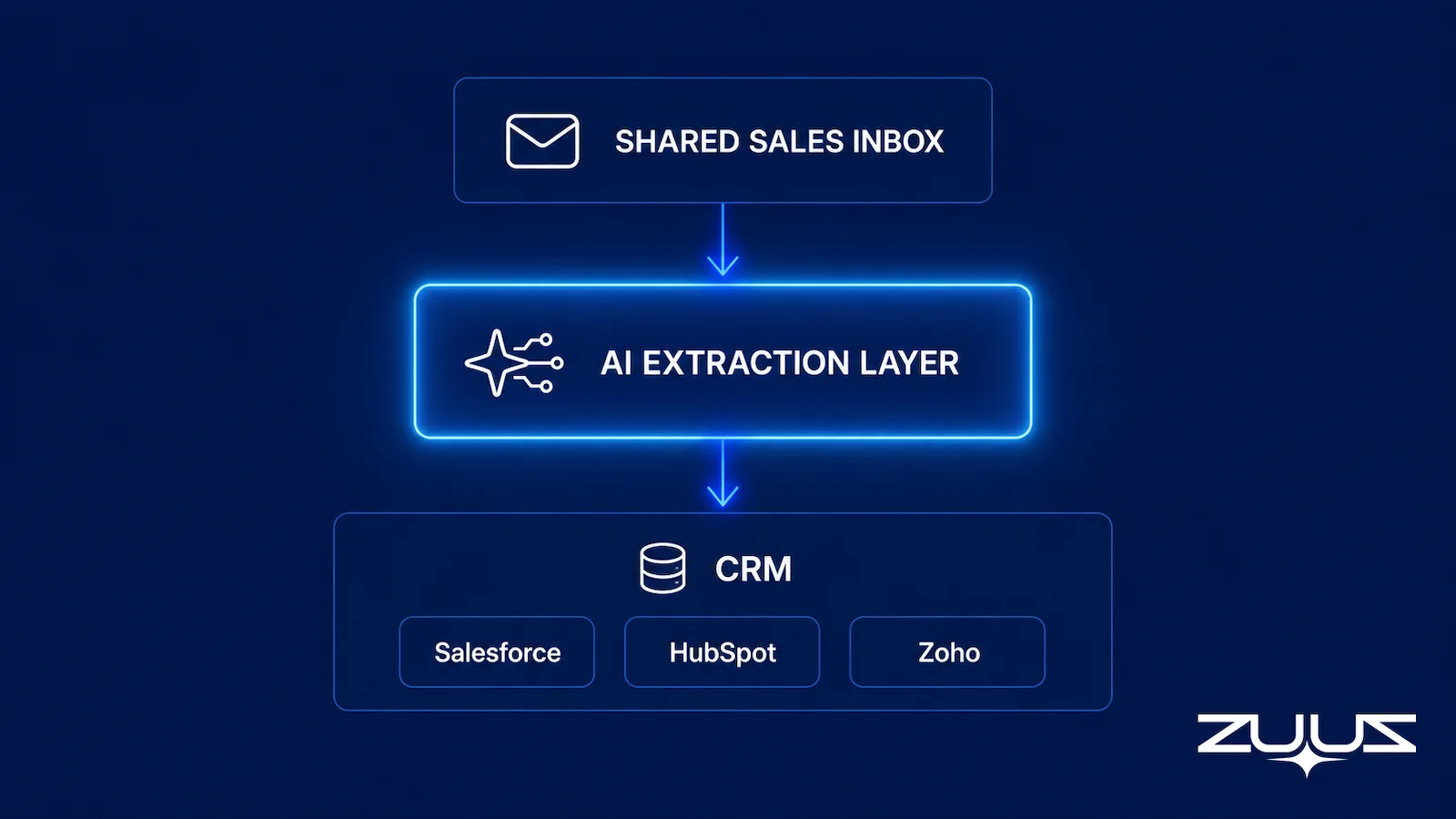
- Connecting email directly to the CRM removes the logging burden from reps. ZUUZ reads the shared sales inbox, extracts deal signals, and writes them to the correct record in Salesforce, HubSpot, or Zoho.
- If your pipeline is two weeks behind, your forecast is two weeks behind. The downstream effect is missed quarters, eroded CFO trust, and leadership operating on conflicting data.
- ZUUZ connects to the sales inbox, reads LinkedIn messages and meeting or call transcripts, and writes leads, stakeholders, next steps and renewal signals into the CRM for the rep to approve in one click. The CRM stays the system of record.
Most sales leaders blame CRM pipeline inaccuracy on rep discipline. After building Cloud Box Technologies from zero to $25M ARR in IT services and distribution, Avinash Gujje reached a different conclusion. The CRM was always wrong, not because reps were careless, but because the system asked them to do something that does not scale: re-enter information that already existed somewhere else.
The real problem is structural. Business happens over email. CRMs are databases that require manual population. The gap between those two facts is where pipeline accuracy dies, forecasts fail, and revenue leaks out quietly every quarter.
This article covers the six root causes of why your CRM pipeline is wrong, what reps actually log versus what happens in deals, and how inbox-connected CRM fixes the data quality problem without adding process overhead to already-stretched sales teams. The focus is enterprise IT services, distribution, and manufacturing teams running Salesforce, HubSpot, or Zoho.
Signs Your Pipeline Data Is Stale
CRM pipeline inaccuracy is usually visible within ten minutes of looking at a pipeline report. The patterns repeat across industries and CRM platforms.
The Frozen Opportunity
An opportunity has not moved stages in 21 days. The last email in the thread, however, is from yesterday. The CRM and the inbox are describing two different deals.
The Round-Number Amount
The deal amount is $50,000 or $100,000 because the rep estimated when creating the record and never updated it after the proposal came back with real numbers. This single issue corrupts weighted pipeline calculations across the entire forecast.
The Outdated Next Step
The next action field says “send proposal” but the proposal went out two weeks ago, the customer already replied with redlines, and procurement sent a contract form. The CRM describes a deal from three weeks ago.
The Invisible Won Deal
Opportunities close without recent activity because the activity was happening in email and never got logged. These deals surprise no one on the account team; they surprise everyone in the pipeline review.
If any of these patterns are visible in your pipeline, the CRM is not a forecasting tool. It is a document the team assembles on Friday afternoons so the dashboard looks acceptable on Monday morning.
See the Pipeline Your CRM Can’t See.
ZUUZ connects to the sales inbox, extracts the deal signal, and writes it to Salesforce, HubSpot, Zoho, Attio or Pipedrive. Book a 15-minute walkthrough on your own inbox.
Why Manual CRM Entry Fails
A rep handling enterprise accounts receives 60 to 100 emails per day. Each email might carry a new lead, a renewal signal, a pricing question on an active account, a procurement escalation, or a quiet deal death. Logging each one correctly in Salesforce takes four to six clicks. Eighty emails multiplied by five clicks equals 400 micro-decisions per day, before any actual selling happens.
The 2025 Salesforce State of Sales report found that sales reps spend only 30 percent of their time actively selling. The rest goes to administrative tasks, of which CRM data entry is one of the largest components. (Salesforce State of Sales, 2025.) That ratio does not improve by adding more coaching or more dashboards.
What actually happens in practice is batch logging. Reps log things at the end of the day, at the end of the week, or in the 24 hours before a quarterly business review. By then the context is gone. The thread that mentioned an October renewal date in passing was archived three days ago. The procurement contact who appeared on a CC line was never added as a contact. The competitor name dropped in paragraph four was never attached to the deal record.
This is not a discipline problem. It is a workload problem that gets framed as a behavior problem. Adding a sales operations hire to chase the team or building dashboards that surface low activity counts does not change the underlying fact: the data lives in email and the system of record is elsewhere.

What Reps Actually Log vs. What Happens
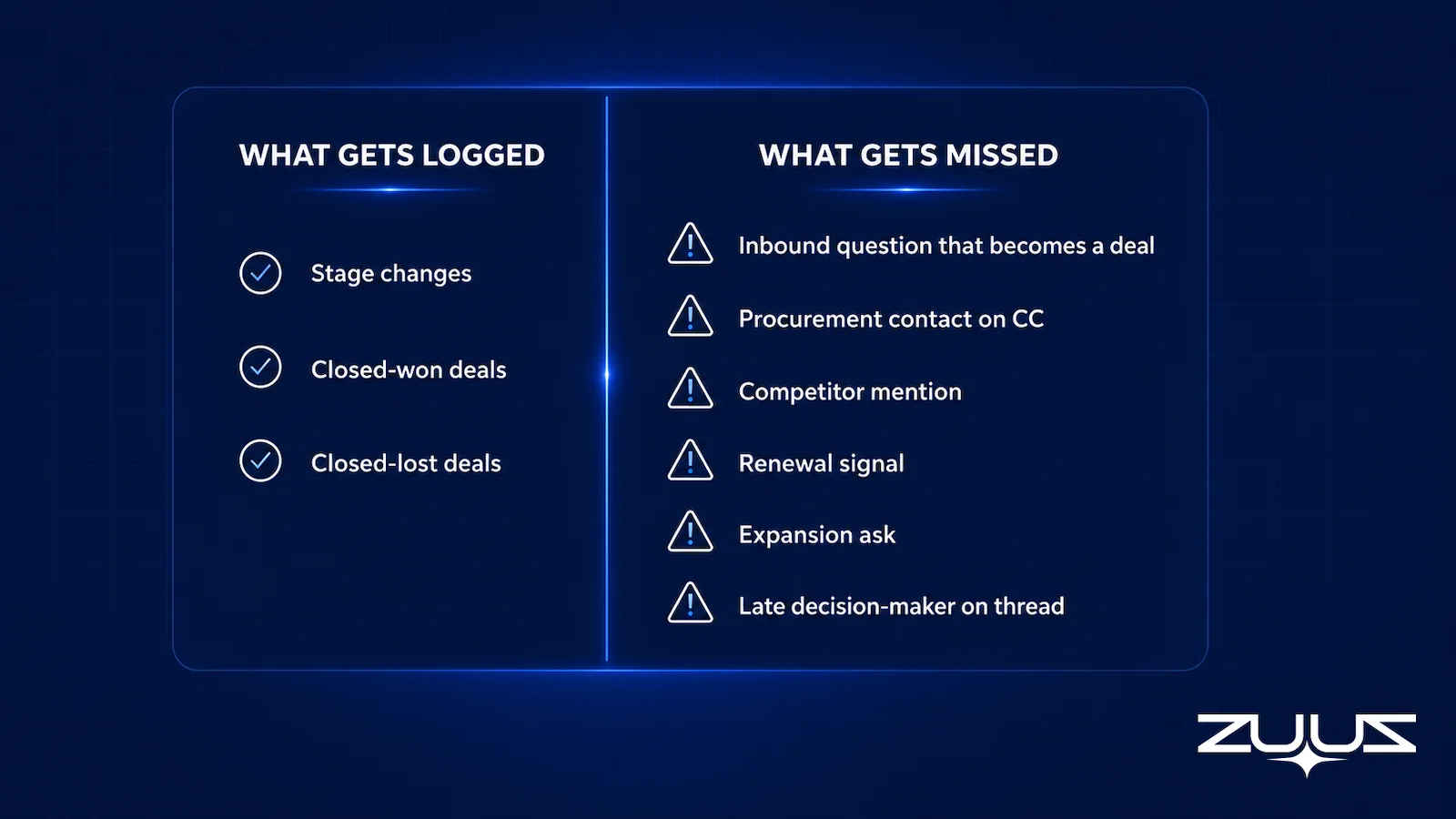
Watching reps log deals in real time reveals a consistent pattern. Stage changes get logged, usually a few days late. Closed-won deals get logged immediately because compensation depends on it. Closed-lost gets logged eventually, with a vague reason code selected from a dropdown.
What does not get logged is more consequential:
- The first inbound that arrived as a “quick question” and became a $40,000 deal six weeks later
- The procurement contact who joined the thread on week three, the person who actually controls the budget
- The competitive mention that should have triggered a battle card and a response plan
- The renewal signal buried in a support reply asking about product roadmap timelines
- The expansion ask embedded in a thank-you email after a successful deployment
- The decision-maker added to the CC line late in a thread, quietly signaling that the deal escalated internally
At RA Technologies, the first 72 hours of running ZUUZ on their sales inbox surfaced $120,000 in pipeline the CRM had never recorded. None of it was new business. It was revenue the team had already earned and never captured.
The mechanics of missed email leads follow a predictable pattern. Signals that arrive as part of an ongoing thread, rather than as a clean new email, almost never get logged because they do not trigger the mental cue that tells a rep to open the CRM and update a record.
How to evaluate a fix for pipeline accuracy
- Does it remove the typing, or only remind reps to type? Reminders raise compliance for a week and decay after it.
- Is there a capture layer reading the channels where deals actually move, meaning email, calendar, LinkedIn messages and meeting or call transcripts?
- Does what it captures land in CRM fields a pipeline report can read, or in an activity feed a human has to open record by record?
- Can the rep see the proposed change against the source message and correct it in one click before it is written?
- Does it run on the CRM the team already owns, with no migration of history and no retraining?
- Is every change traceable, so a manager can follow an updated amount or close date back to the message it came from?
Six Reasons Why Your CRM Pipeline Is Wrong
CRM pipeline inaccuracy is not random. It follows six structural patterns that appear across Salesforce, HubSpot, and Zoho deployments in enterprise IT services and distribution.
1. Stage Data Lags Behind Email Activity
Deal stages are updated when reps remember to update them, not when the deal actually moves. The CRM describes a deal from two weeks ago. The inbox describes a deal happening today. The forecast is built on the CRM.
2. Amount Fields Are Estimated at Creation and Never Revised
Reps enter a placeholder amount when creating a record and rarely return to update it after proposals, negotiations, or scope changes. Weighted pipeline calculations built on these numbers are structurally unreliable.
3. Batch Logging Destroys Thread-Level Context
Logging at the end of a day or week strips the contextual signals that make individual emails meaningful. A sentence in the middle of a paragraph is not memorable 36 hours later. The signal that mattered is lost.
4. Contact Records Are Incomplete
New contacts who appear in email threads mid-deal are rarely added to the CRM account. This means the CRM does not reflect who is actually involved in a buying decision, which distorts both pipeline management and renewal tracking.
5. Competitive Intelligence Lives in Email and Dies There
Competitor names, pricing comparisons, and evaluation criteria mentioned in deal emails almost never reach the CRM record. This data is valuable for forecasting, for product teams, and for battle card development. It evaporates with the thread.
6. Renewal and Expansion Signals Are Invisible
Renewal dates mentioned in passing, expansion asks in account emails, and upsell signals buried in support threads are not visible to the CRM unless someone manually extracts them. For IT distributors and services firms managing multi-product accounts, this is where the largest revenue leaks occur. The article on tracking renewals across multiple products covers the mechanics of this problem in detail.
Stop Losing Pipeline in the Inbox.
Connect your CRM in minutes and let ZUUZ capture the signals your team never logs. Start free, with no integration project required.
Those six reasons rarely appear one at a time, and they compound quietly. A pipeline that is wrong in six small ways is not wrong by a small margin, because every one of the errors pushes in the same direction.

The Forecast Consequence
If pipeline data is two weeks behind, the forecast is two weeks behind. Sales leaders miss quarters not because the deals were absent, but because deal movement was invisible until it was too late to respond. Over-investment in accounts that have already gone quiet happens alongside under-investment in accounts that are quietly advancing toward a decision.
Forecast accuracy degrades in a specific and predictable way when the pipeline underneath is maintained by hand. The cause is rarely the model applied on top of the data. It is that the data feeding it lags behind deal reality, so the forecast describes the pipeline as it was last updated rather than as it stands today.
The downstream effects compound. The CFO stops trusting the number. The board stops trusting the CFO. Sales leadership stops trusting their own reps. Everyone operates on a different version of the truth, and the version with the most political weight wins. That version rarely matches reality.
For IT services teams managing large account portfolios, pipeline visibility problems also surface in renewal cycles. The tools built specifically for IT sales pipeline visibility address this directly, but the underlying data problem has to be fixed first or any visibility tool is just displaying stale data more clearly.

The Pipeline Truth Test
The six causes above explain why a pipeline drifts. This test measures whether the current number can survive a question, which is the version of the problem a CFO actually raises.
- Take the top five deals by value in the current quarter.
- For each, find the evidence in the CRM for its stage and close date – a dated, written commitment, not a rep’s assurance.
- Count how many rest on a stage last changed more than two weeks ago.
- A pipeline in which most of the top five lack dated evidence is a forecast of rep optimism. ZUUZ does not forecast; it makes the record underneath the number real.
The test is useful because it converts a vague complaint into a count. A leader who runs it on a Monday morning and finds four of five top deals resting on stages nobody has touched since last month is not looking at a discipline problem in those four reps. The evidence for all four exists; it is in their mailboxes, which is precisely the gap the six causes describe.
Manual Entry vs. Inbox-Connected CRM: A Direct Comparison
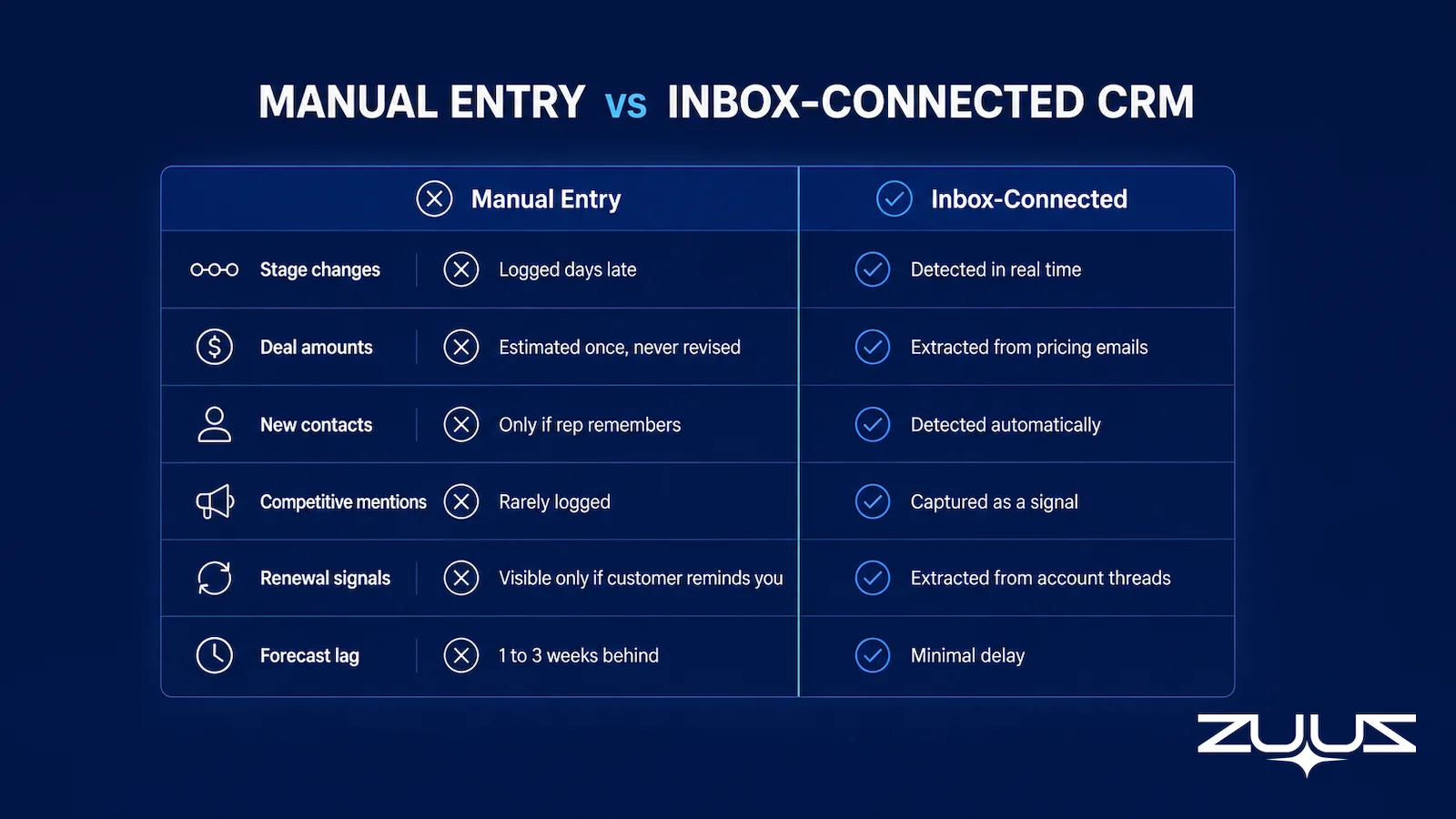
The table below compares manual CRM data entry against an inbox-connected approach across the signal types that matter most for enterprise pipeline accuracy.
| Signal Type | Manual CRM Entry | Inbox-Connected CRM (ZUUZ) |
|---|---|---|
| Stage changes | Logged days after the triggering event, if logged at all | Detected from email thread context and written in real time |
| Deal amount updates | Estimated at record creation; rarely revised after proposals | Extracted from proposal and pricing emails; attached to the correct deal record |
| New contacts in thread | Added only if rep remembers to create contact record | Detected when new email address appears in a thread; contact record created automatically |
| Competitive mentions | Rarely logged; no systematic capture | Extracted from email body and written to deal record as a competitive signal |
| Renewal signals | Visible only if customer emails the CRM owner directly with a reminder | Extracted from account thread context; renewal date created in CRM and assigned to account owner |
| Expansion signals | Captured only if rep flags the email and creates a new opportunity | Detected from expansion-intent language in account email threads; surfaced as a pipeline opportunity |
| Inbound lead capture | Depends on rep reading and acting on each email individually | Every inbound to the shared sales mailbox is classified, matched to an existing contact or company, and logged |
| Forecast data lag | Typically 1 to 3 weeks behind actual deal state | CRM reflects inbox state with minimal delay; forecast built on current data |
How to Get Pipeline Data That Reflects Reality
The fix is to stop asking reps to type what the inbox already contains. The email thread holds the deal. Every signal inside it, the stage transition, the amount discussed, the new contact, the competitive name, the renewal date, should flow from email to CRM without requiring a rep to initiate the transfer.
What Inbox-Connected CRM Actually Looks Like
ZUUZ sits on the shared sales inbox and reads every inbound message. It extracts the signals that matter: source, intent, urgency, contact identity, deal amounts, renewal dates, and competitor mentions. It then pushes those signals to the correct record in Salesforce, HubSpot, or Zoho. The rep sees what was extracted and approves before anything commits during the first few weeks of deployment. After the team has calibrated their confidence threshold, ZUUZ runs autonomously on the patterns they have approved.
What Changes for the Sales Team
Reps stop spending time on data entry and spend more time on the conversations that move deals forward. Pipeline reviews shift from memory exercises to conversations about deal movement the whole team can see. Forecast meetings stop being about whose version of the truth has the most political backing.
The RA Technologies Deployment
RA Technologies, an IT services firm based in the United States, ran a 90-day email lookback on their sales inbox when ZUUZ was first deployed. The lookback surfaced $120,000 in pipeline that had never been recorded in their CRM. Not new business. Revenue the team had already earned, in conversations that had already happened, in a system that had never been told about them. The email-to-CRM automation approach for IT companies that ZUUZ uses is specifically designed for the deal complexity that IT services and distribution teams manage.
CRM-Agnostic Deployment
ZUUZ works across Salesforce, HubSpot, Zoho, Attio or Pipedrive. There is no requirement to switch CRM platforms or rebuild existing workflows. The inbox connection is the integration point. For teams evaluating whether to switch CRM or add an intelligence layer on top of their existing platform, the comparison of ZUUZ against manual CRM entry approaches covers the operational tradeoffs directly.
From an operator’s seat
Across the deployments ZUUZ runs, the pattern is that the 90-day lookback is harder on leadership than on reps. Reps expect the inbox to hold things the CRM does not. Leaders are the ones who have to decide what to do with two dozen surfaced deals and contacts that were real all along, in the middle of a quarter whose number was built without them, and that decision takes longer than the connection did. The part teams do not plan for is the amount field: capture fixes missing records quickly, but an amount that was a round number guessed at creation only gets corrected when a buyer writes a real figure, so that column improves deal by deal rather than overnight. Teams that accept this and review the surfaced list with the amounts marked unconfirmed get a usable pipeline in the first week; teams that wait for every field to be perfect keep running the old spreadsheet alongside it.
One distinction is worth stating plainly, because the category blurs it. ZUUZ is an AI layer on top of the CRM a team already runs; it is never a CRM and it never replaces one. Most tools aimed at pipeline accuracy report on what the rep entered, which means a clean dashboard over incomplete data; ZUUZ writes the record itself from the conversation and hands the rep a finished update to approve.
The First Step, Concretely
The starting point is one mailbox, not a program. Connect it, let ZUUZ read the last 90 days, and have the rep review what it found before anything is written to a record: the inbound inquiries that became deals, the procurement contacts added to CC lines, the competitor mentions and the renewal dates. That review is the cheapest pipeline audit a team can run, because it compares the CRM against the conversations rather than against another report. There is a 30-day free trial with no credit card required.
Frequently Asked Questions
Why Is My CRM Pipeline Always Inaccurate?
CRM pipeline inaccuracy happens because the data lives in email and the system of record is somewhere else. Reps receive 60 to 100 emails per day and logging each interaction correctly requires multiple clicks per record in Salesforce or HubSpot. Batch logging causes signal loss, meaning deal signals like renewal dates, competitive mentions, and new contacts never make it into the CRM record. The problem is structural, not behavioral.
What Is the Biggest Problem with Manual CRM Data Entry?
The biggest problem is not rep discipline but workload. Eighty emails multiplied by five clicks equals 400 micro-decisions per day before any actual selling happens. Reps batch-log at the end of the day or week, at which point context is gone. Thread-level signals like procurement contacts added to a CC line, a competitor named in paragraph four, or a renewal date mentioned in passing almost never make it into the CRM.
How Does Inaccurate Pipeline Data Affect Forecast Accuracy?
If pipeline data is two weeks behind reality, the forecast is two weeks behind reality. Sales teams miss quarters not because deals were absent, but because deal movement was invisible until too late. Teams over-invest in accounts that have already gone quiet and under-invest in accounts that are quietly advancing. The downstream effect is eroded CFO trust, board scrutiny, and sales leadership operating on conflicting versions of the truth.
What Signals Do Reps Most Often Fail to Log in a CRM?
The most commonly missed signals include inbound inquiries that start as casual questions but evolve into meaningful deals, procurement contacts who join a thread mid-conversation, competitor names mentioned in deal threads, renewal signals buried in support replies, expansion asks embedded in thank-you emails, and decision-makers added to CC lines late in a thread. These signals require reading email context, not just scanning subject lines.
How Does ZUUZ Fix CRM Pipeline Accuracy?
ZUUZ reads the sales inbox directly, extracts deal signals including source, intent, urgency, contacts, amounts, renewal dates, and competitor mentions, then writes them to the correct record in Salesforce, HubSpot, or Zoho without requiring a rep to click anything. Reps approve extractions in the early weeks to calibrate confidence. After that, ZUUZ runs on the patterns they have approved. RA Technologies surfaced $120,000 in undocumented pipeline within 72 hours of deployment.
Is CRM Pipeline Inaccuracy a Technology Problem or a People Problem?
It is primarily a system design problem. Asking humans to re-enter information that already exists in email is a design failure, not a discipline failure. The 2025 Salesforce State of Sales report found that reps spend only 30 percent of their time actively selling, with administrative work including data entry consuming the rest. The fix is to route data from where it lives (email) to where it needs to go (CRM) automatically, not to add more process overhead for reps.
See What Your Inbox Is Actually Doing.
ZUUZ connects to your existing CRM and reads your shared sales inbox to show exactly what pipeline, contacts, and signals your team has never logged. The session uses your own data, not a demo environment, so you see live what the CRM has been missing.

CEO of ZUUZ. He scaled Cloud Box Technologies from 0 to $25M ARR in IT services and distribution before building ZUUZ. Connect on LinkedIn

