
Salesforce Email Integration for IT Sales Teams
Salesforce email integration for IT sales teams misses up to 80% of signals. See what breaks, how to fix it, and how RA Technologies found $120K in 90 days.
- Salesforce email integration (Einstein Activity Capture, Inbox sidebar) only logs activity against contacts already in the CRM, missing emails from new contacts, distribution lists, and forwarded threads.
- IT sales teams typically assume 60-70% email coverage in Salesforce. The actual capture rate is closer to 15-20% of significant email activity.
- RA Technologies, a US IT services company, connected ZUUZ to their shared sales inbox and surfaced $120K in previously unlogged pipeline within 72 hours.
- The most damaging setup mistake is treating Einstein Activity Capture as full coverage. It captures what Salesforce already knows about, not what it doesn’t.
- Renewal conversations require separate signal routing from new-business threads. Most native integrations log both to the same flat activity feed, creating noise that obscures risk.
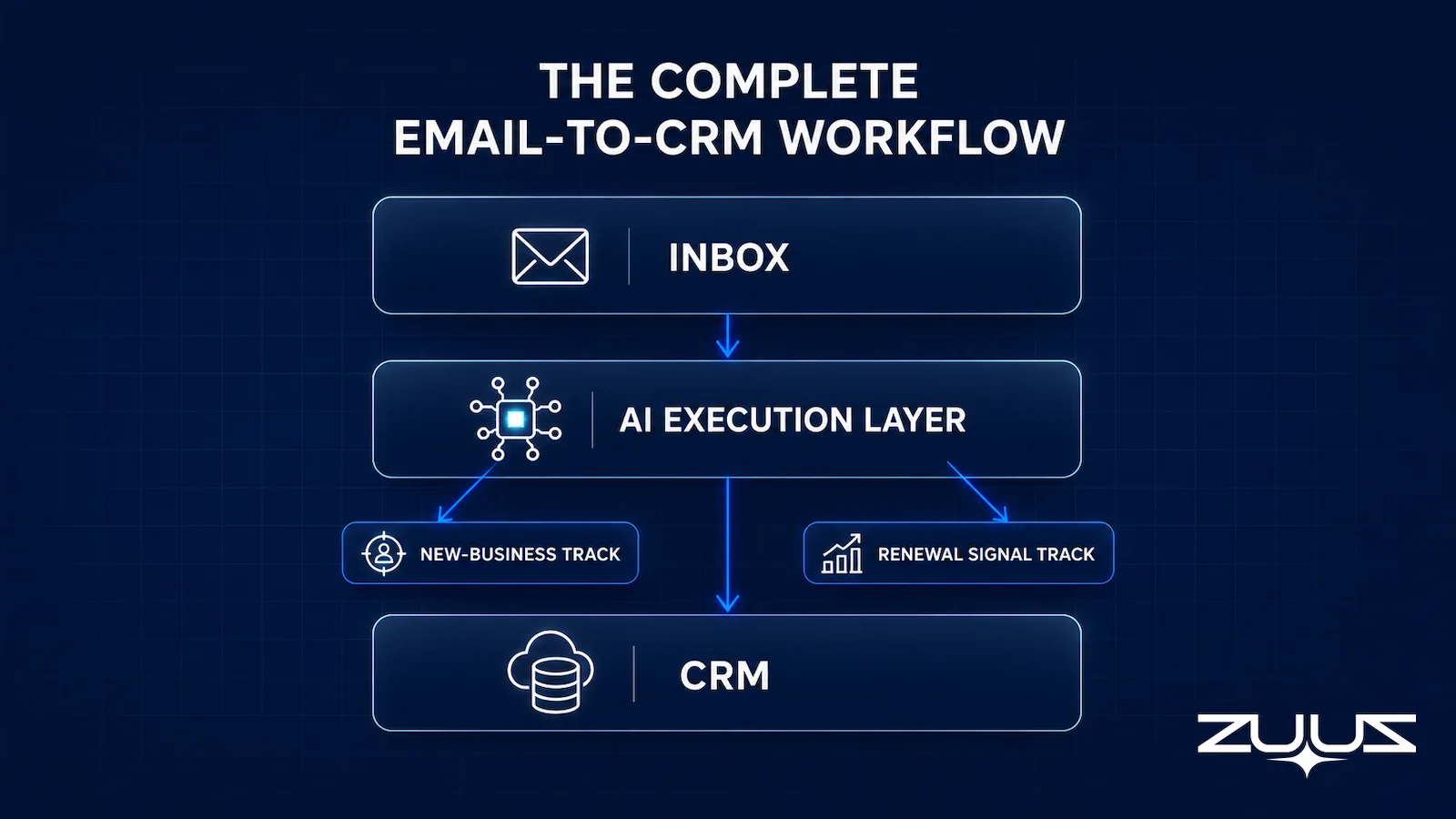
- A complete IT sales email workflow needs two automated tracks running in parallel: a new-business inbound track and a renewal signal detection track, both requiring zero rep action to trigger.
- ZUUZ is an AI layer on top of the CRM a team already runs, not a CRM: it connects to your sales inbox, reads LinkedIn messages and meeting or call transcripts, and writes leads, stakeholders, next steps and renewal signals into Salesforce for the rep to approve in one click.
Salesforce email integration for IT sales teams sounds like a solved problem. Log emails automatically, keep the CRM current, and give managers pipeline visibility. The reality is more specific. Most IT sales teams are running Salesforce on one monitor and Outlook or Gmail on another, and the two systems are not actually reflecting the same deals.
Salesforce State of Sales research (2024) found that sales reps spend only 28% of their week on actual selling activity. The majority of productive time happens in email, but most of that email activity never reaches the CRM in a structured, usable form. Keeping that data current requires records to update in both directions as deals move, not just log activity one-way, covered in the guide to bidirectional CRM sync.
This guide covers what Salesforce’s native email integration options do, precisely where each one stops, the setup mistakes that create false confidence in coverage, and what a complete Salesforce email integration workflow for IT services companies actually requires. The RA Technologies case study shows what the inbox-to-CRM gap costs in concrete terms.
Why IT Sales Reps Live in Their Inbox, Not Salesforce
Most IT sales reps have the same structural problem: Salesforce shows their pipeline, but their actual deals are in Outlook. At Cloud Box Technologies, Avinash Gujje managed 10-12 renewals cycling every month during the company’s growth from $0 to $25M ARR. Every single one of those renewals had a Salesforce record with a close date, a stage, and an owner assigned.
Every single one also had a parallel email thread Salesforce had never seen: pricing questions, technical clarifications, procurement inquiries, vendor coordination. The CRM showed a deal. The inbox showed the actual conversation. These were two different pictures of the same reality.
For IT sales specifically, this gap is structural rather than behavioral. Sales cycles run long. Most customer conversations happen over email for weeks before a deal is logged or advanced. By the time a rep updates Salesforce, the email thread has 20 messages, three different contact threads, and two decision signals that nobody captured.
See the Pipeline Your CRM Can’t See.
ZUUZ connects to the sales inbox, extracts the deal signal, and writes it to Salesforce, HubSpot, Zoho, Attio or Pipedrive. Book a 15-minute walkthrough on your own inbox.
What Salesforce Email Integration Actually Does
Salesforce has multiple email integration options, and being precise about what each one covers is important before diagnosing where coverage fails.
Einstein Activity Capture (EAC)
EAC is Salesforce’s native sync between Gmail or Outlook and your Salesforce org. It automatically logs sent and received emails to matching contact and lead records, syncs calendar events, and keeps activity timelines current. It is on by default for Sales Cloud users and requires minimal configuration to activate.
Salesforce Inbox Sidebar
Available as an add-on, the Inbox sidebar puts Salesforce data inside Gmail and Outlook. Reps can view contact records, log emails with one click, insert availability links, and track email opens without leaving their inbox. Reps with disciplined logging habits find it useful for new-business conversations.
Email-to-Case
Email-to-Case routes inbound emails sent to a specific Salesforce address and creates Case records automatically. It is designed for support queues, not for sales pipeline tracking, and is not relevant to the coverage problem facing IT sales teams.
The common limitation across all three options: they require either explicit rep action or an existing matching record in Salesforce. They capture what your team has already told Salesforce about. They do not find new signals your team has not yet noticed or logged.
Gmail vs. Outlook for IT Sales Teams
Both integrations are functionally similar in what they log. The practical differences are in reliability and setup complexity, which matters for IT services companies managing integration across large teams.
Gmail integration via EAC is generally more stable. Google’s API is consistent, the sync is bidirectional with low lag, and the Salesforce Inbox sidebar for Gmail is well-maintained. IT sales teams using Google Workspace typically complete the configuration without escalating to IT support.
Outlook integration involves more variables: Exchange server version, Microsoft 365 licensing tier, IT admin permissions for Salesforce’s connected app, and occasional OAuth conflicts. Large IT services companies with on-premise Exchange frequently encounter setup friction that does not exist in Google Workspace environments. Plan for a longer configuration timeline and involve the IT admin early in the process.
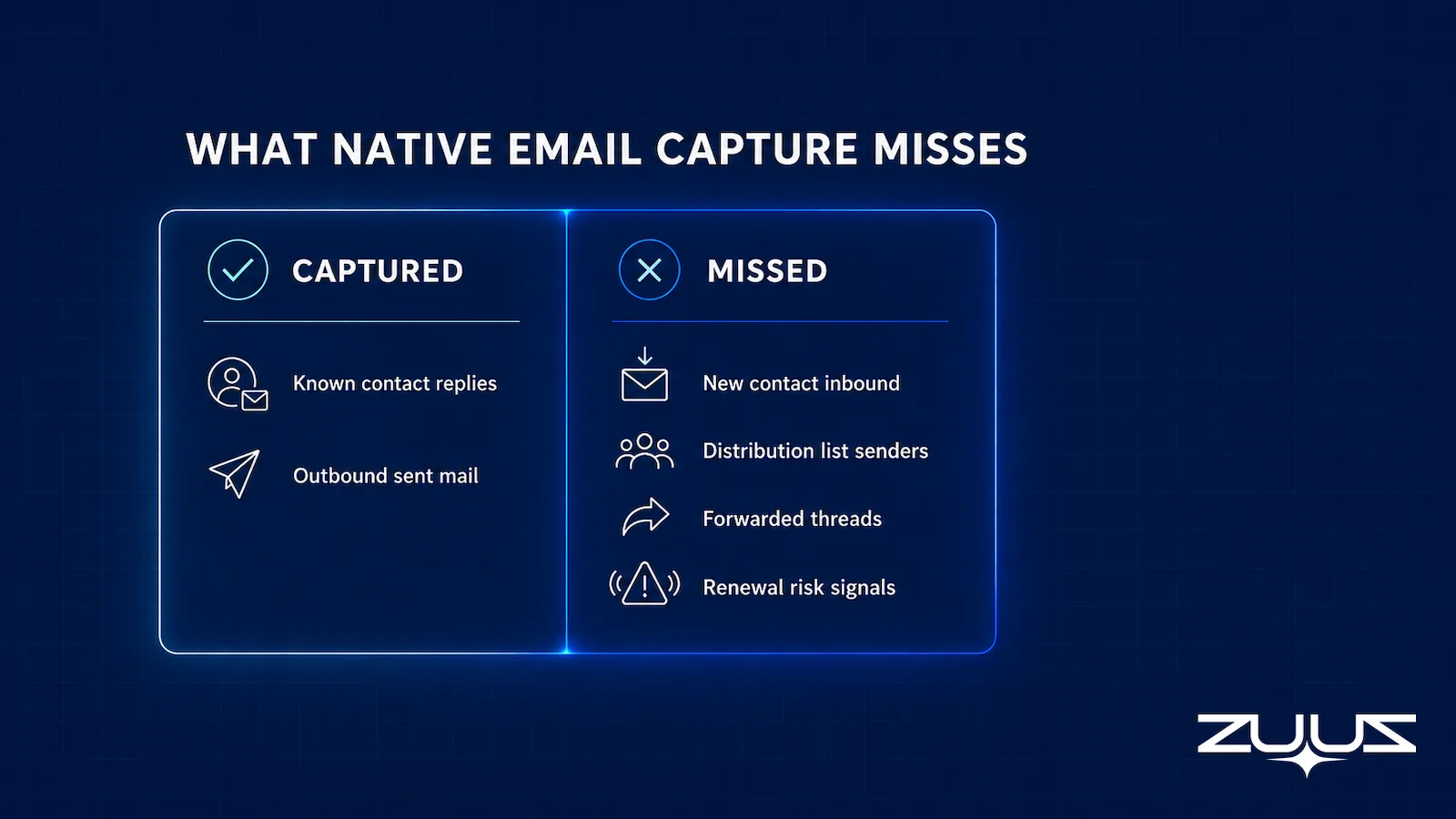
For either platform, the integration works well for logging activity against existing records. Neither resolves the problem of inbound email from contacts not yet in Salesforce, or signals buried in forwarded threads where the original sender is not a Salesforce contact.
How to evaluate an email-to-Salesforce setup
- Coverage of unknown senders. Does it capture inbound from people who are not Salesforce contacts yet, including distribution lists and forwarded threads, or only activity against records that already exist?
- Where the data lands. Does what it captures reach Salesforce fields a report can read, or only an activity feed a human has to open?
- Rep effort. Is there anything to remember: a BCC, a sidebar click, a button, a sync to re-authorize after a password change?
- Renewal separation. Can renewal threads route differently from new-business threads, or do both land in the same flat timeline?
- A capture layer, not just a mail connector. Is something reading the channels where the deal actually moves, email, calendar, LinkedIn messages, meeting and call transcripts, and turning them into records?
- Correction in one step. When the match is wrong, can the rep fix it in one click before anything is written to the record?
The Setup IT Teams Most Commonly Get Wrong
Sync Scope Set to Outbound Only
The default EAC configuration often logs only sent email, not received. For IT sales, the most important signals are inbound: customers reaching out to ask about pricing, terms, renewal timelines, or competitive alternatives. Confirming that two-way sync is active is the first configuration check any IT sales ops team should make.
Contact Matching That Misses Distribution Lists
IT procurement frequently operates through shared inboxes and distribution lists. An email from purchasing@customer.com will not match any Salesforce contact record. It lands as unmatched activity or gets skipped entirely. A fallback rule for domain-level matching on high-value accounts addresses this without requiring manual cleanup.
No Differentiation Between Renewal and New-Business Threads
Most email integration setups log everything to the same activity timeline with no signal classification. A renewal inquiry and a cold inbound reply look identical in Salesforce. For IT teams managing new logos and renewals simultaneously, this creates a noise floor that makes triage nearly impossible for both reps and managers reviewing pipeline.
Treating EAC as Full Coverage
EAC captures email activity against known contacts. It does not catch the engineer-to-engineer email that contains a renewal risk signal, the forwarded pricing thread from a new procurement contact, or the competitor mention buried in a support conversation. These require an additional signal capture layer beyond native Salesforce tooling.
What Leaks When Email and Salesforce Aren’t Synced
The cost of imperfect sync is not visible until measured. Most IT sales leaders assume they are capturing 60-70% of significant email activity in Salesforce. The actual number is typically closer to 15-20%, based on email lookback analysis across IT services accounts that have connected their inboxes to structured pipeline tracking. Salesforce’s State of Sales research reports that reps spend the majority of their week on non-selling work, which compounds the logging gap.
Pipeline Stage Accuracy
Opportunities showing Stage 2 in Salesforce are sometimes at Stage 4 in the customer’s inbox. Pricing has been negotiated, procurement has been engaged, and a timeline has been discussed, but none of that made it to the CRM record. Forecast accuracy suffers, and managers are making decisions on a picture that is weeks behind reality.
Renewal Date Awareness
A customer emails about contract terms for the following year. The email gets read, partially replied to, and never logged. The renewal date arrives and nobody can find the conversation. The rep has to reconstruct context from memory while the customer expects a rep who already knows the history.
Competitive Intelligence
A customer mentions evaluating a competitor in an email thread. If that signal never reaches Salesforce, it never reaches the manager who could adjust the retention approach. In IT distribution and services, where competitive cycles are frequent and customers often run parallel evaluations, this kind of missed signal has direct revenue consequences.
The Record-Ready Test
Coverage numbers are easy to argue about. This test is not, because it asks one question: could the record be handed to someone else today without a conversation?
- Choose an account the owning rep has not touched in two weeks.
- Ask a colleague to say who the buying group is, what was last agreed and what happens next, using the CRM alone.
- Every answer that needs the rep, the inbox or a call is a record-ready failure.
- A record that passes survives a handoff, a territory change and a departure. One that fails is a person, not a system.
Worked on a Salesforce instance with email integration switched on: the colleague opens the opportunity and finds a clean activity timeline, forty logged emails, and no answer to any of the three questions. The procurement contact who joined in week three is not a contact record, because she emailed from a distribution list. The last thing agreed sits in the body of a forwarded thread. The next step field still says the value a rep typed before the holidays. Activity capture passed; the record failed. That is the distinction to keep in mind for the rest of this guide, because logging email and making a record record-ready are two different jobs.
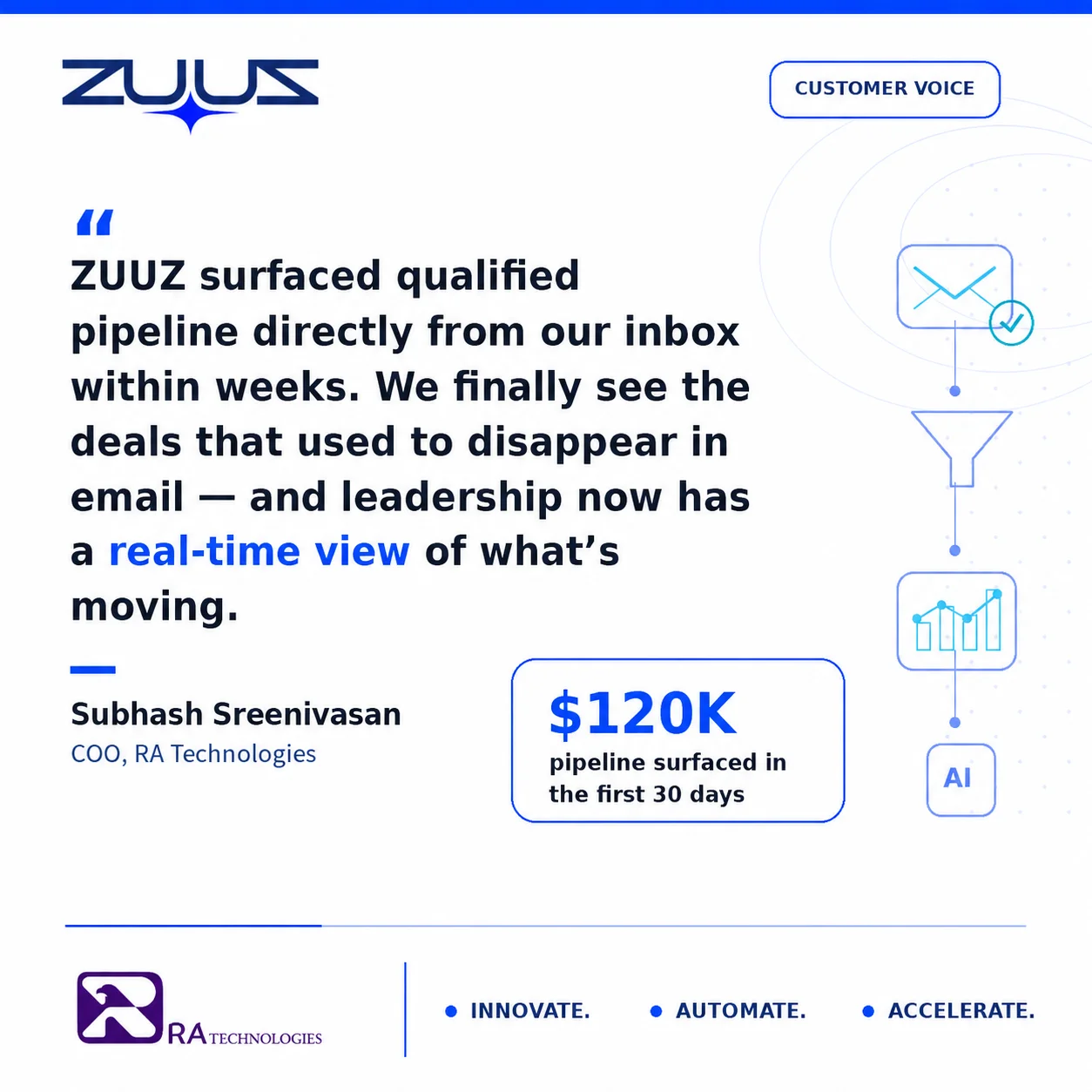
$120K surfaced in 72 hours. RA Technologies, a US IT services company, connected ZUUZ to their team’s shared sales inbox. The first 90-day email lookback surfaced $120K in pipeline that had never been logged: active customer conversations, renewal threads, pricing exchanges. All of it was in email. None of it was in the CRM.
Stop Losing Pipeline in the Inbox.
Connect your CRM in minutes and let ZUUZ capture the signals your team never logs. Start free, with no integration project required.
Recovering that pipeline once is a useful exercise. Keeping the same gap from reopening the next quarter is a tooling decision, and the available options differ more than their feature lists suggest.
Native Integration vs. Purpose-Built Email-to-CRM Tools
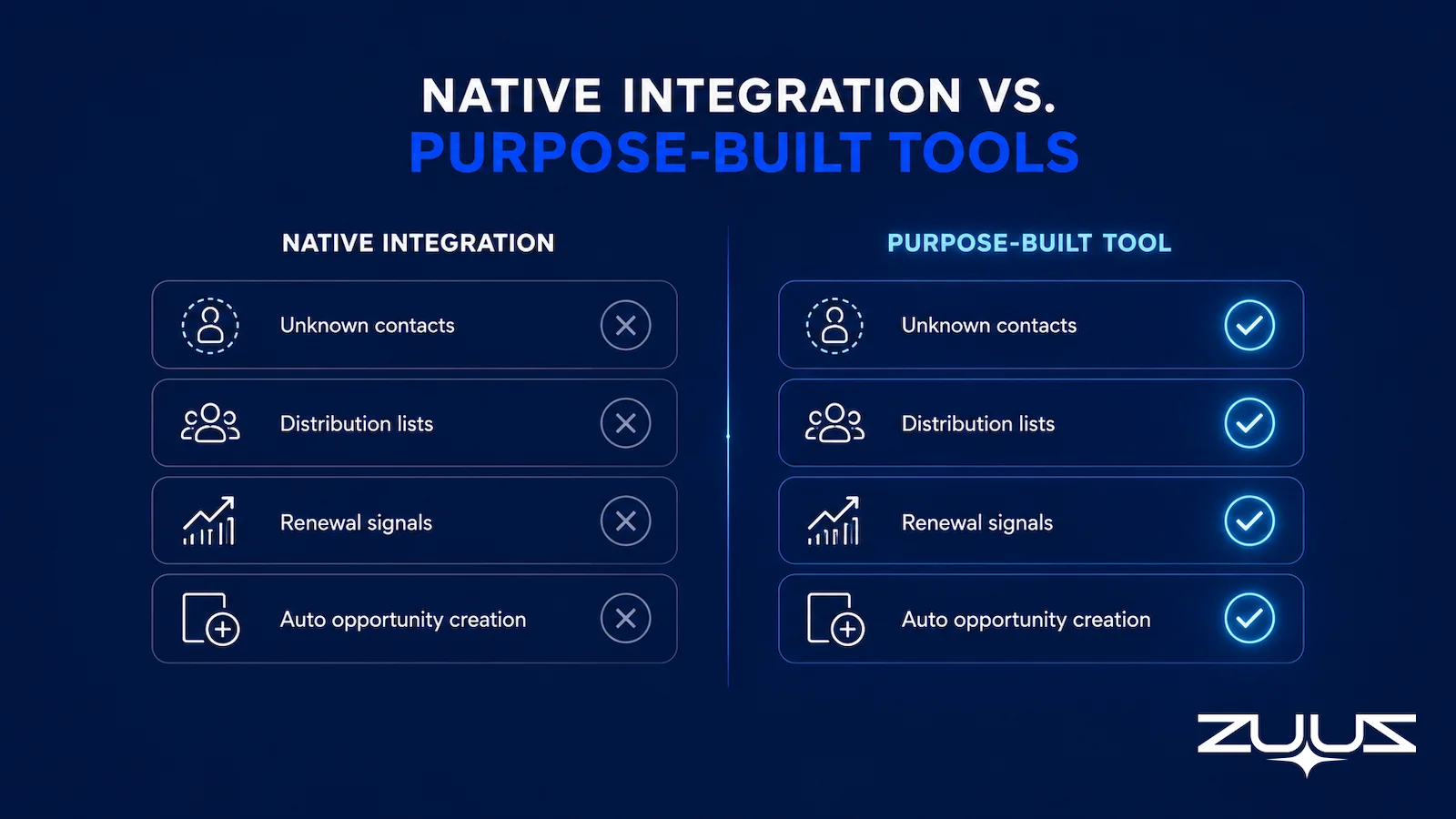
Choosing the right approach requires understanding what each option is actually designed to do. The table below maps the capabilities IT sales teams need against what native Salesforce integration provides versus what purpose-built tools add.
| Capability | Einstein Activity Capture | Salesforce Inbox Sidebar | Purpose-Built Tool (e.g., ZUUZ) |
|---|---|---|---|
| Logs email to known contacts | Yes (automatic) | Yes (rep-initiated) | Yes (automatic) |
| Logs email from unknown contacts | No | No | Yes (creates new record) |
| Handles distribution list senders | No | No | Yes (domain-level matching) |
| Identifies renewal intent signals | No | No | Yes (classifies signal type) |
| Creates Salesforce opportunity from email | No | No | Yes (automatically) |
| Alerts rep with thread context | No | Partial (shows record) | Yes (summarized context) |
| Works with shared/team inboxes | Limited | No | Yes |
| Requires rep action to trigger | No (passive) | Yes (click to log) | No (fully automatic) |
| Runs retroactive email lookback | No | No | Yes (90-day default) |
For IT sales teams with a high volume of inbound from existing accounts, distribution list senders, and shared procurement inboxes, native integration covers the baseline. It does not cover the pipeline that matters most: the active conversations happening outside the contacts Salesforce already knows about.
The email-to-CRM automation guide for IT companies covers the full configuration workflow for teams moving beyond EAC to automated pipeline detection.
How to Handle Renewal Emails Inside Salesforce
Renewals are a distinct email pattern for IT sales teams and most Salesforce setups do not account for them separately from new-business threads. A renewal conversation looks structurally different: it references existing contract terms, involves the same account contacts over a longer period, often includes vendor or distributor parties in addition to the customer, and signals risk through behavioral changes rather than explicit statements.
At Cloud Box Technologies, managing 10-12 renewals per month, the challenge was not tracking the renewal dates themselves; those were in Salesforce. The challenge was tracking the conversation leading up to renewal. A rep might have a renewal close date set for June. The customer’s renewal intent signals, or risk signals, appeared in email threads from April. Salesforce showed a deal at a certain stage. The inbox told a different story.
Slower reply times, pricing questions, a competitor’s name appearing for the first time, a new contact from the procurement team entering the thread: each of these is a signal that the renewal is at risk. None of them are captured by EAC unless a rep explicitly reads and classifies the thread as significant.
What a Renewal-Aware Email Setup Requires
A Salesforce email configuration that actually handles IT renewals separates renewal email activity from new-business activity at the point of ingestion, routes renewal signals to renewal opportunities automatically, and flags risk signals as assigned tasks rather than passive logged activity. The renewal tracking guide for VARs and distributors covers the full signal classification approach for teams managing high renewal volume.
The Right Salesforce Email Integration Workflow for IT Services
A complete workflow for IT sales runs two tracks in parallel, and both must be automatic. The moment either track requires rep action to trigger, coverage drops to whatever percentage of emails reps happen to process carefully that day.
New-Business Inbound Track
Inbound email from unknown domains is matched against the target account list. A new contact record is created in Salesforce. A deal is created in the new-business pipeline. The rep receives an alert with full thread context before the customer has to follow up a second time. This track handles the cold inbound and referral traffic that EAC misses entirely.
Renewal Signal Detection Track
Inbound email from existing account contacts is matched against the open renewal opportunity. Activity is logged automatically. Risk signals such as silence after multiple touchpoints, competitor mentions, and pricing challenge language trigger renewal tasks rather than passive log entries. The rep sees the risk before the renewal date arrives, not after.
For IT distribution companies managing accounts across multiple product lines and vendors, McKinsey’s 2023 B2B Pulse research found that two-thirds of B2B buyers prefer digital and self-serve channels for reordering and renewals. The implication for IT sales is that renewal conversations are often happening in email precisely because buyers want lower-friction interactions, and those interactions need to be captured and structured automatically.
Teams that have mapped this workflow in detail can reference the guide on fixing missed sales leads in email for the step-by-step signal routing configuration.
How ZUUZ Fills the Gap Salesforce Email Integration Leaves
Salesforce email sync logs conversations against contacts the CRM already knows about. It does not identify the pipeline hiding in email that has never been logged. The distinction matters because the most commercially significant emails are often the ones that fall outside existing contact records: a new procurement contact, a forwarded pricing thread, an inbound from a distribution list no one thought to add to Salesforce.
ZUUZ reads email threads and surfaces opportunities and renewals automatically. It is not a replacement for Salesforce; it is the layer between the inbox and the CRM pipeline. When a customer emails about pricing, ZUUZ classifies the intent, matches the account, creates or updates the Salesforce opportunity, and alerts the rep with summarized thread context. No rep action triggers the process. No sidebar requires clicking. No BCC rule needs remembering.
The category line is worth stating plainly. ZUUZ is an AI layer on top of the CRM a team already runs, and it is never a CRM and never a replacement for one. Native email integration reports on what the rep entered or sent; ZUUZ writes the record from the conversation, and the rep approves it before it lands. Salesforce stays the system of record, and manual entries take precedence over anything ZUUZ proposes.
The result RA Technologies saw was not unusual: a 90-day lookback on their shared sales inbox found $120K in active pipeline that their CRM had no record of. Those deals existed as live customer conversations in email. The gap between the inbox and the CRM was not a data problem. It was a structural one that no amount of rep discipline could close without an automated layer reading the email directly.
ZUUZ is CRM-agnostic and also works with HubSpot email lead capture and Zoho for teams that are not running Salesforce. For teams already on Salesforce, ZUUZ writes directly to Salesforce records in native format with no middleware or CSV exports required.
Teams evaluating whether their current CRM data actually reflects their pipeline can start with the guide on why CRM pipeline data is wrong for the diagnostic framework before connecting an email intelligence layer.
From an operator’s seat
Across the deployments ZUUZ runs, the pattern on Salesforce instances is that the blocker is never the mail connection, it is contact ownership. The moment an inbound thread from an unknown sender becomes a real contact, someone has to decide which account it hangs off, and in IT services that question is genuinely hard: the same buyer appears under a parent company, a subsidiary, a reseller and a personal address in the same quarter. The part teams do not plan for is that a capture layer makes this visible on day one instead of at the end of the quarter, so the first week of a rollout is mostly account-matching rules, not tuning. Two smaller surprises are worth the warning. Shared mailboxes carry more unlogged pipeline than individual ones, because nobody feels they own a thread addressed to sales at the company. And the renewal threads are the hardest to route, since an order confirmation and a renewal negotiation look nearly identical to any system that reads only the subject line.
Frequently Asked Questions
Does Salesforce Email Integration Log Every Email or Just Sales Emails?
Einstein Activity Capture can be configured to log all email activity, but it still requires opt-in configuration and only captures emails against existing Salesforce contact records. Emails from contacts not yet in Salesforce are skipped or stored as unmatched activity. A supplementary email parsing layer is required for full inbound capture, regardless of whether the sender already exists in the CRM.
What Happens If a Contact Is Not in Salesforce Yet?
Native Salesforce email integration typically skips emails from unknown senders or creates unmatched activity records that reps must manually resolve. Purpose-built email-to-CRM tools identify unknown inbound contacts, create new Salesforce records automatically, and associate the full email thread so no pipeline signal is lost before a rep sees it.
Can Salesforce Email Integration Sync Renewal Reminders?
Not natively. Salesforce triggers task alerts based on opportunity close dates that reps set manually, but it does not read email threads to identify renewal conversations that were never logged. Email-to-CRM tools designed to recognize renewal-intent patterns close this gap by routing renewal signals directly to the correct opportunity record in Salesforce.
Will Salesforce Email Integration Slow Down Gmail or Outlook?
The Salesforce sidebar adds a lightweight panel inside Gmail or Outlook with minimal performance impact. Background sync tools like ZUUZ operate entirely outside the email client and have zero effect on email performance, since they read mailbox data through the provider API rather than injecting code into the browser or desktop application.
What Is the Difference Between Einstein Activity Capture and the Salesforce Inbox Sidebar?
Einstein Activity Capture is a background sync service that automatically logs sent and received emails to matching Salesforce contact records without requiring any rep action. The Salesforce Inbox sidebar is a browser or desktop add-on that shows Salesforce data inside Gmail or Outlook so reps can view records and log activity without switching tabs. Both are limited to contacts already in Salesforce and do not surface pipeline from unknown senders.
How Does ZUUZ Differ from Native Salesforce Email Integration?
Native Salesforce email integration logs activity for contacts the CRM already knows about. ZUUZ reads email threads and surfaces opportunities, renewal signals, and pipeline context that were never logged at all: emails from unknown contacts, distribution lists, forwarded threads, and multi-party renewal conversations. ZUUZ creates or updates the Salesforce record automatically and alerts the rep with full thread context, with no rep action required to trigger any part of the process.
How do you automatically log emails in Salesforce?
Salesforce offers three native routes: Einstein Activity Capture, which syncs email and calendar activity to related records; the Outlook and Gmail integrations, where reps log messages from a side panel; and Email-to-Salesforce, where a rep BCCs a personal address. Each depends on matching an existing contact or on a rep choosing to log. A capture layer such as ZUUZ reads the inbox and writes structured records to Salesforce without a rep in the loop.
See What Your Inbox Is Actually Doing.
Most IT sales teams on Salesforce are running with 15-20% real email coverage in the CRM. ZUUZ closes that gap automatically without changing how your reps work, so book 15 minutes to see it live on your inbox configuration.

CEO of ZUUZ. He scaled Cloud Box Technologies from 0 to $25M ARR in IT services and distribution before building ZUUZ. Connect on LinkedIn

