
Inbound Lead Management for B2B Revenue Teams
Inbound lead management covers how inbound signals get identified, scored, routed, and synced to CRM. See the full RevOps process, step by step.

CEO of ZUUZ. He scaled Cloud Box Technologies from 0 to $25M ARR in IT services and distribution before building ZUUZ. Connect on LinkedIn
TL;DR: Inbound lead management is the process that turns a form fill, a reply, or an inbound email into a routed, prioritized record with clear ownership inside the CRM. It runs on a connected sequence: identify, match, enrich, score, prioritize, route, apply an SLA, sync, and measure. Teams that treat these as one operating system rather than separate tactics close the gap between when a lead shows interest and when a rep actually works it. ZUUZ is the capture layer inside that sequence: it connects to your sales inbox, reads LinkedIn messages and meeting or call transcripts, and writes leads, stakeholders, next steps and renewal signals into Salesforce, HubSpot, Zoho, Attio or Pipedrive for the rep to approve in one click.
- Inbound lead management is a connected process, not a single tool; it runs from signal identification through CRM sync and measurement as one system.
- Lead scoring and lead prioritization solve different problems: scoring estimates fit and readiness, prioritization decides what a rep works first today.
- Response speed measurably changes outcomes; contacting a lead within five minutes rather than thirty can make it as much as 21 times more likely to qualify, according to research cited in Harvard Business Review.
- Routing needs an explicit hierarchy, such as named-account ownership before territory before round robin, plus a fallback queue, or unmatched leads sit unowned.
- CRM sync lag is where inbound lead management quietly breaks down; a lead that is scored and routed correctly still gets lost if the CRM record updates hours after the fact.
- ZUUZ reads inbound email signal directly and writes matched, routed updates back to Salesforce, HubSpot, or Zoho, without asking a rep to re-enter what already arrived in the inbox.
A prospect fills out a demo request at 4:47 on a Friday afternoon. A different prospect replies to a nurture email with a specific question about pricing. A third calls the general line and asks to be transferred to sales. All three are inbound leads, and by Monday morning, exactly one of them has a rep attached, an SLA started, and an accurate CRM record. The other two are sitting in a queue nobody owns yet, or worse, sitting nowhere at all.
Inbound lead management gets treated as a scoring problem or a routing problem, when it is really both at once, plus capture, plus CRM sync, plus the ownership handoffs between marketing, revenue operations, and sales that make the rest of it actually work. Most teams have a piece of this in place, a scoring model here, a routing rule there, without the full sequence connected end to end.
This guide breaks inbound lead management down into its full operating model, from the moment a signal arrives to the moment it shows up correctly in the CRM and gets measured, and shows where the process most commonly breaks.
What Is Inbound Lead Management
Inbound lead management is the operational process a revenue team uses to capture, qualify, route, and act on interest that a prospect initiates, as distinct from lead generation, which is the marketing work of creating that interest in the first place. Generation gets someone to raise a hand. Management decides what happens in the minutes and hours after they do, and whether that hand-raise turns into a worked opportunity or a record that quietly goes stale.
The scope runs wider than a single tool or a single team’s workflow. It starts the moment a signal arrives, whether that is a form fill, an inbound email, a reply to a campaign, or a call transferred to sales, and it does not end until the lead has an owner, a status, and an accurate record in the CRM that reflects what actually happened. Treated this way, inbound lead management functions as one of the core operating systems inside a revenue operations platform, not a side process bolted onto the CRM.
Most B2B teams already run pieces of this, usually a scoring model in the CRM and a routing rule in a form tool. What tends to be missing is the connective layer between capture and CRM record, the part that decides which signals count, who should see them first, and how fast that has to happen.
The Inbound Lead Management Process, Step by Step
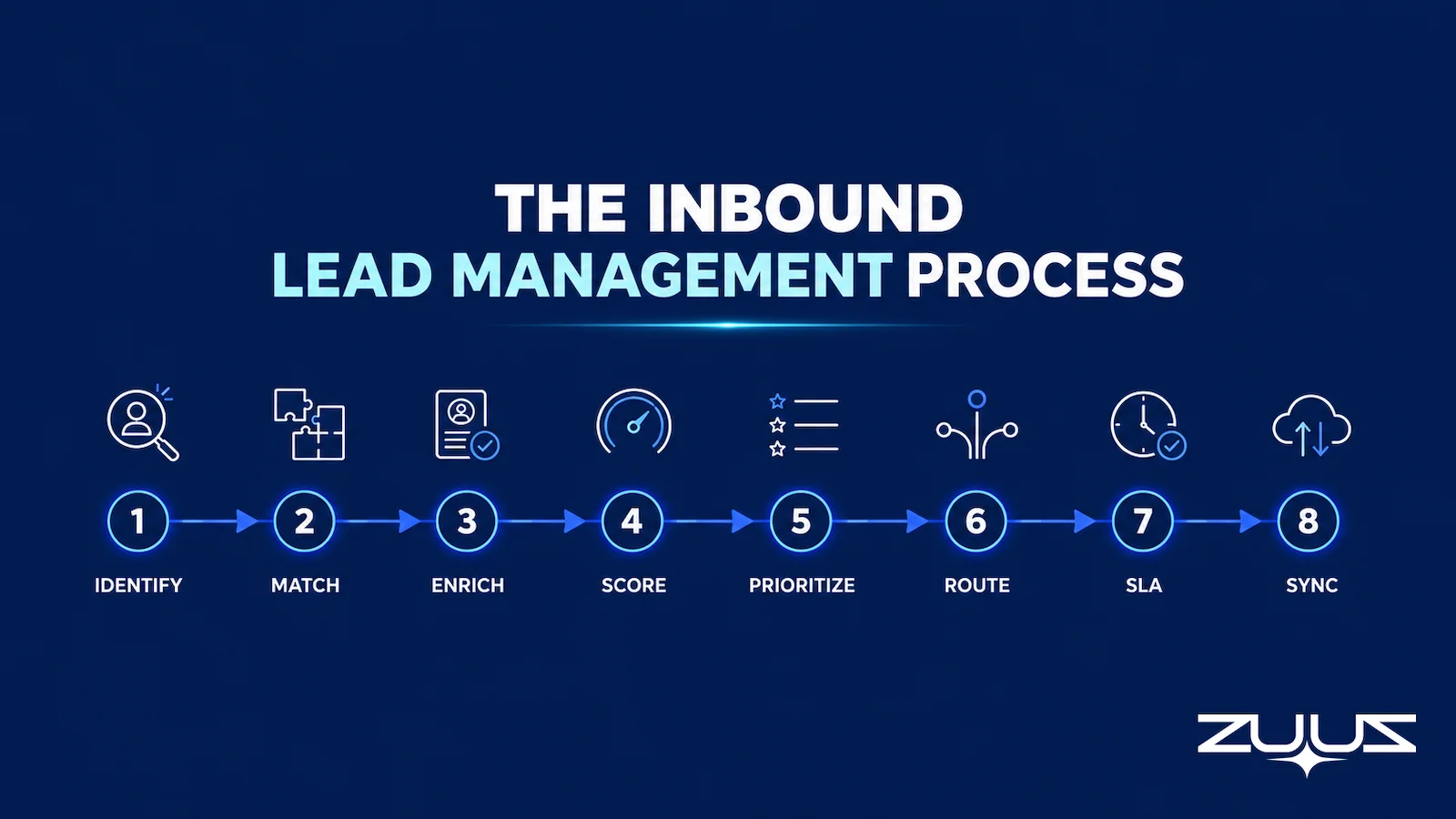
A working inbound lead management process runs as a connected sequence rather than a set of independent tools. Each step feeds the next, and a break at any point, a missed capture, an unscored lead, a routing rule with no match, stops the whole chain from producing a worked lead.
The sequence generally covers eight steps: identify the inbound signal, match or create the right record, enrich it with the context needed to act, score it for fit and intent, prioritize it against everything else already in the queue, route it to an owner, start the response SLA, and sync the result back to the CRM before measuring the outcome. Some of these happen in seconds through automation. Others, particularly the actual sales response, still depend on a rep.
The value of naming these as discrete steps is diagnostic. When conversion drops or leads go cold, the fix usually lives in exactly one of these eight steps, not in a vague sense that “lead management needs work.” A modern RevOps software stack is built to make each step visible on its own, so a team can see which link in the chain is actually the weak one.
How to evaluate an inbound lead management setup
- Channels beyond the form. Does the system see inbound email replies, LinkedIn messages and meeting or call transcripts, or only form fills and campaign clicks?
- A capture layer that writes fields. Does captured signal land in CRM fields that routing rules and reports can read, or only in an activity timeline?
- Match before create. Does an inbound reply from a live account attach to the existing record, or arrive as a duplicate lead with no history?
- Routing hierarchy with a fallback. Is the precedence written down, named account before territory before round robin, with a queue that owns whatever matches nothing?
- An SLA clock the system starts. Does the timer begin when the signal arrives, or when a rep notices it?
- One-click correction. Can the rep fix the owner, the account match or the signal type before the record saves?
Capturing Inbound Signals Across Every Channel
Most inbound lead management systems are built around the web form, which captures only a fraction of the interest a company actually receives. A prospect replying to an old email thread, asking a pricing question on a call, or mentioning a competitor’s contract expiring in a meeting note is just as much an inbound signal as a demo request, but almost none of that gets captured with the same rigor.
Email carries a disproportionate share of this uncaptured signal because it is the channel where deals actually get discussed, not just initiated. A prospect who fills out a form once will often continue the real conversation entirely by email afterward, and that conversation is where intent, urgency, and objections actually surface. Systems built around automated email lead capture exist specifically to close that gap, reading the thread instead of waiting for another form fill.
Capturing the signal also means preserving the context around it: source, original request, product interest, and timestamp, not just a name and an email address. Without that context, everything downstream, scoring, routing, prioritization, has to guess. This same gap shows up in the broader case for email tracking software, since the channel most teams under-instrument is also the one carrying the most usable signal.
Stop Capturing Only Form Fills. Start Capturing the Whole Inbox.
ZUUZ reads inbound email and extracts the deal signal automatically, so a reply or a forwarded thread counts as a captured lead the same way a form submission does.
Lead Scoring vs. Lead Prioritization
Lead scoring and lead prioritization get used interchangeably, but they answer different questions. Scoring estimates how good a lead is, combining firmographic fit against the ideal customer profile with behavioral and intent signals. Prioritization decides what gets worked first right now, which is not always the same lead the score ranks highest.
A well-defined ICP scoring model is necessary but not sufficient on its own. A mid-tier score attached to a named enterprise account asking for pricing today outranks a top-tier score sitting untouched from three weeks ago, and a system built only around lead scoring software without a separate prioritization layer will route both leads the same way.
| Factor | Scoring Answers | Prioritization Answers | Where ZUUZ Supplies the Input |
|---|---|---|---|
| What it measures | Fit and likelihood to convert | What should be worked next | Neither. ZUUZ supplies the captured signal both are calculated from |
| Time horizon | Static until re-scored | Changes hour to hour as new signals arrive | Updated as each email reply, LinkedIn message or transcript lands, not on a nightly batch |
| Inputs | Company size, role, industry, behavior, intent | Score plus urgency, SLA status, account ownership, rep capacity | Firmographics stay in the CRM; intent, urgency and stakeholder changes come from the connected inbox and transcripts |
| Typical output | A tier or numeric value | A queue order | A written CRM field, so the tier or the queue can be built in the CRM itself |
Building explicit priority tiers, immediate, high, standard, and not sales-ready, gives reps a queue they can actually work instead of a scored list they have to reinterpret every morning. This is where email lead qualification automation earns its place, since qualification signal from a live conversation should be able to override a static score the moment it arrives.
Routing Inbound Leads to the Right Rep
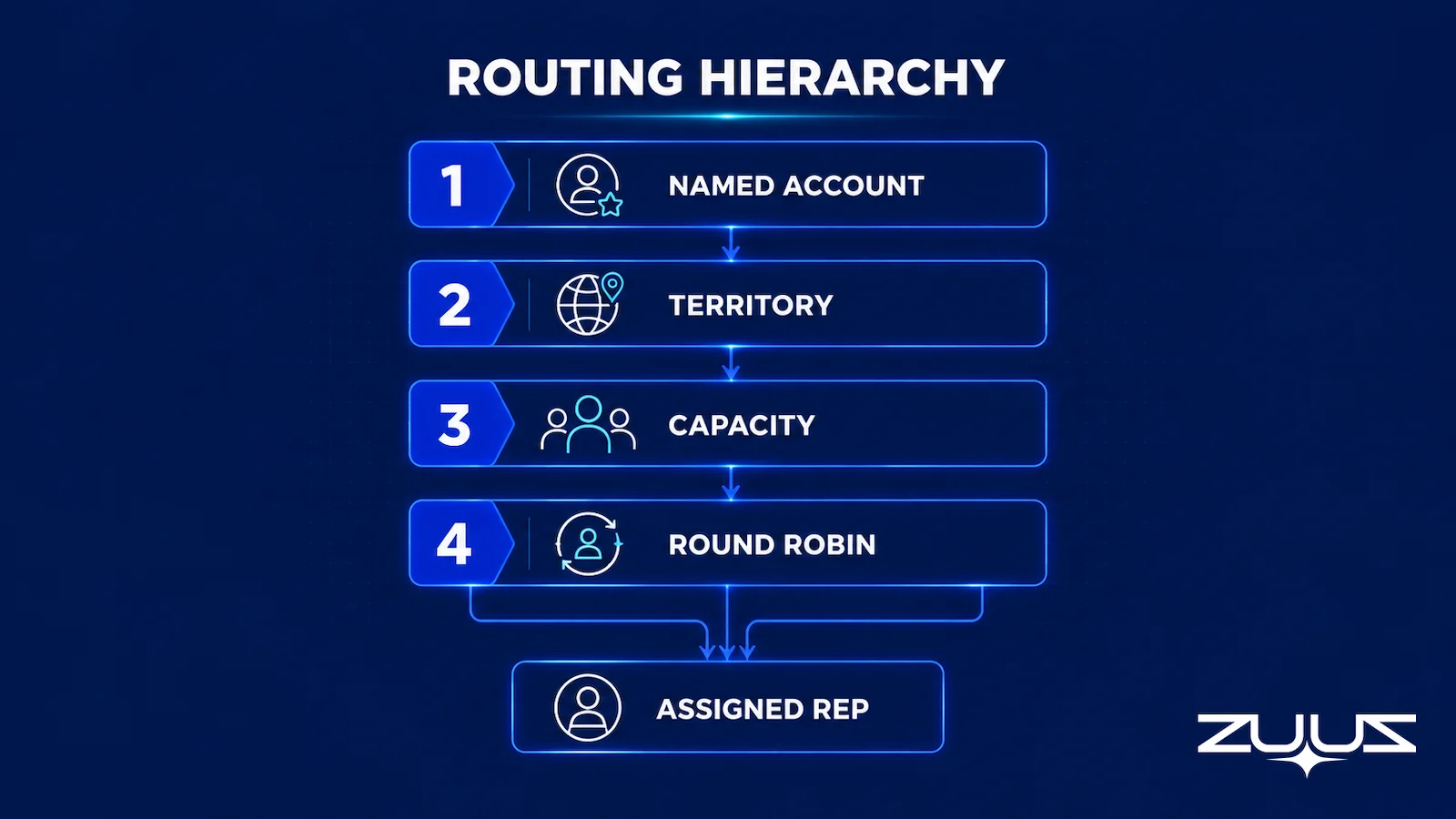
Routing decides who actually receives a qualified inbound lead, and the method matters as much as the qualification work that fed it. Four routing methods cover most B2B setups, and they are rarely mutually exclusive; the real design work is deciding which one wins when more than one applies.
| Routing Method | Best For |
|---|---|
| Round robin | Reps handling similar accounts where balanced distribution matters most |
| Territory-based | Geography, segment, or industry-defined coverage |
| Named-account | Existing account ownership, which should generally override generic distribution |
| Capacity-based | Active workload, PTO, and time zone, to avoid overloading one rep |
Named-account ownership should almost always take precedence over round robin or territory rules, since routing an inbound lead to a stranger when the prospect already has an assigned rep creates confusion on both sides and often stalls the deal while ownership gets sorted out manually. Getting this hierarchy wrong is a common source of the friction covered in deal management software comparisons, where routing accuracy is treated as a first-class feature rather than an afterthought.
Exception and Fallback Routing So No Lead Gets Lost
Every routing setup eventually receives a lead that matches no rule cleanly, a lead outside any defined territory, a duplicate that conflicts with an existing owner, or a signal that looks like sales interest but is actually a support request or a job application. Without an explicit fallback, these leads do not get routed incorrectly. They get routed nowhere.
An owned fallback queue, checked on a defined cadence by a specific person or team, closes that gap. So does a clear precedence rule for when multiple routing conditions match at once, and an escalation path for when an assigned rep does not respond inside the SLA window. Leads that fall through these cracks are functionally identical to the missed sales leads that never make it into the CRM at all, even though the initial signal was captured correctly.
This is also where revenue leakage most commonly starts. A lead can be captured, scored, and technically routed, and still never get worked, because the routing rule that matched it pointed at a rep who was out of office with no exception path defined. Auditing fallback and exception handling on a recurring basis catches this before it shows up as a quarter of missing pipeline.
An Unmatched Lead Should Never Sit Silent. Give It an Owner Automatically.
ZUUZ applies routing logic to every captured signal and flags anything that falls outside the rules, so exceptions surface immediately instead of sitting unassigned.
Setting an SLA and Managing Speed to Lead
Response speed is one of the few variables in inbound lead management with a well-documented, direct relationship to outcomes. Research on more than 100,000 sales calls, cited in Harvard Business Review’s analysis of online sales leads, found that contacting a web lead within five minutes rather than thirty made it as much as 21 times more likely to enter the qualification process. The gap between a fast response and a slow one is not marginal.
A usable SLA separates assignment time from response time, since a lead can be assigned to a rep in seconds and still sit untouched for hours. It also varies by intent tier; a demo request or a pricing question warrants a tighter window than a low-intent content download, and treating every inbound signal with the same SLA either over-serves the low-intent ones or under-serves the high-intent ones.
Starting the SLA clock automatically, tied to the qualifying event itself rather than a manual CRM update, keeps the measurement honest. Automatic escalation when a lead sits past its SLA threshold, whether that means a reminder, a manager alert, or reassignment to the fallback queue, is what actually protects speed-to-lead once volume gets past what any one rep can track manually. Reclaiming that time is also central to sales rep productivity, since a rep who is not buried in administrative tracking has more room to respond inside the window that matters.
Syncing Inbound Lead Data to the CRM in Real Time
None of the preceding steps matter to a rep or a manager if the result does not land accurately in the CRM, and quickly. A lead that is captured, scored, prioritized, and routed correctly, but shows up in the CRM six hours later or not at all, still produces the same outcome as a lead management process with no automation behind it.
Syncing well means deciding correctly whether an inbound signal creates a new lead, updates an existing contact, or attaches to an account or opportunity that already exists, rather than defaulting to creating a new record every time. It also means keeping ownership and status changes consistent the moment routing happens, and preserving the original context, source, request, and timestamp, inside the CRM record rather than losing it in translation.
For companies running more than one CRM, or running Salesforce in one region and Zoho in another, this sync logic has to work the same way regardless of platform. That is what bidirectional CRM sync actually means in practice: a two-way flow where inbound signal writes into the CRM and CRM context, ownership, existing account status, informs how the next inbound signal gets handled.
Routed Correctly Still Means Nothing If the CRM Lags Behind.
ZUUZ writes matched, routed inbound leads back to the CRM as the signal arrives, closing the gap between what happened and what the CRM shows.
The Capture Layer Test
Every tool in this category demos well against a web form. These four questions are what separate a capture layer from a logging feature, and they are worth asking of any shortlist, this one included.
- Does it capture from the channels where the deal actually moves, email, calendar, LinkedIn messages, meeting and call transcripts?
- Does what it captures land in CRM fields a report can read, or only in an activity feed a human must open?
- Does the rep have to remember anything, a BCC, a button, a sidebar, a sync?
- Can the rep correct it in one click before it is written?
A tool that fails 2 or 3 produces activity history, not a pipeline you can run a review on.
Worked example. A customer replies to a six-month-old thread asking what renewal pricing looks like. A form-based stack scores nothing, because no form was filled. An email-logging integration passes question one and fails question two: the message appears on a contact timeline, where no routing rule and no report will ever find it, so no SLA starts and no owner is assigned. A capture layer passes both, because “renewal inquiry” arrives as a field value on a matched record with an owner and a clock running, which is the difference between a lead that is present and a lead that is workable.
Defining Ownership Across Marketing, RevOps, and Sales
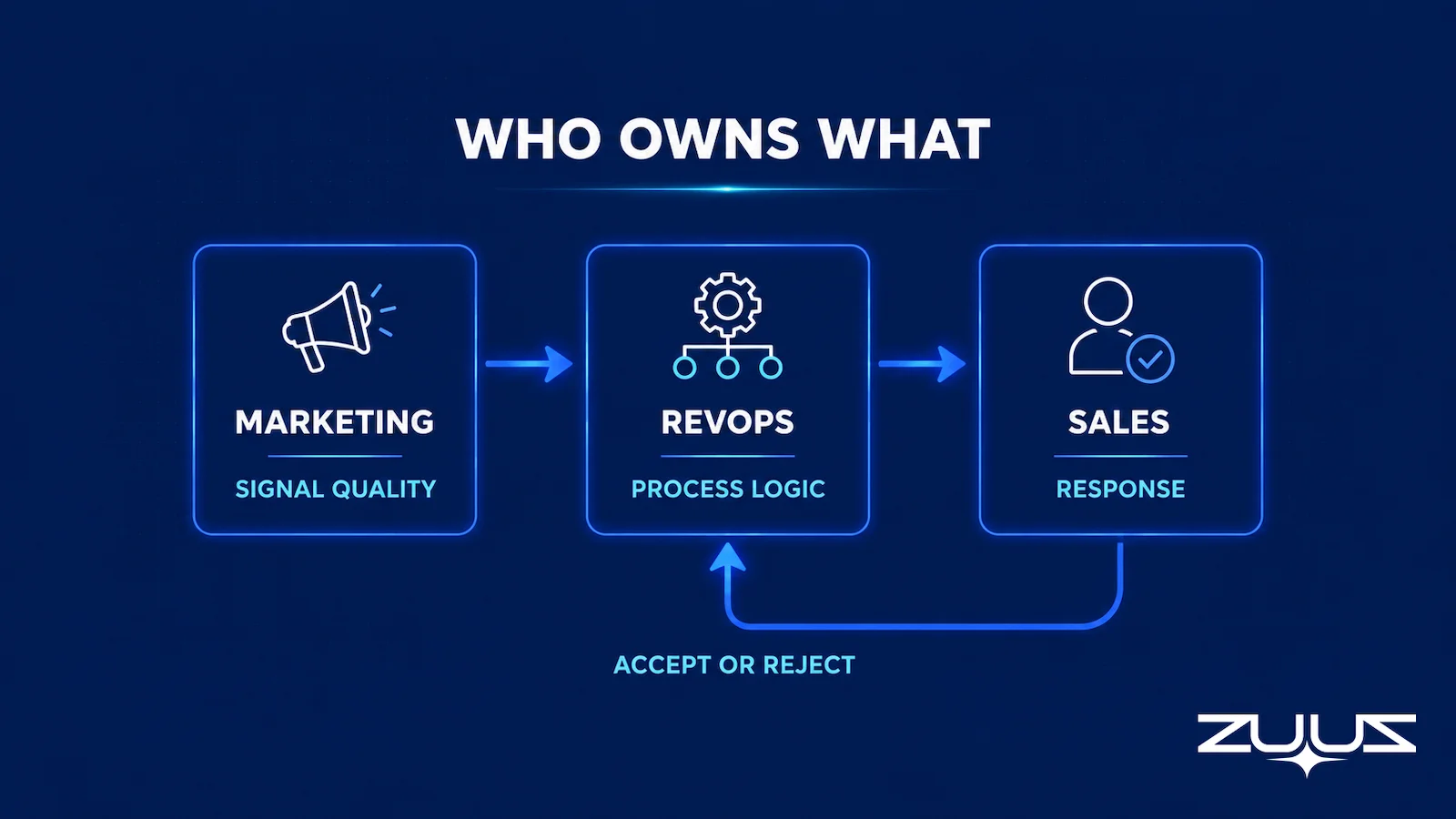
Inbound lead management fails quietly when ownership across teams is implicit rather than written down. Marketing typically owns the quality and context of the signal itself, making sure source data, campaign attribution, and original request are captured accurately before anything gets handed off. RevOps owns the process logic: the scoring model, the routing rules, the SLA definitions, and whether the system as a whole is working as designed.
Sales owns the actual response and disposition, and what happens after a rep accepts or rejects a routed lead deserves its own defined path. A rejected lead should return to a queue with a reason attached, not disappear, since that reason is often the fastest signal that a scoring or routing rule needs adjusting.
Where inbound lead management stops, structured lead nurturing generally begins, particularly for leads that are real but not yet sales-ready. That handoff works best when it is explicit rather than assumed, which is covered in more depth in a companion look at automated lead nurturing via email. Salesforce’s own guidance on inbound sales frames this same marketing-to-sales handoff as one of the most common points where inbound process breaks down.
Measuring Inbound Lead Management Performance
An inbound lead management process should be measured as a system, with metrics that show where in the sequence performance is actually breaking down, not just whether the pipeline number looks healthy at the end of the quarter.
| Metric | What It Shows |
|---|---|
| Lead capture rate | Share of legitimate inbound signals that make it into the CRM at all |
| Time to assignment | Time between an inbound signal arriving and it having a clear owner |
| Speed-to-lead | Time between assignment and the first meaningful sales response |
| SLA attainment rate | Share of leads handled inside the agreed response window |
| Routing accuracy | Share of leads that reached the correct owner on the first attempt, without reassignment |
| Lead leakage rate | Share of qualified inbound leads that were captured but never actually worked |
Lead leakage rate is the metric most teams do not track, largely because it requires visibility into what happened after a lead was routed, not just whether it was routed. A pipeline view built on gaps like this is part of why a CRM pipeline can look healthy and still be wrong, and closing that gap starts with measuring the handoff points, not just the endpoints.
From an operator’s seat
The part teams do not plan for is the matching rules, not the scoring model. Across the deployments ZUUZ runs, the argument in week two is almost never about whether a signal was real; it is about whether an inbound reply belonged to the account the sales engineer owns, the renewal the account manager owns, or the new opportunity an SDR sourced, because in IT services and distribution the same domain appears in all three. Teams that write the ownership precedence down before the mailbox is connected finish the rollout in days. Teams that leave precedence to the routing tool spend a month reassigning records by hand, which is the manual work the project was meant to remove. The order of operations that holds up is to agree precedence first, connect one mailbox, have a human approve the first week of matches, and only then switch scoring on.
Inbound Lead Management: How ZUUZ Closes the Signal-to-CRM Gap
ZUUZ approaches inbound lead management as an AI layer that sits on top of the CRM a revenue team already runs, rather than a separate system that needs its own adoption curve. It reads inbound email directly, matches the signal against existing leads, contacts, and accounts, applies scoring and routing logic, and writes the result back to Salesforce, HubSpot, or Zoho automatically, with a rep reviewing and approving the update before it saves.
At RA Technologies, a US-based IT services company that had run HubSpot for two years before adopting ZUUZ, the system surfaced $120,000 in pipeline within 72 hours that the CRM had never recorded, captured directly from the sales mailbox rather than a form. At Cloud Box Technologies, a UAE-based cloud and IT services company that had previously used its CRM only for order processing, ZUUZ turned inbound renewal signals into tracked, routed records, cutting the review time for 10 to 12 renewals down to minutes from a single connected mailbox.
Because ZUUZ is CRM-agnostic, the same capture, scoring, and routing logic runs whether a team is on Salesforce, HubSpot, or Zoho, which matters most for companies running more than one CRM instance across regions or business units. Teams evaluating this category alongside broader AI-driven lead qualification tools should weigh the same question this whole guide comes back to: does the system remove manual steps from the process, or just move them somewhere else.
Frequently Asked Questions
What is inbound lead management?
Inbound lead management is the process of capturing, qualifying, routing, and acting on interest a prospect initiates, covering everything from the moment a signal arrives, a form fill, an email reply, a call, to the moment it has a clear owner and an accurate record in the CRM. It is distinct from lead generation, which creates the interest rather than handling it once it exists.
What is the difference between lead scoring and lead prioritization?
Lead scoring estimates how good a lead is based on fit and intent signals, producing a tier or numeric value. Lead prioritization decides what a rep should work first right now, factoring in urgency, SLA status, account ownership, and rep capacity alongside the score, which means the highest-scored lead is not always the one that gets worked first.
How should inbound leads be routed to sales reps?
Most B2B teams combine round robin, territory-based, named-account, and capacity-based routing, with an explicit hierarchy defining which rule wins when more than one applies. Named-account ownership should generally take precedence, since routing a lead away from an existing account owner creates confusion and often slows the deal down.
What is the 5-minute rule for lead response?
The 5-minute rule refers to research showing that contacting an inbound lead within five minutes, rather than waiting thirty, dramatically improves the odds it converts into a qualified opportunity, by as much as 21 times according to the study cited in Harvard Business Review’s analysis of online sales leads. It is one of the most consistently cited benchmarks for speed-to-lead.
What happens when no routing rule matches an inbound lead?
A well-designed process routes unmatched leads into an owned fallback queue that someone checks on a defined cadence, rather than leaving the record unassigned. Without this fallback, leads that fall outside every defined rule simply do not get worked, even though the signal was captured correctly.
Can inbound lead management be automated?
Most of the process can be automated, including signal capture, deduplication, enrichment, scoring, routing, SLA timers, and CRM sync. The parts that genuinely require unstructured judgment, reading intent from a conversation, deciding whether a lead is truly sales-ready, benefit most from AI assistance, while the final sales response generally still involves a human reviewing and approving what gets saved.
How is inbound lead management different from lead nurturing?
Inbound lead management covers what happens from the moment a signal arrives through routing, SLA response, and CRM sync. Lead nurturing picks up after that, for leads that are real but not yet sales-ready, running structured follow-up sequences over a longer time horizon rather than an immediate response.
Does inbound lead management work across different CRMs?
A CRM-agnostic approach, like the one ZUUZ uses, applies the same capture, scoring, and routing logic across Salesforce, HubSpot, Zoho, Attio or Pipedrive without requiring a company to standardize on a single platform first. That matters most for companies running more than one CRM instance across regions, business units, or after an acquisition.
Start with one mailbox, not a migration. Connect a single sales inbox and let ZUUZ read the last 90 days, then have the rep review every lead, stakeholder and renewal signal it found before any of it is written to the CRM. That review is also the fastest read on how much inbound the current setup never captured. 30-day free trial, no credit card: https://zuuz.ai/trial/

