
How to Improve Sales Rep Productivity
Sales rep productivity depends on how much time reps lose to CRM admin, not selling. See what drives it and how automated capture gives that time back.


CEO of ZUUZ. He scaled Cloud Box Technologies from 0 to $25M ARR in IT services and distribution before building ZUUZ. Connect on LinkedIn
TL;DR: Sales reps spend just 28% of their time actually selling, with roughly 13 hours a week lost to manual CRM data entry alone. Sales rep productivity improves by removing that admin work rather than working through it faster, using automated capture that reads email and writes structured updates back to the CRM.
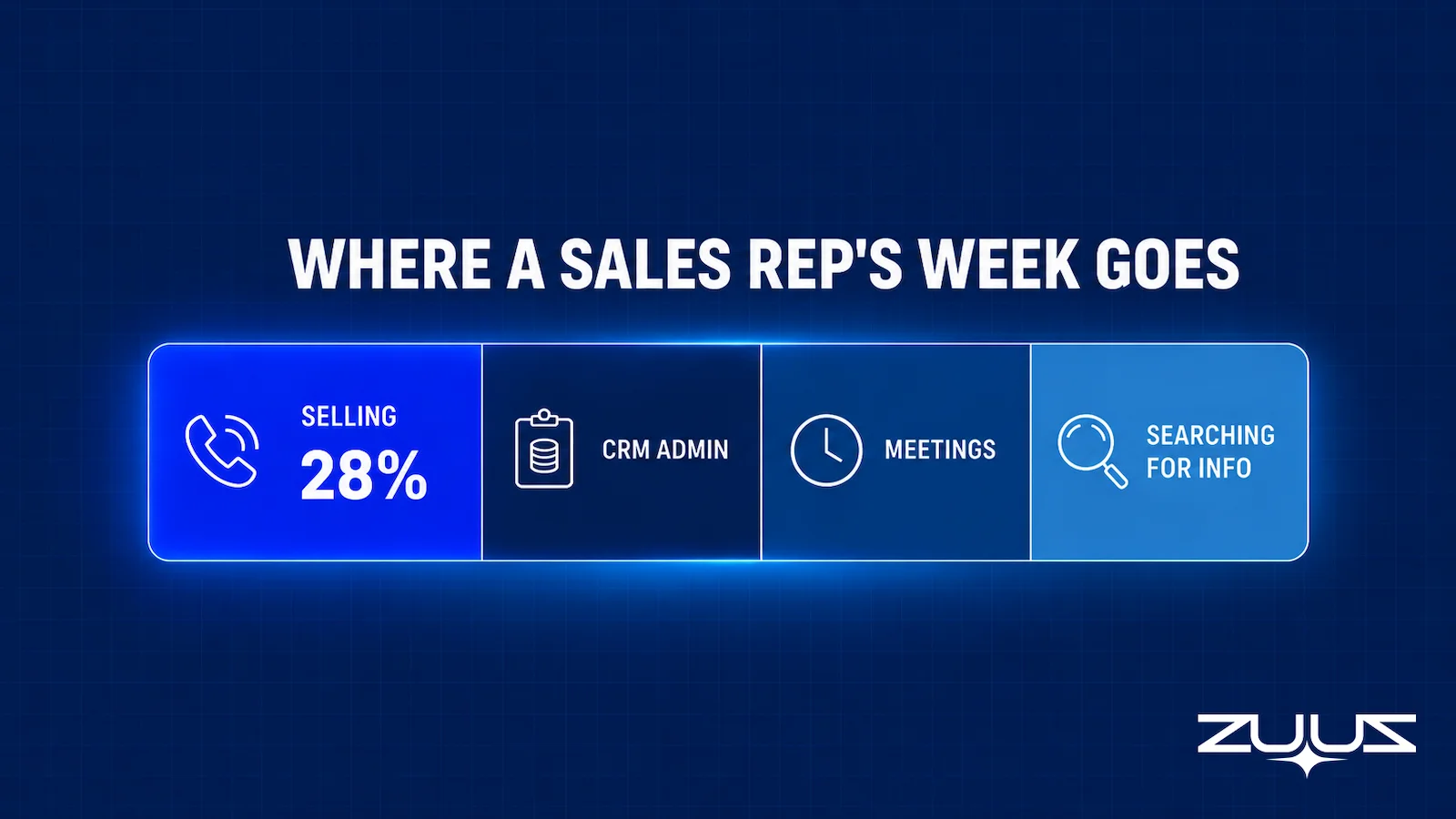
- Sales reps spend just 28% of their time actually selling, according to Salesforce’s State of Sales research; the rest goes to admin, internal work, and searching for information.
- The average salesperson spends 13 hours a week on manual data entry alone, roughly 28% of a working week, according to SuperOffice research.
- Sales rep productivity is best measured as selling time and pipeline outcomes per rep, not raw activity volume like calls made or emails sent.
- Adding more sales tools rarely removes admin work. It usually just moves the typing from one screen to another.
- The change that saves the most time removes the manual step entirely: capturing deal signals from email automatically instead of asking reps to log them by hand.
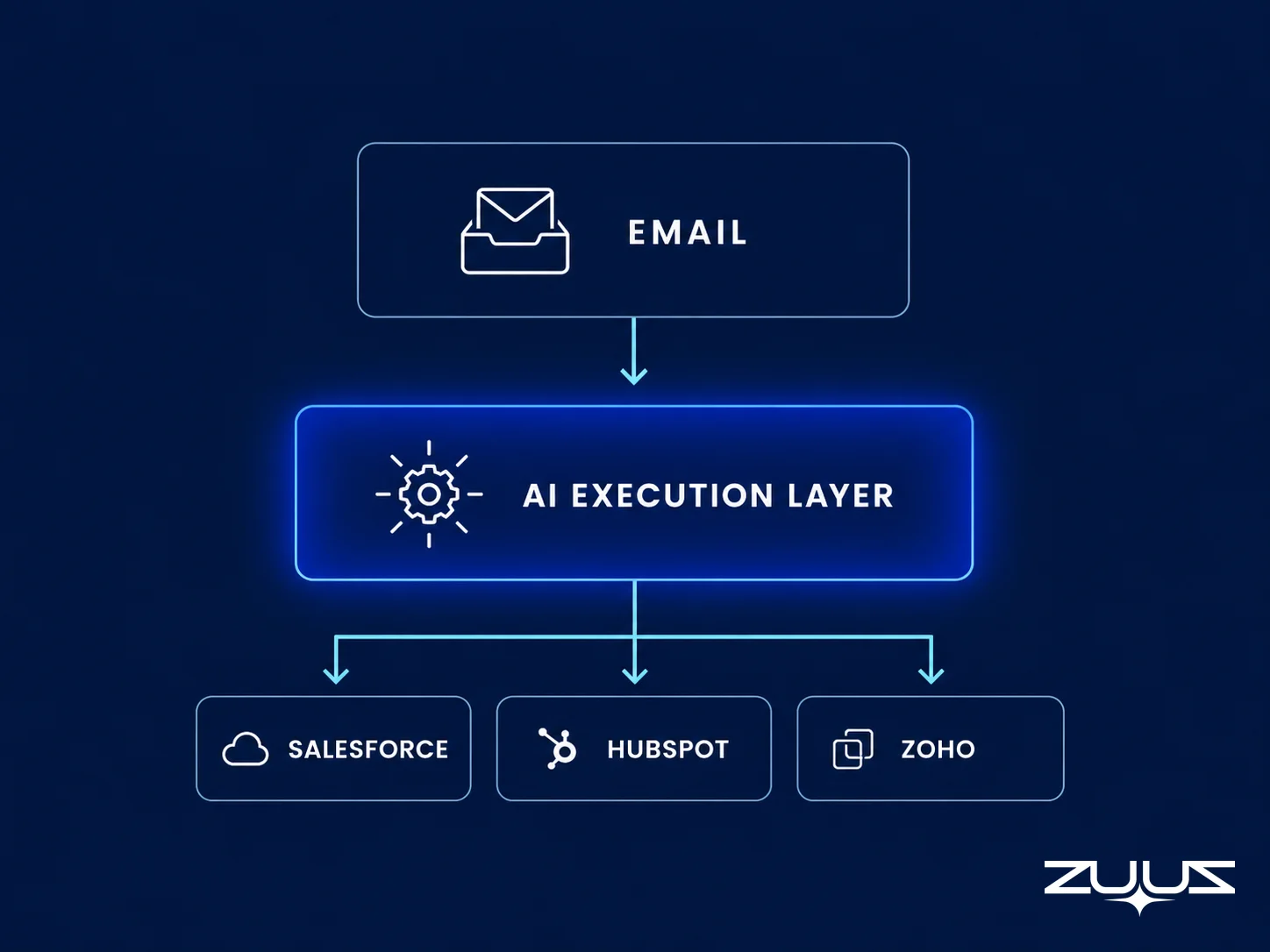
- ZUUZ reads email, extracts deal signals, and writes them back to Salesforce, HubSpot, or Zoho automatically, without replacing the CRM a team already runs.
- The mechanism in one line: ZUUZ is an AI layer on top of the CRM a team already runs. It connects to the sales inbox, reads LinkedIn messages and meeting or call transcripts, and writes leads, stakeholders, next steps and renewal signals into the CRM for the rep to approve in one click.
A sales rep starts the week with a full pipeline and a full calendar, and by Friday, half of the actual selling never happened. Calls got pushed back to log call notes. Deal stages sat unchanged in the CRM because updating them meant stopping to type instead of picking up the phone. None of this shows up on a scoreboard until the quarter closes and the numbers do not add up.
Sales rep productivity gets treated as a coaching problem or a motivation problem, when for most teams it is neither. The actual constraint is time, and specifically how much of a rep’s week goes to selling versus everything a CRM asks a rep to do around selling. Fixing that split changes what a rep can accomplish more than almost any training program does.
This guide breaks down what sales rep productivity actually measures, where the time really goes, what genuinely improves it, and how automated capture changes the math by removing the manual step instead of asking reps to work through it faster.
What Sales Rep Productivity Actually Means
Sales rep productivity measures how much revenue-generating output a rep produces relative to the time and resources available, not how many actions a rep logs in a day. A rep who sends 40 emails and updates 15 CRM fields is busy. A rep who spends that same time on three well-prepared calls that move real deals forward is productive. The distinction matters because most sales tools report activity volume by default, which rewards motion over outcome.
Selling Time vs. Activity Volume
Activity volume counts calls made, emails sent, and CRM fields touched. Selling time counts the hours a rep actually spends talking to a prospect, preparing for a specific deal, or working a next step that moves a specific opportunity forward. A rep can post a high activity count while spending most of the week on the administrative work required to produce that count, which is exactly what most CRM dashboards fail to separate.
What a Productive Week Actually Looks Like
A genuinely productive week concentrates a rep’s calendar around calls, meetings, and deal-specific preparation, with CRM updates happening as a byproduct of that work rather than a separate task competing for the same hours. Sales rep productivity, measured this way, is less about working faster and more about protecting the hours that actually produce revenue from being consumed by everything else on a rep’s plate.
How to Measure Sales Rep Productivity
Measuring sales rep productivity requires more than a dashboard of activity counts. The metrics that actually predict whether a rep is productive combine time allocation with outcomes, so a manager can see not just what a rep did but what that activity produced.
| Metric | What It Shows | Where a Capture Layer Like ZUUZ Touches It |
|---|---|---|
| Selling time percentage | Share of the work week spent on direct selling activity versus admin, meetings, and internal work | Removes the manual logging step rather than speeding it up, so admin hours fall without changing the process |
| Pipeline generated per rep | Revenue-qualified pipeline a rep creates in a given period | Surfaces opportunities sitting in email threads that were never entered, so the number reflects work already done |
| Win rate | Share of qualified opportunities a rep closes | No direct effect on the rate; the record behind each stage is more complete when the deal is reviewed |
| Sales cycle length | Time from first contact to closed deal, by rep | Indirect: next steps and stakeholders stay in the record, so follow-ups and handoffs stall less often |
| CRM update lag | Time between something happening in a deal and it appearing correctly in the CRM | The metric it affects most directly: the update is drafted as the email arrives, for the rep to approve in one click |
None of these metrics mean much in isolation. A short sales cycle paired with a low win rate might mean a rep is closing weak deals fast rather than working the right ones. The pairing that matters most for a productivity review is selling time percentage next to pipeline and win rate, since that combination shows whether more selling time actually correlates with better outcomes for that specific rep. Revenue operations teams that track this consistently often centralize these rep-level metrics inside a revenue operations platform built for that job, rather than assembling them by hand each week.
Stop Measuring Activity. Start Measuring Selling Time.
ZUUZ connects to the sales inbox and prepares the update for the rep to approve in one click, so the metrics reflect what actually happened, not what a rep had time to type.
Where the Time Actually Goes
Sales reps spend just 28% of their time actually selling, according to Salesforce’s State of Sales research, based on a survey of more than 7,700 sales professionals across 38 countries. The remaining time goes to internal meetings, administrative work, and searching for the information a deal needs. That imbalance is not a motivation problem. It is a structural one, built into how CRM systems ask reps to work.
Manual CRM Data Entry
The single largest drain is manual data entry. The average salesperson spends 13 hours a week on admin tasks tied to keeping CRM records current, which works out to roughly 28% of a full working week, according to SuperOffice research. That time goes to logging calls, updating deal stages, and re-typing information that already exists somewhere else, usually in an email thread the rep already read. Those are the same signals that email tracking software is built to catch, just captured too late to save the rep any time.
Chasing Deal Context Across Tools
Reps also lose time hunting for context that should already be attached to a deal: a prospect’s last email, a decision-maker’s title, a promised follow-up date. All of it exists somewhere, but rarely in the CRM record where a rep needs it during a call. Every minute spent searching for that context is a minute not spent moving the deal forward, and the gap is also where CRM data quality problems tend to originate.
Logging Work After It Already Happened
Even when reps do log activity, they log it after the fact, at the end of a day or the end of a week, when memory has already faded. Notes get shorter, deal stages get updated late, and the CRM ends up recording a rough approximation of what happened rather than what actually happened. A pipeline built on delayed, approximate updates stops being a reliable picture of where deals actually stand.
Why Admin Work Keeps Growing Even With a CRM in Place
A CRM is supposed to reduce administrative burden, but for most sales teams it does the opposite once the system fills up with fields, custom objects, and integrations that all expect to be updated by hand. The CRM becomes a second job layered on top of the first one.
Adding Tools Moves the Typing, It Does Not Remove It
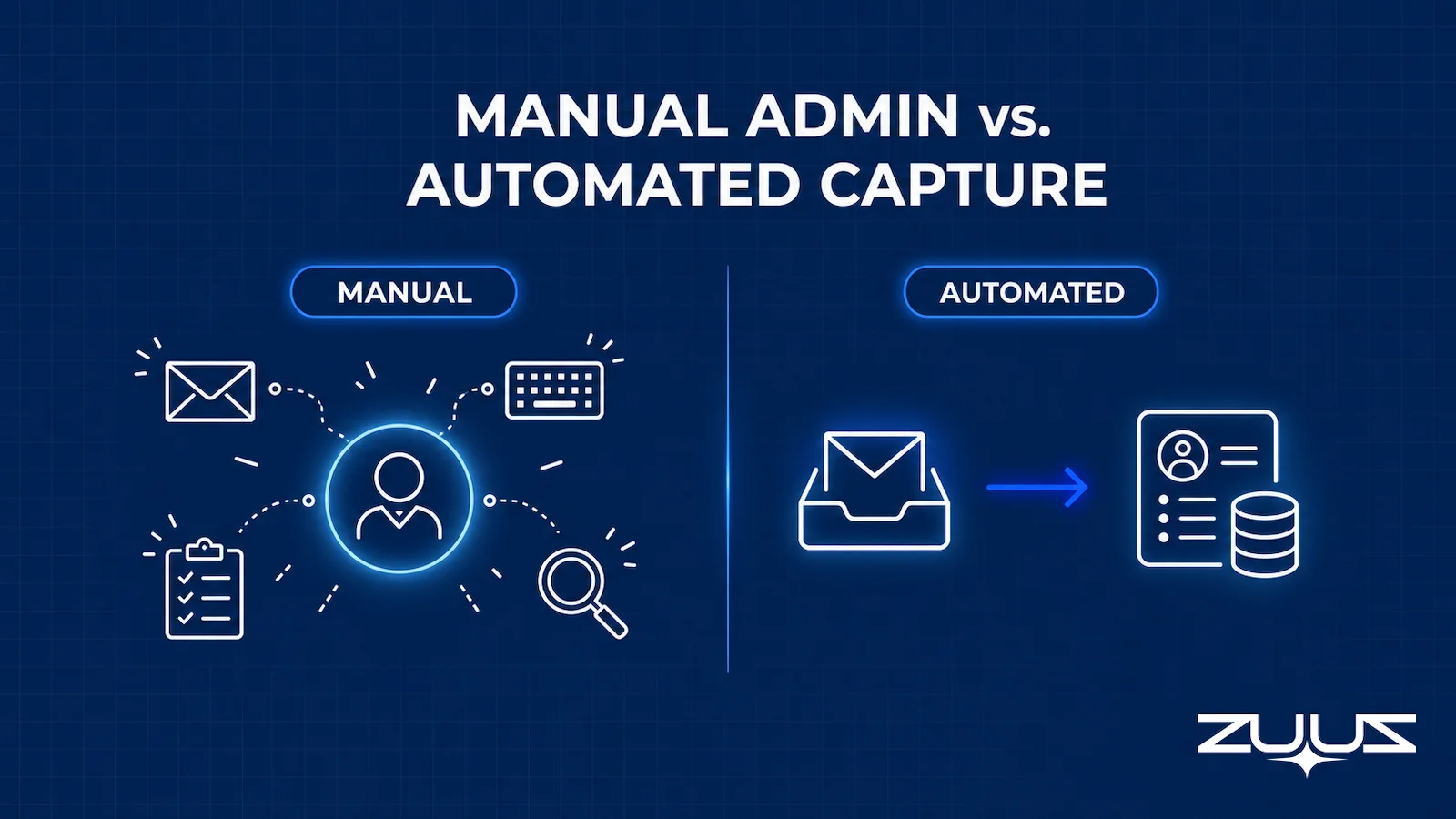
Sales teams often respond to admin overload by buying another tool: a dialer, a sequencing platform, a note-taking app. Each one solves a narrow problem while adding one more place a rep has to check, update, or reconcile against the CRM. Most CRM automation actually relocates data entry instead of removing it, shifting the typing from one screen to another rather than eliminating it. A side-by-side look at automated versus manual capture makes the difference clearer than a percentage on its own can.
What Deals Lose When Reps Skip Logging
When admin work piles up, reps triage it the same way anyone triages a backlog: the easiest and most visible tasks get done, and everything else gets skipped. A rep will update a deal stage because a manager is watching the pipeline report, but skip logging the actual conversation that explained why the deal stalled. That skipped context is often where a missed lead or a stalled deal actually traces back to, buried in an email thread nobody entered into the system.
More Tools Will Not Fix This. Removing the Typing Will.
See how ZUUZ captures deal signals directly from email instead of adding one more app for reps to check.
How to Improve Sales Rep Productivity
Improving sales rep productivity starts with subtraction, not addition. Before adding automation or new tools, it helps to remove whatever is not earning its place in a rep’s process.
Remove Unnecessary CRM Fields and Process Steps
Most CRMs accumulate fields over time as different teams request tracking for their own reporting needs, and few of those fields ever get removed. A sales operations audit that cuts a CRM down to only the fields a deal genuinely needs reduces the typing every rep does on every record, without any new software involved.
Reduce Tool Switching by Centralizing Context
Every extra tool a rep has to check before or during a call adds friction that shows up as lost minutes across dozens of deals a week. Centralizing deal context, email history, and next steps in one place a rep already works from cuts down on the tab-switching that quietly eats a working day. Consolidating instead of adding tools also supports cleaner sales pipeline management, since fewer systems means fewer places for a deal to fall out of sync.
Automate the Admin Work Reps Actually Skip
The admin tasks reps skip most often are the ones with the least immediate payoff: logging a call summary, updating a stale field, capturing a decision-maker’s title from an email signature. Automating exactly those tasks, rather than the ones reps already do reliably, is where automation produces the largest measurable time gain.
Protect Blocks of Time for Selling
Even with admin work reduced, a calendar full of internal meetings and ad hoc interruptions can still crowd out selling time. Reserving specific blocks of the week for outbound calls, deal prep, or account planning, and protecting those blocks the same way a customer meeting gets protected, keeps the freed-up time from simply refilling with something else.
Give Reps Back the Hours a CRM Currently Takes.
ZUUZ captures deal signals from email and writes them back to the CRM automatically, so reps spend the reclaimed time selling instead of typing.
How Automated Capture Changes the Math
Most of the strategies above reduce admin work at the margins. The larger shift comes from removing the manual step entirely, which is the approach ZUUZ takes as an AI layer that sits on top of the CRM a sales team already runs.
Reading Signals From Email Instead of Asking Reps to Type Them In
ZUUZ reads inbound and outbound email and extracts the deal signals inside it: who is involved, what was discussed, what was promised, and what changed. None of that requires a rep to open the CRM first, since the signal capture happens directly from the channel where the conversation already took place. This is the same underlying mechanism covered in how to reduce manual data entry using CRM automation, applied here specifically to the time a rep gets back.
Writing Structured Updates Back to the CRM Automatically
Once ZUUZ extracts a signal, it prepares the update for the CRM record, with a rep reviewing and approving the change rather than typing it from scratch. That approval step keeps a human in control of what actually gets saved, while removing the blank-page work of composing the update in the first place. The sync itself runs in both directions, which is bidirectional CRM sync in practice, not a one-way import that still leaves a rep reconciling records by hand.

Working Across Salesforce, HubSpot, Zoho, Attio or Pipedrive Without a Migration
Because ZUUZ operates as a layer over the CRM rather than a replacement for it, the same capture and sync logic runs whether a team is on Salesforce, HubSpot, or Zoho, without requiring a migration to a single platform first. For a company running more than one CRM instance across regions or business units, that CRM-agnostic design matters as much as the automation itself. Reps who want to query pipeline status in plain English instead of building a report can pair this capture layer with an AI CRM assistant that reads the same synced data.
The effect shows up in real deployments. At RA Technologies, a US-based IT services company that had run HubSpot for two years before adopting ZUUZ, the system surfaced $120,000 in pipeline within 72 hours that the CRM had never recorded, captured directly from the sales mailbox. At Cloud Box Technologies, a UAE-based cloud and IT services company that had previously used its CRM only for order processing, ZUUZ turned inbound renewal emails into tracked records, cutting the time to review 10 to 12 renewals down to minutes from a single connected mailbox.
What to Look for in a Sales Productivity Tool
Sales rep productivity software is a crowded category, and not every tool in it actually reduces work. A short list of questions separates the tools that remove admin burden from the ones that just repackage it. Evaluating options in this category often overlaps with the broader deal management software market, so the same integration and adoption questions apply there too.
Integrates With the CRM Already in Place
A tool that requires migrating off an existing CRM adds months of disruption before it produces any productivity gain. The stronger approach connects to Salesforce, HubSpot, or Zoho directly, so the CRM stays the system of record while the new tool handles the work around it.
Removes Work Instead of Adding a New Workflow to Check
Some sales productivity tools add a dashboard, a notification feed, or a separate app a rep has to check on top of the CRM, which just adds a new source of admin work rather than removing one. The better test is whether a rep’s total number of places to check goes down after adoption, not up.
Keeps a Rep in the Loop Before Anything Gets Written
Automated capture should hand a rep finished work to approve, not remove the rep from the decision entirely. A tool that writes to the CRM only after a rep reviews the change keeps an audit trail intact and keeps manual entries taking precedence whenever a rep corrects something the system got wrong.
The Capture Layer Test
Most productivity tools are judged on features. A more useful question is whether the record ends up complete without rep effort, which is what the Capture Layer Test measures:
- Does it capture from the channels where the deal actually moves – email, calendar, LinkedIn messages, meeting and call transcripts?
- Does what it captures land in CRM fields a report can read, or only in an activity feed a human must open?
- Does the rep have to remember anything – a BCC, a button, a sidebar, a sync?
- Can the rep correct it in one click before it is written?
A tool that fails 2 or 3 produces activity history, not a pipeline you can run a review on. For a productivity decision, question 3 is the one that decides whether any hours come back. A sidebar the rep has to open, a button they have to press or a BCC they have to remember is still the rep doing the remembering, and remembering is the part of the admin load that actually costs the week. Question 2 decides whether the reclaimed time shows up in a review or only in a feed someone has to read deal by deal.
From an Operator’s Seat
Across the deployments ZUUZ runs, the pattern is that the hours come back in an order teams do not expect. The first thing that disappears is not the typing, it is the archaeology, the twenty minutes before a call spent scrolling a thread to work out what was last agreed. Reps notice that before they notice the logging, because it happens under time pressure. The part teams do not plan for is the review week: once the record fills in automatically, managers start finding deals whose stage was wrong for a month, and that produces a short burst of cleanup work that looks like the tool created effort rather than removed it. It is worth warning the team in advance, otherwise the first honest pipeline review gets read as a failed rollout.
A Concrete First Step
There is a small version of this that answers the question in a week. Connect one mailbox, let ZUUZ read the last 90 days, and have the rep review what it found before anything is written to the CRM, then count how many of those updates they would otherwise have typed. It is a 30-day free trial, no credit card: https://zuuz.ai/trial/
Frequently Asked Questions
What is sales rep productivity?
Sales rep productivity measures how much revenue-generating output a rep produces relative to the time and resources available, rather than how many activities a rep logs. It combines time allocation, especially the share of a week spent on direct selling, with outcomes like pipeline generated, win rate, and sales cycle length.
How do you measure sales rep productivity?
The clearest way to measure sales rep productivity combines selling time percentage with outcome metrics such as pipeline generated per rep, win rate, and sales cycle length. Tracking activity volume alone, like calls made or emails sent, rewards motion without confirming it produced anything.
How much time do sales reps actually spend selling?
Sales reps spend just 28% of their time actually selling, according to Salesforce’s State of Sales research based on a survey of more than 7,700 sales professionals. The rest goes to administrative work, internal meetings, and searching for information a deal needs.
What causes low sales rep productivity?
Manual CRM data entry is the largest identifiable drain, with the average salesperson spending about 13 hours a week, roughly 28% of a working week, on admin tasks tied to keeping CRM records current, according to SuperOffice research. Tool switching and delayed, after-the-fact logging compound the problem further.
How can sales reps spend less time on CRM data entry?
The most effective fix removes the manual step rather than making it faster, by capturing deal signals directly from email and writing structured updates back to the CRM automatically. Removing unnecessary CRM fields and centralizing deal context in one place also cuts down on the typing and tool switching that consume a rep’s week.
Does automating CRM updates replace the sales rep?
No, a properly designed system hands a rep a finished update to review and approve rather than writing to the CRM without oversight, keeping a rep in control of what actually gets saved to a deal record. The goal is removing the typing, not the judgment.
Does automated data capture work across different CRMs?
A CRM-agnostic approach, like the one ZUUZ uses, captures and syncs deal signals across Salesforce, HubSpot, Zoho, Attio or Pipedrive without requiring a company to migrate onto a single platform first. That matters for companies running more than one CRM instance across regions or business units.

