
The Modern Revenue Operations Software Stack for 2026
The modern revenue operations software stack for 2026, layer by layer, including the email-to-CRM capture layer most teams skip and what each layer needs.
- A modern revenue operations software stack is a set of layers, not a pile of tools. Each layer has a single job, and the stack only works when the layer beneath it is solid.
- The RevOps stack 2026 looks different from earlier versions for three reasons: tool consolidation, agentic AI that executes rather than just reports, and recognition of the capture gap.
- The capture layer, the part that gets real deal activity from email into the CRM, is the layer most stacks skip. Without it, every dashboard above it reports on partial data.
- Build the foundation before the reporting. CRM and capture come first, then forecasting and intelligence, then enablement, CPQ, and orchestration.
- The right stack size depends on company stage. An early team runs three tools; an enterprise runs six or more, each owning a clear layer.
- ZUUZ sits in the capture and execution layer, reading email and writing structured records to Salesforce, HubSpot, or Zoho, feeding every layer above it.
- In practice the capture layer means one thing: ZUUZ connects to your sales inbox, reads LinkedIn messages and meeting or call transcripts, and writes leads, stakeholders, next steps and renewal signals into Salesforce, HubSpot, Zoho, Attio or Pipedrive for the rep to approve in one click.
Most RevOps teams do not have a stack problem. They have a sequencing problem. They bought a forecasting tool, a conversation intelligence tool, and a BI dashboard, then discovered the numbers still do not match what the reps say is happening in their accounts.
The reason is structural. A revenue operations software stack is a set of layers stacked in dependency order, and most teams invest in the visible top layers while the foundation stays incomplete. The dashboards look polished. The data underneath them does not.
This guide walks the modern revenue operations software stack one layer at a time. It defines each layer, names the category that fills it, calls out the common failure point, and shows how to sequence the build. The throughline is the layer most stacks skip: email-to-CRM capture.
Why a 2026 RevOps Stack Looks Different
The RevOps stack 2026 is not the same shape it was three years ago. Three shifts changed it, and each one moves the center of gravity away from reporting and toward execution.
The first shift is consolidation. RevOps leaders are cutting overlapping point tools because every additional system adds another copy of the data, another integration to maintain, and another place for records to drift out of sync. Fewer tools that each own a clear layer beat a dozen tools with fuzzy boundaries.
The second shift is agentic AI. Earlier RevOps software described what happened. The newer category acts on it, writing records, drafting follow-ups, and triggering next steps without waiting for a rep to click. That moves AI out of the dashboard and into the workflow.
The third shift is the one most stack guides miss. Teams have started to name the capture gap, the fact that the majority of deal activity happens in email and never reaches the CRM. According to the Salesforce State of Sales report (2024), high-performing sales teams are 2.8x more likely to use guided selling, yet that assumes the deal data exists to guide at all. When manual entry competes with selling, entry loses, and the system of record goes stale.
The Layer Model of a Modern RevOps Tech Stack
A modern RevOps stack has six layers. Each layer takes the output of the layer below it and does one job with it. Reading the stack from the bottom up shows why order matters more than tool choice.
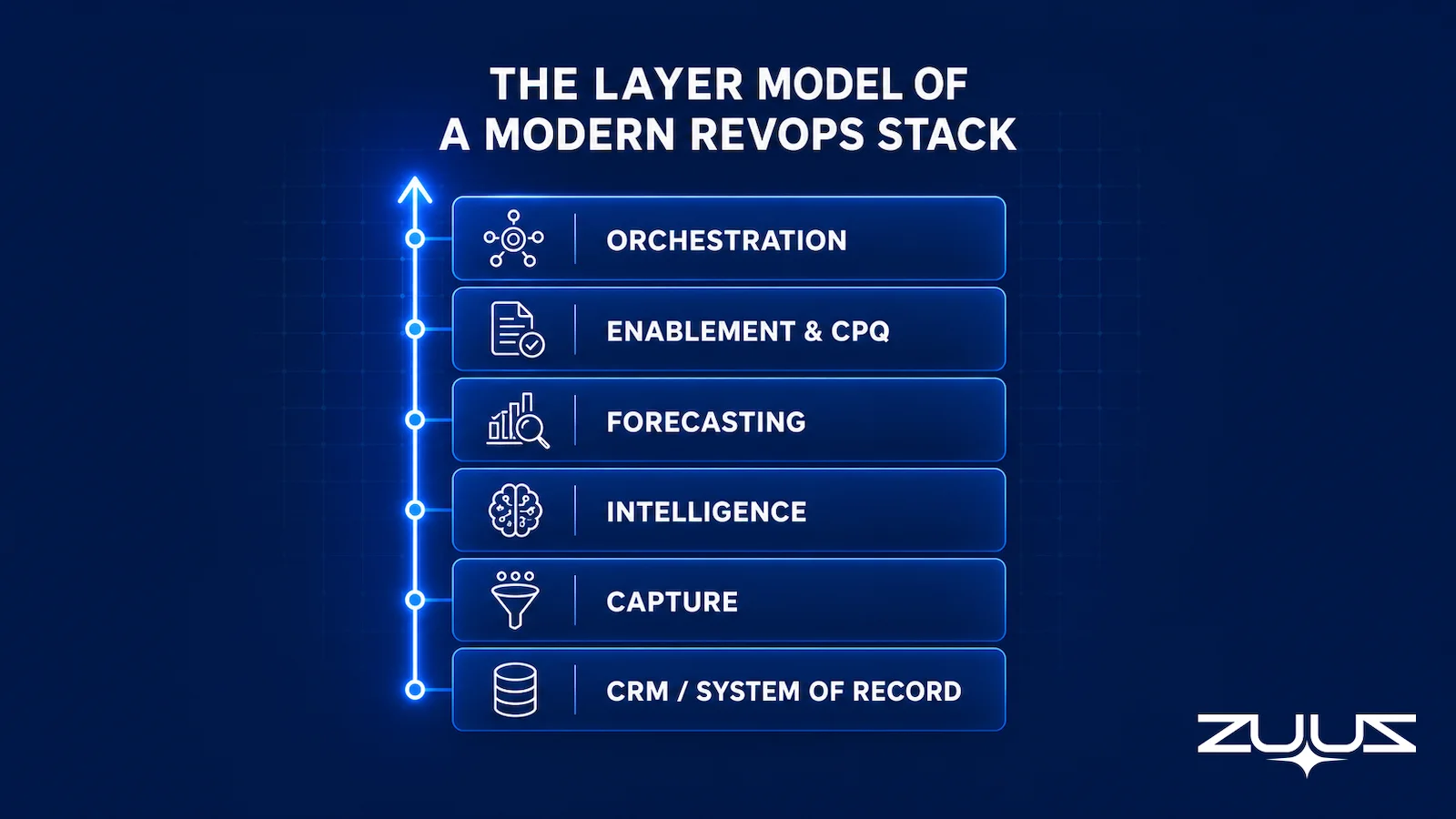
Layer 1: System of Record (CRM)
The CRM is the foundation. Salesforce, HubSpot, and Zoho hold the accounts, contacts, deals, and activity history that every other layer reads from. The CRM does not generate data on its own. It stores what reaches it, which makes its accuracy a direct function of the layer above it. Choosing the right system of record is the subject of the broader revenue operations software buyer’s guide.
Layer 2: Capture
The capture layer gets real activity into the CRM. It reads inbound and outbound email, extracts deal signals, and writes structured records so the system of record reflects what is actually happening. This is the layer most stacks leave to manual rep entry, and it is where the data either becomes complete or stays partial. More on this layer below.
Layer 3: Intelligence
The intelligence layer scores what the capture layer recorded. It ranks deals by health, flags risk, and surfaces the accounts that need attention. It works only when the records beneath it are complete, since a scoring model on partial data scores the wrong deals confidently. The mechanics of how that scoring works are covered in the sibling guide on revenue intelligence software.
Layer 4: Forecasting
The forecasting layer rolls scored deals into a number leadership can commit to. It projects close probability, models the quarter, and tracks the gap to quota. A forecast is only as honest as the pipeline feeding it, which is why forecasting sits above capture and intelligence rather than beside them.
Layer 5: Enablement and CPQ
This layer moves a deal forward once it is real. Enablement tools serve the right content and next step, and configure-price-quote (CPQ) software turns an agreed scope into a clean quote without manual spreadsheet math. These tools act on deals that the lower layers have already captured and scored.
Layer 6: Orchestration
The orchestration layer connects the others and triggers action. It routes leads, fires sequences, schedules meetings, and updates records across systems based on rules or signals. Orchestration is the layer that makes the stack feel like one motion instead of six disconnected tools.
How to evaluate a layer before you buy it
- One job, named dependency. Can you say which single layer this tool owns, and which layer beneath it has to be solid for it to work?
- Capture coverage. Does anything in the stack put real deal activity into CRM fields without a rep retyping it, across email, calendar, LinkedIn messages and meeting or call transcripts?
- Writes or displays. Does the tool write to the system of record, or only read from it and render a view on top?
- Field-level output. Does what it produces land in fields a report can filter, or in a feed a human has to read?
- Every CRM you actually run. Including the one a division inherited through an acquisition, not only the one on the architecture diagram.
- Reversible by the rep. Can a rep correct or reject what it writes in one click, before it lands?
Build the Layer Your Stack Is Missing.
ZUUZ connects to the sales inbox, extracts the deal signal, and writes it to Salesforce, HubSpot, Zoho, Attio or Pipedrive. See the capture layer working on your own inbox in 15 minutes.
Layers are easier to describe than to diagnose. The useful test is not whether a stack contains all six, but which layer is quietly carrying work it was never designed to do.

The Six Layers at a Glance
The table below maps each layer to its job, the category that fills it, and the failure that shows up when the layer is weak or missing.
| Layer | Its Job | Example Category | Common Failure |
|---|---|---|---|
| System of Record | Store accounts, deals, contacts, activity | CRM (Salesforce, HubSpot, Zoho, Attio or Pipedrive) | Treated as complete when only reps’ logged activity is in it |
| Capture | Get real email activity into the CRM | Email-to-CRM capture (ZUUZ) | Left to manual rep entry, so most signals never land |
| Intelligence | Score deal health and flag risk | Revenue intelligence and deal scoring | Scores partial data, ranking the wrong deals with confidence |
| Forecasting | Project the quarter and the gap to quota | Forecasting and pipeline analytics | Precise-looking forecast built on an incomplete pipeline |
| Enablement and CPQ | Move the deal forward and quote it | Sales enablement, configure-price-quote | Quotes built by hand in spreadsheets, off-system |
| Orchestration | Route, sequence, schedule, and sync | Workflow and orchestration | Automations fire on stale records and act on the wrong stage |
The Layer Most Teams Skip
Read the layer model again and one layer stands out as the one teams rarely buy for: capture. Most RevOps stacks have a CRM, a forecasting tool, and a dashboard, and they assume the gap between email and CRM gets filled by reps logging their own activity.
It does not. A rep handling 60 to 100 emails a day cannot also be the integration between the inbox and the system of record. Logging one email by hand takes several clicks across several screens, and across a full team that becomes hundreds of small decisions a day about what is worth recording. Most signals do not make the cut.
The result is a CRM that looks populated but reflects a fraction of real account activity. Renewals mentioned in passing, RFP attachments sent to a shared inbox, and pricing questions forwarded on a Friday never become records. Every layer above capture then runs on that partial picture, which is why a forecast can be wrong even when the model is good. The mechanism is explained further in why your CRM pipeline is wrong.
Skipping capture is not a small omission. It is the difference between a stack that reports on reality and a stack that reports on whatever reps remembered to type. Fixing it is the highest-return move available to most RevOps teams, and it is covered in depth in the guide to the best CRM setup to reduce manual data entry.
The Pipeline Truth Test
There is a cheap way to find out whether the foundation under a stack is solid before sequencing anything on top of it. Run this before signing for a forecasting or intelligence layer.
- Take the top five deals by value in the current quarter.
- For each, find the evidence in the CRM for its stage and close date, a dated, written commitment, not a rep’s assurance.
- Count how many rest on a stage last changed more than two weeks ago.
- A pipeline in which most of the top five lack dated evidence is a forecast of rep optimism. ZUUZ does not forecast; it makes the record underneath the number real.
Worked example. A RevOps lead scoping a forecasting tool runs the test first. Of the five largest deals in the quarter, three carry a stage that has not moved in over a month and a close date that matches the quarter end rather than anything a buyer put in writing. The evidence for all three sits in email threads the CRM has never seen. A forecasting layer would have modelled those three deals precisely, which is exactly the problem: the spend belongs one layer lower.
How to Sequence Building the Stack
The order of the build matters more than the brand on any single tool. Adding a forecasting layer before the capture layer is solid produces a polished forecast on incomplete data, which is worse than no forecast because it carries false confidence.
The sequence below follows the dependency order of the layer model. Foundation first, reporting last.
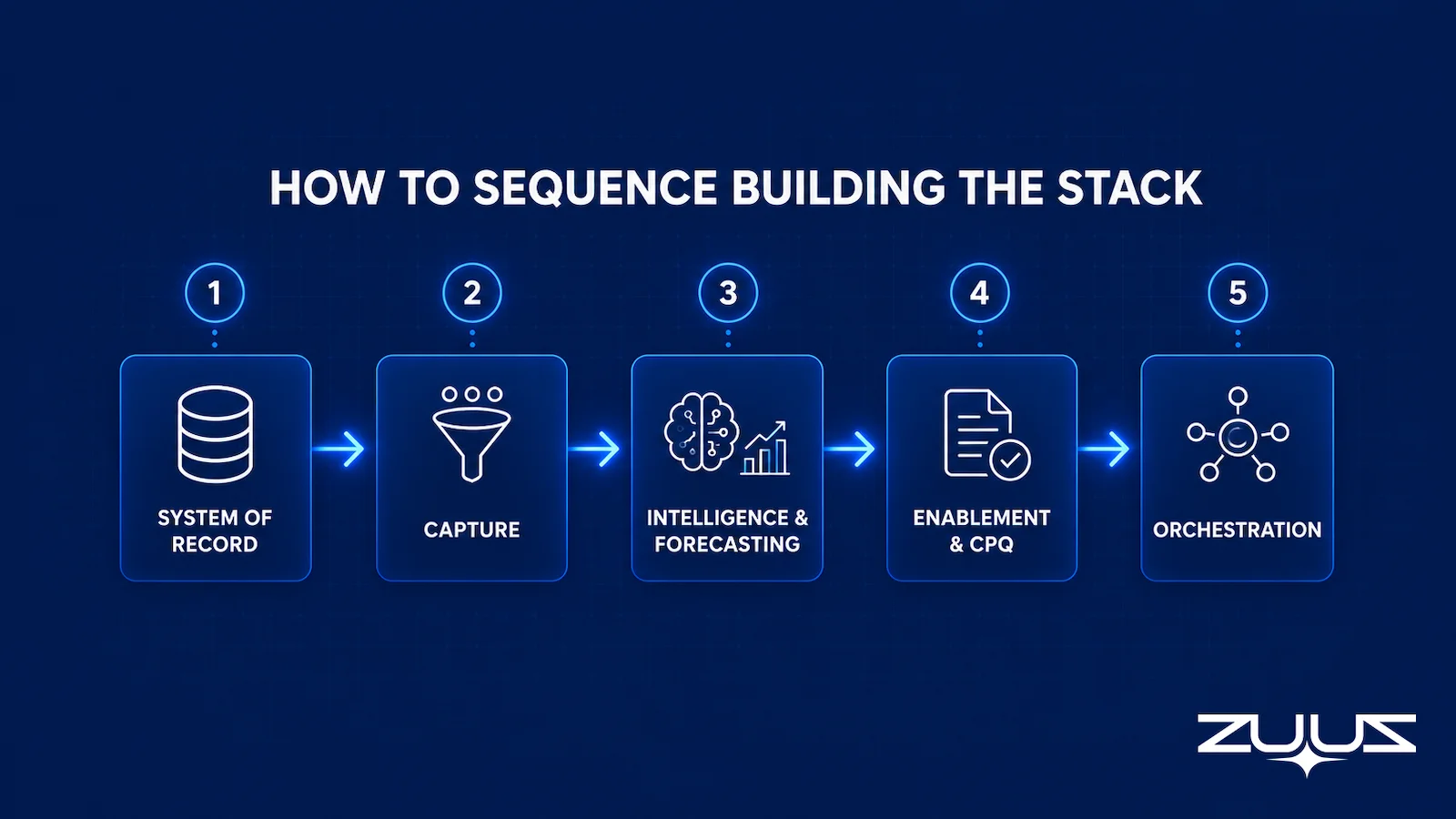
| Phase | Layer to Build | Why It Comes Here |
|---|---|---|
| 1. Foundation | System of record (CRM) | Everything else reads from it; pick one and standardize |
| 2. Foundation | Capture | Makes the CRM reflect real activity before anything scores it |
| 3. Insight | Intelligence and forecasting | Now has complete data to score and project |
| 4. Execution | Enablement and CPQ | Acts on deals the foundation already captured and scored |
| 5. Connective | Orchestration | Wires the layers together once each one is trustworthy |
The common mistake is buying phase 3 before phase 2 is in place. A team feels the pain of bad forecasts and reaches for a forecasting tool, when the actual fix sits one layer down in capture. Sequencing the build this way also keeps cost in check, since the foundation layers make the upper layers worth paying for.
Fix the Foundation First.
Connect your CRM in minutes and let ZUUZ capture the signals your team never logs. Start free, with no integration project required.
The layer model describes what a complete stack contains. It says nothing about how many tools a team of a given size should actually be running, which is where most stack decisions go wrong.
A Sample Stack by Company Size
The number of tools a team should run scales with company stage, not with ambition. The table below shows a sensible stack at three stages, with the same layer model underneath each one. Note that capture appears at every stage, because the capture gap exists at every size.
| Layer | Early-Stage | Mid-Market | Enterprise |
|---|---|---|---|
| System of record | HubSpot or Zoho | HubSpot or Salesforce | Salesforce |
| Capture | Email-to-CRM capture | Email-to-CRM capture | Email-to-CRM capture |
| Intelligence | CRM-native scoring | Dedicated intelligence layer | Dedicated intelligence layer |
| Forecasting | CRM-native reports | Forecasting tool | Forecasting tool |
| Enablement and CPQ | Manual or none | CPQ added | Enablement plus CPQ |
| Orchestration | Scheduling tool | Workflow automation | Dedicated orchestration |
The early-stage column is intentionally thin. A small team gets more from three layers that work than from six layers that nobody maintains. As the team grows, layers split out into dedicated tools, but the capture layer earns its place from day one. For teams managing growing pipeline volume, the sales pipeline management software guide covers how the system of record and capture layers connect in practice.
From an operator’s seat
Across the deployments ZUUZ runs, the pattern is that a capture layer gets approved as a data project and lands as a change-management one. The friction is rarely with reps, who are losing work they never wanted; it is with whoever owns the CRM schema, because complete capture immediately exposes fields that were never filled consistently enough to be trusted, and someone has to rule on which ones are real. The cost nobody budgets is the week of field hygiene between connecting the first mailbox and letting any layer above capture read the result. Teams that spend that week get a forecasting layer that stops being argued with in the Monday meeting. Teams that skip it discover their dashboard has been filtering on a picklist three reps had been using three different ways.
The Capture Layer: How ZUUZ Feeds the Rest of the Stack
ZUUZ occupies the capture and execution layer of the modern RevOps stack. It reads inbound and outbound email, identifies deal signals such as renewals, purchase orders, pricing questions, and procurement replies, and writes structured records to the CRM. Reps do not change how they work in email; the capture layer runs in the background.
The CRM-agnostic design is what lets ZUUZ feed the rest of the stack regardless of foundation. It writes to Salesforce, HubSpot, or Zoho in each system’s native format, so a team can run whichever system of record it already owns and still get complete capture beneath its intelligence, forecasting, and orchestration layers.
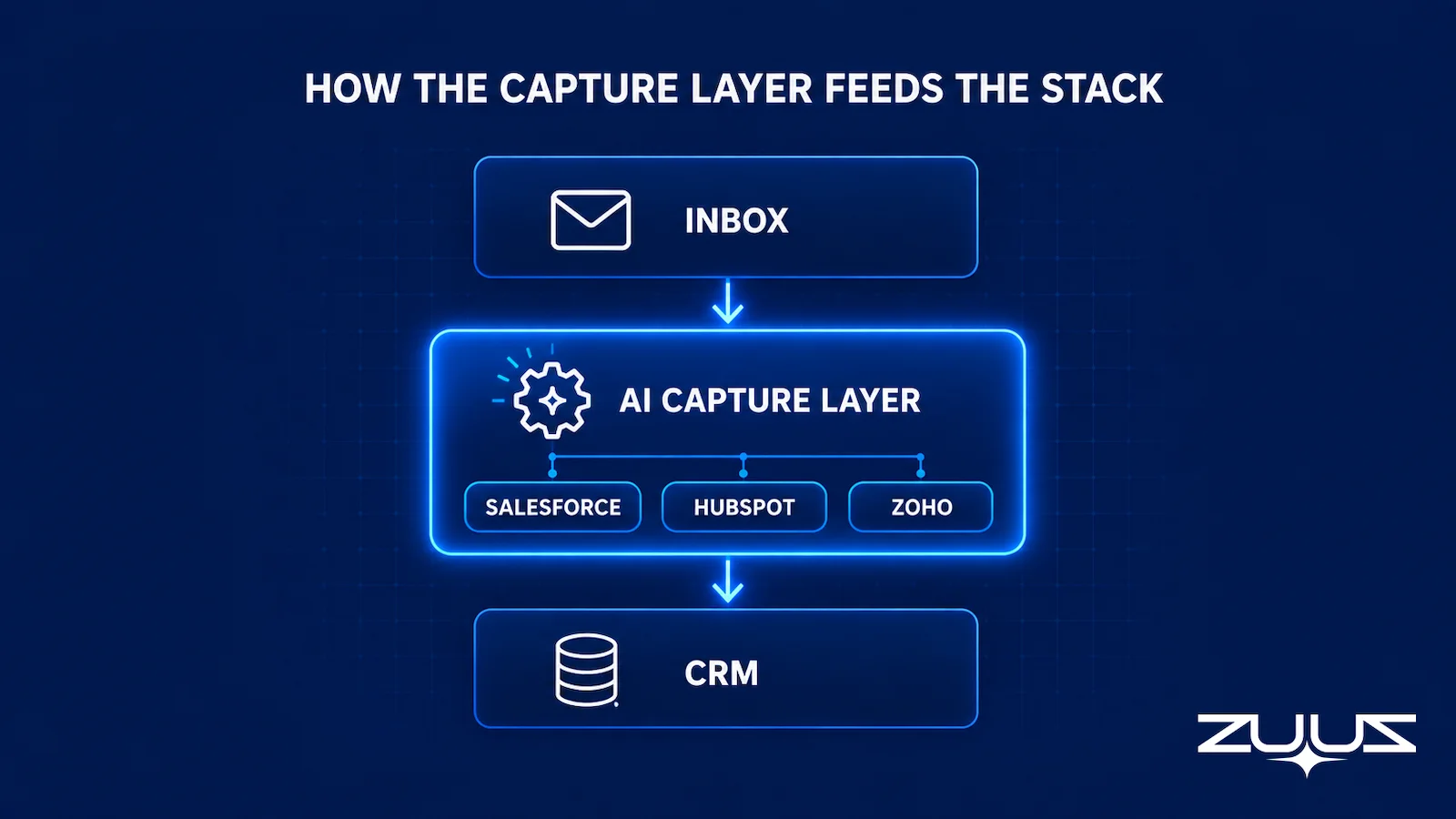
Because ZUUZ writes records rather than only displaying them, it sits in the agentic-execution category rather than the reporting category. It also runs a historical lookback on first connection, scanning prior email to surface deals that were never logged. RA Technologies, an IT services firm in the United States, connected its shared inbox and surfaced $120,000 in previously unrecorded pipeline within 72 hours, drawn from 90 days of prior email activity. Those were active conversations, not past losses, that the CRM had simply never captured.
The point for stack design is that capture is not a feature bolted onto another layer. It is its own layer, and feeding it correctly is what makes the layers above it honest. A team that adds capture under an existing CRM gives its forecasting and intelligence tools complete data to work from for the first time. For the upstream view of how this connects to deal scoring, see the guide on revenue intelligence software, and for the buyer’s-guide view of the system of record, see revenue operations software.
One boundary matters when drawing this on a stack diagram: ZUUZ is an AI layer on top of the CRM a team already runs, never a CRM and never a replacement for one. Most tools sold into the layers above capture report on what the rep entered, while ZUUZ writes the record they report on. Salesforce, HubSpot, Zoho, Attio and Pipedrive are live today; ConnectWise PSA is on the ZUUZ roadmap rather than in the live list.
Frequently Asked Questions
What Is a Modern RevOps Software Stack?
A modern RevOps software stack is the set of connected layers that move a deal from first signal to recorded revenue. It starts with a CRM as the system of record, then adds a capture layer that gets activity into the CRM, an intelligence layer that scores deals, a forecasting layer, an enablement and CPQ layer, and an orchestration layer that triggers next steps. In 2026, the capture layer is the piece most teams still skip.
Why Does a RevOps Stack in 2026 Look Different From Earlier Ones?
Three shifts changed the stack. Teams are consolidating overlapping point tools to cut cost and reduce data sprawl. Agentic AI moved from reporting to execution, so software now writes records and triggers actions rather than only displaying them. And teams have recognized the capture gap, the fact that most deal activity lives in email and never reaches the CRM, which makes every downstream layer unreliable until it is fixed.
What Is the Capture Layer in a RevOps Stack?
The capture layer is the part of the stack that gets real deal activity into the CRM without manual rep entry. It reads inbound and outbound email, extracts signals like renewals, RFP attachments, and pricing questions, and writes structured records to the CRM. Most stacks skip this layer and rely on reps to log activity by hand, which leaves the system of record incomplete and every dashboard above it inaccurate.
In What Order Should a RevOps Team Build Its Stack?
Build the foundation before the reporting. Start with the CRM as the system of record, then add the capture layer so the CRM reflects real activity. Add forecasting and intelligence next, since those layers depend on complete data. Add enablement, CPQ, and orchestration last. Teams that buy a forecasting tool before fixing capture produce polished forecasts on partial data, which carries false confidence.
How Does ZUUZ Fit Into a Modern RevOps Stack?
ZUUZ is the capture and execution layer. It reads every inbound and outbound email, extracts deal signals, and writes structured records to Salesforce, HubSpot, or Zoho. It is CRM-agnostic, so it feeds whichever system of record a team already runs. By filling the capture gap, it gives the forecasting, intelligence, and orchestration layers above it complete data to work from.
How Many Tools Should a RevOps Stack Have?
The right count depends on company size, not on a fixed number. An early-stage team can run a CRM, a capture layer, and a scheduling tool. A mid-market team adds forecasting, enablement, and CPQ. An enterprise team layers in dedicated intelligence and orchestration. The trend in 2026 is consolidation, so the goal is fewer tools that each own a clear layer rather than many overlapping point tools.
What is the difference between a sales tech stack and a RevOps tech stack?
A sales tech stack is the set of tools reps use to find, contact, and close buyers, such as the CRM, the dialer, and outreach tools. A RevOps tech stack is broader: it spans sales, marketing, and customer success systems, the data layer that connects them, and the capture and automation layer that keeps the systems of record current. The revenue tech stack is the umbrella term for the whole picture.
See the Capture Layer Your Stack Is Missing.
Forecasting tools and dashboards display what is in your CRM. ZUUZ captures what never made it there, so book 15 minutes and see the deals already in motion but not in your reports.
The cheapest way to test the capture layer. Connect one mailbox, let ZUUZ read the last 90 days, and have the rep review what it found before anything is written to the CRM. That review doubles as a measurement of the gap every layer above capture has been reporting around. 30-day free trial, no credit card: https://zuuz.ai/trial/

CEO of ZUUZ. He scaled Cloud Box Technologies from 0 to $25M ARR in IT services and distribution before building ZUUZ. Connect on LinkedIn

