
AI Agents for RevOps: What Actually Works Today (and What Does Not)
Where AI agents deliver real ROI in revenue operations: CRM data capture, pipeline hygiene, risk flags, and reporting. Plus where to be careful and how to roll one out safely.

CEO of ZUUZ. He scaled Cloud Box Technologies from 0 to $25M ARR in IT services and distribution before building ZUUZ. Connect on LinkedIn
TL;DR: AI agents and RevOps fit best where the work is reading, filing and checking: capturing deal signal from email, LinkedIn, calls and meetings, keeping CRM records clean and in sync, flagging risk and renewals, answering pipeline questions and reporting on what actually happened. Forecasting claims and fully autonomous outbound deserve far more caution. Roll agents out human-curated and AI-accelerated, with a full change history and one-click rollback on every write.
Where ZUUZ fits: ZUUZ is a revenue intelligence layer on top of the CRM a team already runs. It connects to your sales inbox, reads LinkedIn messages and meeting or call transcripts, and writes leads, stakeholders, next steps and renewal signals into Salesforce, HubSpot, Zoho, Attio or Pipedrive automatically, with full change history and one-click rollback.
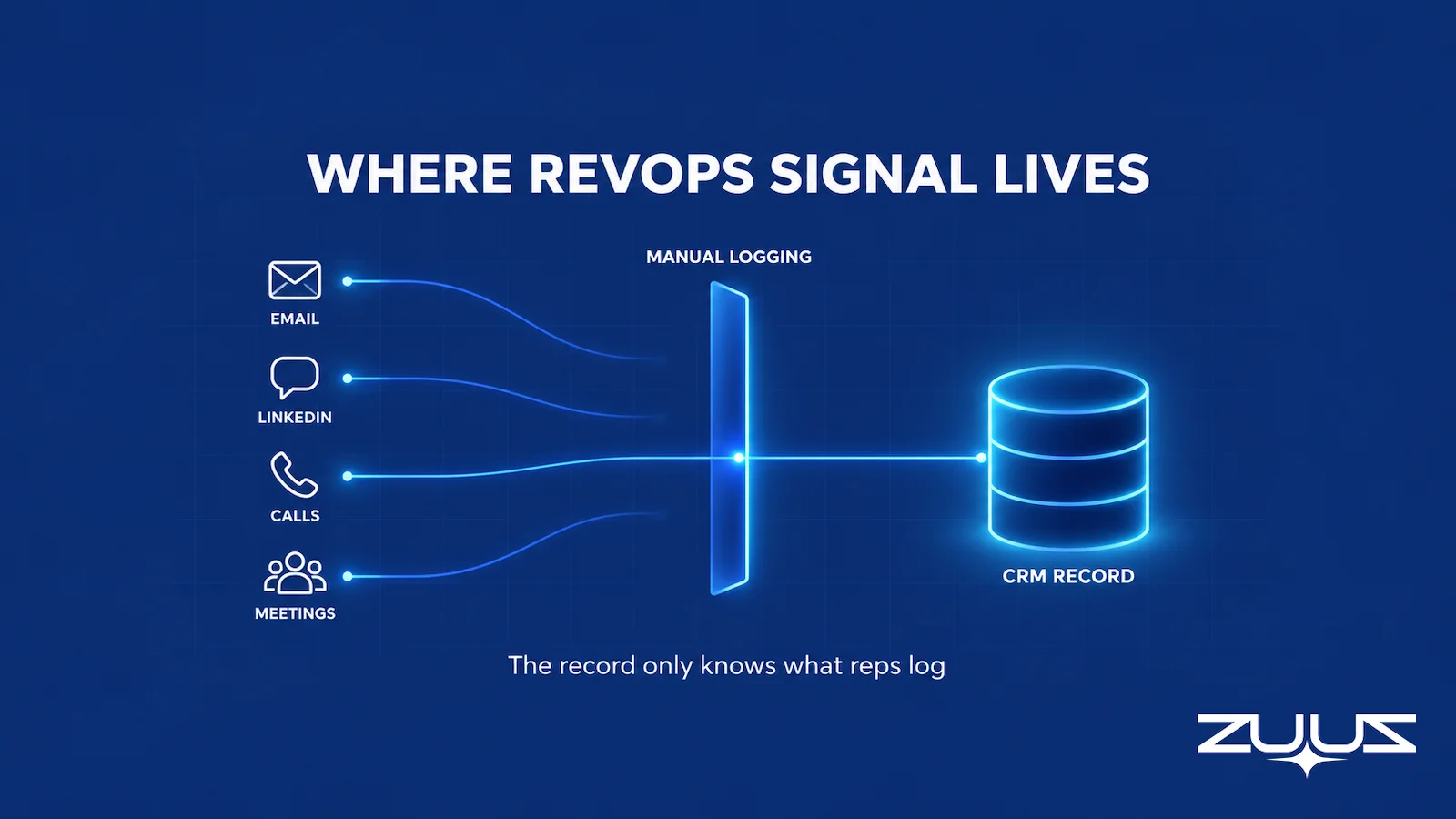
- The biggest RevOps problem an AI agent can fix is not analysis. It is that the CRM only knows what reps log, while the signal lives in email, LinkedIn, calls and meetings.
- Agents do well on bounded, checkable jobs: capture, CRM hygiene and sync, risk and renewal flags, questions over pipeline data, and reports on what happened.
- Be careful with two jobs: forecasting claims, which need backtesting a vendor demo cannot show, and autonomous outbound, which puts the company’s name on messages nobody read.
- Evaluate RevOps AI tools on the team’s own messy data, scoring missed signals and wrong writes, not demo fluency.
- The operating model that holds up is human-curated and AI-accelerated: RevOps owns the definitions, the agent writes the updates, and every write lands in a change history with one-click rollback.
- ZUUZ is a revenue intelligence layer on top of Salesforce, HubSpot, Zoho, Attio or Pipedrive. It captures, syncs, flags and answers, and it never forecasts or sends to buyers.
Picture a RevOps lead on a Monday morning, the kind of scene that repeats in revenue teams everywhere. The pipeline review starts in forty minutes, and the dashboard says three large deals are on track. Then a sales manager mentions, almost in passing, that one of those buyers told the rep last week that the budget moved to next year. The buyer said it in an email thread. The CRM never heard about it, so neither did the dashboard.
That gap is where the conversation about AI agents and RevOps should start, and it is rarely where vendor content starts. Most of what ranks for the topic describes agents that score, route, forecast and orchestrate across every function at once. This guide takes an operator’s view instead: which RevOps jobs AI agents actually do well today, which jobs deserve caution, and how to evaluate and roll one out without breaking the system of record the whole revenue team depends on.
What AI Agents and RevOps Mean Together
Revenue operations is the function that owns the data, process and systems behind the whole revenue engine: marketing handoffs, sales pipeline, renewals and the reporting leadership runs the business on. An AI agent is software that can take in context, decide on a next step within a set of permissions, and carry it out. Put together, AI agents and RevOps describe software that does part of the operational work RevOps has historically done by hand or chased reps to do. IBM’s explainer on AI agents and RevOps frames the pairing the same way, as agents working across the data RevOps already governs.
The definition matters less than the permissions. An agent allowed to read an inbox and propose a CRM update is a very different risk from one allowed to email a customer or change a close date on its own. RevOps and AI agents fit together well when the agent’s actions are narrow, reversible and checkable. They fit badly when the agent is handed judgment calls the business has not defined.
Agents, Copilots and Workflow Automation
Three kinds of software get sold under the same label. Workflow automation follows fixed rules: when a deal hits a stage, create a task. A copilot suggests text or answers a question while a person drives. An agent handles multi-step work with less prompting, such as reading a thread, working out which opportunity it belongs to, and drafting the update.
Many RevOps problems still need rules, not agents. Required fields, stage gates and routing tables are cheaper and more predictable as plain automation. The case for an agent starts where the input is unstructured, like a buyer’s email, and the job is interpreting it.
The Loop an Agent Runs
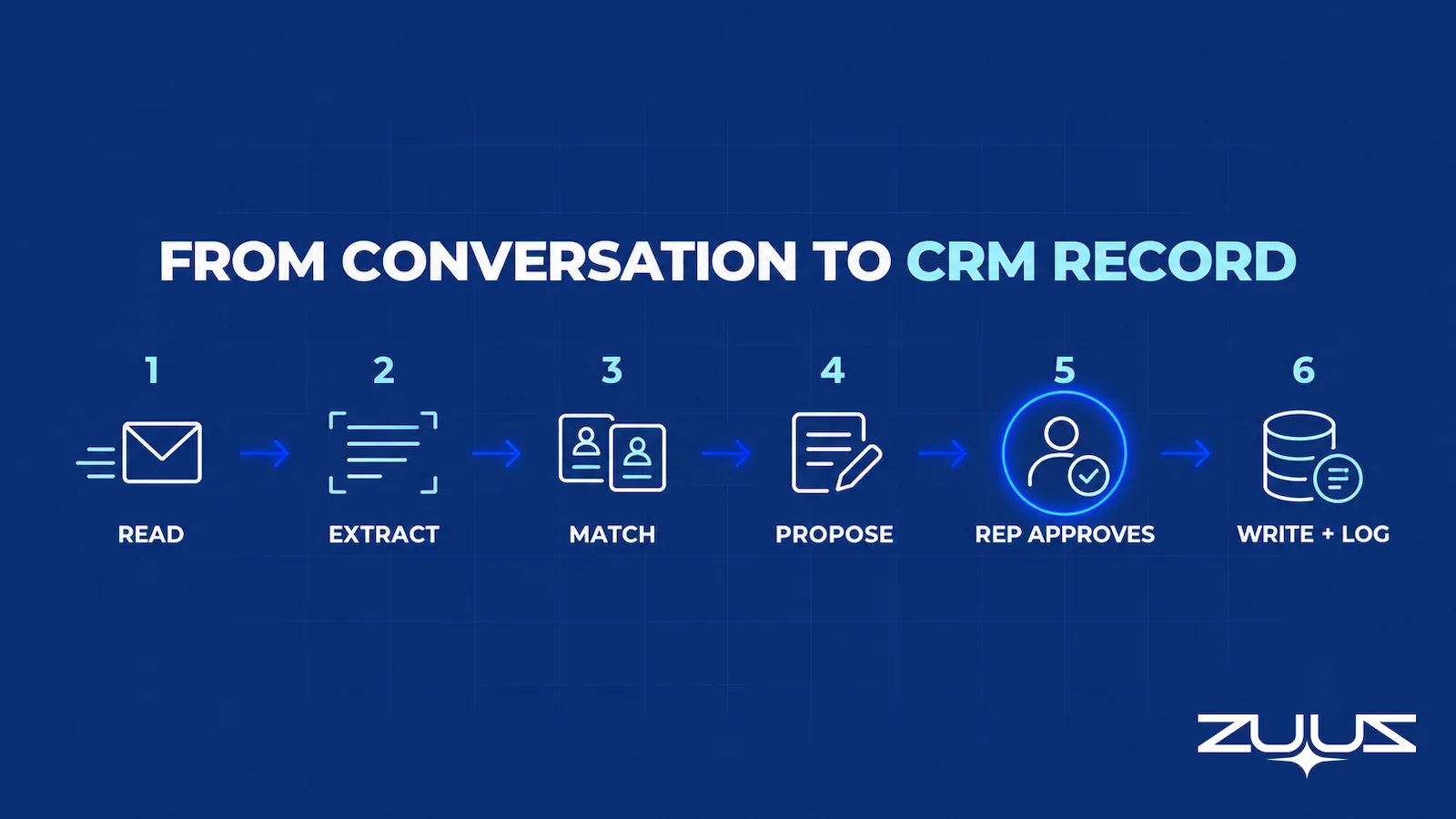
A useful RevOps agent runs the same loop every time. It observes a source, such as a new email or a meeting transcript. It interprets what changed, proposes an action, writes the update inside the scope RevOps has allowed, logs the change so it can be rolled back, and then verifies that the CRM accepted the write. The last step is the one demos skip, and it is the one that decides whether the record can be trusted.
The RevOps Problem an Agent Can Actually Fix
Every RevOps report, from pipeline coverage to renewal exposure, reads from the CRM. The CRM, in turn, only knows what someone put into it. For most revenue teams that someone is a rep who would rather be selling, and the research is consistent on how that goes. Salesforce’s State of Sales, 7th edition (2026) found that sales professionals spend 40% of their time selling and 60% on everything else, with manual data entry alone taking 13% of the week.
The same report found that 46% of sales professionals using agents say data quality issues hurt their sales, with manual errors and duplicate data ranked as the top two problems. Forrester reported in 2022 that among organizations that had recently implemented a CRM, 68% struggled to get a single view of the customer and 39% struggled with data quality, in its analysis of why CRM projects underdeliver. None of this is a software failure in the usual sense. The CRM does exactly what it was built to do; it stores what it is given.
Where the Signal Actually Lives
The facts that move a deal rarely start in the CRM. A champion mentions in an email that procurement wants a security review. A buyer replies on LinkedIn that the timeline slipped a quarter. A customer on a call says, half joking, that the renewal depends on a feature shipping. Each of these is a CRM update, and each one lives in a channel the CRM does not read unless someone copies it over.
This is why the pipeline in the CRM is often wrong without anyone doing anything wrong. The record falls behind the conversation, and every downstream report inherits the lag.
Logging Is Not the Same as Capture
Many teams already sync email into the CRM as activity. That helps with an audit trail, but an attached email is not a structured update. The next step field still says “follow up,” the contact’s role is still blank, and the renewal concern is buried in the body of message fourteen. Capture means turning what was said into the fields that reports read, which is the job an agent is actually suited to.
Avinash Gujje learned the operator side of this running revenue at Cloud Box Technologies, which he scaled from $0 to $25M ARR in IT services and distribution. A revenue leader reads the pipeline to decide where to spend time, so a record that trails the conversation costs decisions, not just data. That lesson is the premise ZUUZ is built on: fix what reaches the record before trying to be clever about what the record means.
Where AI Agents and RevOps Fit Today, Job by Job
The honest answer to “what should AI do in RevOps” runs job by job. The table below lists the jobs where AI agents for revenue operations earn their keep today, what the agent does in each, and what a person should still own. The pattern is consistent: agents are strong at reading, filing and checking, and people keep the judgment calls and anything a customer sees.
| RevOps job | What an AI agent does | What stays human | Where ZUUZ fits |
|---|---|---|---|
| Capture from conversations | Reads email, LinkedIn messages, meeting and call transcripts; extracts contacts, companies, next steps and deal changes | Rep can roll back any record in one click; RevOps defines what counts as a real signal | Live: reads the sales inbox, LinkedIn messages, Teams meeting transcripts and inbound call transcripts |
| CRM hygiene | Fills blank fields, flags duplicates, normalizes company names, notices stale next steps | RevOps owns field definitions and merge rules; ambiguous merges go to a person | Flags data quality gaps and blank fields; manual entries take precedence over anything ZUUZ writes |
| CRM sync | Writes updates to the right object and field, confirms the write landed, logs it | RevOps decides field ownership and which values an agent may never overwrite | CRM Sync writes updates automatically into Salesforce, HubSpot, Zoho, Attio or Pipedrive fields and reads context back |
| Risk flags | Surfaces stalled deals, missed buyer commitments, a quiet champion, with the evidence attached | Manager decides whether the deal is really at risk and what to do about it | Pipeline Risk Monitoring surfaces stalled deals and pipeline health issues, each with its reason |
| Renewal and churn flags | Watches customer conversations for warning signs ahead of a renewal date | Account owner handles the customer conversation | Customer Renewals and Subscriptions watches customer conversations for warning signs ahead of the date |
| Questions over pipeline data | Answers plain-language questions from captured data and CRM records, with sources | The person asking judges the answer and acts on it | Zari answers by voice or typing from the pipeline and CRM data ZUUZ captured, with sources |
| Reporting on what happened | Assembles what changed this week, pipeline at risk, renewals due, data gaps | Leadership interprets the report and sets priorities | Analytics reports what changed this week, pipeline at risk, renewals due and data gaps |
| Forecasting | Better inputs, if anything | The forecast call, and any claim of predictive accuracy | Not offered: ZUUZ never produces a forecast, a win probability or a numeric health score |
| Outbound to buyers | Drafts, if permitted | Sending anything with the company’s name on it | Not offered: ZUUZ reads replies from outreach tools a team already uses and sends nothing itself |
Capture
Capture matters most because every other job depends on it. An agent that reads the sales mailbox and LinkedIn messages can spot a new contact, a new opportunity or a changed timeline the day it happens rather than the day a rep finds time to log it. When the capture covers the channels reps actually sell in, the rest of the stack stops working from last month’s picture. For teams where deals run through direct messages, logging LinkedIn messages in the CRM is often the largest single gap.
CRM Hygiene and Sync
Hygiene is the job RevOps teams already spend Fridays on: duplicate contacts, missing roles, next steps dated three weeks ago. An agent can find these continuously instead of in a quarterly cleanup, and it can fix the safe ones inside rules RevOps sets. Sync is the other half, writing changes back to the record and confirming they landed, which is harder than it sounds once two integrations compete for the same field. The broader case for CRM data quality as an operating discipline applies directly here.
Risk and Renewal Flags
A good risk flag is an observation with evidence, not a mood. “No reply from the economic buyer in 16 days, last email asked about contract terms” is useful. A red dot with no reason is not. Agents do this well because they read every thread, and a manager cannot. The same applies to renewals, where warning signs tend to show up in support threads and account emails well before the renewal date, which is the ground covered by churn risk software.
Answering Questions Over Pipeline Data
RevOps fields a steady stream of questions: which deals have no confirmed next step, what changed on the top accounts this week, what did the customer say about pricing. An agent that answers from captured data and the CRM, and shows where each answer came from, gives that time back. The quality of the answer is capped by the quality of the capture, which is why this job ranks below capture, not above it.
Reporting on What Actually Happened
The most underrated job is plain reporting. What moved, what stalled, which renewals are due, which fields are empty, which committed next steps nobody followed through on. This is AI in revenue operations at its most boring and most valuable, because every number can be traced back to an email, a meeting or a record change.
Every RevOps Report Starts With What Got Captured.
ZUUZ reads email and LinkedIn messages and writes structured records into Salesforce, HubSpot, Zoho, Attio or Pipedrive, so pipeline reports reflect the real conversation.
How Capture Works When It Works
Of all the places AI agents and RevOps overlap, capture sounds simplest and fails in the most predictable ways. The difference between a capture agent RevOps can trust and one it has to babysit comes down to four things: separating fact from inference, matching to the right record, knowing which channels it actually covers, and keeping the source behind every update.
Separate What Was Said From What It Might Mean
“We have budget approved for Q1” is a fact about the deal. “Can you send pricing?” is a signal, not a budget. A capture agent that writes both as “budget confirmed” will make the pipeline look better than it is, which is worse than leaving the field blank. The table below is an illustration of how one buyer email should turn into a record update, including the fields the agent should leave alone.
| Source statement (illustration) | Explicit fact | Proposed CRM change | Left for the rep |
|---|---|---|---|
| “Legal needs to review the MSA before we sign.” | Legal review is required | Next step: legal review of MSA; add blocker note | Whether this delays the close date |
| “Priya from IT security will join Thursday’s call.” | New stakeholder, IT security | Add contact Priya, role IT security; log meeting | Her influence on the decision |
| “We’re comparing two other options.” | Competitive evaluation in progress | Competition field: yes | Which competitors, and how the rep responds |
| “Can you send pricing for 50 seats?” | Pricing requested at 50 seats | Activity logged; quantity noted | Deal amount; this is not budget approval |
Match the Right Account and Opportunity
Extraction gets the attention in demos; matching is where real data breaks. A buyer uses a personal address, a subsidiary has a different domain, a thread covers two open opportunities with the same account, or a forwarded chain mixes three companies. An agent that guesses creates a duplicate or, worse, updates the wrong deal. The safer design proposes the match with its reasoning and asks when it is unsure.
Know Which Channels Are Covered
A connector logo is not proof of coverage. RevOps should confirm which mailboxes are connected, whether shared inboxes are included, whether LinkedIn messages are read, and whether meeting and call transcripts arrive. A deal that looks quiet may simply live in a channel the agent cannot see, and a risk flag built on that silence is noise.
Keep the Source Behind Every Update
Every proposed change should carry the sentence it came from, the timestamp and the channel. That turns checking a change into a two-second glance at the change history instead of a reread of the thread. It also gives RevOps something to audit when a number looks wrong three weeks later, which is the only way anyone will trust the record the agent is filling.
Where to Be Careful With AI in Revenue Operations
Two jobs show up in almost every piece of vendor content about AI RevOps, and both deserve more skepticism than they get. Neither is impossible. Both carry costs that a demo does not show.
Forecasting Claims
Better capture gives a forecast better inputs. That is not the same as a better forecast, and a vendor claiming predictive accuracy should be able to show it. The fair test is a backtest: run the model on past quarters using only the data available at the time, compare it with a simple baseline such as weighted pipeline, and check whether future information leaked into the test. Few teams have the clean history to run that test, and few demos offer it.
A report that says “these four deals have no reply from the buyer in two weeks” invites a question; a precise-looking win probability tends to end one. For most RevOps teams, the safer use of AI is reporting the evidence and leaving the forecast call with the people accountable for it. Teams weighing dedicated forecasting and revenue intelligence software should hold those products to the backtest standard.
Fully Autonomous Outbound
Drafting a reply and sending it are different acts with different consequences. An agent that sends on its own can make a commitment the company cannot keep, mail the wrong contact, double up on a buyer who is already talking to a rep, or damage a domain’s sending reputation. The buyer never knows a machine wrote it; they only know the company sent it. The comparison of AI SDRs with agents that work for the rep, in the guide to what an AI sales agent actually is, covers this split in detail.
Actions That Need a Person
Some actions should never happen without a named person saying yes: anything sent outside the company and any change to commercial terms. A second group can be written automatically but deserves a closer look: closing or reopening an opportunity, merging accounts, and changing a close date or amount. For those, the agent should write the change, flag it, and keep the previous value one click away so the owner can roll it back. Writing both lists down before the pilot starts is one of the cheapest safeguards available.
The Pipeline Truth Test
Before scoring any agent, a RevOps team needs to know how much of the current pipeline number rests on evidence. The Pipeline Truth Test checks whether a pipeline number can survive a question.
- Take the top five deals by value in the current quarter.
- For each, find the evidence in the CRM for its stage and close date, a dated, written commitment, not a rep’s assurance.
- Count how many rest on a stage last changed more than two weeks ago.
- A pipeline in which most of the top five lack dated evidence is a forecast of rep optimism. ZUUZ does not forecast; it makes the record underneath the number real.
Worked for RevOps: the largest deal of the quarter sits in Negotiation with a close date at month end. The CRM shows a stage change from eleven days ago and nothing since. The thread shows the buyer asked for legal review on day three and went quiet on day six. The stage is real, the close date is not, and nothing in the CRM says so. Run this test on the top five before a pilot and again after the pilot, because the change in how many deals carry dated evidence is the cleanest read on whether capture is working. It also tells RevOps which agent job to turn on first: if the evidence is missing rather than wrong, the problem is capture, not analysis.
Evidence Over Predictions. Every Change Reversible.
ZUUZ reports what actually happened in the pipeline and updates the CRM automatically, with full change history and one-click rollback; it never forecasts and never sends to buyers.
How to Evaluate RevOps AI Tools
Most RevOps AI tools look good in a demo because demos use clean data. The evaluation that matters for AI agents and RevOps runs on the team’s own mess. Before comparing vendors, it helps to decide which category the job needs: a CRM’s built-in AI features, a conversation intelligence tool, an integration platform, a configurable agent builder, or an AI layer that captures and writes to the existing CRM. The map of the modern RevOps software stack lays out how these layers fit together.
Test on Messy, Representative Data
Pick fifty real threads from the last quarter, including the awkward ones: forwarded chains, conflicting dates, a buyer on a personal address, a thread about two deals, a message where the buyer says no politely. Ask each vendor to run on those, not on a sandbox. What a tool does with the hard cases predicts how much RevOps time it will cost after launch.
Score Outcomes, Not Fluency
A fluent summary is easy to produce and says little about whether the record is right. The scorecard below lists what to measure during an evaluation. It is a template, not a benchmark, and the thresholds should be set by the team before any vendor runs.
| Metric | How to measure it | Why it matters |
|---|---|---|
| Extraction accuracy | Share of written field values a reviewer marks correct | Wrong values are worse than blanks |
| Missed signals | Signals a human found in the test set that the agent did not | Harder to see than wrong suggestions, just as costly |
| Match accuracy | Updates attached to the correct account and opportunity | Wrong-deal updates corrupt two records at once |
| Rollback rate | Share of written changes a rep or RevOps rolls back | A rising rate means the rules or the matching need work |
| Write success | Changes that actually landed in the CRM | A silent failed sync is invisible until a report is wrong |
| Source traceability | Share of updates and answers linked to their source message | Untraceable answers do not get trusted |
| Permission enforcement | Attempts to act outside the allowed scope | The safety case rests on this one |
Check CRM Fit and Where the Data Lands
Confirm the tool works on the CRM the team runs today, without a migration, and check where captured information ends up: a reportable field, an activity, a note, or a separate database inside the vendor’s app. Data that never reaches a CRM field never reaches a CRM report. The wider buyer’s view of revenue operations software covers the platform side of this decision.
Count the Full Operating Cost
License price is the smallest part of the cost. Add setup, rep review time, RevOps time on exceptions and corrections, and maintenance each time a field or process changes. A tool that saves reps an hour a week but costs RevOps a day in cleanup is not a saving.
Human-Curated, AI-Accelerated
Teams that make AI agents and RevOps work together tend to share an operating model, whatever the tool. People define the rules and own what goes to customers; the agent reads, writes and files, and every change it makes can be rolled back. Human-curated and AI-accelerated is a plain description of that split, and it holds up better than either extreme of doing everything by hand or letting the agent run.
RevOps Owns the Definitions
An agent can only apply rules someone wrote down. What counts as a confirmed next step, which phrases signal renewal risk, which sources are valid, which fields the agent may never touch: these are RevOps decisions, and writing them down is most of the setup work. Skipping this step is how two reports end up disagreeing about the same deal.
Rollback, Designed to Be Fast
Automatic updates only work if checking and undoing them is quick. The change, the previous value and the source sentence should appear together in the change history, so a rep or RevOps can roll it back in one click without rereading a thread. When undoing a change is slow, nobody checks, and the agent quietly becomes unsupervised. Fast, visible changes are also what keep adoption up, the problem most RevOps teams already know from CRM user adoption.

An Audit Trail on Every Write
Every change an agent makes should leave a record: the source, the change made, the before and after values, whether the write succeeded, and who rolled it back if anyone did. That log is what lets RevOps answer “why does the CRM say this?” in seconds, and it is what makes a rollback possible when a rule turns out to be wrong. Manual entries by a rep should take precedence over an agent’s value for the same field, so the agent never overwrites a person’s judgment.
Match Oversight to Consequence
Not every action needs the same oversight. Logging an activity is low risk; changing an amount is not. A sensible pattern writes routine updates automatically from day one, flags material fields such as amount and close date for the owner to check in the change history, and keeps anything sent to a customer behind a person’s approval permanently.
A Rollout Plan for AI Agents and RevOps Teams
Rollouts that bring AI agents and RevOps together successfully start narrow. One team, one workflow, one owner, and a definition of success written down before anything is switched on. Broad launches across every function at once are how agents end up blamed for problems that were really unclear definitions.
Step 1. Pick One Workflow and Set a Baseline
Choose a workflow with a clear before and after, such as capturing confirmed next steps from email into the opportunity record. Measure the current state first: how many open deals have a stale or blank next step, how long updates lag the conversation, how often the Monday review hits a surprise. Without a baseline, nobody can say whether the agent helped.
Step 2. Run in Shadow Mode
Let the agent propose updates without writing anything, and compare its proposals with what a careful reviewer would have done. Count both wrong suggestions and missed signals. It surfaces matching and definition problems before they touch live data.
Step 3. Pilot With Automatic Writes and Rollback
Turn on automatic writes for a small group of reps. Track the rollback rate, failed writes and the time it takes a rep to check a flagged change. Agree in advance on the condition that pauses the pilot, such as a rollback rate above a set threshold, so the decision is not made on anecdotes.
Step 4. Expand, Then Keep Checking
Once the numbers hold, widen the group and add the next workflow, usually risk flags or reporting, which depend on the capture already running. Re-check accuracy whenever the CRM fields, the sales process or the integrations change, because an agent tuned to last quarter’s process will drift quietly. Give it an owner and a review cadence like any other system RevOps runs.
From an operator’s seat
Across the deployments ZUUZ runs, the pattern is that pilots stall on field ownership, not on extraction quality. Teams budget for accuracy tuning and then lose two weeks arguing over who owns Next Step and whether an agent may touch a close date, which is why the never-overwrite list belongs before the first connection, not after the first bad write. The part teams do not plan for is the backlog on day one: a historical lookback surfaces months of unlogged signal at once, and a rep handed a quarter of new records in one sitting checks none of them. Scope the first review to a single account list, with the manager in the room, and the habit of checking the change history forms in one session instead of three weeks. The other surprise is that the most useful early output is not a filled field at all, it is the list of deals where the agent found nothing, because silence in every channel is the clearest signal RevOps gets.
Start With One Workflow on the CRM Already in Place.
ZUUZ runs on the existing Salesforce, HubSpot, Zoho, Attio or Pipedrive instance, so a pilot starts with capture from the sales inbox, not a migration.
Agentic AI RevOps: How ZUUZ Works on Top of the CRM
ZUUZ describes itself as a revenue intelligence layer on top of the CRM, built for the IT channel: MSPs and the vendors, distributors and resellers they work with. It is not a CRM and does not replace one. It works on top of Salesforce, HubSpot, Zoho, Attio and Pipedrive, and the CRM stays the system of record. Nobody changes how they work: reps keep selling in the inbox and on LinkedIn, and ZUUZ updates the CRM automatically, with full change history and one-click rollback.
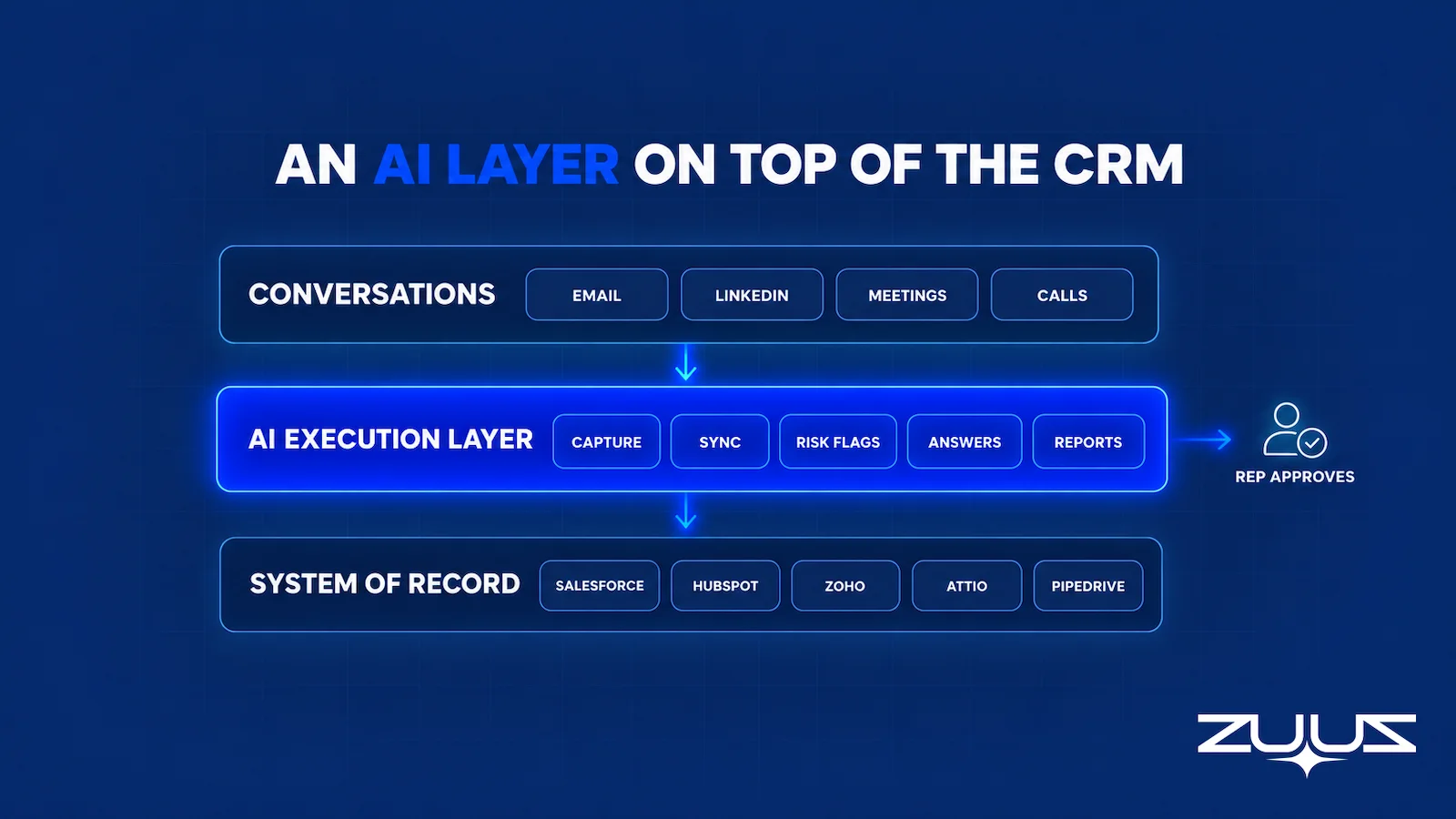
Mapped to the RevOps jobs above, the modules line up as follows. Email Lead Capture reads inbound email and LinkedIn messages, read-only, and extracts contacts, companies and deal signal, including data from attachments. Pipeline Capture reads deal-progression signals and writes clean pipeline to the CRM: stages, stakeholders and momentum. CRM Sync writes those updates to the right fields and reads CRM context back. Beyond email and LinkedIn, ZUUZ also captures Microsoft Teams meeting transcripts and inbound call transcripts from CallTrackingMetrics, and it reads replies from outreach tools a team already uses without sending anything itself.
On the monitoring side, Pipeline Risk Monitoring surfaces stalled deals and pipeline health issues, each with its reason. Account Management assembles each account’s history and deals, and Customer Renewals and Subscriptions watches customer conversations for the warning signs that come before churn, so a renewal tracking process gets its flags early. Analytics reports on what actually happened: pipeline at risk in dollars, what changed this week, renewals due, data quality gaps, follow-through on committed next steps, and a log of every update ZUUZ made. It never produces a forecast, a win probability or a numeric health score, and every number traces to its source.
Zari, the ZUUZ AI agent, is the part people talk to. A rep or RevOps lead asks by voice or by typing, for example which deals went quiet this week or what a customer said about the renewal, and ZUUZ answers from the pipeline and CRM data it captured. It can also summarize an account or a thread and produce the documents a rep needs. It works for the person asking; it does not prospect, email or call buyers, and it never talks to customers.
The proof so far is specific. RA Technologies, a US IT services company, had run HubSpot for two years; ZUUZ ran on the same instance with the same team and surfaced $120K in pipeline within 72 hours that the CRM had never seen, captured from the sales mailbox. Cloud Box Technologies uses ZUUZ to turn inbound email into leads and renewals, so leadership sees live pipeline and tracks 10 to 12 renewals in minutes. The guardrails stay control-framed: a full change history on every update, one-click rollback, and manual entries taking precedence.
Which RevOps Teams This Fits, and Which It Does Not
AI agents in this shape fit revenue teams whose deals already run through conversation: relationship-led B2B sales, IT services, distribution, managed services and value-added resellers, where email and LinkedIn carry most of the deal. They fit teams that trust their CRM less than they would like to, and RevOps leads who spend more time chasing updates than analyzing them. For teams sorting the wider market first, the guide to AI sales tools groups the categories by what each one automates.
They fit less well where the problem is volume, not visibility. A team short on first conversations needs pipeline generation, and a capture agent will faithfully record how little is happening. Teams with very low email volume per rep, or a sales motion that runs almost entirely inside a product, may also find the capture gap small. In those cases the rules-based automation already in the CRM, plus a periodic bidirectional CRM sync review, may be enough.
For everyone else, the practical order is the one this guide followed: fix capture, keep the record clean, flag risk with evidence, answer questions from real data, report on what happened, and leave forecasting and customer-facing messages with people. That is where AI agents and RevOps meet today, and it is plenty of work to hand over.
A concrete first step
Connect one mailbox. ZUUZ reads the last 90 days of that inbox and shows what it found: the contacts, the opportunities, the next steps that were committed and the renewal signals that never reached the CRM. Everything written from that list carries a full change history with one-click rollback, and the never-overwrite rules stay in force from the first run. Nothing is migrated and the CRM stays the system of record. It is a 30-day free trial, no credit card, at https://zuuz.ai/trial/.
Frequently Asked Questions
What are AI agents in RevOps?
AI agents in RevOps are software that read revenue data and conversations, decide on a next step within set permissions, and carry it out. Typical jobs include capturing deal signal from email and LinkedIn, keeping CRM records clean and in sync, flagging risk and renewals, answering pipeline questions and reporting on what happened. People keep judgment calls and customer-facing work.
How are AI agents different from RevOps automation?
Automation follows fixed rules, such as creating a task when a deal changes stage. An AI agent interprets unstructured input, such as a buyer’s email, and decides which record to update and how. Rules stay cheaper and more predictable for structured work, so most teams use both: automation for required fields and routing, agents for reading conversations.
What are the best use cases for AI agents in revenue operations?
The best use cases are bounded and checkable. Capturing contacts, next steps and deal changes from conversations comes first, because every other job depends on it. After that come CRM hygiene and sync, risk and renewal flags with evidence, plain-language questions over pipeline data, and reports on what changed. Forecasting and autonomous outbound carry the most risk.
Can AI agents update CRM records automatically?
Yes. AI agents can update CRM records automatically when every change carries its source, lands in a full change history and can be rolled back in one click. Manual entries should take precedence over the agent’s values, and RevOps should define which fields an agent may never overwrite.
Can AI agents capture sales information from email and LinkedIn?
AI agents can capture it when they are connected to those channels. A capture agent reads the sales mailbox and LinkedIn messages, extracts contacts, companies and deal signal, and writes structured CRM updates. Buyers should confirm which mailboxes, shared inboxes and message types are covered, because a channel the agent cannot see produces silence that looks like a quiet deal.
Do AI agents improve sales forecasting accuracy?
Not automatically. Better capture gives a forecast better inputs, but a claim of better accuracy needs a backtest against past quarters and a simple baseline, using only data available at the time. Many teams get more value from reports on what actually happened, with evidence per deal, while keeping the forecast call with accountable people.
Should AI agents send sales emails without approval?
For most B2B teams, no. An agent that sends on its own can make commitments the company cannot keep, contact the wrong person or damage sender reputation, and the buyer sees only the company’s name. Letting agents draft and prepare work while a rep reviews and sends keeps accountability with a person and still saves time.
How do you evaluate RevOps AI tools?
Evaluate RevOps AI tools on the team’s own messy data rather than a sandbox. Run fifty real threads, including forwarded chains and ambiguous accounts, and score extraction accuracy, missed signals, match accuracy, rollback rate, write success and source traceability. Also confirm the tool works on the existing CRM without migration and that captured data lands in reportable fields.
What does agentic AI RevOps mean?
Agentic AI RevOps means revenue operations work carried out by AI agents that act, not just analyze. Instead of a dashboard describing the pipeline, an agent reads the conversations behind it, proposes or writes updates, raises flags with evidence and answers questions. The term covers a wide range of autonomy, so buyers should ask exactly which actions an agent can take alone.
Will AI agents replace RevOps teams?
AI agents take over tasks, not the function. They can absorb data entry, cleanup and routine reporting, but RevOps still owns definitions, process design, field ownership, tool evaluation and the judgment behind every report leadership uses. Teams that adopt agents well tend to shift RevOps time from chasing updates toward analysis and process work.
How do you measure whether an AI agent is working in RevOps?
Measure against a baseline set before launch. Useful measures include the share of open deals with a current next step, the lag between a conversation and the CRM update, extraction and match accuracy, rep review time, failed writes and missed signals. Net time saved should subtract review and correction effort, not only count tasks the agent touched.
Is ZUUZ a CRM or an AI agent for RevOps?
ZUUZ is a revenue intelligence layer on top of the CRM, not a CRM. It works with Salesforce, HubSpot, Zoho, Attio and Pipedrive, reads email and LinkedIn messages, writes records to the CRM automatically with one-click rollback, monitors pipeline and renewal risk, and answers questions by voice or typing. It does not forecast, and it never sends messages to buyers.

