
MSP Sales Pipeline Signals the CRM Never Records
An MSP sales pipeline grows through expansion and renewal signals that arrive in client email and LinkedIn, not the PSA or CRM. Here is how to capture them.

CEO of ZUUZ. He scaled Cloud Box Technologies from 0 to $25M ARR in IT services and distribution before building ZUUZ. Connect on LinkedIn
TL;DR: An MSP sales pipeline grows mostly inside existing clients, and the signals that start that growth arrive as sentences in an account manager’s email or LinkedIn messages. The PSA records the tickets that follow, the CRM records what somebody chose to log, and the sentence reaches neither. ZUUZ reads the inbox and LinkedIn messages and writes structured records to Salesforce, HubSpot, Zoho, Attio, or Pipedrive, so it fits MSPs that run one of those three as the sales CRM.
- An MSP sales pipeline carries three motions at once: renewals that protect the recurring base, expansion that grows it, and a slower new-logo motion.
- Expansion signals arrive in conversation: a new office, a hiring batch, an audit, a security scare, a contract date, a client IT lead’s LinkedIn message.
- The PSA sees the tickets a business change produces, weeks later. The CRM sees only what an account manager logged.
- Seat and device growth shows up in an email long before it reaches an invoice, and it can mean a billing adjustment, a real expansion, or unbilled scope.
- ZUUZ does not read PSA tickets. MSPs that run Salesforce, HubSpot, Zoho, Pipedrive, or Attio keep that CRM and use ZUUZ as the revenue intelligence layer on top, and MSPs that sell from the PSA with no CRM yet can use ZUUZ as their AI CRM.
On a Tuesday morning the office manager at a sixty-seat accounting client emails her account manager. The firm is taking the second floor in March, and she wants to know what it will cost to wire twenty-five more desks. The account manager replies that he will pull something together, then opens the next email.
The service desk will hear about the second floor in March, as a batch of tickets for switches and user onboarding. Billing will hear about it in April, when the user count changes. The sales CRM may never hear about it, unless somebody creates an opportunity by hand. For three months the only record of a real expansion deal is one sentence in one inbox. That is the normal shape of an MSP sales pipeline, and this guide covers where those signals arrive, why neither the PSA nor the CRM catches them, and what it takes to get them into the system the sales team reports from.
Three Revenue Motions Share One MSP Sales Pipeline
Most pipeline advice assumes one motion: find a prospect, qualify, close. An MSP runs three at once. Renewal protects recurring revenue already on the books. Expansion grows it inside clients that already trust the MSP with their network. New-logo acquisition is the only one most CRMs are really configured for.
Renewals keep the base but add nothing to it, which is why an owner who watches only renewal rates can feel busy and still stall. Expansion comes in small shapes: another site, fifteen more users, a co-managed arrangement for a client that just hired its own IT lead, a security tier added after an insurance renewal. New-logo deals run on somebody else’s clock, because the prospect is usually locked into an incumbent until a contract term ends.
Each motion needs different qualification and timing, but all three depend on the same raw material: something a client or prospect said. The CRM was built to hold the result of that conversation. It was never built to notice that the conversation happened.
Where MSP Expansion Signals Actually Arrive
Ask an MSP owner where the last five expansion deals came from and the answer is rarely a lead form. They came from a client mentioning something in passing, in whatever channel that client uses to talk to the MSP.
A new office, a hiring batch, or an audit
“We signed the lease on the Dallas space” implies cabling, network hardware, firewall work, and onboarding, on a date the client already knows. “Twelve people start in October” tells a per-seat MSP more about next quarter than any PSA report. “Our cyber insurance renewal wants to know if we have MFA everywhere” is a compliance deal with a deadline and an owner attached.
A security scare or a contract question
A near-miss phishing incident makes a client willing to discuss the security stack it declined last year. The first job is handling the incident; the second is noticing that the coverage conversation has opened. “When does our agreement come up?” is not a churn signal, but it is the earliest renewal signal the MSP will get.
A LinkedIn message or a referral introduction
Client IT leads increasingly message their account manager on LinkedIn when a question feels informal, and referral introductions for new logos often happen there too. As covered in the guide to logging LinkedIn messages in a CRM, no native CRM integration brings those conversations onto the record automatically.
| Expansion signal | Where it usually arrives | Does the CRM ever see it? |
|---|---|---|
| New office or relocation | Account manager’s email, often inside an unrelated thread | Only if an opportunity is created by hand |
| Hiring batch | Email from an office manager or HR contact | Rarely; the PSA sees onboarding tickets later |
| Audit or insurance questionnaire | Email with an attachment, often forwarded | Rarely, and usually close to the deadline |
| Security scare | Call or email to the account manager, then a ticket | The ticket reaches the PSA; the sales conversation does not |
| Contract date or cost review | Direct email or LinkedIn message | Only if a renewal record exists and is kept current |
| Client IT lead question | LinkedIn message | No native path; manual logging only |
| Referral introduction | LinkedIn message or a three-way email | Only if the owner or seller creates the lead |
The pattern across every row is the same. The signal is a sentence, it lands with one person, and the system of record learns about it only if that person stops and types it in. That is not a discipline problem. It is a design problem with where capture happens.
The Next Expansion Deal Is Already in an Inbox.
ZUUZ reads account manager email and LinkedIn messages and writes the record into Salesforce, HubSpot, Zoho, Attio, or Pipedrive.
What the PSA Sees, What the CRM Sees, and What Neither Sees
A typical MSP runs a PSA such as ConnectWise, Autotask, or HaloPSA for tickets, time, agreements, and billing, and often a separate CRM such as Salesforce, HubSpot, or Zoho for sales and marketing. Some PSAs include their own sales modules, and some MSPs sell entirely from them. The gap described here exists either way, because it sits between conversations and records, not between two databases.
The PSA is excellent at recording work. Twenty onboarding tickets closed across six weeks look like good service, and they are. They are also the trailing edge of a hiring plan the account manager could have discussed with the client in July. A closed ticket is not evidence that anybody followed up commercially.
The CRM is excellent at recording decisions. Once an account manager decides a quote is coming, the opportunity exists. Before that, the CRM has no view, and the account manager has limited time to give it one: Salesforce’s State of Sales research, seventh edition, found sales professionals spend 40 percent of their time selling and 13 percent of the workweek manually entering data.
| Question about an account | PSA | Sales CRM | Inbox and LinkedIn |
|---|---|---|---|
| How many tickets did the client open last quarter? | Yes, precisely | No | Scattered threads |
| Is the client adding a site or staff? | Only after tickets are raised | Only if someone logged it | Yes, usually weeks earlier |
| What did the insurer or auditor ask for? | No | Rarely | Yes, often as an attachment |
| When is the renewal notice window? | Agreement dates, if configured | If a renewal record is maintained | The client’s own question about it |
| Who at the client is unhappy, and why? | Indirectly, through tickets | Rarely | Yes, in their own words |
| Who introduced this new prospect? | No | If the lead source was recorded | Yes, the original introduction |
Almost every forward-looking question is answered first in a conversation, and the CRM answers it only after somebody translates that conversation into a record. The broader guide to IT sales pipeline visibility tools makes the same point for IT services generally: the gap is at the capture layer, not the dashboard layer.
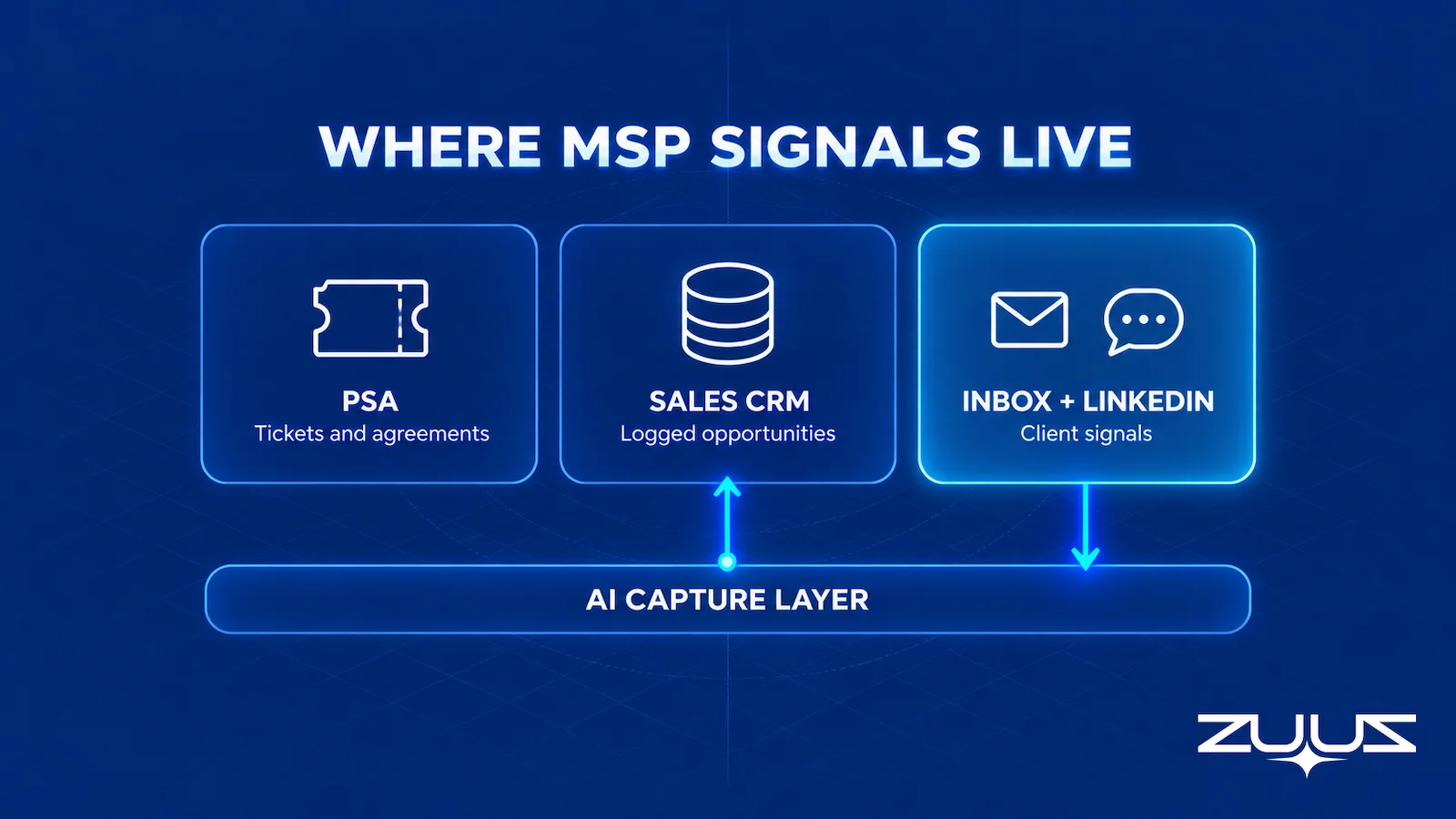
Tighter integration between the PSA and the CRM does not close this on its own. A sync moves records that already exist. It cannot move a sentence that was never turned into a record.
- Coverage: can anyone list every agreement renewing in the next two quarters, with an owner, without asking an account manager?
- Signal sources: does the system see the channels where client change is first mentioned, the sales inbox, LinkedIn messages and meeting or call transcripts, or only what somebody typed into it later?
- Capture layer: is there something that turns those conversations into CRM fields without the account manager doing data entry?
- Fields, not notes: can leadership filter and report on what was captured, or does somebody have to open each record and read it?
- Ownership: does every expansion signal land on a named owner, with a next step and a date?
- Continuity: would the record survive the account manager leaving next month?
What Business Reviews Reveal That the CRM Never Recorded
The quarterly business review is the MSP’s formal expansion ritual. Many MSP QBR guides treat it as the place opportunities are found. In practice it is more often where they are discovered to have sat unrecorded for three months. Halfway through the roadmap slide, the operations director says, “As I mentioned in May, we are still looking at that second location.” The account manager checks the CRM. Nothing, because the May comment arrived in a thread about a printer.
Reviews also expose a second blind spot: the person raising a need is often not the person who approves it. The IT lead asks about security, the CFO controls the budget, the COO owns the audit. A complex B2B purchase usually involves a buying group rather than a single approver. At a small client those roles collapse into fewer people, but each still talks to the MSP through a different thread.
A review works best when it resolves open signals rather than discovering them, which requires every signal from the last ninety days to be on the account before the meeting. ZUUZ does not build QBR decks. What it can do is make sure the account history read before the meeting includes the conversations, not just the tickets, the same idea behind account management software that reads accounts already in the CRM.
How Seat and Device Growth Shows Up in Email Before the Invoice
Per-user and per-device pricing means revenue moves every time a client hires, opens a site, or adds equipment, and the sequence runs in the same order every time. First a sentence in an email. Weeks later, onboarding and procurement tickets in the PSA. Then license and device counts change, and at the next billing reconciliation the invoice finally reflects it. By then the client has already decided how to equip the new team, and the conversation about a higher tier or a separate security policy would have gone better in the week the email arrived.
The harder operator point is that more users can mean three different things. Some growth is a routine usage adjustment already covered by the agreement. Some is a genuine expansion decision that deserves an opportunity with an owner and a date. And some is scope creep: devices added through tickets that never reached the agreement, which is a billing problem rather than a sales one, and the subject of where revenue leakage starts before it reaches billing.
| Growth event | What it usually is | Needs an opportunity? |
|---|---|---|
| A few users added within agreed per-seat terms | Contractual usage adjustment | No, billing updates the count |
| A batch hire for a new department | Possible expansion or a new policy tier | Yes, if scope or tier changes |
| A new office or site | Expansion plus a one-time project | Yes, often one project and one recurring |
| New compliance or insurance requirement | Expansion with a deadline | Yes |
| Devices added through tickets, not on the agreement | Unbilled scope | No, it is a billing correction |
| Client hires an internal IT lead | Possible shift to co-managed service | Often, and sometimes a renewal risk |
Classifying first prevents two opposite mistakes. An opportunity for every added user inflates the pipeline with revenue billing was going to collect anyway. No opportunity at all lets real expansion drift into the PSA as tickets, where it is delivered well and sold by nobody.
Catch Growth at the Email, Not the Invoice.
See ZUUZ turn a client’s hiring or new-office email into a record on the right account in 15 minutes.
MSP Renewals Run on More Than One Clock
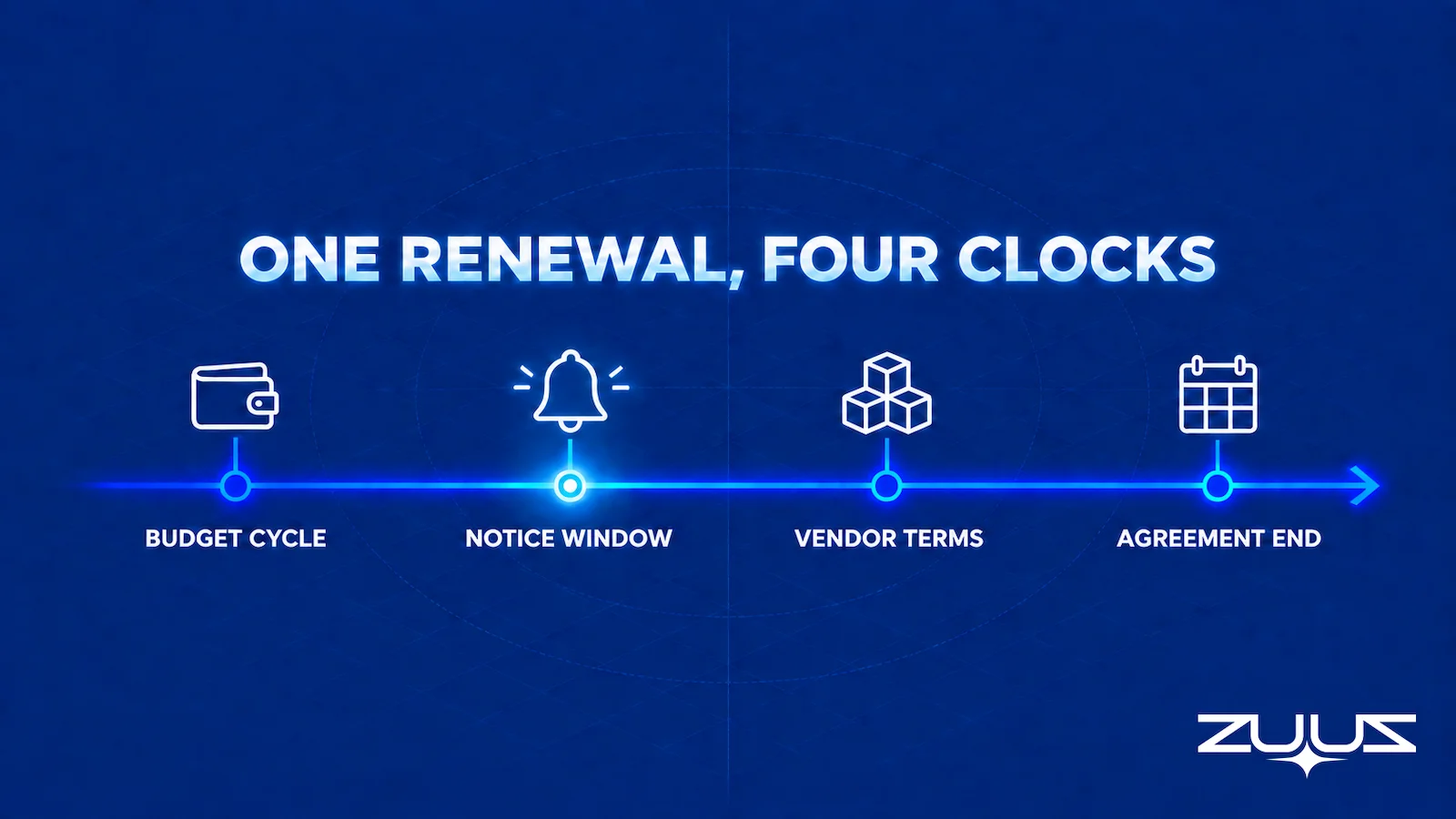
A renewal record with one date field suggests one deadline. Most MSP agreements carry several: the end date, the notice window before it (often the date that actually matters), the terms of the vendor subscriptions the MSP resells, the client’s budget cycle, and the lead time for anything the renewal adds. A client whose notice window opens in January and whose budget is set in November needed the conversation in October, even if the agreement ends in April.
The earliest renewal signals rarely come from date fields at all. They come from “Can we review our costs before the renewal?” or a LinkedIn message from a new IT director who wants to understand the current arrangement. Neither is a cancellation; both mean the renewal is live. The guides to renewal tracking software and churn risk software cover each side of that in depth.
It also helps to keep renewal confirmation separate from proposed expansion. If a renewal record carries an upsell value, a client who renews at the same scope looks like a loss. Two records, one for retained scope and one for the addition, give leadership an honest view of both.
Cloud Box Technologies, a UAE cloud and IT services company, shows what renewal visibility looks like when it runs from conversations. With a single connected user, ZUUZ turned inbound emails into leads and renewals so leadership could see live pipeline in real time, and 10 to 12 renewals were tracked in minutes.
The Renewal Signal Check
Run this once a quarter to find the renewal and expansion risk that lives outside the renewal date field.
- List every renewal in the next two quarters and its date field.
- For each, find the last real conversation, email, message or meeting, and what it said about budget, champion or satisfaction.
- Mark every renewal where the date is the only thing the system knows.
- Those are the renewals that surprise you. The signal existed; it was in a mailbox.
For an MSP, step 2 is where the check gets uncomfortable. The last real conversation on a managed services agreement is rarely with the person who signed it. It is an office manager asking about added seats, a finance contact asking what a line item covers, or a new IT director introducing himself on LinkedIn. Those three messages tell you whether the renewal is routine, contested, or about to grow, and none of them sits on the agreement record.
MSP Sales Strategy Starts With Who Owns Each Motion
Most MSP sales strategy advice is written for new-logo acquisition: lead generation, discovery calls, assessments and proposals. For an established MSP that is usually the smallest of the three motions in the MSP sales pipeline, because renewals and expansion inside current clients carry most of the revenue. A strategy that fits the business starts by deciding who owns each motion, and what each owner needs to see to act on time.
In a typical MSP sales team structure, a new-business rep or the owner handles net-new logos, an account manager owns renewals and expansion in the installed base, the core of MSP account management, and a technical lead or vCIO runs the business reviews where client plans come up. The service desk is not on the sales org chart, yet it often hears about new sites, new hires and ageing hardware first. Each of those roles sees a different slice of the same client.
The table below maps each role in the MSP sales pipeline to the motion it owns and the place its client signal usually lands.
| Role | Motion owned | Where their client signal lands | What they need from the CRM |
|---|---|---|---|
| New-business rep or owner | New logos | Inbound email, referrals, LinkedIn messages | A clean lead record with source and next step |
| Account manager | Renewals and expansion | Client email, LinkedIn messages, business reviews | Full account history, renewal dates, open client asks |
| vCIO or technical lead | Business reviews and roadmap | Review meetings and the follow-up email | Prior commitments and the plans the client mentioned |
| Service desk | None formally | Tickets and notes in the PSA | A route for sales-relevant comments to reach the account owner |
The structure breaks at the handoffs. A technician hears that a client is opening a second office and leaves it in a ticket note, the vCIO hears budget plans in a review and keeps them in meeting notes, and the client emails the account manager about adding seats. Unless each of those reaches the account in the CRM, the account manager works from a partial picture and the expansion conversation starts late.
The practical rule for MSP growth strategies is to measure the handoffs, not only the MSP sales pipeline. For any recent expansion deal, trace when the first signal appeared and when it reached the CRM, because that gap is usually where the growth plan is losing time. The same trace shows quickly whether a conversation capture layer would help, which the next section covers.
What to Evaluate in a Conversation Capture Layer
Any tool that promises to capture pipeline from email or LinkedIn should be tested against MSP realities, not a generic sales demo. Several criteria are also where a tool, ZUUZ included, may simply not fit a given MSP. Continuity deserves particular weight: U.S. Bureau of Labor Statistics data puts median employee tenure at 3.9 years, and an account manager’s LinkedIn conversations with client IT leads sit on a personal account that leaves with them.
| Criterion | Question to ask | Why it matters for an MSP |
|---|---|---|
| Where sales records live | Does it write to the CRM the sales team reports from? | If sales runs inside the PSA, a tool that writes only to Salesforce, HubSpot, or Zoho will not help |
| Capture sources | Does it read each account manager’s inbox and LinkedIn, or only a shared mailbox? | Expansion signals go to named people, not a support address |
| Account matching | Does it attach a signal to the right existing client, or create a duplicate lead? | Most MSP pipeline is expansion, so matching matters more than lead creation |
| Structured output | Does it write named fields, or paste a transcript? | Only fields can be reported on and reviewed before a business review |
| Rep dependency | Is anything captured if the account manager does nothing? | A tool that needs a click per email is a faster version of the current problem |
| Continuity | Does the record survive the account manager leaving? | LinkedIn history on a personal account does not transfer |
| PSA scope | Does it read PSA tickets, and does it claim to? | Get a clear answer; ZUUZ does not |
| LinkedIn behavior | Does it only read messages, or also send them? | Reading client conversations and automating outbound are opposite jobs |
One question cuts through the list. Pick an expansion deal closed last quarter and ask whether the tool would have created a record on the right account from the first email that mentioned it. If the answer depends on somebody clicking a button, it would not have.
MSP Expansion Signals: How ZUUZ Captures Them
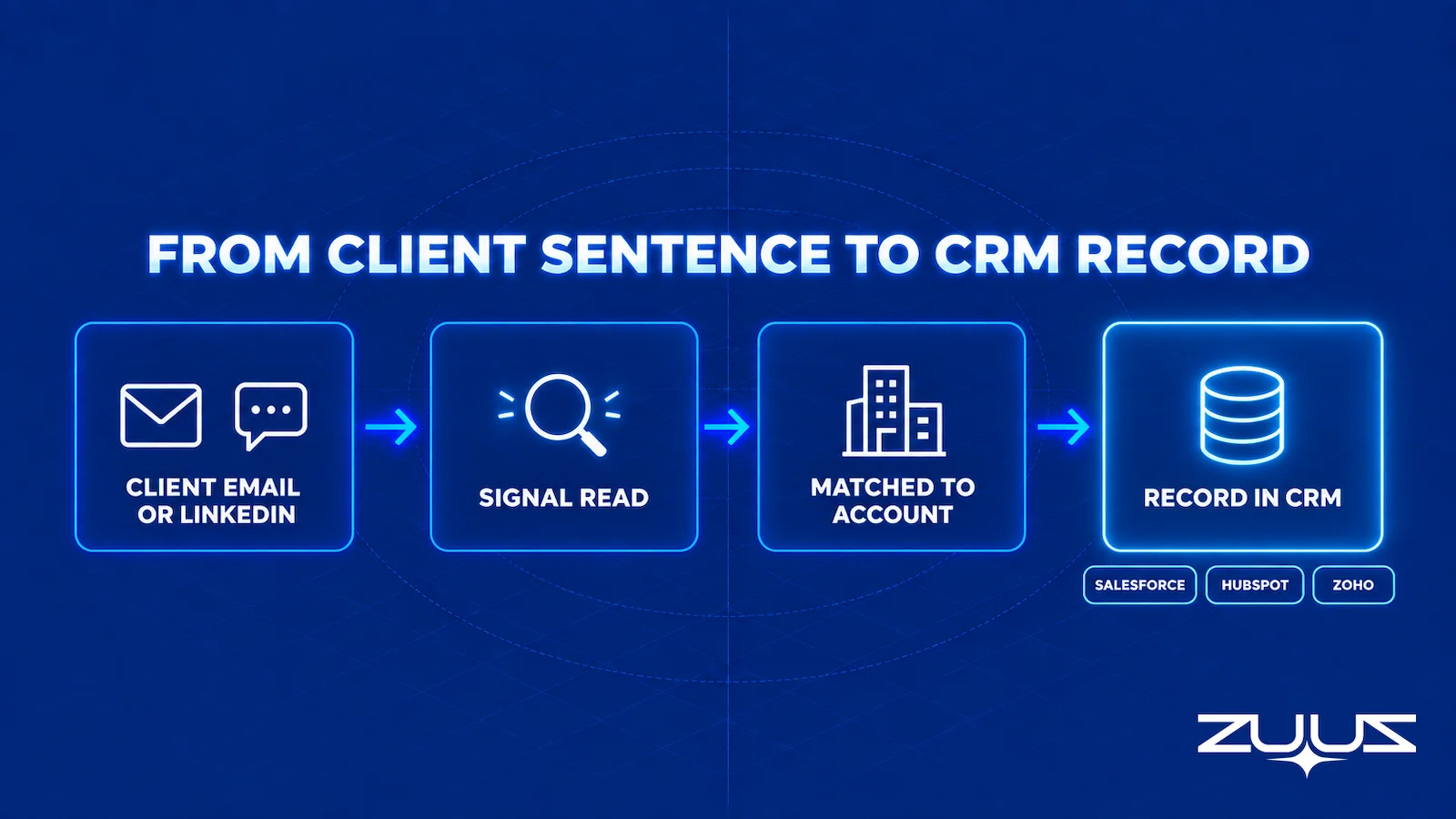
ZUUZ is a revenue intelligence layer on top of the CRM an MSP already runs. For an MSP already on Salesforce, HubSpot, Zoho, Pipedrive, or Attio, it does not replace that CRM, which stays the system of record. ZUUZ reads the sales and account management inbox, and now LinkedIn messages, identifies the deal signal in each conversation, and writes structured records to the connected CRM.
The “second floor in March” email becomes an update on the existing client account: signal type, timing, the contact who raised it, and the next step, attached to the right company rather than filed as a new lead. A client IT lead’s LinkedIn question becomes the same kind of record, and a referral introduction becomes a new lead with its origin preserved. Nobody has to change how they work: account managers keep answering email, technicians keep working in the PSA, and ZUUZ updates the CRM automatically, with full change history and one-click rollback.
For an MSP, the Account Management module matters most. It assembles deal history, renewal and churn status, and communications per client from signals ZUUZ already captures, a lens over existing data rather than a new dataset to maintain. Pipeline Risk Monitoring flags accounts that have gone quiet across email and LinkedIn together, Lead Scoring ranks new-logo inbound and referrals, and CRM Sync writes everything back as ordinary fields. On LinkedIn, ZUUZ reads messages only. It does not send messages, automate connection requests, run sequences, scrape profiles, or import contacts.
RA Technologies, a US IT services company, had run HubSpot for two years when ZUUZ was added on the same instance with the same team. Within 72 hours it surfaced $120K in pipeline from the sales mailbox that the CRM had never seen, as the RA Technologies case study describes. The mechanics are covered in email to CRM automation for IT companies and, for Salesforce shops, Salesforce email integration for IT sales teams.
None of this changes service delivery. Technicians keep working in the PSA and nobody is asked to become a salesperson. Commercial signals simply stop depending on someone remembering to type them into a second system.
See Every Client Signal on the Right Account.
Connect one account manager’s inbox and LinkedIn, then compare what ZUUZ finds with what the CRM holds today.
From an operator’s seat
Across the deployments ZUUZ runs, the pattern is that the first account manager to connect should be the one holding the largest recurring base, not the one chasing new logos, because expansion signals are dense in renewal conversations and thin in cold threads. The part teams do not plan for is duplicate client records. An MSP that has run a PSA and a CRM side by side for years usually has the same client spelled three ways, and that has to be cleaned up before captured signals land where a reviewer will see them. The other surprise is what the first pass turns up: a noticeable share of what looks like new expansion is scope the service desk already delivers and nobody has billed, which is a billing conversation rather than a sales one. Account managers accept a captured record much faster once they see it attached to the right agreement instead of sitting in a feed they have to open.
Which MSPs This Fits, and Which It Does Not
The boundary is simple. ZUUZ reads email and LinkedIn messages and writes to Salesforce, HubSpot, Zoho, Attio, or Pipedrive. It does not read PSA tickets. It syncs won customers to ConnectWise PSA and does not integrate with Autotask or HaloPSA. An MSP that runs one of those CRMs alongside the PSA keeps it, and ZUUZ works on top. MSPs that also resell hardware and licenses run a second, multi-party pipeline on top of the managed-services one, and the guide to the IT VAR sales pipeline covers that side.
An MSP that runs its whole sales process inside the PSA, with no separate CRM, does not need to buy one first. It can use ZUUZ as its AI CRM: ZUUZ builds leads, contacts, accounts, deals, and renewals from email, calendar, meetings, and LinkedIn, and syncs won customers to ConnectWise PSA. Either way, a simple habit still helps: log client comments against the agreement in the PSA and review them weekly with the service lead.
For MSPs in the first group, the fastest test is also the most revealing. Connect one account manager’s mailbox and LinkedIn for a few weeks, then set what was captured next to the CRM’s record of the same clients. The next sales pipeline review tends to look very different from the last one.

A recurring model rewards the MSPs that notice client change early. The signals have always been there, in the office manager’s email and the IT lead’s message. The question is whether the sales pipeline sees them before the invoice does.
A concrete first step
Connect one account manager’s mailbox. ZUUZ reads the last 90 days and writes what it found to the CRM, client by client, with full change history and one-click rollback. The 30-day free trial needs no credit card: zuuz.ai/trial.
Frequently Asked Questions
What is an MSP sales pipeline?
It is the set of open revenue opportunities a managed service provider is working across three motions: renewals, expansion inside current clients, and new-logo acquisition. Because MSP revenue is recurring, much of it sits inside the installed base, and the signals that create it usually arrive in client email and LinkedIn conversations.
How do MSPs find upsell opportunities in existing clients?
Most start as a client comment about a new office, a hiring batch, an insurance questionnaire, an audit, or a security scare. The reliable method is to capture those comments on the client record when they arrive and qualify them against the agreement, rather than waiting for the next business review.
How does the MSP sales process differ for expansion and new logos?
Expansion runs on the client’s own business timeline and starts with a trusted contact, so follow-up speed and account context matter most. New-logo deals usually wait on an incumbent’s contract term and often begin with a referral. Both belong in one pipeline with separate stages and owners.
Does an MSP need a CRM if it already uses a PSA?
Not always. Some PSAs include sales functions, and some MSPs sell entirely from them. MSPs often add Salesforce, HubSpot, or Zoho when they have a dedicated sales team, a marketing function, or a new-logo motion that outgrows the PSA’s sales tools.
Why doesn’t the PSA show expansion opportunities?
A PSA records service work: tickets, time, agreements, and configurations. It sees the tickets a business change produces, such as onboarding twenty users, but not the conversation where the client first described the change. By then the commercial decision has usually been made.
What should an MSP account manager review in a QBR?
Beyond ticket trends, patching, and backup health, an MSP QBR should review every open client signal from the quarter: planned hires, new sites, compliance requirements, security concerns, and agreement questions. That only works if those signals were recorded on the account when they first came up.
How should MSPs track seat growth without double-counting revenue?
Classify each event first. Users added within agreed per-seat terms are a billing adjustment. A new department, site, or service tier is an expansion and deserves an opportunity. Devices added through tickets but missing from the agreement are unbilled scope, a reconciliation task rather than a deal.
When should an MSP start the renewal conversation?
Start from the earliest relevant clock, not the agreement end date. That is usually the notice window or the client’s budget cycle, adjusted for vendor subscription terms and implementation lead time. An email asking to review costs should move the conversation forward immediately.
What is a good MSP sales strategy?
One that matches effort to where revenue actually comes from. For most established MSPs that means treating renewals and expansion inside current clients as the core motion, with a named owner for each, and running new-logo acquisition as a separate effort. The strategy works when client signals from email, LinkedIn, business reviews and tickets reach the account owner quickly.
How should an MSP structure its sales team?
Typically a new-business rep or the owner handles new logos, an account manager owns renewals and expansion, and a technical lead or vCIO runs business reviews. Smaller MSPs often combine these roles in one or two people. What matters more than titles is that every role’s client signal reaches the same account record in the CRM.
What does a managed services sales process look like?
For new logos it runs from an inbound enquiry or referral through discovery, an assessment, a proposal and a signed agreement. For existing clients it runs from a signal, such as a new site, seat growth or an approaching notice window, to a scoped change and an updated agreement. The second process is the one most MSP CRMs track worst, because its signals arrive in conversations rather than forms.
How can MSPs build stronger client relationships?
By acting on what clients already say: following up on plans mentioned in business reviews, responding to seat and site changes before the invoice does, and opening renewal conversations inside the notice window. A consistent account history in the CRM keeps that going even when the account manager changes.
Can AI capture MSP sales opportunities from email and LinkedIn messages?
Yes. ZUUZ reads the sales and account management inbox and LinkedIn messages, identifies signals such as new sites, hiring, compliance deadlines, and renewal questions, and writes structured records to the matching account in Salesforce, HubSpot, Zoho, Attio, or Pipedrive. It reads LinkedIn messages only and never sends them.
Does ZUUZ integrate with ConnectWise, Autotask, or HaloPSA?
ZUUZ syncs won customers to ConnectWise PSA. It does not read PSA tickets, and it does not integrate with Autotask or HaloPSA. It reads email and LinkedIn messages and writes to Salesforce, HubSpot, Zoho, Attio, or Pipedrive for MSPs that run one of those as the sales CRM, and MSPs that sell entirely inside the PSA can use ZUUZ itself as their AI CRM.
Is ZUUZ a CRM for MSPs?
It can be. An early-stage MSP with no CRM yet, selling from the PSA or spreadsheets, can use ZUUZ as its AI CRM, with leads, contacts, accounts, deals, and renewals built from email, calendar, meetings, and LinkedIn. An MSP already on Salesforce, HubSpot, Zoho, Pipedrive, or Attio keeps that CRM, and ZUUZ works as the revenue intelligence layer on top, keeping it current from the client conversations that carry expansion and renewal signal.

