
MSP Sales Automation for Reps Who Skip CRM Updates
MSP sales automation should fill the CRM from client email and LinkedIn, not depend on busy reps logging it. See how to capture the data entry reps skip.

CEO of ZUUZ. He scaled Cloud Box Technologies from 0 to $25M ARR in IT services and distribution before building ZUUZ. Connect on LinkedIn
TL;DR: MSP sales automation works when it fills the CRM from the conversations reps and account managers already have, instead of asking busy people to log them after onboarding calls and escalations. ZUUZ connects to the sales inbox and LinkedIn messages, reads the revenue signal, and prepares structured records for Salesforce, HubSpot, Zoho, Attio or Pipedrive that the rep approves in one click. The CRM stays the system of record and nobody changes how they work.
- Reps at a managed service provider skip CRM updates because the day is full of onboarding, escalations and client calls, so data entry loses every time it competes with a client.
- The missing data is rarely a field. It is a sentence in an email: a new office, a contract question, a security scare, a new IT lead.
- Salesforce's 2026 State of Sales report puts manual data entry at 13% of the sales workweek, which is the price of leaving updates to memory.
- The Capture Gap Audit measures the problem in an afternoon by comparing what a client thread said with what the CRM recorded.
- Good MSP sales automation captures from the inbox and LinkedIn messages, lands in CRM fields, needs no BCC habit or sidebar, and lets the rep correct a record before it is written.
- ZUUZ is an AI layer on top of the CRM, not a CRM, and it does not read PSA tickets.
Picture a forty-person MSP on a Thursday in the middle of a client onboarding. An account manager spends the morning on a migration call, the afternoon on an escalation, and the early evening answering an office manager who wants a price for twenty-five more desks. By the time the laptop closes, the CRM still shows the account as it looked a month ago. Nobody was lazy. Nobody had a free hour. This scene is an illustration, but every MSP sales manager recognizes the shape of it.
MSP sales automation is the answer most teams reach for, and most of what gets sold under that name misses the point. The goal of MSP sales automation is not another sequence or another dashboard. The goal is that the CRM reflects what clients actually said, without a person retyping it. Teams that set out to automate MSP sales often start at the wrong layer, so this guide covers where that data goes missing, how to measure the gap, what to ask of any tool, and how ZUUZ approaches it.
Why MSP Sales Automation Starts With the Updates Reps Skip
Managed service provider sales is a relationship business that is serviced every day, which means the people who sell are also the people clients call. An account manager is judged by how fast a client gets an answer, not by how complete a CRM record is. When the two collide, the client wins, and that is the correct call.
The result is a CRM that records outcomes and misses the road to them. A closed renewal appears. The three emails about budget, the new decision-maker, and the second site do not. Sales managers then ask for updates in a weekly meeting, reps reconstruct them from memory, and the data is a week stale and a little polished by the time it lands.
Salesforce's 7th State of Sales report surveyed 4,050 sales professionals in 2025 and found that manually entering data accounts for 13% of the workweek, inside a week where 60% goes to non-selling work. HubSpot's 2024 Sales Trends Report found reps spend about an hour a day on administrative tasks. Neither study is about MSPs, and both are self-reported, but they describe the same pressure from two directions.
MSP CRM data entry is the task that gives way first, and reminders do not fix it. Friday cleanup rituals do not fix it. Both treat a capacity problem as a discipline problem, and the capacity is not coming back. The only change that holds is moving the capture work off the rep entirely, which is what the rest of this guide is about. For the wider pipeline picture, see the MSP sales pipeline guide.
How to Evaluate MSP Sales Automation
Before comparing any products, agree on the test. Most MSP sales automation looks fine in a demo and fails on the third question below, which is why the test comes first.
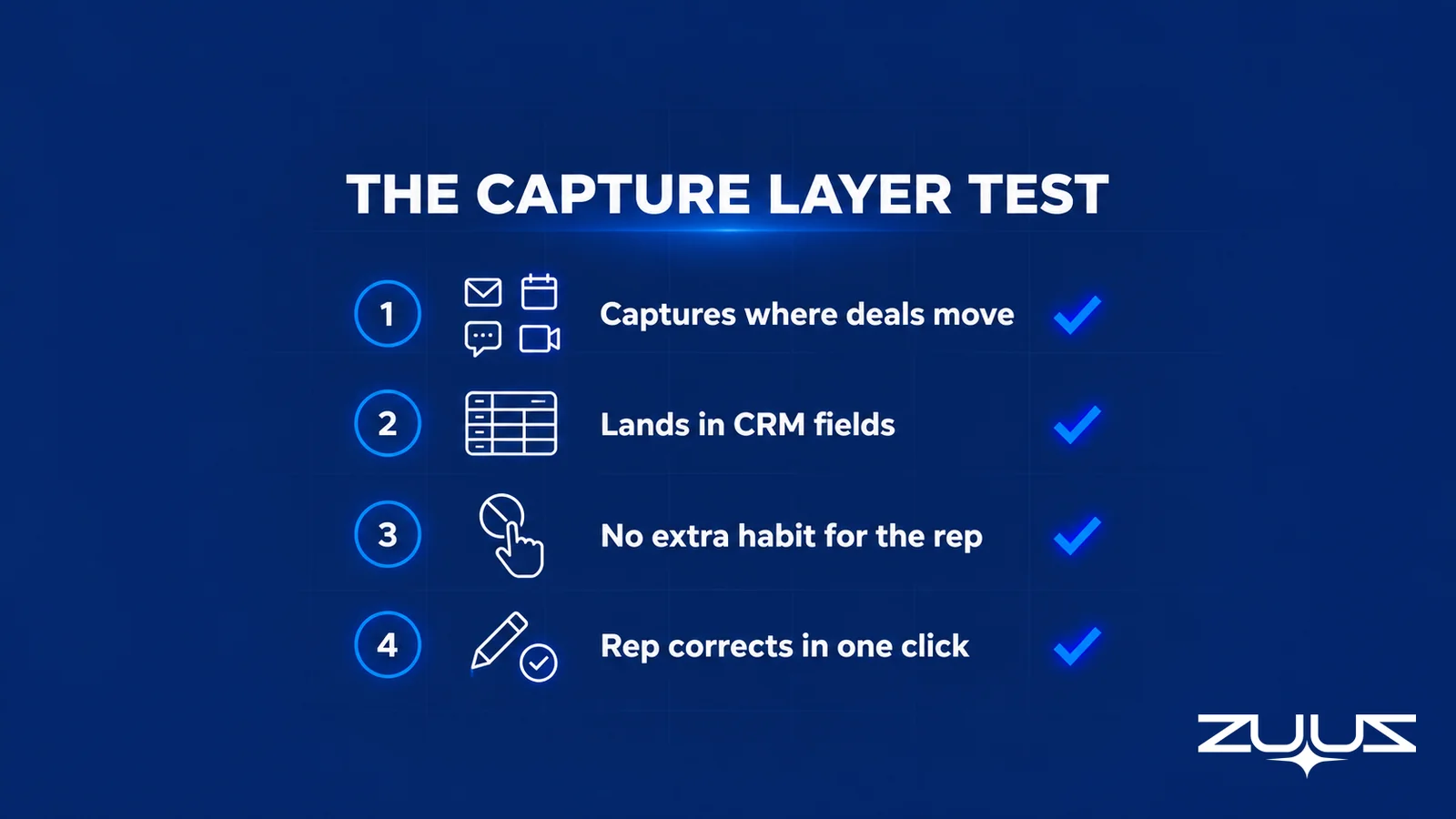
Four questions, scored in order. Failing the second or third produces activity history, not a pipeline.
- Does it capture from the channels where the deal moves: email, calendar, LinkedIn messages, meeting and call transcripts?
- Does it land in CRM fields a report can read, or only in an activity feed?
- Does the rep have to remember a BCC, a button, a sidebar or a sync?
- Can the rep correct it in one click before it is written?
Question two separates tools that help a manager from tools that help a report. An activity feed full of logged emails is easy to produce and hard to use, because nobody can filter a dashboard by "a client mentioned a second office." A field such as stage, next step, renewal date or stakeholder can be filtered, counted and audited.
Question three is where adoption quietly dies. Any tool that needs a rep to remember something is a tool that works for the first three weeks. The capture has to happen because the email arrived, not because someone clicked.
Stop Retyping What Clients Already Wrote. Approve It Instead.
ZUUZ reads the sales inbox and prepares the CRM record for the rep to approve in one click.
Where MSP Client Data Goes Missing Between Inbox and CRM
A typical MSP runs a PSA such as ConnectWise, Autotask or HaloPSA for tickets, time and billing, and a CRM such as Salesforce, HubSpot or Zoho for sales. The gap sits between the conversation and both records, not between the two databases.
Renewal and contract conversations
A client asks what a three-year term would cost, or mentions that finance is reviewing vendors. The date sits in the PSA agreement. The intent sits in an inbox. A renewal that surprises the team usually had a warning sentence months earlier.
Expansion comments
"We signed the lease on the Dallas space" implies cabling, hardware and onboarding. It is a sales opportunity expressed as small talk, and it only becomes a record if someone creates an opportunity by hand. The same goes for a hiring batch, an audit questionnaire or an insurance renewal that asks about security controls.
People changes
A new IT lead, a departed office manager, a CFO who joins a thread for the first time. Each changes who the real buyer is, and each arrives as a signature line. For more on capturing this from LinkedIn, see logging LinkedIn messages in the CRM.

Run the Capture Gap Audit on an MSP Sales Team
Measuring the problem takes an afternoon and no software. The audit below is the one ZUUZ uses with teams that are unsure how much is missing.
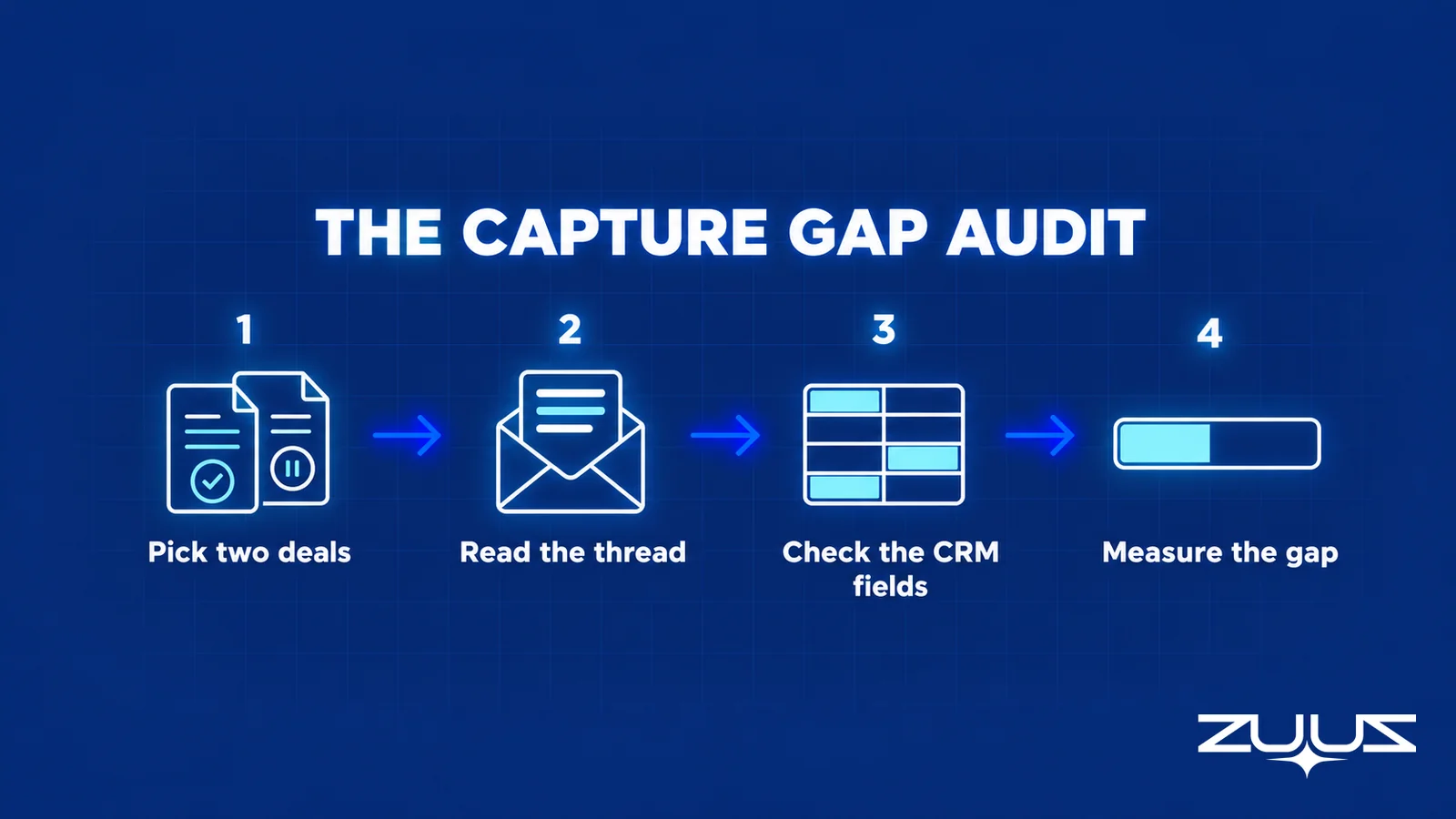
- Pick one closed-won and one slipped deal from last quarter.
- Read the full email and message thread end to end and list every fact that mattered.
- Open the CRM record and mark which of those facts appear in a field, not a note.
- The percentage missing is the capture gap. Above about a third, the CRM records outcomes, not the deal.
Here is a worked example, labeled as an illustration. A slipped expansion deal at a mid-sized MSP has twelve facts that mattered in its thread: the new site, the target go-live date, the budget owner, a competing quote, the hardware lead time, two contacts, the renewal date of the existing agreement, the security questionnaire, the preferred vendor, the approval step, and the client's fear of another outage. The CRM record holds four of them in fields, the opportunity name, amount, close date and owner. Eight of twelve are missing, a gap of about two thirds.
Most teams that run this audit expect to find a few missing details. What surprises them is that the missing facts are not trivia. The competing quote and the budget owner are the facts a sales manager would want in a pipeline review. They were all in the inbox the whole time.
From an operator's seat, the pattern in IT services is consistent: CRM updates slip in proportion to how good the rep is with clients. The reps who answer at seven in the evening are the ones whose records go stale first, because every spare minute is already spoken for. Teams that try to fix this with policy end up punishing their best people. Teams that move the capture work off the rep stop having the argument.
See the Gap Between the Inbox and the CRM. In Minutes.
Connect one mailbox and compare what clients said with what the CRM recorded.
Four Approaches Compared Against the Capture Layer Test
Four approaches cover most of what MSPs try. The table scores each against the Capture Layer Test above.
| Approach | What it captures | Lands in CRM fields | Who does the work |
|---|---|---|---|
| Reps log by hand | Whatever the rep remembers | Yes, when logged | The rep, after hours |
| PSA sales module | Tickets, agreements, billing | In the PSA, not the sales CRM | The team, per ticket |
| Native email sync inside the CRM | Emails and events as activity history, mainly | Usually the activity feed; fields still need a person | Mostly the tool, with rep clean-up |
| ZUUZ conversation capture layer | Email, calendar, LinkedIn messages, Teams meeting and call transcripts | Yes, structured records the rep approves | ZUUZ prepares, the rep approves in one click |
Native email sync is a reasonable baseline and worth turning on. Salesforce documents Einstein Activity Capture as the way to bring email and calendar activity into Salesforce records. The limit is what it produces: a feed of activity. A feed tells a manager that email happened. It does not tell the manager that a client named a budget owner. That is the gap a capture layer closes.
MSP Sales Automation With ZUUZ, From Inbox to CRM Record
As MSP sales automation, ZUUZ is an AI layer on top of the CRM an MSP already runs. It connects to the sales inbox and calendar, reads LinkedIn messages without sending anything, and also takes in Teams meeting transcripts and inbound call transcripts. It reads the revenue signal in those conversations and prepares structured records for Salesforce, HubSpot, Zoho, Attio or Pipedrive. An MSP can run more than one of those at once.
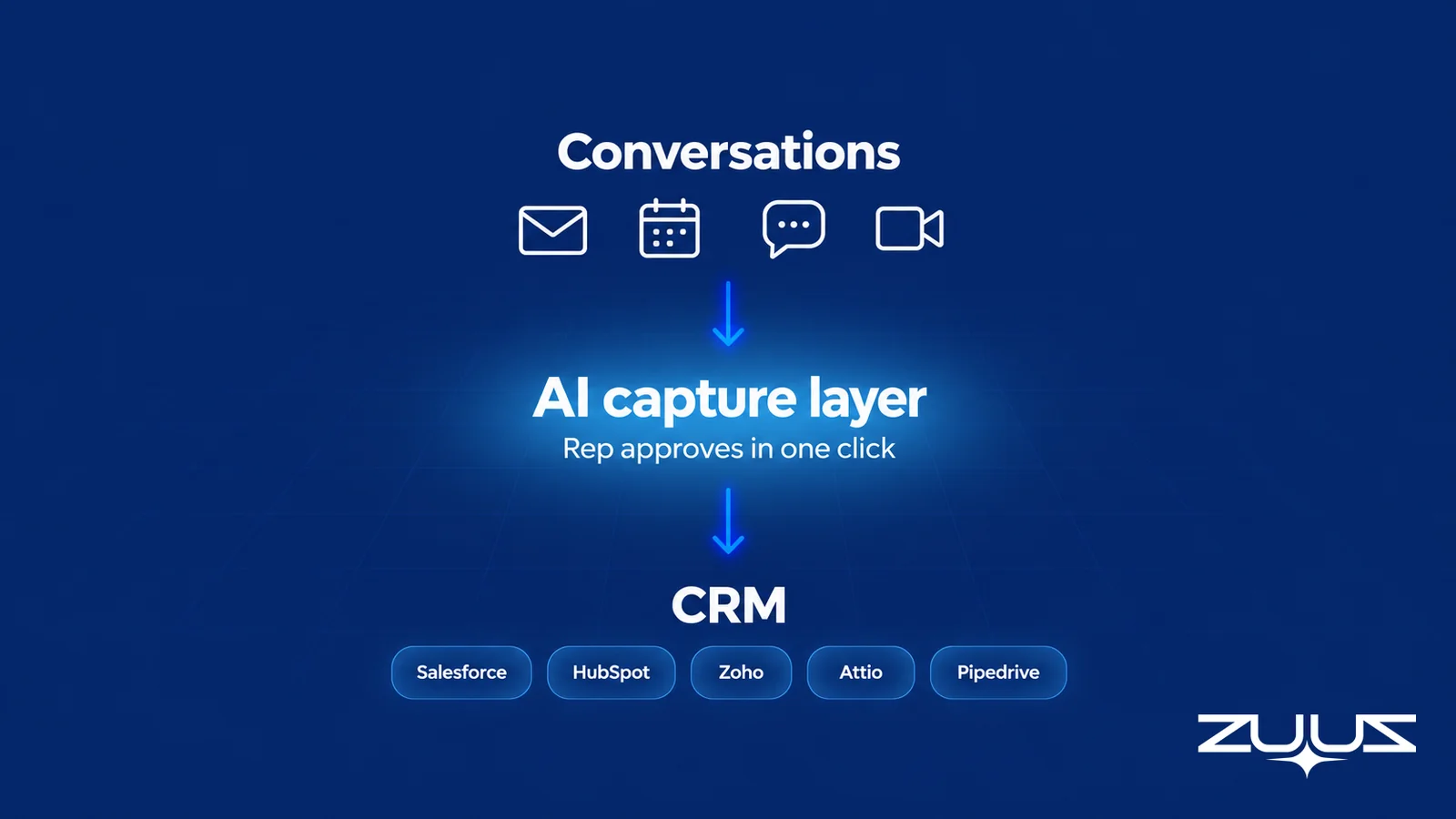
The sequence is the same for every client. A message arrives. ZUUZ reads it against keyword filters, so out-of-scope threads stay out. It prepares a record showing the contact, the account, the renewal or expansion signal, and the reason it matters. The rep sees that record, edits it if needed, and approves it in one click. Manual entries take precedence over anything captured, so nobody has to worry about a tool overwriting their work.
What is structurally different about this kind of MSP sales automation is the position. There is no CRM migration, no new place for reps to work, and no ritual to remember, which is what makes this MSP CRM automation rather than another system to adopt. Pipeline and renewal monitoring flag stalled deals and approaching renewals from the captured conversations, and reporting shows what actually happened rather than a score or a forecast. ZUUZ does not forecast revenue or score deals. It makes the record under the number real.
What the evidence says so far
RA Technologies, a US IT services company, ran ZUUZ on the HubSpot instance it had used for two years, with the same team, and ZUUZ surfaced $120K in pipeline in the first 30 days that the CRM had never seen, captured from the sales mailbox. The full story is on the RA Technologies case study.
At Cloud Box Technologies, a UAE-based cloud and IT services business, 10 to 12 renewals are tracked in minutes from a single connected user, and leadership sees live pipeline without asking for it. Two customers do not make a benchmark, and both are services businesses with email-heavy selling, which is the profile that MSP sales automation has to serve.
Reps Are Not Lazy. Their Days Are Full.
Take the inbox off their plate and keep the CRM current.
What This Approach Does Not Replace
Being plain about limits builds more trust than a feature list. ZUUZ does not replace the PSA. It does not read PSA tickets today, so an MSP that sells entirely inside its PSA and does not run a separate sales CRM is not the fit. A ConnectWise PSA integration is on the ZUUZ roadmap, with no date, and nothing in this guide should be read as a delivery promise.
It also does not replace judgment. A prepared record is a suggestion with the evidence attached, not a verdict. A rep who disagrees edits it, and the edit wins. ZUUZ does not send email on a rep's behalf, does not run outreach sequences, and does not automate LinkedIn connection requests or messages.
For how the PSA and the CRM divide the work, and where the client signal falls between them, see PSA vs CRM for MSPs. For renewals specifically, MSP customer retention covers the conversations that precede a churn, and MSP account management covers what a record needs to survive a handoff.
Test It on One Mailbox Before Deciding
The cheapest way to evaluate MSP sales automation is to point it at one real mailbox and read the result. Connect a single account manager's mailbox and the CRM. ZUUZ reads the previous 90 days on first connection. Compare the records it prepares with what the CRM holds for the same accounts. The gap is visible in minutes, and it prices the decision better than any demo.
- Choose the account manager with the busiest client load, because the gap is widest there.
- Run the Capture Gap Audit on two deals by hand first, so there is a baseline.
- Connect the mailbox and CRM, then review the prepared records the same afternoon.
- Count how many facts the audit marked as missing now appear as approved fields.
A team that wants a deeper look at the data-entry problem can read how CRM automation reduces manual data entry or compare approaches in the best CRM setups for reducing manual data entry. The cluster page for this vertical is CRM automation for managed service providers.
Frequently Asked Questions
What is MSP sales automation?
MSP sales automation is software that removes the manual work between a client conversation and an updated CRM record. For a managed service provider, the useful version captures renewal, expansion and contact changes from email and LinkedIn messages, so reps approve a prepared record instead of retyping what a client wrote.
Why do MSP reps skip CRM updates?
Reps skip updates because the day belongs to clients: onboardings, escalations, and calls that cannot wait. Logging competes with client work and loses every time. The fix is rarely more discipline. It is moving the capture work to a layer that reads the conversation, so the rep only approves the result.
How do you automate CRM data entry for an MSP?
Connect the sales mailbox and the CRM to a capture layer that reads client conversations and prepares structured records. ZUUZ does this for Salesforce, HubSpot, Zoho, Attio and Pipedrive. Each prepared update shows the rep what changed and why, and nothing is written until the rep approves it in one click.
Does MSP sales automation replace our PSA?
No. A PSA records tickets, time, agreements and billing, and it keeps doing that. Sales automation of this kind works on the conversation layer around the PSA, where renewal and expansion signals arrive. ZUUZ does not read PSA tickets today. A ConnectWise PSA integration is on the ZUUZ roadmap.
Is ZUUZ a CRM for MSPs?
No. ZUUZ is an AI layer on top of the CRM an MSP already runs, and the CRM stays the system of record. It connects to the sales inbox and reads LinkedIn messages without sending anything, then writes structured records to the existing Salesforce, HubSpot, Zoho, Attio or Pipedrive account.
How much time do reps lose to manual CRM entry?
Salesforce reports that manually entering data takes about 13% of the sales workweek in its 7th State of Sales edition, based on 4,050 sales professionals surveyed in 2025. That figure covers sales teams generally, not MSPs specifically, but it sizes the cost of leaving updates to memory and evenings.
What data should MSP sales automation capture first?
Start with renewal dates and the conversation behind them, new contacts and role changes, and expansion comments such as a new office or hiring batch. These facts arrive in email first, reach the PSA weeks later as tickets, and often never reach the CRM. They are also the facts account managers most often forget.
Will reps lose control of what goes into the CRM?
No. The rep approves each prepared update in one click and can edit it first. Manual entries take precedence over anything captured, and keyword filtering keeps out-of-scope threads out. The goal is that nobody retypes a client email, not that a tool writes to the CRM without the rep seeing it.
How long does it take to see results?
The first result appears when the mailbox connects, because ZUUZ reads the previous 90 days of that mailbox on first connection. The gap between what was logged and what clients actually said becomes visible within minutes. A US IT services firm, RA Technologies, saw $120K in pipeline surfaced in its first 30 days.
Which CRMs work with MSP sales automation from ZUUZ?
ZUUZ writes to Salesforce, HubSpot, Zoho, Attio and Pipedrive, and an MSP can run more than one at once. There is no migration, because ZUUZ sits above the CRM. Microsoft Dynamics is not part of the live list, so an MSP on Dynamics should wait before planning around it.

