
Best Automated Sales Pipeline Software for B2B Teams
The best automated sales pipeline software automates data capture, not just workflow. See how RA Technologies surfaced $120K in 72 hours.
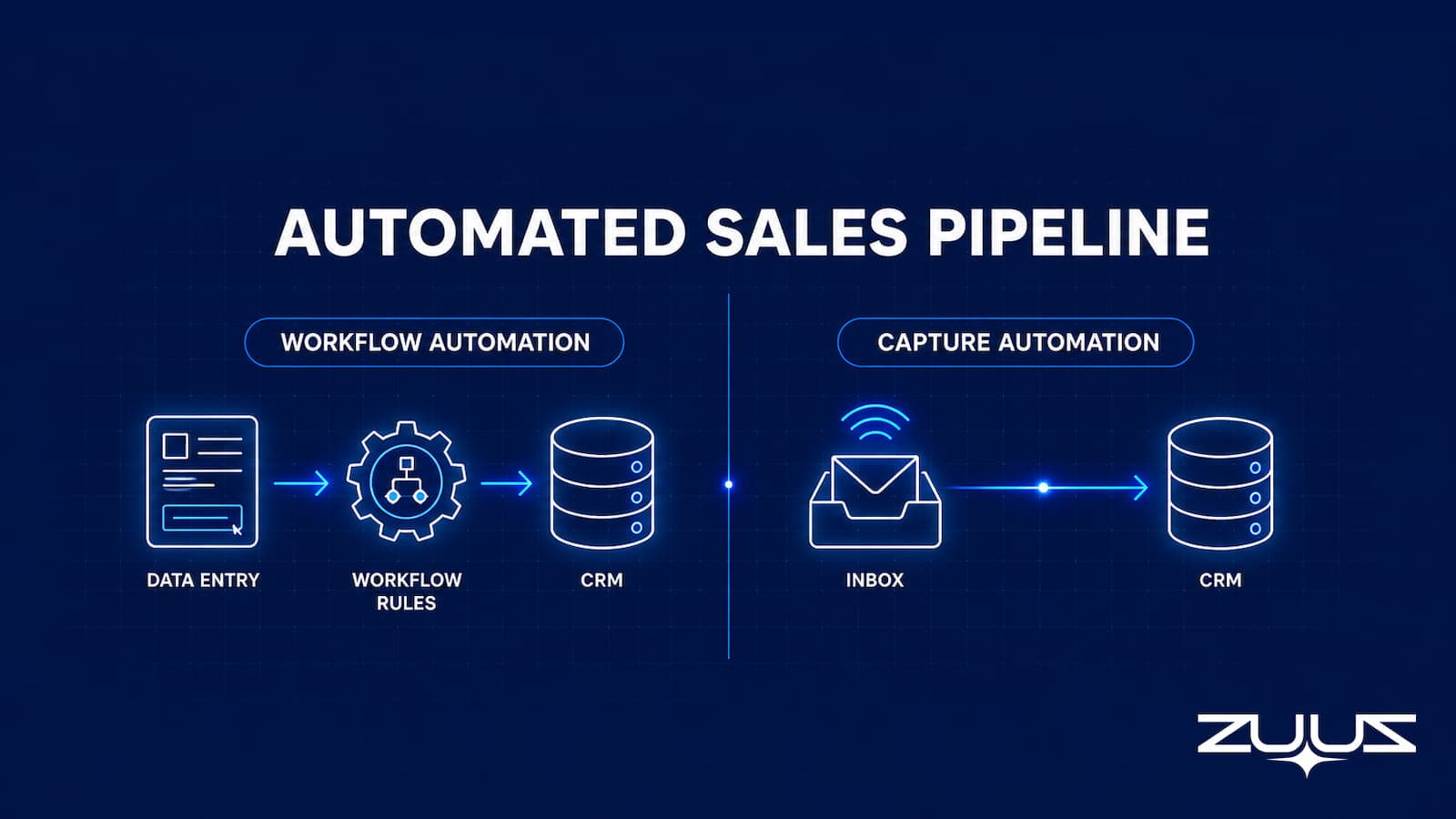
- The word automated hides two very different things. Most pipeline software automates workflow steps after a rep has already logged the deal. A smaller set automates the capture of the deal itself from email.
- Workflow automation (stage reminders, follow-up tasks, deal scoring) still depends on a human entering the data first. If the deal never reaches the CRM, none of that automation ever fires.
- The honest test of automated pipeline software is one question: does it create records, or does it only act on records a rep already typed in.
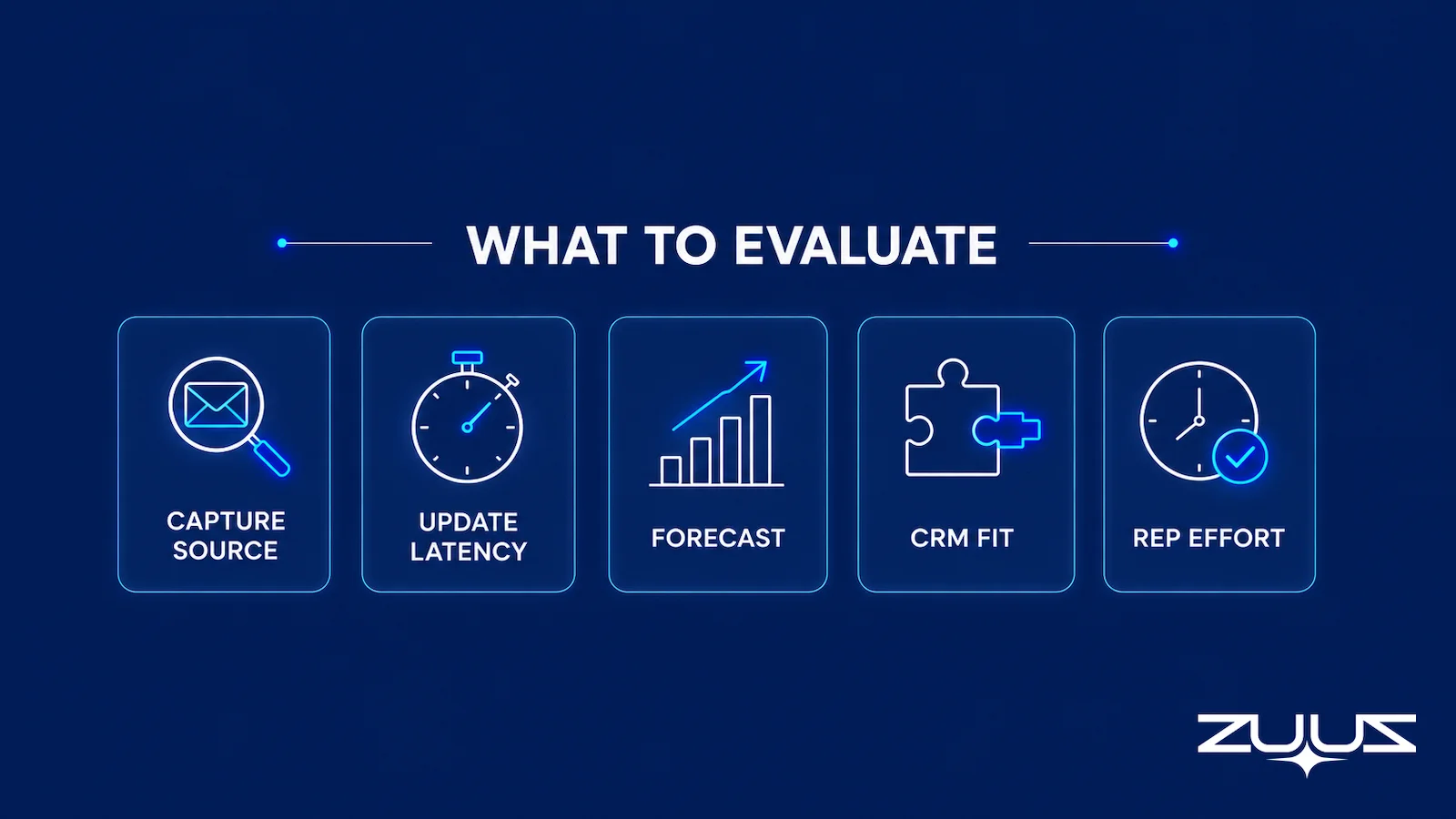
- Evaluate five things: capture source, update latency, forecast automation, CRM-agnosticism, and rep effort per day. The last one decides whether the tool gets used at all.
- RA Technologies surfaced $120,000 in previously unrecorded pipeline within 72 hours by letting ZUUZ read 90 days of email and write the deals into HubSpot.
- ZUUZ automates the capture layer and runs on Salesforce, HubSpot, or Zoho, so teams keep their CRM and add real automation on top of it.
A sales manager opens the pipeline report on Monday and finds it neat, color-coded, and wrong. Three renewals that closed in email last week are not in it. Two deals sit in a stage they left ten days ago. The software is doing exactly what it was sold to do, automating the pipeline, and the pipeline still does not match reality.
That gap is the whole problem with the phrase best automated sales pipeline software. Almost every product in the category automates something. The question buyers rarely ask is what, specifically, gets automated. The answer splits the market in two, and only one half fixes the Monday report.
This comparison breaks down what automation should mean in pipeline software, separates the two kinds of automation that listicles tend to blur together, and lays out the criteria that actually predict whether a tool keeps the pipeline accurate. It sits under the broader guide to sales pipeline management software, narrowed here to the automation question alone.
What Automated Actually Means in Pipeline Software
Strip away the marketing and automated sales pipeline software promises one thing: less manual work moving deals from first contact to close. The trouble is that vendors apply the word to steps that sit at completely different points in the process.
Some tools automate the work that happens after a deal exists in the CRM. A rep logs the opportunity, and the software then moves it between stages on a rule, fires a reminder when it goes stale, assigns a follow-up task, or recalculates a forecast number. This is useful, and it is what most products mean by automation.
A second, smaller group automates the work that happens before a deal exists in the CRM. These tools read the email where the deal is actually being negotiated, recognize that a deal is in motion, and write the record themselves. No rep types anything. The distinction sounds academic until a forecast is wrong, and then it is the only thing that matters.
The Two Kinds of Automation and Why the Difference Matters
Call them workflow automation and capture automation. Both are real. They solve different problems, and confusing them is the most common reason a team buys automated pipeline software and still ends up with a pipeline nobody trusts.
Workflow Automation: Rules on Existing Records
Workflow automation runs inside the CRM on records that already exist. Move a deal to negotiation when a quote is sent. Create a task three days after a stage change. Email an alert when a high-value opportunity goes quiet. Score a deal based on its fields. Every one of these depends on a rep having logged the deal in the first place.
This is what the HubSpot free pipeline, Pipedrive workflow rules, and most CRM-native automation deliver. It removes busywork once the data is in. It cannot create data that was never entered. As covered in why your CRM pipeline is wrong, a clean workflow running on incomplete data produces a tidy report of the wrong numbers.
Capture Automation: Creating the Records
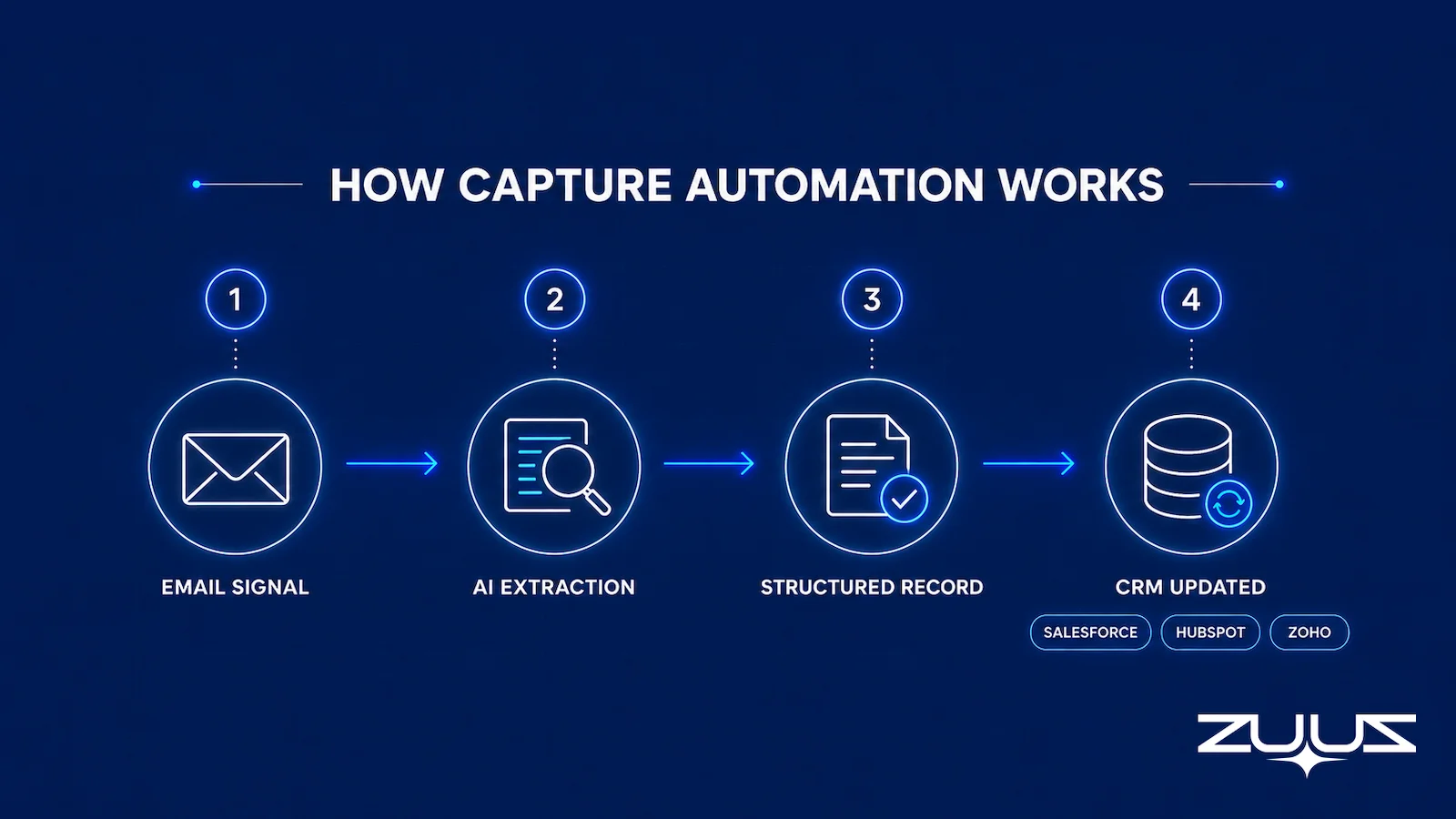
Capture automation works upstream of all of that. It reads inbound and outbound email, identifies that a pricing thread, a renewal mention, or an RFP attachment represents a real deal signal, and writes a structured record to the CRM. The rep does not log anything. The system does.
Once capture is automated, workflow automation finally has accurate data to run on. The two are not competitors. They are layers. The mistake teams make is buying the second layer and assuming it includes the first. It almost never does. The comparison of ZUUZ versus manual CRM entry shows what changes when the capture step stops depending on a human.
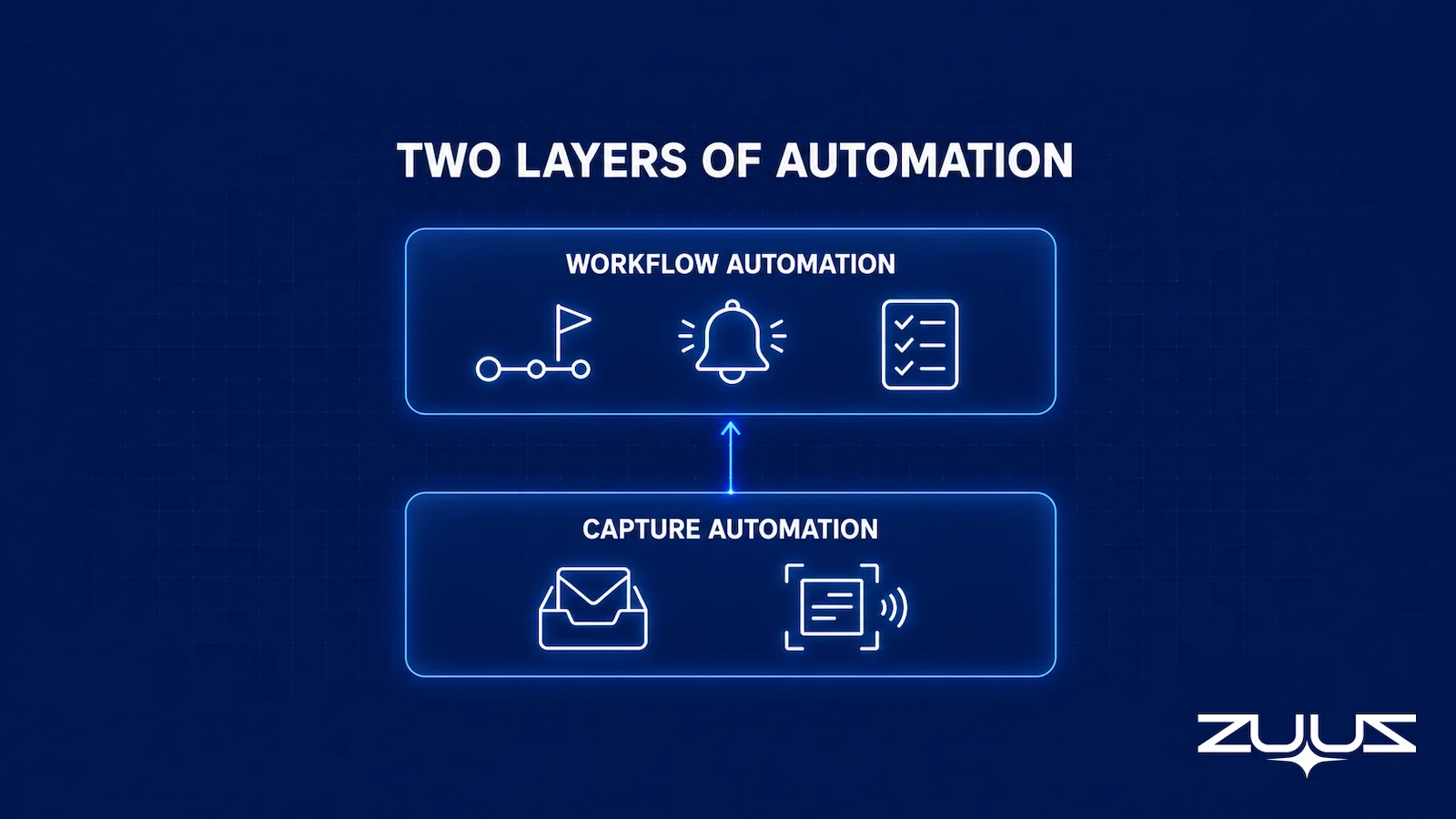
| Dimension | Workflow Automation | Capture Automation |
|---|---|---|
| What it automates | Steps after a deal is in the CRM | Creating the deal record from email |
| Depends on rep entry | Yes, fully | No |
| Fixes missing pipeline | No | Yes |
| Typical examples | Stage rules, task creation, alerts, scoring | Email reading, signal extraction, auto record writing |
| Found in | Most CRM-native and free pipeline tools | A small set of capture-layer tools, including ZUUZ |
The practical consequence is simple. Workflow automation makes a good rep faster. Capture automation makes a forgetful one accurate. Most pipeline problems are accuracy problems, which is why the capture layer is the one most teams skip and most need.
Automate the Part Reps Actually Skip.
ZUUZ connects to the sales inbox, extracts the deal signal, and writes it to Salesforce, HubSpot, Zoho, Attio or Pipedrive. Book a 15-minute walkthrough on your own inbox.
The split between the two kinds of automation is what makes an evaluation checklist useful instead of generic. Criteria written without it tend to reward whichever features demo well.

What to Evaluate in Automated Pipeline Software
Most buying guides rank tools on integrations and pricing tiers. For automation specifically, five criteria predict whether the pipeline stays accurate. Each one separates real automation from a rules engine.
Capture Source
Ask where the data comes from. If every record still starts with a rep filling in a form, the tool automates workflow, not capture. If the tool reads email and creates records, it automates capture. This is the single most clarifying question in the whole evaluation.
Update Latency
Measure how fast a new signal reaches the CRM. Manual logging realistically creates a multi-day lag, because reps batch their entry or skip it. A capture tool should write records in minutes to about an hour. Latency decides whether a manager sees a slipping renewal in time to act on it.
Forecast Automation
Check whether the forecast updates itself from new data or waits for a rep to adjust deal fields. AI forecasting is common, but it scores whatever is in the CRM. A forecast built on records that capture automation keeps current is a forecast worth reading.
CRM-Agnosticism
Confirm whether the tool sits on top of the CRM the team already uses or forces a migration to a new system of record. Many automated pipeline products are standalone CRMs in disguise. A capture layer that writes to Salesforce, HubSpot, or Zoho lets a team keep its history and add automation without a rip-and-replace.
Rep Effort Required
Quantify the daily time the tool asks of a rep. Any tool that adds logging steps will be abandoned within a quarter, no matter how good the dashboards look. The Salesforce State of Sales report (2024) ties high performance to selling time, not admin time. Automation that returns hours to selling earns adoption. Automation that costs hours does not.
| Criterion | What to Ask | Workflow-Only Tools | Capture-Layer Tools |
|---|---|---|---|
| Capture source | Where does each record come from? | Manual rep entry | Email, read automatically |
| Update latency | How fast does a signal reach the CRM? | Days, when logged at all | Minutes to about an hour |
| Forecast automation | Does the forecast update from new data? | Scores existing fields only | Scores continuously refreshed records |
| CRM-agnosticism | Does it replace or sit on the CRM? | Often a standalone CRM | Sits on Salesforce, HubSpot, Zoho, Attio or Pipedrive |
| Rep effort per day | How much logging does it add? | Adds entry work | Roughly 90 seconds of review |

The Pipeline Truth Test
Before comparing products, find out whether the current pipeline number can survive a question. The Pipeline Truth Test takes an hour and settles which kind of automation the team actually needs.
- Take the top five deals by value in the current quarter.
- For each, find the evidence in the CRM for its stage and close date: a dated, written commitment, not a rep’s assurance.
- Count how many rest on a stage last changed more than two weeks ago.
- A pipeline in which most of the top five lack dated evidence is a forecast of rep optimism. ZUUZ does not forecast; it makes the record underneath the number real.
Run the same test on the software being evaluated. If a tool moves stages, sends alerts and scores deals but the evidence behind step 2 still has to be typed by a rep, the automation is working on a record nobody verified. That is workflow automation answering a capture question.
From an operator’s seat
Across the deployments ZUUZ runs, the pattern is that the top five deals fail step 2 more often than the long tail does, which is the opposite of what managers expect. Big deals carry the most conversation and the most people, so the written commitment does exist, it just sits in a thread with six participants instead of in a field. The part teams do not plan for is the week after capture is switched on: close dates move, usually outward, because the real date of last contact is now visible next to the stage. Leaders who read that as a reporting failure switch it off. Leaders who read it as the first honest quarter keep it, and the rule worth agreeing in advance is that no number gets restated for the board until the second month of complete records.
Pipeline Automation Approaches Compared
The market is easier to read by category than by brand. Below are the main approaches to automating a sales pipeline, the automation each one actually delivers, and where each falls short for a B2B team that needs the pipeline to match reality.
CRM-native workflow automation. Salesforce, HubSpot, Pipedrive, and Zoho all ship rule-based automation: stage transitions, task creation, alerts, and scoring. It is solid workflow automation and it ships with the CRM. It does nothing about deals that never get entered, because every rule needs a record to act on.
Free pipeline tools. The HubSpot free pipeline and similar free CRM tiers organize known deals and automate basic reminders. They are a reasonable starting point for a small team. They are not capture automation. The pipeline is only as complete as the reps are disciplined.
AI forecasting and scoring layers. A category of tools applies machine learning to deals already in the CRM, flagging risk and projecting close dates. The intelligence is real, but it runs on whatever data exists. Applied to a partial pipeline, it produces a confident forecast of an incomplete picture. The guide to IT sales pipeline visibility tools walks through how this plays out by layer.
Capture-layer automation. Tools in this category read email and write the records themselves, then hand accurate data to whatever workflow or forecasting layer sits above. This is the part the other categories assume is already handled. For most teams, it is the missing layer. The guide to the best CRM to reduce manual data entry covers how this changes the rep workflow.
Stop Logging Deals by Hand.
Connect your CRM in minutes and let ZUUZ capture the deals your team never enters. Start free, with no integration project required.
Capture Automation: How ZUUZ Automates the Pipeline
ZUUZ automates the layer the rest of the category assumes is already done. It reads inbound and outbound email, extracts deal signals such as pricing questions, renewal mentions, purchase orders, and procurement requests, and writes structured records to Salesforce, HubSpot, or Zoho. Reps do not log deals. They review flagged signals in roughly 90 seconds a day and confirm or dismiss.
The design choice that matters most is that ZUUZ does not replace the CRM. It is CRM-agnostic, writing native records into whichever of Salesforce, HubSpot, or Zoho a team already runs. The workflow automation and forecasting a team has already built keep working. They simply run on data that is now complete.
On first connection, ZUUZ runs a 90-day historical lookback, scanning prior email threads for deals that were never recorded. This is where the gap between workflow and capture automation becomes a number a finance team can see.
RA Technologies: $120K Surfaced in 72 Hours
RA Technologies, an IT services firm in the United States, connected its shared inbox to ZUUZ and ran the 90-day lookback. The system found $120,000 in pipeline that had never reached Salesforce. These were not cold leads or past losses. They were active conversations, including renewals and project expansions, that had been moving through email while the CRM showed nothing.
No amount of workflow automation could have surfaced those deals, because workflow automation needs a record to act on and the records did not exist. Capture automation created them. That is the practical difference between the two kinds of automation, expressed as recoverable revenue rather than a definition.
The insight came from operating Cloud Box Technologies, an IT services and cloud distribution company that grew from $0 to $25 million ARR. At that scale, the pipeline lived in email, not the CRM. Workflow automation on top of that CRM would have reported on a fraction of the business. The fix had to start at capture, which is the principle ZUUZ is built on.
Frequently Asked Questions
What Is Automated Sales Pipeline Software?
Automated sales pipeline software reduces the manual work involved in tracking deals from first contact to close. The term covers two different things. Most tools automate workflow steps after data is already in the CRM, such as stage reminders and follow-up tasks. A smaller set automates the data capture itself, reading email and writing structured deal records to the CRM without rep entry. The two are layers, not competitors.
What Is the Difference Between Workflow Automation and Capture Automation?
Workflow automation runs rules on records that already exist in the CRM, like moving a deal to the next stage or assigning a task. It depends entirely on a rep logging the deal first. Capture automation creates the records, reading inbound and outbound email, extracting deal signals, and writing them to the CRM. Capture automation removes the manual entry step that workflow automation assumes is already done.
What Should You Evaluate When Choosing Automated Pipeline Software?
Five criteria separate real automation from workflow rules. Check the capture source: does it read email or only act on manual entries. Check update latency: how fast a signal reaches the CRM. Check whether forecasting updates automatically from new data. Check CRM-agnosticism across Salesforce, HubSpot, and Zoho. Last, measure the rep effort required per day, since any tool that adds logging work will be abandoned within a quarter.
Are Free Sales Pipeline Management Tools Automated?
Free sales pipeline management tools, including the HubSpot free pipeline and free CRM tiers, automate workflow steps such as stage tracking and basic reminders. They do not automate data capture. Every deal still has to be entered by a rep before any automation runs. Free tools are a fine starting point for organizing known deals, but they do not address the pipeline that never reaches the CRM in the first place.
Do AI Sales Pipeline Tools Capture Deals Automatically?
Most AI sales pipeline tools apply machine learning to scoring, forecasting, and next-step suggestions on data that is already in the CRM. The AI improves how existing records are interpreted, not whether records get created. A smaller category uses AI to read email and generate the records themselves. ZUUZ is in that second category, capturing deal signals from email and writing structured data to the CRM.
How Does ZUUZ Automate the Sales Pipeline?
ZUUZ reads inbound and outbound email, extracts deal signals such as pricing questions, renewal mentions, and purchase orders, and writes structured records to Salesforce, HubSpot, or Zoho. It runs a 90-day historical lookback on first connection. Reps review flagged signals in roughly 90 seconds per day rather than logging deals by hand. RA Technologies surfaced $120,000 in unrecorded pipeline in 72 hours this way.
Can Automated Pipeline Software Work With My Existing CRM?
It depends on the tool. Many automated pipeline products are built as standalone CRMs or are locked to one platform, which forces a migration. Capture-layer tools sit on top of the CRM a team already uses. ZUUZ is CRM-agnostic and writes natively to Salesforce, HubSpot, or Zoho, so teams keep their system of record and add automation on top without replacing anything they have already built.
See the Deals Your CRM Never Recorded.
Workflow automation runs on what reps logged. ZUUZ captures what they did not, so book 15 minutes and see the pipeline that exists today but is missing from your reports.

CEO of ZUUZ. He scaled Cloud Box Technologies from 0 to $25M ARR in IT services and distribution before building ZUUZ. Connect on LinkedIn

