
Sales Activity Tracking Without Chasing Reps for Updates
Sales activity tracking fails when the dashboard measures logging, not selling. What to track, how to audit the data, and how to capture it automatically.


CEO of ZUUZ. He scaled Cloud Box Technologies from 0 to $25M ARR in IT services and distribution before building ZUUZ. Connect on LinkedIn
TL;DR: Sales activity tracking measures what a team does between deals moving. Most dashboards measure something else: how diligently reps log. Until activity reaches the CRM without anyone typing it, activity reports rank reps by admin habit, and the fix is capture rather than another reminder. ZUUZ closes that gap by reading the sales inbox, LinkedIn messages, meeting transcripts and call transcripts and writing the activity onto the CRM record, and a free trial connects one mailbox and reads the last 90 days so the first report is not empty.
- An activity dashboard built on manual logging compares logging discipline, not selling. Two reps with identical weeks can look completely different in the report.
- Track the activities that change a deal: substantive conversations, new stakeholders, answered buyer questions, agreed next steps. Counting dials and sends measures effort, not progress.
- Activity lives in email, calendar, meetings, calls and LinkedIn messages before it ever reaches the CRM. Each source needs a capture route or it stays invisible.
- Audit the data before trusting the dashboard: the share of open deals with no logged touch in 14 days is usually the fastest way to see how incomplete the record is.
- Tracking and surveillance are different things. Reps accept capture that removes admin and resent capture that only produces a scoreboard.
- For MSPs, VARs and distributors, a busy ticket queue or a steady reorder does not mean anyone has discussed the renewal with the person who signs it.
A sales manager opens the activity report before a Monday review. One rep shows 41 logged activities, another shows 9. The rep with 9 closed two deals last month and is running the largest opportunity in the pipeline. The rep with 41 logs every call twice, once as a task and once as a note.
The report is accurate about what was entered. It says almost nothing about what happened. That gap between activity and logged activity is the reason most sales activity tracking projects stall: teams buy a dashboard, then discover the dashboard only knows what someone remembered to type.
This guide covers sales activity tracking end to end: what to track, which numbers are worth a manager’s attention, how the three tracking methods compare, how to audit activity data before relying on it, and what changes when activity reaches the CRM without a rep doing data entry.
What Is Sales Activity Tracking?
Sales activity tracking is the practice of recording the interactions a sales team has with buyers, then reviewing them to understand how work turns into pipeline. Activities include emails, calls, meetings, demos, proposals sent, and the follow-ups in between.
It is often confused with sales tracking, which is broader. Sales tracking follows outcomes: pipeline, stage movement, win rates, revenue. Activity tracking follows inputs, the work that produces those outcomes. A team can have healthy activity and weak outcomes, which usually means the activity is aimed at the wrong accounts. A team can also show weak activity and strong outcomes, which usually means the activity is real and the logging is not.
| Sales activity tracking | Sales tracking | |
|---|---|---|
| Measures | Inputs: conversations, meetings, follow-ups | Outcomes: pipeline, stages, win rate, revenue |
| Answers | Is the work happening, and on the right accounts | Is the work producing results |
| Fails when | Reps log inconsistently | Stages are updated late or optimistically |
| Owner | Sales manager, sales operations | Sales leadership, RevOps |
Why the Activity Dashboard Often Measures Logging, Not Selling
Every activity report inherits the habits of the people filling it. Three patterns distort almost all of them.
- Uneven logging. One rep logs after every call. Another logs on Friday afternoon from memory, and drops whatever seems minor. The report compares their memory, not their week.
- Channel blindness. Native CRM logging tends to capture what happens inside the CRM. Conversations that happen in a mailbox, a LinkedIn thread or a meeting recording often never arrive. LinkedIn messages in particular sit outside most capture setups entirely.
- Double counting. A single meeting can appear as a calendar event, a manually logged task and a note, which inflates one rep’s totals while a colleague who logs once looks quiet.
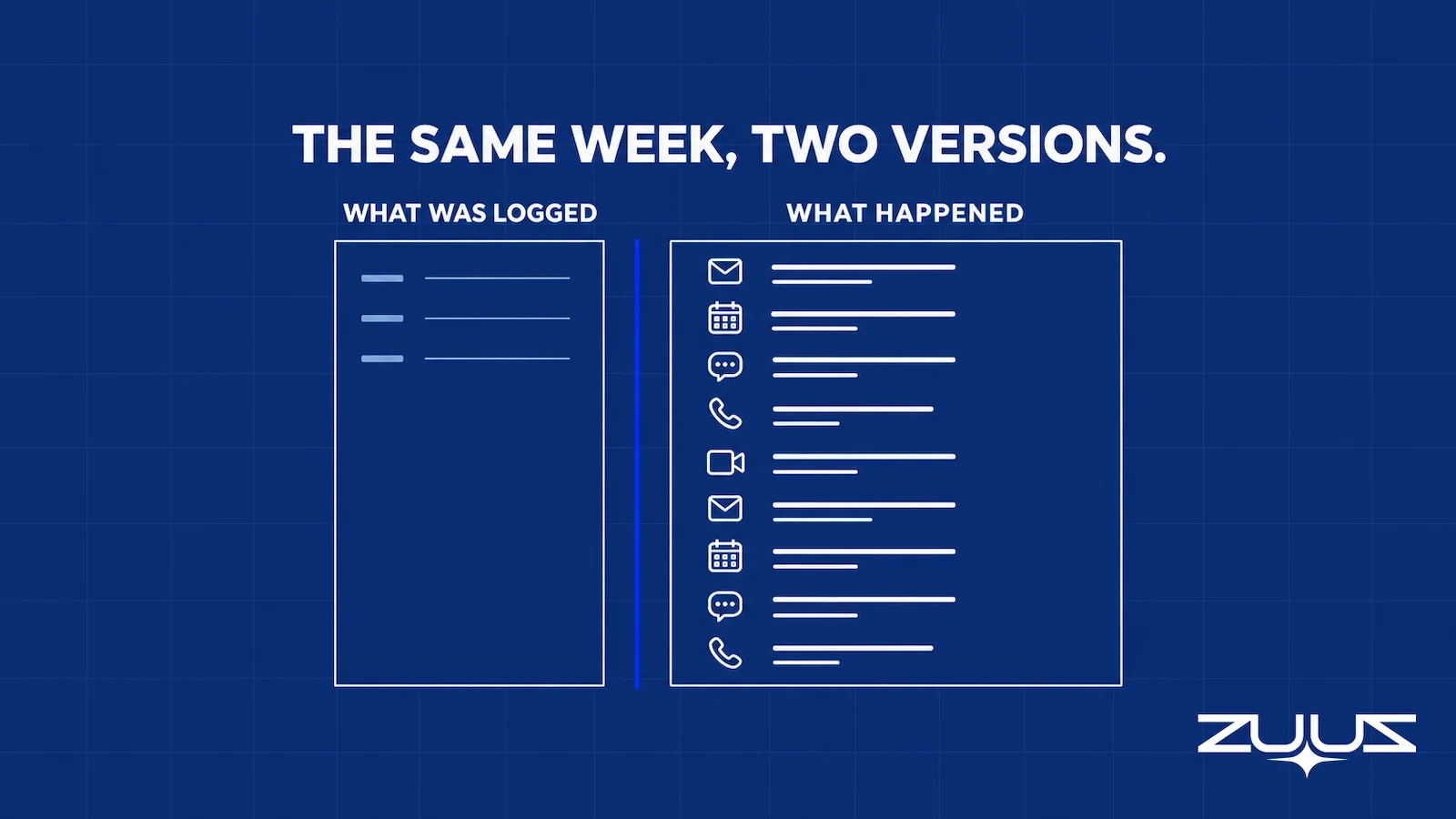
The result is a report that ranks admin behavior. Managers sense it, which is why activity dashboards are quietly abandoned after a quarter: nobody trusts a number that punishes the rep who was on calls all week. The same root cause produces a pipeline that does not match reality.
Track the Week That Happened, Not the Week That Got Typed.
ZUUZ connects to the sales inbox and reads LinkedIn messages, Teams meeting transcripts and inbound call transcripts, then writes the activity and what changed onto the CRM record automatically, with full change history and one-click rollback.
Which Sales Activities Are Worth Tracking?
Sales activity tracking fails when it tries to cover everything, because that produces noise and resentment in equal measure. The useful set is small, and each item answers a question a manager would otherwise ask a rep directly.
| Activity | Worth measuring | Weak on its own |
|---|---|---|
| Outbound contact | Accounts reached that fit the profile, and replies that contain a question or an objection | Total emails sent or calls dialled |
| Meetings | Meetings where a need, constraint or next step was recorded | Meetings booked |
| Stakeholder coverage | Number of distinct people engaged on an open deal, and whether the approver is one of them | Contacts added to the account |
| Follow-through | Promised actions completed by the date promised | Tasks marked complete |
| Buyer responsiveness | Days since the buyer last replied, per open deal | Days since the rep last sent something |
| Renewal and expansion contact | Whether the person who signs has been spoken to before the renewal window opens | Account touches in aggregate |
Two distinctions keep this honest. Leading indicators (conversations, stakeholder coverage, responsiveness) move before revenue does. Lagging indicators (win rate, cycle length) confirm what already happened. And volume is context, not evidence: ten follow-ups on a deal that has gone quiet is a warning sign, not diligence.
Where Sales Activity Happens Before It Reaches the CRM
Sales activity tracking is only as complete as the channels feeding it. Most teams have five, and each has a different failure mode.
| Source | What it holds | Why it goes missing |
|---|---|---|
| Most of the real negotiation, questions, commitments | Only the messages a rep chooses to log, or a sync that copies the message without the meaning | |
| Calendar | Meetings held, who attended | Recorded as an event with no outcome attached |
| Meetings and calls | What was actually agreed | Notes live in a personal document, a transcript tool, or nobody’s memory |
| LinkedIn messages | Early conversations, intros, quiet objections | Almost never captured by CRM tooling |
| Shared inboxes | Inbound requests, renewals, reorders | Nobody owns the thread, so nothing is logged against an account |
A dashboard that only sees one or two of these will always understate the work. It is worth listing the five sources and marking which ones the current setup genuinely captures, because that list usually explains the reporting gaps in one page. The same audit is how pipeline visibility tools get judged in practice.
What to look for in an activity tracking setup
- Channel coverage. Does it see email, calendar, meeting and call transcripts and LinkedIn messages, or only what a rep clicks to log?
- A capture layer, not a logging reminder. Does the activity reach the record without the rep typing it, or does the tool just chase the rep harder?
- Fields a report can read. Does a captured conversation land in CRM fields and on the deal, or in an activity feed someone has to open one record at a time?
- Rep effort per day. Count the remembered steps: a BCC, a sidebar, a sync, a button. Each one is a place the record goes quiet.
- Correction in one click. Can the rep fix or roll back what was captured in one click, so the record stays human curated?
- Handoff strength. Could the account be handed to a colleague today and still answer who the buying group is, what was last agreed and what happens next, from the record alone?
Spreadsheet, CRM Logging or Automatic Capture
Three sales activity tracking methods exist, and the honest comparison is about who does the work.
| Spreadsheet tracker | Manual CRM logging | Automatic capture (for example ZUUZ) | |
|---|---|---|---|
| Who enters data | The rep, after the fact | The rep, in the CRM | Nobody; the system reads the source |
| Coverage | Whatever is remembered | Whatever is logged | Every connected channel |
| Detail captured | Counts | Counts plus notes | Counts, participants, and what changed |
| Breaks when | The team grows past a handful of reps | A quarter gets busy | A channel is not connected |
| Best for | A founder selling alone | Small teams with strong process discipline | Teams whose deals live in email and meetings |
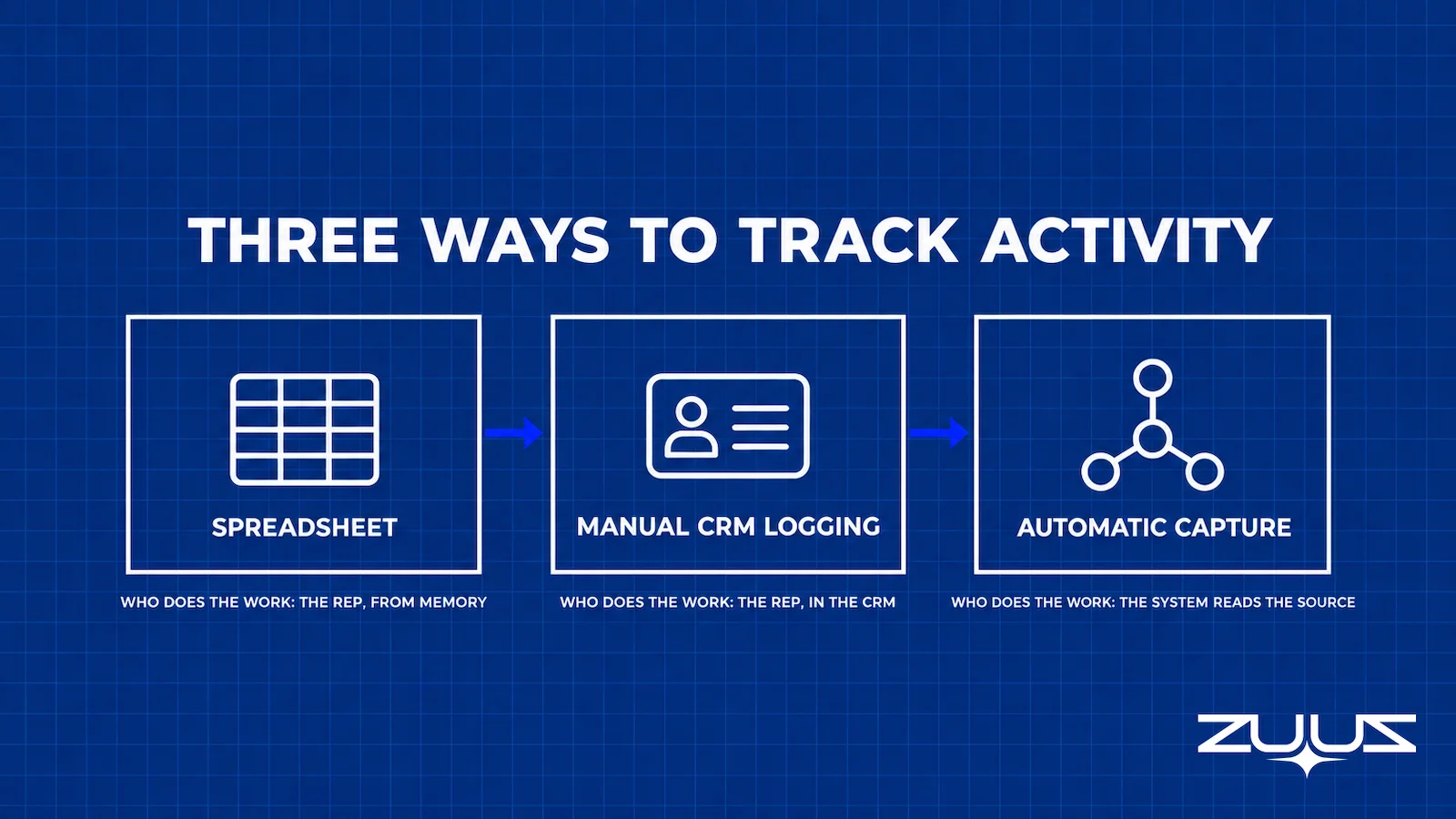
The threshold question that most guides avoid: when does a spreadsheet stop working? A practical answer from running this in an IT services and distribution business is that it holds while one person can remember every open deal, which in practice means a single seller or a very small team. Once reps handle enough daily email that they cannot recall the week without scrolling, the spreadsheet becomes a second job and the data degrades quietly.
The Capture Gap Audit: Check the Data Before Trusting the Dashboard
Before any target is set on activity numbers, it is worth establishing how complete the underlying data is. The Capture Gap Audit takes an afternoon and change the conversation.
- Silent open deals. The share of open opportunities with no logged activity in the last 14 days. In most teams this number is high enough to end the debate about whether the report is complete.
- Channel coverage. Pick ten recently closed deals and count how many of their real conversations exist in the CRM. Email threads and meetings are usually where the gap shows.
- Stakeholder completeness. How many contacts are on each open deal, compared with how many people actually appear on the email threads for that account.
- Duplication. Whether the same meeting appears more than once through different tools, which inflates counts and quietly penalizes the rep who logs once.
This audit belongs alongside the regular CRM data quality review, because activity gaps and field gaps have the same cause. Managers who run it usually stop asking reps to log more and start asking why logging was ever the rep’s job.

A Review Cadence That Uses Activity Data Properly
Activity data earns its place in three meetings, each asking a different question.
- Weekly, per rep. Which open deals have had no buyer reply, which promised actions are overdue, and which accounts have gone quiet. The conversation is about unblocking, not volume.
- Monthly, per team. Whether stakeholder coverage on open deals is improving, and whether follow-through on commitments is consistent across the team. Pipeline reviews work better when this is already visible.
- Quarterly, per segment. Which activity patterns preceded won deals in that segment, and which preceded slipped ones. This is a retrospective, not a forecast.
Reporting on what happened is the point. Activity data describes the past accurately; it does not predict outcomes, and treating it as a predictor is how teams end up managing a number instead of a pipeline.
See Which Deals Went Quiet Before the Review, Not During It.
ZUUZ surfaces open deals with no buyer reply and commitments that passed their date, from the conversations the team is already having.
Tracking Without Turning It Into Surveillance
Reps object to activity tracking for a reason that is usually fair: it has often been used to rank people by effort rather than to help them sell. The distinction that holds in practice is who the data serves first.
Capture that removes admin is accepted quickly, because the rep gets the time back and the record fills itself. Capture that exists only to produce a leaderboard is resisted, and reps route around it by holding conversations outside the tracked channels, which destroys the data anyway.
Three rules keep it on the right side. Report at the level of deals and accounts rather than individuals wherever possible. Use the data to ask what a deal needs, not to ask why a number is low. And be explicit about what is captured and what is not, which matters more when capture includes email and messages. CRM adoption follows the same logic: tools that take work away get used, tools that add work get avoided.
From an operator’s seat
Across the deployments ZUUZ runs, the order of operations decides whether activity tracking survives its first month. Teams want the dashboard switched on in week one and the capture connected later, and that sequence produces the same argument every time: the report is wrong, the reps get blamed, so they log defensively and the data gets worse. Connect the channels first, let a 90-day read fill in the history, and only then show anyone a chart. The part teams do not plan for is the cleanup that capture exposes. Once email and meetings land on the record, duplicate contacts and two versions of the same account surface all at once, and somebody has to own merging them for a week. That week is the cost nobody budgets, and it is also the week the activity report stops being argued with.
What MSPs, VARs and Distributors Should Track Instead
Sales activity tracking built for new-business teams misreads channel and services businesses, where most revenue comes from accounts the company already has.
- MSPs. A busy ticket queue is service activity, not commercial engagement. The number worth watching is whether anyone has had a commercial conversation with the decision maker before the agreement renews, which the PSA will not tell you.
- VARs. Renewal and co-term dates drive the calendar. Activity tracking should show which renewals have had a real conversation and which have had an automated reminder, since renewals across product lines hide the quiet ones.
- Distributors. A steady reorder pattern looks like health until it stops. Contact with the buying contact, not order volume, is the leading signal.
- All three. Deals often involve a vendor, a distributor and the end customer on the same thread. Counting each message as separate activity inflates the picture; counting the thread against the account keeps it honest.
A pattern worth naming from years of running sales in IT services and distribution: the reps who logged least were often the ones closest to their customers. They were in threads all day, answering technical questions and chasing vendor availability, and the CRM was the thing that happened later if the day allowed it. Ranking that team by logged activity would have promoted the wrong people.
What changed the conversation was not a new dashboard. It was the record filling itself, so the weekly meeting could start from what customers actually said rather than from what anyone found time to type.
What this looks like in a real deployment
At RA Technologies, a US IT services company, ZUUZ ran on the HubSpot instance the team had used for two years, with the same people and no migration, and surfaced $120K in pipeline within 72 hours that the CRM had never seen.
At Cloud Box Technologies, a UAE cloud and IT services business, 10 to 12 renewals are tracked in minutes from a single connected user, and leadership sees live pipeline without asking anyone for an update.
Sales Activity Tracking: How ZUUZ Fills the Record
ZUUZ is a revenue intelligence layer on top of the CRM a team already runs, not a replacement for it. Salesforce, HubSpot, Zoho, Attio or Pipedrive stays the system of record.
For activity tracking, three things change:
- The sources are connected, not remembered. ZUUZ connects to the sales inbox and calendar, reads LinkedIn messages, Microsoft Teams meeting transcripts and inbound call transcripts, and reads replies from outreach tools. Nobody logs anything by hand.
- The record gets the substance, not just the event. Alongside the activity, ZUUZ writes the participants, the next step and the stage signals it finds, so the account shows what changed rather than only that an email existed. Every update is logged with one-click rollback, and meeting notes land on the record the same way.
- Reporting describes reality. Because the capture is even across reps, an activity report compares work rather than admin habits. CRM reports then show follow-through, quiet deals and renewals due, all from what actually happened.
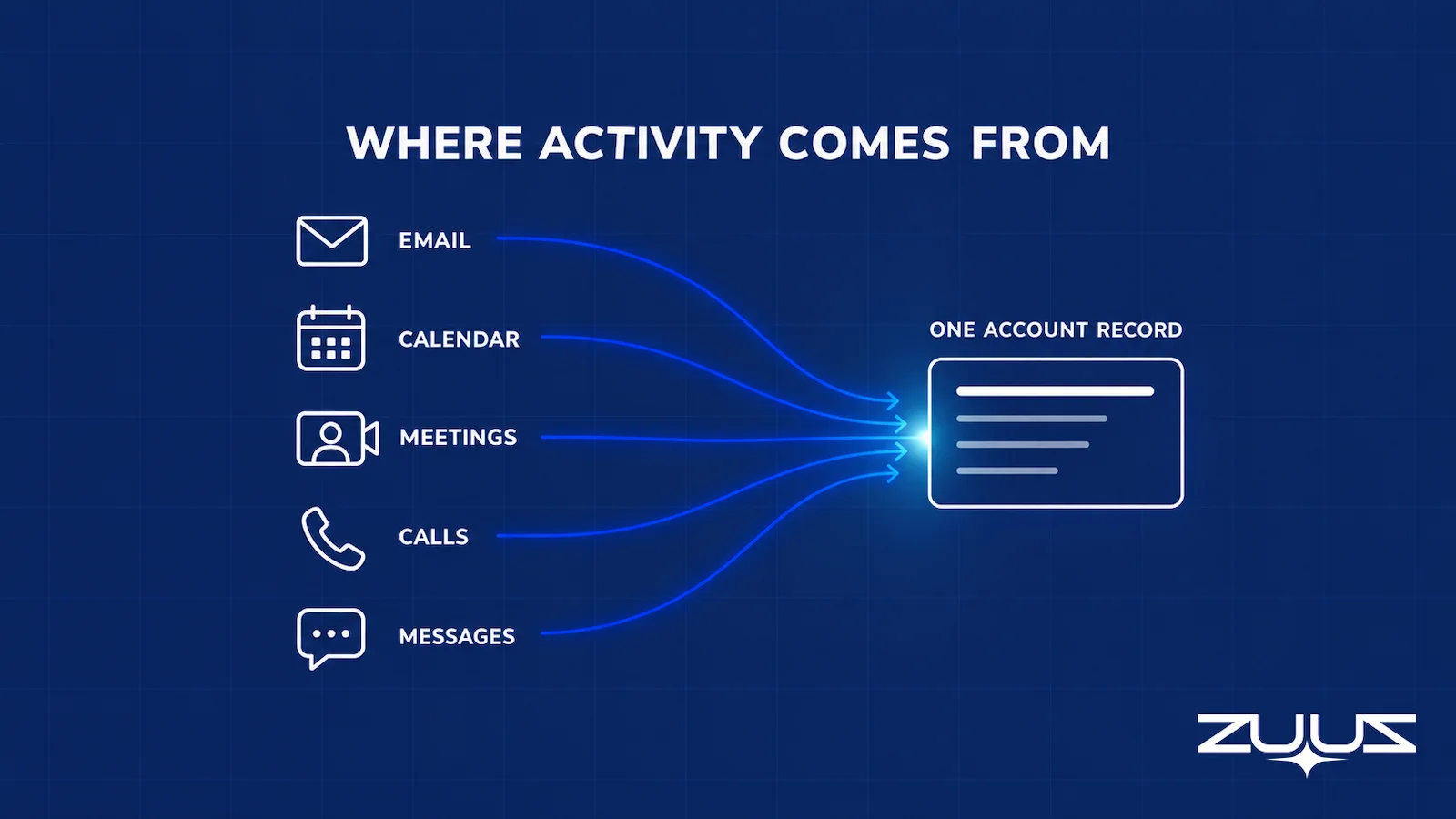
On connection, ZUUZ reads a 90-day history of the connected mailbox, so the first activity report is not empty. At RA Technologies, a US IT services company running HubSpot, this surfaced $120K in pipeline within 72 hours that the CRM had never seen. At Cloud Box Technologies, 10 to 12 renewals are tracked in minutes instead of being rebuilt by hand.
What ZUUZ does not do is score reps, predict outcomes or rate deal health. It reports what happened, which is the only thing an activity system should be trusted to do. Teams that want a fuller picture of rep workload usually pair it with a look at where selling time actually goes.
Start the Activity Report With Ninety Days Already In It.
Connect one mailbox and see what a complete activity record looks like against the last quarter of real conversations.
Setting Up Sales Activity Tracking in Five Steps
- Name the four or five activities that matter for the motion being run, using the table above rather than the CRM’s default list.
- Map the channels where those activities happen, and mark which are currently captured and which are not.
- Close the capture gap before setting targets, whether through native tooling such as the Salesforce activity capture options, HubSpot’s connected inbox, or a capture layer that reads the conversations directly.
- Audit the first month using the four checks above, and fix coverage rather than chasing reps.
- Run the cadence weekly, monthly and quarterly, and report at deal level in the weekly meeting.
Frequently Asked Questions
What is sales activity tracking?
Sales activity tracking records the interactions a sales team has with buyers, such as emails, calls, meetings and follow-ups, and reviews them to understand how work turns into pipeline. It measures inputs rather than outcomes, which makes it useful for coaching and for spotting deals that have gone quiet before they slip.
What is the difference between sales tracking and sales activity tracking?
Sales tracking follows outcomes: pipeline, stage movement, win rates and revenue. Sales activity tracking follows the inputs that produce them, such as conversations held, stakeholders engaged and commitments met. Outcome tracking shows whether the quarter is working. Activity tracking shows why, and it is the earlier signal of the two.
Which sales activity metrics should a manager track?
Five cover most teams: qualified conversations held, distinct stakeholders engaged per open deal, days since the buyer last replied, promised actions completed on time, and renewal conversations held before the renewal window. Each answers a question a manager would otherwise ask a rep, which is the test of whether a metric earns its place.
How do you track sales activity automatically?
Connect the channels where activity happens rather than asking reps to log. Native CRM capture tools sync email and calendar from a connected mailbox. A capture layer goes further by reading the conversation, including LinkedIn messages and meeting transcripts, and writing participants, next steps and stage changes onto the record automatically, keeping a full change history with one-click rollback.
Can you track sales activity in a spreadsheet?
Yes, while one person can hold every open deal in their head. A spreadsheet tracker works for a founder or a very small team. It degrades as soon as reps handle enough daily email that recalling the week requires scrolling, because entries get skipped and the totals stop being comparable between people.
How do you track emails, calls and meetings in a CRM?
Three routes exist: manual logging by the rep, native sync that copies email and calendar items onto matching records, and automatic capture that reads the conversation and writes structured detail. The first depends on discipline, the second records that something happened, and the third records what changed.
What should a sales activity dashboard include?
Open deals with no buyer reply in the last 14 days, commitments past their promised date, stakeholder coverage per open deal, renewals approaching with no conversation logged, and a capture-coverage panel showing which channels are connected. The last one matters because it tells the manager how much of the picture is missing.
How do you measure sales rep productivity fairly?
Compare work, not logging habits, which requires even capture across the team before any target is set. Then judge on outcomes per opportunity worked rather than raw activity counts, and use activity data to find blockers. A rep with fewer, deeper conversations on the right accounts usually outperforms a higher activity count.
Will activity tracking make reps feel monitored?
It depends on what the data is used for. Capture that removes admin is accepted because the rep gets time back. Tracking that only produces a leaderboard gets resisted, and reps move conversations to untracked channels, which destroys the data. Reporting at deal level rather than person level keeps the focus on what deals need.
How much activity data goes missing with manual logging?
The share varies by team, but the fastest way to measure it is a direct audit: take ten recently closed deals and count how many of their real conversations exist in the CRM. Email threads, meetings and LinkedIn messages are where the gaps concentrate, and the result is usually enough to end the debate.
What should MSPs and VARs track instead of call volume?
Commercial contact against the renewal calendar. For an MSP, a busy ticket queue shows service work, not whether anyone has discussed the renewal with the decision maker. For a VAR, the useful measure is which renewals and co-terms have had a real conversation rather than an automated reminder.
How does ZUUZ handle sales activity tracking?
ZUUZ is a revenue intelligence layer on top of the existing CRM. It connects to the sales inbox and calendar, reads LinkedIn messages, Teams meeting transcripts and inbound call transcripts, and writes the activity plus participants, next steps and stage signals onto the record automatically, with every change logged and reversible in one click. It reports what happened and does not score reps or predict outcomes.

