
What an AI CRM Assistant Does and How It Works
See how an AI CRM assistant lets reps query and update Salesforce, HubSpot, or Zoho in plain English, capturing leads from email without a new CRM.

CEO of ZUUZ. He scaled Cloud Box Technologies from 0 to $25M ARR in IT services and distribution before building ZUUZ. Connect on LinkedIn
TL;DR: An AI CRM assistant is a rep-facing layer that reads sales context, answers pipeline questions in plain English, and writes structured updates back into the CRM a team already uses. The strongest ones sit on top of Salesforce, HubSpot, or Zoho instead of replacing them, so the CRM stays the system of record. This guide explains how that model works, what a rep can ask and automate, and what to check before buying one. ZUUZ works this way: it reads the sales inbox, LinkedIn messages and meeting transcripts, answers questions from what it captured, and writes records to Salesforce, HubSpot, Zoho, Attio or Pipedrive. A free trial connects one mailbox and reads the last 90 days.
- An AI CRM assistant is an interaction and execution layer that works on top of an existing CRM, not a new AI-native CRM that replaces it.
- Its defining feature is plain-English access: a rep can ask a question about an account or lead and get an answer without building a report.
- CRM-agnostic assistants operate across Salesforce, HubSpot, Zoho, Attio or Pipedrive at once, which matters for teams running more than one system.
- The most useful assistants both read from and write to the CRM, keeping records current instead of creating a separate data silo.
- Capturing leads from email, scoring them, and matching them to the right record are common jobs where an assistant saves reps the most manual work.
- Buyers should test data access, write accuracy, bi-directional sync, and permissions before trusting an assistant with live CRM data.
A sales rep opens Monday morning with forty unread emails, three deals waiting on quotes, and a manager asking which accounts went quiet last week. The answer lives across the inbox, the calendar, and the CRM, but pulling it together by hand takes most of the morning. An AI CRM assistant is built for this gap: it turns scattered sales activity into answers a rep can ask for in plain language, and into records the CRM keeps current on its own.
This article looks at the rep-facing assistant specifically, how it works, what it does, and how to evaluate one, rather than surveying every AI feature vendors now attach to their products.
What Is an AI CRM Assistant?
An AI CRM assistant is software that uses AI to understand sales context, answer questions about CRM data, and, in more capable versions, perform CRM actions on the rep’s behalf. It sits between the person doing the selling and the database that records it. Instead of clicking through record pages and report builders, the rep asks a question or lets the assistant handle a routine update.
The category has grown crowded because almost every vendor now markets AI CRM software with some AI feature attached. What separates an assistant from a widget is scope. A real assistant can take in unstructured input like an email thread, connect it to the right account or opportunity, and either surface the relevant information or write a structured change into the CRM. A chatbot that only rephrases text does not.
AI CRM Assistant vs. AI-Native CRM
The most important distinction is also the most often blurred. An AI-native CRM is a database with AI built into its core, and adopting it usually means migrating off the CRM a team already runs. An AI CRM assistant is a layer that adds AI on top of the existing system, so Salesforce, HubSpot, or Zoho stays the source of truth while the assistant adds a new way to interact with it.
That difference decides how much disruption a buyer signs up for. Replacing a CRM means data migration, retraining, and process risk. Adding an assistant on top keeps the record, the integrations, and the reporting intact, and layers new capability over them. ZUUZ is built on the second model, which is why this guide treats the assistant as an execution layer rather than a replacement.
Assistant, Copilot, or Agent?
The terms overlap, and vendors use them loosely. A useful way to separate them is by autonomy. A copilot, often marketed as an AI sales copilot, suggests text or a next best action while the rep drives. An assistant performs bounded tasks, such as answering a question or updating a field. An agent executes multi-step workflows with less prompting, sometimes described under the agentic AI CRM label, for example capturing a lead, scoring it, and logging it without being asked each time. Most practical tools blend these behaviors, so the label matters less than what the tool can actually read, answer, and write.
How an AI CRM Assistant Works
Underneath the plain-English surface, an assistant follows a consistent pipeline. Knowing the steps helps a buyer see where a given tool is strong and where it quietly stops short. The table below outlines the model most rep-facing assistants share.
Table 1: The AI CRM assistant pipeline
| Step | What happens | Why it matters |
|---|---|---|
| Connect | The assistant gets permissioned access to the CRM plus source systems like email and calendar | An assistant can only reason over data it can actually see |
| Understand | It extracts entities, intent, and buying signals from unstructured activity | Turns a raw email into structured, usable sales information |
| Match | It links the signal to the correct contact, account, lead, or opportunity | Prevents useful information from becoming disconnected AI output |
| Decide | It chooses to answer, recommend, or execute a bounded action | Separates a lookup from a controlled change to the record |
| Sync | It reads current data and writes approved updates back | Keeps the CRM current instead of spawning a second database |
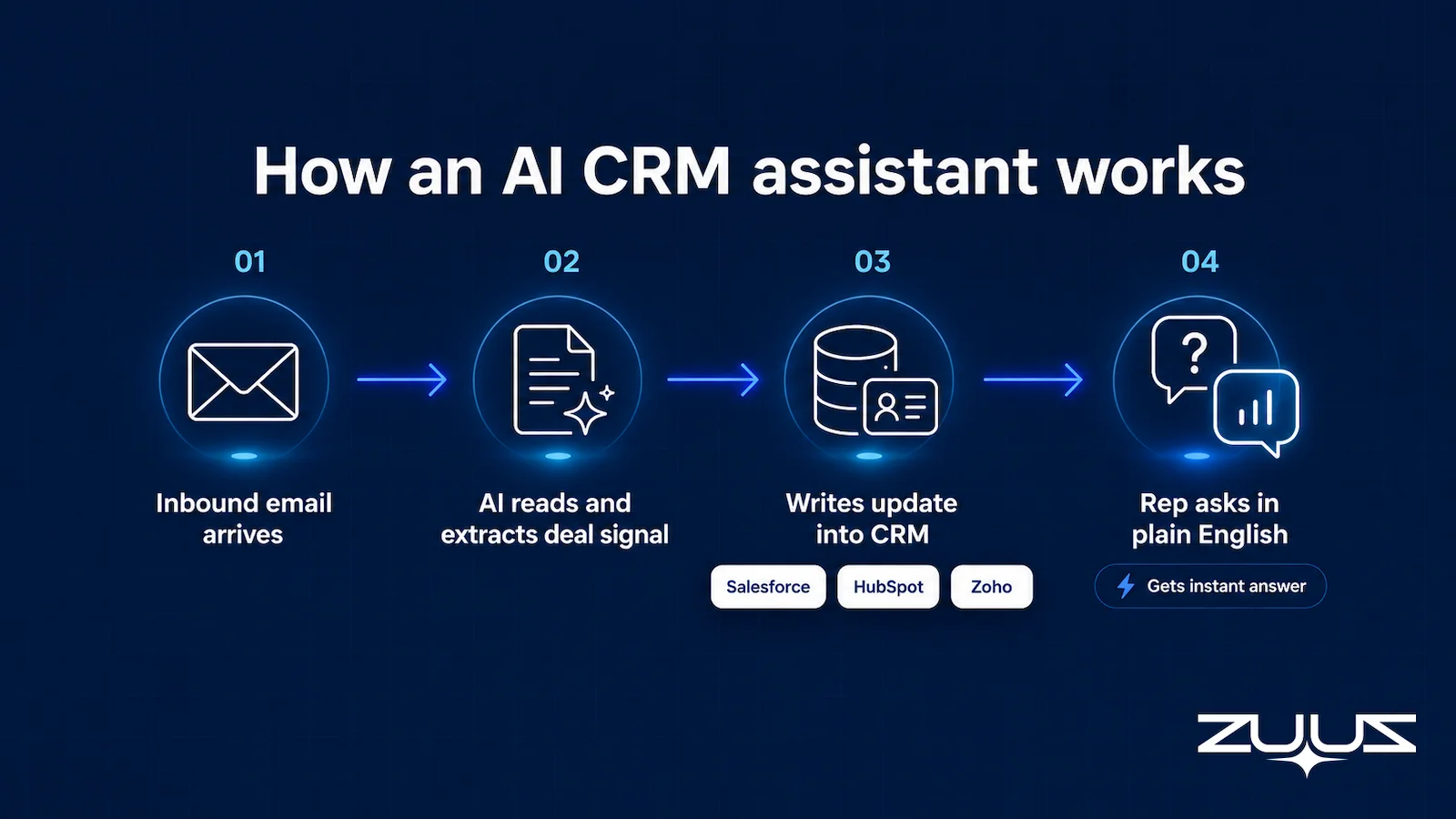
Each step is a place where tools differ. Some connect only to the CRM and miss the email where the sales event happened. Others detect a signal but stop at a suggestion rather than a structured write. The value of an assistant depends less on how fluent it sounds and more on how completely it moves through this chain.
Stop Reading About the Pipeline. Watch It Run.
ZUUZ moves an email from inbox to a structured CRM update in one pass. See the full pipeline on a live inbox.
Ask the CRM in Plain English
The feature that defines a modern assistant is natural-language access. A rep can type or speak a question the way they would ask a colleague, and the assistant retrieves the answer from live CRM data without a saved report or a filter view. Questions like “which new leads came in this week and have not been contacted,” “what is the status of the renewal for that distribution account,” or “show me deals that have gone quiet for ten days” return answers in seconds.
This matters because reporting is where CRM value usually leaks. Reps who cannot build a report do not ask the question, and information that took effort to enter never gets used. Plain-English querying removes that friction and puts the CRM’s own data back within reach of the people who need it during a call or a handoff. The table below shows the pattern.
Table 2: Plain-English questions and what the assistant does
| A rep asks | The assistant does |
|---|---|
| “What happened with the Meridian account last month?” | Pulls recent emails, meetings, and notes tied to that account |
| “Which leads need follow-up today?” | Filters open leads by last activity and surfaces the stalled ones |
| “Summarize the last three threads on this opportunity” | Assembles deal context and produces a summary for review |
| “Who owns the renewal closing this quarter?” | Returns owner, close date, and current stage from the record |
Natural-language querying is the rep-facing half of a broader shift toward conversational AI for sales and marketing. For the wider conversational AI CRM category, including the split between customer-facing and rep-facing systems, the guide to conversational CRM covers the landscape in depth. The assistant discussed here is the internal, rep-facing form of that idea.
Why Working Across Any CRM Matters
A native assistant, such as Salesforce Einstein, HubSpot’s built-in AI, or Zoho’s Zia, lives inside one vendor’s ecosystem and reasons only over that vendor’s data. That works when a company is committed to a single CRM and every relevant record already lives there. Many teams are not in that position. A company might run HubSpot for marketing-sourced leads and Salesforce for enterprise accounts, or inherit Zoho from an acquisition. In those cases a native assistant sees only part of the picture.
A CRM-agnostic assistant connects to more than one system and applies the same workflow across all of them. The rep asks one question and gets an answer that spans the tools the business actually uses. The record stays where it already lives, and no migration is required to get value. Table 3 lays out the trade-off.
Table 3: Native CRM AI vs. a CRM-agnostic assistant
| Consideration | Native CRM AI | CRM-agnostic assistant |
|---|---|---|
| Data scope | One vendor’s platform | Multiple CRMs at once |
| Setup | Built in, tied to that CRM | Connects on top of existing systems |
| Lock-in | Reinforces one ecosystem | Preserves current CRM choices |
| Best fit | Single-CRM teams | Teams running more than one CRM |
The architecture question a buyer should ask is straightforward: where does the assistant get its evidence, where does it execute, and where does the final record live? An assistant that answers all three across the systems a team already runs is more durable than one that assumes everyone standardizes on a single platform.
See What It Does for Your Reps. Live.
Watch lead capture, scoring, and record updates run on top of your own CRM in a 15-minute walkthrough.
What an AI CRM Assistant Does for a Sales Rep
Capabilities are easiest to judge when framed as jobs a rep needs done rather than feature labels. As an AI assistant for sales reps, a capable tool handles several of these jobs at once and can update the CRM automatically as it works, and the connective tissue between them is the shared context it builds. The payoff is sales rep productivity: less time on admin, more time in front of buyers. Table 4 groups the common ones.
Table 4: Rep jobs an AI CRM assistant handles
| Job | What the assistant does | How ZUUZ does it |
|---|---|---|
| Capture leads from email | Identifies genuine inbound leads in the inbox and creates or matches the record | Reads the sales inbox and LinkedIn messages, then writes the lead to the CRM for one-click approval |
| Score and prioritize | Ranks incoming leads by contextual signals so reps work the best ones first | Scores from intent signals in the conversation, never a win probability or health score |
| Keep records current | Handles activity logging and updates fields so the CRM reflects reality without manual entry | Writes stakeholders, next steps and stage signals onto the record as threads move |
| Draft a reply for the rep to review | Assembles deal context into a quote draft the rep reviews and sends | Drafts the reply; the rep reviews and sends it |
| Assemble context before acting | Gathers the relevant history so the rep does not search across records | Assembles account history from email, meetings and calls before the rep asks |
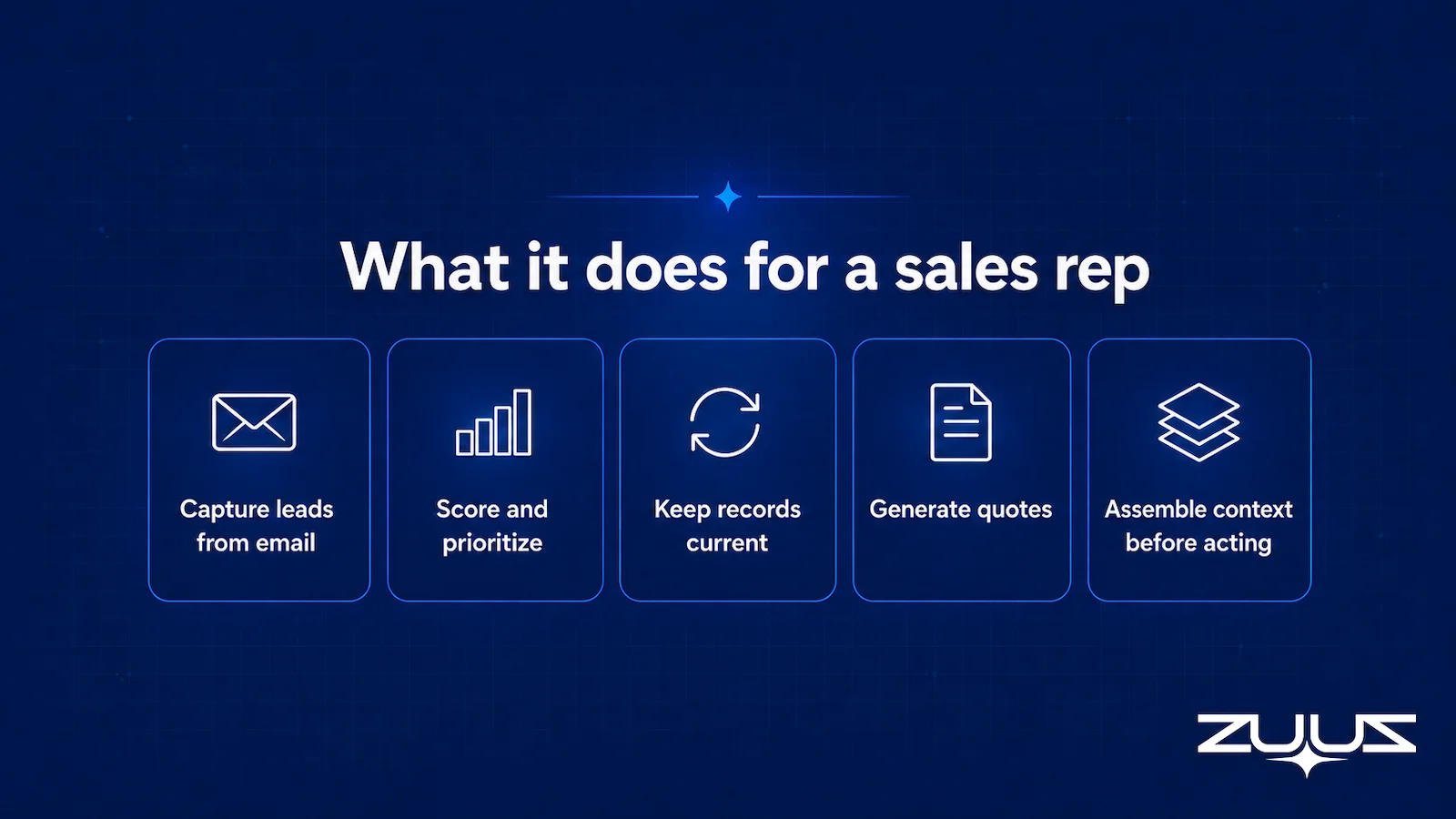
Lead capture is often the highest-value job because so much pipeline starts as an email that never reaches the CRM. An assistant that reads the inbox can surface those leads and match them to the right account, a problem covered further in the approaches to fixing manual CRM data entry. Quote drafting saves similar time on the outbound side, turning a forwarded price request into a draft the rep only needs to review and send.
Assistants also differ in when they act. A prompt-driven assistant waits for the rep to ask, like a chatbot. An event-driven assistant reacts when something happens, such as a new inbound lead or a renewal date approaching, without being prompted. The most practical setup combines both: proactive capture for routine work, and on-demand plain-English access when the rep has a specific question.
One thing that becomes obvious from years of running sales in IT services and distribution: reps do not avoid the CRM because they dislike software. They avoid it because the CRM asks them to retype what they already wrote in an email an hour earlier. Any assistant that answers questions beautifully but still expects that retyping solves the wrong half of the problem.
The test that matters is therefore not how good the answers sound, but whether the record improves without anyone being asked to maintain it. That is what the Capture Layer Test below is for.
What this looks like in a real deployment
At RA Technologies, a US IT services company, ZUUZ ran on the HubSpot instance the team had used for two years, with the same people and no migration, and surfaced $120K in pipeline within 72 hours that the CRM had never seen.
At Cloud Box Technologies, a UAE cloud and IT services business, 10 to 12 renewals are tracked in minutes from a single connected user, and leadership sees live pipeline without chasing anyone for an update.
How ZUUZ Approaches the AI CRM Assistant
ZUUZ is an agentic-AI execution layer that sits on top of the CRM, not an AI-native CRM. It connects to Salesforce, HubSpot, and Zoho at the same time and keeps each one as the system of record. The point is to add capability to the CRM a team already trusts rather than ask them to move.
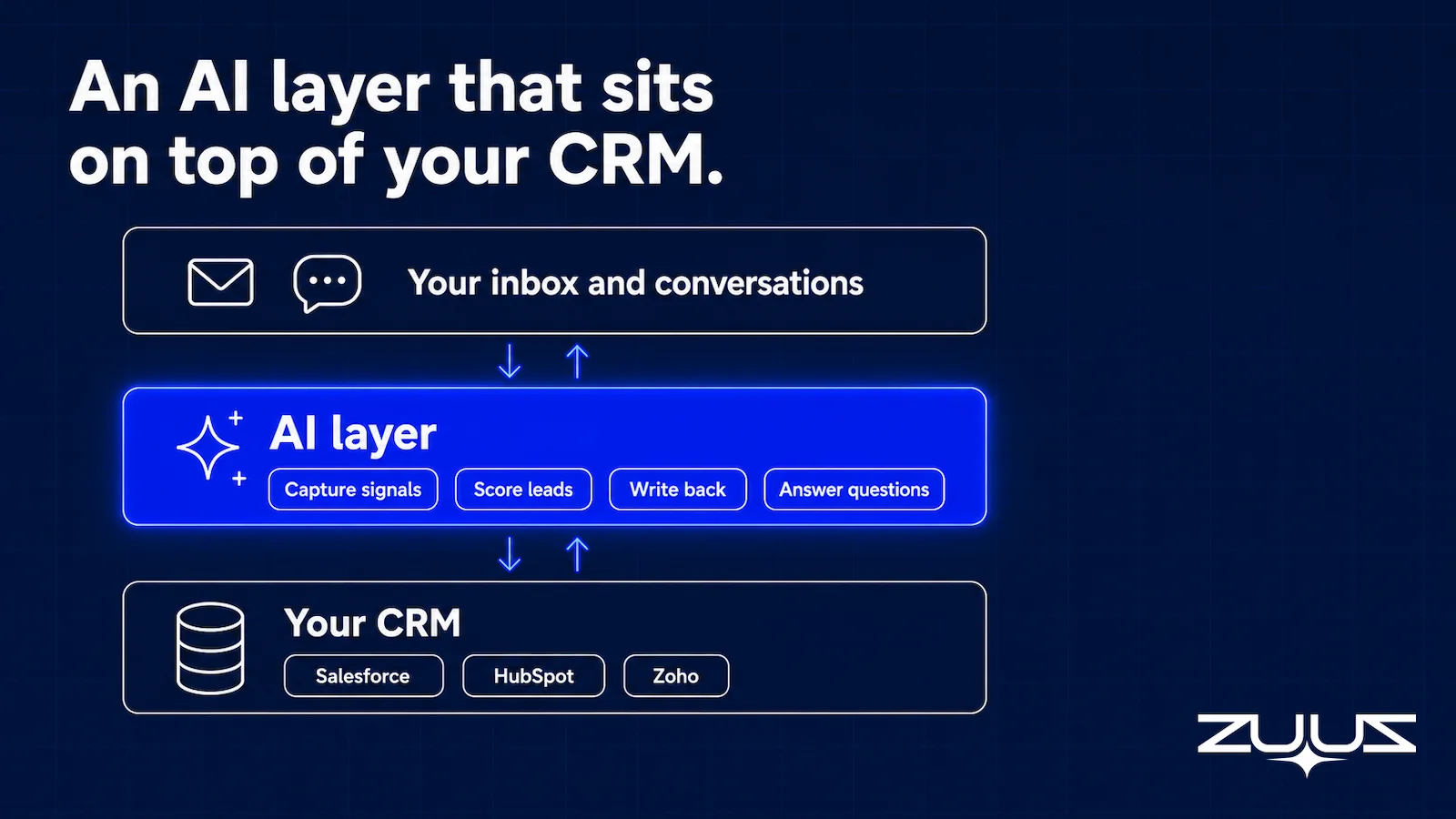
On the capture side, ZUUZ reads sales email to identify and score leads that would otherwise stay outside the structured pipeline, then matches them to the right record through bi-directional CRM sync. Reps get a Sales AI agent they can query in plain English, so account status and lead priorities are a question away instead of a report away. RA Technologies, an IT services firm in the United States, is one of the customers using this email-to-CRM capture approach in production. ZUUZ has four paying customers across distribution, retail, and IT services, and the model is the same for each: capture, sync, and answer on top of the existing CRM.
It is worth stating what ZUUZ does not do. It is not a CRM replacement, and it does not provide sales forecasting. The assistant’s job is to connect conversation, context, and execution for the rep, not to predict revenue. That narrower focus keeps the tool honest about where its value sits. The tagline captures the intent: business happens in conversations, not in software.
See It Run on Your Own Inbox. Not a Demo Dataset.
Watch lead capture, plain-English queries, and CRM sync work on top of Salesforce, HubSpot, or Zoho.
From an operator’s seat
The part teams do not plan for is that an assistant is judged on its first wrong answer, not its first right one. Across the deployments ZUUZ runs, the pattern is that reps accept a missing field without complaint and reject the whole tool over one stakeholder attached to the wrong account, because a wrong name in front of a customer costs them something personally and a blank field does not.
That changes the order of work. The useful first week is a read-only lookback on threads the reps already remember, not live writing on current deals: they check the assistant against conversations whose outcome they know, and the matching rules get corrected before anything reaches a record a manager reviews. Teams that connect and start writing on the same afternoon spend the following month rebuilding trust rather than records.
The Capture Layer Test: What to Look For Before Choosing One
Feature lists rarely reveal whether an assistant will hold up in daily use. A better approach is to turn vague claims into testable requirements. The checklist below reframes common promises as questions a buyer can verify in a demo or trial.
Table 5: An AI CRM assistant evaluation checklist
| Question to ask | What a good answer looks like |
|---|---|
| What systems can it read from? | Named CRMs plus the source systems your workflow needs, such as email |
| What CRM actions can it execute? | Structured writes to specific objects and fields, not just AI notes |
| Is the sync truly bi-directional? | Data moves both into and out of the CRM, with no separate database |
| Can a rep query it in plain English? | Useful answers without building a report, tied to the live data model |
| How are permissions and approvals handled? | Clear controls before the assistant writes to production records |
| How will accuracy be measured after launch? | A test set and targets, not vendor productivity claims |
The strongest signal is whether an assistant can show where an answer or action came from. Traceability lets a rep verify an important output instead of trusting an unexplained result, and it separates a serious tool from a demo. The gap between a tool that summarizes and one that executes only shows up under this kind of scrutiny, a theme explored in why a CRM pipeline so often shows the wrong picture.
Conclusion and Next Steps
The real test of an AI CRM assistant is not how well it chats. It is whether the tool can understand relevant sales activity, work with the CRM a team already runs, and help reps turn context into action they can trust. Rep-facing plain-English access, CRM-agnostic reach, and bi-directional sync are the traits that separate a durable assistant from a passing feature. Teams evaluating one should start by asking what it can read, what it can write, and how they will measure it. From there, a short trial against real inboxes and pipelines will reveal far more than any datasheet.
Frequently Asked Questions
What is an AI CRM assistant?
An AI CRM assistant is software that uses AI to understand sales context, answer questions about CRM data in plain language, and perform CRM actions for a rep. It typically works as a layer on top of an existing CRM rather than as a replacement for it, connecting the rep to the record without manual report building.
How does an AI CRM assistant work?
It follows a pipeline: connect to the CRM and source systems, understand unstructured activity like email, match the information to the right record, decide whether to answer or act, and sync changes back to the CRM. Each step determines how completely the assistant turns raw sales activity into usable, current records.
Is an AI CRM assistant the same as an AI CRM?
No. An AI CRM, or AI-native CRM, is the database itself with AI built in, and adopting it usually means migrating systems. An AI CRM assistant sits on top of an existing CRM such as Salesforce, HubSpot, or Zoho and adds AI capability without replacing the underlying system of record.
Can an AI CRM assistant capture leads from email?
Some can. This requires access to email content plus the ability to classify a genuine lead, extract the details, match it to the right account, and write it into the CRM. Not every assistant does all four steps, so buyers should confirm that inbox capture reaches the CRM rather than stopping at a summary.
Can an AI CRM assistant work with Salesforce, HubSpot, or Zoho?
It depends on the tool. Native assistants work only inside their own CRM. CRM-agnostic assistants connect to Salesforce, HubSpot, and Zoho, sometimes at the same time, applying one workflow across all of them. Teams running more than one CRM should look specifically for this multi-platform support.
Does an AI CRM assistant provide sales forecasting?
Not necessarily, and forecasting is a separate capability from being an assistant. Some products bundle prediction, but an assistant can be fully useful for querying, lead capture, and record updates without it. ZUUZ, for example, is an execution layer that captures leads and answers plain-English queries and does not provide forecasting.
Can you ask your CRM questions in plain English?
Plain-English querying lets a rep ask the CRM a question and get an answer from live data without building a report. The assistant interprets the request, pulls the matching records from Salesforce, HubSpot, or Zoho, and returns the result in seconds. This natural-language access is the feature that most defines a modern AI CRM assistant.
What is the best AI CRM assistant?
The best AI CRM assistant is the one that reads from the systems a team already runs, writes structured updates back through bi-directional sync, and answers plain-English questions tied to live data. Rather than trust a feature list, buyers should test data access, write accuracy, and permissions on real inboxes and pipelines before committing.

