
Einstein Activity Capture: Limits, Pricing, and Alternatives
What Einstein Activity Capture is, how it works, what it costs, why standard-tier data expires after six months, and how to evaluate alternatives.

CEO of ZUUZ. He scaled Cloud Box Technologies from 0 to $25M ARR in IT services and distribution before building ZUUZ. Connect on LinkedIn
TL;DR: Einstein Activity Capture logs email and calendar activity to Salesforce but cannot create new CRM records from what it reads. Its data sits on a separate Activity Platform store that deletes anything older than six months on the standard tier, 24 months requires a paid license, and its Exchange Web Services connection is affected by Microsoft’s retirement timeline. ZUUZ reads the same inbox and writes structured deal records directly to Salesforce, HubSpot, or Zoho. A free trial connects one mailbox and reads the last 90 days, so the gap between what was logged and what was actually said is visible before any license decision.
- Einstein Activity Capture syncs email and calendar activity to Salesforce, but it does not create new contact or deal records from that activity.
- Microsoft begins officially retiring Exchange Web Services in October 2026, with a permanent shutdown in April 2027, affecting any EAC, Salesforce Inbox, or Lightning Sync connection still running on it.
- Salesforce requires Einstein Activity Capture connections created before Spring ’26 to be upgraded to Microsoft Graph by October 1, 2026, the upgrade cannot be rolled back, and connections set up from Spring ’26 onward already use Graph.
- The recommended deadline to migrate existing connections from EWS to Microsoft Graph is August 3, 2026, well before the October retirement date.
- EAC’s matching logic is simple and its email filtering lacks subject-line or keyword rules, so noisy inboxes produce noisy activity logs.
- Captured activity is stored on Salesforce’s Activity Platform rather than as ordinary Salesforce records, and orgs running only Standard Einstein Activity Capture lose anything older than six months by default.
- Standard EAC is included with Sales at the Starter, Pro Suite, Professional, and Enterprise levels; the 24-month retention and expanded capabilities require a paid license such as Einstein for Sales, Sales Engagement, Inbox, or Revenue Intelligence.
- ZUUZ reads the same email and calendar activity and writes structured, qualified records to the CRM automatically, closing the record-creation gap EAC leaves open.
Einstein Activity Capture solved a real problem when Salesforce shipped it: reps stopped manually logging every email and meeting. What it never solved is the harder problem underneath, whether the CRM actually has a record of a deal at all.
A looming Microsoft infrastructure change makes this the right year to look at the tool closely regardless of feature gaps. This guide covers what Einstein Activity Capture does well, where its data actually lives and how long it survives there, what it costs across editions and add-ons, where it consistently falls short, and what changes for any team still connected through Exchange Web Services.
What Einstein Activity Capture Actually Does
Einstein Activity Capture automatically syncs email, calendar events, and contacts between Salesforce and Microsoft 365 or Google Workspace, replacing manual activity logging for reps. It runs as a background connector rather than a feature reps interact with directly.
For a team whose main complaint is that reps forget to log calls and emails, EAC closes that gap well. The activity shows up on the record automatically, without a rep opening Salesforce to type it in.
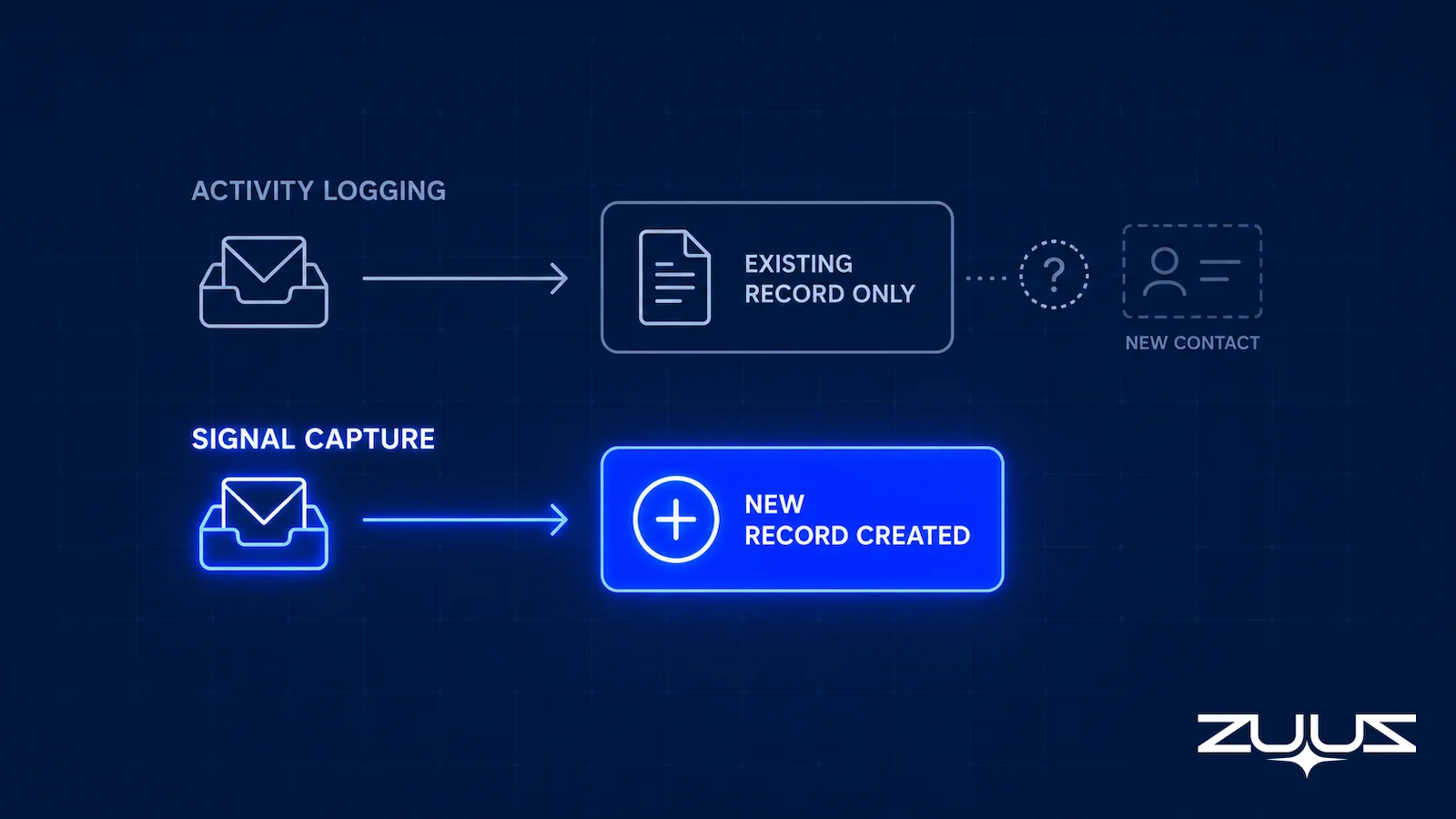
The distinction that matters for evaluating alternatives is between logging and capture. Logging records what happened against a contact or deal that already exists in the CRM. Signal capture goes a step further and builds the record itself from what the activity contains.
How Einstein Activity Capture Works, Step by Step
Einstein Activity Capture runs as a connection between a rep’s mailbox and Salesforce rather than as an add-in inside the mail client. Once a user connects Microsoft 365 or Google Workspace, the service reads that mailbox and calendar and copies activity into Salesforce, where it appears on the activity timeline of matching records. Salesforce documents the behavior in its own Einstein Activity Capture overview.
The flow has four stages, and each one explains a different complaint teams have later:
- Connect. An administrator creates a configuration and assigns users to it. Each user authorises their own mailbox and calendar, which is why capture stops for anyone whose connection lapses.
- Capture. Emails and calendar events are read from the connected mailbox going forward. Historical mail is not backfilled the way a one-off import would be.
- Match. Activity is associated with existing Salesforce records by matching participant email addresses against contacts, leads and accounts. Anything that has no matching record has nothing to attach to.
- Surface. Matched activity renders on the activity timeline. It is visible on the record, and it behaves differently from standard Salesforce tasks and events in reporting, because of where the data is stored.
That last stage is the one most teams discover late. A logged email tells a manager that a conversation happened. It does not tell the CRM that the deal moved, that a new stakeholder joined the thread, or that a renewal date was agreed, because the capture step copies messages rather than reading them for meaning.
How to Set Up Einstein Activity Capture
Setup happens in Salesforce Setup, not in Outlook or Gmail. Salesforce’s setup documentation walks through the current flow, and the shape of it is consistent across editions:
- Open Einstein Activity Capture in Setup and create a configuration, which is the container for who is included and what syncs.
- Connect the mail service, either Microsoft 365 or Google Workspace, and complete the authorisation as each user.
- Choose what the configuration syncs: email, events, contacts, or a combination, and in which direction.
- Assign users or profiles to the configuration, then confirm that activity is appearing on the activity timeline of a known record.
- Review the sharing setting that controls who can see captured activity, because the default is more restrictive than most teams expect.
Salesforce also publishes a considerations page that is worth reading before rollout rather than after, since it lists the behaviors that generate most support tickets: retention on the standard tier, what is excluded from reporting, and how matching handles records that do not exist yet.
Where Einstein Activity Capture Data Actually Lives
This is the part most evaluations miss, and it changes how the rest of the feature set should be read. Captured emails and events do not land in Salesforce as ordinary records by default. They are processed and held on the Activity Platform, which runs on Hyperforce infrastructure on AWS, and surfaced back into the activity timeline from there.
Salesforce is direct about the tradeoff in its own documentation: that data does not count against Salesforce data storage limits, but it is subject to a retention period. Storage a team does not pay for is storage a team does not permanently own.
The retention clock is the consequence. According to Salesforce’s data retention documentation, an org running only Standard Einstein Activity Capture users, with no paid licenses, retains captured activity for six months by default, adjustable between three and six months by contacting Salesforce Customer Support. Anything older is deleted from Activity Platform storage and stops appearing in the interface.
Adding at least one paid license changes the picture considerably. With Einstein for Sales, Inbox, Sales Engagement, or Revenue Intelligence in the org, or an edition that includes them, the default retention across all Activity Platform data rises to 24 months, and can be set anywhere from three months to five years through Salesforce Support.
The table below summarizes how licensing changes both the retention window and where the data ultimately sits.
| Org licensing | Default retention | Adjustable range | Where the data sits |
|---|---|---|---|
| Standard Einstein Activity Capture only | 6 months | 3 to 6 months, via Salesforce Support | Activity Platform |
| At least one paid license (Einstein for Sales, Inbox, Sales Engagement, Revenue Intelligence) | 24 months | 3 months to 5 years, via Salesforce Support | Activity Platform |
| Sandbox | 6 months | Not adjustable | Activity Platform |
| Sync Email as Salesforce Activity enabled | Follows the org’s data storage limits | Governed by storage, not a retention clock | Salesforce records |
Two practical implications follow. A team on the free tier is running an activity history that quietly expires twice a year, which makes any year over year analysis of email engagement impossible on that data alone. And the fix for that is a paid license, which means retention is effectively a pricing decision rather than a configuration one.
There is a related detail worth checking at setup. When a mailbox first connects, Salesforce backfills a limited window: emails default to 180 days and up to 50,000 messages, while events default to zero days, meaning meetings that ended before the connection are not synced at all unless an admin raises that setting to as much as 180 days and 5,000 events.
- Coverage: does it capture from every channel a deal moves through, the sales inbox, the calendar, meeting or call transcripts and LinkedIn messages, or only Exchange and Gmail mail?
- Where the data sits: is captured activity stored in CRM objects a report and a formula can read, or in an external store the CRM only displays?
- Retention: how long is the history kept, and does keeping it longer cost money?
- Record creation: can it create a contact, lead or opportunity that does not exist yet, or only log against records that already do?
- Capture layer: does anything turn the content of those conversations into fields, next steps and renewal signals, or is the output a logged email?
- Rep effort: is anything captured on a day the rep forgets the BCC, the sidebar or the button?
Einstein Activity Capture Pricing: What Is Included and What Costs Extra
Einstein Activity Capture has no standalone price. It is packaged, which is why the honest answer to what it costs depends entirely on which edition and add-ons an org already holds.
The Standard tier is included with Sales at the Starter, Pro Suite, Professional, and Enterprise levels, and is also available with Unlimited, Einstein 1 Sales Edition, and Agentforce 1 Edition. For teams in those editions, turning EAC on adds nothing to the invoice. That is the version with the six month retention ceiling described above.
The expanded capabilities sit behind separate licensing. Einstein for Sales is included in Einstein 1 Sales Edition and sold at extra cost in Enterprise and Unlimited. Sales Engagement is included with Sales in Performance and Unlimited and costs extra in Professional and Enterprise. Revenue Intelligence is an extra cost item in Enterprise and Unlimited.
For scale, Salesforce’s published sales pricing lists Starter Suite at $25 per user per month and Pro Suite at $100, with the Core, Advanced, and Max tiers at $195, $395, and $550 per user per month respectively, billed annually. On the add-on side, Agentforce for Sales starts at $125 per user per month and Revenue Intelligence starts at $220 per user per month. Salesforce notes that pricing is subject to change, so the live pricing page remains the authority on current figures.
The number that actually matters in an evaluation is not the license line. It is the cost of the records that never get created. A tool that logs activity against existing records leaves every inbound conversation without a matching record entirely uncaptured, and no edition upgrade changes that, because it is a design boundary rather than a feature tier.
The Capture Layer Test: five things to require of any capture setup
- It creates records from new conversations, not only logs against records that already exist.
- Activity lives on the CRM record, so retention follows the CRM rather than a separate store.
- It reads what changed in a thread, not just that the thread happened.
- It covers channels beyond email and calendar, including meetings and LinkedIn messages.
- It does not depend on a connection path that is being retired.
The sections below measure Einstein Activity Capture against those five, and the comparison table further down shows how ZUUZ handles each job on top of the same Salesforce org.
The Limitations of Einstein Activity Capture
Several limitations show up consistently across published reviews and Salesforce admin communities. Email filtering lacks subject-line, keyword, or folder-based rules, so unrelated email volume clutters the activity timeline alongside genuine deal signals.
Calendar sync struggles with recurring events and delegated calendars in more complex scenarios. Task sync runs one way only, so tasks created in Outlook or Gmail do not sync back to Salesforce. Contact matching uses relatively simple logic, which produces duplicates and incomplete records from meeting invites.
None of these are edge cases. They are the normal experience of running EAC at any real email volume, which is why CRM data quality tooling exists as its own category alongside activity capture in the first place.
Sync Email as Salesforce Activity, and What It Changes
Salesforce offers a setting that addresses part of the storage question directly. With Sync Email as Salesforce Activity enabled, captured emails and events are written into Salesforce as actual records rather than living only on the Activity Platform, which means they follow standard Salesforce data storage limits and behave like the rest of the org’s data for reporting purposes.
Teams that need durable, reportable activity history generally want this on, and Salesforce publishes a migration path for orgs moving to it. The tradeoff is the mirror image of the retention tradeoff: records that persist properly consume the data storage allocation the org pays for.
What the setting does not change is the record creation boundary. Synced emails still attach to contacts, leads, and opportunities that already exist. An email from a prospect with no matching record in Salesforce has nothing to attach to, whether it is stored on the Activity Platform or written into the org.
The Exchange Web Services Retirement Most Teams Have Not Planned For
There are two timelines here and they are easy to conflate. The underlying one is Microsoft’s: Exchange Web Services is being retired, with official retirement beginning in October 2026 and a permanent shutdown following in 2027.
The one that actually governs a Salesforce admin’s calendar is Salesforce’s. In its own upgrade documentation, Salesforce states that Einstein Activity Capture connections set up against Microsoft Office 365 before Spring ’26 must be upgraded to Microsoft Graph by October 1, 2026 to avoid service disruption. Anything configured from Spring ’26 onward is authenticated through Microsoft Graph automatically and needs no action.
Once EWS stops functioning for a given connection, Einstein Activity Capture stops syncing emails, events, and contacts from that mailbox to Salesforce. Salesforce Inbox and Lightning Sync are affected the same way, since both depend on the same underlying protocol. None of this is a Salesforce product decision. It is an infrastructure change on Microsoft’s side that any tool built on EWS inherits.
How to Tell Which Connection Your Org Is Actually On
The question sounds like it needs an audit and does not. Two facts settle it for most orgs.
First, when was Einstein Activity Capture originally configured against Microsoft 365? If the answer is Spring ’26 or later, Graph is already in use and there is nothing to migrate. If it predates that, or nobody remembers, treat it as an EWS connection until proven otherwise, because that is the case that breaks.
Second, does the org run org-level connections or user-level connections? Salesforce documents a separate upgrade flow for each, surfaced through prompts in Setup, so knowing which one is in play determines who has to do the work: an administrator once, or every connected user individually. The second case is the one that slips, because it depends on people who do not know a deadline exists.
Two details are worth planning around before starting. The upgrade is one way. Salesforce is explicit that once a connection moves to Microsoft Graph, it cannot be rolled back to Exchange Web Services, so this is not a change to trial in production on a Friday. And the failure mode on the other side of the deadline is quiet: a connection that stops authenticating stops syncing email, events, and contacts. It does not announce itself in the activity timeline. It simply stops adding to it, and the first symptom is usually a rep noticing that a thread they know they sent is not on the record.
The retention clock keeps running through all of it. Activity already captured continues aging out on its normal schedule, six months on the standard tier, so a sync that quietly stops in October does not freeze the history in place. It leaves a record that keeps thinning while nothing new arrives to replace it.
This is not optional to plan around. A team that has not confirmed which connection method its EAC setup uses today should treat this as the trigger to evaluate alternatives before the August migration deadline, not after a sync silently stops in production.
The Record Creation Gap
The most consequential EAC limitation rarely gets top billing in feature comparisons: EAC cannot create new contact, lead, or opportunity records from inbox activity on its own. It logs activity against records that already exist. A prospect who emails in cold, with no existing Salesforce record, generates no new record at all.
This matters more than filtering or calendar edge cases because it defines what EAC is built to do. It is an activity logger for known relationships, not a signal capture layer for deals that start in the inbox before they exist anywhere else.
The Record-Ready Test
A full activity tab is easy to mistake for a complete record. This test decides whether a record could be handed to somebody else today without a conversation.
- Choose an account the owning rep has not touched in two weeks.
- Ask a colleague to say who the buying group is, what was last agreed and what happens next, using the CRM alone.
- Every answer that needs the rep, the inbox or a call is a record-ready failure.
- A record that passes survives a handoff, a territory change and a departure. One that fails is a person, not a system.
Run it on an account Einstein Activity Capture has been logging for months and the result is usually the same. The colleague can see that eleven emails and two meetings happened, and can open them one at a time, but cannot say who signs, what was agreed on pricing, or what the next step is, because none of that reached a field. That is the distance between a complete activity history and a record-ready account, and closing it is the job an EAC alternative is actually being bought for.
What to Evaluate in an EAC Alternative
Mapping the jobs against what EAC actually does makes the boundary concrete, and gives an evaluation checklist that is harder to answer with a demo.
| Job | Einstein Activity Capture | What to require of an alternative | How ZUUZ handles it |
|---|---|---|---|
| Log email and meetings against an existing record | Yes, automatically | Table stakes, not a differentiator | Captures from the inbox, calendar, Teams meeting transcripts and inbound call transcripts, then writes the activity to the record |
| Create a contact, lead, or opportunity from an unknown sender | No | Creates the record from the message itself | Creates the contact, lead or opportunity from the conversation, with the rep approving in one click |
| Filter by subject line, keyword, or folder | No rules of this kind | Rules that keep noise off the timeline | Keyword filtering keeps out-of-scope threads out of the CRM entirely |
| Sync tasks in both directions | One way only | Two way, or an explicit reason it is not needed | Writes the next step onto the record; two-way task sync stays with the CRM’s own tooling |
| Keep activity history beyond the license window | Tied to the retention tier | Records that persist under normal CRM storage | Activity sits on the CRM record, so history follows the CRM rather than a separate store |
| Survive the Exchange Web Services retirement | Only on a Microsoft Graph connection | Connection method documented, not assumed | Connects to Outlook and Gmail independently, so capture does not depend on the retired Exchange Web Services path |
| Work across more than one CRM | Salesforce only | Matches the platforms actually in use | Writes to Salesforce, HubSpot, Zoho, Attio or Pipedrive, so more than one CRM can be covered |
Three questions separate a genuine replacement from a lateral move. First, does the tool create new records from inbound email, or only log activity against records a rep already created manually.
Second, how does connection reliability hold up against the EWS changes landing in 2026. A tool still dependent on the same infrastructure Microsoft is retiring inherits the same timeline risk regardless of how good its other features are.
Third, does the tool work across more than one CRM. A single-CRM activity capture tool solves today’s problem but not a future acquisition or a second business unit running a different platform.
One observation from running sales teams in IT services and distribution: activity logging and pipeline accuracy are barely related. Teams with disciplined logging still discovered deals late, because what gets logged is that a message existed, while what moves a deal is a sentence inside it. A renewal date agreed in passing, a new procurement contact copied in halfway down a thread, a quiet objection raised on a Friday. None of that becomes a field because none of it is what a sync was built to carry.
That gap is what the Capture Layer Test above is really measuring. Einstein Activity Capture answers the first question well and the rest partially, which is exactly why it works as a foundation and not as the finished system.
What this looks like in a real deployment
At RA Technologies, a US IT services company, ZUUZ ran on the HubSpot instance the team had used for two years, with the same people and no migration. It surfaced $120K in pipeline within 72 hours that the CRM had never seen, captured from the sales mailbox.
At Cloud Box Technologies, a UAE cloud and IT services business, 10 to 12 renewals are tracked in minutes from a single connected user, and leadership sees live pipeline without asking anyone for an update. Neither deployment replaced Salesforce or HubSpot, and neither asked reps to change how they work.
One boundary worth stating plainly: ZUUZ is an AI layer on top of the CRM a team already runs, never a CRM and never a replacement for one. Einstein Activity Capture and the tools usually compared with it report the activity a rep generated. ZUUZ connects to the sales inbox, reads LinkedIn messages and meeting or call transcripts, and writes leads, stakeholders, next steps and renewal signals into Salesforce, HubSpot, Zoho, Attio or Pipedrive fields for the rep to approve in one click.
From Logged to Captured: How ZUUZ Extends What EAC Leaves Undone
RA Technologies, a US-based IT services company, ran HubSpot for two years before connecting its sales inbox to ZUUZ. Activity logging alone had never surfaced deals that started as cold replies with no matching CRM record to log against.
A 90-day historical lookback across that mailbox surfaced $120,000 in pipeline that had never existed in HubSpot at all, because nothing in the inbox had a record to attach to until ZUUZ created one. ZUUZ reads inbound and outbound email, extracts contact, company, and deal signals, including data found in attachments, and creates or updates the structured record directly, rather than logging activity against a record that has to exist first.
A lead scoring layer ranks what gets captured by intent and engagement, and a pipeline risk layer flags accounts that have gone quiet against their typical cycle length. Because ZUUZ operates across Salesforce, HubSpot, Zoho, Attio or Pipedrive rather than one platform tied to one email infrastructure, it is not affected by which calendar or email connection method a specific CRM vendor’s native tool depends on.
From an operator’s seat
Having run this migration in practice, the order that works is to leave activity capture switched on while a capture layer runs beside it, rather than cutting over on a date. The two answer different questions, and holding them side by side for a month is the fastest way to show a Salesforce admin what was never reaching a field. The part teams do not plan for is the hygiene decision underneath record creation: once records start being created from inbound threads, somebody has to own the rule for when an interested email becomes an opportunity, and no tool settles that for a RevOps team. The other cost nobody budgets is permissions time. Mailbox access, and on Microsoft estates the Graph consent, sits with IT, and that approval tends to set the real start date.
Capture the Deals Activity Logging Never Sees.
ZUUZ creates the record, not just the log entry. Book a 15-minute walkthrough on your own inbox.
The pattern behind that number is not unique to one company. When the only record of a deal is a thread in someone’s mailbox, the pipeline a leader reviews on Monday is a picture of the accounts that happened to get logged, not the accounts that are actually in play. Activity logging narrows that gap for relationships the CRM already knows about. It cannot narrow it for the ones it has never heard of.
Activity capture is one piece of a broader landscape. The full guide to AI sales tool categories covers how CRM data sync compares to conversation intelligence, lead scoring, and pipeline risk monitoring as separate categories.
Frequently Asked Questions
What is Einstein Activity Capture?
Einstein Activity Capture is a Salesforce feature that automatically syncs email, calendar events, and contacts between Salesforce and Microsoft 365 or Google Workspace. It replaces manual activity logging by capturing what reps already do in their inbox and calendar.
Why do teams look for Einstein Activity Capture alternatives?
Common reasons include limited email filtering, one-way task sync, simple contact matching that produces duplicates, and the inability to create new CRM records from inbox activity. Microsoft’s retirement of Exchange Web Services starting October 2026 adds a timeline-driven reason as well.
Is Salesforce retiring Einstein Activity Capture?
No. Salesforce has not announced a retirement of Einstein Activity Capture itself. The relevant change is on Microsoft’s side: EAC connections that authenticate through Exchange Web Services stop syncing once Microsoft retires that protocol, starting October 2026 with a permanent shutdown in April 2027.
Can Einstein Activity Capture create new leads or contacts?
No. EAC logs activity against records that already exist in Salesforce. A prospect who emails in with no existing record generates no new lead or contact from that activity alone, which is the most significant gap for teams relying on inbound email.
Does ZUUZ replace Einstein Activity Capture?
ZUUZ reads the same inbound and outbound email EAC would log, but instead of only logging activity against existing records, it extracts deal signals and creates or updates structured records directly in Salesforce, HubSpot, or Zoho.
What happens to my CRM sync when Exchange Web Services retires?
Any connection still authenticating through EWS, including EAC, Salesforce Inbox, and Lightning Sync, stops syncing email and calendar data once Microsoft removes that dependency starting October 2026. The recommended migration deadline is August 3, 2026, and the permanent shutdown lands in April 2027.
How do I know if my Einstein Activity Capture connection uses EWS or Microsoft Graph?
The setup date is the fastest signal. Salesforce authenticates Einstein Activity Capture connections to Microsoft Office 365 through Microsoft Graph automatically from Spring ’26 onward, so anything configured from that release forward is already migrated. Connections created before Spring ’26 need to be upgraded by October 1, 2026. Salesforce provides separate upgrade flows for org-level and user-level connections through prompts in Setup, so it is also worth confirming which connection type the org uses before planning the work.
Can the Microsoft Graph upgrade be reversed?
No. Salesforce states that once a connection is upgraded to Microsoft Graph, it cannot be rolled back to Exchange Web Services. Plan the change as a one-way migration rather than something to test and revert.
Does an EAC alternative need to support multiple CRMs?
Only if the company runs more than one. A single-CRM activity capture tool solves the immediate sync problem but does not extend to a second business unit or an acquired company running a different platform, which is a common blind spot when evaluating replacements.
What replaces Lightning Sync after its retirement?
Salesforce has announced the retirement of Lightning Sync and points teams to Einstein Activity Capture for email and calendar syncing. Both tools log activity to records that already exist, and neither creates a new lead, contact, or opportunity from an email. Teams planning the migration should decide whether they need activity logging alone or capture that also creates and updates records from the inbox.
How much does Einstein Activity Capture cost?
Einstein Activity Capture has no standalone price. The Standard tier is included with Sales at the Starter, Pro Suite, Professional, and Enterprise levels, so orgs on those editions pay nothing extra to turn it on. Expanded capability and longer retention require a paid license such as Einstein for Sales, Sales Engagement, Inbox, or Revenue Intelligence, which are included in some editions and cost extra in others. Salesforce publishes Sales pricing from $25 per user per month for Starter Suite up to $550 for the Max tier, with Revenue Intelligence starting at $220 per user per month and Agentforce for Sales at $125.
Is Einstein Activity Capture free?
The Standard version is included at no additional cost with several Sales editions, so it is free in the sense that it adds no line item. It is not unlimited. Standard-only orgs retain captured activity for six months by default, and lifting that to 24 months requires at least one paid Einstein Activity Capture license in the org.
How long does Einstein Activity Capture keep data?
For orgs with only Standard Einstein Activity Capture users, the default retention period is six months and can be adjusted between three and six months through Salesforce Customer Support. With at least one paid license in the org, such as Einstein for Sales, Inbox, Sales Engagement, or Revenue Intelligence, retention across all Activity Platform data defaults to 24 months and can range from three months to five years.
Where is Einstein Activity Capture data stored?
Captured email and event data is processed and held on Salesforce’s Activity Platform, which runs on Hyperforce infrastructure on AWS, and is surfaced into the activity timeline from there. Salesforce notes that this data does not count toward Salesforce data storage limits but is subject to the retention period, which is why it can disappear from the timeline over time.
What is Sync Email as Salesforce Activity?
It is a Salesforce setting that writes captured emails and events into Salesforce as actual records rather than leaving them only on the Activity Platform. Records created this way follow standard Salesforce data storage limits and behave like the rest of the org’s data for reporting. It does not change the record creation boundary: synced email still attaches only to contacts, leads, and opportunities that already exist.
How does Einstein Activity Capture work?
It connects a rep’s Microsoft 365 or Google Workspace mailbox to Salesforce, then reads email and calendar events going forward, matches them to existing contacts, leads and accounts by email address, and displays them on the activity timeline. It copies conversations onto records. It does not interpret them, so stage changes, new stakeholders and commitments still depend on a rep updating fields.
How do you set up Einstein Activity Capture?
An administrator opens Einstein Activity Capture in Salesforce Setup, creates a configuration, connects Microsoft 365 or Google Workspace, chooses whether email, events and contacts sync, then assigns users or profiles to that configuration. Each user authorises their own mailbox. Confirm the rollout by checking that activity appears on the timeline of a known record, and review the sharing setting, which is restrictive by default.
What is the difference between Einstein Activity Capture and Salesforce Inbox?
Einstein Activity Capture is the background connection that logs email and calendar activity to Salesforce records. Salesforce Inbox is a licensed productivity experience inside the mail client, with features such as email tracking, templates and scheduling. Capture happens without the rep doing anything; Inbox is a set of tools the rep works in, and it carries its own license cost.

