
How to Log LinkedIn Messages in HubSpot, Salesforce and Zoho
There is no native way to auto log LinkedIn messages in HubSpot, Salesforce, or Zoho. What each manual method costs, and how to capture the signal instead.

CEO of ZUUZ. He scaled Cloud Box Technologies from 0 to $25M ARR in IT services and distribution before building ZUUZ. Connect on LinkedIn
TL;DR: There is no native way to automatically log LinkedIn messages in HubSpot, Salesforce, or Zoho. HubSpot's LinkedIn Sales Navigator integration brings profile context onto the record, requires a Sales Hub Professional or Enterprise seat plus a Sales Navigator Advanced Plus account, and states in its own documentation that an InMail conversation will not automatically save to the record timeline. Every manual workaround fails for the same reason: it depends on a rep deciding a message matters and then doing extra work outside the conversation. ZUUZ now reads LinkedIn messages as a capture source alongside the email inbox and writes structured records to Salesforce, HubSpot, Zoho, Attio, or Pipedrive.
- HubSpot's LinkedIn Sales Navigator integration exists to surface profile details, shared connections, and account updates on a CRM record, not to move conversations into it.
- HubSpot's documentation states plainly that an InMail conversation sent from a record will not automatically save to that record's timeline, and that a LinkedIn message can be logged manually if needed.
- The integration requires two paid tiers at once: an assigned Sales Hub Professional or Enterprise seat and a LinkedIn Sales Navigator Advanced Plus account.
- HubSpot also states it is not possible to import contacts from LinkedIn using the integration.
- Ordinary LinkedIn direct messages, the ones sent between connections inside LinkedIn itself, sit entirely outside the native integration.
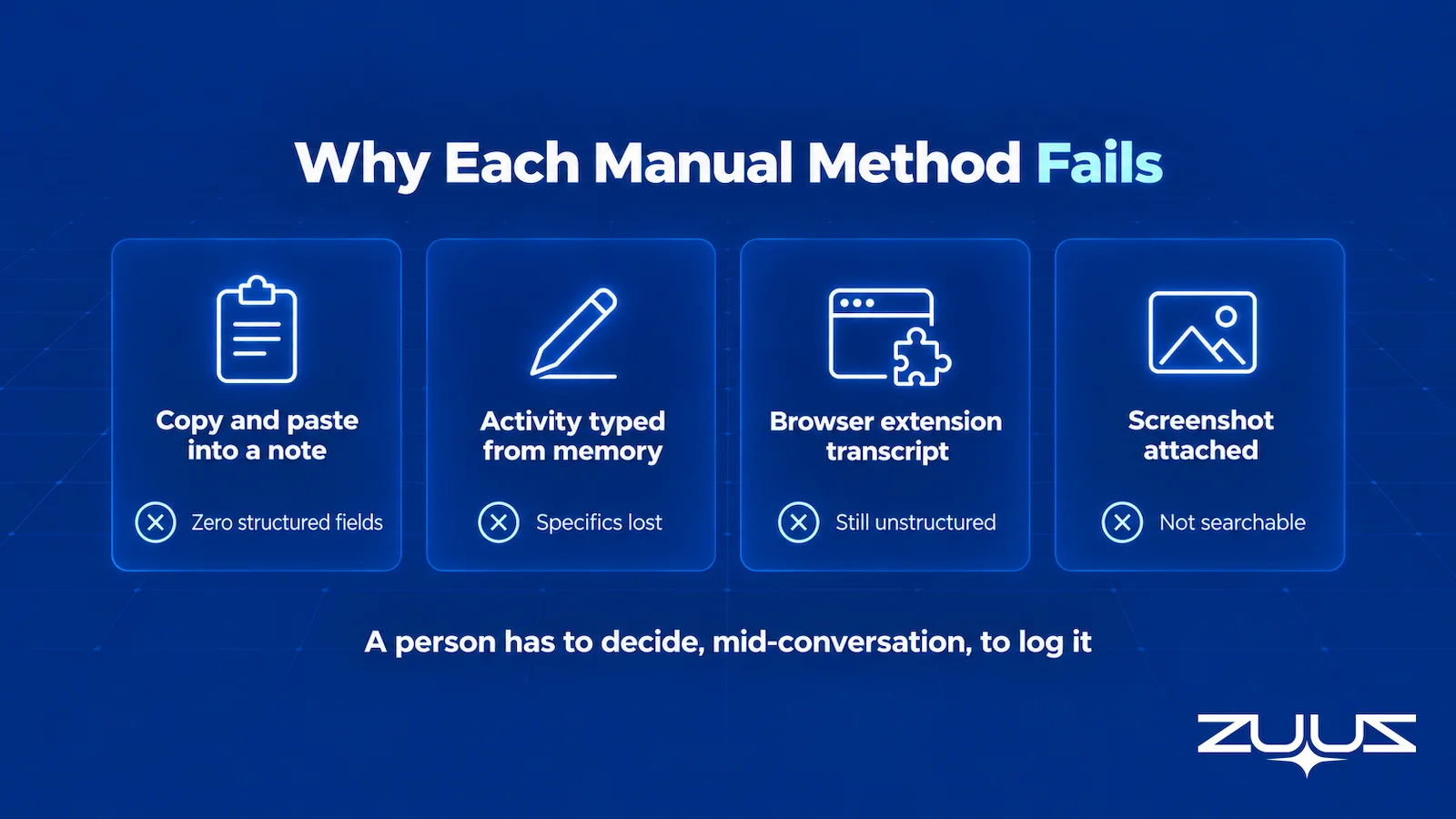
- Copy-paste notes, activities typed from memory, browser extensions that paste a transcript, and screenshots all fail on the same axis: they depend on rep discretion at the moment of the message.
- Logging a message and capturing the signal inside it are different operations. A pasted transcript in a note is an artifact, not a record a pipeline report can read.
- ZUUZ reads LinkedIn messages for deal signal and writes structured records to Salesforce, HubSpot, Zoho, Attio, or Pipedrive. It does not send messages, send connection requests, run sequences, or import profile data.
A distributor tells a partner manager that their vendor rep is changing next month. A reseller asks whether a deal registration is still valid. A prospect who went quiet on email replies to a comment and asks what the renewal would cost. None of those three messages arrive in an inbox. All three arrive as LinkedIn messages, and none of them reach the CRM unless somebody stops what they are doing and types them in.
The question of how to log LinkedIn messages in HubSpot, Salesforce, or Zoho comes up constantly in vendor forums and gets a consistent answer: there is no native automatic path. This guide covers what the native LinkedIn integration was actually built to do, what each manual workaround costs and where it breaks, why logging a message is a different job from capturing the signal inside it, and what to evaluate in anything that claims to solve it.
Why LinkedIn Messages Started Carrying Deal Signal
For a long time, LinkedIn messages were where cold pitches went. That is still true of the inbox as a whole, which is exactly why the channel gets dismissed. But in relationship-led selling, and particularly in IT services, distribution, and channel businesses, a second layer of traffic runs underneath the noise, and it is made of real deal events.
Four kinds show up repeatedly. The warm introduction, where a mutual contact connects two people and the entire origin story of an account is three messages long. The vendor or channel change, where a distributor rep announces they are moving accounts and an existing relationship needs rebuilding. The deal registration or partner thread, where terms get discussed informally before anything reaches a formal quote. And the quiet reopen, where a prospect who stopped answering email surfaces months later in a channel that feels lower pressure.
The reason those threads matter more than their length suggests is that a complex B2B purchase is not one conversation. A buying group for a complex solution has many members, and each gathers information independently. Those people do not all sit on the same email thread. Some of them will only ever talk to a seller in a direct message, and the account record in the CRM has no idea they exist.
This is the same structural problem covered in missed sales leads hiding in email, now running on a second channel. The difference is that email at least has decades of tooling pointed at it. LinkedIn messages have almost none.
What the HubSpot LinkedIn Integration Actually Does
The most common assumption is that connecting LinkedIn to HubSpot will bring LinkedIn conversations into HubSpot. That is not what the integration was designed for, and HubSpot's own documentation is unusually clear about it.
According to HubSpot's guide to connecting HubSpot and LinkedIn Sales Navigator, last updated August 31, 2026, the integration exists so users can view LinkedIn insights and Sales Navigator activity directly on HubSpot records, including profile details, shared connections, and account updates. Its stated purpose is to help teams research prospects, personalize outreach, and maintain context during the sales process. That is a research and context feature. It is a good one. It is not a conversation feature.
Three constraints in that document decide whether the integration is even available to a given team. It requires an assigned Sales Hub Professional or Enterprise seat. It separately requires a LinkedIn Sales Navigator Advanced Plus account. And each user has to connect the app individually from the HubSpot Marketplace under their own login, so it is a per-seat setup rather than an org-level switch an administrator flips once.
Two further lines matter more than the setup requirements. HubSpot states that it is not possible to import contacts from LinkedIn using the integration, which rules out the other thing teams commonly expect from it. And on InMail, HubSpot states that a user can continue to send InMail messages in HubSpot and view the whole conversation in the InMail pop-up, but the conversation will not automatically save to the record's timeline, and that a LinkedIn message can be manually logged to a contact timeline if needed.
Read that last sentence carefully, because it is the answer to the primary question. Manual logging is not a workaround that users invented around a gap. It is the documented path.
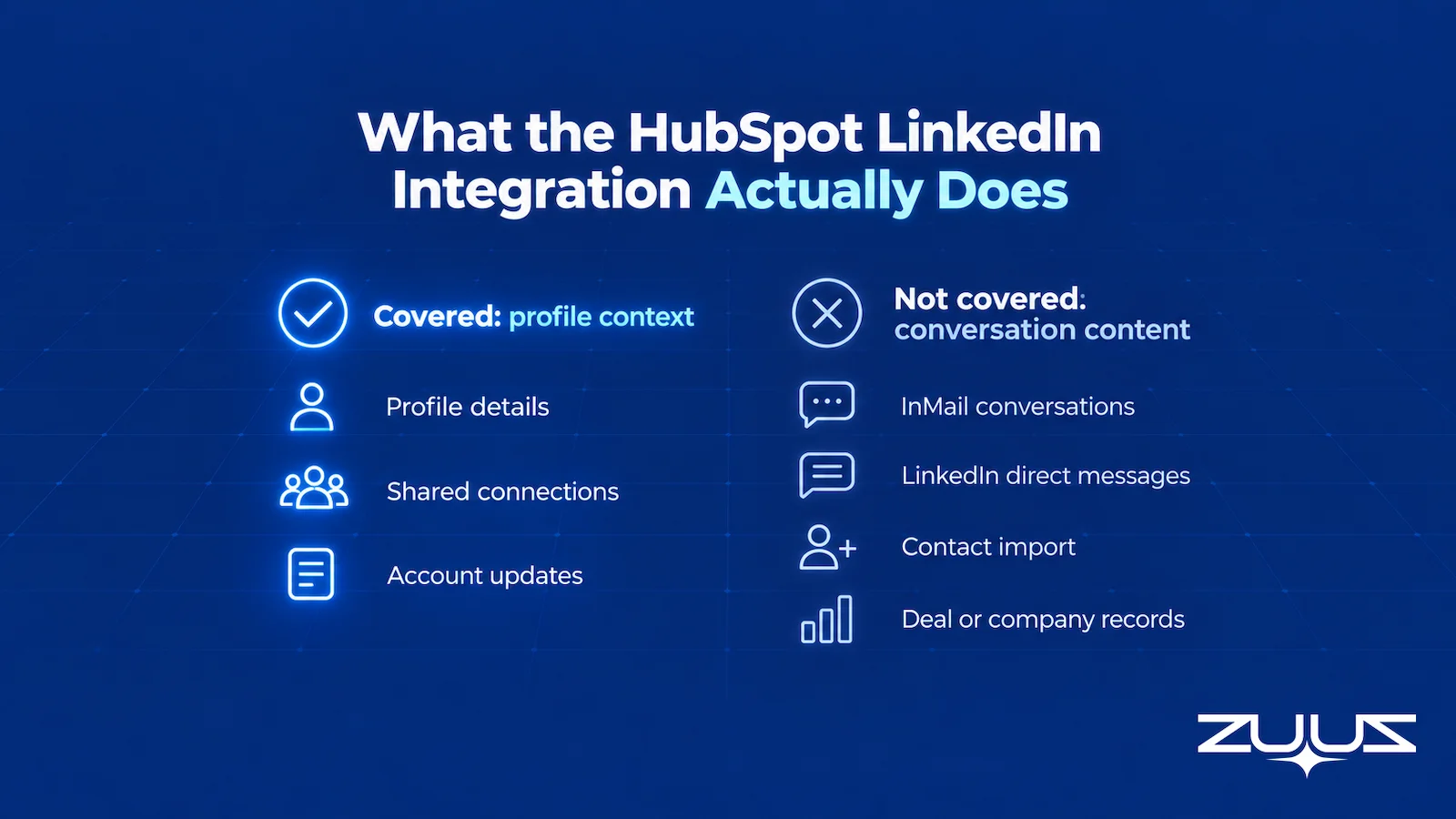
There is one more boundary worth naming. Everything above concerns InMail, a Sales Navigator feature composed from inside HubSpot. An ordinary LinkedIn direct message, the kind that runs between two people who are already connected and gets typed inside LinkedIn itself, is outside the integration entirely. For most relationship-led sellers, that ordinary DM is where the actual deal traffic lives.
| Capability | Covered by the native integration | Notes from HubSpot's documentation |
|---|---|---|
| View a contact's LinkedIn title, company, tenure, location, industry | Yes | Shown on a Sales Navigator card in the record's right panel |
| View shared connections, icebreakers, related leads, account news | Yes | Positioned as research and context for outreach |
| Send an InMail from a HubSpot record | Yes | Composed in a pop-up on the record |
| Automatically save an InMail conversation to the record timeline | No | Documentation states the conversation will not automatically save |
| Log an ordinary LinkedIn direct message | No | Outside the integration; manual logging is the documented path |
| Import contacts from LinkedIn | No | Documentation states this is not possible with the integration |
| Create a deal or company record from a LinkedIn conversation | No | The integration reads profile context, not conversation content |
| Availability | Conditional | Requires a Sales Hub Professional or Enterprise seat and a Sales Navigator Advanced Plus account |
None of this is a criticism of the integration. It does the job it was scoped to do. The problem is that teams arrive at it looking for conversation capture and leave with profile enrichment, then spend the next two years filling the difference by hand.
Your Best Threads Are Not in the CRM.
ZUUZ reads LinkedIn messages and email for deal signal, then writes the record. Book a 15-minute walkthrough.
What to look for before picking a method
- Does the tool read conversations or send them? Outbound automation is a different product sold into the same search.
- Does it bring message content onto the record, or only profile context that was already on LinkedIn?
- Is there a capture layer that writes named CRM fields, rather than pasting a transcript into a note?
- Does anything reach the record on a day when the rep does nothing?
- Does the record survive the rep leaving, given that their LinkedIn inbox does not transfer?
- Does it write into the CRM the team already runs, without requiring an upgraded seat on both sides?
How Teams Log LinkedIn Messages Today, and Why Each Method Fails
Ask ten revenue teams how they handle this and the answers cluster into five patterns. Each one is a rational response to the gap. Each one breaks somewhere different, and the differences are worth being precise about before choosing one on purpose.
Copy and paste the thread into a note. The rep selects the messages, pastes them into a note on the contact record, and moves on. This preserves the words, which is more than most methods manage. What it does not produce is any structured field. The company name, the deal value floated in message four, and the competitor mentioned in message six all sit inside a text blob that no report, filter, or workflow can act on.
Log an activity typed from memory. The rep creates a note or task that says something like "spoke on LinkedIn, they are interested, following up next week." It takes twenty seconds, which is why it is popular. It also loses the specifics that made the message worth logging, and it is written after the fact, when the exact number or the exact objection has already blurred.
Use a browser extension that pastes a transcript. Several small tools sit in the browser and push a LinkedIn thread into the CRM as a logged activity. This is genuinely faster than manual copy-paste and it is the best of the manual family. It still requires the rep to click it on the right thread, it typically produces the same unstructured transcript, and it adds a third-party extension with access to the LinkedIn session and the CRM to the security review.
Screenshot and attach. Common in channel and partner teams where the thread includes pricing that people want preserved exactly. It is the most faithful copy and the least useful record. Nothing inside an image is searchable, and no field anywhere gets populated.
Do nothing. By volume this is the most common method, and it is not laziness. Salesforce's State of Sales research, seventh edition, found sales professionals spend 40 percent of their time selling and 13 percent of the workweek manually entering data. A rep already spending that much of the week on data entry will not volunteer a sixth channel of it.
| Method | Effort per thread | Completeness of what is saved | Survives rep turnover | Searchable in the CRM |
|---|---|---|---|---|
| Copy and paste the thread into a note | High, two to four minutes | Full text, zero structured fields | Only for threads that were pasted | Full-text only, no fields to filter |
| Logged activity typed from memory | Low, about twenty seconds | Summary only, specifics lost | Weakly, the summary omits context | Yes, but there is little to find |
| Browser extension transcript paste | Low, one or two clicks | Full text, still unstructured | Only for threads the rep clicked | Full-text only |
| Screenshot attached to the record | Medium | Exact visual copy | Image persists, meaning does not | No |
| Do nothing | None | Nothing | No | No |
| Automated conversation capture | None after setup | Structured fields plus the source thread | Yes, the record exists independently | Yes, as ordinary CRM fields |
| ZUUZ, a capture layer on top of the CRM | None after setup; one-click rollback on any update | Structured fields, with the source thread kept next to them | Yes, the record lives in the CRM, not in a personal LinkedIn inbox | Yes, as ordinary CRM fields |
The table makes the pattern visible. Every manual row shares one dependency: a person has to decide, in the middle of a conversation, that this particular message is CRM-worthy, and then leave the conversation to act on that decision. That judgment call is where the loss happens, and it is not fixable by training. The messages a rep is least likely to log are the early ambiguous ones, which are exactly the messages that later turn out to have been the start of the deal.
Logging a Message Is Not Capturing the Signal in It
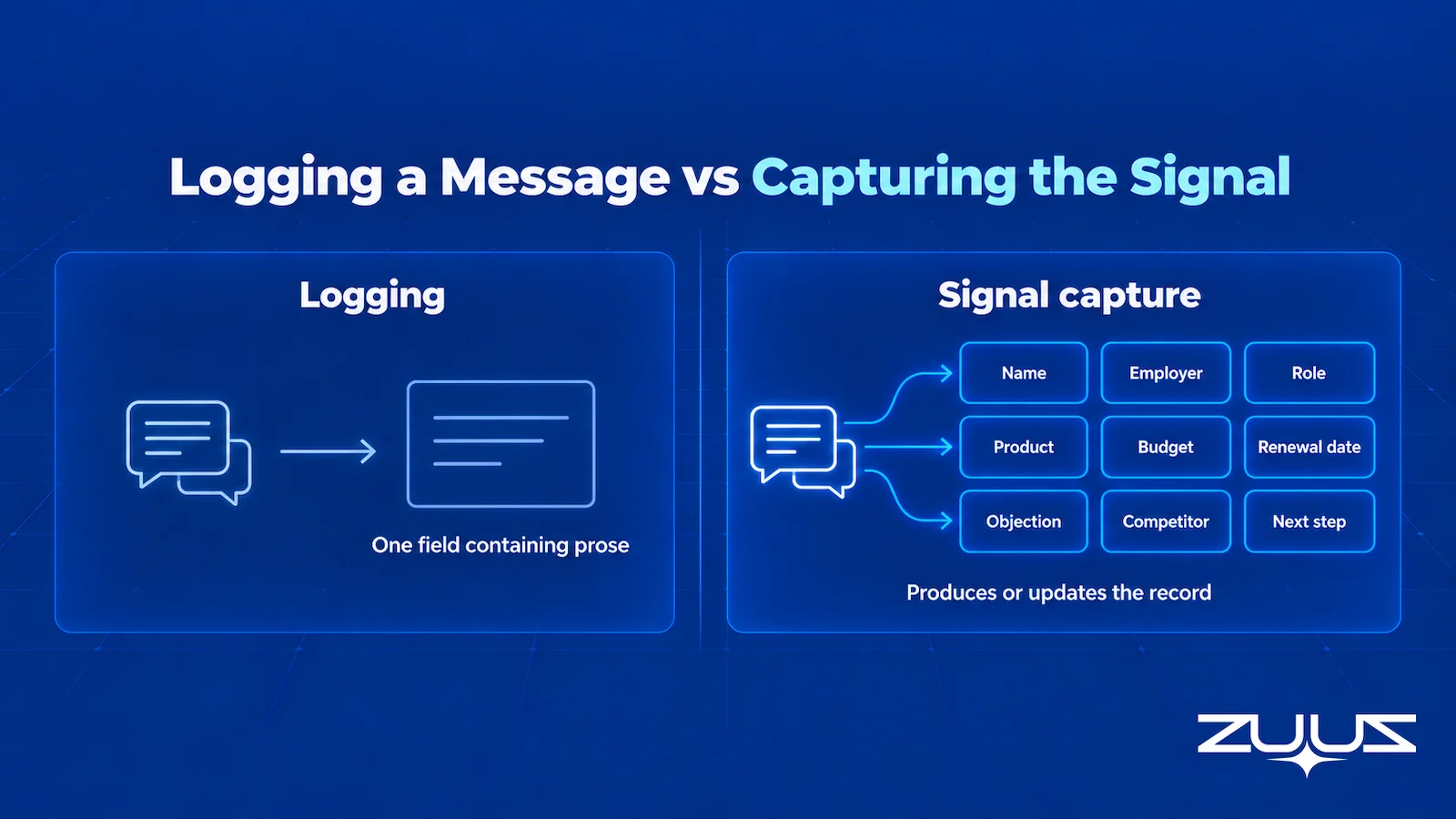
This distinction decides whether any of this work pays off, and it is the same argument that applies to email. Activity logging records that a conversation happened against a record that already exists. Signal capture reads what the conversation contains and produces or updates the record itself. The limits of Einstein Activity Capture are the clearest worked example on the email side: it syncs activity to Salesforce reliably and still cannot create a new contact or opportunity from an inbound message.
Applied to LinkedIn, the gap is wider, because the thread often arrives before any record exists at all. A warm introduction to a company nobody has entered yet has nothing to log against. A rep who pastes that thread into a note first has to create the company, create the contact, guess the deal stage, and then attach the note. The pasting was the easy part.
Consider what a single useful LinkedIn thread actually contains: a person's name and current employer, a role that may have changed since the CRM last saw them, a product they are asking about, a rough budget or a renewal date, an objection, a competitor, and a next step with a timeframe attached. That is eight or nine structured fields. Pasted as a note, it is one field containing prose.
The cost shows up at the reporting layer rather than the record layer, which is why it stays invisible for so long. Forrester found that among decision makers who had implemented a CRM in the prior twelve months, 68 percent struggle to get a single view of the customer and 39 percent report data quality problems. A CRM full of pasted transcripts is not a single view. It is an archive that happens to live next to one.
There is a practical test for this. Pick a closed-won deal that started in a LinkedIn message, then try to answer three questions using only CRM fields: which channel originated it, how many days passed between first contact and first meeting, and who else at the account was involved. If answering requires opening a note and reading, the message was logged but the signal was never captured.
Logging LinkedIn Messages in Salesforce and Zoho
The vendor changes and the shape of the problem does not. Teams asking how to log LinkedIn messages in Salesforce or in Zoho arrive at the same three options: create an activity or task by hand and paste or summarize the thread into it, install a third-party extension that does the pasting, or accept that the conversation stays on LinkedIn.
The reason it is identical across all three CRMs is worth stating plainly, because it explains why waiting for a native feature is a poor plan. LinkedIn messaging data is not exposed for general third-party read access the way a mailbox is. There is no equivalent of connecting a mail account with delegated permission and receiving the message stream. So the native integrations from every CRM vendor stop at the boundary of what LinkedIn makes available, which is profile and account context rather than conversation content.
That also explains why the tools in this space are extensions running in the browser rather than server-side connectors. It is a meaningful architectural difference to understand before a security review, not a detail. An extension operates inside an authenticated browser session on the rep's machine. It is a different trust model from a CRM integration authenticated at the org level, and it has different failure modes when a rep changes laptops, uses a second browser, or turns the extension off.
For teams running more than one CRM, or migrating between them, the multiplier is worse. Whatever manual convention gets adopted has to be adopted twice, and pasted notes are the least portable content in a CRM migration. This is one of the practical arguments for bidirectional CRM sync handled at the platform layer rather than per-tool.
Every LinkedIn Thread, on the Right Record.
Connect the sales inbox and LinkedIn messages, then see which conversations the CRM has never recorded.
The Rep Turnover Problem Nobody Budgets For
Every manual method above has a hidden expiry date attached to the person using it. When a rep leaves, whatever lived only in their LinkedIn inbox leaves with them. The connection is theirs, the message history is on their personal account, and the successor inherits a CRM record that starts at whatever point somebody last typed something into it.
This is not an edge case. U.S. Bureau of Labor Statistics data puts median employee tenure at 3.9 years, with 22 percent of workers at one year or less with their current employer. On a sales team of ten, the arithmetic says relationship history is walking out the door on a regular schedule.
Email at least degrades gracefully. A departing rep's mailbox is a company asset that can be transferred, searched, and read by whoever takes over the account. A LinkedIn inbox is a personal asset on a personal account. It is not transferable, and there is no administrative recovery path. Anything of value in it had to be captured before the person left, which returns the entire problem to the judgment call described earlier, made months ago by someone who no longer works there.
Teams that have been through this once tend to stop treating LinkedIn logging as a productivity nicety. It becomes a continuity question, and it changes what they look for in a solution. The same reasoning drives most successful CRM user adoption work: the systems that survive are the ones that do not depend on a busy person remembering to feed them.
The Record-Ready Test
Before comparing tools, it is worth measuring the gap in plain terms. This test takes one account and asks whether the CRM alone can carry it.
- Choose an account the owning rep has not touched in two weeks.
- Ask a colleague to say who the buying group is, what was last agreed and what happens next, using the CRM alone.
- Every answer that needs the rep, the inbox or a call is a record-ready failure.
- A record that passes survives a handoff, a territory change and a departure. One that fails is a person, not a system.
On relationship-led accounts, the test usually fails on step two in the same place: the colleague can name the deal and the amount, because those were typed, but not the second stakeholder the rep met through a LinkedIn introduction, or the scope change a buyer sent as a direct message on a Friday. Run it on three accounts before evaluating anything. The answers point at which channel is missing, and for teams whose partner and vendor traffic runs on LinkedIn the answer is rarely email.
What to Evaluate in Any Solution to This
The market around LinkedIn and CRM is crowded and mostly aimed at a different problem. A large share of the tools that appear in searches for this are outbound automation: they send connection requests, run message sequences, and scrape profiles at volume. Those tools answer the question of how to send more LinkedIn messages. They do not answer the question of how to get the ones that already happened into the CRM as usable records. Sorting those two categories apart is the first evaluation step, and the criteria below are written to make the difference obvious.
| Criterion | Question to ask | Why it decides the outcome |
|---|---|---|
| Direction of the tool | Does it read conversations, or send them? | Outbound automation and conversation capture are opposite jobs; buying one expecting the other is the most common mistake here |
| Profile versus conversation | Does it bring in profile context or actual message content? | Native CRM integrations stop at profile context, which is where most evaluations end without noticing |
| Record creation | Can it create a new contact, company, or deal from a thread, or only attach to an existing one? | The highest-value threads arrive before any record exists |
| Structure of the output | Does it write named fields, or paste a transcript? | A transcript is searchable; only fields are reportable, filterable, and usable in workflows |
| Rep dependency | Does anything get captured if the rep does nothing? | Any method requiring an in-the-moment decision loses the ambiguous early messages by design |
| Continuity | Does the record survive the rep leaving? | LinkedIn inboxes are personal accounts with no administrative transfer path |
| Channel coverage | Does it treat email and LinkedIn as one capture surface or two products? | A deal that moves between channels should produce one record, not two partial ones |
| CRM coverage | Does it write to more than one CRM? | Single-CRM tools become migration debt at acquisition or platform change |
| Licensing prerequisites | Does it require an upgraded CRM seat, a premium LinkedIn tier, or both? | The native HubSpot path requires both, which changes the real cost per user |
| Security model | Browser extension in a rep's session, or an org-level authenticated integration? | Different trust boundary, different failure modes, different review process |
One criterion deserves emphasis because it is the one most often skipped. Ask what happens when nobody does anything. A tool that produces a perfect record when a rep clicks the right button and nothing when they do not is a faster version of the existing problem, not a different answer to it.
How ZUUZ Reads LinkedIn Messages as a Capture Source
ZUUZ is a revenue intelligence layer on top of the CRM a team already runs. It does not replace Salesforce, HubSpot, Zoho, Attio, or Pipedrive and does not store the pipeline itself. Its Email Lead Capture module reads the sales inbox for deal signal and writes structured records into the CRM. As of this release, that module reads LinkedIn messages as a second capture source alongside email.
The mechanism is the same one already applied to the inbox. ZUUZ reads the conversation, identifies the contact, the company, the product or service under discussion, and the deal signals inside it, and then creates or updates the corresponding record in the connected CRM. A thread from a company that does not exist in the CRM yet produces the company and the contact, not a note waiting for someone to file it. Reps keep working in LinkedIn and their inbox as they do today, and ZUUZ updates the CRM automatically, with full change history and one-click rollback.
It is worth being exact about what this capability is not, because the surrounding category is full of tools doing something else entirely. ZUUZ reads LinkedIn messages. It does not send LinkedIn messages, does not send or automate connection requests, does not run outreach sequences, does not scrape profiles, and does not import LinkedIn contact or profile data. It is a capture integration, not an automation tool, and it is not a LinkedIn CRM.
What captured records connect to is the part that makes the capture worth doing. A lead scoring layer ranks what comes in by intent and engagement, so a partner asking about deal registration is not queued behind a recruiter. Pipeline risk monitoring flags accounts that have gone quiet against their normal cycle, and it now sees quiet across both channels rather than assuming an account is dormant because the email thread stopped. Account management keeps the record current as roles and companies change. CRM sync writes all of it back to Salesforce, HubSpot, Zoho, Attio, or Pipedrive as ordinary records in ordinary fields.
For teams in IT services and distribution, where the partner and vendor relationships that drive revenue live on LinkedIn as much as in email, this closes a gap that was previously covered by hoping somebody remembered. The same reasoning behind email to CRM automation for IT companies now applies to a second channel, with one record at the end of it rather than two.
The proof to date comes from the email side of the same capture layer, which is the honest way to read it while LinkedIn capture is newer. RA Technologies, a US IT services company, had run HubSpot for two years; ZUUZ ran on the same instance with the same team and surfaced $120K in pipeline within 72 hours that the CRM had never seen, captured from the sales mailbox. At Cloud Box Technologies, a UAE cloud and IT services company that had used its CRM for order processing only, inbound email now turns into leads and renewals, leadership sees live pipeline from a single connected user, and 10 to 12 renewals are tracked in minutes. The mechanism behind both is the one now reading LinkedIn: a conversation in, a structured record out, every change logged and reversible.
From an operator's seat
The part teams do not plan for is not the LinkedIn connection; it is deduplication. A rep's LinkedIn threads are full of people who are not in the CRM yet, and the same buyer arrives as a personal profile on LinkedIn and a work address in email, so the first week of the change history is mostly a rep checking that this person is that contact and this company is that account. Teams that agree the matching convention before switching the channel on, which account name wins and whether a partner contact belongs to the partner record or the end customer, clear that queue in a couple of days. Teams that skip it spend the time they saved merging duplicate companies a month later. Across the deployments ZUUZ runs, the order that works is email first for a week or two, because CRM-side matching gets calibrated on the channel where identities are cleanest, then LinkedIn added on top of it.
Stop Pasting Threads Into Notes.
See ZUUZ read a real conversation and write the CRM record from it, in 15 minutes.
The broader point holds regardless of which tool a team picks. A pipeline review reflects the conversations that happened to get recorded, not the conversations that happened. Every channel left outside the CRM widens the difference between those two things, and the channels that get left outside are usually the informal ones where the earliest and most useful signals show up first.

Anyone weighing this against the email side of the same problem will find the comparison useful, since the failure modes rhyme and the evaluation criteria overlap almost completely.
The First Step, Concretely
The smallest useful starting point is one mailbox, not a rollout. Connect it, let ZUUZ read the last 90 days, and see what it writes to a record, with full change history and one-click rollback: the contacts, the companies and the deal signals that were in conversations but never in the CRM. That review is also the quickest way to see what the same capture will do with LinkedIn threads, because the failure mode is identical and the output is the same structured record. There is a 30-day free trial with no credit card required.
Frequently Asked Questions
How do I log a LinkedIn message in HubSpot?
There is no native automatic method. HubSpot's documentation states that a LinkedIn message can be manually logged to a contact timeline if needed, which in practice means opening the contact record, creating a note or logged activity, and pasting or summarizing the conversation by hand. Some teams use a browser extension to speed up the pasting, which still requires the rep to trigger it on each thread.
Does the HubSpot LinkedIn Sales Navigator integration log messages automatically?
No. HubSpot states that a user can send InMail from a HubSpot record and view the whole conversation in the InMail pop-up, but that the conversation will not automatically save to the record's timeline. The integration is built to surface profile details, shared connections, and account updates on the record, not to move conversations into it.
Can I auto log LinkedIn messages in HubSpot?
Not through HubSpot or LinkedIn natively. Automatic capture requires a third-party layer that reads the conversation and writes to the CRM. When evaluating one, the question that separates the options is whether it creates structured CRM fields from the conversation or only attaches a transcript to a record somebody already made.
What does the HubSpot LinkedIn integration require?
Two paid tiers at the same time. HubSpot's documentation states that a user must have an assigned Sales Hub Professional or Enterprise seat and a LinkedIn Sales Navigator Advanced Plus account. Each user also connects the app individually from the HubSpot Marketplace under their own login rather than an administrator enabling it once for the organization.
Can I import LinkedIn contacts into HubSpot?
Not with the Sales Navigator integration. HubSpot states directly that it is not possible to import contacts from LinkedIn using the integration. The integration reads profile information for display on records that already exist rather than creating records from LinkedIn.
How do I log LinkedIn messages in Salesforce?
The same three options apply as in HubSpot: create a task or activity by hand and paste or summarize the thread, use a third-party browser extension that pastes a transcript into the record, or use a capture layer that reads the conversation and writes structured fields. There is no native Salesforce feature that pulls LinkedIn conversation content onto the timeline automatically.
How do I log LinkedIn messages in Zoho CRM?
Manually, by creating a note or activity on the contact and pasting or summarizing the conversation, or through a third-party tool. As with HubSpot and Salesforce, the limit is not a gap in Zoho. LinkedIn does not expose message content for general third-party read access the way a mailbox does, so every CRM vendor's native integration stops at profile and account context.
Why is there no native way to sync LinkedIn messages to a CRM?
Because LinkedIn messaging is not made available for general third-party read access in the way an email account is. A mailbox can be connected once with delegated permission and read from a server. LinkedIn messages have no equivalent path, which is why the tools in this space run as browser extensions in the rep's own authenticated session rather than as org-level integrations.
Are Chrome extensions that log LinkedIn messages a good solution?
They are the fastest of the manual methods and the best of that family, but they inherit the same two limits. The rep still has to trigger the extension on the right thread, so anything not clicked is not captured. And the output is usually an unstructured transcript rather than named CRM fields. They also introduce a browser extension with access to both the LinkedIn session and the CRM, which is a different security review from an org-authenticated integration.
What is the difference between logging a LinkedIn message and capturing it?
Logging attaches a record of the conversation to a CRM object that already exists. Capturing reads what the conversation contains and produces or updates the object itself, populating fields such as company, contact role, product interest, deal value, and next step. A pasted transcript is searchable text. Only structured fields can be reported on, filtered, scored, or used in a workflow.
What happens to LinkedIn conversation history when a rep leaves?
It leaves with them. A LinkedIn inbox sits on a personal account, so unlike a company mailbox it cannot be transferred, searched, or administratively recovered by the team. Whatever was not captured into the CRM before the departure is gone. With U.S. Bureau of Labor Statistics data showing median employee tenure of 3.9 years, this affects most sales teams on a predictable cycle.
Does ZUUZ read LinkedIn messages?
Yes. ZUUZ reads LinkedIn messages as a capture source alongside the email inbox, identifies the deal signal inside them, and writes structured records to Salesforce, HubSpot, Zoho, Attio, or Pipedrive. It handles LinkedIn conversations the same way it already handles email: the conversation produces or updates a CRM record rather than a note that has to be filed.
Does ZUUZ send LinkedIn messages or connection requests?
No. ZUUZ reads LinkedIn messages for deal signal only. It does not send messages, send or automate connection requests, run outreach sequences, scrape profiles, or import LinkedIn contact and profile data. It is a capture integration rather than an outbound automation tool.
Is ZUUZ a LinkedIn CRM?
No. ZUUZ is a revenue intelligence layer that runs on top of the CRM a team already uses. It does not store the pipeline or replace Salesforce, HubSpot, Zoho, Attio, or Pipedrive. Its role is to read the conversations that carry deal signal and keep the existing CRM current from them.
Which CRMs does ZUUZ write LinkedIn message data to?
Salesforce, HubSpot, Zoho, Attio or Pipedrive. Records captured from LinkedIn land as ordinary records in ordinary fields, the same as records captured from email, so they behave normally in reporting, filters, and workflows without a separate LinkedIn-specific object to maintain.
How Do You Track LinkedIn Conversations in a CRM?
Track them in three layers: log the thread against the contact so it exists on the record, capture what the conversation says into fields such as product interest, deal value and next step, and keep the record independent of one rep's personal account so it survives turnover. Manual logging and browser extensions deliver the first layer at best. ZUUZ reads LinkedIn messages without sending anything and writes the structured fields.

