
How to Use Outlook as a CRM (And When It Breaks)
How to use Outlook as a CRM for one seller, where it breaks once a second rep joins, and how to keep Outlook while your existing CRM stays current.


CEO of ZUUZ. He scaled Cloud Box Technologies from 0 to $25M ARR in IT services and distribution before building ZUUZ. Connect on LinkedIn
TL;DR: How to use Outlook as a CRM comes down to contacts, color categories, flags and tasks, and that setup holds up for exactly one seller. A second rep or a manager needs a CRM of record, and the gap that follows is that deal facts stay in each rep's inbox. ZUUZ closes that gap as an AI layer over the CRM already in place (Salesforce, HubSpot, Zoho, Attio or Pipedrive): it connects to the Outlook mailbox and calendar, reads the threads, and drafts structured records that the rep approves in one click. It is not a CRM, and it does not forecast.
- Outlook works as a CRM for one person: contacts, color categories, flags and tasks can hold a small pipeline, but Outlook has no deal object, stage field or shared ownership.
- The breaking point is the second rep or the first manager, because history, next steps and ownership live in individual mailboxes.
- The fix is neither leaving Outlook nor buying an "Outlook CRM". Reps keep working in the inbox, and a CRM of record holds what the team shares.
- The Record-Ready Test checks whether a colleague can name the buying group, the last agreement and the next step from the CRM alone.
- Teams with no CRM yet need to choose one first, since ZUUZ sits on top of Salesforce, HubSpot, Zoho, Attio or Pipedrive and does not replace them.
- ZUUZ reads the mailbox and calendar, writes structured records to the CRM, and leaves the rep to approve each one with a single click.
Most sales teams that live in Microsoft 365 start the same way. The owner or the first rep keeps every lead in Outlook, uses a few categories to mark who is hot, flags the emails that need a reply, and calls it a pipeline. For one person this works, and the search for how to use Outlook as a CRM is usually a sign that someone is trying to make it work a little longer.
The trouble starts when a second seller joins, or when a manager asks which deals are real. The answers sit in separate mailboxes, and the CRM that was bought to hold them is always a step behind. This guide gives the honest version of how to use Outlook as a CRM: what Outlook does well, a six-step setup, where it stops, and how to keep Outlook as the daily workspace while a CRM of record holds the shared history.
The scope here is how to use Outlook as a CRM day to day, not a review of CRM products.
What Outlook Can Do as a CRM Without Add-Ins
Outlook ships with more relationship-tracking tools than most people use. Contacts store names, companies, phone numbers and notes, and Microsoft documents how to create, view and edit contacts and contact lists. Color categories can be applied to emails, meetings, contacts and tasks, and one item can carry several categories at once, which a folder cannot do. Flags and reminders turn a message into a dated follow-up, and the calendar records the meetings that happened.
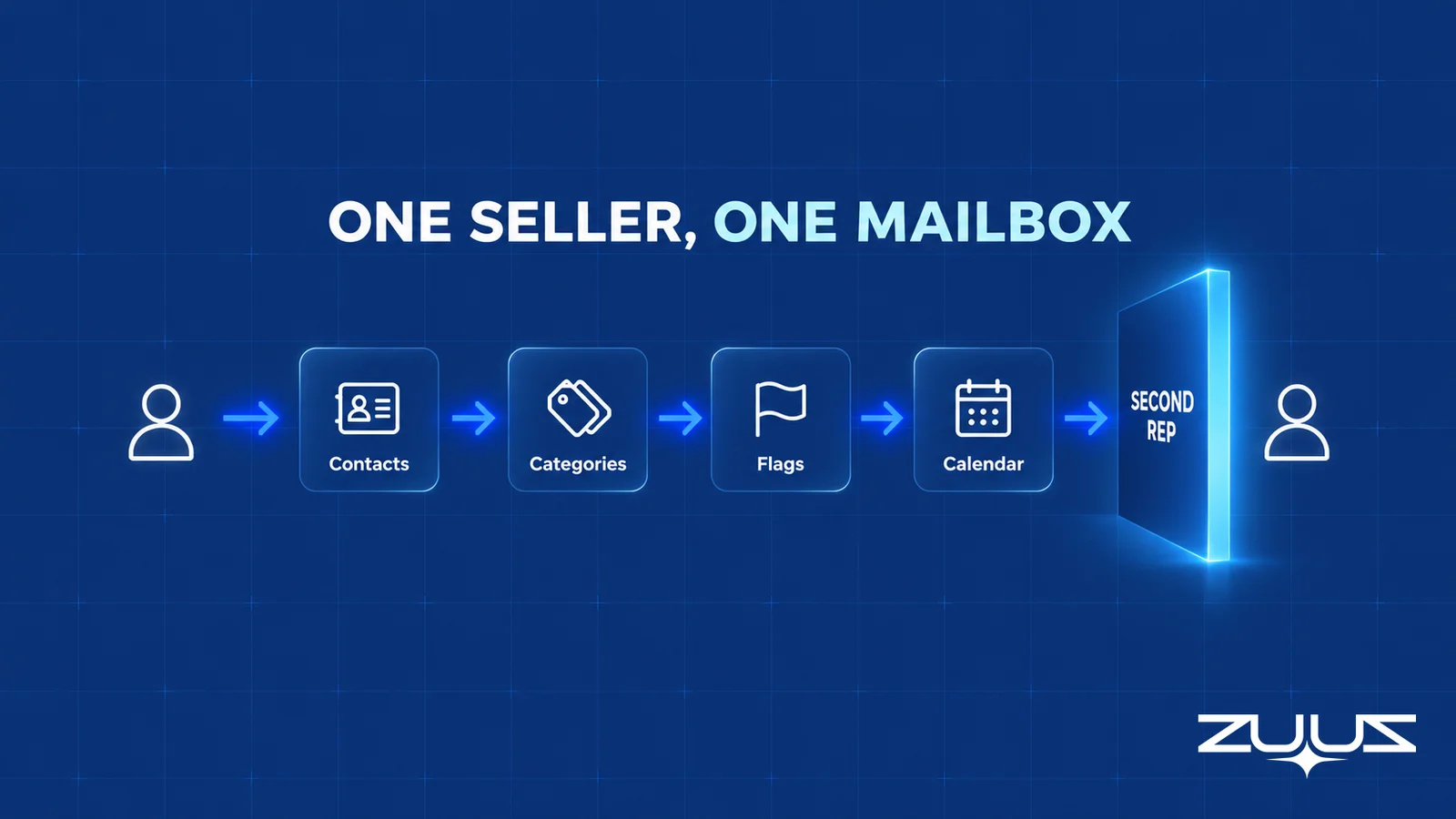
Used together, those pieces cover the basics of a one-person sales process. The table maps each CRM job to the Outlook feature that approximates it and shows where the approximation ends.
| CRM job | Outlook feature | Where it holds | Where it stops |
|---|---|---|---|
| Know the contact | Contacts and contact lists | Name, company, phone, a few notes | No account hierarchy, no buying-group roles |
| Mark the stage | Color categories | One category per stage, visible at a glance | Stage is a label with no date, no history and no report |
| Remember the follow-up | Flags, reminders, tasks | Personal due dates on messages | Due dates belong to one mailbox, so nobody else sees them |
| Record what happened | Calendar and search | Meetings and threads are findable by the rep | Search finds words, not facts such as amount or decision date |
| See the pipeline | Filtered category views | A rough list for a single seller | No deal value, no owner, no roll-up for a manager |
The pattern in that table is consistent. Every feature behind using Outlook as a CRM works for the person who set it up, and none of them produces a record that another person can act on.
How to Use Outlook as a CRM in Six Steps
For a single seller or a very small team that has not yet chosen a CRM, this is a workable order of operations. It takes an afternoon, and the discipline matters more than the tooling.
- Create one set of stage categories. Use four to six names such as New Lead, Qualified, Proposal Sent, Negotiating and Customer. Keep the names identical across contacts, emails and meetings so a single category filter shows everything for that stage.
- Clean the contact list. Add the company name and role to each contact, and put the buying roles that matter (the person who signs, the person who uses) in the notes field.
- Categorize live conversations. Walk the inbox and sent folder once, and tag every thread tied to an open opportunity with its stage category.
- Flag the next action. Every open deal gets a flagged message or a task with a real date, written as something the buyer can answer, such as "send revised scope by Thursday".
- Put commitments on the calendar. Calls, proposal reviews and renewal dates become calendar items with the contact attached.
- Review weekly. Filter by each stage category, clear overdue flags, and move categories forward only when the buyer wrote something that justifies it.
The sixth step is where most personal systems quietly fail. A category moved on a hunch is a rep's opinion stored as data, and the same habit is why CRM data quality problems appear in every system, not only in spreadsheets and inboxes.
Keep Working in Outlook While the CRM Stays Current.
See how ZUUZ reads the mailbox and calendar and prepares structured updates for the CRM, so the rep keeps the inbox and the team gets the record.
Where Using Outlook as a CRM Breaks Down
The limit of using Outlook as a CRM is not a missing feature. It is structural: Outlook organizes one person's work, while a CRM organizes the company's knowledge of a customer. Four failures appear in roughly the same order in most teams.
The second rep problem. Categories and flags are a personal convention. Two reps who both use "Qualified" mean different things by it, and neither can see the other's inbox. The manager problem. A manager asking for the pipeline gets a spreadsheet typed from memory, which is the same reconstruction that makes a weekly review unreliable, a failure explored in the guide to the sales pipeline review. The handoff problem. When a rep goes on leave or changes territory, the next person inherits an inbox they cannot read. The reporting problem. Outlook has no field for deal value or close date, so no report can total what is open.
None of that is a reason to abandon Outlook. It is the reason to add a CRM of record for anything the team shares, and to stop asking Outlook to be one. The inbox stays the place where selling happens, and the practical question is how its content reaches the CRM. The answer is rarely "ask reps to log more", since low CRM user adoption is what teams are usually already fighting.
How to evaluate any Outlook-plus-CRM setup
- A CRM of record. Is there one system where deal value, stage, owner and next step live as fields, not as categories in a mailbox?
- A capture layer. Does anything put the thread, the meeting and the call into those fields without the rep retyping it?
- Fields, not feeds. Does captured activity land in fields a report can filter, or only in an activity feed someone has to open record by record?
- No new habit. Does the rep have to remember a BCC address, a button, a sidebar or a sync?
- Rep correction in one click. Can the rep fix or reject what was captured before it is written?
- Manual entries win. If a rep typed a value, does automation leave it alone?
How to Use Outlook as a CRM Alongside the CRM Already in Place
Once a CRM exists, the goal changes. Outlook stops being the system and becomes the input, and the work is making the input reach the record reliably. Four approaches are in common use, and each has a different failure mode.
| Approach | Who sees the history | What the rep does | Where it stops |
|---|---|---|---|
| Outlook alone | Only the mailbox owner | Categories and flags by hand | No shared record, no report |
| CRM add-in or sidebar in Outlook | Anyone with CRM access, for logged items | Clicks to log or link each email | Logging depends on the rep remembering; fields stay empty |
| Manual logging after the fact | The team, after a delay | Types notes into the CRM in batches | Facts arrive late and compressed |
| ZUUZ over the existing CRM | The team, in CRM fields | Approves finished records in one click | Needs one of Salesforce, HubSpot, Zoho, Attio or Pipedrive |
The native add-in route is the one most Microsoft 365 teams try first. For Salesforce users, the retirement of the older desktop add-in and the choices that follow are covered in the Einstein Activity Capture alternative guide, and IT sales teams weighing the options will find the trade-offs in Salesforce email integration for IT sales teams. HubSpot teams face a similar gap, which HubSpot email lead capture automation addresses from the inbound side.
What the add-in routes share is that logging remains an action. Email goes to the CRM when someone clicks or when a sync rule fires, and the structured parts of a deal (amount, stakeholders, decision date) still need a person. The broader pattern across IT services and distribution firms is laid out in email-to-CRM automation for IT companies, and meeting notes follow the same rule, as shown in the guide to how to log meeting notes in Salesforce.
Stop Choosing Between the Inbox and the Record.
ZUUZ connects to Outlook and the CRM already in use, and hands the rep finished updates to approve instead of fields to fill in.
The Record-Ready Test
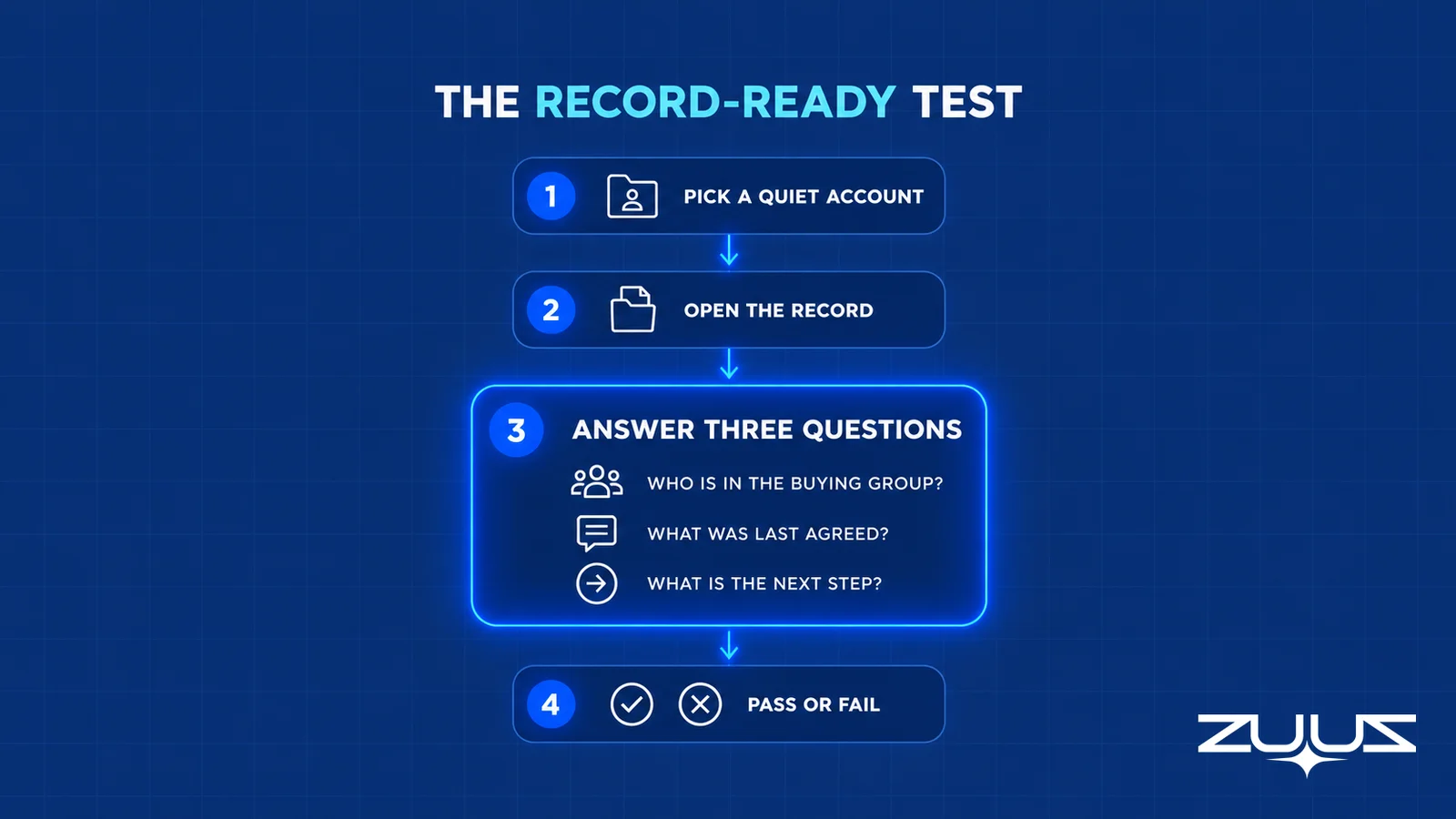
Whether Outlook, a CRM add-in or a capture layer is doing the work, one check separates a usable record from a personal note. The Record-Ready Test takes about twenty minutes and needs no tooling.
- Choose an account the owning rep has not touched in two weeks.
- Ask a colleague to say who the buying group is, what was last agreed and what happens next, from the CRM alone.
- Every answer needing the rep, the inbox or a call is a record-ready failure.
- A record that passes survives a handoff, a territory change and a departure.
Worked example. In an illustration of a typical scenario, a forty-person IT services firm runs on Outlook categories plus a CRM that the reps update on Fridays. The account chosen is a managed-services renewal. The CRM shows a stage and a close date, and nothing else. The buying group, a procurement lead who asked for a revised scope and a finance contact copied on the last thread, exist only in the owner's inbox. The colleague cannot answer two of the three questions, so the record fails, and the finding is concrete: the facts were written in email and never reached a field.
Run the same check on three accounts before deciding anything else. A clean pass means the current process works. A failure on every account means the process depends on memory, a theme that also drives sales handoff problems.
What Operators See When the Inbox Is the Only System
From an operator's seat, the pattern is consistent across the IT services and distribution teams ZUUZ works with. Reps do not stop using Outlook when a CRM arrives. They keep selling in the inbox and treat the CRM as a second job done at the end of the week. The record that results describes what the rep remembered, not what the buyer wrote.
Avinash Gujje, who scaled Cloud Box Technologies from $0 to $25M ARR in IT services and distribution, draws the same conclusion from running sales there: a rep will maintain one system, and it is always the inbox. Any design that asks for a second system to be kept in step by hand is asking for a habit that will not last, so the record has to be built from the inbox the rep already lives in.
The part teams do not plan for is the cost of the quiet quarter. Nothing breaks when a rep keeps deals in categories. The cost appears at renewal, at handoff or when the owner leaves, and the same inventory that sales activity tracking tries to produce is missing precisely when it is needed.
See the Record Your Team Would Have Had.
Connect one mailbox and compare what the CRM holds with what the threads actually say, before any migration or tooling decision.
When to Keep Outlook Alone and When to Add a CRM of Record
Whether Outlook as a CRM is enough depends on headcount and on who needs the history.
- Keep Outlook alone when one person sells, no one else needs to cover for that person, and the pipeline fits on one filtered view. Use the six steps above and revisit when the first colleague joins.
- Add a CRM of record when a second rep, a manager or an owner needs the same history. Choose the one the team will actually open, since each of Salesforce, HubSpot, Zoho, Attio and Pipedrive connects to Outlook in some form.
- Fix capture, not the CRM when a CRM exists but fails the Record-Ready Test. A new CRM would inherit the same empty fields.
ZUUZ is not a CRM and does not appear in the first row. It becomes relevant only in the third row, and in the second once a CRM has been chosen. A team with no CRM at all needs to pick one first, and the reasoning behind that sequence is in the comparison of ZUUZ and manual CRM entry.
Outlook Plus CRM: How ZUUZ Keeps Both Current From the Inbox
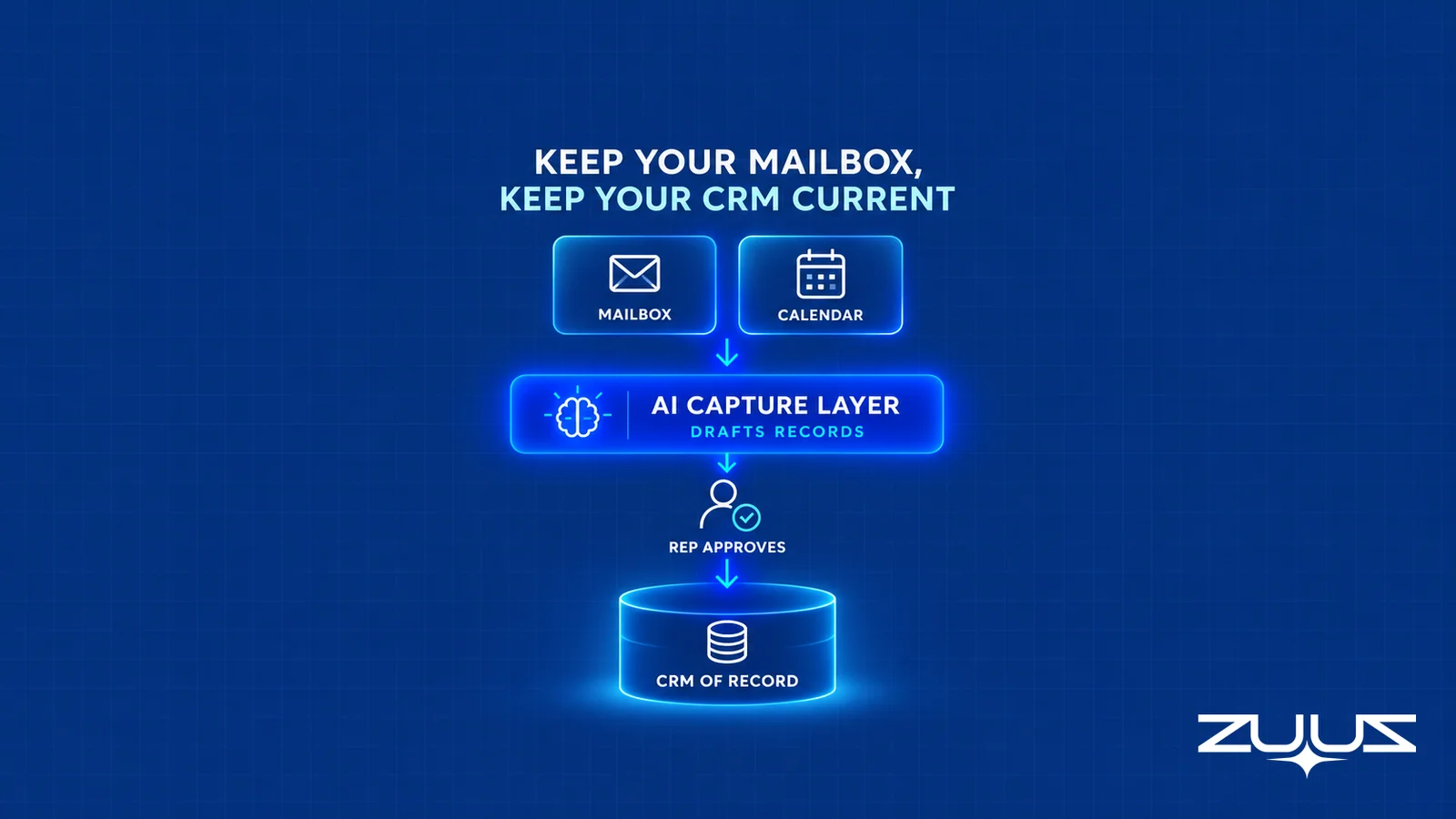
ZUUZ is an agentic AI execution layer that runs on top of an existing CRM rather than replacing it. It connects to the sales inbox and calendar in Outlook (and Gmail), reads LinkedIn messages and, where connected, Microsoft Teams meeting transcripts and inbound call transcripts, and prepares structured records for Salesforce, HubSpot, Zoho, Attio or Pipedrive. The CRM stays the system of record, and reps keep the inbox they already use.
What is structurally different is the order of work. The rep does not log anything first. ZUUZ drafts the contact, the activity, the stage and the next step from the thread, and the rep approves the finished record in one click or corrects it before it is written. On first connection ZUUZ reads the last 90 days of the mailbox, keyword filtering keeps out-of-scope threads out, and a value the rep typed by hand takes precedence over anything captured. It reports what happened and does not forecast or score deals. Writes follow bidirectional CRM sync rules, so the CRM and the capture layer stay consistent.
At RA Technologies, a US IT services company, ZUUZ ran on the HubSpot instance the team had used for two years, with the same people, and $120K in pipeline was surfaced in the first 30 days that the CRM had never seen, captured from the sales mailbox. The deployment is documented in the RA Technologies case study. At Cloud Box Technologies, a UAE cloud and IT services business, inbound email becomes leads and renewals so leadership sees live pipeline, and 10 to 12 renewals are tracked in minutes from a single connected user.

The practical result for a Microsoft 365 team using Outlook as a CRM today is that Outlook remains the workspace and the CRM becomes the shared record without a weekly cleanup. Where a team has no CRM, ZUUZ is the second purchase, not the first.
A first step smaller than a rollout. Connect one mailbox. ZUUZ reads the last 90 days and the rep reviews what it found before anything is written to the CRM. Run the Record-Ready Test on three accounts afterward and compare. 30-day free trial, no credit card: https://zuuz.ai/trial/
Frequently Asked Questions
Can Outlook be used as a CRM?
Outlook can serve as a CRM for one person. Contacts, color categories, flags, tasks and the calendar hold a small pipeline. It cannot serve a team, because it has no deal object, no stage field and no shared ownership. Once a second rep or a manager needs the history, a CRM of record is needed and Outlook becomes the input to it.
How do you use Outlook as a CRM?
Create four to six stage categories, clean the contact list, tag open conversations with a stage, flag the next action with a real date, put commitments on the calendar and review the filtered category views weekly. Move a category only when the buyer wrote something that justifies it. This holds for one seller and stops working at the second.
Is there a CRM for Outlook?
Yes, in two forms. Most CRMs, including Salesforce, HubSpot, Zoho, Attio and Pipedrive, offer an Outlook add-in or email connection that links messages to records. A separate group of products is built around Outlook itself. Either way the CRM, not Outlook, holds the shared record, and the question is how conversations reach it.
Does Microsoft have a CRM tool?
Yes. Microsoft sells Dynamics 365, which includes sales applications, and its documentation is on Microsoft Learn. Outlook itself is an email, calendar and contacts client, not a CRM. Microsoft also documents a category called Tracked to Dynamics 365 that email tracking can apply to Outlook items.
Which CRM best integrates with Outlook?
The best fit is usually the CRM the team already runs, since Salesforce, HubSpot, Zoho, Attio and Pipedrive all offer Outlook connections. Switching CRMs to fix an email gap rarely helps. The deciding factor is whether conversations become structured fields, not whether a sidebar exists, which is why a capture layer matters more than the connector.
Is Salesforce for Outlook being discontinued?
Yes, the older Salesforce for Outlook add-in is being retired, with full retirement scheduled for December 2027 according to Salesforce. Replacement paths and what each captures are covered in the Salesforce for Outlook replacement guide.
Can a team share an Outlook-based CRM?
Not in a way that produces a pipeline. Shared mailboxes and calendars share messages and meetings, but Outlook has no field for deal value, stage or owner, so no report can total open deals. Categories and flags remain a personal convention that each rep applies differently, which is why the shared view always drifts.
What is the difference between an Outlook category and a CRM stage?
A category is a color label on an item. A CRM stage is a field on a deal record with an owner, a date, a history and a report behind it. A category can imply a stage, but it cannot be summed, audited or handed to a colleague, so it holds one rep's opinion rather than the team's data.
Does ZUUZ replace my CRM or Outlook?
No. ZUUZ is an AI layer on top of the CRM a team already uses, never a CRM and never a replacement for one. It connects to the Outlook mailbox and calendar, prepares structured records for Salesforce, HubSpot, Zoho, Attio or Pipedrive, and the rep approves each one. Outlook remains the workspace and the CRM remains the system of record.
Do reps have to leave Outlook to use ZUUZ?
No. Reps keep working in the inbox and calendar they use today. ZUUZ reads the threads and prepares finished records, and the rep approves or corrects each one in a click. The rep is the decision maker, so a wrong guess is caught before it reaches the CRM, and anything a rep typed by hand takes precedence.
What does a team need to start with ZUUZ and Outlook?
A mailbox to connect and a CRM that is one of Salesforce, HubSpot, Zoho, Attio or Pipedrive. On first connection ZUUZ reads the last 90 days, and the rep reviews what it found before anything is written. A team with no CRM should choose one first, because ZUUZ has nothing to write to otherwise.
What is the Record-Ready Test?
It is a four-step check for whether a CRM record is usable by someone other than its owner. Pick an account untouched for two weeks, ask a colleague to name the buying group, the last agreement and the next step from the CRM alone, and count every answer that needs the rep or the inbox as a failure.

