
Why the IT VAR Sales Pipeline Lives Outside the CRM
The IT VAR sales pipeline runs across vendor, distributor, VAR and customer. See where deal registration and rep-change signals land and how to capture them.

CEO of ZUUZ. He scaled Cloud Box Technologies from 0 to $25M ARR in IT services and distribution before building ZUUZ. Connect on LinkedIn
TL;DR: An IT VAR sales pipeline runs across four parties: the vendor, the distributor, the VAR and the end customer. The signal that moves each deal arrives in channel manager emails, deal registration notices, distributor threads, customer email and LinkedIn messages, while the CRM holds only what a rep remembered to log. ZUUZ is a revenue intelligence layer on top of Salesforce, HubSpot, Zoho, Attio, or Pipedrive that reads the sales inbox and LinkedIn messages and writes structured deal records to the CRM.
- An IT VAR opportunity is one customer project with at least four companies attached, each holding a different piece of the deal.
- Deal registration is a sequence of dated events, not a checkbox, and the terms vary by vendor program.
- A vendor rep change mid-deal is a relationship handover, and it usually surfaces first in an auto-reply or a LinkedIn message.
- Distributor questions are deal blockers that often sit in a sales ops inbox the pipeline review never opens.
- The CRM records the shape of a deal. The conversations record its condition: protection, contacts, blockers and whether the date is real.
- ZUUZ reads the sales inbox and LinkedIn messages and writes structured records to the existing CRM. It does not replace the CRM or send messages.
Picture a storage refresh at a regional hospital group. In the IT VAR sales pipeline it is one line in the CRM: one account, one opportunity, one close date. Behind that line sit a vendor channel manager who approved the deal registration, a distributor account manager who needs the end-user legal entity before the order can book, a customer IT director who just moved go-live back a month, and a new vendor rep who introduced herself on LinkedIn last Tuesday. None of those four facts is in the opportunity record. All four decide whether the deal closes this quarter.
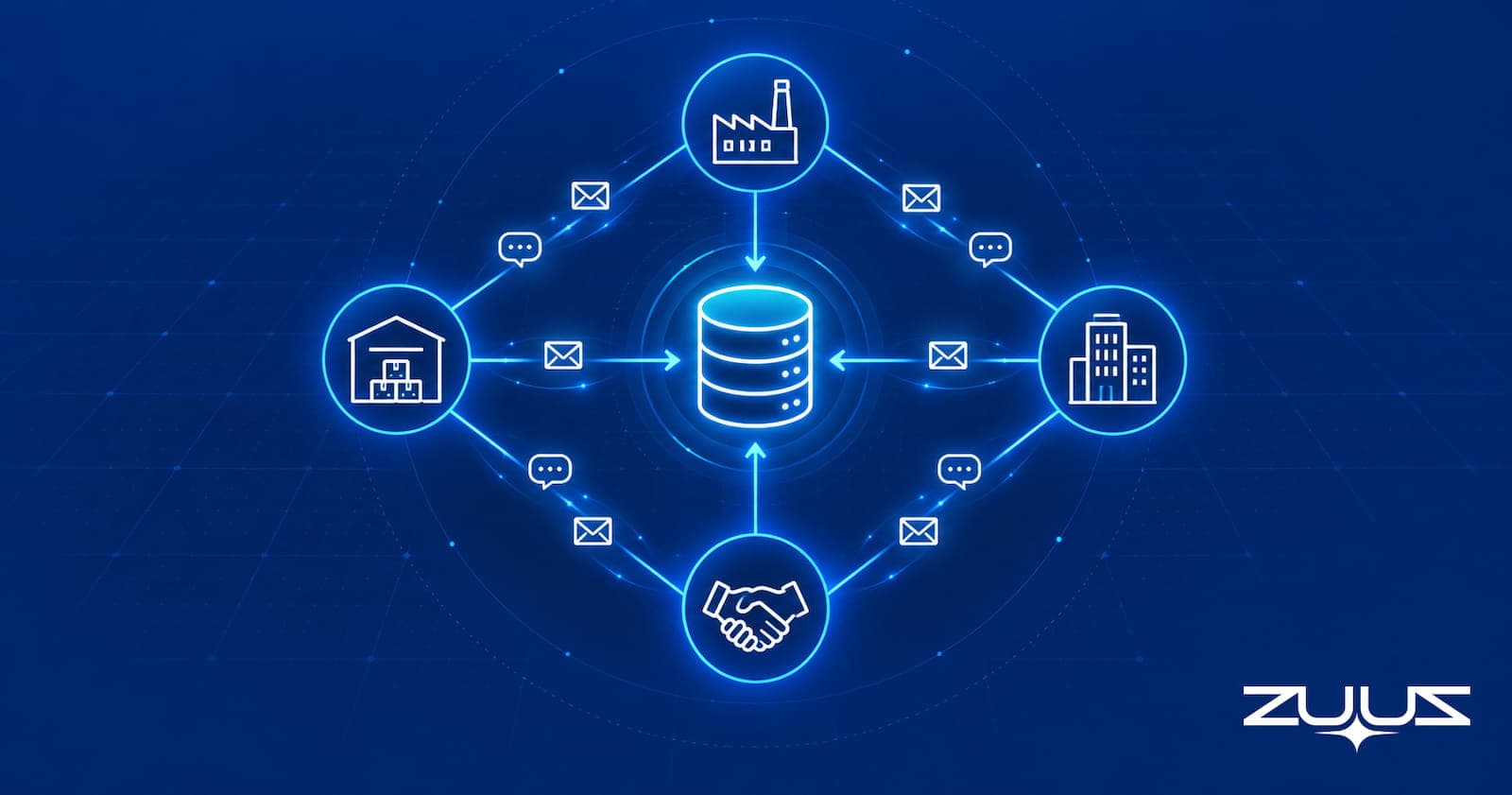
That gap is the defining problem of the IT VAR sales pipeline. A value-added reseller does not sell alone. Every deal is a multi-party transaction, and the signal that moves it is spread across inboxes and message threads the CRM never reads.
This piece is written from the operator side. ZUUZ founder Avinash Gujje scaled Cloud Box Technologies from $0 to $25M ARR in IT services and distribution, a business built on vendor and distributor relationships, and the patterns below are ones sales leaders at VARs recognize from their own pipeline reviews. It covers how a VAR deal moves, where each party’s signal lands, where it gets lost, and how to get it into the CRM without asking reps to log more.
An IT VAR Deal Has Four Parties and One CRM Record
A direct sales team sells to a buyer. A VAR sits in the middle of a chain. The vendor makes the product and runs the partner program. The distributor carries the transaction: it books the order, extends credit, manages availability and often supplies licensing help. The VAR owns the customer relationship and the solution design, and the end customer owns the budget and the decision.
Each party moves on its own schedule. Customer intent, vendor approval and distributor readiness change independently, which is why a single opportunity stage rarely describes where a VAR deal stands. A deal can be at commit with the customer and still be blocked because the registration lapsed or the distributor is waiting on a document nobody sent.
The customer side is not one person either. A complex B2B purchase is decided by a buying group, and each member gathers information independently. Add a channel manager, a vendor territory rep and a distributor account manager, and a mid-sized infrastructure deal can have a dozen people writing about it across four companies.
The table below maps each party to what it controls, where its signal arrives, and what typically makes it into the CRM.
| Party | What it controls | Where its signal arrives | What usually reaches the CRM |
|---|---|---|---|
| End customer | Budget, scope, timing, sign-off | Email with the account rep, meetings, the odd LinkedIn message | Stage, amount and close date, when the rep remembers |
| Vendor channel manager | Registration approval, program benefits, pre-sales support | Email, portal notifications, LinkedIn messages | A registered checkbox, at most |
| Vendor territory rep | Account coverage, escalations, exceptions | Email and LinkedIn, and the person changes often | Rarely recorded as a contact |
| Distributor account manager | Order booking, credit, availability, licensing | Email threads with sales ops or the rep | Nothing until the order is placed |
| VAR rep and pre-sales engineer | Solution design and every other relationship | Their own inbox and LinkedIn account | Whatever they log |
Every row except the last depends on the last. The CRM’s picture of a multi-party deal is only as complete as one busy person’s willingness to transcribe four other companies’ messages.
How a Deal Moves Through the IT VAR Sales Pipeline, Stage by Stage
The clearest way to see where signal goes missing is to follow one deal. The example below is a composite of a common pattern rather than any specific customer, and program mechanics are described generically because registration rules, protection terms and benefits vary by vendor.
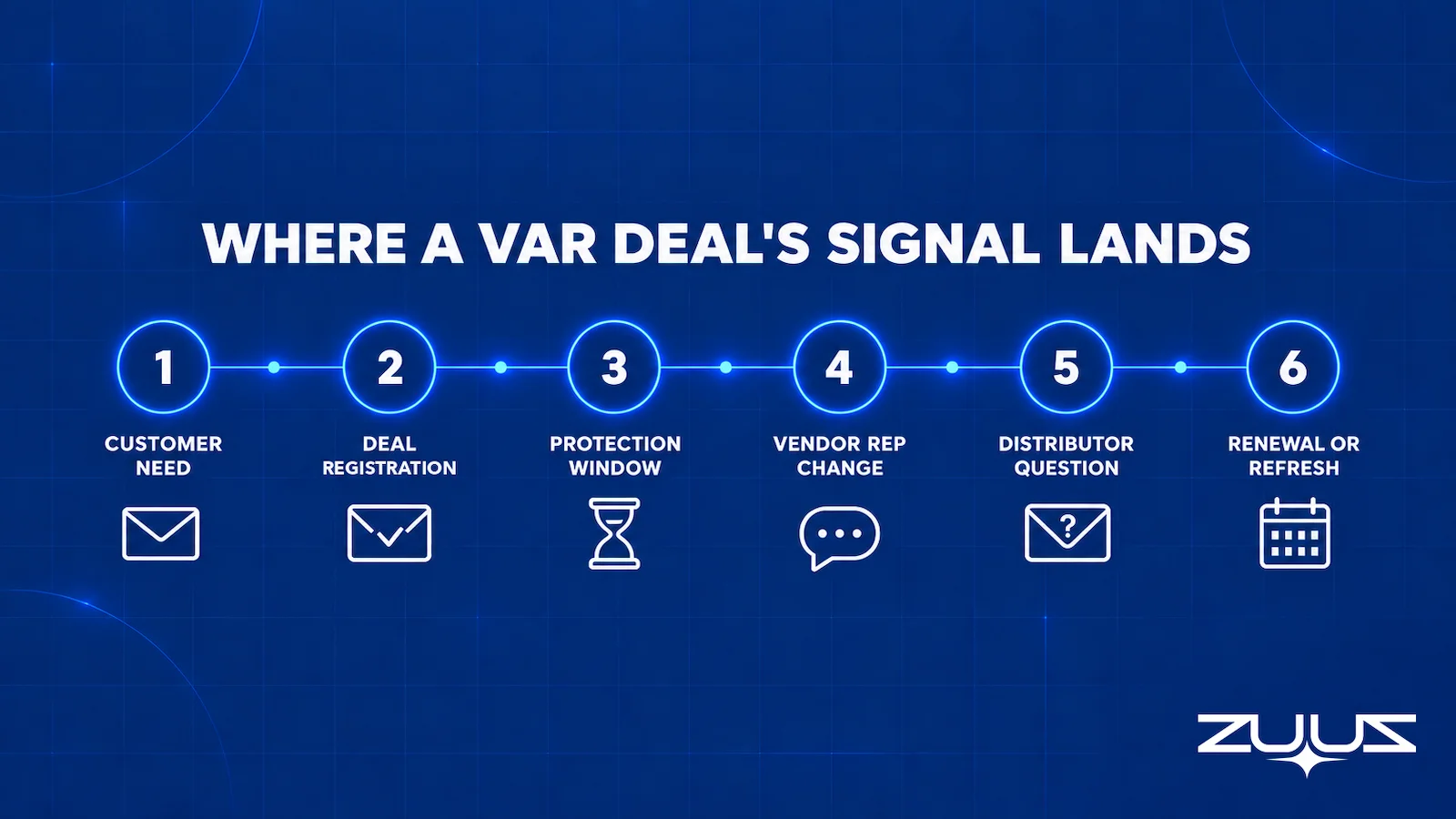
1. The Customer Need Surfaces
The deal starts in the end customer’s email. A support contract is nearing expiry, a platform is going end of life, or the IT director mentions a new site. The rep books a call and creates an opportunity. The CRM is at its most accurate here, with one conversation and one person to log it, although the leads that get missed in email never reach even this step.
2. Deal Registration Goes In
The rep, or more often someone in sales ops, submits a registration on the vendor’s partner portal. What comes back is email: a receipt, then an approval, a rejection or a request for detail. Those emails go to whoever submitted, which is not always the account owner. The CRM may carry a registered checkbox, but the approval date, reference, expiry and conditions live in one person’s inbox.
3. The Protection Window Starts Running
An approved registration typically gives the partner some protection or program benefit for a defined period, on terms each vendor sets. The clock starts on approval, not when the customer is ready. If procurement slips a quarter, the registration can run down while the CRM still shows a healthy close date. The extension request is another portal submission and another email.
4. The Vendor Rep Changes Mid-Deal
Territories get realigned and channel managers move. The VAR finds out through an auto-reply pointing to a new name, a forwarded introduction, or a LinkedIn message from someone who has taken over the account. The relationship that approved the registration and promised pre-sales help now sits with someone who has never heard of this deal, and the CRM still shows the old contact, if any.
5. The Distributor Asks a Question
Near the order, the distributor needs something: the end-user legal entity, the installation country, the registration reference, a credit decision or licensing details. The question lands in a thread between the distributor and the VAR’s sales ops coordinator. Until it is answered the order cannot book, and nobody on the sales side sees it.
6. The Deal Closes and New Clocks Start
When the order books, the CRM catches up because someone has to enter it for commissions or order processing. Closing also starts new clocks: the subscription or support renewal, the hardware end-of-support date and the customer’s own refresh plan. The first notices about each arrive later as vendor or distributor emails, addressed to whoever was on the original order.
Count the handoffs. Six stages produced signal in at least four inboxes and one LinkedIn account, and the CRM saw a meaningful update at two of them: when the opportunity was created and when the order booked. Everything in between, where the deal was actually won or put at risk, happened somewhere else.
The Deal Moved in Six Places. The CRM Saw Two.
ZUUZ reads the sales inbox and LinkedIn messages and writes what each party said to the CRM record. See it on a real deal in 15 minutes.
Deal Registration Is a Clock, Not a Checkbox
Most VAR CRMs treat deal registration as a yes-or-no field. Operationally it is a sequence of events, each with a date, each arriving as a separate message. Treating it as a checkbox is how a sales leader ends up reviewing a registered deal whose protection lapsed weeks earlier.
The deal registration process also runs on a system the CRM does not read. The vendor’s partner portal is the source of truth for status, and no tool that reads email can see inside it. What the VAR’s inbox does see is every notification the portal sends and every message the channel manager writes around it, which is where the operational detail usually lives anyway.
The table below breaks registration into the events a sales leader needs to see.
| Registration event | Where it usually arrives | What the CRM shows | What goes wrong when it is missed |
|---|---|---|---|
| Submitted | Portal receipt email to the submitter | A checkbox ticked early | A submission is treated as an approval |
| Approved or rejected | Portal or channel manager email | A checkbox, if updated | A rejection sits unread while another partner works the account |
| Conditions attached | Channel manager email or LinkedIn message | Nothing | A condition goes unmet and the benefit does not apply |
| Protection nearing expiry | Automated reminder, where the program sends one | Nothing | The customer delays and the window closes |
| Extension requested or granted | Portal email and channel manager reply | Nothing | Nobody knows if it went through until order time |
| Reference needed at order | Distributor email asking for it | Nothing | The order stalls while someone searches old inboxes |
None of this requires a new system. It requires that the messages the VAR already receives get read and attached to the right opportunity, so the dates inside them become something a pipeline review can filter on.
When the Vendor Rep Changes Mid-Deal
Channel relationships are held by people, and people move. U.S. Bureau of Labor Statistics data puts median employee tenure at 3.9 years across the US workforce, with 22 percent of workers at one year or less with their current employer. For a VAR carrying deals with several vendors, vendor-side contact changes are routine, and some will land mid-deal.
The change rarely arrives as a formal notice. It shows up as an auto-reply, a new name on a cc line, or a LinkedIn message from someone who has taken over the region’s partner accounts. Vendor reps and channel managers live on LinkedIn, and partner introductions increasingly happen there first. The account rep accepts, replies and moves on, and the CRM never hears about it.
The cost is continuity. The outgoing rep may have promised a pre-sales engineer or supported an exception. A handover changes who holds those commitments without changing the registration, so the VAR has to re-confirm them with someone new, which is why good account management for teams running a CRM treats contact roles as something that changes faster than records do.
LinkedIn adds a second problem. A LinkedIn inbox sits on a personal account, so when the VAR’s own rep leaves, every vendor and partner thread leaves too. The guide to logging LinkedIn messages in HubSpot, Salesforce and Zoho covers why no major CRM has a native answer for it.
Distributor Questions Are Deal Blockers, Not Admin
In many VARs the distributor relationship is run by sales ops or an order coordinator rather than the account rep. That split is efficient for order processing and invisible to the pipeline. The distributor’s questions are dependencies: the order cannot book until they are answered, and some, such as a missing registration reference, decide whether the expected program terms apply.
Two states matter, and they look identical in the CRM. In one, the distributor is waiting on the VAR for a document or a customer confirmation. In the other, the VAR is waiting on the distributor for availability, credit or licensing. Both leave the opportunity at its final stage, only one is fixable by the VAR today, and a sales leader cannot tell which without reading the thread.
Distributor threads also resolve quietly, in a separate reply chain two days later, with nothing updated. That is the better failure mode. The worse one is a question never answered because the only person who saw it was out that week.
Every Party Writes About the Deal. Now the CRM Reads It.
Connect one inbox and see which vendor, distributor and customer signals the CRM is missing today.
What the CRM Sees Versus What the Inbox and LinkedIn See
Put the walkthrough, the registration events and the rep changes side by side and a pattern appears. The CRM records the shape of a deal: account, amount, stage and date. The conversations record its condition. This is the structural issue behind IT sales pipeline visibility in general, made harder by three outside companies in every deal.
It is not a discipline problem that more CRM training fixes. Salesforce’s State of Sales research, seventh edition, found sales professionals spend 40 percent of their time selling and 13 percent of the workweek manually entering data. A VAR rep coordinating a vendor and a distributor on every deal will not add three more companies’ messages to that 13 percent.
The table below compares the two views of the same deal, question by question.
The fourth column is what a capture layer can do about it. ZUUZ is a revenue intelligence layer on top of the CRM the VAR already runs, never a CRM of its own: every value in that column is written into an ordinary CRM field automatically, with full change history and one-click rollback.
| Deal question | What the CRM shows | What the inbox and LinkedIn show | What ZUUZ writes to the CRM |
|---|---|---|---|
| Is the deal protected? | Registered: yes | Approval date, conditions, expiry reminder, extension thread | Registration approval date, conditions and expiry as fields on the opportunity, flagged before the window closes |
| Who is the vendor contact? | The name entered at creation, if any | The new rep’s LinkedIn introduction and the old rep’s auto-reply | The new vendor rep created as a contact from the LinkedIn introduction, with the previous one marked as changed |
| Can the order book? | Final stage, pending order | A distributor question about the end-user entity, still unanswered | The open distributor question attached to the opportunity as a dated next step |
| Is the close date real? | The date set at the last review | The customer’s email moving go-live into next quarter | The customer’s new go-live date written to the close date automatically, with one-click rollback |
| Who else is involved? | One primary contact | Procurement, security and the IT director on separate threads | Procurement, security and the IT director added as stakeholders on the account |
| What happens after close? | Nothing until someone creates a renewal | Vendor and distributor notices about support and subscription dates | Support and subscription dates captured as renewal signals with an owner |
Every cell on the right already exists in some mailbox or thread at the VAR. The work is moving it from the conversation to the record without routing it through a person’s memory, which is the root cause behind most of the reasons a CRM pipeline is wrong.
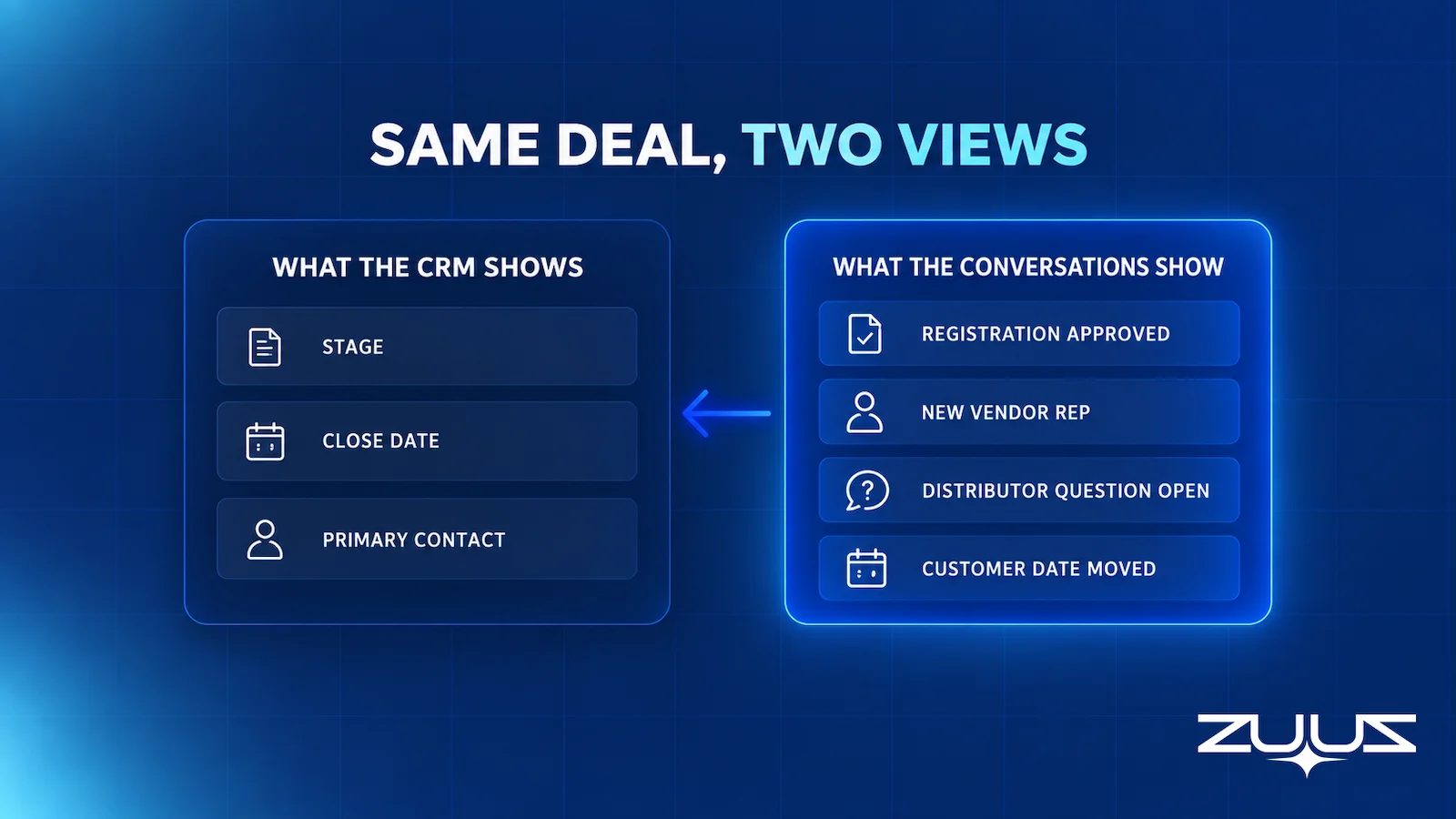
That also changes what a VAR pipeline review should check. Stage, amount and close date are the least informative fields on a VAR opportunity. The questions that predict whether a deal closes on time are about the other parties: registrations nearing expiry with no recent customer activity, vendor contact changes nobody acknowledged, distributor questions open for more than a few days, customer date changes not reflected in the close date, and deals quiet across email and LinkedIn at once. Almost every one of those can only be answered by reading, which is why they get skipped in busy weeks and why they belong in a pipeline review that reflects reality.
Renewals and Refresh Run on Different Clocks
The first sale is only the start of an account’s revenue. An IT VAR’s installed base generates subscription renewals, support renewals, hardware end-of-support dates and customer refresh plans, each on a clock set by a different party. A single customer can carry several across several vendors, a discipline covered in depth in the guide to renewal tracking software for VARs and distributors.
For pipeline purposes the point is narrower. Renewal and refresh signal arrives the same way new-deal signal does: as vendor notices, distributor reminders and customer emails asking what happens when support ends. Read and attached to the account automatically, renewals show up as opportunities with owners and dates rather than as last-minute scrambles.
Cloud Box Technologies, a UAE cloud and IT services company, shows what that looks like. It used its CRM for order processing. With ZUUZ connected, inbound emails become leads and renewals, so leadership sees live pipeline in real time from a single connected user, with 10 to 12 renewals tracked in minutes.
The Renewal Signal Check
An installed base hides risk behind dates that look fine. The Renewal Signal Check finds renewal and expansion risk that lives outside the renewal date field.
- List every renewal in the next two quarters and its date field.
- For each, find the last real conversation, email, message or meeting, and what it said about budget, champion or satisfaction.
- Mark every renewal where the date is the only thing the system knows.
- Those are the renewals that surprise you. The signal existed; it was in a mailbox.
Worked example for a VAR: a three-year support renewal on a customer core switching estate sits 90 days out with a clean date field. Step 2 turns up an end-of-support notice the distributor forwarded in March, a customer email asking what a refresh would cost, and no reply from the VAR. Two of those are a refresh opportunity and one is a competitive opening. None of them is in the CRM, and the date field still reads as a routine renewal.
The Next Renewal Is Already in the Inbox.
ZUUZ turns vendor, distributor and customer messages into CRM records for new deals and renewals alike, from one connected inbox.
Multi-Party Deal Signal: How ZUUZ Captures It for VARs
ZUUZ is a revenue intelligence layer on top of the CRM a VAR already runs, whether Salesforce, HubSpot, Zoho, Attio or Pipedrive. It does not replace the CRM or hold the pipeline itself. It reads the sales inbox and LinkedIn messages for deal signal and writes structured records into the CRM, so the record reflects the conversations instead of a rep’s summary of them. That is what keeps an IT VAR sales pipeline current when four parties are writing about the same deal. Reps keep working in email and LinkedIn as they do today, and ZUUZ updates the CRM automatically, with full change history and one-click rollback.
Applied to multi-party deals, the channel manager’s approval email, the distributor’s question, the customer’s changed go-live date and the new vendor rep’s LinkedIn introduction are each read and matched to the right account and opportunity. Email Lead Capture creates or updates contacts, companies and deals from those conversations, including parties who have never been in the CRM. Account Management keeps contacts current as roles change. Lead scoring ranks new inbound by intent, so a partner referral is not queued behind a vendor newsletter. Pipeline Risk Monitoring flags deals gone quiet against their normal pattern, now across both email and LinkedIn, and CRM Sync writes it all back as ordinary records in ordinary fields.
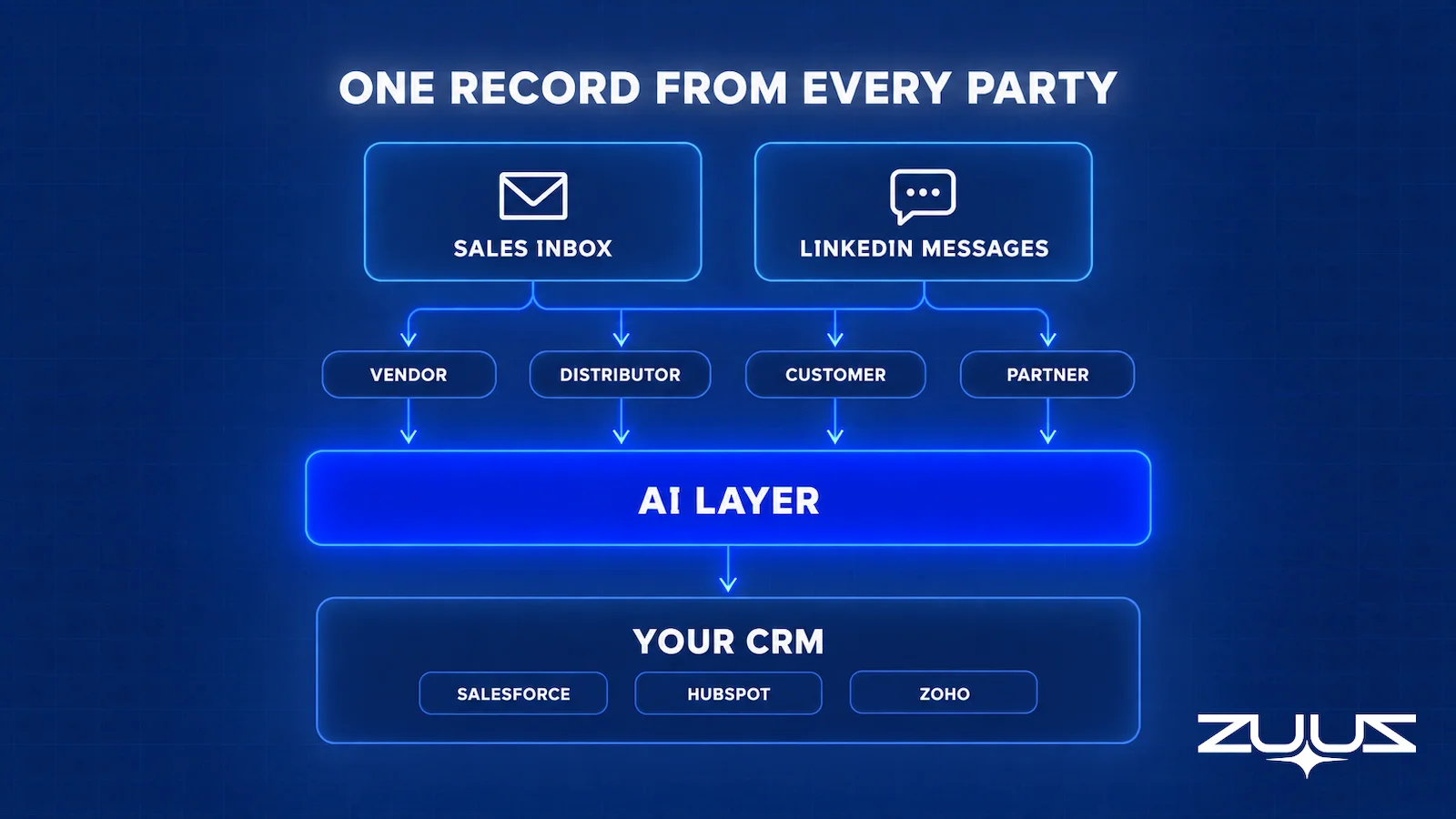
The scope is worth stating precisely. ZUUZ reads LinkedIn messages; it does not send them, automate connection requests, run outreach sequences, scrape profiles or import LinkedIn contacts. It reads the emails a vendor portal sends; it does not log in to the portal. For VARs that also run a managed-services practice, ZUUZ syncs won customers to ConnectWise PSA, and the guide to the MSP sales pipeline covers how client signal splits between the PSA and the CRM on that side of the business. And it goes further than native activity sync, which, as the guide to Salesforce email integration for IT sales teams explains, logs email against records that already exist rather than creating the ones a new party needs.
RA Technologies, a US IT services company that had run HubSpot for two years, shows what reading the mailbox surfaces. ZUUZ ran on the same HubSpot instance with the same team and surfaced $120K in pipeline within 72 hours that the CRM had never seen, captured from the sales mailbox. The RA Technologies case study has the detail.
How to Evaluate a Capture Layer for a Channel Business
Most tools pitched at this problem were built for direct sales teams with one buyer and one inbox. A VAR’s evaluation has to test whether a tool understands that one opportunity involves several companies writing to several people, often in different inboxes at the VAR.
| Criterion | Question to ask | Why it matters for a VAR |
|---|---|---|
| Multi-party matching | Can it attach vendor, distributor and customer messages to one opportunity? | A VAR deal is one project with several companies on it |
| Shared-domain handling | Does it avoid treating every email from a distributor’s domain as one deal? | Distributors and vendors write about many deals at once |
| Channel coverage | Does it read LinkedIn messages as well as email? | Rep changes and partner introductions increasingly happen on LinkedIn |
| Record creation | Can it create a contact or company that does not exist yet? | New vendor and distributor contacts arrive constantly |
| Mailbox coverage | Can it read sales ops and coordinator inboxes, not only reps’? | Registration and distributor threads often land there |
| Direction | Does it only read, or does it also send? | Outbound automation is a different job with a different risk profile |
The most telling test is the second row. Ask the vendor to show what happens when the same distributor account manager writes about two different deals in one week. A tool that files both threads to one opportunity makes the pipeline less accurate, not more.
For sales leaders at VARs, the practical lesson does not depend on any one tool. A pipeline is only as current as the slowest party’s messages reaching the record, and in a four-party deal the slowest party is usually the one nobody on the sales team is reading. Fixing that starts with deciding which inboxes and threads count as part of the pipeline, and then making sure something reads them.
Teams that want to start on the email side before adding LinkedIn will find the IT-specific capture and sync steps in the guide to email to CRM automation for IT companies.
From an operator’s seat
Across the deployments ZUUZ runs at channel businesses, the pattern is that the hard part is not reading the messages, it is deciding which mailboxes count. A VAR deal is spread across a rep, a pre-sales engineer, a sales ops coordinator and often a shared orders alias, and the registration and distributor threads land in the last two. The part teams do not plan for is the shared-domain problem: one distributor account manager writes about six deals in a week, so matching on domain alone makes the pipeline worse before it makes it better. Get the matching right on one vendor and one distributor first, with a person checking the change history every day, then widen. The cost nobody budgets is the week of someone senior confirming those first matches.
A Concrete First Step
Pick one mailbox, not the whole team. Connect a single sales or orders inbox, let ZUUZ read the last 90 days of vendor, distributor and customer mail, and see what it writes to the CRM, with full change history and one-click rollback. On a channel deal that review is the whole point: you see which registrations, rep changes and renewal notices were sitting unread. It is a 30-day free trial with no credit card: https://zuuz.ai/trial/
Frequently Asked Questions
What is an IT VAR sales pipeline?
It is the set of open opportunities a value-added reseller is working, where each deal involves the vendor whose product is sold, a distributor that handles the transaction, the VAR and the end customer. Unlike a direct pipeline, each deal’s status depends on several outside companies, not only the buyer.
What is deal registration?
Deal registration is a feature of many vendor partner programs that lets a reseller register an opportunity with the vendor. If approved, the partner typically receives some protection or program benefit on that opportunity for a defined period. The exact terms are set by each vendor’s program. The deal registration guide covers the full process and how vendors run their programs.
How does the deal registration process work for IT resellers?
The reseller submits the opportunity through the vendor’s partner portal with customer and product details. The vendor or its channel manager approves it, rejects it or asks for more information, and each outcome usually arrives as an email. Approved registrations run for a set period, and extensions are requested separately. When two partners register the same account, the vendor has to settle a channel conflict.
How long does deal registration protection last?
It depends entirely on the vendor’s program. Protection periods, benefits, exclusions and extension rules differ between vendors and sometimes between partner tiers or product lines. The reliable source is the program terms and the approval notice itself, which is why that email belongs on the opportunity rather than in one inbox.
What happens if a deal registration expires before the customer buys?
The partner can lose the protection or benefit the registration provided, depending on the vendor’s rules, and may need to request an extension or register again. The common failure is that the customer delays, the CRM still shows a healthy close date, and nobody sees the expiry reminder until order time.
What should a VAR do when its vendor channel manager changes mid-deal?
Record the new contact against the account and every open opportunity, then re-confirm what the previous contact committed to, such as pre-sales support, an approved exception or a registration’s status. A handover changes who holds the relationship, not the registration, so open commitments need restating to the new person.
Which distributor questions should a VAR track against the opportunity?
Any question that blocks the order from booking: end-user legal entity, installation country, registration reference, credit decisions, availability and licensing confirmations. Each should carry the date raised, who is waiting on whom and who at the VAR owns the answer.
Why do LinkedIn messages matter for IT resellers?
Vendor reps and channel managers change often and are active on LinkedIn, and partner introductions frequently start there. That makes LinkedIn the first place a rep change or new partner relationship shows up. Because a LinkedIn inbox sits on a personal account, those threads leave with a rep who leaves unless they were captured.
Does ZUUZ replace the CRM a VAR already uses?
No. ZUUZ is a revenue intelligence layer that runs on top of Salesforce, HubSpot, Zoho, Attio or Pipedrive, and the CRM stays the system of record. ZUUZ reads the sales inbox and LinkedIn messages for deal signal and writes structured records into the existing CRM, so reports and pipeline reviews keep running where they already do.
Does ZUUZ send LinkedIn messages or run outreach?
No. ZUUZ reads LinkedIn messages for deal signal only. It does not send messages, automate connection requests, run outreach sequences, scrape profiles or import LinkedIn contacts. It keeps the CRM current from conversations that already happened.
Can ZUUZ see deal registration status in a vendor partner portal?
No. ZUUZ does not log in to vendor partner portals. It reads the emails those portals send, such as receipts, approvals and expiry reminders, along with the channel manager’s own messages, and attaches that signal to the right account and opportunity in the CRM.
How quickly can an IT services company see results from ZUUZ?
RA Technologies, a US IT services company that had run HubSpot for two years, is the clearest reference. ZUUZ ran on the same HubSpot instance with the same team and surfaced $120K in pipeline within 72 hours that the CRM had never seen, captured from the sales mailbox.

